Month: May 2018

  • 2018’s Best Touchscreen 2-in-1 Laptops (So Far)

    2018’s Best Touchscreen 2-in-1 Laptops (So Far)

    There has been a huge increase the in number of 2-in-1 laptops that feature touchscreen controls for tablet mode. Love it or hate it, touchscreens are here to stay, and they will likely continue to be evolved into mainstream computing.

    Here are some of our favorite touchscreen laptops available right now.

    HP Spectre x360

    This lightweight, slim bezel 2-in-1 is a great option for the most mobile users among us. The battery life is amazing, and the keyboard is also a pleasure to use. You won’t find a better balance between tablet and laptop than this system.

    Microsoft Surface Pro

    The Microsoft Surface Pro has positioned itself to be the touchscreen laptop to beat. It is designed from the ground up to work around a touch interface and the Surface Pen. Going beyond simple touchscreen controls and note taking, the Surface Pro also aims to be a digital artist’s tool. Unfortunately, the newer version of the Surface Pro no longer includes the Surface Pen, so expect an accessory purchase right off the bat.

    Lenovo Yoga 920

    If screen real estate is your priority, then the Lenovo Yoga 920 should be where you begin looking. The general 13.9-inch display is larger than many 2-in-1 systems. With a fully metal build and an interesting take on laptop hinges, the
    Yoga makes a classy statement. It also features the same level of touchscreen sensitivity as the Surface Pro despite the larger screen.

    Samsung Chromebook Pro

    What would happen if you took a Samsung Note 8 and blew it up into a 2-in-1 computer? You’d get the Samsung Chromebook Pro. If Chrome OS is your jam but you find typical Chromebook offerings a little short on power, then the Chromebook Pro is well worth looking into. The Google Play store alone means that you will have more than enough apps for both your productive and procrastinating sides.
  • The Best Features from the New Windows 10 Update

    The Best Features from the New Windows 10 Update

    The latest Windows 10 update landed yesterday for PCs and tablets. Like the Fall Creators Update, this spring update adds new features and refreshes Windows 10 without changing the platform itself. Here are some of our new favorite features.

    Timeline

    The biggest new feature in this Windows update is Timeline. Essentially, it replaces the Task View button and allows you to see a synchronized view of all your past apps and activities across your multiple Windows 10 systems.

    You can use this feature to easily transfer activity from one Windows system to another. You can also combine the Timeline with Microsoft Edge on your smartphone to sync your browser history as well.

    Microsoft Edge Tab Mute

    Following in Chrome’s footsteps, Edge will also have the ability to mute tabs. Those annoying websites that like you blast you with autoplaying videos or sounds can now be easily muted.

    Fixed App Scaling

    A new Advances Scaling setting will allow you to fix desktop apps that appear blurry after your display settings change. The caveat is that it will only work on your main display and may not work for every single app.

    Faster Bluetooth Pairing

    In an effort to make pairing peripherals via Bluetooth simpler, Microsoft is working with vendors to ensure hardware will support their new fast pairing feature. Currently, the Surface Precision Mouse is the only one to support it, but new devices should appear soon.

    Enhanced Graphic Settings

    This is particularly useful for laptop users who may not want to use the same performance or power saving settings for every game. You now have the ability to customize the graphics performance per game.

  • The Best Nintendo Switch Accessories

    The Nintendo Switch has put Nintendo back in the limelight. After the success of the original Wii and the failure of the Wii-U, it seems that the mojo is finally back. Gamers everywhere are enjoying console-quality gaming on the go.

    Not only has the Switch sparked the imagination of its consumers, it has also created an accessory niche that third-party companies are taking advantage of. Here are the best accessories you can get for your Nintendo Switch.

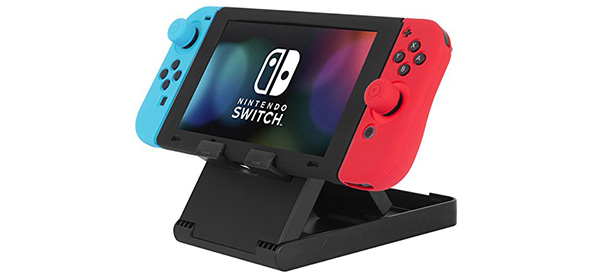
    5. Screen Stand

    amazon

    With its detachable Joy-con controllers and overall portability, the Switch is practically begging for a stand. While this is a typically inexpensive accessory, there are a few features you’ll want to be sure to get: Adjustable angles is almost a requirement, as is the ability to fold the stand flat for easy packing. Finally, make sure the charging port is available for use while the Switch is sitting on its stand.

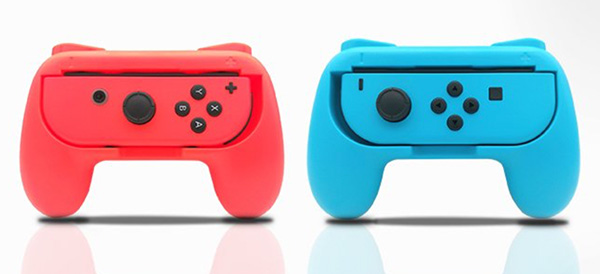
    4. Joycon Grips

    amazon

    The detachable Joy-con controllers are easily one of the best features of the Switch. The portability and ability to turn one controller into a pair is brilliant. However, for those with larger hands, the Joy-cons can be a little problematic. And for travel, the Pro controllers can be too bulky. This is where Joy-con grips come into play! Like the stand, there are several companies making these products. If possible, get your hands on one before you buy – comfort is key.

    3. External Battery

    03-external-battery

    amazon

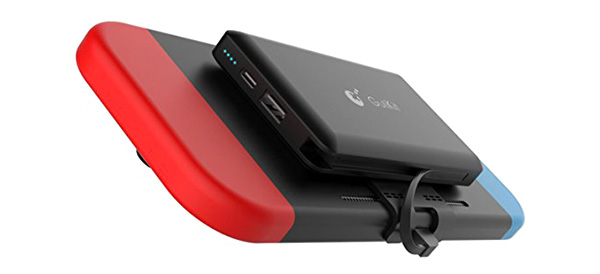
    One of the most common complaints about the Switch is how fast the battery drains. For those with short commutes or easily accessible charging stations, it’s no big deal. For others, the relatively low battery life in the Switch is a deal breaker. Luckily, there are some external battery solutions available. While they are more expensive than some of the other accessories on this list, having a mounted backup battery on your Switch could be a necessity for long commutes or remote play sessions.

    4. Dock Mount

    02-dock-mount

    amazon

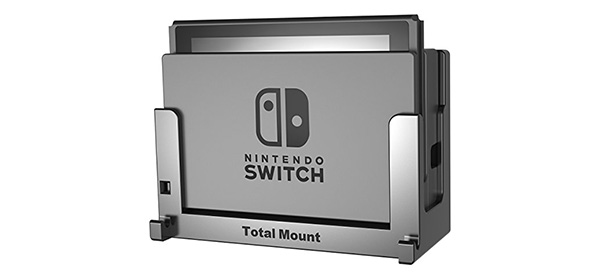
    Sticking the Switch dock in your television cabinet may not be the best way to get easy access to your device. And if it’s already cramped with other consoles, the unusual vertical orientation may not fit at all. So, mounting the dock may end up being your best bet. A third party solution like this one allows you to mount the Switch against your wall (or side of your cabinet) and even keep it running cool with a fan.

    5. Nintendo Labo

    01-labo

    nintendo

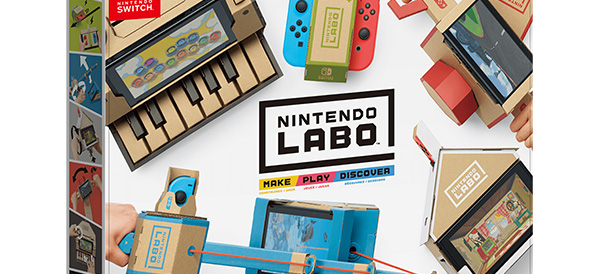
    Topping our list is Nintendo’s very own accessory called the Nintendo Labo. The Labo allows you to craft different cardboard “Toy-Con” creations like robots, guitars, stands, motorcycle handles and more. You can purchase a variety kit with a lot of different projects or single purpose kits. And of course, you can mix and match to create your own unique creations.

    We give the Nintendo Labo high marks for out of the (cardboard) box thinking!