Month: May 2018

  • Windows 10 April Update Crashing Intel Solid State Drives

    Windows 10 April Update Crashing Intel Solid State Drives

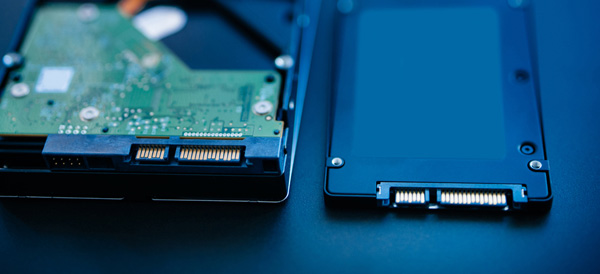
    Microsoft is blocking the rollout of the April Windows 10 update to certain users. Windows users with Intel Solid State Drives are being blocked from the update in order to protect them from a system-crashing series of bugs. Specifically, the Intel SSD 600p Series and Intel SSD Pro 6000p Series are encountering the bug, according to a report by Ars Technica. 

    Solid State Drives Causing Woes? 

    This isn’t the first time new OS updates have caused issues with SSD users. The unique drivers incorporated by SSDs often clash in unexpected ways with operating systems. Linux users experienced similar issues last year, with the new OS’s power management features attempting to override the primary functions of the SSD drivers. 

    What’s the Deal? 

    The details of this bug are currently unknown. It seems unlikely this issue will be terribly massive: a simple fix already exists. Users need only rollback the update from the Safe Mode screen to recover their PCs. However, this is frustrating, given the ubiquity of Intel SSDs and the massive size of Microsoft. How is it that no beta testers found this bug? Or, if they did, why wasn’t it addressed before the updates went live? 

    Sign of Things to Come? 

    This update was already delayed after bugs causing blue-screens were identified by beta testers. The update went back to the developers for fine-tuning, but somehow still went live with computer-crashing bugs. Thankfully these bugs aren’t fatal, but they are still troubling. How does a company as big as Microsoft miss something as big as this? 


  • Fitness Tracking App Round-Up: Which Ones Fit your Lifestyle?

    Fitness Tracking App Round-Up: Which Ones Fit your Lifestyle?

    Staying motivated to exercise is important. One of the best ways to do that is to use a fitness tracking app! Helping you stick to your routine and achieve your goals, these apps make great companions for busy people looking to stay fit. Which ones fit your lifestyle the best? We’ll help you narrow it down with this round-up! We only picked apps available on both iOS and Android, so don’t sweat which kind of phone you have! 

    JEFIT 

    JEFIT is great for anyone who wants to be spending time in the gym. Designed to be great for users of all skill levels, JEFIT lets you record you reps and weights and keep track of your progress. The app allows you to choose from tons of user submitted workouts to help keep things fresh. On the downside, the app doesn’t have routine planning, but this is a small gripe for a free app. Not to mention, the app’s other functionality is good enough to make it a great pickfor fitness tracking app.  

    Keelo 

    This fitness tracking app is great for those who want to do quick, one-off style workouts on the fly. Utilizing the HIIT strategy for workouts, Keelo is great for really busy users. If you can set aside between 10 and 20 minutes three or four times a week, this is the app for you. These fast-paced workouts are meant to get your blood pumping and show results in a few weeks! Did I mention the app is free? Because that’s worth mentioning! 

    Sworkit 

    If you really want to get in shape and really don’t want to (or can’t) go to the gym, Sworkit is your fitness tracking app. You tell the app what your fitness goals are and tell it how much time you can dedicate to a routine. The app then builds you a personalized regiment for a six-week program. It’s surprisingly in-depth for being a free app. You can also spring for the premium subscription ($60 per year, or $30 per 4 months) that gives you access to more features. Real fitness trainers and exclusive workours are available to premium users, too.  

    Our Favorite Fitness Tracking App: Aaptive 

    Aaptive is a cool app: you pay either monthly ($15) or yearly ($100) for access to thousands of audio fitness classes. New classes are added by the trainers each week, so you’ll never run out of engaging exercises. There are classes for lifting, cycling, running and more. If you’re really serious about fitness and don’t mind spending money on a subscription, you’ll find Aaptive a great app for working out.  

  • Which Tablet is Worth your Money?

    Which Tablet is Worth your Money?

    Smart phones are nice, but sometimes you want a bigger screen for your smart device. Whether you’re drawing, looking at photos, watching movies or playing games, tablets are awesome addition to your smart device arsenal. When you just want that bigger screen for a handheld touch device, nothing else will do!

    Nothing says quality, solid build and premium design more than our 5 best premium tablets. From major manufacturers such as Apple, Samsung, Amazon, Microsoft and Google these tablets carry the state of art in technology and design. With that in mind, let’s check out some of our favorite premium tablets!

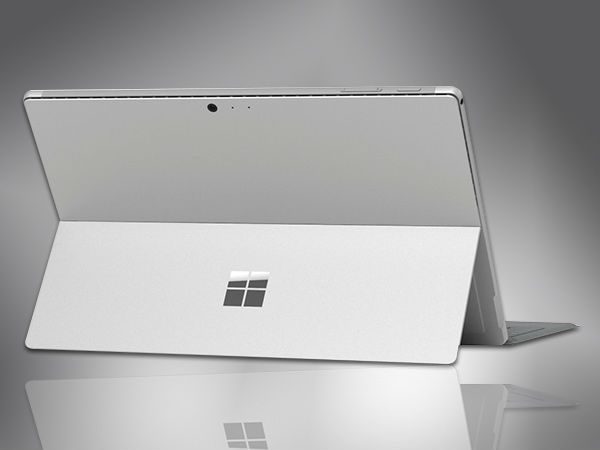
    Microsoft Surface Pro

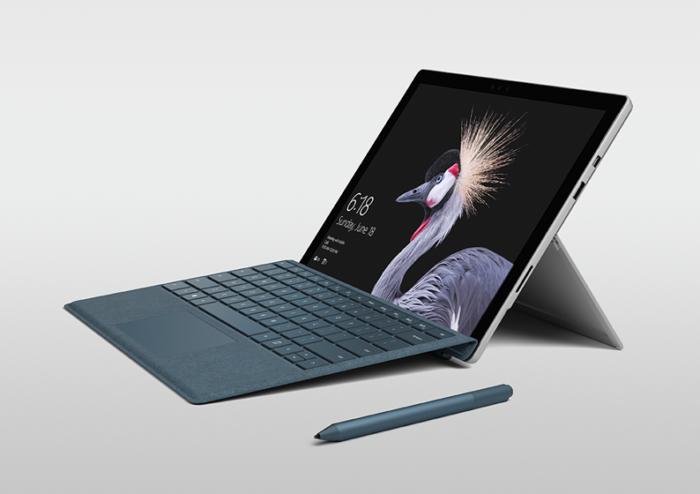
    This tablet is so premium that it’s also a laptop. The Surface Pro made our list of best touchscreen laptops, too, which might sound weird until you see one in person: it really is both. With a stellar screen and great form factor, you can’t get a much cooler 2-in-1 tablet. Retailing for $659, it’s not too pricey.

    There are only a few real downsides for the Surface Pro. The very incremental advances it possesses when compared to its predecessors are slightly disappointing.  Additionally, the design is a little too minimalist: there is no USB-C port! Then again, it’s still a great tablet, so it’s a small nitpick.

    Google Pixel C

    Your favorite Android tablet, the Google Pixel C performs like a giant version of its phone siblings. The Pixel C also has an optional magnetic keyboard that is quite solid, letting the tablet act as a laptop. This is easily the most powerful Android tablet that exists, for what it’s worth. The tablet performs great while multitasking and rarely suffers stutters or slowdown.

    If you need a tablet for work or just like pushing your technology to its limit, this is a great pick for you. On the other hand, this one is a bit expensive, retailing for $950. Additionally, many users see Android as a drawback instead of a feature. Many apps are released on iOS first and often perform better there to boot.

    The Samsung Galaxy Book

    This tablet rightfully belongs on the quickly growing list of impressive Microsoft Surface Pro contenders. The Samsung Galaxy Book is a top-shelf Windows tablet with a price to match. Its robust processing power, high-end display and essential add-on accessories make it one of the best tablet-hybrids.

    It’s a Windows 10 tablet with a stunning 12-inch Super AMOLED display, Intel’s latest processors and detachable keyboard cover with stylus. It starts at $1,130 for the Wi-Fi-only version and $1,300 for the LTE model, sold via Verizon, which was the configuration we reviewed. Samsung offers a 10-inch variant that runs for $630, but this review is of the 12-inch model.

    iPad Pro

    No list of premium tablets would be complete without Apple’s contender in the mix. And this time around, unsurprisingly, Apple is our favorite. The iPad pro is a rock-solid tablet, with a gorgeous Retina display and fantastic performance. Many users have a preference for iOS, and for good reason. Slowdown is almost nonexistent, and app support is fantastic.

    If there are any drawbacks, they’re the same ones that apply to all Apple products: expensive peripherals and proprietary charging. If you want the Apple Pencil or proprietary keyboard to go with it, this one will run you some serious cash. For just the iPad itself, you’ll be spending around $600.


  • These Tech Startups Are So Dumb You May Never Unroll Your Eyes

    These Tech Startups Are So Dumb You May Never Unroll Your Eyes

    The wide world of technology is rife with start-ups and venture capitals. Companies are all vying to be the next Apple, always pushing the envelope and redefining themselves. Or, at least, they’re trying to do these things. Sometimes they’re hit with the rough wake-up call that their ideas are just freaking weird, man. Sometimes that might be a good thing, and other times it’s… well, you’ll see. Check out the ten weird tech developments we could find. You won’t be disappointed, but the investors might! 
     
    [adPH1]  

    10. Rapt.fm 

    Photo Credit: Forbes 

    This one is odd yet endearing. Rapt.fm is a social platform dedicated to teaching people how to rap. And it has 50,000 users. Color me impressed! Now, this isn’t the odd part, rap is tremendously popular, and it makes sense that people would want to learn. The odd part is the venue the startup got their footing in.  

    The CEO, Erik Torenberg (catchy rap stage name), got the initial money for the platform in an unusual way. Originally, he and his team taught employees at businesses like Fathead, Chalkfly and Quicken Loans. What? Yeah, they were marketed as “team-building” exercises. Corporate America is weird, guys. Look no further than white-collar worker-turned-rapper Little Dicky to see more evidence of this. Textbook weird tech. 
     
    [adTextOnly]

  • Looking to Organize? Find Out Our Favorite To-Do App!

    Looking to Organize? Find Out Our Favorite To-Do App!

    Everyone knows how hard it can be to stay organized during your busy day. Between all the things you have to remember and fighting traffic, simple errands can get left behind pretty easily. How do we recommend you organize your schedule? One way is with a handy to-do app! We love the ones we’ve rounded up here, you just might too! The apps we’ve picked are all available on both Android and iOS! 

    Todoist 

    Available in both premium and free forms, Todoist is a great app for everyday use. This app has a clean interface and great readability. For those who don’t mind paying around $30 a year, the premium version of the app has great functionality. Projects for increasing productivity, labels and the ability to share projects with other users are all pluses for this app.  

    This app also sports some really cool productivity charts and sharable progress trackers. It doesn’t have quite the same collaborative suite as, say, Asana (I’ll get to that) but it’s certainly cool funcitonality. 

    Remember the Milk 

    A great to-do app for household use, Remember the Milk offers a lot of functionality even in the free app. This app works offline and offers some great collaborative functionality, helping married couples or roommates organize chores and errands. The premium version, that boasts more general functionality, runs around $40 a year. This is a bit pricier than the competition. 

    This app doesn’t feature location-based reminders, which is a bit of a bummer. It also doesn’t have UI quite as clean or user-friendly as Todoist or Asana. These small gripes don’t hold it back from being a great to-do app, though! 

    Our Favorite To-Do App: Asana 

    If you’re trying to collaborate with a large group to increase productivity, Asana is for you. Featuring a great user interface and some downright awesome collaboration tools, this to-do app earns our spot for favorite. Exceptional for workplace productivity, consider this one if you want to help your office get organized.  

    While Asana doesn’t sport a desktop app, it makes up for it in its incredible shared functionality. The premium version, which goes for around $12 per month, allows you to access a large suite of functions. Advanced dashboards, search functionality and teams numbering much higher than the base 15-person cap. That all said, Asana is comparatively expensive, and if you want something a bit more affordable we recommend Todoist.  

    Those small nitpicks aside, Asana is a great app, and we recommend you try out the free version with your team and see if its right for you! 

  • Which Mobility Scooter is Right for You?

    Which Mobility Scooter is Right for You?

    So your mobility isn’t what it used to be… no problem! Today, some insurance companies will actually help with coverage on a mobility scooter, or even pay for the whole thing. Check it out for yourself! Either way, it may be worth checking them out and seeing if it fits your lifestyle. With that in mind, let’s look at the top ten mobility scooters.

    Drive Medical Phoenix Heavy Duty

    A heavy, sturdy scooter for a great price, this one is a good pick. This one has a headlight, which is good for darker areas. It also has a basket in the front for carrying things, making it great for grocery store trips! The seat is customizable, broad and comfortable. For $1,200, this is a great heavy-duty pick.

    Pride Mobility Go-Go Sport

    This scooter is notable for its four-wheel drive and durability. It’s not terribly fast, topping at 4 MPH. That said, it’s rugged and durable, and works great when outdoors! If you like being outside and enjoying the sunlight, this is a great pick! For a combination of durability and mobility, check out the Go-Go Sport!

    E-Wheels EW-72

    A stylish and slick scooter, the E-Wheels EW-72 has a look inspired by classic cars! For those looking to really zoom, this scooter has a top speed of 15 MPH! As a heavy-duty scooter, it works quite well, as it has a top weight rating of 500 pounds! If you’re looking for a great, stylish, heavy-duty scooter, this is a great choice for you!

    Transformer Electric Folding Mobility Scooter

    Another great choice for carrying in a trunk and carrying around with you, this transforming scooter is pretty neat. It folds up into a nice, compact shape so it can go anywhere with you! The battery is airline compliant, so it can fly with you, which is great for those who fly often. If you’re on the move and need a scooter that can keep up, this is the one for you!

    E-Wheels Jellybean Electric Scooter

    The second E-Wheels scooter on our list, this one is also quite heavy-duty! This one is three-wheeled, though, so it’s got a bit of a different construction from some others on this list. The best thing about this scooter, though, is the high speed! It tops out at 18 MPH, which makes it a serious scooter! It has a great battery, too, offering up to 45 miles on a single charge. This one also has an anti-theft alarm, which is great! It sports a huge back-mounted basket, perfect for trips to the market.

    Spitfire 420 Ex

    Another great scooter, this one has interchangeable panels in different colors. The panels come in red, blue and silver, and are easy to change out! It also boasts quick-connect batteries, a comfortable seat and padded armrests. The wheels are anti-tip, which makes this a very safe pick. The front-mounted basket even has an interior lining, which is great for shopping. If you’re looking for a good mobility scooter for medical reasons, such as old age, this is a good pick.

    SmartScoot Lithium Foldable Travel Scooter

    This folding scooter is great to throw in the trunk or backseat and carry with you to a destination. The best thing about this scooter: the battery! It has great battery life for how portable it is for travel. It lasts for up to 12 miles! It also breaks down into three parts, and only weighs 27 pounds.

    Drive Medical Scout 3 Wheel

    At the very low price of right around $600, this three-wheeled scooter is a popular choice. A little less expensive than its four-wheeled counterpart, this one is a good value. The drawbacks to this scooter include its three-wheeled construction, slightly low battery life and make. There are more comfortable, high-end scooters, but if you’re looking for a good bargain, this is it. This scooter is the most affordable on our list!

    Best Value: Drive Medical Scout Compact 4 Wheel

    For those on a budget, the Drive Medical Scout Compact is a very popular choice. At $700, it’s a fantastic value, and it shows in its popularity. It’s a good scooter, with all the trimmings you’d expect from a medical mobility scooter. Older customers on a fixed income love the low price, and the price doesn’t compromise the quality. This one also has interchangeable panels in red and blue, so you can change your style! A great value for the money for those looking to save.

    Best Overall Mobility Scooter: Shopride Sunrunner

    If you’re looking for an especially comfortable scooter, look no further than the Sunrunner! It has a 300-pound capacity and a huge 25-mile battery. You can opt for a headlight, which is quite useful. It has a front basket, perfect for shopping. The star of the show is the big, comfortable seat, though. You can’t beat the level of comfort on display here! It’s hard to find something this premium and high-quality for this price! It retails for $1,500 but can often be found on sale for less.


  • OnePlus 6 Avengers Special Addition

    OnePlus 6 Avengers Special Addition

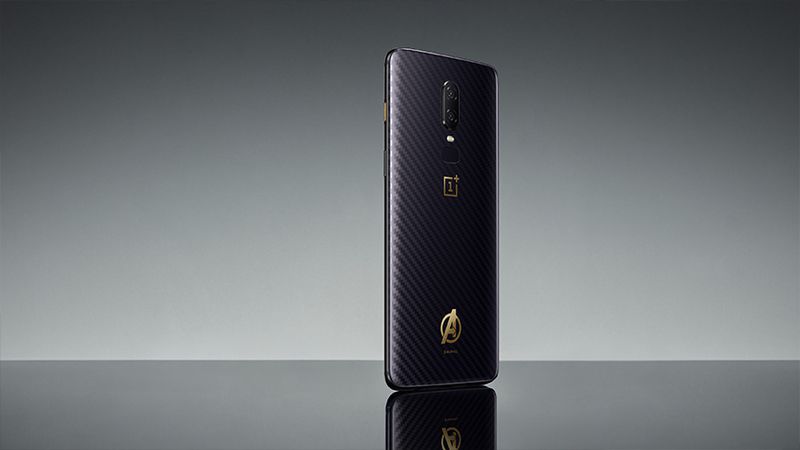
    Im sure by now you have read our Smartphone spotlight on the OnePlus 6, gotten all the great details and may have even considered picking one up. Why wouldn’t you, its big, beautiful with all the power of Luke Cage. Well hold up, first off its not really easy to get in the states. They don’t just sell them at the Best Buy here, you have to order it off the internet from china. Now before you do that there is something else you should know, There is a special addition Avengers Infinity War OnePlus 6. If this has your spidey senses tingling check out the details.


    The price is a meager $660, terrific deal even Peter Parker could afford. For that you will get the special edition 6, which is essentially the OnePlus 6 aside from a few cosmetic changes. There’s different textured back, that’s a “custom 3D aramid fiber-textured glass body, with Gorilla Glass 5 coating. It looks like something Shuri would have concocted. There is a well placed and stunningly official looking  Avengers and Marvel logo on the back of the phone, near the bottom. I like the way this phone looks like it was crafted elegantly from a blown off piece of Winter solders arm.


    Special Edition What

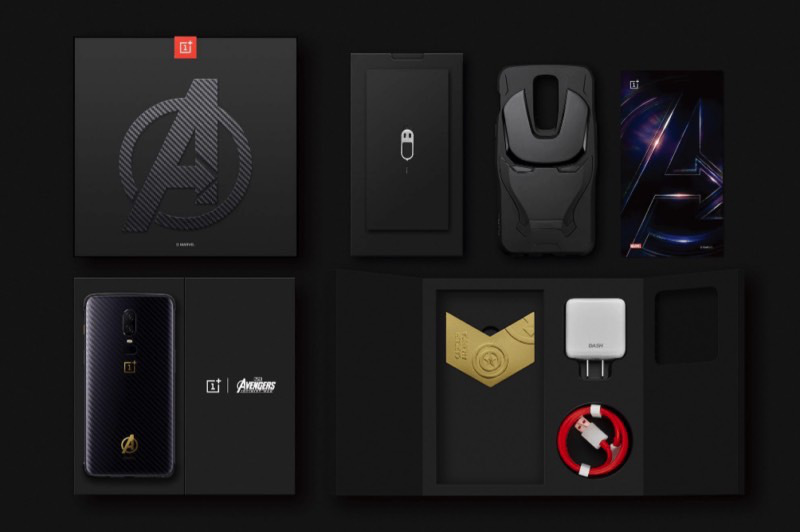
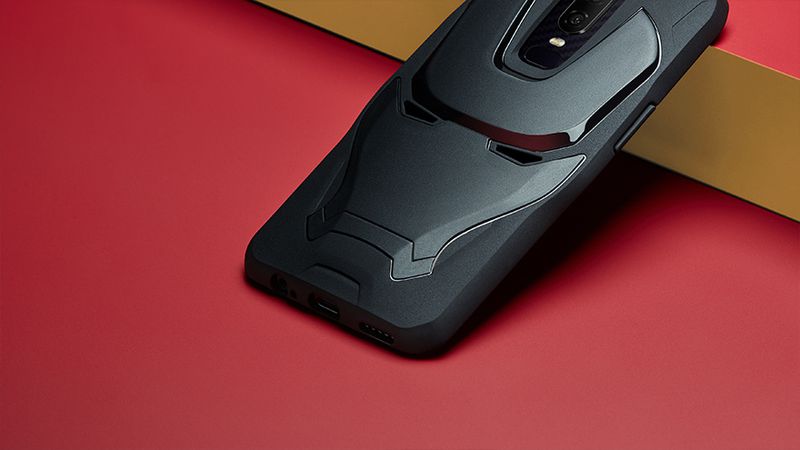
    Yes,  its nice looking, what else makes this special. First off  you’re getting the 8GB/256GB RAM and storage combo if you’re buying the Avengers model. You’ll have to pay $660 for it a $31 premium over the regular model that offers the same specs. Besides it being really cool looking You also get a special retail box and a special case that has Iron Man’s mask printed on it. In each of these cool marvel boxes you get a special medal.

    Tell Me More About this OnePlus 6 Avengers Medal

    Yes ill do just that. This medal comes in the box. Yes each OnePlus 6 Avengers phone in each box contains a random Avengers medal. There are 6 random medals. Getting all six different medals by June 30th will get you into a draw for a 100,000 yuan ($15,700). You can’t get the medals you lack without buying additional OnePlus 6 Avengers phones. If your doing the math, you would have to spend a lucky $6,600 with a 1/36 chance of getting all different medals.

    The Final Thought

    I love to geek out, for the 5T they released a Star Wars edition. For some reason the The Avengers: Infinity War edition featuring a Kevlar-style patterned back along with a gold Avengers emblem and color-matched mute switch seem so much cooler. I kinda want it, I just need 5 more of you to jump on this. We can combine the medals and maybe with the 100,000 yuan. In my best Captain America voice… Who is with me?

  • Surface, Its New Version and a Price Drop

    Surface, Its New Version and a Price Drop

    The Surface wants to compete with the ipad for a broader market, so look for a price drop. A new report out today by Bloomberg claims that Microsoft is planning its next tablet line to be lower-cost in an effort to attract people to their products who aren’t interested in the more expensive Surface Pro. The move is directly aimed at competing with Apple’s recently launched $329 iPad, and could see Microsoft debut the devices as soon as the second half of 2018.


    Low Cost Surface

    From what I am hearing  the tablets will be priced at around $400, so not quite iPad cheap but not far off. They will be the first Surface devices to adopt USB-C and rounded edges “like an iPad,” instead of the square corners of the current devices. Storage tiers will include 64GB and 128GB, as well as LTE options, and the devices will feature 10-inch screens.  All good news.

    There are also rumors of a significant decrease in battery power. While I cant confirm any yet and wont until it gets the Beau’s 6 hour injustice marathon battery test, I will say that the rumors holds some weight. Currently everyone has come to a 6.6 – 14 hour battery life estimate for the current models. What we have hear it the new cheaper tablet will be coming in around 4 hours less. Knocking four hours of battery off a tablet with a 13.5 hour runtime is bad. Knocking four hours of run time off a tablet with a 9.6 hour battery life is terrible. In fact, if that penalty carried over across the board, this new Surface tablet wouldn’t even break the three hour mark. Relax, ill continue to monitor and keep you updated.


    The Final Thought

    Like always Apple steps in and delivers and the rest  of the tech world follow suit. follow suit. This is good new, a low cost Microsoft device is a great option for the marketplace. When the marketplace has diverse low cost options we all win.


  • Smart TV Roundup: Which One is Right for You?

    Smart TV Roundup: Which One is Right for You?

    Everyone needs to park it on the couch and watch some TV sometimes. After a long day, there’s nothing better than surfing some Netflix or Hulu and enjoying a nice show. Which Smart TV should you consider though? There’s just so many options out there! To help you narrow it down, here’s our favorite smart TVs rounded up! 

    Sony A1 OLED TV 

    Sony’s ultra-premium smart TV is a little pricey, depending on where you get it, running somewhere between $3,000-$4,000. But don’t let that scare you from checking it out! Sporting an amazing picture quality and a really stunning form factor, this TV makes an awesome centerpiece to a room.  

    This 65″ TV boasts all the awesome processing and features you expect from Sony. The picture quality never stutters or suffers under high framerate programming. This TV even incorporates Google Assistant or Alexa support for voice control! If you’re looking for one of the very best and don’t mind spending a bit of money, you’re looking for the Sony A1 OLED. 

    LG SIGNATURE OLED 65W7P W7 

    If you’re looking for something that looks absolutely bananas on your wall and impresses everyone, you’re looking for this. LG’s Signature OLED is a “wallpaper” style display, coming in at a positively unbelievable 2.57mm thick. You read that right. It is downright hard to fathom just how thin this screen is.  

    Even better than the eye-popping form factor of this LG is the picture quality. There is no TV on the market with a better display than this, full stop. That LG managed to make this display so powerful and thin at the same time is a testament to their pedigree. It’s not all magic, though: the TV comes included with a required sound bar. The sound bar is actually the processor for the TV, allowing the display to be as thin as it is. All said, this is quite an impressive TV, but it will cost you: $8,000 MSRP definitely stings.  

    Our Favorite Smart TV: SAMSUNG Q9F 4K QLED TV 

    The QLED line of TVs is just awesome. There’s no better word for them. If you’re looking for the best all-around TV for the price, this is our pick. Operating on the Tizen operating system, the QLED line is easy and accessible to use. The TV boasts great black values, bright colors and sharp images.  

    This TV is seriously smart, too, it’s not just in the name. It automatically detects connected devices and relabels inputs in the menu system. It programs the remote control according to connected devices. It’s really just impressive, easy-to-use and awesome technology. Couple that with the razor-thin connection cable and ability to mount the screen flush with the wall and it’s no wonder this is our favorite! 

  • Are You Hungry? Check Out Our Favorite Recipe Apps!

    Are You Hungry? Check Out Our Favorite Recipe Apps!

    I am terrible at cooking. Just absolutely terrible. I can’t make a scrambled egg without step-by-step instructions. Thankfully for me (and people like me) there are tons of great recipe apps. If you’re hungry and looking for a great app to help you make dinner, check out this round-up! These apps are available on both Android and iOS, so don’t sweat which platform you’re on! 

    BigOven 

    This simple and easy to use app has over 350,000 recipes. Now that’s a lot of meals! This app has some really neat functionality, too. Features like making a weekly planner for meals and making a grocery list make the app feel like an organizer and recipe app in one.  

    BigOven also has social functionality, allowing you to upload pictures of your recipes. You can even see what your friends who use the app are making! This functionality makes BigOven stand out from other recipe apps in interesting and helpful ways. 

    Cookpad 

    Featuring many social media-like feature, Cookpad is an interesting little app. Unlike most recipe apps, this one allows you to exchange recipes with your network of friends and family. The app builds a unique user profile as you upload and comment on recipes, helping you find recipes that are right for you. 

    Cookpad also lets others comment on your recipes. These comments could be for dishes that would pair well with the recipe, or for ingredient substitutions. Many vegetarian users or users with allergies love this aspect of Cookpad! If you’re looking for a great place to find and share recipes, Cookpad is for you! 

    The Coolest of all Recipe Apps: Yummly 

    Yummly’s best feature? It has a search function that helps you find recipes for your lifestyle. Whether you have a food allergy or prefer vegetarian meals, Yummly lets you search its huge database to find the right recipe for you. Even better, the app learns your preferences and suggests recipes for you that match your tastes! 

    Yummly also features Instacart support, unlike many other recipe apps. You can build a shopping list from a recipe and add that list to your Instacart. Then you can order everything on your list and have it delivered right to your door! This makes cooking dinner fast and convenient. This app is our favorite for good reason!