Month: June 2018

  • Tech Throwback: Motorola E1 Rokr, The First iPhone

    Tech Throwback: Motorola E1 Rokr, The First iPhone

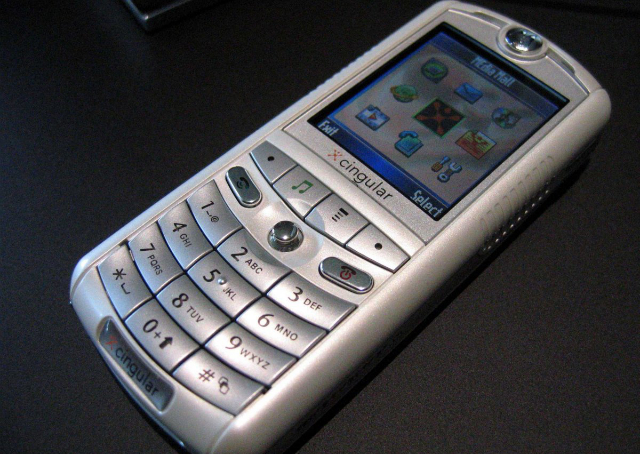
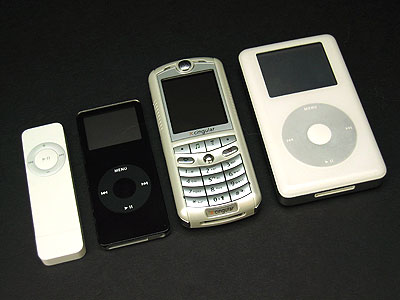
    I like to take a look at where I’ve been to evaluate where Im going. Technology is cyclical after all… wait no its not. That said I still like all the feels that come rushing back like a flood of nostalgia every time I get my hand on the tech I grew up with. Im going to go back periodically and take a looking at the stuff that used to blow our hair back and get our minds rolling. Some of these device blew up and changed the world, some where ahead of their time and some just fell flat and became colossal failures. Today we have a flop but it set the table for one of the greatest tech revolutions of mankind’s existence. Before there was a thought of an iphone, there was Apples first foray into the mobile world. There was a partnership with Apple and Motorola for the Motorola E1 Rokr.
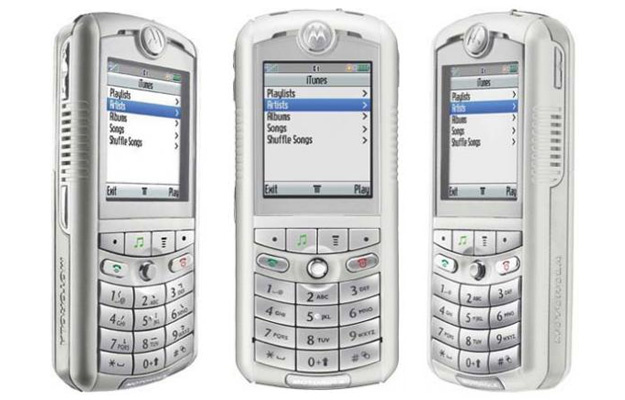


    The Motorola E1 Rokr

    The Rokr E1 is a repackaged Motorola E398 candybar style phone. However this new bombshell would come with Apple-licensed technology to play back iTunes Music Store purchased music. This doesn’t sound very stellar but at the time this was huge. Phones where just getting cameras. The V3 Razr was blowing up the cellular world, cell phones where now not just fashion accessories but status symbols as well.

    Launched on September 7, 2005 in San Francisco, California, the E1 is the first phone to be integrated with Apple Inc.’s iTunes music player. It features a music player with an interface similar to that of Apple’s iPod music players.

    The next phone being the first iPhone in 2007. This made the Motorola Rokr highly anticipated and tech sites were following the collaborations between Motorola and Apple as far back as December 2004.The Motorola e1 Rokr was a Cingular exclusive. Cingular had dedicated an endcap and standalone display in all of their corporate owned stores.
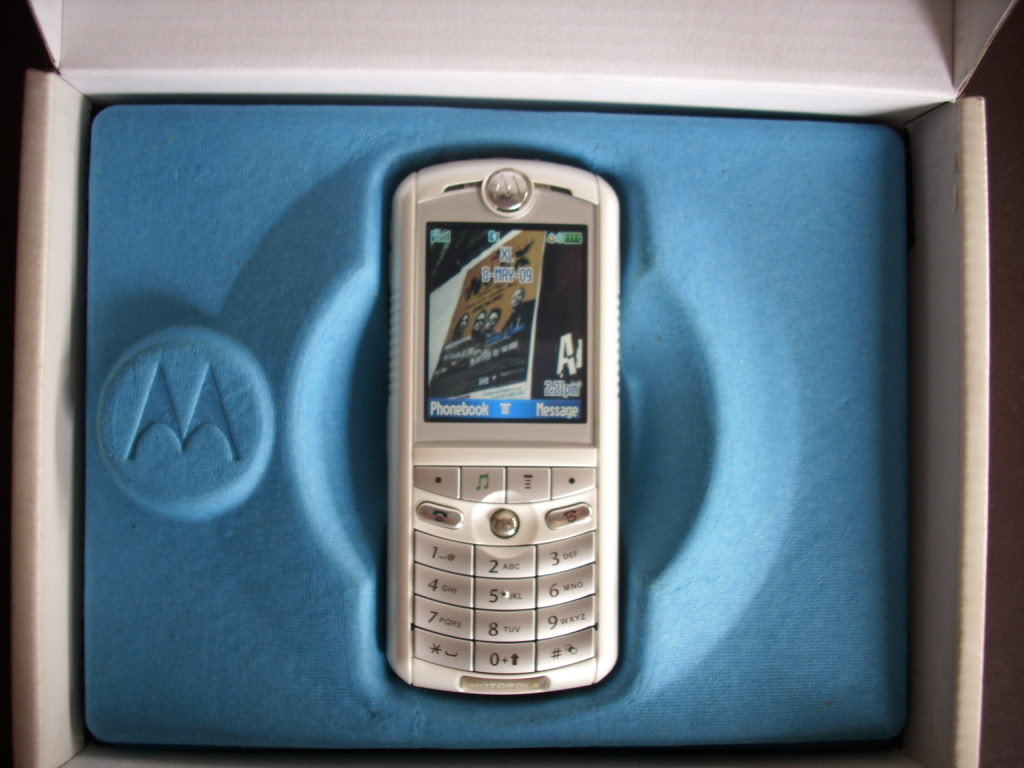
    Powering Up The Rokr

    I found a gently abused Motorola E1 Rokr on ebay, a new battery and we are powering it back up. It shows the Motorola logo and familiar os pops on. I spent many years with a motorola phone and this brings back floods of memories. It operates just like we all remember, even though the Rokr was not a popular phone the motorola brand was and it was everywhere from 2003-2009. The Cingular brand and Jack icon make me happy. It is basic AF, with only 9 options I’m fully through it a few unceremonious minutes
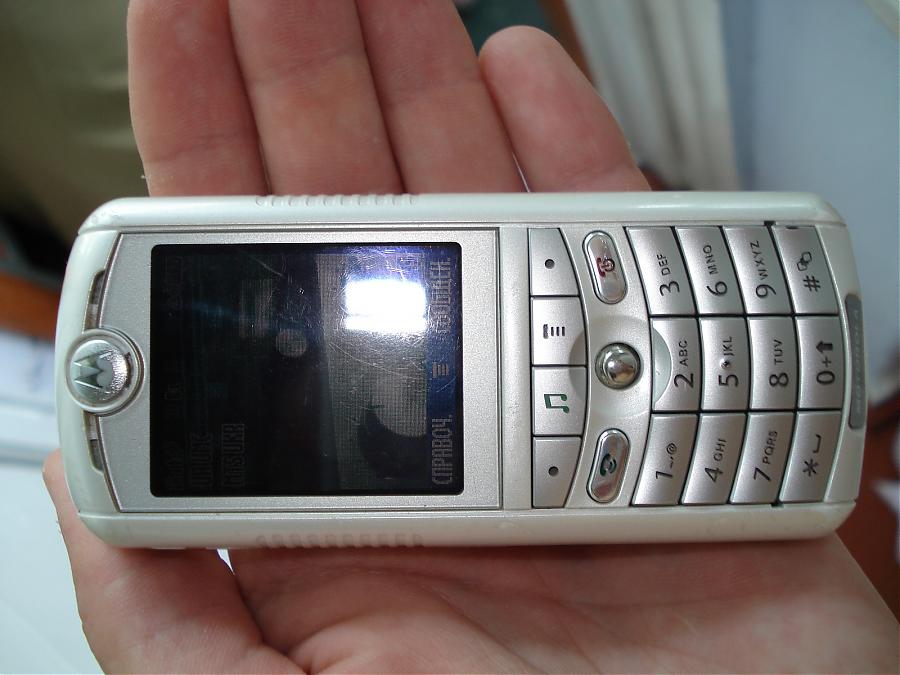
    But wait! The Rokr has a memory card still full of early ougt hits still on it. Keane, The Killers and Jets “are you gonna be my girl”! the speakers are awful. I am shocked this was acceptable, but at the time it was a wow. The 512 mb card is full with 83 songs on it.

    Its clunky, its slower then I remember the motorolas being. It just has the ipod music player, not the iTunes store so adding music on the fly is not a reality yet.

    The Flop

    Apple scheduled the iPod nano unveiling on the same day as the release of the Rokr. The Nano a success, the Rokr just something to look at in the Cingular store. The relations between Motorola and Apple were bitter and negative. Then Motorola CEO Ed Zander blamed the failure of the Rokr on Jobs and  later accused Apple of purposely undercutting the Rokr. Soon After the Rokr E1 was replaced by the E2, which lacked iTunes support and was superseded by the iTunes-enabled SLVR L7.
     

    The Final Thought

    At the time we had our fingers crossed that Apple and Motorola would unveil exactly what we had been dreaming of for years: a mobile phone with Apple industrial and software design, great call quality, and typically ingenious Apple feature simplification. ingenious Apple feature simplification. We would have to wait another year for that, The iPhone. But the Motorola E1 rocks got Apples gears turning and a stepping stone to Job’s magnificent Vision. Sometime we must fail to change the world and no one embodies that like Steve.

  • Coolest Things Coming to iOS 12

    Coolest Things Coming to iOS 12

    At WWDC 2018, Apple unveiled tons of new info about the upcoming iOS 12. We’re compiling a quick list of the coolest features we know so far, including release date and features. While this isn’t the biggest software change Apple’s ever brought, it’s iterative and responsible. The changes, for what it’s worth, are also all quite welcome. Let’s get into it! 

    Augmented Reality with Other Players 

    Apple promises iOS 12 will sport tons of new features for developers to build multiplayer games. Specifically, Apple showcased how the ARKit 2 software will allow developers to build shared AR experiences. This means that users can both see the same Augmented Reality object from their device, and changes made by one user will be seen by the other. A simple example would be drawing on a virtual chalkboard and your friend seeing it.  

    While this sounds fun for games at first, it also would be huge in the classroom. Imagine the students watching as their teachers shows them a diagram of a cell, pointing and changing things in real time. Then they could all have their own models to toy with, and the teacher could help them locate parts of the cell. Even testing could change to accommodate this more hands-on learning! 

    Backward Compatibility 

    Apple has stated they intend for this iOS update to focus on not leaving older model phones behind. Specifically, the update will support phones from the 5S forward, and iPads from the iPad mini 2 and forward. According to Apple, iOS 12 well help older devices pull up the camera and keyboard functions faster, and just be smoother overall. 

    This is a wise move on the part of Apple. Most smartphone users are keeping their phones longer as technology in the sector plateaus. Despite flashy new phones drawing in plenty of users, a sizable base of Apple users won’t be flocking to buy an iPhone X anytime soon. Keeping support for the older model phones for longer is a smart move on Apple’s part.  

    Upgrades to Siri 

    Siri is now set to be more responsive and generally useful. This update will introduce Siri shortcuts, which allow you to program certain actions to certain words. For instance, you could shortcut “I’m lost,” to pull up the map app and navigate home. This change might seem small at first glance, but it’s actually a huge help. Alexa and Google Assistant are so useful because they’re so smart and responsive. Siri, by contrast, is sort of clunky and you have to use exact phrases to get her to act. Hopefully this update will address this and bring her up to speed with the competition.  

    iOS 12 Release Date 

    The developer beta for iOS 12 started on June 4th, but there is a public beta on the way! The public beta will likely begin on June 26th, if the iOS 11 beta is anything to base things off of. Finally, sometime in September, when the new line of iPhones release, we can expect to see the final version. While iOS 12 isn’t the most exciting or flashy update ever, it’s a much needed one. Siri is in big need of an overall, and older phones have not fared well with iOS 11. Apple’s likely making strides in the right direction. 

  • Looking for the Biggest Display? Check out a 4K Projector!

    Looking for the Biggest Display? Check out a 4K Projector!

    While TV panels keep getting bigger and bigger, the hassles of installing and storing them do, too. Not to mention, they consume a ton of power and they’re super fragile! If you’re interested in having a massive, gorgeous 4K display but don’t want to worry about a TV, what are you supposed to do? Well, you could check out an awesome 4K projector! We’ve got three here, chosen for their various strengths, to help give you an idea of what to look for. 

    Epson 5040UB 

    While this projector is technically a 1080p projector, it uses some interesting optical shift technology. That optical shift makes it give the appearance of a 4K image without actually being 4K. This one is on the list for its price point, however, as it offers a great image quality for its cost. If you’re just looking to dip your toe into projecting, this $2,300 projector is a good place to start. It sports a great range of colors and looks vibrant. It’s only big drawback is that it only has an HDMI 2.0 input, meaning it’s not very future-proof for upcoming 4K releases. 

    Sony VPL-VW285ES 

    If you want to see every single pixel of your 4K image, this Sony projector is for you. If you have true 4K you want to watch on a massive scale and have it look great, this projector is perfect. It is a little expensive, though, coming in at $5,000, but it’s well worth it. If you’ve ever wanted to have movie-theater quality images in your house, this is how you do it. Now all you need is a big tub of popcorn and a comically large soda to drink! The only downside to this one, aside from steep price, is the colors. The color range isn’t as good as the other projectors on this list, and our pick for favorite blows it out of the water in terms of black levels.  

    Our Favorite 4K Projector: JVC DLA-X590R 

    Much like the Epson we mentioned earlier, the JVC is technically a 1080p projector. However, it uses optical shift technology to scale the images it sends up to 4K. Its biggest strengths are its strong colors and intense contrast. This 4k projector will wow you with its deep black values and vibrant colors. While it isn’t quite as crisp or sharp as the Sony, it’s much more affordable and offers better color values. Those features alone make it our favorite, as it does an incredible job for the price. You can usually snag this projector on Amazon for around $3,000. You won’t be dissapointed: this little guy punches way above his weight class! 

  • Red Hydrogen One Smartphone Promises to be “Holographic”

    Red Hydrogen One Smartphone Promises to be “Holographic”

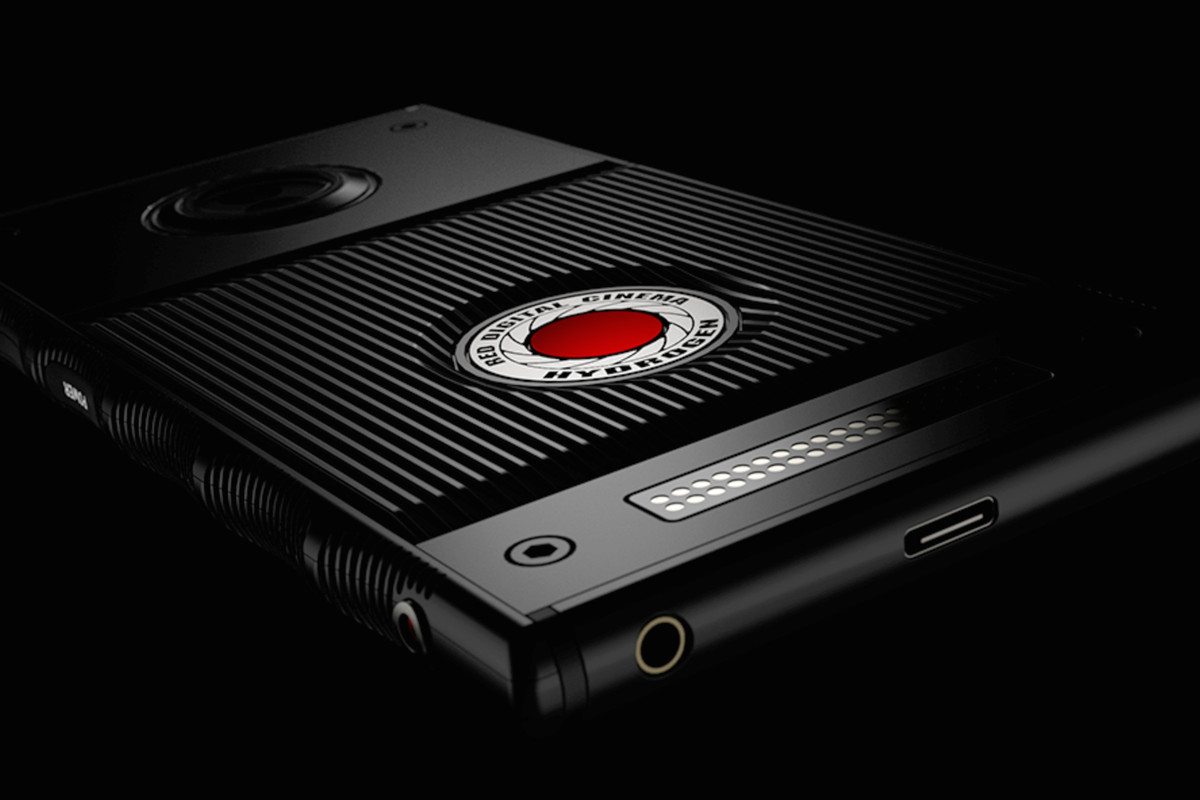
    Holograms are a mainstay of sci-fi film and fiction. When you hear “hologram,” I’m sure you’re thinking of Darth Sidious appearing as a ghostly image to threaten Darth Vader. Or maybe you think of hardlight constructions like Halo’s Cortana. Well, the Red Hydrogen One smartphone promises to be holographic, but not like that.  

    Holohraphic Means Depth, This Time 

    According to early reports of the phone, it’s not so much holographic as it is three-dimensional. Looking into the display, things have a depth to them that is impressive for naked-eye viewing. This sounds like a refinement of the technology that powered the Nintendo 3DS. The technology is referred to as “4V holographic,” and is still in its early stages. However, Red seems confident that filmmakers and game makers will be excited for the platform.  

    Red Hydrogen One Specs 

    The Red Hydrogen One will be available on Verizon and AT&T plans. The phone boasts some impressive specifications, like its Qualcomm Snapdragon 835 processor and A3D Spatial Surround sound. It comes in two configurations, one that’s aluminum and one that’s titanium. The phone has an industrial, hard-edge look to it and reports say that it feels heavy and sturdy. Red, well-known for their high-end cameras used in Hollywood films, seems poised to compete with Apple and Samsung in the premium smart phone space.  

    Release Details 

    The phone is slated to ship sometime later this summer. Preliminary reports say that the two constructions will be priced differently. The aluminum-bodied version will go for $1,295, while the titanium one will be $1,595. Wait a minute, sixteen hundred dollars for a smart phone? Red must be incredibly satisfied with the way their holographic screen looks. Since they’ve priced their phone as even more expensive than the iPhone X, Red must be confident. Later this summer, when the experimental holographic smartphone arrives, we’ll find out whether it’s worth the investment.  

  • Which Laptop Bag Is Our Favorite?

    Which Laptop Bag Is Our Favorite?

    We know bags aren’t the most exciting thing in the tech world, but it’s important to take care of your laptop! You spent a lot of money on a nice piece of technology, so it’s only right that you should get a good bag to carry it. Which one should you pick though? We have a list of some of our favorites here for you to check out! 

    WaterField Designs Staad Attache 

    This bag, interestingly, was designed with the iPad Pro in mind. Originally meant to be a tablet bag, it still works great as a laptop bag. It’s made in San Francisco and uses an easy-open clip on the front flap. It also sports a water-resistant zipper, helping to keep your tech from being doused. It has a pass-through for luggage handles, which makes it great for taking on flights. It’s made from durable waxed canvas and has a rustic, natural look. It’ll run you around $230, which is on the high side, but it looks great and won’t let your tech get banged up or drenched! 

    Mobile Edge Eco Laptop Messenger 

    For those looking for an excellent value, check out the Mobile Edge Eco on Amazon. It’ll cost you under forty bucks, and it offers a ton of pockets and flaps. While its make and design aren’t quite as luxurious as some of the other bags on this list, it makes the list for being so affordable. Without dipping too deep into your bank account, this bag offers great utility and durability in keeping your laptop safe. 

    Mobile Edge Core Gaming Backpack 

    The second Mobile Edge bag on this list, the Core Gaming Backpack is excellent for gamers. It’s padded and durable, and comfortable to carry. It unzips all the way to the bottom, making it airport checkpoint-friendly, and keeps your gaming laptop safe. It has room for all your cables and peripherals, and even has a charging cable so you can top off your phone while you’re moving between airport gates. Super handy for those who want to game on the go! 

    Our Favorite Laptop Bag: North St. Weekender Meeting Bag 

    This bag is made by Portland-based North St. It’s very durable, made from tear-resistant Cordura, the bag is both lightweight and water-resistant. If you often ride a bike in the rain with your laptop, consuder this bag! It’s also great if you spend a bit of time back and forth between airports. Not to mention, it’s very stylish and hip! It’s a mid-priced bag, though, running at $130. However, it’s very durable and very high-quality; you won’t be disappointed in your purchase. 

  • 10 Cool Things You Didn’t Know You Could Do with Windows 10

    10 Cool Things You Didn’t Know You Could Do with Windows 10

    Windows 10 is a robust, fascinating operating system. It’s user-friendly and deep, and there’s likely tons of neat little tricks in it you don’t know about. How many of these interesting Windows 10 tricks do you know? You’re sure to find something here you didn’t already know how to do! 

    Old-School Desktop 

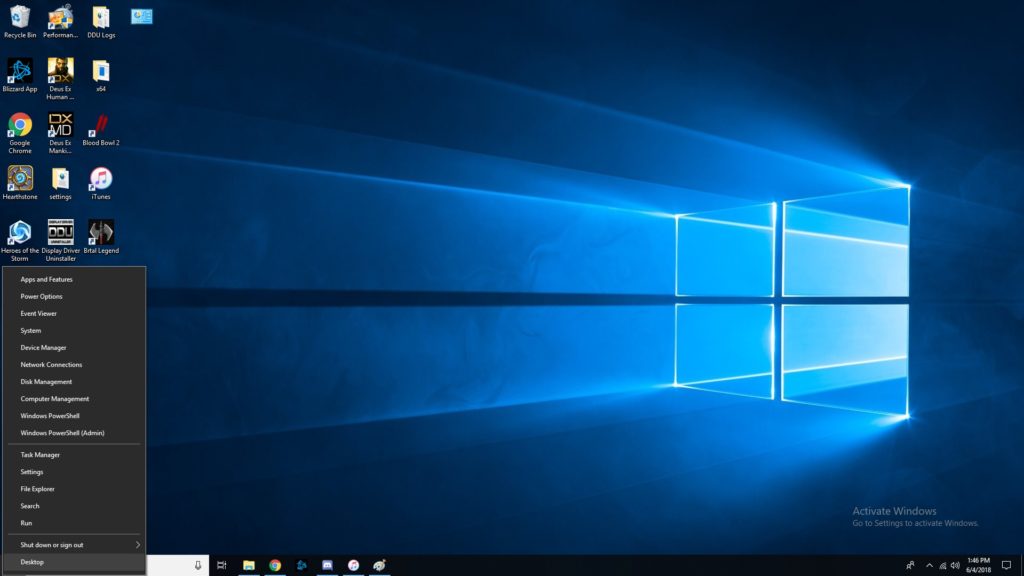
    If you like the more old-school look, try right-clicking the Windows button. This pulls up a set of controls that are familiar to long-time users. Hopefully if you’re having trouble navigating the OS, this trick helps you find your bearings. 

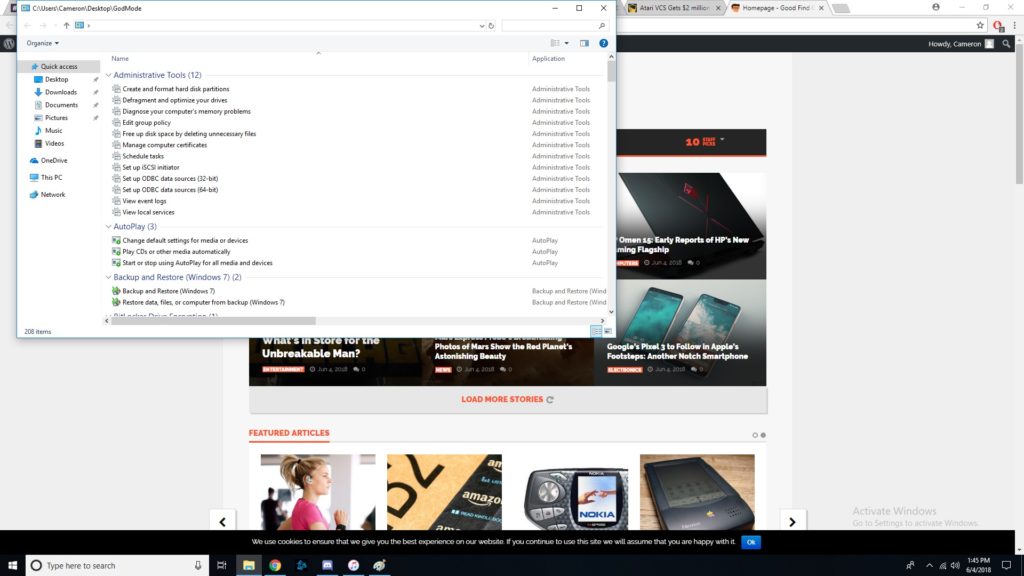
    God Mode, Enabled 

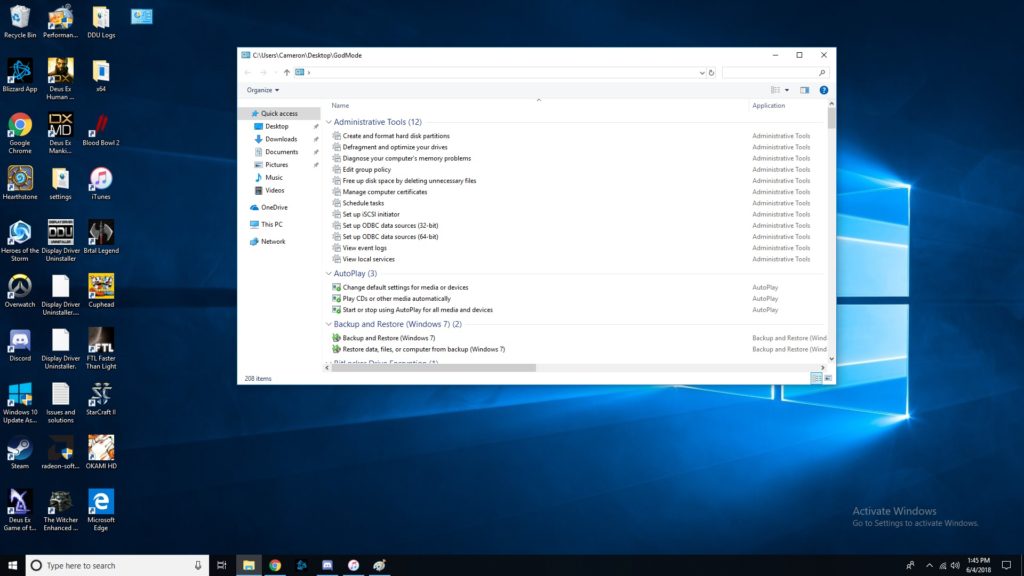
    If you’ve ever wanted to take direct control, you’ll love God Mode. It’s surprisingly easy to enter this Windows “cheat code,” but it’s super useful. To start, you should go to your desktop, right click, and make a new folder. Then, rename the folder “GodMode.{ED7BA470-8E54-465E-825C-99712043E01C}”. Congratulations, you’ve now enabled God Mode. Have fun with all these commands! 

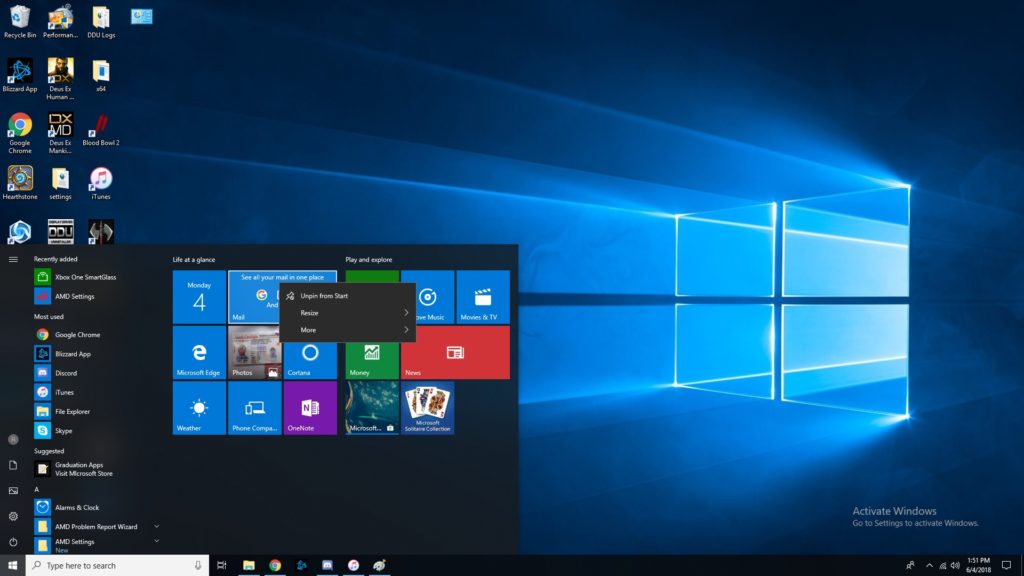
    Customize Tiles 

    If you want to customize your tiles, right click them. Now you can unpin, resize, pin to taskbar and more. You tile dashboard is meant to be an all-inclusive display, so having direct control of it is awesome. Make it your own, and have it show all the info you want at a glance! Remember, Windows 10 was made to be a great desktop OS and a great tablet interface in one. 

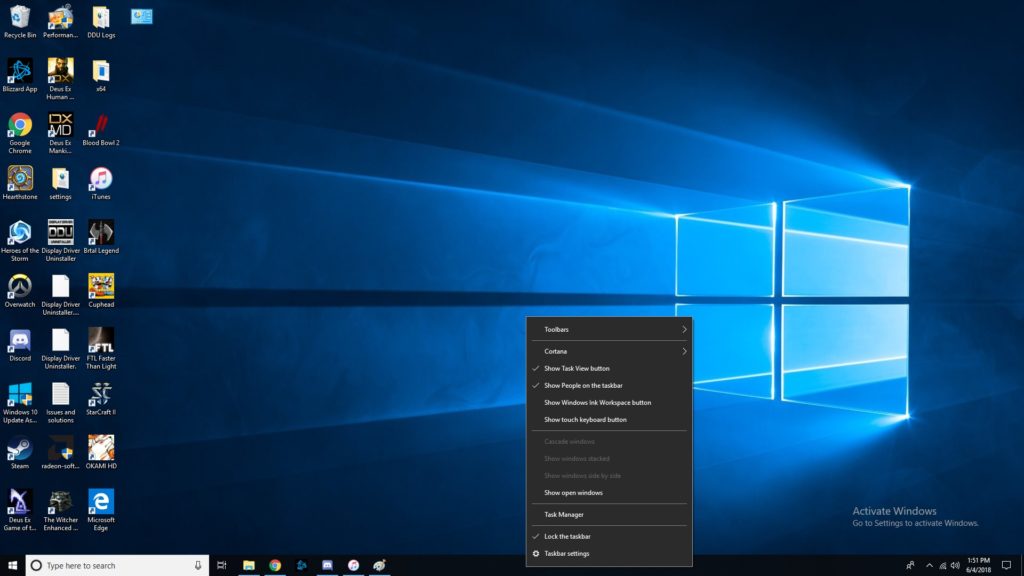
    Right Click Taskbar 

    Right clicking the taskbar brings up tons of awesome functions. Don’t be afraid to try it out! Some Cortana functionalities are controlled through here, you can mess with Windows schemes, and more! This one is simple but helpful. A lot of folks don’t even know this menu is there! 

    Show Desktop Button 

    That tiny little bar down there in the bottom-right corner where the cursor is in the image is the show desktop button. If you have a bunch of windows open and want to see the desktop, this is a great shortcut. Clicking in the bottom right corner is much easier than having to minimize four or five windows one after the other! 

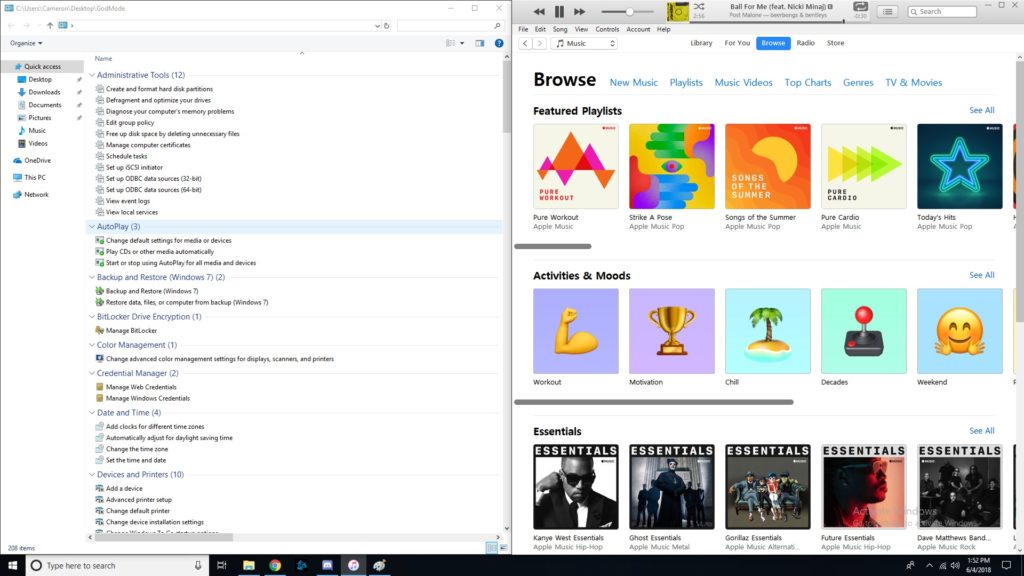
    Pinning Windows  

    If you drag a window to one side of the screen, it’ll get pinned there as exactly half the screen. If you drag it to a corner, it will become a quarter of the screen. This is awesome for professionals who need to multitask! If you often use editing software or have to multitask a lot, you’ll love this feature. It’s also just cool to have for when you want to live-Tweet a stream and not have to hold your phone the whole time. 

    Fun with Cortana 

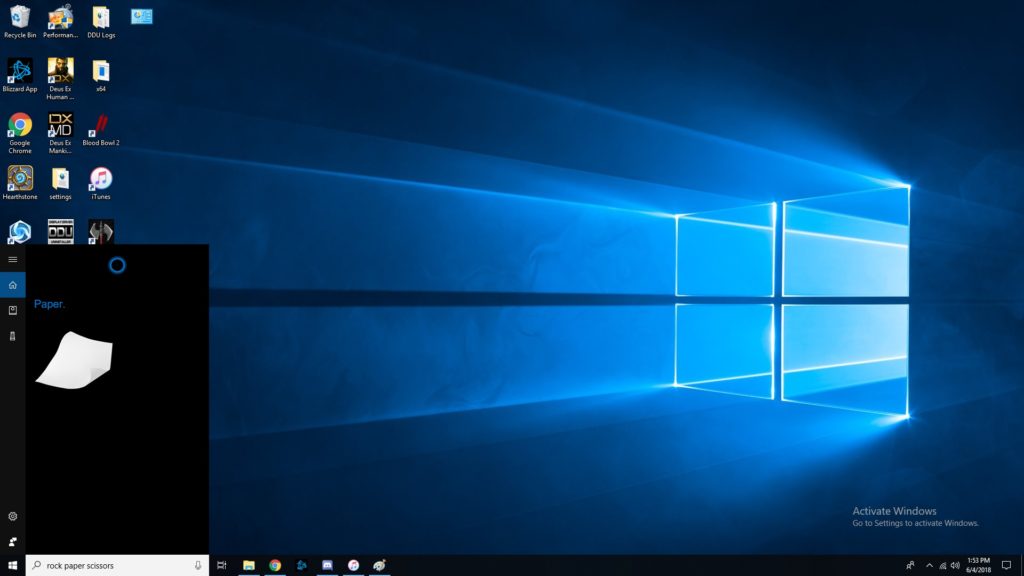
    Did you know Cortana knew a bunch of games? She can play rock, paper scissors, for one. She can flip coins, roll dice and more. Just type in the Cortana box any of those commands, or, if you’ve enabled it, use voice commands. These little diversions are a fun use of Cortana’s functionality. 

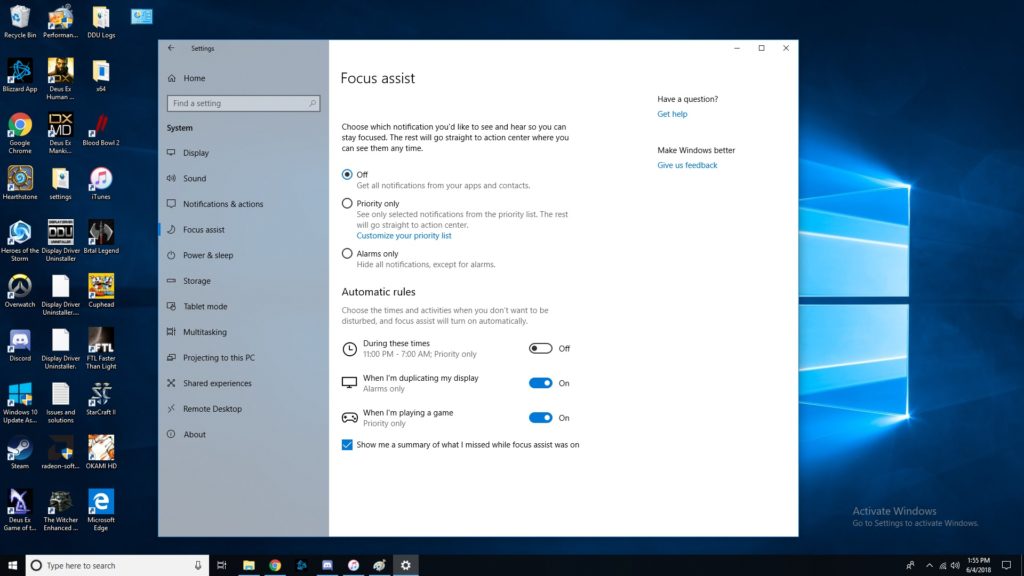
    Focus Assist 

    Sick of notifications throwing you off when you’re trying to work? Try Focus Assist. Go to settings, and under system settings you’ll find Focus Assist. This mode lets you set hours you’d like to silence notifications, and even lets you customize which notifications are high-priority. This functionality is similar to smartphones’ Do Not Disturb mode. It isn’t frequently used, though, as many people don’t even know that it’s there! 

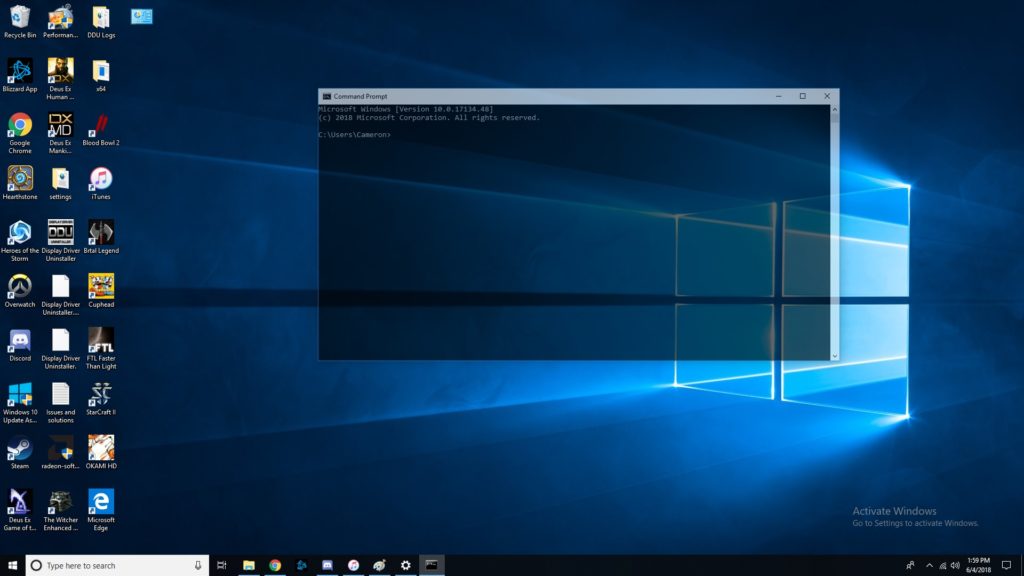
    Transparent Command Prompt 

    The command prompt is super handy for programming and debugging. If you often use the command prompt but would like to be able to monitor other windows while doing so, try this trick. When using the command prompt, right click the top of the bar. Then, click on colors, and look for the opacity slider at the bottom. Slide until the window is as transparent as you want it! Now you can watch your commands get reflected in real time. 

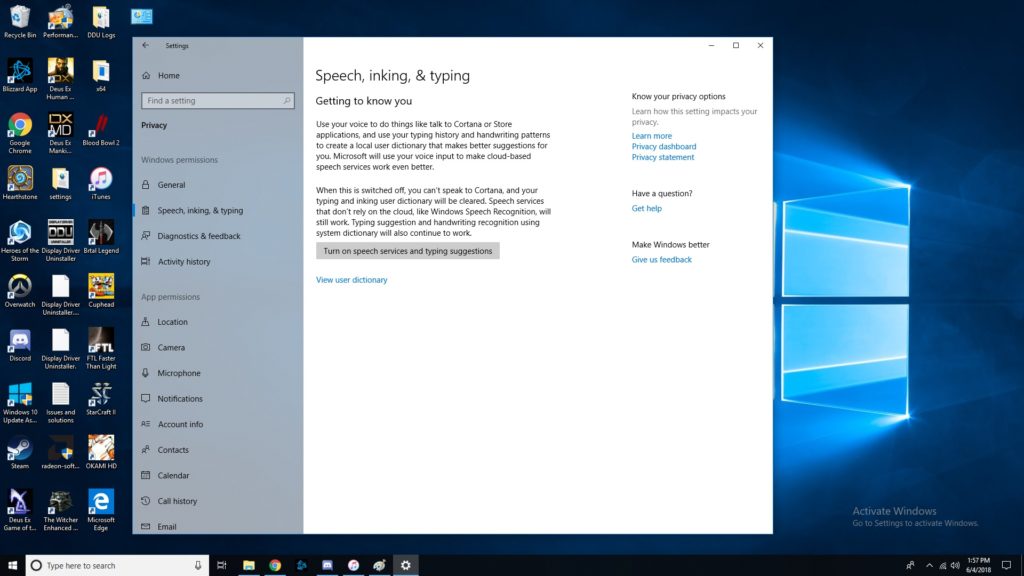
    The Coolest Hidden Windows 10 Function: Dictating 

    Dictation is super handy for a number of uses. For one, it’s good for when you just don’t feel like typing or feel like you can speak faster than type. More importantly, it’s a great accessibility tool for those unable to use a keyboard. In any event, enabling dictation is simple! Go to settings, then speech, then related settings. Then, click on “Speech, inking and typing privacy settings” and enable dictation. Boom, now we’re talking! Literally!  

    Did you know all of these cool Windows 10 tricks, or did you learn something new? Now, go forth and enjoy your operating system with all these new tricks you know! 

  • Computex 2018: What is Asus Up To?

    Computex 2018: What is Asus Up To?

    Asus, known for typically playing second fiddle to Apple, wowed crowds at Computex 2018 on Monday. Asus showed off some absolutely crazy pieces of new tech! These will certainly get you excited for the future of technology. Since we’re so hyped, we rounded up Asus’ three big reveals from the conference.

    ZenBook Pro 

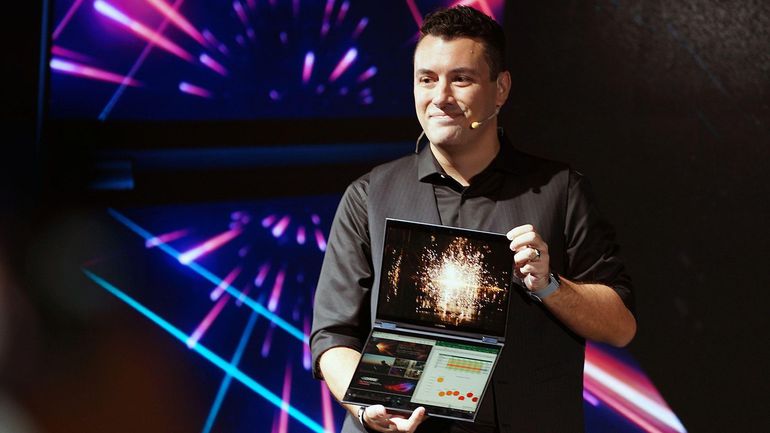
    A very sleek, technologically advanced new laptop, the ZenBook Pro is the more traditional option for those wary of Project Precog. What’s Project Precog? We’ll talk about it in a minute. The ZenBook Pro, though, is this year’s Asus innovation, featuring a trackpad that doubles as a display. You read that right, the new laptop has a tiny 5.5-inch display as a trackpad. Asus is calling this innovation the ScreenPad. The display seems geared at productivity, including functions with Microsoft Office suite of apps. Apple’s TouchBar plays in a similar space, but the ScreenPad is much beefier. This looks pretty awesome, but time will tell just how useful it is. 

    VivoWatch BP 

    This smart watch is promised to carry the world’s first medical-grade blood pressure sensor in a smart watch. Tech like this is a huge step in the right direction. The future of wearables is likely a fusion of medical and consumer technology. While the VivoWatch isn’t the flashiest wearable we’ve ever seen, it still shows that Asus is putting some serious thought into their offerings this year. Not to mention, they’re pioneering a field that will likely define the way we think of wearables, and that alone is worth praise. 

    Asus Highlight from Computex 2018: Project Precog 

    This dual-screen, AI-enabled laptop was a show-stealer. Featuring two massive touch screens and no physical keyboard, Project Precog promises to be the laptop of tomorrow. The laptop is set to ship with AI functionality to make your life easier. Suggested uses of the AI at the show were things like battery life conservation, helping you make Excel spreadsheets and recognizing users by face. If none of that sounded cool enough, it’ll also read where your hands are in relation to the display and generate a virtual keyboard under your hands when you want to type. How cool is that? Project Precog is set to launch in 2019. 

  • Which Gaming Mousepad is Our Favorite? Check Out Our Round-Up!

    Which Gaming Mousepad is Our Favorite? Check Out Our Round-Up!

    The hottest new trend in PC gaming is huge, desk-covering mousepads. Gone are the days of gaming with small, office-approved mousepads! The era of the gaming mousepad is here. Which one is the best for upping your game? Which ones are our favorites? Read on to find out! 

    Razer Sphex v2 

    If you’re a minimalist, you’ll love Razer’s entry in the gaming mousepad race. This incredibly thin mousepad looks great on a desk and helps your space look less busy. It even comes in a small size for those who have less space. It’s durable in spite of its thin profile and works great as a no-frills gaming mousepad. Razer sells this awesome product for $15. 

    SteelSeries QcK 

    Much like the Razer Sphex, the QcK is a no-frills, straightforward mousepad. It sports a very high thread count, your mouse slides beautifully along its surface. If you would like to hook your mousepad into your RGB lighting suite you could also opt for the Prism model! This one lets your whole setup flash in matching RGB illumination, which is super cool! It’s available from SteelSeries in a wide array of sizes and shapes for any desk. A great pick for a serious-minded gamer! 

    Corsair MM1000 Qi 

    This mousepad is a bit different from the ones discussed earlier. The MM1000 sports wireless Qi charging for your gaming mouse, allowing it to stay topped-off without interrupting your gaming! You can even charge your phone while you play if your phone is Qi enabled. This huge, smooth mousepad won’t break the bank, either, coming in at around $80. If you have a Qi enabled mouse and/or phone, give the MM1000 a shot! 

    Our Favorite Gaming Mousepad: Corsair MM600 

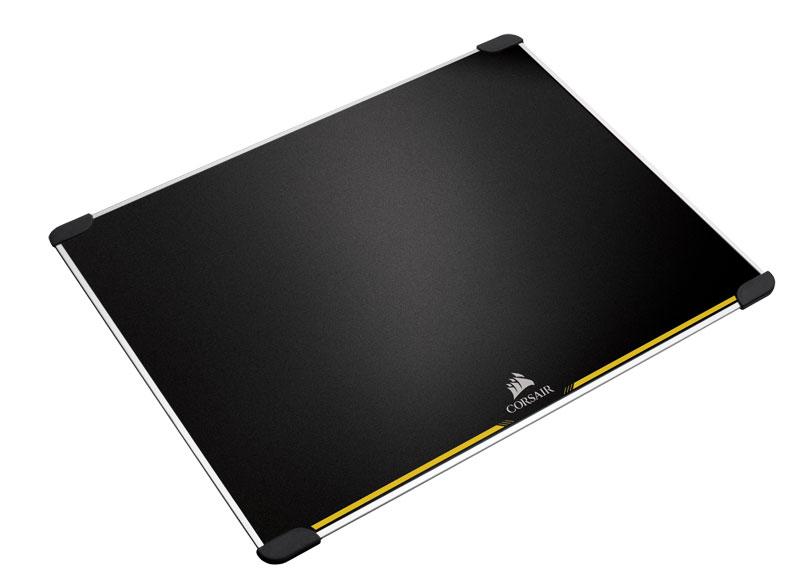
    The huge MM600 is a low-tech yet awesome mousepad for gamers. It’s double sided and features rubber feet in each corner to keep it in contact with your desk. It’s made from aluminum and its surface is treated to be low-friction. This mousepad truly feels premium, and it’s very affordable for how high quality it is. You can pick one up for yourself for around $40 from Amazon. 

  • Round-Up: Cool Tech Not for Sale Yet

    Round-Up: Cool Tech Not for Sale Yet

    Every day, new technology goes up on crowdfunding sites to get funding to go live. Tons of awesome inventions are funded this way, and we love perusing the coolest ones. There’s so many to check out, though! To help you find the coolest ones, here’s a quick round-up of some of our favorite new pieces of cool tech being crowdfunded now.  

    Forward X Ovis 

    This neat new piece of tech is perfect for those who spend a lot of time in airports. Since it’s complete with obstacle avoidance and facial recognition, this handy little guy will follow you all over the terminal. It also comes with a bracelet for tracking that tells you if it falls out of range and helps you find it if it gets lost. So, if you’re the kind of person who loves their Rumba, this self-driving luggage is perfect! It’s on Indiegogo now for $400, so if it interests you, go check it out there! 

    Zen Float Tank 

    Sensory deprivation tanks, great for meditation and inner reflection, are notoriously expensive. However, the Zen Float tank seeks to remedy this by offering inflatable deprivation tents for home use. Up on Kickstarter now, the Zen Float Tank is an interesting solution to the prohibitive price of float tanks. By being both inflatable and sized for a home, it is able to discreetly hang out in the back of a room. It’s low maintenance, too, requiring little upkeep. These things all make the Zen Float Tank very cool tech for those looking to experience sensory deprivation and meditation. 

    Earth- Interactive AR Globe 

    This high-detail globe model of Earth is impressive on its surface. It’s colorful and informative, giving excellent topographic views of Earth’s surface. However, real magic kicks in when you use the paired augmented reality app, though. The app allows you to turn the globe and learn about the different countries, climates and creatures in our big, beautiful world. If you love learning, or have a little one who does, this is perfect. Many kids would love to learn geography with a hands-on tool like this! Heck, I’m an adult, and I still want to play with this thing! It’s up on Kickstarter now. 

    Our Favorite Upcoming Cool Tech: Beambox Laser Cutter 

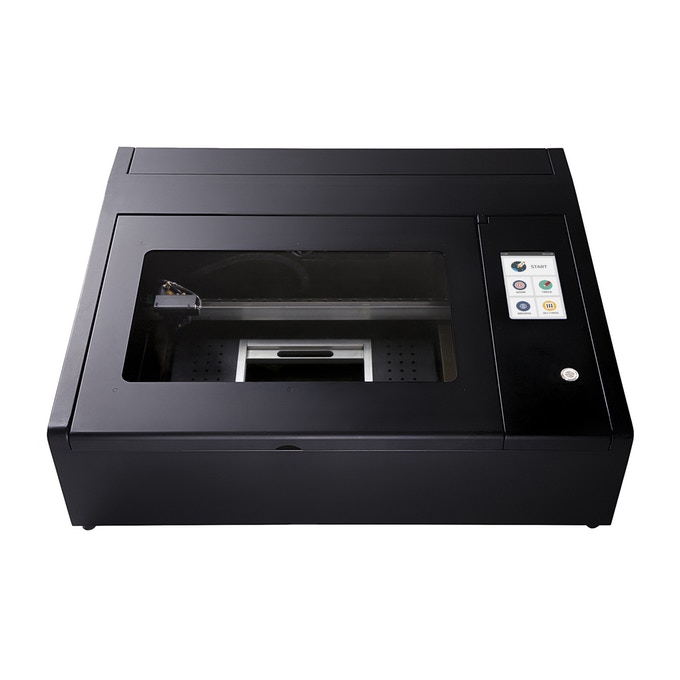
    Top of the list of things that make you go “oh, cool,” is the Beambox laser cutter. If you;ve ever wanted a cutter to do engravings on all kinds of materials, check this one out. It’s awesome. Usually you would need a lot of knowledge on how to set a laser cutter, how to calibrate it and use it effectively. Beambox, however, was designed to be easy to use! It has presets for different materials and it hooks right up to your computer. You can put in any design you want, and the Beambox will engrave it! It’s so cool! 

  • Xbox Systems to Support Voice Assistants Like Alexa

    Xbox Systems to Support Voice Assistants Like Alexa

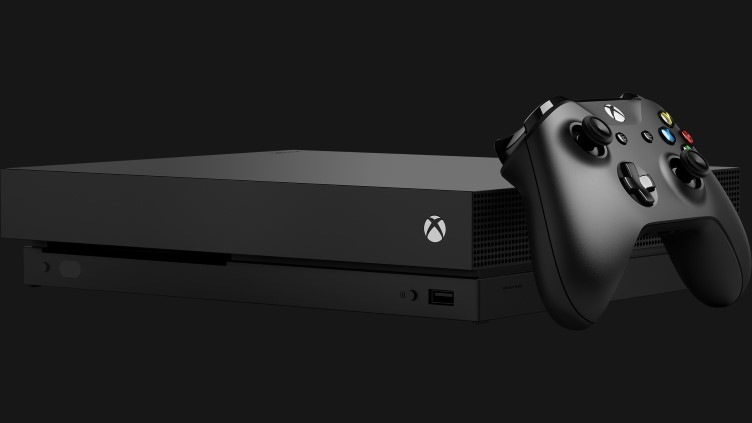
    A new report from Windows Central has shown a screenshot of options for voice assistants in Xbox One. While the system already has support through the (now shuttered) Kinect service via Cortana, the Windows Central report goes beyond Microsoft’s proprietary AI. The report indicates Google Assistant and Alexa would both be supported in addition to Microsoft’s own assistant. 

    Smart Speaker Integration 

    Smart speakers are sort of taking over the world right now, so it makes sense that Microsoft would focus on this technology. The Xbox One has always been marketed as a home entertainment system first, with TV and music being huge for the system. Having the system connect to your Smart Home network is a no-brainer for Microsoft.  

    Xbox Voice Gaming Potential 

    Additional inputs aren’t a bad thing, and Xbox is known for unconventional inputs. The aforementioned Kinect service serves as evidence of this. Voice and gesture commands were once a hallmark of the Xbox family of games but fell out of favor as the company refocused on core games. However, the surge in popularity of voice assistants could signal another push by Microsoft to reenter the Kinect space. “Alexa, start Halo on my Xbox,” is one thing. But “Alexa, help me find nearby save points,” could bring a new layer of depth to certain games.  

    Heck, Microsoft could even be cute and play favorites with Cortana funcitonality in Halo. As fans know, Cortana is actually an AI character in the famed sci-fi series. Talking to her directly in game via a smart speaker could bring another layer of immersion to the experience. “Cortana, where are the enemies?” “Cortana, show me the way out of here,” you can imagine the possibilities.  

    Considerations for Xbox Owners 

    There is nothing more frustrating than buying a cool new piece of tech only to find out it isn’t compatible with your set-up. If you’re an Xbox owner thinking about getting a smart speaker, it may be wise to hold off until Microsoft announces more. We aren’t sure as of yet which services and speakers will be compatible. For the moment, hold tight and see what unfolds.