Month: August 2019

  • Do You Need Flood Insurance? The Facts

    Do You Need Flood Insurance? The Facts

    While the types of insurance you can get for your home often include coverage for damage from natural disasters, you might need flood insurance for full coverage. This goes double if you live in an area prone to flooding due to proximity to the ocean or frequency of hurricanes. Today we’re going to look into flood insurance and help you determine whether you need it for your home, or if your homeowner’s insurance is enough to cover you.

    Flood Insurance

    Flooding Risks

    Of all the natural disasters that occur in the US, nine out of ten of them cause flooding. Flood damage can be catastrophic on your property, damaging everything from your home’s foundation to your belongings. Electronics, furniture, pictures and collectibles can all be destroyed and ruined by flood waters. Keep in mind that homeowner’s insurance likely can only cover a small percentage of the amount of damage that a flood can cause to your home.

    Not to mention, flooding often brings silt, mud, and even sewage into your home, leaving a disgusting mess inside your home. Even worse, there are some floodwaters fast-moving and dangerous enough to sweep entire homes off of their foundations and simply carry them away. The only thing worse than your home being damaged badly is your home simply washing away into the ocean. This type of damage would likely be impossible to cover with normal homeowner’s insurance.

    Do You Need Flood Insurance?

    If you live on a flat plain in the middle of Nebraska, you probably don’t need to worry about flood insurance. Likewise, if your home is atop a mountain and far from any bodies of water, it’s highly unlikely that a flood will ever reach you. If one does, you’ll certainly have bigger problems than whether your baseball cards get soaked.

    Meanwhile, if you live in a lowland area near a river or on the coast, you should look into flood insurance. Keep in mind that if your area is particularly flood-prone, you might actually already have flood insurance. Many mortgage companies require you to have flood insurance if the likelihood of a flood in your area is over a certain amount.

    National Flood Insurance Program

    There are two different types of flood insurance you can look into. The first is the National Flood Insurance Program, or NFIP, offered through FEMA. This government-operated insurance is available to communities in flood zones, typically near the coast or in lowland regions near bodies of water. There are two coverage types available in NFIP, and most communities covered by it get access to both.

    There’s building property coverage, which offers to cover the cost to repair your home or get a new one entirely. This can pay out up to $250,000, allowing you to cover a wide range of damage. The other type is personal property coverage, which pays out damages to your property up to $100,000. This includes things like your TV, computer, furniture and collectibles.

    Private Flood Insurance

    Unlike NFIP, private flood insurance varies widely from insurer to insurer, so it’s harder to make generalized statements about it. However, as a general rule, you should speak to your local insurance agent to learn more about what they can offer in your area. People who have homes worth more than $250,000 or personal property worth more than $100,000 tend to be those interested in private flood insurance.

    For instance, if you have a summer home or a mansion that’s worth over $250,000 located on the Florida coast, you’ll likely want to speak to a private company about flood insurance. NFIP can only pay out up to $250,000, so there’s no real reason to go through them to insure a mansion or beachfront property.



  • Cruising to Europe? The Ultimate Cruise Guide

    Cruising to Europe? The Ultimate Cruise Guide

    If you’re looking to get away for a while and enjoy a nice vacation, you might be thinking of taking a trip to Europe. After all, it’s a continent full of history, ancient buildings and cultures that are fascinating to learn about. However, traveling to Europe can be a bit stressful when you’re just trying to enjoy your vacation. There’s so much to do, and traveling all over is a bit of a feat in terms of scheduling and planning.

    Thankfully, there’s a much simpler way of traveling around Europe that also turn your travel time into leisure time: cruising. Cruise boats are as much giant floating resort hotels as they are a means of transportation, so if you’re looking for a relaxing way to visit some amazing locales, a cruise boat is the right call for you. Here are some of the best cruises to Europe you can find.

    Seabourn Ovation

    First sailing out in 2018, the Ovation is the newest ship in Seabourn’s fleet. The luxury cruise liner carries up to 600 passengers and has been described as “intimate,” offering a nearly one-to-one ratio of crew to passengers. The storied luxury of Seabourn is on display on the Ovation, as well, with the food and amenities onboard described as “decadent”. Every passenger room on the boat offers a veranda with an ocean overlook, and every room has flat-screen TVs and a complimentary in-suite bar.

    Passengers can opt for upgrades like the “Pure Pampering” package, which means your baths will be drawn by your suite stewardess. The cruise liner often takes routes through the Mediterranean, though it also visits Northern Europe and even offers cruises through the British Isles. No matter what part of Europe you’re interested in seeing, Seabourn Ovation is a great ship to do it on.

    Celebrity Reflection

    The Celebrity Reflection was first introduced in 2012, and it had a renovation in January of 2018. The Reflection has room for up to 3,046 passengers, and offers unique amenities like the Game On club, which has huge, flat-screen table games, which is great for teenagers or gamers. There’s also a top-deck Lawn Club, giving guests a naturalistic area for relaxing on the boat. Also available on this ship is the Alcoves, an extra-charge area that allows for smaller crowds and cabana-style lounging.

    There are twelve different restaurants aboard the Reflection, though of them seven cost extra to dine in. Most of the cabins offer verandas with ocean overlook, and all of them come equipped with flat-screen TVs and minibars. There’s also the option to upgrade to an Aqua Class cabin, which grants the passengers 24-hour butler service and direct access to the spa. The boat splits its time between the Caribbean and Europe, though it’s a blast to be on in either region.

    Viking Sea

    As the name implies, the Viking Sea is a luxury cruise liner that cruises all over Europe. It often offers cruises through the Mediterranean, across various beautiful locales such as Rome, Venice, Barcelona and Athens. The ship was introduced in 2016, and is on the smaller size, accommodating only 930 passengers. This smaller size allows it to visit smaller ports, such as Norway and Bergen. The ship is, notably, extremely luxurious for all passengers.

    Case in point? Every cabin has heated floors, king-sized beds, flat-screen TVs, balconies, and even complimentary wi-fi. Noteworthy attractions on the boat include a unique infinity pool on the nose of the ship that gives the illusion of swimming in the ocean. Between this and the numerous options for delicious cuisine, it’s hard to go wrong with the Viking Sea as your ship of choice for a European cruise.


  • Talcum Powder Class Action: What You Should Know

    Talcum Powder Class Action: What You Should Know

    If you’ve watched any daytime TV lately, or been listening to the radio much, you’ll probably have noticed a trend. There are a ton of ads for class action suits being taken up against Johnson & Johnson in relation to cancers caused by their talcum powder. What should you know about these suits, and could you be owed money? Read on to get a better grasp on this situation so you can find out what you need to know.

    Talcum Powder Class Action

    Background

    In late 2018, a jury awarded plaintiffs in a suit against Johnson & Johnson a $117 million mesothelioma verdict and a $4.69 billion ovarian cancer verdict. The case alleged that the company knew fully well that their product was likely to cause mesothelioma and ovarian cancer, but hid this reality from the public in order to continue selling it. Around the same time this suit was being resolved, Johnson & Johnson agreed to pay another $1.5 million to settle another mesothelioma case.

    Much of the information in regards to this case was actually broken in a Reuters article that investigated the matter. In that article, it was found that the company has known for decades that the talcum powder they use for their baby powder products has been tainted with asbestos. Asbestos is a highly dangerous mineral for humans, and is known for being extremely carcinogenic.

    The Report

    According to the Reuters report, Johnson & Johnson had been informed several times between the early 70’s and 2003 that there were traces of asbestos present in the talcum powder used in their products. On their own website, the company has denied these claims as “absurd conspiracy theories,” in spite of their recent losses in court. At present, the company continues to defend its baby powder products as “safe and asbestos-free.”

    The documents showing that Johnson & Johnson were aware of the danger posed by their products were also cited in the Reuters article. These documents had been kept secret prior, though they were made public as a result of the lawsuit against the company. In the face of these court proceedings, and the Reuters report, a class action suit naming several companies has appeared.

    The Class Action

    Several companies, including Johnson & Johnson, Vanderbilt Minerals, Colgate-Palmolive and Imerys Talc America, have been named as defendants in the suit. At present, Johnson & Johnson is facing over 11,000 talcum-related lawsuits, making them the most-named defendant out of those named in the class action suit. Most of these suits are being settled for undisclosed amounts as the company is facing mounting pressure to address the numerous claims that their products cause cancer.

    While most of the settlements have been undisclosed amounts, one settlement is known to have been for $1.5 million. This class action has the potential to be absolutely devastating for the companies named as defendants. In a quote from the Bar Association, a lawyer confirms as much: “Thousands of companies used cosmetic talc in their products over the last hundred years. The entire population could claim exposure, especially to defendants that sold personal care products that could be ingested, inhaled or exposed via air-borne contact.”

    What This Means

    If you, or someone in your family, developed mesothelioma or ovarian cancer after using Johnson & Johnson baby powder, you should speak to a lawyer representing a class action that names the company as defendants. Odds are good that you could be owed money: it’s worth talking to a lawyer to find out more. Remember, every case is unique, so make sure you do your research before stepping into the legal arena.


  • Samsung Galaxy S Pen: Best Phone Peripheral Ever?

    Samsung Galaxy S Pen: Best Phone Peripheral Ever?

    Samsung’s Note series of phones started the trend of the massive, tablet-like smartphones called “phablets”. What was once a niche size of phone for those who wanted massive screens and huge batteries has become industry standard. Now, nearly every flagship smartphone has a “plus” or “XL” version that comes with even more bells and whistles. As such, the Galaxy Note has become a little less special for its size. That said, it still has an ace in the hole that makes it impressive.

    That ace in the hole comes from the S Pen peripheral. Part stylus, part Bluetooth remote controller, the S Pen is a huge part of the Note’s ability to overperform as a productivity phablet. Now in its ninth generation as the Galaxy Note 10 (remember, they skipped 6 and went straight to 7 from 5), the Note is back with even more features for its unique stylus. Let’s take a look at what may be the best smartphone peripheral ever: the S Pen.

    S Pen Origins

    Undoubtedly, the Galaxy Note was originally meant to win over power-users who loved the stylus of their Blackberry devices. Handheld PDAs and productivity technology were red-hot in the late nineties and mid-aughts, but after the iPhone blew the doors off of the smartphone market and started a touchscreen revolution, brands like Blackberry fell out of fashion. That’s where the Note came in, complete with a handy stylus and tons of productivity-minded functionality.

    Originally, the S Pen was essentially just a Bluetooth-enabled stylus. It was helpful for navigating precise menus and checking emails, of course. You could take notes with it, as the phone’s name suggests, as well. As such, it was a popular choice among both professionals and students, allowing them to organize their important documents and notes all from their smartphones. Essentially, the S Pen allowed the Note to work almost like a laptop.

    Newest Features

    The Note line of phones has always sported the most cutting-edge tech seen in Samsung handsets, and each new iteration has brought new features to the S Pen. While each successive phone has brought new features like in-display fingerprint scanners and bezel-free screens, the S Pen has also been changed to keep up.

    For example, on the Note 10, the S Pen has the ability to convert your handwriting to text. This is a huge feature for people who need to take quick notes on the fly and then have text versions of them quickly, such as assistants, professionals and students. These text copies can then be copied and pasted into other fields, allowing you to rapidly create transcripts of your notes.

    Air Actions

    Another new feature on the S Pen for Note 10 is the introduction of Air Actions. These are somewhat like gestures you can perform with the pen in order to make your phone take certain actions. For instance, when you’re using the camera, you can use Air Actions to change the camera mode, or to zoom in. Alternatively, you could even use the button on the S Pen to snap a picture, even when you’re not directly at your phone.

    While the Air Actions are a little wonky at first, they become quite intuitive after a few uses. When you add it all together, between the zoom function and switching camera modes, as well as snapping pictures with a button press, it’s easy to see the Note 10 as a great phone for fans of photography! Other new features on display with the new S Pen include AR doodles, which allow you to draw objects onto a digital space and share the drawing with your friends. All said, there’s a lot to love about the new S Pen, and it carries on a great tradition of productivity aids for Note smartphones!


  • Results Are In: Best HR Software Features & Prices in 2019

    Results Are In: Best HR Software Features & Prices in 2019

    Looking for the best combination in HR Management and the latest technology breakthrough? How much does this software cost and what do you need to look for? What are the pros and cons? We have the scoop! We’ve cut your search time in half by compiling a list of the best and most affordable state-of-the-art HR software available today.

    Whether you’re a Fortune 500 company or a start-up looking to make your first hire, modern-day HR solutions have never been more vital to businesses as they are in 2019. In the last decade we’ve seen HR software take great strides in practically reinventing itself.

    In fact, in the past couple of years we have seen features that we never knew we needed become indispensable for recruiters and businesses alike. But don’t sweat it, we know why you’re really here – what are those features and most importantly, what’s it going to cost you?

    Before we dive into pricing, lets take a look at what some of your basic goals are and how investing in HR software can transform your business:

    Size

    How many employees does your business currently have and how many are you projected to hire in the near future? This is an important aspect to take into consideration since most HR Software companies offer rates based on how many employees you have. For example, a company that runs payroll for 20 employees will have a greatly different pricing structure to work with in comparison to a company that runs payroll for 2,000 employees.

    Functions

    HR managements falls under a huge umbrella that covers a bunch of different essential features. What exactly are you looking for within your unique business structure? Most industries outsource tasks such as payroll, hiring, performance reviews, time off tracking, etc.

    While it can be tempting to outsource all aspect of your business with HR Software, it may not always be really necessary. You should especially take this into consideration when pricing comes into play. Not all HR Software companies offer a complete package at one price. For example, Bamboo HR ups their prices for companies that run payroll with them by $4 per employee and $25 per month.

    Budget

    But what’s this going to really cost you? Let’s dive in. There is no getting around the fact that HR Software pricing greatly varies from one provider to the other. How much should you spend on HR Software and is it really worth the price tag that comes with it?

    Typically, when licensing HR Software on a monthly basis, prices range anywhere from $50 – $1,000 each month. Subsequently, this will to depend on the factors mentioned above such as size and functionality of your unique business model.

    Most HR Software providers offer a trial month for you to try out their product, without dishing out a single penny. Win-win! As a business, you should take advantage of this. Take some time to go through the trial and error process before committing. This will not only help you compare different HR Software, but will also give you a concrete answer on what it’s going to cost you.

    Here is a list of the top-rated HR Software companies for you to try out in 2019:
    1. BambooHR
    2. Zoho People
    3. Dayforce HCM
    4. SAP SucessFactors
    5. Kronos Workforce Central
    6. Deputy
    7. Gusto
    8. Zenefits
    9. CakeHR
    10. ADP Workforce Now


  • Apple TV+ News: What We Know

    Apple TV+ News: What We Know

    It’s 2019, and it seems like everyone wants a piece of that sweet, sweet streaming money. When Netflix started streaming some select content on their website over a decade ago, it seemed like a novelty that would do little to disrupt the way cable companies operated. Now, however, nearly every media company is trying to get a piece of the streaming pie. Between CBS All Access, Disney Plus, DC Universe and numerous others, the streaming field is extremely crowded.

    Yet another huge name is entering the streaming world, with Apple TV+ announced to be landing before the end of the year. While pretty much every streaming service offers good video quality and great streaming content, the important differentiators between them are their exclusive content. So, what is Apple TV+ bringing by way of exclusive content to attract users away from Netflix and Hulu?

    The Service

    Apple has long been spinning up to become more “service-focused,” as they themselves have stated at numerous tech shows and investor calls. Apple TV+ is clearly the biggest part of that, and is meant to go hand-in-hand with other Apple subscription services like Apple Music. At present, many details about the service are unknown. However, speculation holds that it will likely cost less per month than Netflix in order to combat the streaming juggernaut.

    Hard details, like the exact price, release date and availability, are all being kept under tight wraps for now. It’s safe to assume that the service will be available on Apple TVs, on iOS devices and on Macs. However, it’s unclear whether it will be available on other streaming platforms, like Amazon Fire TV, Roku, or Android TV devices. However, we do know some details about noteworthy shows we’re going to be seeing on the service. Read on for details.

    The Morning Show

    One of the biggest marketing pushes we’ve yet seen for Apple TV+ has been for “The Morning Show.” While looks on its face like an actual morning show in the advertisements, it’s actually a scripted drama based around characters who work for a morning TV show. Reese Witherspoon, Jennifer Anniston and Steve Carrell are all set to star. The series will mark the return of Steve Carrell to TV after the end of The Office.

    Interestingly, Apple seems to be betting big on The Morning Show, having already ordered two seasons of the show. It’s likely to be a cornerstone of the advertisements for Apple TV+, as the star power involved is tremendous. That said, the quality of the show alone will likely dictate how it performs. If it’s the smash-hit Apple is expecting, it could likely drive users to the service.

    See

    Speaking of star power, the fantasy epic “See” will be starring Jason Momoa and Alfre Woodard. Leveraging Momoa’s history of portraying fantasy characters and Woodard’s exceptional work with Marvel, the series will likely serve as a huge talking point for the service. “See” is set in a world where a virus has decimated most of humanity and left only a few million survivors behind. Those survivors have all been rendered blind by the virus. The show is set to take place centuries after the current day.

    For All Mankind

    If “See” is the service’s keystone fantasy series, then “For All Mankind” is set to be the sci-fi end of the spectrum. The series will be helmed by Ronald D. Moore, of Battlestar Galactica fame, and will center on an alternate-history version of our own world. The series asks the question: what would happen if the space race had continued long after it ended in our own world? The speculative series will likely serve as the main sci-fi series for the service to round out the major pillars of TV favorites.


  • Mazda CX-5: A Crossover Contender?

    Mazda CX-5: A Crossover Contender?

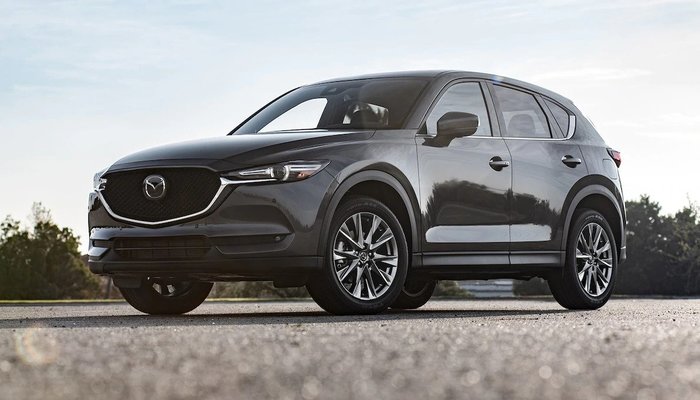
    The Mazda CX-5 is a big contender in the world of crossovers. It’s positioned right between being a mainstream, everyday vehicle at its lower trim levels and a serious example of luxury in its high-end Signature trim level. Is it a worthwhile purchase for your family, though? Let’s take a closer look.

    Mazda CX-5

    Design

    Crossovers need to look like they’re a few feet off from being actual sports cars, and the CX-5 doesn’t miss that mark. Where many competitors have bland and boring designs on their crossover SUVs, the CX-5 looks athletic and ready to pounce. The design is simple and straightforward, not drawing too much attention to itself while still looking stylish enough to impress. The massive grille and interestingly-smooth body make for a distinct appearance that doesn’t distract from the important design elements.

    Oddly, the Signature trim doesn’t get a lot of visual distinctions from the rest of the range. The 19-inch wheels on the Signature are a dark silver color, which differs from the lower entries, though that’s the only difference aside from the discreet “Sg” badge. That badge is easy to miss, and, unless you know what you’re looing for, could be overlooked altogether. However, it’s what’s on the inside that counts.

    Interior

    If you opt for the Signature upgrade, you get everything. Literally every option available for the CX-5 is on if you get the top trim level. This includes everything from a unique heads-up display, heated and cooled seats, a heated steering wheel, a Bose sound system and more. The seats get Nappa leather for the upholstery, you get slick ambient lighting all over, and even a sleek leather wrapping for the steering wheel.

    What is notable, of course, is the lack of a few features we’d expect on a trim level set to be competing with luxury rivals. There’s no wireless charging for cell phones, no remote start option, and no automated hatchback that you can swing your foot under to open. That said, there’s a lot to love in the interior of the vehicle for those looking for serious luxury.

    Tech

    When you’re shopping for a nice, new SUV, the tech on display is a huge consideration. The Mazda CX-5 offers up some great tech, but it’s a bit sluggish in places. For instance, the infotainment system is wonderful, with a big and bold 7-inch display. However, it can take a long time to boot up, and it’s a bit slow to react to inputs or connect to Bluetooth.

    Additionally, as soon as you’re in motion, the touch screen is locked and you have to use the rotary dial on the center console; this only adds to the frustration of using the system. That all being said, the screen looks great and the sound system, especially in the Signature trim level, is exemplary. Thankfully, the system also incorporates both Android Auto and Apple CarPlay, which is a much-needed feature in 2019.

    Engine

    Under the hood, the CX-5 is rather impressive at the Signature trim level. The turbocharged 2.5-liter inline-four is a bit of a beast, rocking 250 horses and 310 pound-feet of torque. It goes zero to sixty in only 7.3 seconds, which is impressive for an SUV. This all means that you can actually get up and go, accelerating ahead in traffic and navigating crowded highway traffic more efficiently. No one likes getting left in the dust, so this is a welcome update.

    Bottom Line

    While the CX-5 technically starts at $24,350, we recommend the Signature trim level highly. If you’re in the market for a more budget-friendly crossover, the Honda CR-V is probably a better bet. That said, if you want a compromise between budget and luxury, the Signature trim level, which goes for $37,885, is what you’re looking for. In that configuration, it’s a pretty solid vehicle.


  • Which Galaxy is Which? Our Guide to the Crowded Samsung Phone Lineup

    Which Galaxy is Which? Our Guide to the Crowded Samsung Phone Lineup

    Samsung has been pretty busy making smartphones in their Galaxy family of phones. No fewer than nine Galaxy devices are new for this year, so it might be difficult deciding which is right for you. Thankfully, we’ve got the lowdown for you: here’s our guide to the Galaxy family of phones.

    Samsung Galaxy Guide

    Samsung Galaxy S10

    For starters, the Galaxy S10 is the flagship phone of the Galaxy line. It offers the most standard-style experience, with a medium screen size, solid build quality, great battery life and a sharp display. Lots of unique features, like the in-display fingerprint scanner and the ability to wirelessly charge, aren’t quite as new and flashy as they once were.

    However, just because its family of phones offers some of its cool features elsewhere doesn’t mean you should write off the S10: at $900, it represents a great price for the mainline Galaxy phone lineup. For those looking for a great, standard-style handset with the best build quality and don’t mind a high price tag, the S10 is one of the best Android phones out there.

    Galaxy S10 Variants

    The S10E is the budget version of the Galaxy S10, occupying a similar space to the iPhone XR and Pixel 3A. Unlike its bigger brother, the S10E retails for only $750, and it sports a smaller overall display and handset size. If you’re looking for a phone with a lot of features and a smaller profile that fits easily in a pocket, the S10E is a good option. However, if you love massive displays and cutting-edge tech, consider looking into the full-fledged S10 line.

    On the other end of the spectrum from the budget S10E is the S10 Plus, a $1,000 smartphone with a 6.4-AMOLED screen that looks downright amazing. Fans of huge screens and long battery life should consider the S10 Plus a must-buy, as it offers both in abundance. If you can swing the huge price, this is easily the best S-line Galaxy phone that Samsung has yet made, though its massive size might be a bit of a drawback for those who prefer smaller handsets. A 5G-enabled version of the S10 Plus is also available for $1,300.

    Samsung Galaxy Note 10 Line

    The Note line of phones popularized the massive “phablet” size handsets that are commonly sold as “Plus” or “XL” models of other flagship lines. Ironically, despite the note being the “plus size” Galaxy phone, the Galaxy S10 Plus offers a bigger screen than the Note 10. The main difference, however, is that the Note sports the excellent S Pen, a productivity aid that doubles as a Bluetooth trigger for the camera. Coming in at $950, the Note 10 actually slots comfortably between the S10 Plus and the standard S10.

    Samsung Galaxy Note 10 Plus sports an extremely massive 6.8-inch display that easily bests every other Galaxy device (barring, of course, the Galaxy Fold). It retails for $1,100, making it the most expensive non-folding Galaxy device as well as the largest. Unlike the standard Note 10, the Plus offers expandable memory with an SD card. There is also a 5G-enabled Note 10 Plus, retailing for $1,300.

    Samsung Galaxy A50

    The discount-priced Galaxy A50 is one of our favorite budget Android phones. The A50 sports an in-display fingerprint scanner, a big 6.4-inch screen and three great cameras. For the old-school users, this phone also sports a conventional 3.5mm headphone jack! For only $350, this is a great entry-level, budget smartphone. If you’re looking for something with lots of new bells and whistles, though, the A50 might not be the best choice for you.

    Samsung Galaxy Fold

    The yin to the Samsung Galaxy A50’s yang, the Galaxy Fold will retail for $1,980 and offers a tremendous 7.3-inch, tablet-like inner display. The front face of the folded device is only 4.6 inches, though its far from the main attraction on this stylish and futuristic phone. If you’re looking for the fanciest and craziest smartphone in the world, the Fold is what you’re after. That is, of course, if you can swing the two thousand bones to buy the thing.


  • 2020 Hyundai Palisade: A Refined SUV

    2020 Hyundai Palisade: A Refined SUV

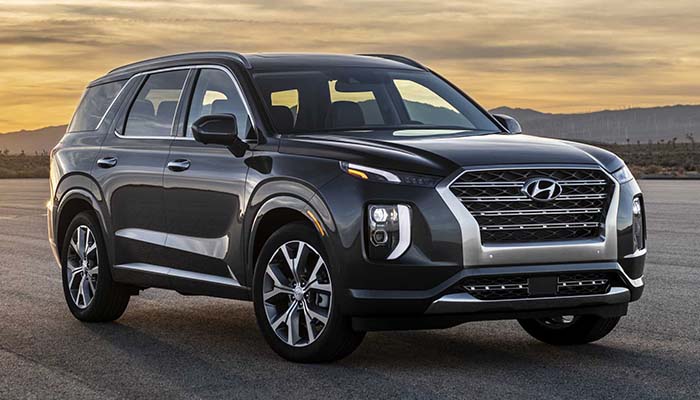
    For those looking to cart a whole bunch of kids and adults all over town, having a three-row SUV is a must. However, most three-row SUVs are a little boring in appearance and a lot boring to drive. That’s why the newest offering from Hyundai, the Palisade, is exciting: despite being a massive SUV that can seat the whole family, it’s also got tons of luxurious tech and a great ride. Let’s take a closer look at the newest family-mobile from Hyundai.

    2020 Hyundai Palisade

    Design

    Much like other new Hyundai models like the Kona and Santa Fe, the Palisade features and unusual front grille and some strange body lines. It looks decidedly strange at first glance, and hardly fits the mold of most modern SUVs. However, this isn’t to say it looks unappealing: it’s a rather intriguing design, with top-mounted headlights, a tapered, stair-step grille and a general “folded” feel in the design.

    It’s also worth noting that this car is a gigantic beat. It’s actually the biggest Hyundai to ever come off the production line: it’s a solid four inches longer and three inches wider than the Santa Fe XL. As it turns out, the Palisade is taking over for the retiring Santa Fe XL, as it does the latter car’s job significantly better. The enormous size comes into play in a big way when you see the ample space and leg room for pretty much every seat.

    Under the Hood

    The Palisade is no race car, but it does offer some excitement under the hood. The 3.8-liter engine is a V6 with a surprisingly attentive eight-speed transmission. The engine will surprise many drivers with its 291 horses and 262 pound-feet of torque, offering up smooth and responsive performance. Acceleration is ample but not jarring, offering a smooth ride that keeps the kids in the back from feeling like they’re on a rollercoaster when you need to get up to highway speeds.

    As you’re likely not interested in burning up the roads in the Palisade, this is likely all good news. The smooth performance from the engine feels like it was tailor-made to keep spills and motion sickness in the back to a minimum. While the Palisade is significantly more stylish and fun than a minivan, it clearly knows its place in the world as a kid-friendly family-wagon. It gets a respectable 19 MPG in the city and 26 MPG on the highway, making it pretty standard for a “mid”-sized SUV.

    Interior Comforts

    One of the most important things when it comes to a three-row SUV is the comfort level. The cabin needs to not only be comfortable for the driver, but also the passengers. While the kids need tons of room for all their toys and car seats and whatnot, the driver also wants a suitably peaceful and comfortable cabin for when they’re dealing with all the kiddos. That’s where the luxury of the Palisade comes in.

    If you opt for the Limited trim, you get quilted Nappa leather, though all trim levels get heated first- and second-row seats. The second row is elevated for better visibility, which is great for kids who can get car sick to be able to look straight ahead. All in all, the Palisade punches way above its weight class in terms of cabin comfort. While this isn’t priced or marketed as a luxury vehicle, it does sport luxury-feeling materials, especially at the limited trim level.

    Bottom Line

    If you’re looking for a kid-hauling family SUV that feels luxurious without a luxury price tag, the 2020 Hyundai Palisade is a fine vehicle. Between the stylish design, smooth engine performance and gorgeous interior, it’s hard to go wrong if you’re looking for a good way to schlepp the kids around town.


  • Back to School Tips: What to Buy and How to Save

    Back to School Tips: What to Buy and How to Save

    When you’re shipping your little ones off to school, the last thing you want is for them to be underequipped. In the modern classroom, things are fast-paced, interconnected and competitive. Getting high marks is harder now than ever before, so making sure your kids are outfitted with the best gear is a must to help them stay competitive. Today we’re going over the must-have tech and best deals you can find on back-to-school gear.

    Back to School Tips

    Only Shop Deals

    Between buying back-to-school clothes, school supplies and new tech the kids might need for school, you might find yourself spending a lot of money on them. This is why we highly recommend you only shop for deals this time of year. If you just buy the first thing you see every time you walk into a store, you’re going to find yourself seriously strapped for cash in no time.

    Make sure you’re getting deals on all school supplies that start around at least 40% off. For clothes, buy either steep discounts, like 30% off or better, or buy secondhand clothes that are significantly cheaper than brand-new. When it comes to tech, it’s okay to buy laptops or tablets that are a few generations behind to save a few hundred bucks. Make sure you make that cash last!

    Don’t Get Distracted

    There are tons of gadgets and gizmos that you might think the kids could need for school. Things like e-readers might seem like sensible purchases until you realize that a tablet does the same thing, but can also double as a notepad and research aid. Don’t let marketing hype trick you into buying tons of stuff that your kid doesn’t actually need for school.

    Another example of this is stores selling back to school clothes in big “sales events” without actually offering significant discounts. Remember, there are tons of stores you can go to in order to find deals on clothes. If you go to a department store and see absurdly high “sale” prices on clothes, it’s best to leave and look for better deals elsewhere.

    Power vs Convenience

    If you plan to buy your kid a laptop for school or for college, it’s best to know what you’re looking at. A lot of high-end laptops might look like they’re great for students, but think critically. How much power does a student really need to write research papers and type notes? A super high-end processor and a 4K screen might be a bit of overkill on a device meant to help with studies.

    We recommend prioritizing a smaller laptop, something like a Chromebook or a netbook. These are less expensive than high-end gaming laptops, offer a smaller, more portable profile, and don’t guzzle battery charge as quickly. These things all make them ideal for putting in a school bag and carrying from class to class to take notes. Your tech-savvy youngster might be begging for a super-powered laptop with tons of RAM and great graphics, but they’ll appreciate not lugging that heavy beast all over campus.

    Fitness Tracker

    If you’re sending a kid off to college and they seem interested in fitness, it might be worth looking into getting them a fitness tracker. Examples like the FitBit and Apple Watch are great for keeping track of time spent exercising and calories burned. They can also serve as handy ways to keep from opening the smartphone and scrolling ad infinitum when it’s study time!

    Many people who use smart watches or fitness trackers that pair with their phones have noted their time saving functionality. Since you don’t have to open your phone to see the time or check an incoming message, you don’t have the same desire to start scrolling through your social media feeds. This frees up that much more time to study and do schoolwork!