
Month: February 2021

  • iPhone vs Android: Which is Right for You?

    iPhone vs Android: Which is Right for You?

    One of the fiercest rivalries in the tech world today is the ongoing feud between Google and Apple over control for the soul of the smartphone. Despite ostensibly designing the first true smartphone with 2007’s iPhone, Apple doesn’t enjoy the majority market share that Google’s Android does today. What’s the deal with the Android versus iOS feud? Which of the two big operating systems is better for you, and why?

    Today, we’re going to look at the two OS’s, what makes them different, and whether you should be “taking a side” in this battle. We’ll be looking at features, phones and corporate cultures in order to give you a full picture of the battle of the smartphones.

    Design Ethos

    Google and Apple have very different design strategies when it comes to their operating systems. Much like Apple’s own Mac line of computers, iPhones operate in a sort of “walled garden.” There’s less software available on Apple products overall, but the company curates the selection very diligently. Ostensibly, you won’t find shovelware on the App Store, nor will you be at any risk of ever happening upon a virus.

    However, with Apple, you’re stuck playing inside the wall: you’ll likely not find the same breadth of customization and modularity you see on Android. Google’s more hands-off approach to their OS has made it very wide-ranging in appeal: manufacturers from Samsung to Huawei all create phones that run on some variation of the Android OS. The more open, customizable user interface of Android is more popular with some users who like to fine-tune their own experience.

    “It Just Works”

    Apple is often described as “high technology for people with low tech tastes,” and this is often true in practice. Apple’s products tend to be bleeding edge, top-of-the-line, and terribly expensive. Their user interface tends to be easy-to-navigate and aesthetically pleasing, and people who even have little tech knowledge are usually able to easily find what they’re looking for. In short, it just works.

    Android is a different story. Less tech-savvy users might find it difficult to navigate Android’s more open-ended operating system: there is little structure or direction unless the phone manufacturer has installed their own proprietary launcher. Launcher, in turn, can be downloaded for any Android device to help tailor your phone more explicitly to your tastes and preferred experience.

    Security Features

    This might come as a surprise to Android users, or be a strange statement if you’re an iOS user, but the iOS platform only has one app store. It’s just called the App Store, and it’s locked down tight. Apple strictly controls what can be put up for sale or download on the App Store, meticulously combing for any potential security threats to their users. Viruses on Apple devices are literally unheard of for this reason.

    Likewise, Apple users might be shocked to hear that Android devices actually have several third-party app stores available. As such, viruses are a reality on Android devices. They’re far from common, and you’d be hard-pressed to get one unless you were being careless, but they’re still a cause for some concern. The more pressing reality of Android’s open-ended style is that more apps are allowed in, but there’s less quality control.

    Cognitive Load and User Functionality

    On a more academic note, researchers have found that Apple’s clean, no-frills design ethos lessens cognitive load when using their devices when compared to Android. Android home screens can be done up with tons of widgets and information, making them significantly more likely to overwhelm some users.

    However, this isn’t to say Android is inferior: far from it! However, Android and iOS are simply designed for different types of buyers. In the end, Android remains more popular primarily because it’s available on a wider variety of devices. Further, those devices run the gamut from high-end flagship phones to budget handsets, while Apple’s iOS is only available on the premium-priced iPhone line.

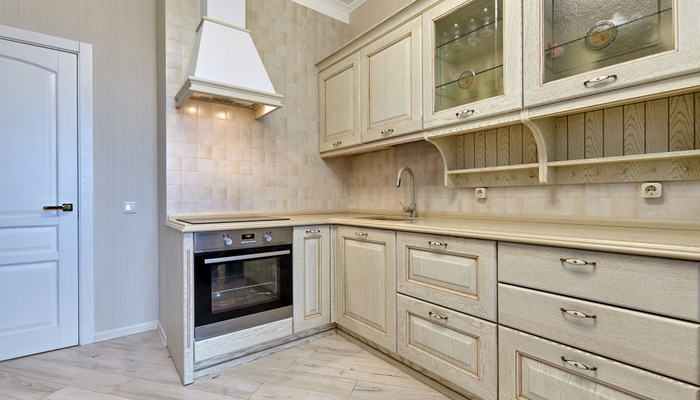

  • Tackling a Kitchen Remodel? What You Need to Know

    Tackling a Kitchen Remodel? What You Need to Know

    No house is a home without a great kitchen. If you’re looking to remodel your home’s kitchen, you’re likely wondering where to start. How much will it cost? What kinds of renovations should you be looking to get done? There are a lot of factors with a kitchen remodel.

    Don’t sweat it, though, because we’ve got you covered. Today we’re going over the top things you need to know when considering a kitchen remodel. Let’s get your house looking brand-new with a great new kitchen.

    Top Things to Know When Taking on a Kitchen Remodel

    Expected Cost

    The cost of any given remodel will directly depend on just how much you want to get done. Are you getting entirely new cabinets, or just replacing the doors? Do you want your countertop refinished or do you want an entirely new countertop? Will you be upgrading to new appliances to modernize your kitchen’s look?

    Make sure you have a good idea of what you want before you talk to a contractor or remodeling company. Make yourself a list of the changes you want to see. That way, when you go to them for a quote they can give you an accurate estimate of what the labor and materials will cost. You can then adjust what you’re looking for accordingly.

    Research the Contractor

    Before you dive in with a contractor or remodeling company, do a bit of research. You don’t want to immediately start signing contracts with a company or contractor after just meeting with them. You’ll want to look online at detailed background on what the people doing the work have done in the past. Do people like them? Do they do a good job? Are they prompt and professional?

    Importantly, you’ll also want to make sure whoever is doing the work has experience with the kind of work you’re asking them to do. If they’ve never redone cabinets, or the ones they have done are of lower quality, you might want to go with someone else for the work.

    Another thing you need to keep in mind is what kind of price you’re paying for the work. Does the contractor charge a fixed rate, or do they give estimates up front? If cost is a concern, consider going with a contractor who offers you a flat fee for specific jobs. This allows you to have a better idea of what you’re paying.

    Further, make sure you ask about their policy in case something unexpected comes up. What if a contractor breaks the pipes in the sink, or causes other damage to the house? What if some unexpected damage existed before the contractors even arrived? You’ll want this info up-front.

    Get a Time Table

    Before the contractors get started, you’re going to want to know just how long the project will take. A professional contractor should be able to give you an accurate time table, though you should also be prepared for delays should unexpected things arise.

    For instance, if a contractor falls ill or has a family emergency, this will naturally slow the process. Likewise, some contractors occasionally find themselves working faster than their estimate, pleasantly surprising themselves or the remodeling homeowners. In fact, some contractors will give a “worst-case” time estimate in order to prepare you in case something goes wrong.

    Another important question to ask is: will any parts of the home be inaccessible during the remodeling process? Often, more complex remodeling projects will result in the kitchen or other parts of the home being accessible only to contractors. Get an idea of when this will be and be prepared to schedule around it. If you don’t know when this will occur, you could be caught off-guard and unsure what to do for dinner.

    Other Important Info

    Make sure your contractor service is fully accredited. Pretty much every place in the US requires any contractor work done by a third party requires accreditation. If you’re unsure, ask them right away to see their accreditation and licensing.

    Not only is this licensing required, seeing it up to date and ready to go shows that the company in question is responsible and dependable. If the company doesn’t have this licensing, you should simply walk away. It’s unlikely a company unwilling or unable to go through this process is trustworthy enough to do work on your home.

    You’ll also want to know how updates to the project are going to be communicated to you. Will there be a group text, or will updates be recorded on a sheet in the home? You want to know before you go ahead with the work.


  • What You Should Know Before You Remodel your Kitchen

    What You Should Know Before You Remodel your Kitchen

    If you’re serious about your house looking its best, one of the first places to focus is the kitchen. Who wants to have an old, worn-out looking kitchen? Certainly not us! If you’re looking into getting a kitchen remodel, here are the top things to keep in mind.

    What You Should Know Before You Remodel your Kitchen

    Research the Contractor

    When you start with any project like this, make sure you know who you want to do it. If you’re looking at certain contractors, make sure they’re experienced and accredited. You don’t want some shady contractor coming in and charging you too much for shoddy work.

    Make sure you know up front how the contractor charges. Do they accept a flat fee up front? Do they charge by the hour? These are details you want to have before they walk into your home. Also, make sure you know their policy on unexpected wrinkles. How do they handle unexpected damage, or if one of their guys breaks something?

    Make sure the contractor is also experienced in the kind of work you want done. If they’ve never redone floor tiles, then maybe you should consider someone else for your floor-tile centered remodel. You want a contractor who knows the work you want done.

    Costs

    It’s important you make sure you know what the project is likely to cost. Get in touch with a contractor and see if you can get a good ballpark estimate of how much you can expect the project to set you back. Of course, this is going to be an estimate at first.

    The cost of the project will be directly related to just how much you want done. If you just want new cabinets, that shouldn’t run you too much. If you’re get new counters, new flooring and new appliances, too, then expect to spend a pretty penny.

    Get a Time Table

    Make sure you know before the contractor gets started just how long to expect the work to take. How will the contractor company handle it if one of their workers falls ill or has an emergency? What is their contingency plan if some unexpected damage occurs?

    Another important thing to know is whether there will be parts of your house inaccessible, and for how long. It’s hard to plan around contractors as-is, let alone without knowing when your kitchen might be inaccessible. Get this info up-front so there’s no surprises. That way you can plan your weeks around the schedule of the remodel!


  • Best Patio Furniture Deals

    Best Patio Furniture Deals

    There’s nothing quite like sitting on the back porch, enjoying a cold drink on a mild afternoon. You’ve got a good book in your hands and a cool breeze in your hair. That is, of course, if you have nice patio furniture to make this a reality! Let’s check out the best patio furniture deals!

    Many people are looking to purchase new patio furniture for the deck; however, trying to find brands that are both made well and within the budget can be a challenge. Qualities of patio furniture that people need to consider include the size, the style, and durability, and the price. Fortunately, there are plenty of options to choose from and many of these include some fantastic deals as well. The top 3 patio furniture retailers are Forever Patio, Harmonia Living, and Alfresco Home.

    Best Patio Furniture Deals

    Alfresco Homes
    Alfresco Homes is a well-known brand in the world of outdoor furniture. Their prices are quite reasonable for how modern and stylish their furniture is! They have a wide variety of materials, including resin, marble, aluminum and more.

    Their pieces span a wide range of decorative options, including woven wicker, resin, cast aluminum, and marble mosaic garden pieces. They regularly come out with inspiring, cutting-edge designs that set the bar high for the rest of the industry. For those who are looking for inspiration with their outdoor furniture, take a look at what Alfresco Home has to offer.

    If you’re looking for sturdy outdoor furniture, Alfresco is a great choice. They often have great deals on their website, where you can shop for a ton of different types of furniture. They’re one of the better options when it comes to high-end outdoor furniture!

    Forever Patio

    With a name like Forever Patio, you can expect their patio furniture to be rather durable! Their high-quality furniture pieces are rated quite highly and will typically withstand even heavy weather conditions. If you’re looking for durable furniture, Forever Patio is a great choice.

    The Forever Patio brand has developed an impressive track record over the years of providing excellent, quality furniture for a good price. They have a large collection to choose from, so every family should be able to find something that they need. They span everything from bar tables to daybeds and everything in between. They have stylish designs that can fit any scheme and the furniture is made in a detailed way. Finally, the name fits the furniture. Their durability is famous throughout the industry and their furniture is known to withstand all different types of weather.

    The best thing about this brand is that they are rather affordable for how durable their products are. Whether you’re getting a table and chair set, a day bed or a bar table, you can rest assured they’ll be sturdy. Check out their site to see what kinds of deals they have going on!

    Harmonia Living

    If you’re looking for wicker furniture, Harmonia Living has a great range to choose from. While wicker is known for its tendency to unravel, Harmonia takes steps to make their furniture more durable. Their furniture all uses High-Density Polyethylene Wicker, which is sturdy and scratch-resistant. It also has the benefit of being less likely to unwind than traditional wicker!

    The problem that many people have found with wicker furniture is that it has a tendency to unwind over time; however, this is not a problem with this famous brand. Harmonia Living uses a different kind of wicker called High-Density Polyethylene Wicker, which is resistant to scratches, resistant to ultraviolet radiation, and environmentally friendly. All of these qualities mean that the furniture is going to resist unwinding, allowing it to last for years.

    Harmonia Living often has deals on their various furniture ranges through their website. If you’re looking for a great set of wicker patio furniture, check them out! You’re sure to find some great deals on wicker furniture!


  • Home Decor Pro Tip: Lighting and Paint Tricks to Make Your House Look Bigger

    Home Decor Pro Tip: Lighting and Paint Tricks to Make Your House Look Bigger

    When I was a kid I had dreams of playing center field for the Yankees or starting my own internet company. Now that I’m an adult homeowner, I just want a lush green looking yard and to walk into my big, well lit, well-painted home. I guess it’s all about perspective. I mean a well-lit living room,  matched with the right paint colors,  can make your room look so much bigger, inviting, and warm, while totally evolving the feng shui.

    That first step into your own home is important. You want it to completely welcome you home and put you at total ease. To tell you the truth I haven’t decided whether I want that initial reaction to being that of a warm cozy home,  or big open and spacious home. Luckily both of this can be achieved with the right paint and the right lighting. Yes, it’s very true different paint colors and styles can have completely different effects on your rooms.

    The right lighting and paint can set the tone for the rest of your house. You can manipulate this tone at your will based on your color choices. Let’s take a deeper look into how paint colors and lighting can change the feel of the room and the tone of your home.

    Two Main Choices, Light or Dark

    Just like McSorley’s on 2nd ave, there are only two choices. Light or dark. The light will make your eye travel continuously around the room.  This gives the effect of making the room appear more spacious and open. The color of a lighter room tends to recede, giving a cooler vibe. You want to use light colors to create a feeling of openness in a room and make it feel more expansive.

    This is great for small apartments or tight bedrooms. Light colors will bounce whatever light is available in the space, which can help if you don’t have great natural light. We will get to more on lighting in a bit.

    When you decide to go from a dark color to light you will need to prime the wall with a white primer first. This is important, don’t skip this. Pick your colors carefully, know how they will react to their surroundings, i.e. white absorbs no light, just reflects. Whereas blues absorb red lights. When selecting your light colors, remember different colors will draw the eye to the separation and will stop where the colors change.

    If you use one color the eye keeps moving from room to room and judges the space as being larger than it is. I would recommend this for a smaller home.  If you are getting a claustrophobic feeling from your room try painting the ceiling a lighter color then the walls. This will make the ceiling look like it has been elevated and larger.

    The dark paints create a cozier and warmer feel but makes the room feel smaller in doing so. If your house is set up to walk into a big open space, using dark colored paints is a great way to make it feel more comfortable. For a great effect try painting the ceiling a darker color than the walls to make it appear lower.

    I deeply enjoy the look of dark colored walls with a nice bright white trim. The contrast establish a border and boundary that the eye picks up immediately. It’s like it adds a sense of order to the room, but you can extend the trim to other rooms. This will give the effect of a continuous space, with both the coziness and the openness at the same time.

    Don’t Be Afraid of Change

    It’s best to play around with the coloring and change it every so often. I like to change mine for the holiday seasons, adding light colors to the open spaces with some deep reds as a contrast walls. It makes my holiday decorations pop. Speaking of contrast walls, let’s talk about their purpose in small narrow rooms.

    If you paint both end walls of a narrow room darker than the other walls, the end walls feel closer to you. It will make the room appear more of a square shape. In a bigger room, a nice look is to divide the walls with a lighter color on top and a darker color on the bottom.

    Lighting

    Now onto lighting, everything can affect the lighting. Lighting also affects eveything. Let’s start with your room placement. A north facing room will appear cooler and bluish. If your room is south facing dark colors will look brighter; lighter colors will virtually glow.

    To the east is great for reds and yellows, your colors will look warm and yellowy before noon, then turn bluer later in the day. West facing you will want to go with something bold, the morning light makes the colors look dull, however they are stunning in the evening light.


  • Boost Your Immune System! Try These Vitamin Subscription Services

    Boost Your Immune System! Try These Vitamin Subscription Services

    Everything has a subscription these days. You subscribe to a video streaming service like Netflix. You could have a shave club subscription, or maybe a makeup subscription. Maybe you get meal boxes in the mail, or something more fun like a Loot Crate-style grab bag. But do you get your vitamins delivered to your door?

    Most people don’t get nearly enough vitamins, and it shows in their overall health. After all, it’s hard getting enough vitamins in a normal diet. Don’t worry: today we’re going over the best vitamin subscriptions for those trying to get healthy.

    Vitamin Subscription Services

    Why Get a Subscription?

    Personalized vitamin subscriptions are an important service when you compare them with a normal multivitamin. Mass-market vitamins have to appeal to the widest number of people, but that means that they could be full of stuff you’re already getting enough of.

    Subscription services are wonderful because they’re personalized. You get exactly the vitamins that your diet is missing, so you’re that much healthier! Not to mention, it’s nice to get them delivered right to your door. You don’t need to remember to go out and get them, or be bothered with a trip to the supermarket.

    The Best Subscription Services

    Generally speaking, you want to go with a service that fits your budget and offers you the best value. Some of the more well-regarded vitamin subscription services are HUM Nutrition and Persona Nutrition, both of which offer you access to professional nutritionists. These two services are a bit on the pricier side, however.

    If you don’t care about having contact with a dietician or nutritionist, Rootine offers a subscription service of personalized vitamins for $60 per month. Similarly, Vitafive offers less expensive prices for vitamins in gummy form, and even offers support for Amazon Prime users.

    Other services that get good reviews and offer personalized services are Care/of and Ritual. Care/of sends you multiple pills or powders for your vitamin regiment, whereas Ritual just sends you one pill that has all the stuff you need in it.


  • Is Networking on LinkedIn the Path to a New Job?

    Is Networking on LinkedIn the Path to a New Job?

    LinkedIn is a social platform, much like Facebook, Instagram or Twitter, but it has a distinct edge over those platforms for job-seekers. While Facebook and the like are inherently casual and mostly for wasting time (sorry, Facebook) LinkedIn could help you score a new job.

    No, seriously! LinkedIn is a professional networking app that allows you to make connections and make your name known amongst professionals in your field. If you’re not using LinkedIn to expand your professional network, you’re missing out on a huge help to your career prospects.

    LinkedIn and Job Prospects

    What is It?

    LinkedIn is, at its core, a professional-minded social networking app. The stated purpose of the site is to help connect professionals. You can upload your resume, work history and connections and make yourself more well-known in your field.

    Unlike Facebook and Twitter, profiles on LinkedIn are professional first. Recruiters and employers often first look to a candidate’s LinkedIn profile to see how the candidate stacks up. It’s a quick way to pull someone’s work history and resume without having to go through the formal hiring procedures.

    Networking

    If you’re a freelancer or someone looking to break into a field, then the networking offered by LinkedIn is a huge boon. Hiring managers and recruiters often set apart time of their day to browse LinkedIn connections. By increasing your network’s size, you make it that much more likely that hiring managers can see you in their normal scouting.

    You can’t predict just how big of a role networking could play in your job-hunting process. Just because you know someone, you might get an inside track on a job you didn’t even know existed. If you’re gunning for a competitive position, the benefit of knowing someone in the field can be impossible to pass up.

    Job Listings

    Another big part of LinkedIn is the job listing section. If you’re actively hunting for a job, you can make managing your LinkedIn a full-time job! There are always new listings going live on this tab, so you can rest assured that you’ll find new opportunities on the site every day. In fact, many people get messages about open positions if they simply maintain their LinkedIn.

    If you’ve become recently unemployed, LinkedIn can be a huge boon to your job search. It puts you in the loop regarding what jobs are open in your field and gives you a structure to searching for your next career. The listings can be sorted based on pay, field and requirements.

    This allows you to stay up-to-date on just what options are available to you. If you’re keeping tabs on your LinkedIn profile, then you make it that much more likely you find the work you’re looking for. It almost acts like a headhunter agency that doesn’t take a cut of your pay when it finds you a job!

    In the Know

    Another huge aspect of LinkedIn is the active job article section. The articles can keep you in the loop on various industry trends, changes in the company or companies you’re interested in getting work in and showing you what behaviors led to various CEOs and execs getting ahead. It helps to know what got the people at the top to their positions and just how they keep their position in their field. After all, knowing is half the battle!

    Personal Brand

    LinkedIn is also important in managing ones own personal brand. If you apply for a job and the employer looks up your LinkedIn profile, it can help solidify your professional legitimacy. If people who know you have endorsed your skills and put their name behind you, it makes you that much more desirable than the candidates who don’t have such guarantees.

    There are numerous skills you can list on your profile, such as Photoshop or Microsoft Excel. Some people list skills like “sales experience,” “customer service experience,” or “writing talent.” Any of these types of skills can be endorsed by your LinkedIn connections, including your prior managers and coworkers.

    Is LinkedIn Right for You?

    So, you’re looking for a better job and you don’t know where to start to get yourself a leg up. Well, maybe it’s time to download LinkedIn and get your profile up. It’s not that hard to list your skills connect with your coworkers and former managers, and get validation on your personal skills.

    When you’re competing for positions in highly sought-after fields, every little bit helps. Put yourself in a winning position by getting a LinkedIn account.


  • How LinkedIn Can Help You Find a New Job

    How LinkedIn Can Help You Find a New Job

    There’s no way to sugarcoat it: trying to find a new job is really, really difficult. It’s hard to even know where to begin. Who’s hiring? Who has good benefits and a good work environment? If you’re not using some kind of job board or have a ton of connections, you’re running in blind.

    That’s where LinkedIn comes in. More than just being a simple job board site, LinkedIn is the best social media app for meeting professional connections. After all, it’s much easier to get ahead in a crowded job market when you know the right people. Here’s how to have LinkedIn work for you.

    LinkedIn

    Take it Seriously

    LinkedIn might be a social networking site, but you should take it seriously. It’s not quite the same as Facebook or Instagram. It’s an opportunity to present yourself in a professional and well-curated way for potential employers and colleagues.

    As such, you should make sure you present your best self on LinkedIn. Make sure your pictures aren’t ones of you and your buddies hanging loose and partying. Make sure you’re well-dressed and well-groomed in your pictures!

    Use it Often

    Make sure to use LinkedIn often. Even if you’re employed and like your job, it’s good to have connections that you cultivate. If you only use the app when you’re looking for a new job, you’ll be out of luck. It’s not enough just to run to it in an emergency: you need to keep up to date!

    By using the app often, you ensure that you’ve got a presence online that potential employers and professional connections can see. This is essentially an ad for yourself as an employee. Take pride in it, and make sure everyone knows just how good of an employee you are.

    Resume

    Make sure you keep a well-formatted, up-to-date copy of your resume easily accessible on your LinkedIn. You never know when a recruiter or hiring manager might come along and see your profile. If they do, you want to make sure your info is all up-to-date and accurate!

    There’s no reason to potentially miss out on a great job just because you’ve got some goofy typos on your resume. Make sure you keep everything connected to your business page tight and well-formatted. This is an easy step to take that will take you only a few minutes, so don’t put it off!

    If you’re looking to make lasting businesses connections, LinkedIn is where it’s at. Get your profile active and looking great today.


  • The Best iOS Photo Apps for Shooting and Editing

    The Best iOS Photo Apps for Shooting and Editing

    Everyone loves to snap pictures! Every smart phone is equipped with great camera functionality, but they lack a decent photo app to go with it. Whether you’re looking to send pictures to family or post them to show your friends, you’re probably wondering which photo apps are the best! Here’s a round-up of our favorite photo apps!

    Snapseed

    Snapseed is a user-friendly photo editing app for iPhone. Allowing for different filter types and tools for adjusting exposure and sharpness, Snapseed allows for professional-style photo editing from your iPhone. You’re also able to edit only selected parts of a photo, letting you fine-tune images to your taste! It even has a healing tool like Photoshop. Best of all, this app is free! Snaseep is our favorite iOS photo editor.

    Cortex Camera

    This app is fantastic for shooting in low-light or nighttime situations. Using a really neat process, Cortex Cam is able to cut down of visual grain that is so common in low light pictures. Typcally, when taking pictures in low light, your phone camera will increase the ISO to attempt to squeeze more light into the lens. This has the side-effect of creating grainy images. Cortex Cam combats this by taking a large number of images in a short span of time and collating them into one image, eliminating that visual noise. This is easily the best app for low-light shooting!

    Superimpose

    Another Photoshop-like app, Superimpose allows two pictures to be blended together. If you want an app to blend together two photos from your phone, this is the app for you! This app has gradient masks that allow for one photo to mask the dark aspects of another with its own light aspects, allowing for interesting artistic projects. Superimpose can also be used for double exposure-style pictures, like using a foreground from one photo and a background from another. Superimpose is $1.99 on the app store, but you get a ton of awesome functionality for that price. If you’re looking to make compositions from your phone, Superimpose is a great app for you!

    Our Favorite Photo App: Camera+

    This app is exactly what is says it is: an enhanced version of the iPhone’s existing camera app. This app gives shutterbugs precise control over their phone’s camera functionality. Between altering shutter speed and white balance, this app is a must-have for smartphone camera enthusiasts. Camera+ has a manual focus function that is especially helpful for photographing extremely close objects, which is great!  It also has a handy 30-second delay feature for those who want to take pictures with themselves in the frame.If you have the technical know-how, or want to develop it, this app is a great choice for you!


  • Which Laptop is the Best for Photographers?

    Which Laptop is the Best for Photographers?

    If you’re a photographer, or an aspiring photographer, you’re certainly going to be using photo editing software. You’re also going to want that software to be accessible on the go, so you can edit while you’re shooting. With that in mind, the photographer’s best friend is their laptop. Which laptop is the best for editing on the go? Read on to find out our favorites! 

    Dell XPS 15 

    Dell’s XPS 15 is a great non-Apple choice for photographers. If you want a laptop that excels for photo editing and runs on Windows, this one is a great choice. It sports InfinityEdge technology, meaning it has a huge screen size for how small of a machine it is. Its display is color-accurate and has a 4K resolution, meaning your photos will look accurate while you’re editing.  

    The XPS 15 is a bit expensive, although that’s par the course for laptops with displays strong enough for photo editing. It retails for around $1,000, but you can often find it on sale for around $750. Consider this one if you heavily prefer Windows over Mac OS. 

    Apple Macbook Pro 13 inch with Retina 

    Unsurprisingly, Apple’s flagship laptop remains a fantastic choice for photographers. If you needed any reminders: Retina display is amazing, the battery life is great, and Mac OS was made with content creators in mind. Unsurprisingly, the Retina display remains the best laptop display on the market. With the best colors, contrast and saturation available on a laptop, you won’t be disappointed in this choice. 

    On the negative side, the Macbook is pretty expensive no matter where you go. It can be found anywhere from $900-$1,000, depending on sales and the like. It also doesn’t have a great deal of storage, which is a bit disappointing for photographers. That said, this is still a great pick. 

    Our Favorite Laptop for Photography: Apple Macbook Pro with Touchbar

    The step up from the older Macbooks, this new one sports the handy new touchbar technology. The touchbar is an OLED display above the keyboard that allows for quick access to tons of shortcuts. The toucbar has a number of applications across the OS, like suggested word selection and scrolling. The great use for photographers is the shortcuts in Photoshop, making Adobe’s robust suite even easier to use. Additionally, all the positives about the previous Macbook still apply, with the exception of the battery life. 

    Unfortunately, battery life isn’t nearly as impressive on this one; it seems the touchbar really saps the power from the laptop. Jokes aside, it is markedly lower than its predecessors. Additionally, this one is tremendously expensive: you can usually find it around $1,500.