Category: Android

  • Heads-Up, Android Users: Galaxy Note 9 Leaks Suggest New Features

    Heads-Up, Android Users: Galaxy Note 9 Leaks Suggest New Features

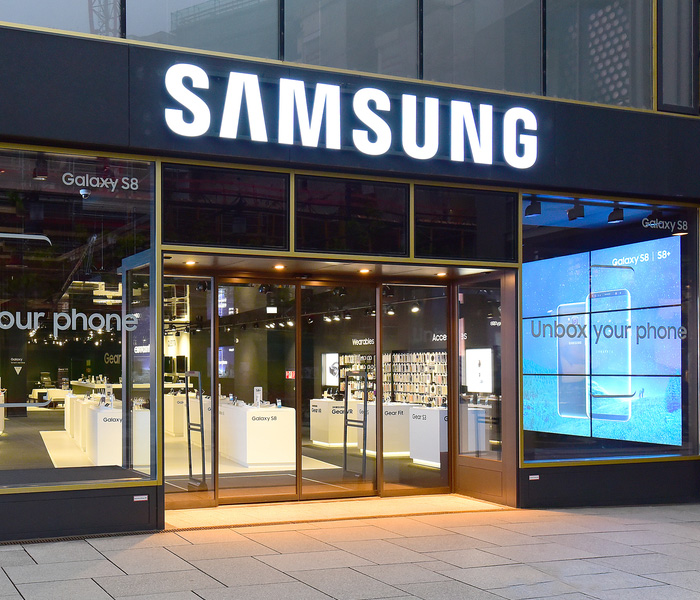
    Samsung is a huge name in the world of Android phones. And that’s no mistake: the Galaxy series of course phones has been, with some exceptions, phenomenal. Whats next for the storied brand? The Galaxy Note 9. So, let’s break it down: what’s in store for the next Samsung phablet? The rumor mill is here to help fill us in. 

    In Screen Fingerprint Scanner? 

    This rumor has gone back and forth a ton. Whether it’s true or not, it would make sense. Phone makers the world over are trying to maximize screen space without making the handset too massive. This is what led to the infamous iPhone X notch.
    That said, a purported in-screen fingerprint scanner would be an interesting solution. Just how such a thing might work is anyone’s guess. 

    Note 9: Better Speakers than the Note 8? 

    The Note 8 was a great phone… except it’s speakers. It would be fantastic if the rumors of the Note 9’s speakers came true. Huge, front-facing speakers would be great. Considering how massive the Note line is, it’s underwhelming to think of them as having small sound. 

    Battery Life 

    The rumors that the phone will have an in-screen fingerprint scanner also claimed the phone will have an enormous battery. The battery rumored would be a 3,850mAh battery. In plain terms, that’s freaking huge compared to the battery in the Note 8.
    With such a huge screen and the purported sound quality, a huge battery is a must. Why even have such a massive phone if it’s going to just die soon after it’s pulled from the charger? 

    Pricing 

    Samsung would be wise to keep the price around the same place that the Note 8 launched. Even though the Note 9 is likely to be one of the most high-tech phones of the year, it still has to compete with the iPhone X. A price point around $950 seems to be a sweet spot. 
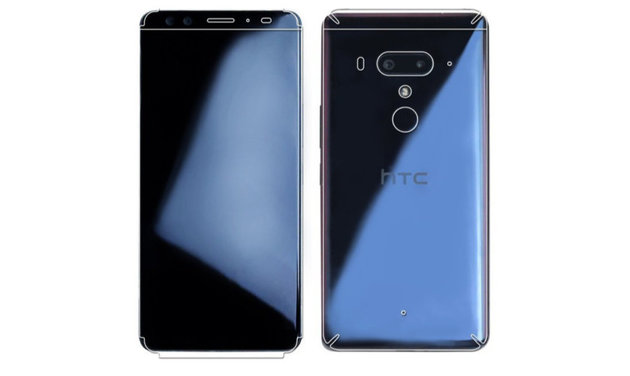
  • No More Buttons? HTC U12 Plus to Use Haptic Feedback Instead

    No More Buttons? HTC U12 Plus to Use Haptic Feedback Instead

    In a move reminiscent of the iPhone 7’s home “button,” the HTC U12 is going to have pressure-sensitive areas shaped like buttons. The “buttons” will give a little burst of haptic feedback when “pressed,” simulating the action of a mechanical button. This is an interesting choice: reducing the number of moving parts certainly reduces the number of things that could become broken or damaged.  

    U12 Sporting 4 Cameras 

    Yeah, no joke! This sucker will have two cameras on the back and two on the front. This allows for a style of photography called “Bokeh,”a super artsy style of portraiture. It’s best described as a clear image in the foreground with a hazy, hipster-looking fade in the background. It’s the look all those Instagram-famous models have in their selfies.  

    The cameras also sport a 2x optical zoom, which is handy for snapping photos at a distance. Digital zoom is known for diluting the image, whereas optical zoom retains image quality over distance. 

    Main Squeeze 

    Much like the Google Pixel 2, the HTC U12 will recognize when it is squeezed as an input. The U12 will also be able to differentiate between short and long squeezes, as well as holds. These inputs can then be bound to different actions, such as opening the camera or turning on the flashlight. This functionality comes as no surprise, as HTC manufactures the Google Pixel. 

    The same technology that recognizes the squeeze input allows the phone to determine which hand it is being held in. It even has touch inputs on the sides to switch to single-hand mode, allowing for greater accessibility. 

    Modern, but Unique 

    The U12 will also sport a Gorilla Glass back, like many of its contemporaries, but without wireless charging. This makes its glass back primarily aesthetic, which is something of a bummer, considering how much more fragile it is. Again, most people will opt for a phone case, but it’s still not ideal to elect to make a fragile piece of technology even more breakable.  

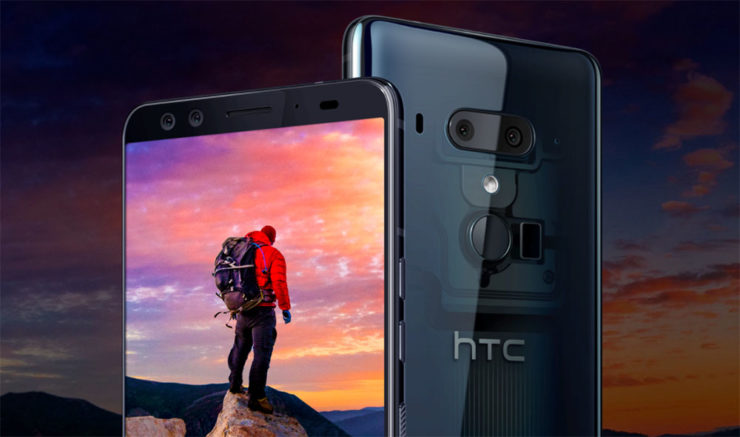
    HTC interestingly eschewed the notch design so common to premium smartphones these days. Instead they opted for a tall screen with very thin bezels at the top and bottom. This look sets it apart from phones like the iPhone X. The phone will be releasing sometime in mid-June. The 64GB version will retail for $800, and the 128GB version will be $850.  

  • Xiaomi Mi 8: Coming to America Soon?

    Xiaomi Mi 8: Coming to America Soon?

    You’ve certainly only heard of the Xiaomi Mi line of phones if you’re an avid follower of Chinese smartphone makers. Well, if you’re not in that (incredibly small) camp, you’re about to be: The Mi line of phones is one of the best budget smartphone lines out there. It’s comparable in a lot of ways to the phenomenal OnePlus line. What should expect in the Mi 8? And when should you expect it? 

    Xioami Who? 

    Xioami is a Chinese smartphone maker that specializes in affordable Android handsets. They have been incredibly successful in the Far East, rapidly becoming the largest Chinese smartphone maker. Backed by several generations of iterated smartphone technology, the company is now releasing the Xiaomi Mi 8 to coincide with their 8th anniversary. 

    Mi 8 To Come to America? 

    The Chinese phone maker has promised that this phone will be their first mass-market release in America. According to Xiaomi, who already sells fitness trackers and smart home speakers in the US, their smartphones will be coming State-side as early as late 2018, or as late as early 2019. This is exciting news for Android enthusiasts looking for affordable premium smartphones. 

    In the Meantime, 

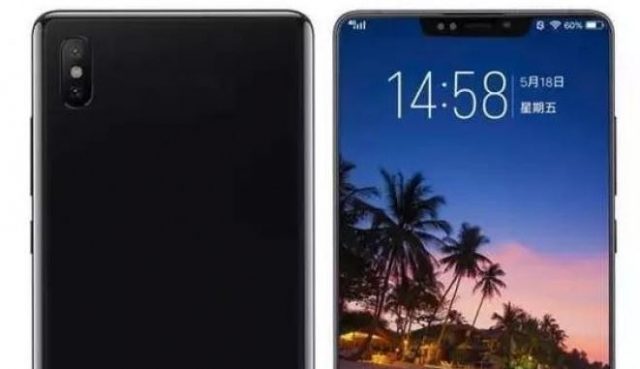
    The Mi 8 is set for a May 31st launch in China and is sure to make waves there. With their impressive track record and the phone’s impressive specs, it’s sure to impress. The phone sports a ton of advanced features, like an in-screen thumbprint scanner, wireless charging, a huge six-inch screen and 3D face scanning. All that, and it still costs about $450. Here’s hoping this little wonder comes to the States here soon! 

  • Time to Jam! Which Music App is the Best for You?

    Time to Jam! Which Music App is the Best for You?

    Everyone loves to put their headphones in and jam sometimes. Sometimes you want to play music for your house guests, and other times you want to listen to your tunes through your car stereo. Which music app do we love the most? Check out our roundup to find out! 

    Google Play Music 

    Offering a free version and a $10 per month subscription, Google Play Music is an awesome choice for listening on the go. Allowing you access to all of their cloud-based music library, the subscription is really the way to go. The subscription also comes with personalized radio stations and recommendations based on your music tastes. 

    Google even throws in a YouTube Red subscription, to boot! If you haven’t watched Cobra Kai yet, you should! 

    Apple Music 

    While Apple doesn’t offer a free version like Google Play Music, all the primary functionality of Google’s app is behind its paywall, so this doesn’t really change much. That said, Apple’s subscription also sports access to streaming internet radio stations (including the phenomenal Beats1 Radio) and access to millions of songs. You can even download songs straight to your device to save on your data plan! 

    Google and Apple provide two very similar apps. The main differences are Apple’s slightly wider selection and access to Beats1 and exclusive content, and Google’s YouTube Red subscription. It’s really a toss-up between these two, but neither is a bad choice. 

    Shazam 

    Shazam, well-known for its ability to detect songs and name them for you, is also a great music streaming app! Once it has recognized a song, you can buy it through Shazam to add to your collection. While it doesn’t make a great streaming app by itself, Shazam makes a great companion to someone who constantly hears tracks out and about they want to add to their collection.  

    Shazam works in seconds to identify music, and does pretty well even in noisy, crowded areas. For those who often go to venues or hear music on their walks to work, Shazam is a great pick! 

    Our Favorite Music App: Spotify 

    Offering both a free version and a $10 monthly subscription, Spotify is a well-known music app. Featuring the ability to create and share custom playlists, Spotify incorporates an awesome social element. Sharing playlists with your friends is akin to making mixtapes, and helps you feel more connected to your music. 

    Spotify also boasts millions of songs, rivalling Apple Music in terms of selection. The subscription is really the right way to go here, especially if you hate ads. For audiophiles looking to just get lost in the music, Spotify is the right music app for you. 

  • HTC U12 Plus, What We Know so far

    HTC U12 Plus, What We Know so far

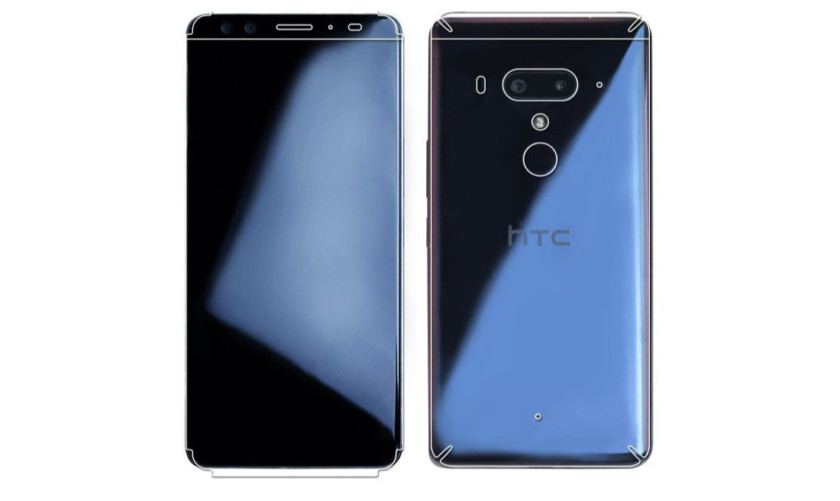
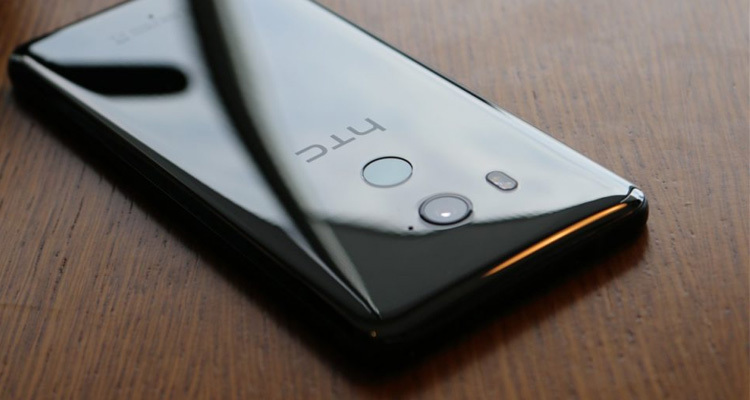
    HTC’s latest flagship has arrived! On top of new cameras and a full screen without a notch notch, HTC has created a phone is literally more sensitive than ever. This is the HTC U12 Plus. The HTC U12 Plus gives a great first impression, at least when it comes to design. Almost every modern flagship is made of glass panels held together by a metal frame, but HTC’s design feels sturdy with an almost brick-like heft to it. HTC may have changed designs over the years, but the build quality continues to be excellent. The new phone still manages to retain some of HTC’s signature style, so you won’t mistake it for anything other than an HTC.


    HTC U12 Plus comes with a 6.0-inch Quad HD+ display with no notch and thin bezels. That Super LCD 6 display is protected by a custom layer of Gorilla Glass that’s actually closer to Gorilla Glass 3 than 5. Gorilla Glass 3 is harder than 5, so it will likely be more difficult to scratch. Ill be the judge of that, grabs keys. As for software, it’s running Android 8.0 Oreo. Even though Android 8.1 has been out for five months, HTC still couldn’t manage to load up the latest version of Android on its new smartphone.

    The U12 Plus seems to be a big upgrade over its predecessors, at least on paper. It sports a 16MP wide-angle lens and a 20MP telephoto lens around back, while the front has two 8MP cameras. The U11’s camera was one of the best of 2017, so we’re really excited to see the U12 Plus

    HTC continues its minimalist Liquid Surface design language, giving us a beautiful glass design with IP68 water resistance.I would have liked to see a few more changes, the HTC U12 Plus is still a gorgeous device. We also have to applaud HTC for resisting the notch, something many other 2018 flagships are now rocking. Instead of physical keys, they are now pressure-sensitive. While these buttons may not provide a physical click, they do provide haptic feedback to let you know they’ve been triggered.

    The Colors for HTC U12

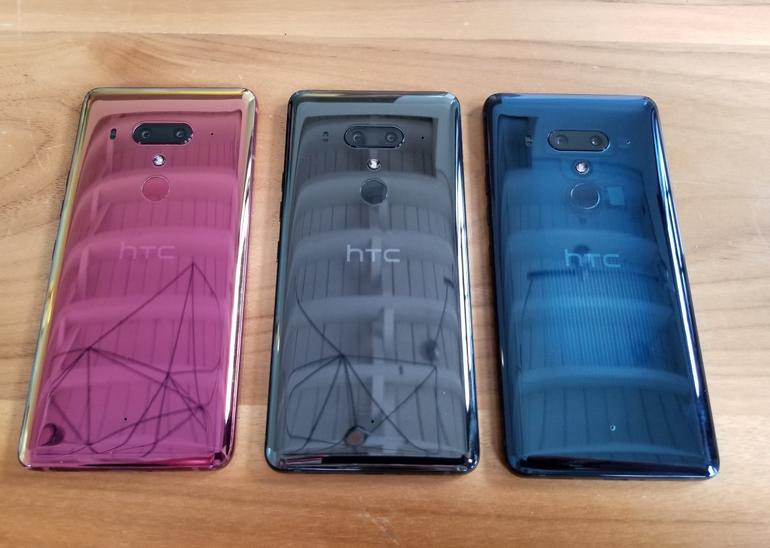
    The HTC U12 Plus will be available in ceramic black, translucent blue, and flame red.

    The ceramic black (known as titanium black in some markets) is probably the least exciting of the three options, but that’s not to say it looks bad. It’s a shiny, reflective, and polished glass option that is actually more gray than black.

    The translucent blue model is partially see-through, allowing you to see some of the internals. It isn’t quite on the level of a clear case, but it is still pleasantly unique.

    Finally there’s the flame red variant. This model has an eye-catching sheen that seems more pink than red. Unfortunately, the flame red won’t be available immediately at launch.

    Quick Spec Look

    • Display 6.0-inch Super LCD 6 2,880 x 1,140 resolution 537ppi
    • 18:9 aspect ratio
    • DCI-P3, sRGB
    • SoC Qualcomm Snapdragon 845 Mobile Platform
    • 2.8GHz, 64-bit octa-core
    • GPU Adreno 630
    • RAM 6GB
    • Storage 64/128GB
    • MicroSD expansion up to 2TB with Flex Storage
    • Cameras Rear cameras
    • Primary: 12MP wide-angle HTC UltraPixel 4 sensor, ƒ/1.75 aperture, 1.4μm pixels
    • Telephoto: 16MP sensor, ƒ/2.6 aperture, 1.0μm pixels
    • Phase detection and laser autofocus, OIS, HDR Boost 2, dual-LED flash
    • Front cameras
    • Dual 8MP sensors, ƒ/2.0 aperture, 1.12μm pixels, wide-angle with 84-degree field of view
    • Audio HTC USonic with Active Noise Cancellation
    • HTC BoomSound Hi-Fi edition
    • Hi-Res audio recording
    • Hi-Res audio certified
    • Qualcomm aptX HD, LDAC up to 32-bit high-resolution wireless audio via Bluetooth
    • Battery 3,500mAh
    • Non-removable
    • Qualcomm Quick Charge 3.0
    • IP rating IP68
    • Sensors Edge
    • Ambient light
    • Proximity
    • Motion G-sensor
    • Compass
    • Gyro
    • Magnetic
    • Fingerprint
    • Sensor hub for activity tracking
    • GPS, AGPS, GLONASS, Galileo, BeiDou
    • Network 2G/2.5G GSM/GPRS/EDGE
    • – 850/900/1800/1900MHz
    • 3G UMTS
    • – AWS/850/900/1900/2100MHz
    • – HSDPA 42, HSUPA 5.76
    • 4G LTE
    • – FDD: Bands 1, 3, 4, 5, 7, 8, 12, 13, 17, 20, 28, 32, 66
    • – TDD: Bands 38, 39, 40, 41
    • – Support Cat 18 Gigabit LTE: downloads up to 1.2Gbps, uploads up to 150Mbps, up to 5CA and 4×4 MIMO (where supported
    • – VoLTE and Wi-Fi calling (where supported)
    • Connectivity USB 3.1, Type-C
    • Bluetooth 5.0
    • Wi-Fi 802.11 a/b/g/n/ac (2.4 and 5GHz) with MU-MIMO
    • NFC
    • DisplayPort over USB Type-C
    • HTC Connect
    • AirPlay, Chromecast, DNLA, and Miracast
    • Software Android 8.0 Oreo
    • Dimensions and weight 156.6 x 73.9 x 8.7-9.7mm

    The Final Thought

    We got some movement from HTC. This is good. Any signs of life from the once dominant smartphone aficionados is good. Ive always said that HTC is for the high end smartphone user, not the everyday Eddie. The produce a high-end classy flagship smartphone that always goes under appreciated. Im sorry I just miss my HTC one..

  • OnePlus 6: A Great Phone (For the Price)

    OnePlus 6: A Great Phone (For the Price)

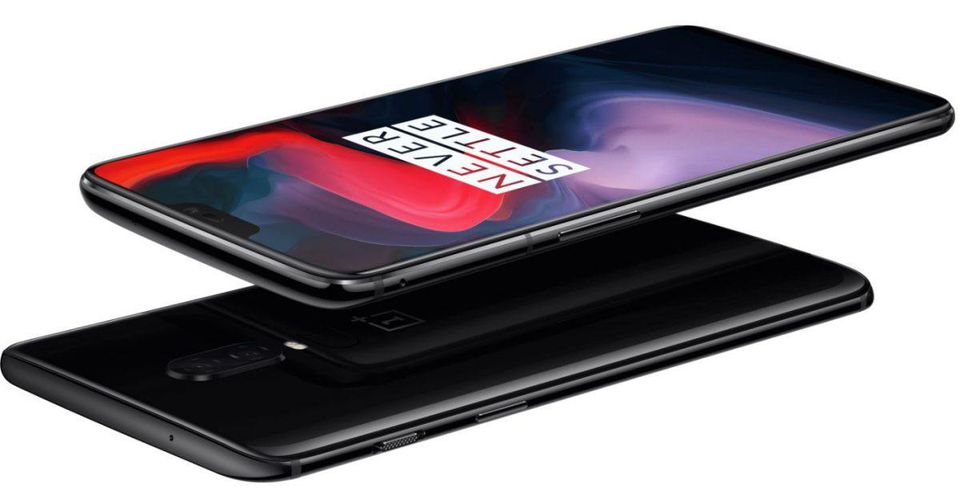
    OnePlus has made something of a name for themselves as makers of cheap alternatives to Samsung and Google phones. The OnePlus 6, their 2018 flagship, is no different. Retailing for a cool $529, and sold unlocked on their website, the OnePlus 6 is a great budget choice for a premium-feeling smartphone.  

    Top Notch (Or Not) 

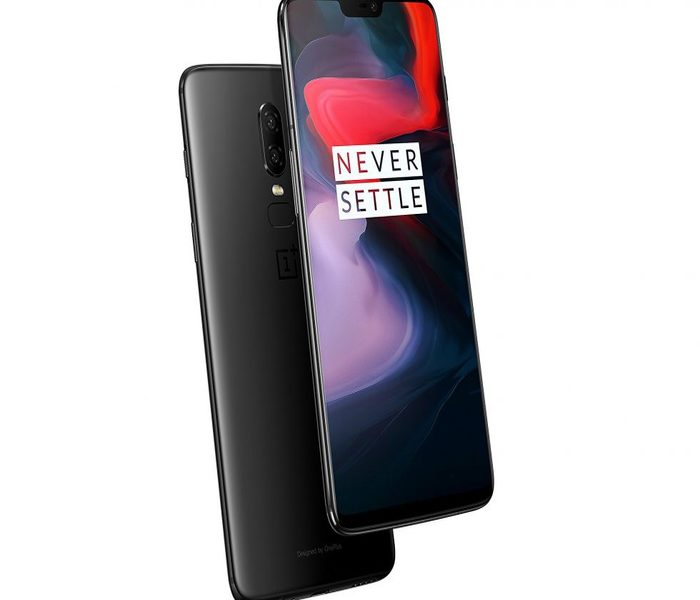
    The newest trend among premium smart phones is the inclusion of a top screen notch. This has been talked to death, and many Android users can’t stand the iPhone-looking notch design. The idea, of course, is to maximize screen size without increasing handset size. However, as the screen takes up most of the front face, normal hardware like the earpiece and the front-facing camera have to go somewhere, thus the notch.  

    This is an interesting look, but many are not sold on the odd break in the display. These users will be pleased that the OnePlus 6 offers a feature that blackens the screen all around the notch, giving the illusion of a standard phone display. Both modes look great, to me, and I would find neither to be particularly distracting. 

    OnePlus 6 Eschews Metal Back 

    OnePlus models predating the 6 all had a unique construction that included a metal back. Many other phone manufacturers have now switched to using a glass back. The glass back decision has largely been in order to facilitate wireless charging. The OnePlus 6 has no support for wireless charging, though. Instead, it seems, OnePlus chose to make their new flagship glass-backed just to look like the competition. 

    All-glass constructions like this are worrisome, due to their fragility. While most users will have their phones in a protective case, it is still disappointing to see OnePlus ditching their unique design in favor of a more generic appearance.  

    Some Disappointing Features 

    The OnePlus 6 is certainly not a perfect phone. The fingerprint reader on the back is tiny. So tiny, in fact, that it is often difficult to get an accurate scan of your finger. This is disappointing, given that fingerprint scanning technology has been standard on smartphones for more than four years now. The other disappointment is the phone’s relative lack of waterproofing: the website says the phone isn’t rated for any submersion. 

    Bottom Line? It Doesn’t Hurt Your Bottom Line 

    The most impressive thing about the OnePlus 6 is just how many things it does right, though. It is a snappy, quick phone with a great build (in spite of its glass back and small fingerprint scanner.) Its shortcomings can be forgiven in light of its price. Given that it’s a full $300 cheaper than a lot of its competition, it’s alright to overlook a few minor gripes. If you’re in the market for a great looking phone for a great price and can overlook some small issues, consider the OnePlus 6. 

  • Restaurant Review App Roundup: Let’s Eat!

    Restaurant Review App Roundup: Let’s Eat!

    Are you looking for a great new place to grab a bite? Look no further than a good restaurant review app! Which review app is the best to use though? We’re getting meta, today, and reviewing the reviewers! 

    Zagat 

    The well-respected Zagat name is also attached to a fine restaurant review app. This app is pretty no-nonsense, getting right into the reviews in a way that is almost too abrupt. However, if you just want the highlights and don’t have time to go in much deeper, this app is great. Zagat has separate scores for décor, service and food, allowing you to see the different aspects of reviewed restaurants. 

    Uniquely, Zagat sports a selection of professionally-reviewed and expertly recommended restaurants. If you want to spend less time browsing and more time fine dining, look no further than Zagat. 

    Urbanspoon 

    Urbanspoon is a slick, stylish and polished app. Made with urban explorers in mind, it lets you browse restaurants by a number of criteria. You can compare restaurants by popularity, cuisine, overall rating and more! If you’re in a new city and looking for something to eat, this is a good app for you. 

    Urbanspoon even has some practical functionality. You can make reservations from the app, saving time when you’re getting ready to go get dinner! 

    Foursquare 

    Featuring some really cool social functions, Foursquare is a popular app for circles of friends. Foursquare allows you to share your favorite places with your friends, and you can see your friends’ recommendations too! Your friends can suggest menu items at their favorite restaurants and you can tell the app which friends’ tastes you trust.  

    Foursquare also lets you tailor your own results by telling it what kinds of things you like. This helps you exert tighter control over search results and make sure you can find great new places that you like. Foursquare is a great pick if you like to see what your friends are eating! 

    Our Favorite Restaurant Review App: Yelp 

    While Yelp has grown to encompass much more than just restaurant reviews, it’s still the best app for searching for new places to eat. With tons and tons of reviews submitted by users and professionals alike, it’s hard to go wrong with Yelp. Easy to use and full of tons of great search functionality, we can’t recommend this one enough. 

    Notable features for Yelp include the option to search for local deals, find great little hole-in-the-wall restaurants, and tons of pictures of every restaurant reviewed. You always know what you’re getting into with a new place when you check it out on Yelp first! 

  • Need a Ride? Check out Our Favorite Ride Sharing App List

    Need a Ride? Check out Our Favorite Ride Sharing App List

    If you’re looking to hitch a ride, there’s no shortage of great ride sharing apps for you to try out. Which one is the best, though? Well, that’s subjective. But we can certainly tell you which one is our favorite! 

    Juno 

    Juno is a ride sharing app that focuses, first and foremost, on paying its drivers well. The idea is that better paid drivers will deliver a better experience for the end users of the app. This is pretty sound logic, all considered! However, Juno is still in a soft-launch window, so it’s hard to say how this will play on a large scale.  

    That being said, the app is clear and concise, cutting straight to the important stuff. The app has options for normal rides and an SUV option for when you and a bunch of pals need a ride. The app is pretty good about estimating the fare and giving ETAs, which are common but appreciated features. Keep an eye out for this ride sharing app when it goes into a full release! 

    Lyft 

    Lyft is the second-largest ride sharing app in the US, which is unsurprising. Featuring pricing comparable to Uber, Lyft is often used by people looking to compare and try to find the best rates for rides. Many drivers actually do the same thing, but in reverse, driving for both services and seeking fares that pay the most from each.  

    Lyft offers the standard ride sharing app features of normal-sized rides or “Lyft Plus” for large groups. The Lyft Line service is also available for those looking to keep the price of their fare down. It accomplishes this by having multiple users share one ride, somewhat like a city bus. This is great for keeping the price down during busy times of day! Speaking of, unlike Uber, Lyft caps its demand-based price escalation at 400 percent. Which is still a lot. But it’s good to know there is a cap, unlike Uber’s service. 

    Our Favorite Ride Sharing App: Uber 

    You may have seen this one coming, but we really like the original. Uber has gotten as big as it is for good reason: it’s a really great app! Pioneering all the ride sharing app features we’ve come to expect, Uber has had time to really hone its service. The end-user experience is really just top-notch.  

    Options for choosing what kind of car you want to ride in (sedan, SUV, luxury car) are present, as you would expect. Additionally, like Lyft, you can call an UberPOOL ride, allowing you to split the fare with strangers to keep the price down. The coolest thing that Uber offers that competitors don’t is UberASSIST, a specialized service for mobility-impaired people. ASSIST drivers are trained to help wheelchair users, and their vehicles are equipped to accomadate them as well! 

    There you have it, our favorite ride sharing apps. Next time you need to catch a ride, keep these apps in mind!  

  • OnePlus 6 Coming May 22nd: What’s New?

    OnePlus 6 Coming May 22nd: What’s New?

    China-based smartphone maker OnePlus launches its newest flagship, the OnePlus 6, on May 22nd. The hotly-anticipated phone will be able to participate in the Android P OS beta and sports a host of new features.  

    Phone Notch, For Better or Worse 

    Love it or hate it, the phone notch is here to stay. The OnePlus 6 features an iPhone X-like notch at the top of its edge-to-edge display. This odd aesthetic feature houses some necessary hardware. Namely, the front-facing selfie camera and the speaker for actually taking, y’know, phone calls. Interestingly, much like other Android phones that sport the notch, there is an option in the software setting to hide it. The screen to either side of the notch darken, making the phone appear to have a more traditional screen. 

    Overall Design 

    The OnePlus 6 has a back made of Gorilla Glass 5, meaning it should be pretty sturdy. It’s also somewhat water resistant, although OnePlus urges you don’t toss it in the pool. It should be able to survive a bit of rain or maybe being dropped in the dishwater, but any real prolonged submersion wouldn’t be good for it. On the camera side, it has an interesting dual-camera setup on the back, allowing for tons of neat features. Namely, image stabilization and blurred-background portrait photos. 

    One Plus 6: Great for Gaming 

    The OnePlus 6 is awesome for playing games on the go. With options to mute incoming notifications while gaming, and de-prioritize background apps, the phone was made with gaming in mind. Anyone who’s been interrupted in the middle of a game of PU:BG by an untimely phone call knows how awesome it is to mute incoming notifications. Additionally, you can display the games in low or high resolution and disabled auto-brightness while gaming, so you can save battery life. 

  • Best Video Chat App for Staying Connected

    Best Video Chat App for Staying Connected

    Everyone loves to stay connected. It’s why we love the internet! If you want a way to stay connected with your friends and family even when they’re not around, you probably like to use a video chat app. If you’re looking for a fantastic app with great functionality for chatting, keep reading! We’ve got a countdown of video chat apps we love! 

    Google Duo 

    Google Duo, standard with Android phones, can also be installed on iOS devices, which is great! Since iPhone users often have friends and family on Android devices they want to chat with, this is a great pick. Duo has a really simple, clean UI that is easy to use. It also has a neat “Knock-Knock” feature, allowing the person being called to see a video preview of who’s calling them. This is a cool little touch! 

    Duo is a great choice if you like clean, simple interfaces, one-touch calling and communicating across iOS and Android platforms. 

    Skype 

    Everyone knows Skype, thanks to its comparative age. Having launched in 2003 as a desktop application, Skype has seen quite a bit of history for a video chat app. Featuring great integration on Windows PCs and sporting a solid mobile app, Skype is a fine choice. If you like calling from a desktop to a cell phone, or vice-versa, Skype is for you!  

    Skype is also handy at synching with your contacts and helping you stay connected with all your friends. Skype remains one of the best chat apps, even after more than 15 years on the market! 

    Kik 

    Kik, primarily known as a text-chat app, has recently dipped its toes in the video chat app pool. The new video functionality is unique, earning its spot on the list be being different and endearing. The video functionality has a small thumbnail-style window of video for both participants and keeps the large text window open for text chatting.  

    This unique emphasis on text with a slight implementation of video is cute. It allows for a very casual chat setting, ideal for emulating a “just chilling” environment. Kik is a great choice for video chatting for a few hours with a good pal, just kicking back and doing a lot of nothing. 

    Our Favorite Video Chat App: Facebook Messenger 

    Facebook Messenger, believe it or not, tops our list! Primarily, we chose this one because it is easy to use, clean, and ubiquitous. Who doesn’t have Facebook? If you want to video chat with a friend, Facebook messenger is great, because they probably already have it. It’s so much easier to just go into an existing app and start chatting, rather than open the app store and download one. 

    Facebook Messenger is also simple and concise, using a great interface to help you get into calls with no fuss. An all-around great pick, and easily our favorite video chat app!