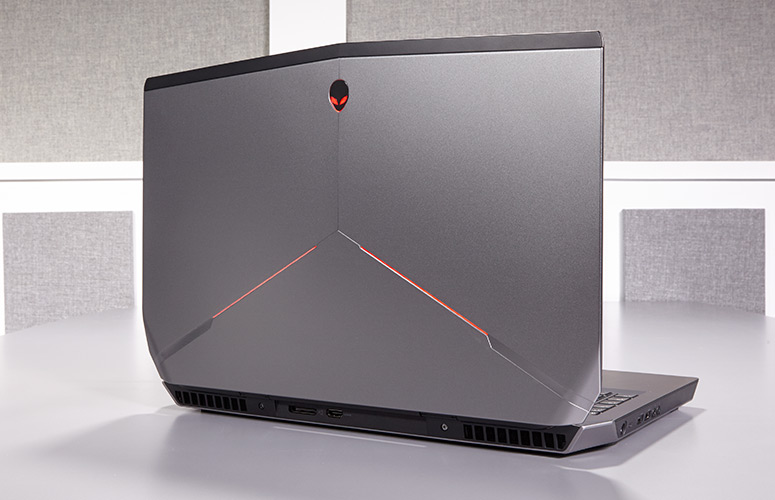
Alienware has a new gaming laptop for their 17 line. They have spared no expense, except yours of course, to develop a mind boggling, earth shattering, nay I say completely volatile piece of gaming tech here. Alienware threw everything it could at the Alienware 17 R5 , cramming a 6-core Intel Core i9 processor in there, along with 32GB of RAM, and a GTX 1080 graphics card. It’s certainly outfitted like a gaming desktop, so here we go.
The Great
- Excellent build quality
- High refresh rate display
- Variety of configuration options
- Exceptional gaming performance
- Tobii Eye Tracker
- 13 customizable lighting zones
- High Quality Audio
The Not
- Heavy and large
- Mediocre 3 hour battery life
- CPU performance fails to competitors
The Conclusion
Its Bad, bad bad to the bone. Its all you can ask for in a gaming laptop. It has the power, the speed, the sound and the look. Not to mention a functioning eye tracking for aiming.. Moderatly priced and highly impressive fps in all test I’ve done, including a stunning 93 fps in Battlefront.

Whats New With The Alienware 17 R5
For the Alienware 17 R5, Alienware made design modifications to the exterior design, creating a slimmer chassis with even more customized lighting opportunities. Completely revamped the cooling and audio systems make for quieter fans and louder speakers. Then did an overhaul of the Alienware Command Center software making it much easier to customizing your lighting and overclocking your processor and graphics card. Add in a powerful Intel 8th Gen Core i9 processor that can be overclocked to 5 GHz and and a factory overclocked Nvidia GeForce GTX 1080 GPU plus speedy SSD and a brilliant QHD screen, you have the premier gaming laptop. The Alienware 17 RS is also the first in the series to implement Intel’s new 2.9-GHz, 8th Gen Core i9-8950HK processor with a whopping 32GB of RAM, and thanks to the Alien Command Center, you can overclock this bad boy to a smoking 5 GHz.

Design
Alienware added even more LED zones to the Laptop, while making the system slimmer with its new hinge-forward design. There are now 13 LED zones you can control from the control center. Once open you find yourself staring at a full-size traditional keyboard glowing with stunning backlights. The keyboard and a massive touchpad glow in excitement. The 17.3-inch panel sits above the glossy plastic strip housing the Tobii Eye Tracker.

Quick Speck Look
- CPU Intel Core i9-8950HK @ 2.9GHz
- Operating System Windows 10 Home
- RAM 32GB
- Hard Drive Size 256GB SSD
- Hard Drive Type PCIe m.2 SSD
- Secondary Hard Drive Size 1TB
- Secondary Hard Drive Speed 7,200rpm
- Display Size 17.3
- Highest Available Resolution 2560 x 1440
- Native Resolution N/A
- Graphics Card Nvidia GeForce GTX 1080 (8GB GDDR5X)
- Video Memory 8GB
- Wi-Fi 802.11ac
- Wi-Fi Model Killer 1435 802.11ac 2×2 WiFi
- Bluetooth Bluetooth 4.1
- Touchpad Size 4.0 x 2.1
- USB Ports 4
- Warranty/Support 1-year
- Size 16.7 x 13.1 x 1.2 inches
- Weight 9.77 pounds

The Final Thought
One Word.. Fantabulous. Its not the gaming laptop we needed but its the laptop we deserve. Eye tracking aiming is game changing for me, makes battlefront so much more fun..