Tag: ios12

  • iOS 12 Improves Performance on Older iPhones

    iOS 12 Improves Performance on Older iPhones

    You have probably read our articles on some of the big news out of the WWDC this week already. Apple gave a preview of iOS 12, the next operating system for iPhones and iPads, at its annual WWDC conference in San Jose this week. Today im going to tell you about a big feature that will enhance everyone iPhone, yeah even the older ones. The iOS 12 improves performance ?

    For any iPhone capable of running iOS 11, when upgrading to the iOS 12 you will notice some vast improvements. This is first iOS upgrade that will make your iPhone….faster…

    Yes you heard that correctly, the new iOS 12 improves performance on previous models on the iPhone.Apple says iOS 12 will launch apps 40% faster and the camera 70% faster on an iPhone 6S — the model that came out in 2015.

    Release Date, We Can Guess That

    That is great news everybody! When can we update!!  Its safe to say the iOS 12 update will be available in September, much like every year. They release it a few days before the new iPhone ships. So for those of you with the 6s experiences apples slowdown to maintain your battery life, you will just have to keep waiting. Or will you…

    For a small $99 per year you can subscribe to be an apple developer and beta test new software. Along with getting the software updates way earlier,  you also get access to their developer tools as well. SO yeah you can jump in now and start beta testing the iOS 12 months before the rest of us, with all the new goodies at your disposal. However as fantastic as this sounds remember that ios 12 is not finished and will likely encounter more bugs and crashes than you can handle. You can download the software through Xcode, which is what programmers use to build iPhone apps. You can also install it by adding a profile to your iPhone or through iTunes.

    The Final iOS 12 Improves Performance Thought

    Its gonna be a good software update year, lot of performance perfections coming. Lets hope apple can deliver on this promise..
  • 4 Improvements We Need in iOS 12

    4 Improvements We Need in iOS 12

    Apple’s iPhone X is not only the most impressive iPhone Apple has ever made, it’s also the most controversial. It’s a completely reimagining of the iPhone, and much of what users have grown accustomed to over the years has changed. Of course, it goes without saying that many people don’t like change, especially with regards to a device that is such an integral part of our lives.

    The iPhone X is Apple’s first iPhone that doesn’t have a home button, which means users have to learn new navigation gestures. Most people seem to like them, but there are also people who do not — and that’s the least controversial of the major changes in Apple’s iPhone X. The infamous “notch” at the top of the phone’s display continues to be a point of content, and the wounds left by the removal of Apple’s beloved Touch ID fingerprint scanner are nowhere close to healing.

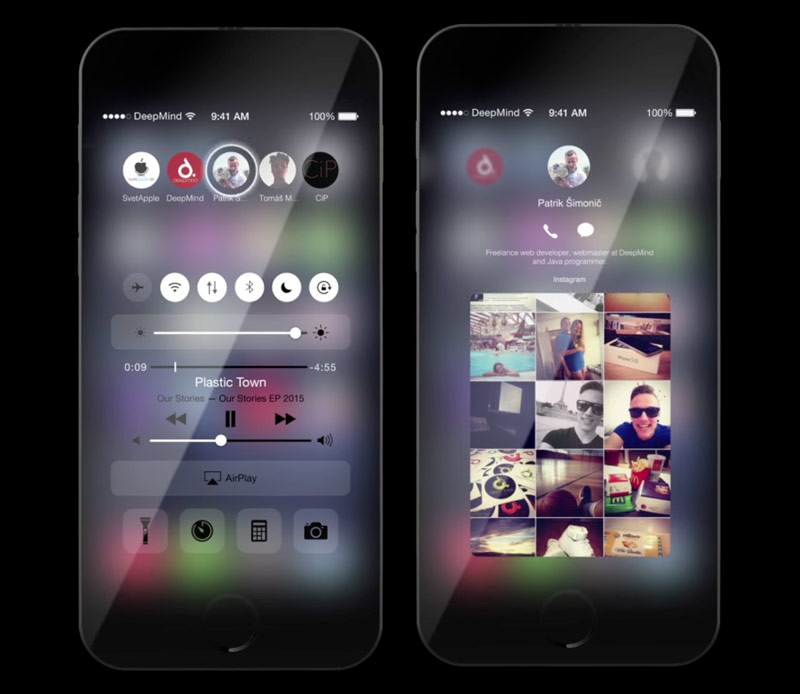
    There are 4  things I would like to see improved in Junes announcement of iOS 12

    1. Grouped notifications

    Apple’s notification system in iOS continues to be a major pain point among many, many iPhone users. We’ve discussed it a million times before here on the site, so we’re not going to dive back into all the ways it’s annoying. Suffice it to say the notification system in iOS needs a lot of work.


    They could solve this by creating notification groups. This way instead of having notifications from each app spread throughout the list, each individual app’s notifications are displayed in a group, one on top of the other. A simple 3D Touch would then expand any app’s notifications. simple problem simple solutions


    2.Improved widgets

    Apple’s widget implementation in iOS is somewhat useful, but Estefad has a way to improve it in iOS 12. In addition to a single page where multiple app widgets can reside, as is the case now, this iOS 12 concept allows app developers to create widgets that are displayed when the user 3D Touches an app icon. So instead of just an action menu that almost no one uses or even remembers is available, a 3D Touch on an app icon would give users access to key info and features without having to actually open an app.


    3. Mode of Darkness

    This one needs no introduction. iPhone users have been clamoring for a dark mode in iOS for years. The difference with iOS 12 is that a dark mode would finally make a lot of sense. Beyond being easier on the eyes at night, a dark mode on devices with OLED displays like the iPhone X would save battery life.


    4. New pull-down menu for apps

    For a long period of time, iOS was all about uniformity. As the years passed with more and more new features being added, things have gotten far less organized. App settings is one area where there is no continuity in iOS. Some settings are accessible within each app itself, though there are a million different places where one might find the settings menu. Then there’s a section in iOS’s main Settings app where additional settings are located for third-party apps. Ugh.

    In this iOS 12 concept, there’s a great hidden pull-down menu that creates a single, uniform location for key features and a shortcut to app settings. Adding a nifty additional piece to the puzzle is a great feature at the top of that pull-down menu: a way to secure each app behind Touch ID (or Face ID on the iPhone X) at the system level. Many apps include Touch ID and Face ID implementation, but why leave it up to developers?


    The Final Thought

    Reality strikes ands Apple will likely release a much more tame upgrade with iOS 12 at WWDC this year after reports of Apple putting some major iOS features on hold to focus more on reliability and performance. I can dream though and mabye someone will read this and think, yeah that could work.