Tag: Microsoft Surface Go

  • Apple’s iPad vs Microsoft’s Surface Go: Which Tablet Wins?

    Apple’s iPad vs Microsoft’s Surface Go: Which Tablet Wins?

    With the Microsoft Surface Go taking on the iPad, many are wondering which tablet wins in a head-to-head. While neither is the most powerful in its respective hardware family, the two are both priced aggressively. The iPad is $329, while the Surface Go is $399, putting them in pretty direct competition. We’ll get into the pros and cons of each and see which the better buy is for your money!

    Apple’s Trusty iPad

    The iPad hasn’t changed too much since it was first introduced. While it now supports Apple Pencil and sports a retina display, the tablet is largely the same device it was when it launched the tablet craze. The 2018 model is slightly smaller and less expensive than the Surface Go, but they have similar power under the hood. That said, the iPad’s A10 Fusion chip is a bit more powerful than the Pentium Gold processor in the Surface Go. Similarly, the screen on the iPad is ever-so-slightly crisper and clearer than Microsoft’s 2-in-1.

    The iPad runs on iOS, the same as you’d find in an iPhone. That means you have access to the suite of apps from the App Store, but nothing resembling a full desktop ecosystem. iPad is compatible with both keyboards and the Apple Pencil, so you can use it as a pseudo-2-in-one.

    Microsoft’s New Hotness

    The Surface Go is definitely the new hotness on the tablet block. It has a few things on the iPad: firstly, it has more memory out of the gate. It sports 64GB of memory to the iPad’s 32GB, which is sizable. That means you can have more apps, photos, songs, whatever you please. Similarly, the Surface Go has double the RAM of the iPad, but that’s just a step up from 2GB to 4GB. How much difference that makes in day-to-day activities is hard to say, as neither is going to be running full AAA video games any time soon.

    The Surface Go is also capable of running Windows 10 in full desktop mode. It ships in 10 S, which is the tablet-style operating system that is an Apple competitor. If you want to upgrade it, you can do so for free, but its irreversible. However, many everyday users would likely prefer the full Windows 10 suite so that they can use more than just apps from Microsoft’s store.

    Which Tablet Wins?

    As all “this versus that” discussions between Apple and Microsoft, its hard to say which one wins. On the one hand, the iPad has the superior display and is much more stylish. The Surface Go, however, offers the full Windows 10 experience on a tablet, which is a big deal. They allow you to do similar things, but in different-looking ecosystems. It almost comes down to a “feel,” which is to say there is no right answer. Both are fantastic, but neither has a distinct edge. If one appeals to you aesthetically, or from a design perspective, go with it. They’re otherwise evenly matched!

  • Microsoft Surface Go Early Impressions

    Microsoft Surface Go Early Impressions

    The Microsoft Surface Pro is easily one of the finest two-in-one tablets in the world. As such, it’s surprising that Microsoft has struggled to create a smaller version of the tablet that impresses. The Surface Pro is pretty big, all said, coming in at nearly 13 inches. The new Microsoft Surface Go, due out on August 2nd, seeks to take what makes the Pro great and just put it in a smaller package. Does it succeed where others have failed, or is it the device Microsoft’s been trying to make?

    Pricing and Unboxing

    First things first, let’s talk price. The Surface Go starts at $400 for a configuration with 4GB of RAM and 64GB of storage. That’s a big more expensive than the iPad, which comes in at $329, and both tablets come without a keyboard or a stylus. The lack of the Surface Pen and Type Cover in the box isn’t surprising, but it’s still disappointing.

    That said, the Surface Go has a pretty big leg up over the iPad: USB-C. Apple has stubbornly stuck to the Lightning Cable, eschewing the industry standard. As such, they’ve left their tablets and phones in the past as every other device makes the switch. Not to mention, the Surface Connect port gives you a way to connect to external displays while charging your device. This is something Apple doesn’t seem to be bothered by: if you want to charge and send a signal, you need a dongle to split the single Lightning port.

    Design

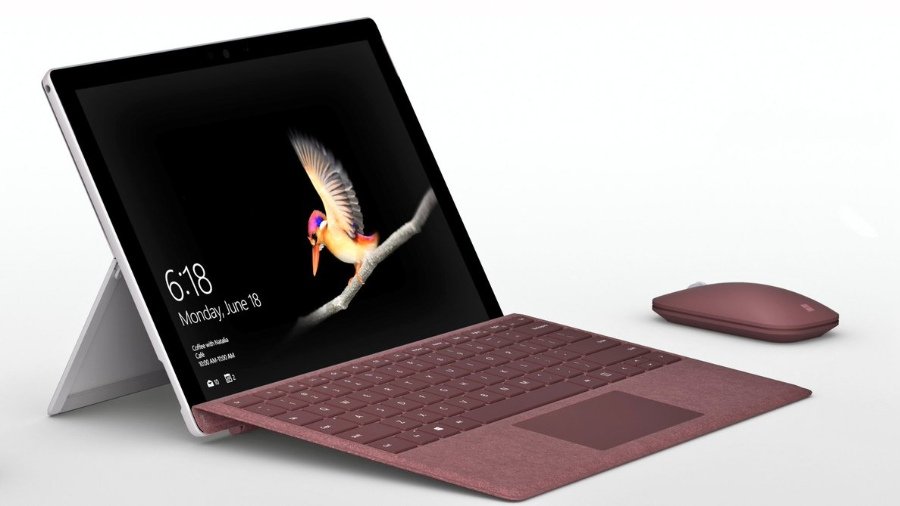
    The Surface Go is really just a smaller Surface Pro. That’s not supposed to be funny: it’s almost uncanny. Microsoft has managed to scale down the exact tablet they’ve had for years into a more compact size. Of course, there’s a slight dip in performance that you would expect from a smaller device. However, the features and apps are all still intact, just running on a smaller screen.

    This newer, smaller tablet is also a bit softer, design-wise. The corners are rounded, and the feel is generally more appealing. It seems that the smaller Surface has been designed with students in mind primarily. The tablet fits into a bag easily and feels great in one hand. The optional Type Cover and Surface pen make it even better, as it can be converted into a laptop-like configuration. Taking notes with either the keyboard or the pen is easy and intuitive.

    Microsoft Surface Go Early Impressions

    While it’s early yet, it seems like the Microsoft Surface Go is an ample competitor with the iPad. Not only that, it’s a worthy inheritor of the Surface name, and a great buy for the money. If you’re looking for an affordable tablet that can convert into a laptop, this is a great option. However, it is somewhat lacking in regards to power, but it makes up for it in usefulness.