Tag: touchscreen laptop

  • HP Spectre x360 15 Impresses With 4K

    HP Spectre x360 15 Impresses With 4K

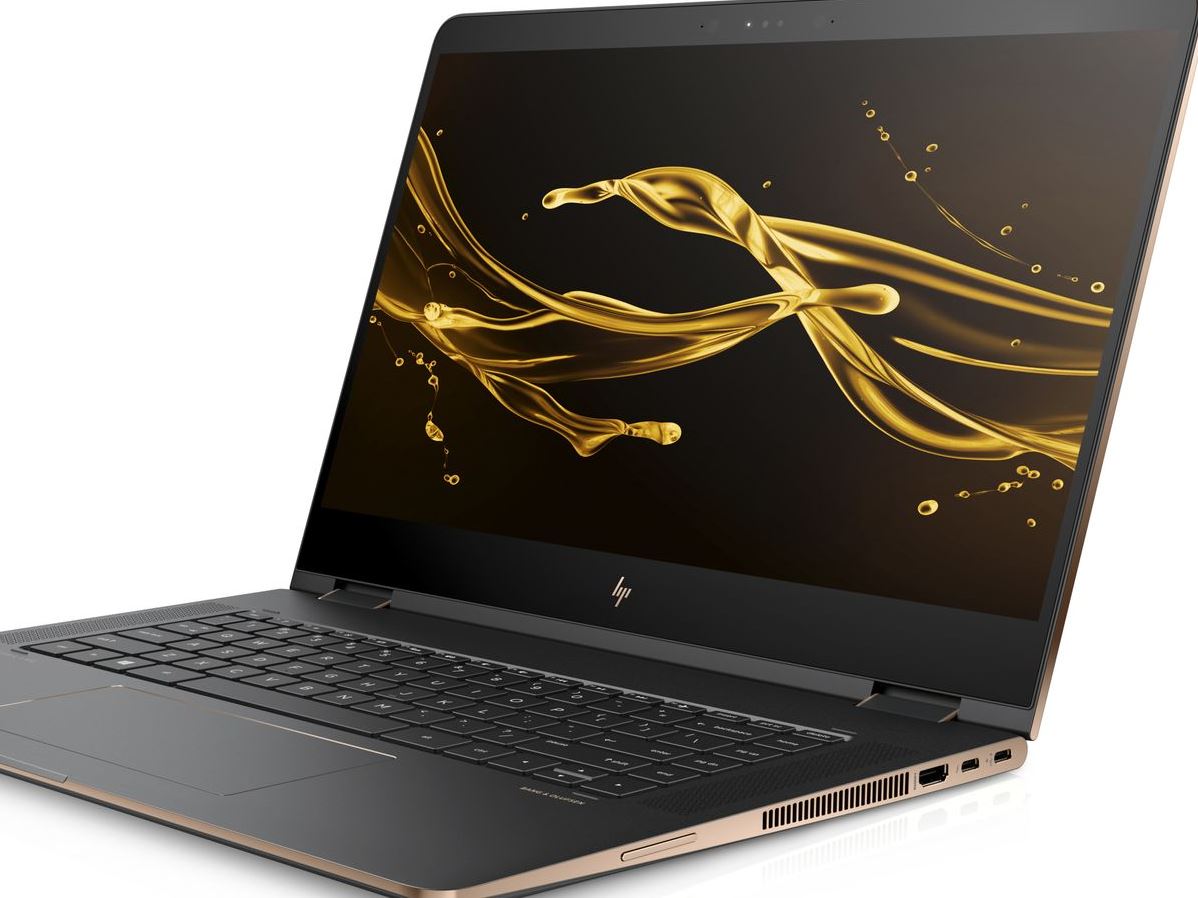
    The HP Spectre is a big, gorgeous convertible laptop that doesn’t fail to impress. While it isn’t the most portable device in the world, it more than makes up for that in power and flexibility. Today we’re breaking down our favorite new features of the HP Spectre x360 15 for 2018. 

    Design and Feel 

    This year’s Spectre is a fantastic machine and is built very well. The hinges feel smooth and steady when opening the laptop, and the finish feels sleek and high-quality. The display is certainly the star of the show: the Spectre comes stock with a 4K touchscreen. There is, interestingly, no option for a standard 1080p display, which certainly accounts for the computer’s price. Retailing for $1,220, this one is definitely aimed at professionals who want a big, bold display with a touch screen. 

    Performance 

    The base version of the laptop comes with a quad-core Intel processor and an MX150 graphics card, courtesy of Nvidia. These are both solid components and will serve all but the most demanding of users. Those who do demand more, though, will be happy to hear a version with a much beefier hexa-core Intel processor and a Radeon RX Vega M graphics card is also available. Both versions perform great, keeping up with common applications and never putting out too much heat or noise from the strain.  

    Keyboard and Pen 

    The computer comes included with an HP active pen, which is great for most common applications. Seriously creative-minded individuals can instead opt to buy the Tilt Pen, which is around $90. While the active pen is awesome for most uses, those who plan to be extensively drawing will appreciate the more flexible and responsive Tilt Pen. 

    The keyboard is also great, and thanks to the redesign from last year’s Spectre, is huge. It even sports a full number pad to the right of the normal keyboard! The keys have a good, non-slippery finish and their action is fine, if a little “sticky.” Those accustomed to mechanical keyboards might be a bit put off, but this laptop was definitely not made with serious gaming in mind. 

    Bottom Line: Spectre x360 15 is Great for Creative Pros 

    If you’re looking for a convertible that performs well and has a great display, this one is a fine pick. If you’re looking for a serious gaming laptop, of course, you’ll need to look elsewhere. Similarly, if you’re in the market for a budget laptop for doing homework and watching YouTube videos, this one isn’t the right choice. However, if you need a good computer for both work and drawing, look no further than the 2018 HP Spectre x360 15. 
  • Need a Touchscreen Laptop? Here are Our Favorites.

    Need a Touchscreen Laptop? Here are Our Favorites.

    For artists, students and professionals, a touchscreen laptop is a great way to get more hands on with work, research and play. Good laptops are expensive, though, so making a decision about which to buy can be very difficult. To help guide you, we’ve compiled some of our favorite touchscreen laptops! Ready for some new tech? Read on!

    Surface Book 2

    For those who want the best of all worlds, the Surface Book 2 touchscreen laptop has you covered. This convertible laptop converts into a 15-inch tablet for ease of handling and boasts an incredible display. The Surface Book 2 is very light and durable in both tablet and laptop mode, to boot. This laptop also sports a pretty tremendous amount of processing power, with 16 GB of RAM, usingan Nvidia GeForce GTX 1060 graphics card, all powered by an 8thGen Intel Core i7. If that all sounds very expensive, that’s because it is. The Surface Book 2, while awesome, is expensive: it retails for $2500.

    If the initial sticker shock of this touchscreen laptop fades and you still find yourself wanting this level of power, flexibility and control, then the Surface Book 2 is for you. Everything from video and photo editing to computer gaming comes natural to a rig this beefy, and with its convertible modes and lightweight design, this really is the best package to house it all in.

    Samsung Chromebook Pro

    This touchscreen laptop is the absolute best choice for students or note takers. The Chromebook Pro has a nifty storable stylus and a slick, easily-stashed design that makes it great for traveling in a backpack. The Chromebook saves all of your handwritten notes to Google Keep, which is fantastically useful by itself. This feature is made even more desirable for note takers when you take into account its main function: it stores your notes in a digitized, searchable text file!

    Being able to search back through your handwritten notes with an automated function makes studying a breeze. If you constantly find yourself searching your notebooks or saved note files for lectures and test answers, the Chromebook Pro was made for you. Retailing at a reasonable $600, this one doesn’t break the bank as much as the Surface Book 2, so it won’t set students back too far. The downside? It only sport about 9 hours of battery life, which can be frustrating on long days when you haven’t finished your studying or note taking yet. That gripe aside, the Chromebook Pro is still the best touchscreen laptop for students.

    Our Favorite Touchscreen Laptop: Microsoft Surface Pro

    Microsoft’s Surface Pro touchscreen laptop is technically a tablet 2-in-1, but we’ll let it slide onto the list for just how useful it is. It is beefy enough under the hood to make it feel like a fine laptop when it has its keyboard attached, and it also sports Bluetooth support for wireless mice. The stylus and note taking steal the show: this is a device designed with touch functionality in mind first and foremost. The optional Surface Pen is responsive and accurate, making it a fantastic tool for artists and students.

    If you’re in the market for something affordable and strong and don’t mind picking up the Surface Pen separately, this is the best touch laptop on the market. A must-have for artists and just an overall great device for everyone else. I really can’t think of anything else to knock the Surface Pro for aside from the lack of an included Surface Pen, and the Pen itself is so excellent that it’s hard to fault Microsoft for making it a separate product.