Tag: tv

  • LG Cinebeam 4k Projector Truly Beams

    LG Cinebeam 4k Projector Truly Beams

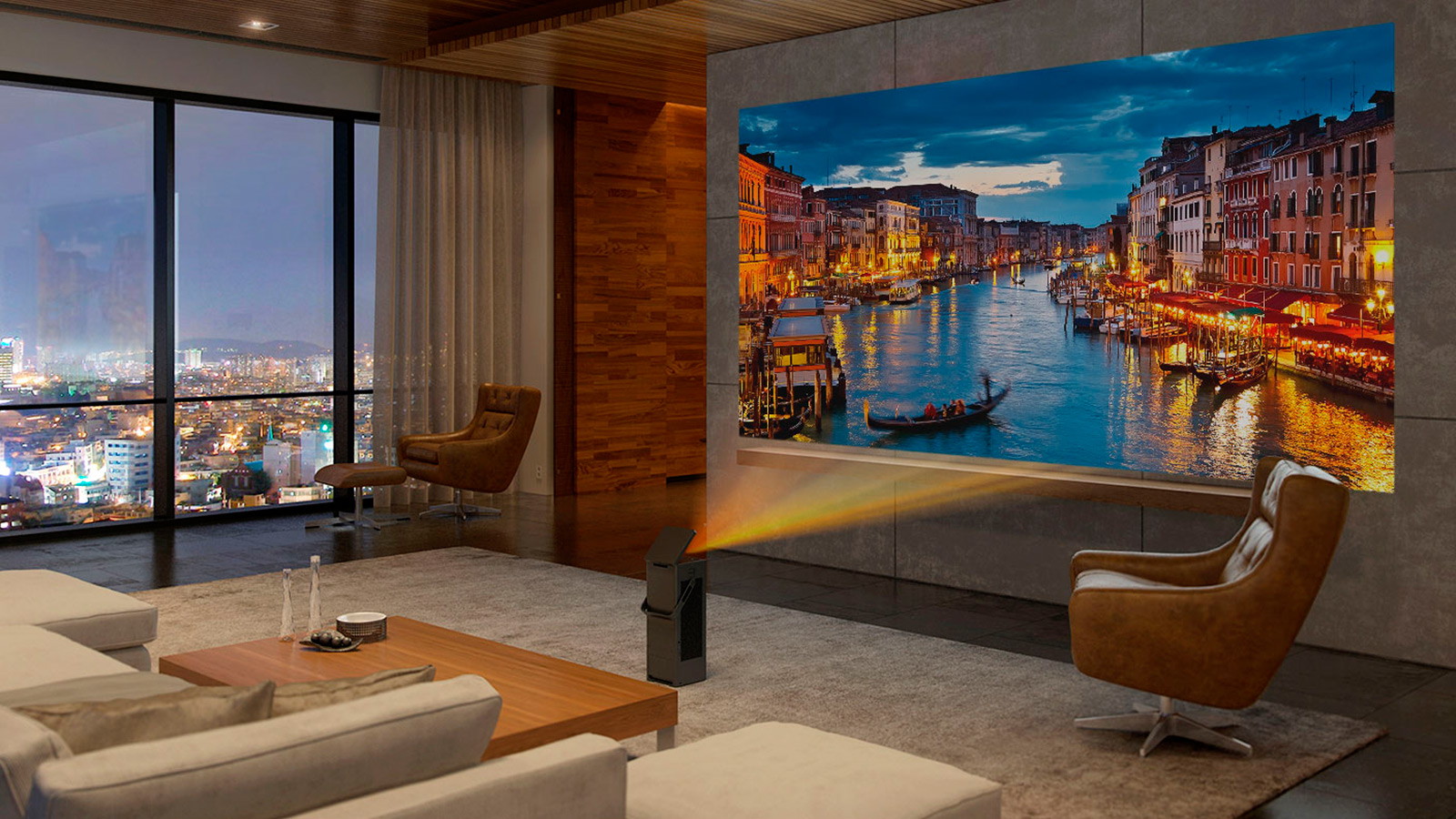
    The latest tech from the South Korean manufacturer LG is set to embrace the Ultra-HD revolution in its LG Cinebeam 4k Projector, specifically the all-new HU80KA 4K Projector that we saw at CES earlier this year: LG has just released that the portable projector starting at  $2,999.

    The Great

    • Bright
    • Light
    • Beautiful Picture
    • Ultimately Portable
    • Best Value for 4k Screen Size

    The Not

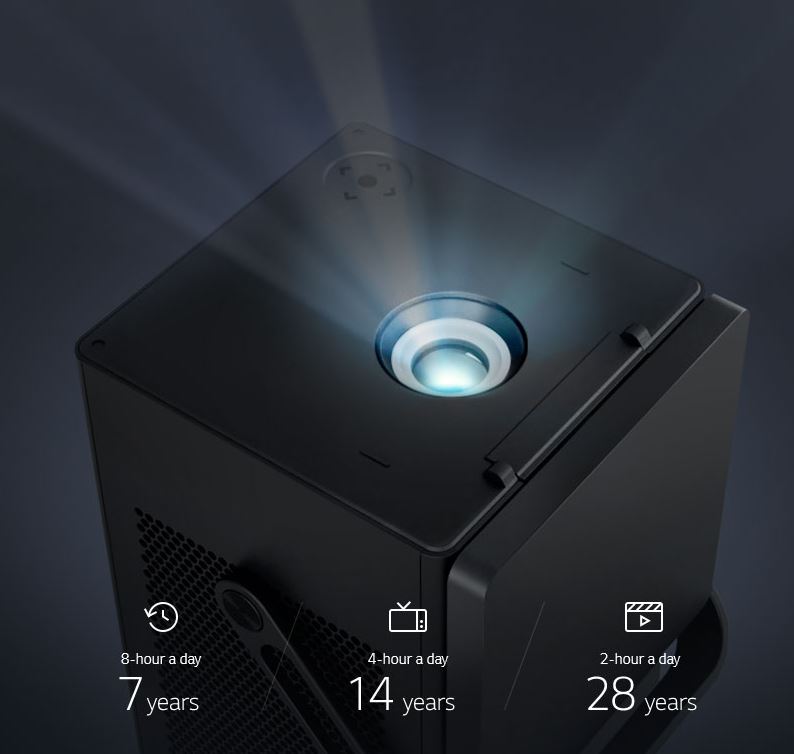
    • Limited Light Lifetime

    The Conclusion

    The LG Cinebeam 4k Projector is LG’s brightest projector yet, able to display a 150-inch picture at 2,500 lumens, while its HD projectors top out at 2,000 lumens. To take advantage of this extra brightness, the HU80KA also supports high dynamic range via HDR10, though unfortunately, Dolby Vision doesn’t appear to be supported. Two built-in 7-watt speakers provide enough audio power in case you’re bringing the projector with you, but you can easily connect it to an external speaker system or sound bar using the optical output, HDMI, or wirelessly via Bluetooth.
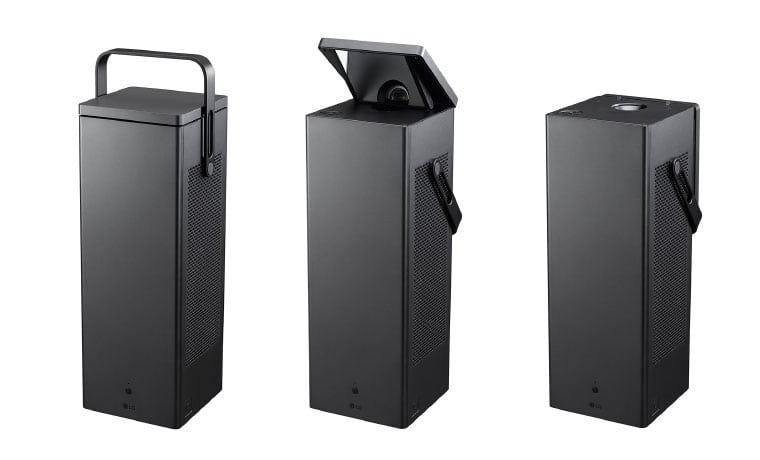
     

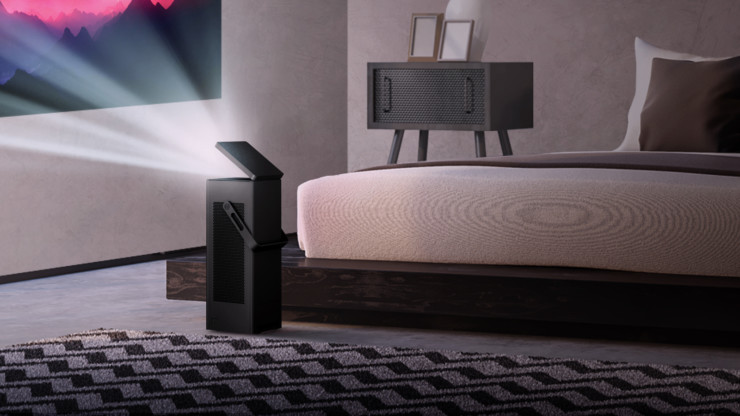
    The LG Cinebeam 4k Projector is a versatile and beautifully glorious black box. Spunky one-two 7 W speakers that you can choose to hook up to external speakers and sound bars via optical or Bluetooth. Size and weight, this compact package comes in at about 14 pounds, but delivers far above its competition with a stunningly sharp laser engine that projects up to 2,500 lumens, allowing crisp viewing even in bright conditions. Coupled with LG’s innovative Trumotion Technology, the compact box paints an amazing 150″ screen (74″ by 132″) on your wall from 14.1 feet. Do the math, and a screen 70″ or greater can be projected directly on the ceiling. Makes it Nice for viewing in bead but also just adding a nice Star light canopy or thunderstorm right above your bed.
    LG Cinebeam 4k Projector 77 Inch OLED

    Even a mammoth 77-inch OLED is dwarfed by a 150-inch picture, and that’s exactly what the new LG Cinebeam 4k Projector UHD projector brings to the table. Even better, the CineBeam is available now for a price that is close to what you’d expect to pay for a 75-inch 4K TV — not bad for what promises to be one of the best home theater projectors around.
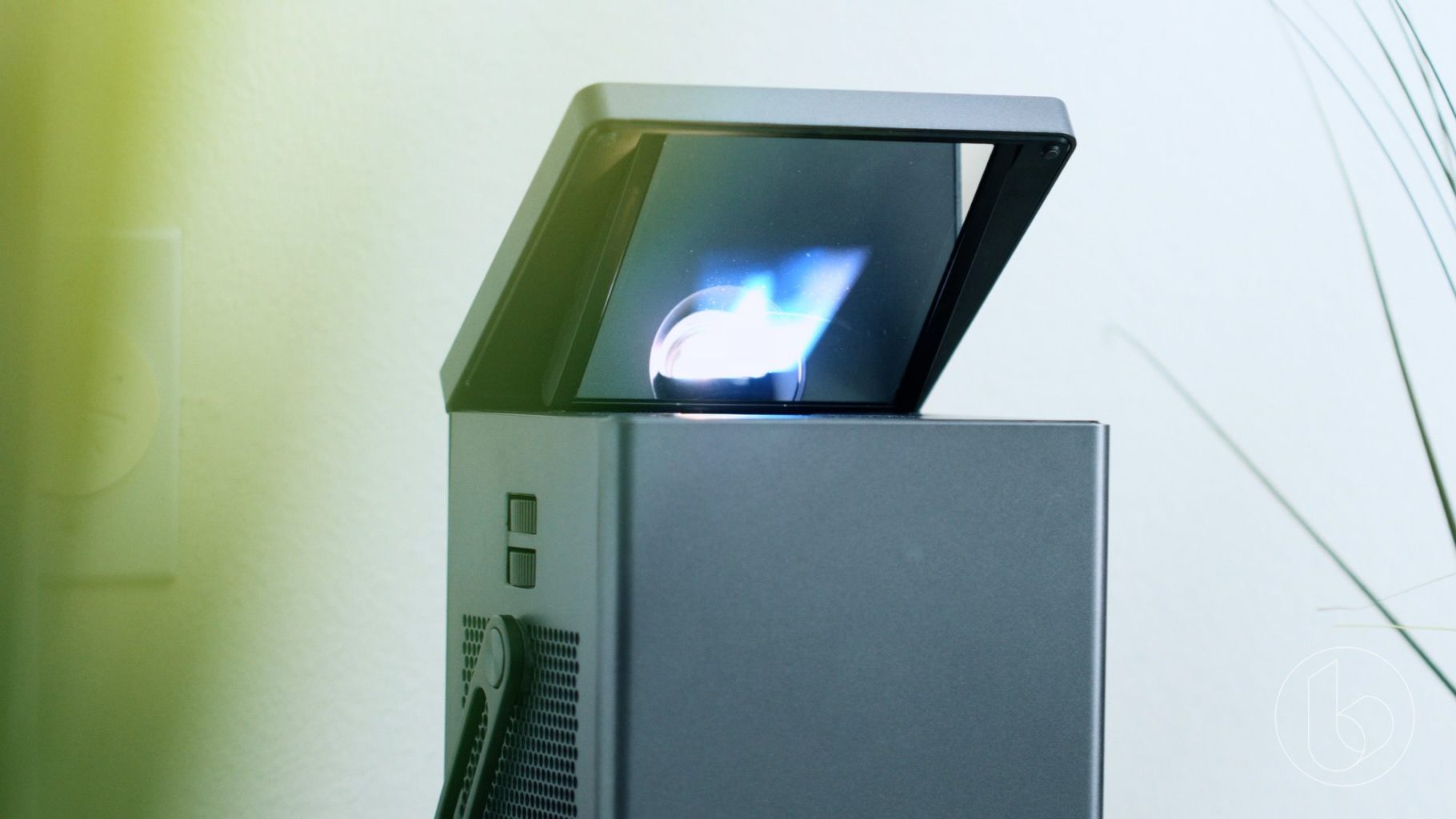
    Not only can the LG Cinebeam 4k Projector deliver a huge picture, but it does so in a compact, portable form that doesn’t require you to find a table or stand for setting it at the exact right height. LG Says, as the projector’s mirrorless I-shaped engine allows the projector to display without problems whether it’s mounted on the wall, hung from the ceiling, or placed on the floor.
     

    The Final Thought

    Will the projector outclass OLED in terms of black levels? Probably not – especially without the aid of more advanced HDR formats like Dolby Vision or HDR10+. But, that said, its portability and price may help LG’s latest beamer beat out the competition in its design class.



  • Which Streaming Device is Right for You?

    Which Streaming Device is Right for You?

    TV has changed in the last ten years. At one point in time, it was either cable or nothing. Now, with the popularity of Netflix, Hulu and internet TV at an all-time high, cable is the exception rather than the rule. If you’ve been looking to cut the cord and watch internet TV, you’re probably wondering what the best streaming device for your living room is. How can you narrow them all down, though? That’s what we’re here for.

    There are a number of options out there for streaming. Whether you’re an Apple fan who wants to use Apple TV for your content, or you want something smart-home integrated like Alexa, there’s a ton of options. Maybe you’re looking for something more general-use, like Roku? Let’s take a look at some of the most popular streaming options and what each brings to the table. Hopefully this will help you narrow down your options and make a good decision.

    Fire TV

    Fire TV is Amazon’s proprietary TV streaming platform. There are budget options, like the Fire TV Stick, which just plugs into the back of your TV, and more full-fledged platforms like the Fire TV Cube. No matter which one you’re looking into, there are a number of similarities between the platform’s various hardware devices. Namely, the user interface and the Alexa integration. If you like using your voice to pull up your favorite shows, Fire TV is for you.

    For those who really enjoy voice commands, the Fire TV Cube comes with a remote that offers voice-control option. You can navigate menus, search for actors and movies and issue commands all with your voice. It feels very natural to command your entertainment in much the same way you command your smart home features. For people who like high-tech solutions that just work without lots of fiddling and tech knowledge, Fire TV is a perfect fit.

    Roku

    Roku is a very well-known name when it comes to streaming devices. From the budget-friendly Roku Express to full-blown smart TVs with Roku integration, there are versions of the streaming platform across the spectrum of budgets. The best thing about Roku is how straightforward and simple it is. The remote is small and sports only a few buttons. A clean, simple user interface shows you the information you need to see to find your entertainment.

    If you’re new to the world of internet TV, or just want a simple way to turn your old TV into a smart TV, the Roku is the best option for you. While it might not sport the same wide variety of options and features as Fire TV or Apple TV, Roku offers a great platform for users who want a simple and clean platform. The low entry price of the Roku Express is also a huge selling point for the platform.

    Apple TV

    For those users who are fans of the Apple ecosystem, Apple TV is a no-brainer. Offering a great, seamless experience across your Mac, iPhone and Apple Watch, the Apple TV is a great extension of the clean design and deceptive simplicity that makes Apple so popular. Logging in to apps is simple, as you can copy passwords and logins directly from an iPhone or iPad.

    While the Apple TV ecosystem doesn’t offer as many apps as a system like Roku, it’s still a robust hub for your media. If you have lots of pictures or videos on your phone you’d like to see on your TV, AirPlay 2 gives you that option. You can even issue voice commands through Siri to find TV and movies you’d like to watch. The only downside? The higher-than-average price when compared to the competition.


  • Cutting the Cord Without Breaking the Bank

    Cutting the Cord Without Breaking the Bank

    Ostensibly, the whole point of not having cable and using Internet TV is to keep your monthly costs down. After all, cable is prohibitively expense for the average person, so there’s no reason to have a cable subscription. However, if you’re subscribed to Hulu, Netflix, Sling and more, you’re going to see those monthly bills getting to a similar place as that cable bill.

    There’s good news though: there are plenty of free streaming services you can start using today. There’s no great reason to spend a ton of money on entertainment when so much is available for free, right now, on the internet. Let’s keep it inexpensive!

    Pluto TV

    Pluto TV is an internet streaming service available on most streaming platforms. If you have Roku, Apple TV, Fire TV, whatever: you can run Pluto. It works by aggregating content from the internet and grouping it into channels of like content. For instance, if you like anime, there’s tons of websites that have free episodes of anime, and Pluto uses those to create an all-anime channel. Similarly, if you’re into gaming, there’s a channel for that.

    Most of what you’ll see on Pluto is older re-runs of shows from major networks or online content from larger websites. There are commercials, which is how the thing gets monetized, but it’s completely free to download and use. When it comes to completely free television, Pluto is a great option.

    The Roku Channel

    If you run your streaming services through Roku, you can access the Roku Channel. This free streaming channel is operated by Roku themselves and offers classic and modern movies, news streaming and more. Essentially, it’s a great companion to whatever other content you watch on Roku. The channel also offers older streaming TV content, making it a bit of a grab-bag when it comes to entertainment.

    You can also manage your other subscriptions through the Roku Channel. For instance, if you have HBO or Shotime subscriptions, you can manage them through the Roku Channel, streamlining your bill while allowing you to find your content all consolidated to one place. If you use Roku, this is a great free TV option.

    Kanopy

    One of the coolest things about living in the modern world is public goods like parks, public transit and libraries. You’ve already paid for it through your local taxes, after all, so you might as well enjoy these public goods. Kanopy is one such public good in this category: it connects to your local library to allow you to rent movies, though the number you can “borrow” digitally could differ from library to library.

    Once you have the app downloaded, you enter your library card and then create a Kanopy account. Then, like that, you’re hooked up to watch free movies, courtesy of your local library. While you’re at it, consider heading by your library and checking out some books: there’s tons of great stories to be found within!

    Crackle

    The long-running service from Sony, Crackle, has been around in some form or another since 2004, long before Netflix was offering streaming content online. Interestingly, Crackle has a lot in common with Netflix. There are tons of older sitcoms and 90’s cult classic movies available on-demand, and there’s even original programming like The Oath that you can watch. Like Netflix, the selections are updated regularly and you can almost always find something to watch you haven’t seen before on Crackle.

    Unlike Netflix, however, Crackle is totally free. There’s no catch to it: the content streaming on the service costs nothing to view. Why not give it a shot? You can binge some of your favorite old sitcoms today, for free, through Crackle.


  • Which Streaming Device is Right for You?

    Which Streaming Device is Right for You?

    TV has changed in the last ten years. At one point in time, it was either cable or nothing. Now, with the popularity of Netflix, Hulu and internet TV at an all-time high, cable is the exception rather than the rule. If you’ve been looking to cut the cord and watch internet TV, you’re probably wondering what the best streaming device for your living room is. How can you narrow them all down, though? That’s what we’re here for.

    There are a number of options out there for streaming. Whether you’re an Apple fan who wants to use Apple TV for your content, or you want something smart-home integrated like Alexa, there’s a ton of options. Maybe you’re looking for something more general-use, like Roku? Let’s take a look at some of the most popular streaming options and what each brings to the table. Hopefully this will help you narrow down your options and make a good decision.

    Fire TV

    Fire TV is Amazon’s proprietary TV streaming platform. There are budget options, like the Fire TV Stick, which just plugs into the back of your TV, and more full-fledged platforms like the Fire TV Cube. No matter which one you’re looking into, there are a number of similarities between the platform’s various hardware devices. Namely, the user interface and the Alexa integration. If you like using your voice to pull up your favorite shows, Fire TV is for you.

    For those who really enjoy voice commands, the Fire TV Cube comes with a remote that offers voice-control option. You can navigate menus, search for actors and movies and issue commands all with your voice. It feels very natural to command your entertainment in much the same way you command your smart home features. For people who like high-tech solutions that just work without lots of fiddling and tech knowledge, Fire TV is a perfect fit.

    Roku

    Roku is a very well-known name when it comes to streaming devices. From the budget-friendly Roku Express to full-blown smart TVs with Roku integration, there are versions of the streaming platform across the spectrum of budgets. The best thing about Roku is how straightforward and simple it is. The remote is small and sports only a few buttons. A clean, simple user interface shows you the information you need to see to find your entertainment.

    If you’re new to the world of internet TV, or just want a simple way to turn your old TV into a smart TV, the Roku is the best option for you. While it might not sport the same wide variety of options and features as Fire TV or Apple TV, Roku offers a great platform for users who want a simple and clean platform. The low entry price of the Roku Express is also a huge selling point for the platform.

    Apple TV

    For those users who are fans of the Apple ecosystem, Apple TV is a no-brainer. Offering a great, seamless experience across your Mac, iPhone and Apple Watch, the Apple TV is a great extension of the clean design and deceptive simplicity that makes Apple so popular. Logging in to apps is simple, as you can copy passwords and logins directly from an iPhone or iPad.

    While the Apple TV ecosystem doesn’t offer as many apps as a system like Roku, it’s still a robust hub for your media. If you have lots of pictures or videos on your phone you’d like to see on your TV, AirPlay 2 gives you that option. You can even issue voice commands through Siri to find TV and movies you’d like to watch. The only downside? The higher-than-average price when compared to the competition.


  • Watching TV for Free: Ditching Cable

    Watching TV for Free: Ditching Cable

    No one likes paying a ton of money just to watch TV. In 2019, it’s very difficult to justify spending a ton of money on TV when you can watch tons of content online for free. After all, YouTube offers a ton of content for free watching, while there are free shows available on a number of official sites. With all of this free content available online, surely there are better ways to watch TV without spending a lot of money. Here are some of the best free TV platforms you can watch right now.

    Free TV Platforms

    Over-the-Air Channels

    Of course, there are a number of channels offered for free over the airwaves. Even if you have an HDTV, you can still tune in to over-the-air channels via an HD receiver. Your local digital stations will include the local news, weather and normal syndicated TV channels. You won’t have to worry about missing some of the biggest TV show premiers, and you don’t even need an internet connection or a smart TV to access these channels.

    The only equipment you need to see your local digital channels is a digital HD receiver and an HD television. There’s no fee for accessing this content, as you already have accessing to these public TV channels. This is the lowest-tech way to access free TV channels, and a tried-and-true method.

    Roku

    One of the best ways to access a wide variety of free content is by getting a Roku device for your living room television. Essentially, a Roku device turns any existing HDTV into a smart TV. This means you can access online content, such as the free Pluto TV or YouTube apps, or you could opt for paid services like Netflix or Hulu. In either case, Roku also offers a “Featured Free” tab for free content through the platform.

    A Roku Express, the lowest-costing Roku device, retails for $30 and gets you set up for online TV through your living room. As another note, there are a number of TVs that are pre-packaged with Roku software, so make sure you’re not already set up with Roku before you head out to buy a Roku Express.

    Pluto TV

    Another free TV option for people looking to cut the cord is Pluto TV. Pluto is a curated content platform that collates a large amount of online content. Essentially, Pluto takes a number of videos that are already available for free online and presents them in handy groupings, adds in commercial breaks, and makes them into TV channels. For instance, lots of channels focus on video games, or cooking, or other granular and specific topics.

    Some larger channels could have reruns or licensed content from the likes of MTV or Comedy Central, for instance, both of whom have Pluto TV channels that offer a free sub-set of their lineups. The biggest draws to Pluto are that it’s free, it’s HD, and the content is incredibly varied and entertaining. If you just want something to watch and don’t want to pay anything to watch it, Pluto is for you. All you need to watch is an internet connection! If you want to watch it on your TV, you can get the app for free on Roku.

    Local Library

    Your local library has quite the large selection of DVDs available for you to borrow. Access to public libraries is free for all citizens of a city, so there’s no reason to not take advantage of this free resource that is available to you. You can find a number of new movies available for borrowing at your library to help you have movie night without spending a dime!

    Remember: a penny saved is a penny earned. Don’t spend more than you have to for your entertainment!


  • LG Cinebeam 4k Projector Truly Beams

    LG Cinebeam 4k Projector Truly Beams

    The latest tech from the South Korean manufacturer LG is set to embrace the Ultra-HD revolution in its LG Cinebeam 4k Projector, specifically the all-new HU80KA 4K Projector that we saw at CES earlier this year: LG has just released that the portable projector starting at  $2,999.

    The Great

    • Bright
    • Light
    • Beautiful Picture
    • Ultimately Portable
    • Best Value for 4k Screen Size

    The Not

    • Limited Light Lifetime

    The Conclusion

    The LG Cinebeam 4k Projector is LG’s brightest projector yet, able to display a 150-inch picture at 2,500 lumens, while its HD projectors top out at 2,000 lumens. To take advantage of this extra brightness, the HU80KA also supports high dynamic range via HDR10, though unfortunately, Dolby Vision doesn’t appear to be supported. Two built-in 7-watt speakers provide enough audio power in case you’re bringing the projector with you, but you can easily connect it to an external speaker system or sound bar using the optical output, HDMI, or wirelessly via Bluetooth.


    The LG Cinebeam 4k Projector is a versatile and beautifully glorious black box. Spunky one-two 7 W speakers that you can choose to hook up to external speakers and sound bars via optical or Bluetooth. Size and weight, this compact package comes in at about 14 pounds, but delivers far above its competition with a stunningly sharp laser engine that projects up to 2,500 lumens, allowing crisp viewing even in bright conditions. Coupled with LG’s innovative Trumotion Technology, the compact box paints an amazing 150″ screen (74″ by 132″) on your wall from 14.1 feet. Do the math, and a screen 70″ or greater can be projected directly on the ceiling. Makes it Nice for viewing in bead but also just adding a nice Star light canopy or thunderstorm right above your bed.

    LG Cinebeam 4k Projector 77 Inch OLED

    Even a mammoth 77-inch OLED is dwarfed by a 150-inch picture, and that’s exactly what the new LG Cinebeam 4k Projector UHD projector brings to the table. Even better, the CineBeam is available now for a price that is close to what you’d expect to pay for a 75-inch 4K TV — not bad for what promises to be one of the best home theater projectors around.

    Not only can the LG Cinebeam 4k Projector deliver a huge picture, but it does so in a compact, portable form that doesn’t require you to find a table or stand for setting it at the exact right height. LG Says, as the projector’s mirrorless I-shaped engine allows the projector to display without problems whether it’s mounted on the wall, hung from the ceiling, or placed on the floor.


    The Final Thought

    Will the projector outclass OLED in terms of black levels? Probably not – especially without the aid of more advanced HDR formats like Dolby Vision or HDR10+. But, that said, its portability and price may help LG’s latest beamer beat out the competition in its design class.
  • Smart TV Roundup: Which One is Right for You?

    Smart TV Roundup: Which One is Right for You?

    Everyone needs to park it on the couch and watch some TV sometimes. After a long day, there’s nothing better than surfing some Netflix or Hulu and enjoying a nice show. Which Smart TV should you consider though? There’s just so many options out there! To help you narrow it down, here’s our favorite smart TVs rounded up! 

    Sony A1 OLED TV 

    Sony’s ultra-premium smart TV is a little pricey, depending on where you get it, running somewhere between $3,000-$4,000. But don’t let that scare you from checking it out! Sporting an amazing picture quality and a really stunning form factor, this TV makes an awesome centerpiece to a room.  

    This 65″ TV boasts all the awesome processing and features you expect from Sony. The picture quality never stutters or suffers under high framerate programming. This TV even incorporates Google Assistant or Alexa support for voice control! If you’re looking for one of the very best and don’t mind spending a bit of money, you’re looking for the Sony A1 OLED. 

    LG SIGNATURE OLED 65W7P W7 

    If you’re looking for something that looks absolutely bananas on your wall and impresses everyone, you’re looking for this. LG’s Signature OLED is a “wallpaper” style display, coming in at a positively unbelievable 2.57mm thick. You read that right. It is downright hard to fathom just how thin this screen is.  

    Even better than the eye-popping form factor of this LG is the picture quality. There is no TV on the market with a better display than this, full stop. That LG managed to make this display so powerful and thin at the same time is a testament to their pedigree. It’s not all magic, though: the TV comes included with a required sound bar. The sound bar is actually the processor for the TV, allowing the display to be as thin as it is. All said, this is quite an impressive TV, but it will cost you: $8,000 MSRP definitely stings.  

    Our Favorite Smart TV: SAMSUNG Q9F 4K QLED TV 

    The QLED line of TVs is just awesome. There’s no better word for them. If you’re looking for the best all-around TV for the price, this is our pick. Operating on the Tizen operating system, the QLED line is easy and accessible to use. The TV boasts great black values, bright colors and sharp images.  

    This TV is seriously smart, too, it’s not just in the name. It automatically detects connected devices and relabels inputs in the menu system. It programs the remote control according to connected devices. It’s really just impressive, easy-to-use and awesome technology. Couple that with the razor-thin connection cable and ability to mount the screen flush with the wall and it’s no wonder this is our favorite! 

  • TV Shows that Depict Technology Accurately

    TV Shows that Depict Technology Accurately

    Not everyone cares as much about technology as I do, which is fair. I’m kind of a nerd. But you know when you watch a movie or TV show and see something that just doesn’t… work? It just doesn’t work that way, guys! You can’t “enhance” footage from a CCTV camera! That’s not how recording technology works!  

    Alright, I’m good, I swear. With that, let’s introduce our favorite TV shows that get tech right. 

    Sherlock 

    This show is fantastic, for one thing. It’s engaging and smart and fast-paced, keeping the viewer on the edge of their seat. Story beats are often depicted through text messages, as is common in modern tales. Sherlock pioneered a visual technique that makes these texts flow beautifully in the action. 

    In Sherlock, texts appear as floating, stylish words onscreen near the characters reading them. This more accurately represents what it feels like in the moment when you’re reading your phone. By using this technique, Sherlock smartly sidesteps a common pitfall of TV set in modern day: how do you depict smart phone interfaces on screen? 

    Black Mirror 

    This show’s whole premise is how terrifyingly likely its scenarios are. Black Mirror is a modern blend of the Twilight Zone and cautionary sci-fi tales of the 50’s. Episodes meditate on the potential fallout of technological advances. One episode presents perfect recall through recording software embedded in your eyeballs. Another imagines a world where everyone has a social rating like a credit score displayed for all to see. 

    The anthology-like presentation and believable technology make Black Mirror a scary peek into our own potential future. Without the believable, down-to-earth technology, the show wouldn’t work on as many levels as it does. 

    Silicon Valley 

    Silicon Valley is a very goofy show about some very goofy software developers. Depicting the ins and outs of an internet start-up, Silicon Valley does a great job of accurately depicting the lives of programmers. From the accurate depictions of Silicon Valley offices to the types of desks and computers developers use, the show is certainly on the nose. 

    This is no surprise however. The show was created by Mike Judge, who also created King of the Hill and Office Space. Judge has also been part of an internet start-up himself, so he knows the source material personally. This lends the show a “real”-ness that ups the credibility of its technology–and its laughs.  

    Our Favorite Depiction of Technology on TV: Mr. Robot 

    The phenomenal and believable hacking on Mr. Robot comes courtesy of love and care from the show’s producer. Kor Adana, once a cyber security specialist, helps advise on the show. Adana uses knowledge from his previous vocation and ample consultation with real hackers to make the show believable.  

    On screen command prompts and use of actual technology help ground the show. The believable hacking and tech make the show that much more engaging, lending it credibility. This makes Mr. Robot as close as we’re likely to get to a televised version of Neuromancer. 


  • What a Powerful Little TV Projector!

    What a Powerful Little TV Projector!

    The Good

    • Set up could not be any simpler. Unboxing to watching TV done in under 5 minutes.
    • The 1080HD Picture quality is amazing
    •  Small size, mobile, and reasonable price

    The Bad

    • Works best in a dark area or room
    • Watching off the projector in daylight or bright areas in moot
    • Volume is muffled at max setting and the menu screen is lacking

    The Conclusion

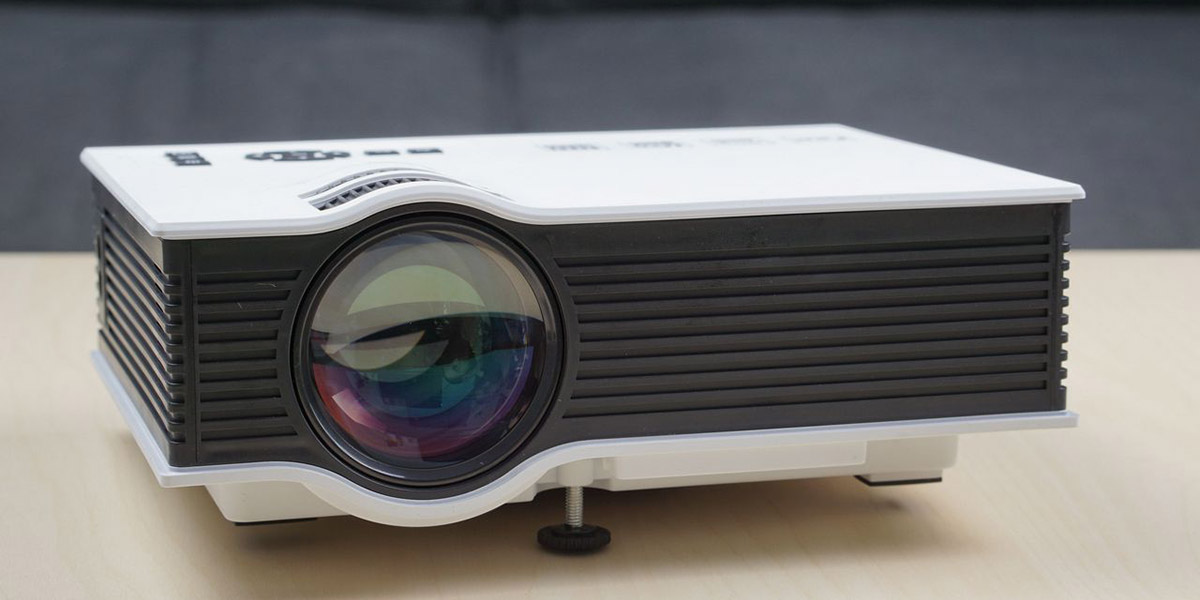
    This is a small, but powerful projector that provides great picture quality. Being very portable, you can throw in a bag and take to a meeting or a friend’s house to watch a movie. Comes equipped with all the needed connections such as HDMI or an output for a computer monitor. With a price tag of $128.99, the GAOAG Mini LED projector is a great buy for any night time outdoor or indoor needs.

    Small but Powerful

    With 1,800 Lumens and 1080P picture, this little projector packs a powerful punch! Along with great picture quality, this sleek and mobile projector, weighing just about 2 pounds, can be quickly packed up and brought anywhere hassle free. The GAOAG projector also comes with the capability to pair up to you iPhone or smart device for easier watching convenience. GAOAG has some competition such as the RAGU Z720 projector that offers 3,000 Lumens, weighs 7 pounds, and costs and extra $80.00. The GAOAG is a great source to watch movies or TV in dark spaces, it is not meant for PowerPoint or Office presentations. Another issue that has arose with the GAOAG Mini LED is projector is lack of basic image processing. When using VGA input, you can scale and shift the screen around, but not when using HDMI. With HDMI, the only option you have is scaling the image.

    Final Thoughts

    Projectors were all the rage a few years ago, but tapered off due to it’s technical limitation and mortal enemy, The Sun. With new ideas and advancements from companies such as GAOAG, maybe the projector can find it’s way back into our homes and hearts? GAOAG is certainly on the right path and has made a very affordable, portable, and high quality LED Projector. I’m anxious to see what the next stage of advancements hold.

  • The Wall, Samsung’s TV Vision

    The Wall, Samsung’s TV Vision

    All In All

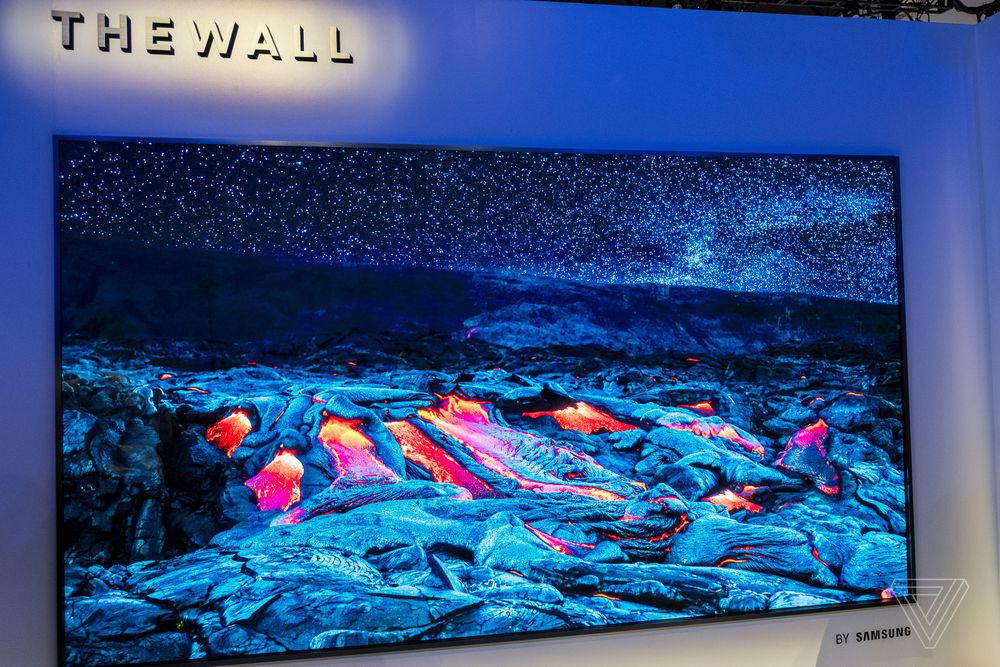
    MicroLED is a technology that shrinks traditional LEDs to a smaller size, and gives them the ability to produce their own light. Think OLED, but take out the organic part. MicroLED doesn’t require a discrete backlight, and there’s no need for LCD shutters. In turn, this creates a brighter, more contrast-rich television that can turn pixels off individually. This has brought us the next level of cool from Samsung… The Wall.

    The Wall is an all encompassing 146-inch modular MicroLED TV that, thanks to its sheer size and gorgeous self-emitting pixels, commands attention. It can transform into any size, and deliver an incredible brightness, color gamut, color volume and black levels. Get excited about this it is the next step along roadmap to the future of screen technology.

    Whats a MicroLED Again?

    The MicroLED technology featured in The Wall eliminates the need for color filters or backlight, yet allows the screen to offer consumers the ultimate viewing experience. Also, the MicroLED screen excels in durability and effectiveness, including luminous efficiency, the light source lifetime and power consumption, setting the standard for future screen technology.MicroLED uses an array of millions of individual, tiny LEDs to create the image. It’s very similar to the technology used in scoreboards and jumbo screens, but scaled for home use. A big, expensive home. Samsung says the 146-inch size was chosen to comply with the standard ceiling height. While 146 is the talked about size, this MicroLED tech let’s you adjust the screen size to any size with no quality loss, distortion or color change.

    The name says it all and there is no other way to describe this, the future of TV… all in all it’s just another tv on …The Wall.

    When Can we expect this?

    Samsung says we are still years away, their next step is a 2-5 year plan for a 75 inch MicroLED set. They say this can be manufactured in a size and quantity to actually compete against OLED in the mainstream market. I guess I’ll just keep waiting and saving..I’m guessing a 10k price tag for the Wall.