Month: May 2018

  • The Ten Dumbest Apps Ever

    The Ten Dumbest Apps Ever

    Not every app is a winner. Sometimes developers run out of money, time or patience and simply ship an unfinished product. Other times, devs set out to make a tremendously stupid app. In either event, you came here to see mind-numbingly stupid apps, so here goes: our list of the ten dumbest apps ever.
     
    [adSOC]  

    The Little Application That Does Nothing

    01-nothing

    Photo Credit: Apple Store

    This app gets bonus points for doing what it says it does. It actually does nothing. Seriously, it doesn’t do anything. Actively. It’s received updates, for some reason, and still does nothing. I’m actually sort of mad that this exists, but it’s also hilarious, so, that’s alright.
     
    [adTextOnly]

  • Google Privacy Policy to Become More Readable

    Google Privacy Policy to Become More Readable

    Taking effect on May 25th, Google’s new privacy policy aims to be more transparent and more plainly explain what user data it collects and shares. William Malcolm, a privacy leader at Google, stated in a blog post: “We’ve improved the navigation and organization of the policy to make it easier to find what you’re looking for; explained our practices in more detail and with clearer language; and added more detail about the options you have to manage, export, and delete data from our services.”

    Clarification

    Notably, this rewording of the privacy policy does not represent any changes to the policy: it is simply a clarification in attempt to make the policy more transparent. This move coincides with the May 25thGeneral Data Protection Regulation in Europe, certainly a move to assure users their data isn’t being used against them.

    Google has recently made adjustments to the “my account” tab of their Google Account home page, allowing users to selectively purge searches they don’t want attached to their online presence. These changes come amidst widespread anxiety over data collection and algorithmic abuse by companies like Google and Facebook. Shifts such as these are reassuring, and hopeful signal a shift to a more responsible role for the tech giant.

    Ad Muting

    In a related move, Google has begun incorporating a “Mute this Ad” function in their search engine. Most users probably already use an Ad Block plug-in on their desktops, but it is still a welcome update to mobile devices.

  • Cisco Pulls All Ads From YouTube

    Cisco Pulls All Ads From YouTube

    In a move to preserve brand integrity, Cisco has pulled all of its ads from YouTube. A now-deleted post from Cisco stated that they didn’t want their brand to appear alongside “sensitive content.” CNN recently reported that ads from major companies like Facebook, Cisco and Amazon were appearing alongside videos featuring “white nationalists, Nazis, pedophilia, conspiracy theories, and North Korean propaganda.”

    Not Unprecedented

    This move is not unprecedented, though. Last March, Verizon, AT&T and the British Government all pulled ads from the streaming site when news broke that their ads were appearing alongside videos promoting terrorism. Again, in November, a report broke that ads from Amazon, Mars, eBay and others were appearing alongside videos with pedophilic content. In both instances YouTube vowed to tighten controls over where advertisers’ spots appeared on the site.

    Cisco, a major manufacturer of networking equipment, follows in the example of those companies that do not want their ad spots confused with their monetary endorsement. YouTube’s responsibility and culpability in relation to inflammatory, hateful content hosted on their site is a topic of much debate at this point. Some argue that YouTube shouldn’t allow content containing white nationalist hate speech and borderline Nazi propaganda. Others contend that YouTube exists solely as a platform for video hosting and shouldn’t act a censor, as understanding extremist views is key to countering them.

    In either event, Cisco would sooner pull all of their ads in a show of disgust at the presence of such content than get into an argument about freedom of speech. As a business interested in making money and not stirring up political discussions, this is a reasonable move.

  • Which Streaming App is Best?

    Which Streaming App is Best?

    There are many streaming services and apps vying for your money and your eyes. Which ones do we love? Which streaming app is our favorite for bingeing shows and for having movie night? Read on to find out!

    Sling Orange

    Sling is a cool idea. While more and more people are ditching cable (and you should, too, it’s an awful rip-off) Sling offers a much more affordable alternative to those who still want to watch Live TV. With an “a la cart” offering of channels, Sling addresses many of the issues we have with bloated cable packages.

    The base package of Sling is $20 per month, which makes it the priciest streaming app on this list, but it offers a unique enough service to make it worth the money. Consider this one if you want a cable-style viewing experience without spending cable-style money.

    Amazon Video

    Once only available to Prime members, Amazon Video is now offered as a standalone streaming app. With a great streaming library and the ability to download shows and movies for offline viewing, Amazon video is a worthy contender with Netflix. Amazon Video is $8.99 per month. This means if you plan to stick with the service for more than a year, consider an Amazon Prime subscription. This will allow you to access all the other Prime benefits, too.

    While Amazon has little in the way of original programming, it is currently the only place to watch Doctor Who online. That alone makes it worthy of consideration!

    Hulu

    For lovers of primetime TV who hate having to schedule around air times, Hulu is awesome. Hulu runs primetime shows the day after they air, making it an awesome cable replacement. Hulu has fantastic original programming, like the The Handmaid’s Tale, and also sports a great library of TV show and movies. If you love TV and the occasional movie, Hulu is definitely worth your attention. It’s tied for our favorite streaming app with Netflix.

    Hulu also has two subscription tiers. The first is $7.99 per month but runs commercials during shows. The $11.99 tier runs no ads during shows, but will occasionally run a short spot before popular shows.

    Netflix

    The longtime champ of the streaming app market, Netflix now has a real rival in the form of Hulu. That said, Netflix has the best original programming of any streaming app, bar none. Stranger Things, Orange is the New Black, Travelers and the Netflix Marvel series all prove time and again the Netflix hosts some incredible programming. If you want a little of everything (movies, TV, original programs) you can’t go wrong with Netflix. Netflix has several subscription tiers.

    The first is only $7.99 per month, but that only nets you one standard definition stream. For $10.99 per month you get two HD streams, and for $13.99 you get four 4K streams. These are reasonable when compared to the competition, but the more desirable HD streams are somewhat pricey.

  • Graphics Card Roundup for Gamers and Crypto Miners

    Graphics Card Roundup for Gamers and Crypto Miners

    With the price of the graphics card finally falling, now is a great time to start looking at upgrading. Whether you’re looking to upgrade your rig to handle the most demanding AAA titles or just want better performance for games like League of Legends and Overwatch, we’ve got something for you. Check out our roundup of our favorite graphics cards.

    Nvidia GeForce GTX 1080 Ti

    This is an expensive graphics card, usually found for between $800-$1000, but its price has been falling as of late. The GTX 1080 Ti is a notable upgrade over the 1060, but its price holds it back from being our recommended “best overall” graphics card. For those interested in lots of 4K gaming, though, this graphics card will not disappoint. The card has great cooling; you won’t find it running too hot like some of its premium cousins.

    This card has performance comparable to the Titan X, but without carrying the same absurd price tag. It’s worth noting that this single card isn’t quite as impressive as two standard GTX 1080’s in SLI (linked together to run as one graphics card) but it is more affordable and more easily installed and supported than an SLI set up. If you’re not afraid to spend some money and want a somewhat future-proof card for 4K gaming, this one is for you.

    AMD Radeon RX Vega 56

    The Vega 56 is an impressive card for its overall, consistently overperforming from what we expect. It is somewhat pricey thanks to BitCoin mining, but as we’ve mentioned, as that craze dies down, this card and others in its class will come down from their lofty markups. With that in mind, the Vega 56 is a fantastic choice for those looking to run Full HD gaming, consistently outperforming the Nvidia GTX 1070.

    As an investment, it is future-proofed to a degree, as it is somewhat overkill on most 1080p HD games. As 144-240 Hz monitors become more commonplace, this graphics card will begin to really shine, as it will have no trouble keeping up with such blistering refresh rates. On the downside, this one runs pretty hot, so you’ll need a hefty cooling system to keep your rig from overheating.

    As you might expect, it’s also power-hungry, so be prepared to see your power consumption go up as this card chugs away. If you want a high-end card for HD and don’t mind a bit of a price tag, consider the Vega 56.

    Our favorite overall graphics card: Nvidia GeForce GTX 1060

    If you want a solid graphics card to play HD games and don’t want to spend an arm and a leg, look no further. The GTX 1060 won’t be blowing the other cards on this list out of the water in terms of raw performance, but what it lacks in pure power it more than makes up for in value.

    You can probably snag this part for around $300 on Amazon and you expect to see that price fall as the GPU market settles down. For that price you get a reliable card that can be overclocked to even handle 4K, as long as you have ample cooling and power to maintain it.

    On the flipside, this card doesn’t over SLI, so you won’t be pairing it with another 1060 to double its output. That said, for those who simply want a strong card for a reasonable price, the 1060 hits all the benchmarks you want it to and doesn’t compromise on overclocking.

  • Which Food Delivery App is the Best for You?

    In the past few years several companies have popped up in major cities offering to deliver food to your door from nearly every restaurant in town (for a small fee.) Whether you’re stuck at the office or just don’t feel like fighting crosstown traffic to get a sandwich, there is no shortage of delivery apps vying for your buck!

    But your time and money are valuable, and you can’t waste your lunch break waiting for a slow service. Don’t worry, we’ve got you covered! Which of delivery app is the best choice for you? Check out our round up of our favorite food delivery apps!

    Yelp Eat 24

    Yelp’s a well-known player in the world of restaurant ratings, but you can also rely on them to deliver your food! The service is timely, and the app is clean, which are both big pluses. The app sports the usual delivery fees and minimum order prices that you’d expect, but they change by restaurant. All in all, Yelp’s service is a solid choice if they’re available in your area. That’s the best part, too: the service is in more than 1,500 cities, so odds are good you can use them! 

    GrubHub

    GrubHub has a simple, no-frills interface and a very easy-to-navigate search function. This delivery app unfortunately sports a $10 minimum for all orders, which we don’t love. This, however, is not a deal breaker. GrubHub offers a feature to track your food as it goes, which we really like! On the negative side, GrubHub is somewhat slow and, in our experience, has issues with order accuracy.

    This could all change based on your area and delivery driver, but it’s worth mentioning. That being said, GrubHub makes our list due to its ubiquity. You’ll almost always find a restaurant in your area that they can deliver from in a reasonable time. Slight inconsistencies in delivery time or customer experience could be chalked up to just how big GrubHub is, and how many drivers it has.

    Postmates

    Postmates is a pretty wide service and doesn’t specialize in just food. That said, it has a pretty great food delivery side! Postmates doesn’t do restaurant partnerships, so they’re more an “available by area” type of delivery app. They can even pick up alcohol for you, which is sweet for when you’re looking to get a party started! It’s pretty widely available, as it’s in more than 90 cities. There’s a modest fee attached to each delivery. That said, you can opt for a premium subscription that waives delivery fees for $10 from certain retailers. 

    UberEats

    Uber, best known for their ride sharing service, has wisely taken their existing driver base and repurposed it slightly to allow for food deliveries. UberEats is fast, as a general rule, getting orders to hungry customers with little hassle in our experience. Oddly, there is no option to tip your driver in this delivery app, which, while standard for Uber, is something of a bummer when you want to show your appreciation.

    UberEats, like GrubHub, offers superb tracking of your order and sports a clean, user-friendly interface. Much like their ride sharing app, UberEats is reliable and reasonably priced, and you can’t go wrong with them. They’re only slightly more expensive on average than DoorDash, which is really the only strike against them.

    Caviar

    A fancy name for a sleek app, Caviar’s a great delivery service. If they’re available in your area, they’re well worth using. They have the standard delivery fees and minimum order fees you’d expect, of course. The service, however, is quite excellent, with friendly drivers and fast deliveries. Your food will usually arrive on time and it will typically be in good condition when you get it! The only drawbacks are slightly expensive delivery fees and small number of cities covered. If you are covered, though, this is a fine service! 

    Our Favorite Delivery App: DoorDash

    Our favorite overall delivery app! DoorDash has the benefit of being inexpensive, like Uber, and generally they are very speedy! You can tip your driver in this one, which is a huge plus! This allows you to show your appreciation for your driver’s good service.

    Additionally, DoorDash has a good selection of restaurants to choose from, a clean user interface that is only occasionally difficult to use and the delivery app doesn’t have a minimum order limit. While your experience in your area may be different, regarding restaurant selection or speediness, we still find that DoorDash has the overall best service for the price!

  • Don’t Overpay For K-Cups – Find The Best Online Deals

    Don’t Overpay For K-Cups – Find The Best Online Deals

    Need coffee? K-cups are the most convenient and fastest way to get your daily dose of caffeine in the morning. Great for people always on the go, K-Cups are a godsend to working people and stay-at-home parents everywhere.

    Available in grocery stores and other retail stores nationwide, K-Cups have come to dominate the coffee industry. With tons of K-Cup options and accessories available, you can find any flavor and type of coffee you can imagine, making for a whole lot of options, and with K-Cup refill filters, you can use any brand of coffee you prefer and save money. If you are interested in learning more about K-Cups where to get them at the best prices, read more below.

    When they first came out, there were only a few choices of K-Cups available, now there are literally hundreds to choose from. You can find Keurig brand K-Cups at most stores including popular flavors such as Keurig’s Donut Shop coffee. If you aren’t sure which cups you might like, you can purchase a variety sample pack, just like the ones you might find included with your Keurig machine. If you already have a coffee brand you prefer, you can find both home-brew brands like Folgers and Café Bustelo, and coffee shop brands like Starbucks, Peet’s Coffee and Dunkin Donuts in a variety of their flavors. With these conveniently ready-to-brew pods, you can make coffee almost instantly – just turn on your Keurig coffee machine, load the pod, press the button and you’ll have a piping hot cup of coffee in less than a minute.

    How You Are Overpaying Now

    When it comes to replenishing your supply, there are a few different ways to go about it. The most expensive way is to buy your K-Cups in the store. Often, you’ll find K-cups in packs of 10 for around $6 or $7, but this is not the most economical option. This brings you to $0.70 per cup of coffee…

    How to Save Now

    When it comes to saving money, the key is to buy the larger boxes because, the more you buy, the more you can save in the long run. While the packs of 10 are great for trying out certain flavors, you can buy larger boxes of 60 to 75 K-Cups for $35 to $40 in wholesale stores like Costco, in some grocery stores like Ralphs, or even online from websites like Amazon. Doing this could bring you to $0.50 per cup of coffee or less, saving you almost a quarter each cup that you drink. If you are anything like our staff at GoodFind, that savings adds up very quickly.

    With Amazon, you can subscribe and save on K-Cups, having your preferred brand and flavor ordered and shipped to you automatically each month. Another option for subscription services is to use Keurig’s Auto-Delivery service that allows you to buy all Keurig branded cups as often as you like with a savings of 25% off. There’s also premium coffee subscription services like Coffee cargo, where you can try premium coffees that you can’t get anywhere else.

    Other Options

    Another great way to fill up is with refillable options. With K-Cup refillable pods and filters, you can use literally any coffee you prefer, because you can add your own ground coffee into the pod. This is a great way to get that same fresh ground taste right out of your Keurig machine. Refillable K-Cups called GoodCups can be purchased through Amazon and are loaded into the same spot where you would put your disposable K-Cups. Coffee Bean N Leaf Brews makes another great refillable coffee pod that is completely reusable and dishwasher safe. Of course, Keurig also makes their own refillable pod: the Keurig My K-Cup that allows you to use your own gourmet coffee by adding it to the filter provided. Replace the filter with the pod loader attached to your machine and you are ready to go. Using any refillable pod is not only a great way to have your favorite coffee not available in disposable cups, but it’s also great for the environment too!

    Keurig Green Mountain said it plans by 2020 to change the plastic composition in the billions of K-cup single-serving coffee containers it sells annually, making them more lucrative to recyclers while removing one of the nagging complaints that mountains of the little pods are piling up in landfills.

    “Our goal is 100 percent Keurig K-cup pods diverted from landfills by curbside recycling,” said Monique Oxender, the coffee brewer’s chief sustainability officer. “The consumer is going to brew it, peel and empty it, and pop the pod into the recycling bin in the same behavior they would do with a yogurt cup. We want them to make it a habit.”


  • Top 5 Smart Fridges

    Top 5 Smart Fridges

    So last week my fridge broke, this is the fridge that came with the first home I bought 6 years ago. I’ve never purchased a large appliance before, So I was more then a little perplexed. I thought back to an article I wrote about a guy that upgrade his dated house to a smart house to increase his homes value. One of the key elements to that was the smart fridge so I decided that is the way I  want to go.

    Fridges have come a long way in recent years.  Apparently now you don’t even have to leave the comfort of your own home to purchase a smart fridge that will transform your regular, plain old kitchen into a souped-up one. Smart fridges now come equipped with Wi-Fi capability, remote and voice controls (we’re looking at you, Bixby and Alexa), as well as food-preserving temperature monitoring, to name a few. But with so many cool, new features and brands to consider, it can be hard to find the best fridge that will work for me. Now its off to do some research to find my new smartfridge and pass this info I found on to you all as well.


    1.Samsung Family Hub French Door

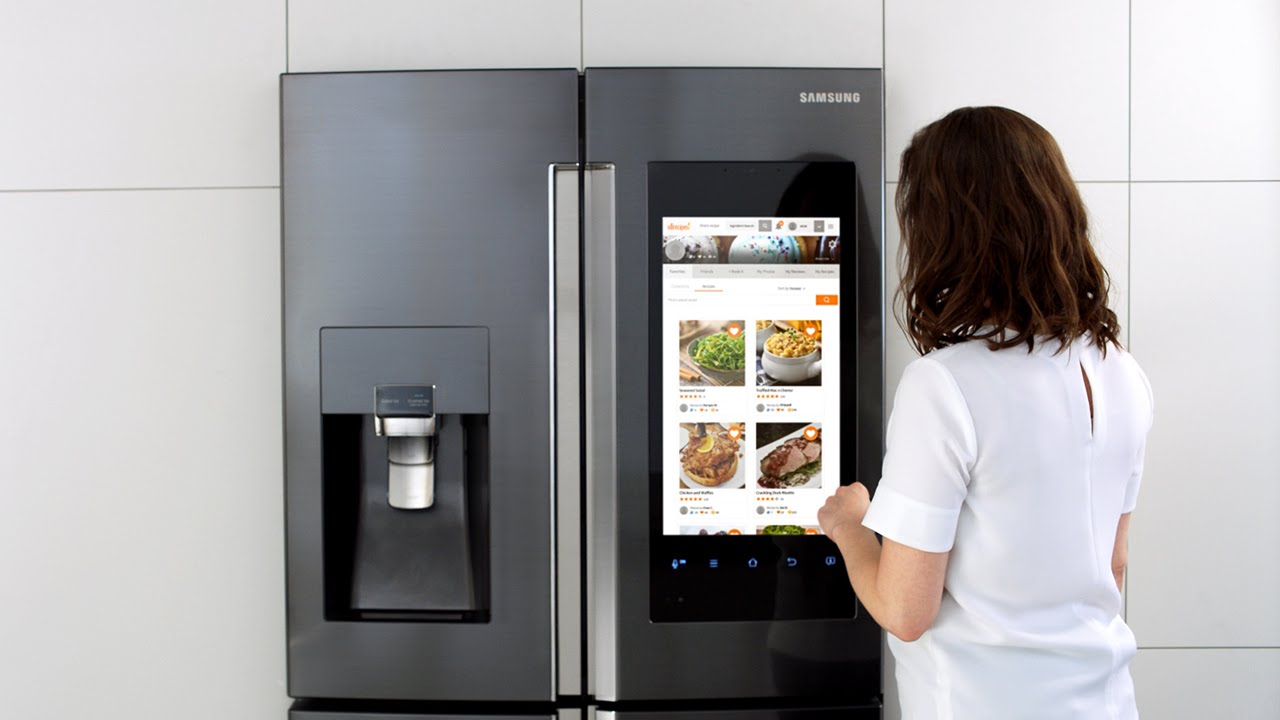
    Samsung’s Family Hub can connect to and control third-party devices that are part of the SmartThings smart home ecosystem such as lights, thermostats, home video cameras, and more. So from this fridge’s screen, you can adjust a SmartThings-compatible thermostat or view what’s happening outside your front door or in another room of the house with a SmartThings-compatible camera. Use Samsung’s Bixby voice-activated assistant to get personalized updates about your schedule – straight from your fridge.

    A good deal on this fridge is $2500. If I can find it for that price this is my guy. It has all the latest features and is the King of the smart-fridge hill right now.

    2.Kenmore Smart

    Stainless steel, French doors, extra-large capacity and the Kenmore Smart app . With this Energy Star-qualified appliance, you can always make sure your food stays at the correct and safe temperature thanks to the convenience of the Kenmore Smart app and GeniusCool™ technology that creates the ideal temperature and humidity levels for your cuisine. I can Control the fridge remotely with Alexa or use voice commands to activate the ice maker or air filter or to adjust and monitor your fridge’s temperature. Nice recessed LED interior lighting brightly illuminates the fridge’s contents, helping to ensure nothing goes to waste in a forgotten corner. Plus, the extra-large dispenser area on the front of the fridge is big enough to accommodate not just glasses but coffee pots, water bottles and even large pitchers, too, making it convenient to access fresh, clean water anytime.

    At $2300 prime this seems like a good option, the only hesitation is we’ve found a few little qualms, the kinda stuff you don’t know when you purchase blind on line like:

    • The plastic components are thinner material = Cheap
    • The drawers don’t pull out as far.
    • The overall feel is light / cheap.
    • Both refrigerator and freezer interior lighting is lacking.


    3.Whirlpool – 32 Cu. Ft. French Door Refrigerator

    Wi-Fi connectivity so that it can connect to your home automation system of choice, but the real advantage of this fridge is that it includes a smart learning process that adapts to your schedule and can readjust for parties or other events where the door is frequently opened or closed. Whirlpool decided to stick with simple, fridge-specific features that don’t ask you to rethink the role of your kitchen. Marinating some meat? The screen will show you recommended times for different cuts and ask if you want to set a timer. Cleaning the fridge? Whirlpool will suspend cooling to save energy and also shut the door alarm off so it doesn’t annoy you while you scrub. Seems more intuitive then smart.. pass

    cost on this guy – $ 4400  and I know you already know what a Whirlpool french door fridges looks like.. boring


    4.GE Profile Smart French Door Refrigerator

    Huge capacity, black stainless steel and a built-in Keurig K-Cup with instant hot water makes this fridge one of the coolest on our list. It comes with two evaporators to create separate, optimized climates in the fresh food compartment and in the freezer to ensure ideal humidity, making your food taste better and last longer.  Electronic Temperature Controlled Drawer with Colored LED Lights and Scheduled hot water. SO i have hot water on tap whenever I know I may need it. I can even use Amazon’s Alexa to control your fridge simply using my voice. Just ask Alexa to heat up water for your favorite hot beverage or turn on GE’s TurboCool function to restore the ideal temperature after putting away groceries

    $3300 I like this one a lot. I like the darker stainless steal look. I love the way the door float open. This one I high in the running for Beau’s new fridge. I just wish it had the big screen wow factor the Samsung does.


    5.LG Signature Smart Fridge French Door Refrigerator

    Again no screen but knock twice to illuminate and see inside InstaView’s glass panel, Door-in-Door feature allows you to get in and get out with ease. LG says it  stays true to the essence, delivering a new sense of life for the most discerning individual. I kinda agree, there is a is a smart sensor detector at the foot of the refrigerator that opens the door automatically. Just step on the “Door Open” light projection on the floor in front of the refrigerator and the door gently opens.

    $6600, its nice but ill have to pass


    The Final Thought

    And the winner of the honor of being my new fridge is… The Samsung Family Hub. It was the highest reveiwed, best priced and has the wow factor of the screen. Not to mention the tech geek I am, but this thing has loads of useless features. Im in, congrats Samsung


  • Expect Big Things from Apple’s WWDC

    Expect Big Things from Apple’s WWDC

    Last year’s WWDC (Worldwide Developers Conference) saw the announcement of the HomePod as well as the new iPad Pro 12.9 and iPad Pro 10.5. This was also when Apple revealed iOS 11 and watchOS 4. Apple will have to up the anty if it wants to compete with Google’s jaw dropping I/O conference. Lets look at some big things we expect to hear about in Junes WWDC.

    iOS 12

    This is a not a surprise, we have seen twelve iOS update keynotes at these things over the years. This year what we are looking to see is vast stability upgrades. Primary apps getting overhauled or upgrades, apps like  Mail, Camera and Photos ever calendars, calculators, and stocks. Could we make iMovie a little more mainstream and easier?  Security and performance focus would be less exciting but much needed. What not to expect is for apple to blow your hair back with some revolutionary feature or function, they will save that for September.


    iPhone SE

    I’ve written about this before, the SE has aged well and served its purpose but now its time for even the entry level iPhone to get a much needed upgrade. Why waste something this meaning less and cram it in with the big release in September when you can pop it out at the end of June and give a pop to the Q2 earnings.  I would expect the SE to unveiled and introduced at the WWDC and pre orders a week after.


    Watch OS 5

    They do this every year, while we are starting to hear rumors about the Watch 4, we will for sure see the preview for the new watch OS. Id like to see a quicker control option, new watch faces, and if the crowd gets too bored at this tech conference maybe test out a new sleep tracking feature.


    New Mac Pro

    We know a redesigned Mac Pro is coming, and Apple even recently made a point of reminding everyone when it said the following in a press release:

    “In addition to the new iMac Pro, Apple is working on a completely redesigned, next-generation Mac Pro architect-ed for pro customers who need the highest performance, high-throughput system in a modular, upgrade-able design, as well as a new high-end pro display.”

    Im thinking we will see a big keynote on this. I would expect it to be the highlight of WWDC, kinda mad I spent that $8000 on a new mac pro in Feb.


    What Else

    Those are the thing we know for sure they will hit upon at the WWDC but I wouldn’t be surprised to see a new Apple TV, with a boost to TV content. The Macbook and Mac Mini will be getting some attention as well, and don’t forget about a possible hint at a revamped iPad Pro for a fall release. Not to mention we will have to sit through hours of financial report and sales bragging from Tim Cook to look forward to..

  • 5 SmartDevices to Improve Your Golf Game

    5 SmartDevices to Improve Your Golf Game

    The The Players Championship starts today, so what better time to take a look at all the smart toys out there to improve your golf game. SMartdevice are everywhere and in everything, golf just seems a natural fit. We are always looking to drop our score and an edge up and we need the data to do this. Well these 5 devices will have you the envy of your club house and playing like a pro.


    1. Cobra’s “first connected golf club.”


    The $349 King F7 Driver pairs the club with a smartphone app that allows you to track your game via GPS. Beyond that, the club features three different centers of gravity, allowing you three different potential approaches and flight paths. Say that again, yes it is Equipped with 3 Center of Gravity settings for maximum distance.It features an Arccos sensor seamlessly integrated into the grip to automatically record each drive, providing real-time stats for distance and accuracy. Not to mention it is one of the baddest drives out there even with out the connect.


    2. GolfBoard

    This electric-powered vehicle, which evokes a skateboard or snowboard, replaces a golf cart and promises to literally speed up your round of golf. Recently it’s gone from something vaguely futuristic to something you can find at more than 300 courses worldwide. You can even buy your own. Prices start at $6,500 for the standard model that motors up to 10 mph. Yes it looks like fun, and yes it will provide endless hours of youtube fail videos.


    3. FX-Sport VC Golf headphones

    FX-Sport specializes in wireless sport headphones. Its new VC Golf model is called “the first psychological coaching device for golf.” On it, you can access hours of soothing, sage words from golf gurus — they get in your head so you don’t lose yours. It’s listed at $199. The Headphones are preloaded with many hours’ worth of psychological coaching, mental preparation, practice drills and workouts, from world class golf psychologists, coaches and trainers. All practice drills have a strong emphasis on the psychological. Advice on how to focus, what to focus on and what to do when things are not progressing as you would like. I wish I could change the voice to Ty Webb. Be the ball Danny!


    4. TLink GPS Golf Watch

    Wearable golf tech that displays instant yardage ⏤ the distance to the back, middle, and front of the green ⏤ on 40,000+ courses worldwide. Simply open up the GPS app on your smartphone, connect TLink with your phone. Never worry about what club to use, you have the data right there.


    5. SetupEye

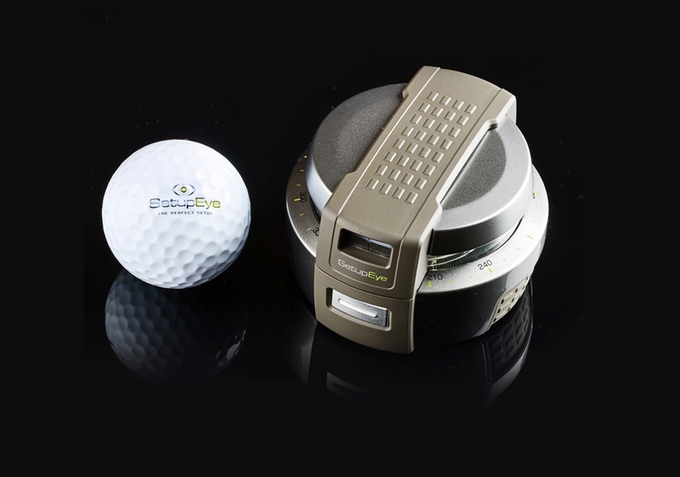
    Im pretty sure this was frowned upon in Caddyshack 2 but If your alignment is off, then you aren’t going to come anywhere close to firing on target. SetupEye uses lasers and “target lock technology” to help golfers take dead aim with absolute confidence. Simply lock onto the flag or your chosen target through the viewfinder, press the button, and place the device on the ground between you and your golf ball. From there, just follow the shooting green lightsaber as it points the way.


    The Final Thought

    You got the ultimate club to track your swing from your drives, the watch to tell you exactly how far to the pin and a golf coach in your ear. You are navigating the course quickly and stylishly on your gold board and you have the target locked on the hole to nail this last putt, see you at the tavern for a beer you golf pro.