Month: May 2018

  • Restaurant Review App Roundup: Let’s Eat!

    Restaurant Review App Roundup: Let’s Eat!

    Are you looking for a great new place to grab a bite? Look no further than a good restaurant review app! Which review app is the best to use though? We’re getting meta, today, and reviewing the reviewers! 

    Zagat 

    The well-respected Zagat name is also attached to a fine restaurant review app. This app is pretty no-nonsense, getting right into the reviews in a way that is almost too abrupt. However, if you just want the highlights and don’t have time to go in much deeper, this app is great. Zagat has separate scores for décor, service and food, allowing you to see the different aspects of reviewed restaurants. 

    Uniquely, Zagat sports a selection of professionally-reviewed and expertly recommended restaurants. If you want to spend less time browsing and more time fine dining, look no further than Zagat. 

    Urbanspoon 

    Urbanspoon is a slick, stylish and polished app. Made with urban explorers in mind, it lets you browse restaurants by a number of criteria. You can compare restaurants by popularity, cuisine, overall rating and more! If you’re in a new city and looking for something to eat, this is a good app for you. 

    Urbanspoon even has some practical functionality. You can make reservations from the app, saving time when you’re getting ready to go get dinner! 

    Foursquare 

    Featuring some really cool social functions, Foursquare is a popular app for circles of friends. Foursquare allows you to share your favorite places with your friends, and you can see your friends’ recommendations too! Your friends can suggest menu items at their favorite restaurants and you can tell the app which friends’ tastes you trust.  

    Foursquare also lets you tailor your own results by telling it what kinds of things you like. This helps you exert tighter control over search results and make sure you can find great new places that you like. Foursquare is a great pick if you like to see what your friends are eating! 

    Our Favorite Restaurant Review App: Yelp 

    While Yelp has grown to encompass much more than just restaurant reviews, it’s still the best app for searching for new places to eat. With tons and tons of reviews submitted by users and professionals alike, it’s hard to go wrong with Yelp. Easy to use and full of tons of great search functionality, we can’t recommend this one enough. 

    Notable features for Yelp include the option to search for local deals, find great little hole-in-the-wall restaurants, and tons of pictures of every restaurant reviewed. You always know what you’re getting into with a new place when you check it out on Yelp first! 

  • Need a Ride? Check out Our Favorite Ride Sharing App List

    Need a Ride? Check out Our Favorite Ride Sharing App List

    If you’re looking to hitch a ride, there’s no shortage of great ride sharing apps for you to try out. Which one is the best, though? Well, that’s subjective. But we can certainly tell you which one is our favorite! 

    Juno 

    Juno is a ride sharing app that focuses, first and foremost, on paying its drivers well. The idea is that better paid drivers will deliver a better experience for the end users of the app. This is pretty sound logic, all considered! However, Juno is still in a soft-launch window, so it’s hard to say how this will play on a large scale.  

    That being said, the app is clear and concise, cutting straight to the important stuff. The app has options for normal rides and an SUV option for when you and a bunch of pals need a ride. The app is pretty good about estimating the fare and giving ETAs, which are common but appreciated features. Keep an eye out for this ride sharing app when it goes into a full release! 

    Lyft 

    Lyft is the second-largest ride sharing app in the US, which is unsurprising. Featuring pricing comparable to Uber, Lyft is often used by people looking to compare and try to find the best rates for rides. Many drivers actually do the same thing, but in reverse, driving for both services and seeking fares that pay the most from each.  

    Lyft offers the standard ride sharing app features of normal-sized rides or “Lyft Plus” for large groups. The Lyft Line service is also available for those looking to keep the price of their fare down. It accomplishes this by having multiple users share one ride, somewhat like a city bus. This is great for keeping the price down during busy times of day! Speaking of, unlike Uber, Lyft caps its demand-based price escalation at 400 percent. Which is still a lot. But it’s good to know there is a cap, unlike Uber’s service. 

    Our Favorite Ride Sharing App: Uber 

    You may have seen this one coming, but we really like the original. Uber has gotten as big as it is for good reason: it’s a really great app! Pioneering all the ride sharing app features we’ve come to expect, Uber has had time to really hone its service. The end-user experience is really just top-notch.  

    Options for choosing what kind of car you want to ride in (sedan, SUV, luxury car) are present, as you would expect. Additionally, like Lyft, you can call an UberPOOL ride, allowing you to split the fare with strangers to keep the price down. The coolest thing that Uber offers that competitors don’t is UberASSIST, a specialized service for mobility-impaired people. ASSIST drivers are trained to help wheelchair users, and their vehicles are equipped to accomadate them as well! 

    There you have it, our favorite ride sharing apps. Next time you need to catch a ride, keep these apps in mind!  

  • Senate Passes Bill Overturning FCC Repeal of Net Neutrality

    Senate Passes Bill Overturning FCC Repeal of Net Neutrality

    In a surprising, but welcome, turn of events, the FCC has been dealt a blow in the battle for net neutrality. The Senate passed a bill that would preserve Obama-era neutrality rules, preventing FCC chair Ajit Pai’s personal crusade to crush net neutrality. For the uninitiated, net neutrality encompasses a series of protections for internet traffic. Namely, monetization of priority websites and equal footing for all content are controlled by net neutrality legislation. Ajit Pai primarily represents the interests of companies like his former employer Verizon. Huge telecom companies like Verizon and Charter stand to gain quite a bit of money from the repeal of net neutrality rules.  

    What’s Next for Net Neutrality? 

    This isn’t even close to the end of this fight, unfortunately. As it stands, Pai’s disastrous repeal is still on track to take effect on June 11th. That’s not a lot of time for the bill to be brought to a vote in the House, and even it is brought there, it still has to get past the Republican majority there. 

    So You’re Saying There’s a Chance? 

    There is, technically, a chance. Pai himself, and the FCC, seem convinced that the bill will die in the House, thus allowing Net Neutrality to finally be repealed. This would be a bad thing. Thankfully, there is a solid chance that some Republicans in the house are conscientious of how disastrous voting in favor of a neutrality repeal would be for their chances of reelection. This contingent of Republican legislators could lead to the bill passing the House, too.  

    Then This is Over, Right? 

    Not quite. After the House, it goes to the desk of the President of the United States. Which is troubling, to say the least. Trump isn’t exactly a predictable guy, and Pai was his pick for FCC chair. The odds seem good that if this bill gets to him, he’ll simply kill it there. But we can hope. For right now, net neutrality is still a possibility for the future. But the future is looking grim. 

  • Microsoft’s New Adaptive Controller Makes Xbox Gaming More Accessible Than Ever

    Microsoft’s New Adaptive Controller Makes Xbox Gaming More Accessible Than Ever

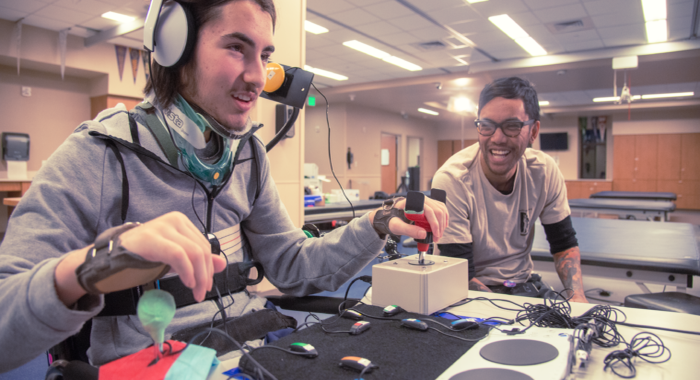
    For many gamers, the controller isn’t a portal into another world, but is a hindrance keeping them from enjoying the game. Microsoft seeks to alleviate that problem with their new adaptive controller. Retailing for $100, the adaptive controller looks pretty simple at a glance. The front face sports two big buttons and a directional pad. There are a few menu buttons, and some USB ports. It looks incomplete. And that’s purposeful, because it kind of is incomplete before its end-user gets their hands on it.  

    Accessibility Through Adaptivity 

    On the side of the controller are a series of 3.5mm jacks, each wired to be an Xbox controller button. This might seem very odd to some readers. Why 3.5mm jacks? What is this? The Adaptive Controller is an officially sanctioned version of something many gamers have been using for some time now. Accessibility rigs like this one have been the norm for years for limited mobility gamers, using 3.5mm jacks to customize their experience. Binary, on-off buttons are commonly plugged into the jacks to act as different controller inputs. Some of the jacks even support standard-style josticks. The adaptive controller also sports two side USB ports.  

    One Size Does Not Fit All 

    By releasing an eminently-customizable controller and making no assumptions about the end-user, Microsoft has made something truly special. Officially recognizing the existence and unique struggles of mobility-limited gamers is refreshing. Many hospitals and non-profits have been helping gamers with rigs like this for some time. Seeing it officially condoned and supported by Microsoft is truly exciting for the future of accessibility in gaming.  The unassuming adaptive controller will certainly be a boon to those gamers who want to enjoy their experience without a standard controller holding them back. 

    Adaptive Controller Affordability 

    By making this type of controller widely available for this price, Microsoft changes the game for limited-mobility gamers. Custom-built rigs like this are often prohibitively expensive. Broadened Horizons, a hardware maker, is somewhat similar to the Xbox Adaptive Controller, but has no large face buttons out of the box. It actually requires several add-ons to match the XAC’s functionality. Microsoft has certainly changed the face of this type of technology. The XAC will be compatible out of the box with all Xbox One systems, and a tiny bit of set-up gets it rolling on most Windows PCs. Hopefully this is a sign of things to come, and more accessibility options will be opened up because of this first step. 

  • Helsinki to Lead the Way For AI Education with Free Class

    Helsinki to Lead the Way For AI Education with Free Class

    Helsinki University in Finland has launched a course on artificial intelligence — one that’s completely free and open to everyone around the world. A lot of tech giants like Google now have divisions working on artificial intelligence projects, and even whole non-tech industries already depend on AI for various tasks. Its scary to think how much we already depend on AI and what it will entail in the future. Its best to jump ahead of the curve on this, especially you youngsters. Parent enroll your teens in this class for the summer.


    More Details on Helsinki’s Free AI Class

    Helsinki’s course focuses on the basics, starting with defining what AI is and explaining how it can solve problems. It is more of a beginner course. The fist part of the materials is a discussion on how we use AI  already  in the real world. In the second part of the course, they explain how machine learning works and what neural networks are. It will apparently take you about 30 hours to complete the course. Students in Finland can even earn academic credits through the Open University.

    For us Americans, you can  enroll in the course outside Finland. You will have an option to receive a certificate that can be posted on the Linkedin page. Everyone who completes the course will also get a certificate (PDF) emailed to them. You have an option to do the course at your own pace, but they recommend trying to finish in 6 week. According to their understanding, having a deadline makes it more likely that students will finish the course.


    The Final Thought

    This is the big growth sector right now and will be even more in the future. Helsinki University hopes that one percent of the Finnish population – some 54,000 people – will take the online course this year. So far 24,000 have signed up and that is alot. If you think about that number and the magnitude in which AI will dominate our next half century. Finland will be the worlds new super power.  It could  and probably will be the first nation to fall to  Elon Musk’s prophecy of the Immortal AI dictator.  The US needs to invest heavily in the next generation of programmers now and have them lead the curve on AI.

  • Digitsole Smart Sneakers

    Digitsole Smart Sneakers

    October 21st. 2015, this is the day Martian McFly goes back to the future and get power laces shoes. I looked forward to this date since I was a small child I ever wanted from a shoe. Lets fast forward a few years to 2017, Nike released a back to the future special edition shoe. It was merely a high priced novelty shoe, completely useless and unrealistic. let down, no hover board, no power lacing shoes, I was feeling very betrayed. That was until I found the Digitsole Smartshoe 2.0 sneakers. Stamp out cold feet with these self-lacing, thermostat-controlled, crowdfunded beauties from shoemakers Digitsole.

    Better late then never. However Digitsole founder and CEO Karim Oumnia says he and his team presented the first auto-lacing smartshoe in October 2015 (to fit with the Back to the Future theme) before taking their prototype to CES 2016. So im going to allow this,  I mean who knows how bad Doc and Marty messed up our timeline. Two  years late for a commercially viable smartshoe is understandable when you have a teenager messing with the time continuum.


    What is a SmartSneaker?

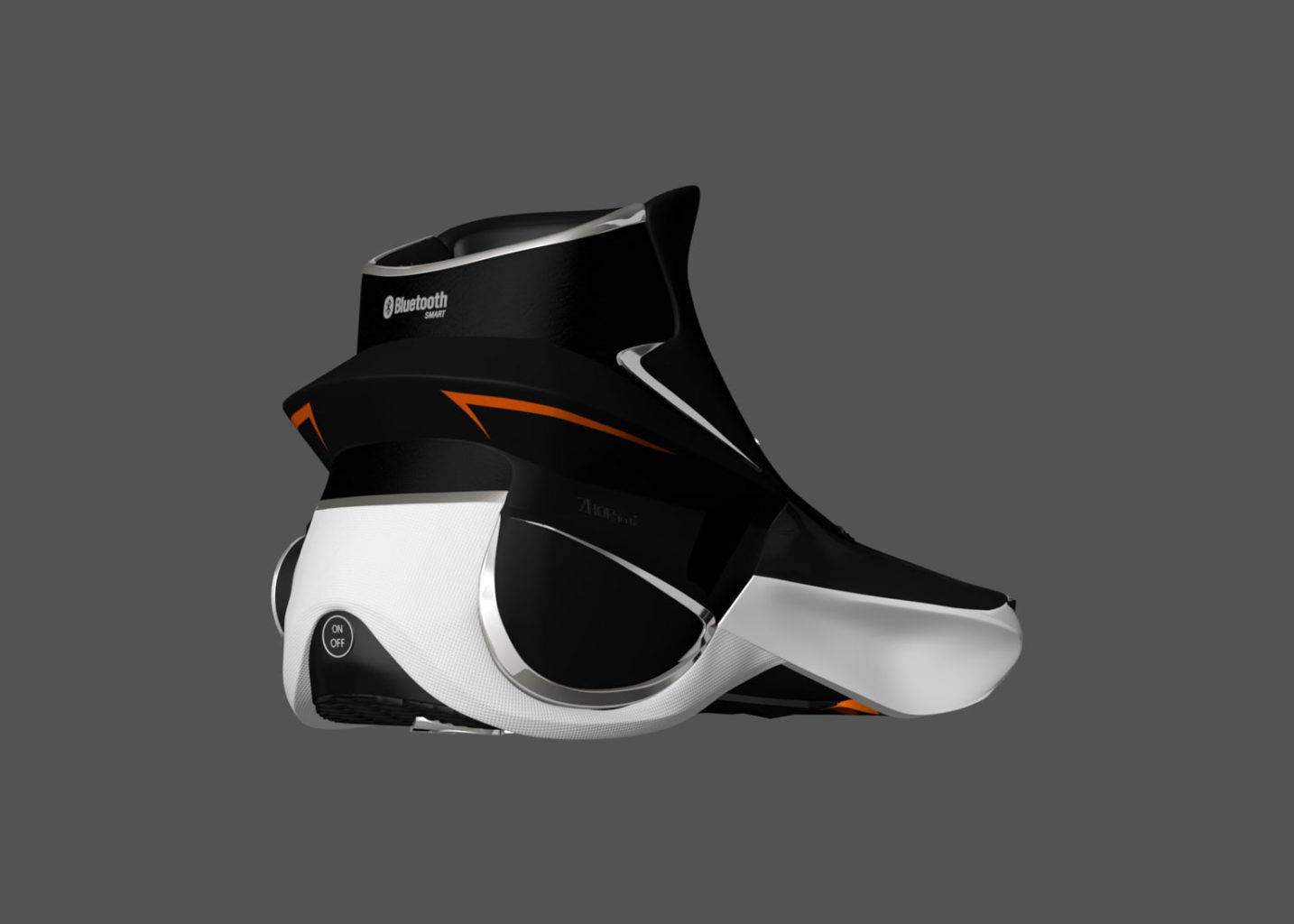
    The first auto-tightening, interactive, heating, fitness tracking & shock absorbing sneaker. More importantly what can a SmartSneaker do. Designed to warm each foot to your preferred temperature with the tap of an app, Digitsole’s Smartshoe 2.0 sneakers also promise to track your movement, gait and calorie burn with greater accuracy than a wrist-worn device. And, whether you’re prone to overpronation or keen to pump up your propulsion, their app-based personalized audio coaching will help you take pride in your stride.

    No Power Laces?

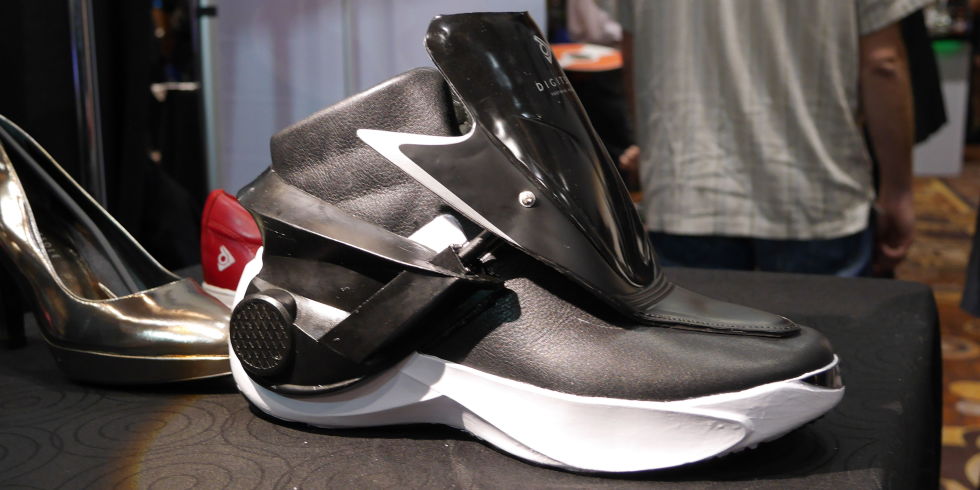
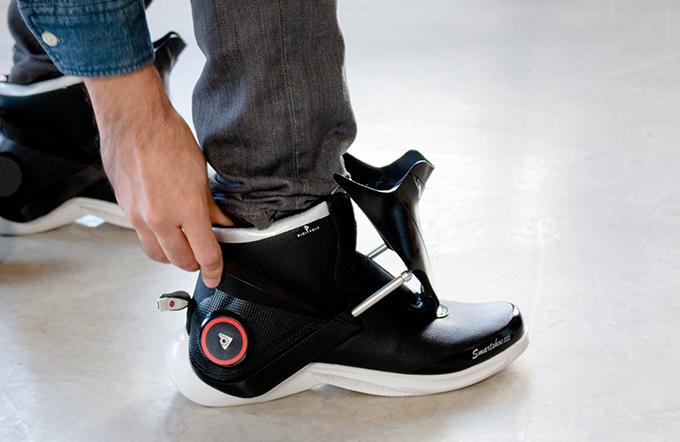
    Tell me about the power Laces. They don’t quite have power laces. Hold Up. However they do have auto tightening feature. As opposed to actually being ‘self-lacing’, the Digitsole shoes have a tongue-like cover that closes to tighten around your foot. You can activate it via the app or press a button on the side of the shoe to achieve that firm Nike Air Mag–esque fit.

    The Final Thought

    These may already look familiar, I did a quick write up on them in the Top 5 wearables you need for the gym article a few weeks back. All Back to the future non-sense aside these are legit tech. These are ground breaking and revolutionary. The future of footwear, but would it be to much to add a speaker. That would be cool.

  • 5 Tech Misconceptions People Adamantly Believe

    5 Tech Misconceptions People Adamantly Believe

    I’ve done a lot of troubleshooting, fielded a lot of tech questions and generally helped a lot of people with their IT issues. I am the go to tech guy for a large number of people. I’m that nephew that installed AOL on your first computer, you know who I’m talking about. I’ve heard and seen a lot of obscure,obscure and down right wrong practices in tech.  Here are 5 general tech misconceptions the less techy crowd still think are good savvy ideas.

    1.I Heard, If I Remove the Battery From my Laptop When it’s Plugged in it Will Extend my Batteries Life.

    Wrong. Laptop batteries vary in their composition but they are all chemical based. Meaning, the atoms inside a given battery are manipulated to produce electrons and the chemicals in the reaction (oxidize) and decay over time. Something a bit similar happens in our own bodies and why anti-oxidants help us live longer. Energy has a price; but these reactions occur whether a battery is in use or sitting on a shelf.

    Try it this way, who ages better the person that stays active and exercises daily or the tech blogger sitting at his computer all day not moving? The stationary blogger will age much quicker.

    2. All I know is Closing Unused Apps on Your iPhone will Make it Faster.

    Again Wrong. If you own an iPhone, you’ve probably heard the myth that closing down all of your open iOS apps will save battery life And free up memory to run faster.

    It’s a great way to shutdown a malfunctioning or crashed app. But the myth that it’ll help to eke-out a few more hours battery life is completely false.

    Not only is force quitting your apps in this manner unnecessary, it’s actually detrimental. Apps in the background are effectively “frozen”, severely limiting what they can do in the background and freeing up the RAM they were using. iOS is really, really good at this.is so good at this that unfreezing a frozen app takes up way less CPU (and energy) than relaunching an app that had been force quit. Not only does force quitting your apps not help, it actually hurts. So in short if it’s not malfunctioning don’t worry about it.

    3. No, Don’t Charge your Phone Battry till It’s at Zero

    The idea that you should always completely discharge a battery before charging it up again has legitimate origins, but it doesn’t apply to current technology. Years ago, when nickel–metal hydride (NiMH) and nickel-cadmium (NiCad) batteries were common, they suffered from an issue called battry memory: Unless the battery was completely spent before being recharged, it would “remember” how much power it had used and only charge back up that amount. If done repeatedly over time, the battery would never charge totally again.

    The lithium-ion (Li-ion) battery that’s probably in your phone or laptop right now doesn’t suffer from this issue. They have a limited number of charge “cycles”before batteries start to hold less overall power. Ideally charge your devices from time to time before they fully die.


    4.The Updates are just a way to make my phone Crash so I have to get a new one

    Just before the latest and greatest phone comes out, your phone suddenly starts running slowly. Maybe it starts freezing, or the apps you use get sluggish. Either way, if you can relate, you can probably also understand the common feeling that this is all a plan by tech companies to force you into upgrading.False

    Its a common Tech misconceptions, It’s not some corporate trick to force you into the newest tech, or trap you on the consumerist treadmill. As those new phones are released, they come with more memory, better screens, faster processors. Then developers start building their apps around them. When they do, they optimize their apps for the newer devices. So as apps are updated to make use of all of the features on those new devices, they seem to slow down on older phones.


    5. Karen Told me, off-brand ink cartridges voids the warranty on your printer
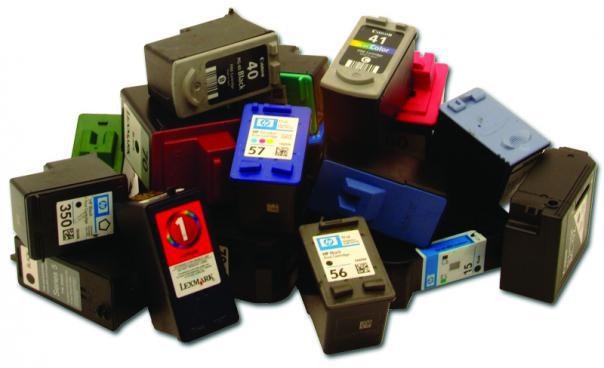
    Knock it off Karen. Untrue. Branded ink cartridges are expensive so people often use off-brand cartridges to keep their printing costs down. Fortunately, despite the myth, There is no chance of voiding any warranty on your printer by using off brand cartridges. But then again, third-party tampering isn’t covered in the event of gunshot wounds to your printer either. Most all the problems that printers are likely to have are still covered just fine under the warranty.


    The Final Thought on Tech Misconseptions

    we could go on an on about Tech misconceptions and you are probably guilty of believing or even perpetuating some of these. Don’t be the Karen’s of the world and give it just a little more thought. Tune in next time when we talk about de fragging memory and airport x ray machines. I may just turn this in to a regular colum

  • That’s No Mac Pro, That’s a Samsung ArtPC PULSE

    That’s No Mac Pro, That’s a Samsung ArtPC PULSE

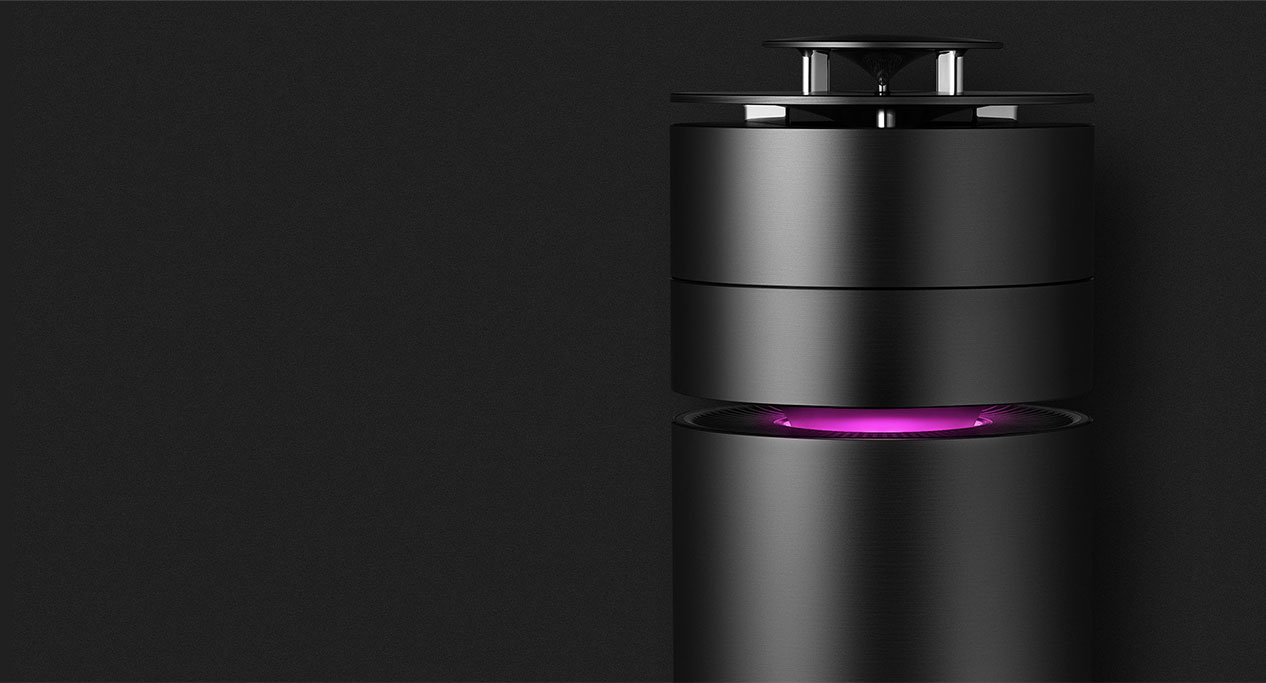
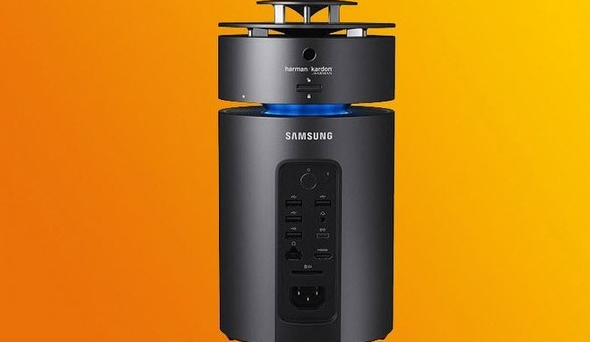
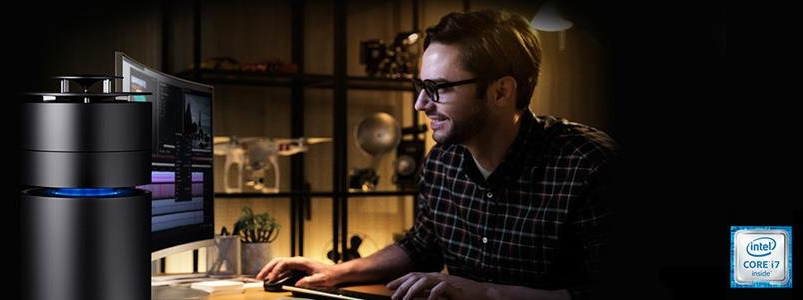
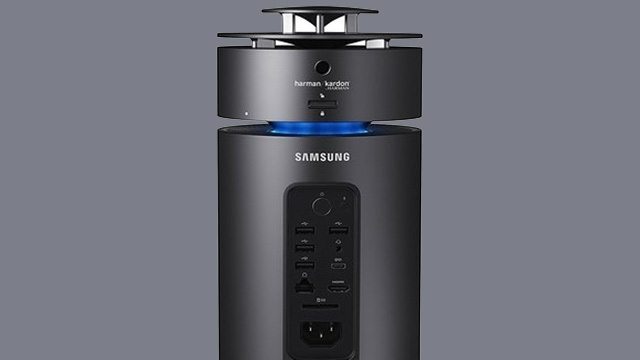
    Samsung ArtPC PULSE is trying to redefine the design of computers like Apple has already done. This computer is impeccably slim and exquisitely  premium. The Samsung ArtPC PULSE is built with full metal in a cylindrical form factor. This is actually the second computer you want to place at the center of your space.


    The Great

    • Very Pretty
    • Beautiful Desgin
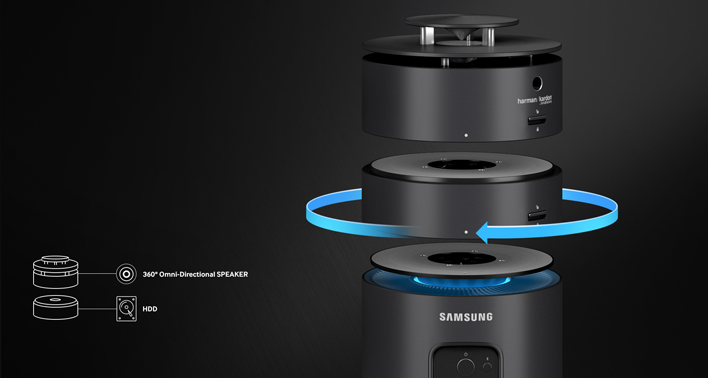
    • Stackable Expandable HDD
    • LED Notifications
    • Great 360 Sound


    The Not

    • Mac Pro Knockoff
    • Standard Power
    • Uninspired


    The Conclusion

    The desktop PC is undergoing a renaissance, with designs that beg to be showcased in a living room or creative space. Samsung is joining HP as they mock what Apple does best. Think outside the box and innovate. It’s a distant 3rd in a playing field of 3.


    The ArtPC draws immediate comparison to Apple’s machined Mac Pro. With an aluminum build, integrated 360-degree speakers tuned by Harman Kardon— an audio and electronics brand that Samsung is in the process of acquiring— and a modular, expandable design, the ArtPC’s aesthetic is divisive. Part minimalist metal and fully utilitarian, the ArtPC Pulse invites comparisons from passersby to my desk to anything from a futuristic space capsule to Oscar the Grouch’s trash can abode.


    Give Us The Deats

    The small, cylindrical shape of the desktop machine is quite innovative and attractive. It looks magnificent sitting on a table top with a lighting band proving to be a striking contrast against its full metal, black body. It is equipped with a brilliant and fast working processor. The Radeon Rx graphics card ensures that the graphics you view on your screen are always impeccable. One of its greatest features the way it is engineered. You can twist and turn and remove storage whenever you do not need it, and fix the module back on whenever you do need it.


    The Sound And Design

    Harman Kardon 360 degree Speakers are the best part about the Samsung ArtPC. They are crisp clean and booming. I’ve always found sound quality lacking in computers and it’s nice to see Samsung up the game. This shows that PC manufacturers are teaming up with the best sound system providers to give users good audio systems alongside powerful PCs


    The design is fairly minimal in design and measures 5.51 x 5.51 x 12.18 inches (13.9 x 13.9 x 30.9 cm) and uses the single central fan concept. It’s pretty but it’s not as stunningly elegant as the Mac Pro.


    There is one more interesting and innovative design of the Samsung ArtPC PULSE. This Computer allows you to attach and detach more storage whenever you need. Position the HDD unit and spin to click and easily add more storage. Think easily stackable hard drives. Kinda cool.

    Quick Specs of The Samsung ArtPC PULSE

    • CPU Intel Core i7 (6th Gen) 6700 / 3.4 GHz
    • Chipset Type Intel H110 Express
    • Form Factor Memory SO-DIMM 260-pin
    • Slots Qty 2
    • HD SSD  NVM Express (NVMe) 256GB + 1TB Serial ATA-600
    • GPU AMD Radeon RX 460 2 GB GDDR5 SDRAM
    • RAM Technology DDR4 SDRAM Memory Speed  2133 MHz Configuration Features 2 x 8 GB


    The Final Thought

    In A Samsung world of being second best this is just that. If you said to yourself want a mock Mac Pro “speaker as a Desktop” that runs windows 10, well  then you have found your dream machine.


  • Wearable Tech: Which Tech Items are Must-Haves?

    Wearable Tech: Which Tech Items are Must-Haves?

    The hot new trend of wearable tech has gotten a ton of traction lately. Apple Watch, FitBit and countless others have made wearables hot-ticket items. They’re stylish, functional and cool all at once. Which ones are our favorites? Which ones are must-haves? Check out our roundup of the coolest wearable tech out right now! 

    Rocket Skates 

    Oh yes, these are real. Sort of like a combination of Heelies and an electric scooter, these sci-fi action-hero shoes can propel you at up to 12 mph. That’s super impressive for being shoes with wheels. These cool shoes also come with a phone app to track your route, mileage and battery.  

    These aren’t easy to use, to be sure, but if you’re looking to turn heads and jet around on freaking rocket skates, these are awesome. Just be careful not to crash into any walls or anything. 

    Lenovo Vibe Band 

    At least one smart watch had to make the list! The Lenovo Vibe Band is a stylish little device. Sporting a unique e-ink display, the Vibe looks great in direct sunlight and has a discreet display. It functions as a fitness and sleep tracker and does it all with 7 days of battery life.  

    Even better, the Vibe Band is priced under $100, giving you a ton of features without having to pay Apple Watch or Android Wear prices.  

    Bio Sport Smart Ear Buds 

    These ear buds double as biometric sensors and fitness trackers. Pretty neat, huh? They have great sound quality thrown in, too, which is always a plus for working out! These neat little ear buds can be tossed in a bag and stored easily, and they appear very discreet when in-ear. If you want a fitness tracker but don’t like wrist-mounted devices that get in the way or draw attention to themselves, then the Bio Sport Smarts are for you! 

    The Coolest Wearble Tech Device: Nixie 

    This incredibly cool little drone wraps around your wrist like a watch when not in use. When you command it, however, it unfolds and takes off. It can then snap pictures, usually selfies, before swooping back down to your wrist. It looks like something Tony Stark would have and it is amazing.  

    While it might not be the most useful wearable in the world, it tops this list for just being so cool. It’s just incredibly impressive to see it unfold, take off, and do its thing before landing back where it started. This one is still in development, so it won’t be available just yet. Hopefully it’ll get a full release soon! 

  • OnePlus 6 Coming May 22nd: What’s New?

    OnePlus 6 Coming May 22nd: What’s New?

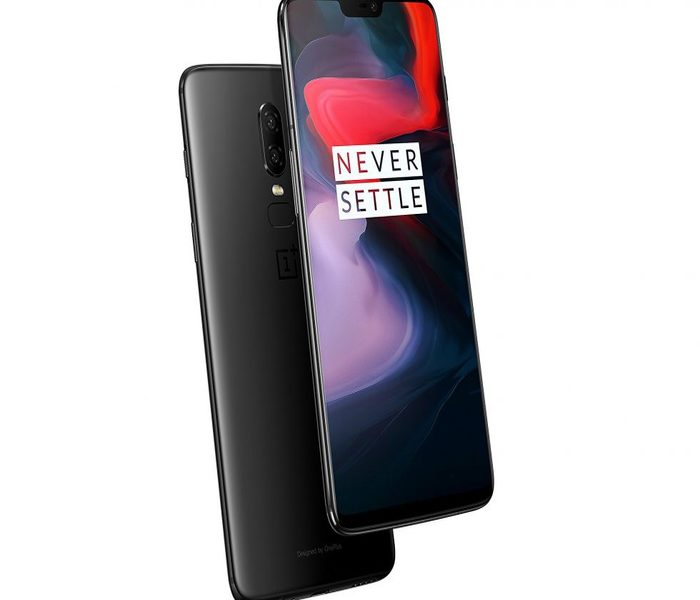
    China-based smartphone maker OnePlus launches its newest flagship, the OnePlus 6, on May 22nd. The hotly-anticipated phone will be able to participate in the Android P OS beta and sports a host of new features.  

    Phone Notch, For Better or Worse 

    Love it or hate it, the phone notch is here to stay. The OnePlus 6 features an iPhone X-like notch at the top of its edge-to-edge display. This odd aesthetic feature houses some necessary hardware. Namely, the front-facing selfie camera and the speaker for actually taking, y’know, phone calls. Interestingly, much like other Android phones that sport the notch, there is an option in the software setting to hide it. The screen to either side of the notch darken, making the phone appear to have a more traditional screen. 

    Overall Design 

    The OnePlus 6 has a back made of Gorilla Glass 5, meaning it should be pretty sturdy. It’s also somewhat water resistant, although OnePlus urges you don’t toss it in the pool. It should be able to survive a bit of rain or maybe being dropped in the dishwater, but any real prolonged submersion wouldn’t be good for it. On the camera side, it has an interesting dual-camera setup on the back, allowing for tons of neat features. Namely, image stabilization and blurred-background portrait photos. 

    One Plus 6: Great for Gaming 

    The OnePlus 6 is awesome for playing games on the go. With options to mute incoming notifications while gaming, and de-prioritize background apps, the phone was made with gaming in mind. Anyone who’s been interrupted in the middle of a game of PU:BG by an untimely phone call knows how awesome it is to mute incoming notifications. Additionally, you can display the games in low or high resolution and disabled auto-brightness while gaming, so you can save battery life.