
Month: January 2019

  • Cracked Phone Screens are the Worst!

    Cracked Phone Screens are the Worst!

    You’ve got that fancy, expensive smartphone in your pocket. You know, the one that cost you hundreds of dollars but is also incredibly fragile and prone to developing those unsightly cracks. Yeah, that smartphone.

    If your phone has developed a series of spiderweb cracks following an unfortunate high-speed encounter with the floor, it’s frustrating. However, you need to get it repaired as soon as possible. You see, it’s not as expensive as you might think, and you could be causing more damage to your phone by leaving it cracked and still using it.

    Fix Your Cracked Phone Screen Right Away

    Cracked Screens are Even More Fragile

    So, as you well know, a glass screen is a fragile thing. It’s glass, after all. When your phone takes a high-dive off of a table to the hard floor, it’s going to crack. However, this isn’t the least of your worries when it comes to phone fragility.

    Here’s the thing: even the most durable Gorilla Glass has a finite lifespan. Your phone might be rock-solid for the first several drops, but once the first cracks start to show, it’s likely not far from shattering completely. You see this in spiderwebbing damage that spread out from smaller cracks in some situations.

    If your phone screen gets cracked, it’s not enough to simply put it in a case and hope nothing bad happens. You need to get the screen replaced entirely, which can be a tough ask, as it’s often expensive to go through this kind of repair procedure.

    Say Goodbye to Waterproofing

    If your phone is a newer model with a high waterproofing and dust-resistance rating, then we’ve got bad news for you. Once the screen is cracked, it’s unlikely your phone resists these outside materials anymore. Much like when your body has a cut, any open exposure to the outside world is terrible for your phone.

    Where before water would simply roll off of your phone and cause no damage at all, now it can flow straight into that hairline crack. Even if your phone doesn’t get wet, it could be getting dusty. Dust and debris can get stuck in your phone’s internal components after entering through an external crack. That’s because your phone’s normal dust resistance is compromised.

    You don’t need us to tell you how much of a problem these things are. Your phone is already damaged, so getting it repaired right away is your best bet. If you don’t, leaving it damaged and accruing dust and water damage could result in an even more expensive repair process. When it inevitably fails thanks to the buildup of damage, you’ll wish you had gotten it fixed right away.

    Resale

    When it’s time to upgrade to the newest model, you really don’t want to try to sell a phone with a cracked screen. No one wants to buy a phone that looks like it was owned by a butter salesman with no thumbs. After all, the most common way to get money to upgrade is by trading in, so why hurt your phone’s resale value?

    What’s more, all phone resellers know that a cracked phone could be evidence of more damage inside the device. Like we mentioned, water and dust damage is much more common among phones with cracks.

    On top of this, it’s much more likely that someone clumsy enough to have a cracked phone is clumsy enough to have more damage inside the phone than is showing. At least, in the eyes of a phone reseller this is the case.

    Health Risks

    There are also notable healthy risks associated with keeping a phone with a cracked screen for months without fixing it. For one thing, you could accidentally incur a cut from the sharp glass of your screen. If you’re rolling your eyes, don’t. Your phone’s cracks could spiderweb and result in small shards coming loose, resulting in potential injury to your fingers or hands.

    Further, trying to read text through a cracked screen puts further strain on your eyes. It’s already been shown that staring at a phone screen for too long can result in poor vision, so imagine adding a cracked screen on top of that.

    Consider the costs for either of these things. If you get badly cut by your phone screen, you might need to visit a doctor’s office, which is expensive. If you end up needing glasses from straining to look at a damaged screen, that’s pretty expensive.

    Bottom line? Get your phone screen fixed right away if it cracks. There’s no reason to limp along with a broken phone.

  • The Best Cars for New Drivers

    The Best Cars for New Drivers

    There are a ton of cars out there for new drivers to consider. It seems like you can’t turn your head without seeing an add for some new vehicle. But which cars are the best for new drivers? It can be very difficult to narrow down which one is right.

    So, your kid’s about to get their own car for the first time. What features does it need to have? Surely, your biggest concern is the safety rating of the vehicle. More than anything, you need a car that has the best safety ratings to keep them from getting hurt. But that’s not the only consideration! Let’s look at some of the best cars for new drivers.

    The Best Cars for New Drivers

    Ford Focus

    The $17,00 starting price for the Ford Focus makes it a solid entry point for any new driver. The vehicle is sleek and stylish, so it’ll please many new drivers for just its looks! It sports a great motor for a new driver, with enough power to get them where they need to go but not so much that they’ll get into trouble!

    The Focus is also a leader in safety in its class. Seven airbags make it unlikely that any crash will occur without an airbag deploying to protect the people inside. The car’s doors are also inlaid with boron-steel beams that are incredibly dense and hard to break, keeping the driver quite safe. In addition to that, the vehicle sports a handy back-up camera.

    Toyota Corolla

    Much like the Ford Focus, the Toyota Corolla costs a budget price of $17,000, making it a great starter car. It’s not just that low price that makes it a great pick: it’s also got a five-star safety rating. The car isn’t exactly “cool,” but it is a solid pick for a new driver thanks to its stellar safety features.

    For one thing, it’s loaded with airbags. There are eight airbags in the vehicle standard, and this ensures that any direction someone goes that they’ll be caught by an airbag. The seats were specially constructed to reduce the likelihood of whiplash, as well, making this a great pick for newer, inexperienced drivers.

    Other great features include the great gas mileage, stellar reliability and exceptional handling. In all, the Corolla is an easy vehicle to take care of and drive around for any new driver. You can rest assured that your kid will be safe in a Corolla, which is something you can’t put a price on.

    VW Jetta

    What’s not to love about the Jetta? Okay, the looks, maybe, but that’s no huge concern. Your first-time driver doesn’t need a muscle car to race around with their buddies, right? The Jetta is a great, sensible vehicle for new drivers thanks to its reliability, safety ratings and low introductory price.

    The Jetta starts at $16,000, making it a great buy for the money. The vehicle also boasts an impressive five-star safety rating, like the Corolla, putting it in great company. It sports an Electronic Stability Control System that is said to reduce accidents by as much as 33% among all drivers.

    JD Power also rated the Jetta five-stars for reliability, meaning you know the youngster won’t have to worry about the thing breaking down on them somewhere. Additionally, adaptive traction control and six standard airbags don’t hurt to seal the deal for this new-driver friendly vehicle!

    Honda Civic

    Blending sleek looks, a fun drive and Honda reliability, the Honda Civic is a great all-around car. If your first-time driver needs a reliable and safe starter car, there’s no better place to go than Honda. This IIHS Top Safety Pick is far and away a favorite of new drivers and offers no shortage of reliability.

    It’s a bit pricier than some cars on this list, starting around $180,000, but it does offer a lot for that price. Standard backup camera, eco-boost drive modes and daytime running lights are all great features to help put this car over some of the competition.

    The efficient fuel-economy is nothing to scoff at either, helping to keep the costs of owning the car lower. Thanks to its high safety ratings, it will also likely result in less injury to the driver. This is due in large part to the stellar Advanced Compatibility Engineering body it sports, which promises to keep drivers safe.

    Conclusion

    These are all great picks for any new driver. Those looking to safe money and protect their young drivers could feel safe going with any of these top picks for safety and reliability.

  • Are These The Best Earbuds for Working Out?

    Are These The Best Earbuds for Working Out?

    There is a phenomenon going down with the culture in our youths today. It seems the younger people have ditched the self-destructive and human deprecative behaviors of adolescent debauchery and replaced it with working out.

    Yes, I have said it before and that won’t stop me from saying it again, the gym is the hot new bar or club scene of the 21rst century. These young misguided adults have ditched the drugs, booze, and promiscuous dancing for the gym.

    Now instead of getting the hot new designer clothes and dancing the night away, one dawns on their finest spandex, water bottle, and sneaker, in the wee early hours of the day. As weird as it sounds, it’s the new world we live in. There is still one constant though… Music.

    They all are still listening to music at the gym. Music, radiating from little tiny buds stuck in everyone’s ears, helping to keep this new health generation motivated and achieving.  I know this took me a while to get here, but let’s talk about the best earbuds for working out, shall we?

    Earbuds at the gym are crucial, they are not only the peripheral sense that interacts with all of your smart gym tech, but they pump the music to keep you on that elliptical for just one more song.

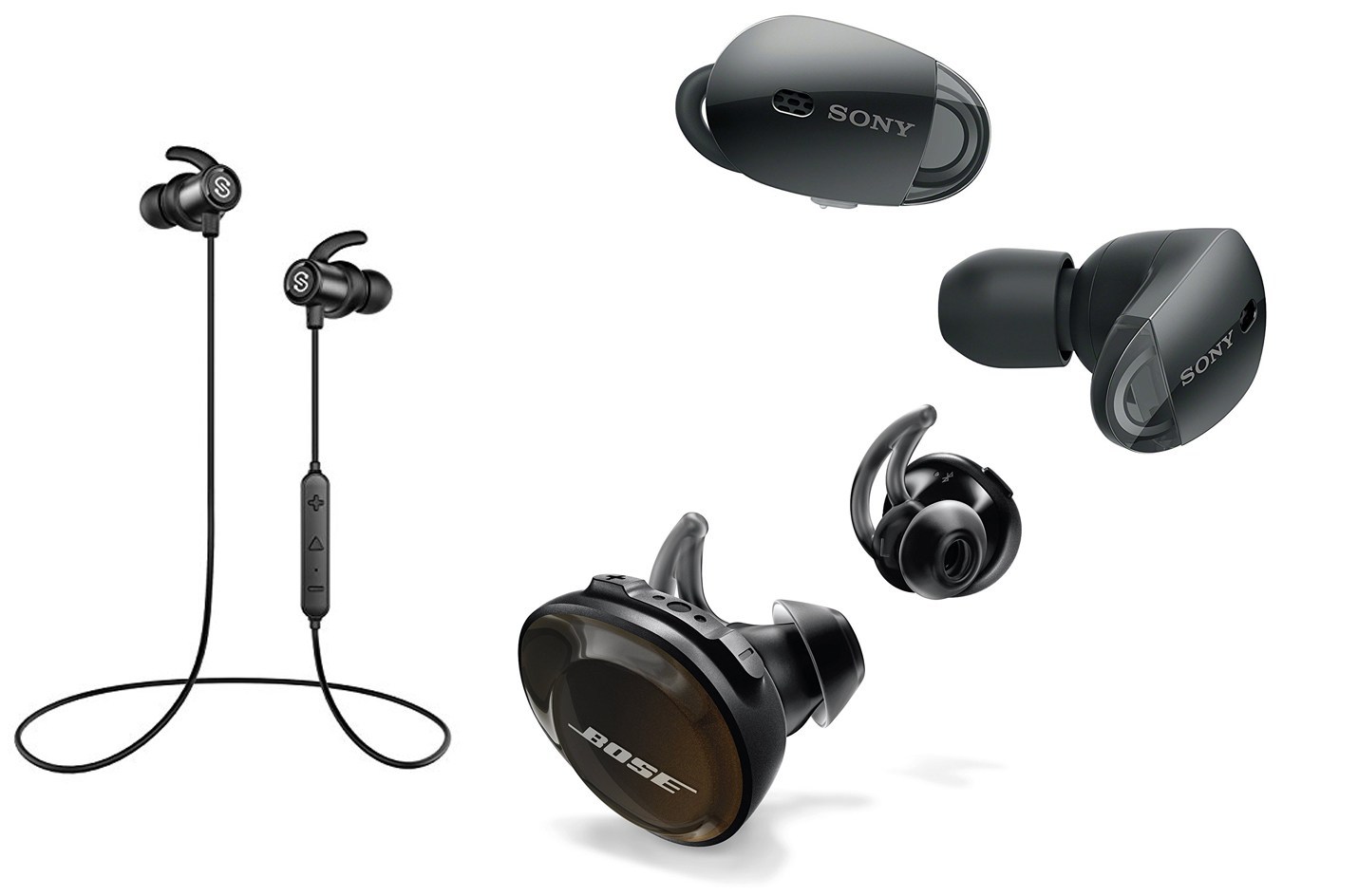
    Plus you need the best pair to look cool, this is the new club scene after all. Like everything these days, you don’t have to sacrifice quality for aesthetics. These are the top 5 best sounding and best-looking earbuds for working out.

    Bose SoundSport Truly Free Wireless Sport Headphones

    Bose, of course, Bose, would be number one. They are the most elegant and fantastic sounding earbuds on the planet. These beautiful little buds just screw into place right in your ear. This will form a snug fit in all ears, just adjust the sound for the perfect earbud.  Rocking the company’s highest-quality speakers, the sound is incendiary. They give up t0 five hours of play time with each charge.

    If that is not enough for your workout, the case can give you an additional charge of 10 hours. Inspired sweat-resistant headphones with the Bose Connect app’s “find my buds” feature, there is no risk of damage or loss.

    Jabra ELITE ACTIVE 65T

    Number 2 should be Jabra’s motto. Never better than Bose,  but demolish everyone else. They are the Mack Robinson of earbuds. These completely wireless headphones have a waterproof coating. They also sport an astonishing call drop rate, next to zero.

    Plus smart features like Amazon’s Alexa, Apple’s Siri, or Google Assistant. Got to stay connected when you want to disconnect and run right? Five hours of battery life, but with the jabra, you can go 15 before needing to charge up your carrying case.

    Skullcandy METHOD WIRELESS IN-EAR HEADPHONES

    Skullcandy slips into the 3 holes here for its quality and for separating itself from the pack. Individuality, you want to be unique at the gym. Skull candy packs the hardware to a flexible collar leaving your buds light AF. To make this list they have to be sweat- and water-resistant headphones. Light, great, flexible and different, not to mention cheap. $39.99, a magnificent bargain.

     Powerbeats 3

    Yeah, as expected beats make an appearance in the top 3. Monster and Dr. Dre have some terrific sound equipment, like the Powerbeats3. You never need to worry about these guys Shifting or moving at the gym. The universal ear hooks keep them right in place, and comfortable. 12 hours of battery life, That will last me a month of gym time. I know, I should spend more time at the gym.

    Aftershokz

    Bone conduction? It transfers sound via vibration of your cheekbones. That means nothing goes in or on your ear. You can hear your surroundings and the music at the same time with no blockage. Imagine being able to hear the music at the gym and have a conversation too, music to my ears.

    The sound is different but terrific, it’s not like it is playing but rather being produced in your head. Truly amazing distraction free headsets, comfortable and easy to use. These tend to stay on after the gym.

    Honorable Mention: AirPods

    As a full fledge apple fan geek, I must mention the Airpods. While they were not designed for working out, their weight acts as a terrific counterbalance. This keeps these insanely light buds in place through almost any workout, while remaining totally comfortable.

    They are not the best sounding option on the list but hold no liability.

  • Tackling a Kitchen Remodel? What You Need to Know

    Tackling a Kitchen Remodel? What You Need to Know

    No house is a home without a great kitchen. If you’re looking to remodel your home’s kitchen, you’re likely wondering where to start. How much will it cost? What kinds of renovations should you be looking to get done? There are a lot of factors with a kitchen remodel.

    Don’t sweat it, though, because we’ve got you covered. Today we’re going over the top things you need to know when considering a kitchen remodel. Let’s get your house looking brand-new with a great new kitchen.

    Top Things to Know When Taking on a Kitchen Remodel

    Expected Cost

    The cost of any given remodel will directly depend on just how much you want to get done. Are you getting entirely new cabinets, or just replacing the doors? Do you want your countertop refinished or do you want an entirely new countertop? Will you be upgrading to new appliances to modernize your kitchen’s look?

    Make sure you have a good idea of what you want before you talk to a contractor or remodeling company. Make yourself a list of the changes you want to see. That way, when you go to them for a quote they can give you an accurate estimate of what the labor and materials will cost. You can then adjust what you’re looking for accordingly.

    Research the Contractor

    Before you dive in with a contractor or remodeling company, do a bit of research. You don’t want to immediately start signing contracts with a company or contractor after just meeting with them. You’ll want to look online at detailed background on what the people doing the work have done in the past. Do people like them? Do they do a good job? Are they prompt and professional?

    Importantly, you’ll also want to make sure whoever is doing the work has experience with the kind of work you’re asking them to do. If they’ve never redone cabinets, or the ones they have done are of lower quality, you might want to go with someone else for the work.

    Another thing you need to keep in mind is what kind of price you’re paying for the work. Does the contractor charge a fixed rate, or do they give estimates up front? If cost is a concern, consider going with a contractor who offers you a flat fee for specific jobs. This allows you to have a better idea of what you’re paying.

    Further, make sure you ask about their policy in case something unexpected comes up. What if a contractor breaks the pipes in the sink, or causes other damage to the house? What if some unexpected damage existed before the contractors even arrived? You’ll want this info up-front.

    Get a Time Table

    Before the contractors get started, you’re going to want to know just how long the project will take. A professional contractor should be able to give you an accurate time table, though you should also be prepared for delays should unexpected things arise.

    For instance, if a contractor falls ill or has a family emergency, this will naturally slow the process. Likewise, some contractors occasionally find themselves working faster than their estimate, pleasantly surprising themselves or the remodeling homeowners. In fact, some contractors will give a “worst-case” time estimate in order to prepare you in case something goes wrong.

    Another important question to ask is: will any parts of the home be inaccessible during the remodeling process? Often, more complex remodeling projects will result in the kitchen or other parts of the home being accessible only to contractors. Get an idea of when this will be and be prepared to schedule around it. If you don’t know when this will occur, you could be caught off-guard and unsure what to do for dinner.

    Other Important Info

    Make sure your contractor service is fully accredited. Pretty much every place in the US requires any contractor work done by a third party requires accreditation. If you’re unsure, ask them right away to see their accreditation and licensing.

    Not only is this licensing required, seeing it up to date and ready to go shows that the company in question is responsible and dependable. If the company doesn’t have this licensing, you should simply walk away. It’s unlikely a company unwilling or unable to go through this process is trustworthy enough to do work on your home.

    You’ll also want to know how updates to the project are going to be communicated to you. Will there be a group text, or will updates be recorded on a sheet in the home? You want to know before you go ahead with the work.

  • Is Networking on LinkedIn the Path to a New Job?

    Is Networking on LinkedIn the Path to a New Job?

    LinkedIn is a social platform, much like Facebook, Instagram or Twitter, but it has a distinct edge over those platforms for job-seekers. While Facebook and the like are inherently casual and mostly for wasting time (sorry, Facebook) LinkedIn could help you score a new job.

    No, seriously! LinkedIn is a professional networking app that allows you to make connections and make your name known amongst professionals in your field. If you’re not using LinkedIn to expand your professional network, you’re missing out on a huge help to your career prospects.

    LinkedIn and Job Prospects

    What is It?

    LinkedIn is, at its core, a professional-minded social networking app. The stated purpose of the site is to help connect professionals. You can upload your resume, work history and connections and make yourself more well-known in your field.

    Unlike Facebook and Twitter, profiles on LinkedIn are professional first. Recruiters and employers often first look to a candidate’s LinkedIn profile to see how the candidate stacks up. It’s a quick way to pull someone’s work history and resume without having to go through the formal hiring procedures.

    Networking

    If you’re a freelancer or someone looking to break into a field, then the networking offered by LinkedIn is a huge boon. Hiring managers and recruiters often set apart time of their day to browse LinkedIn connections. By increasing your network’s size, you make it that much more likely that hiring managers can see you in their normal scouting.

    You can’t predict just how big of a role networking could play in your job-hunting process. Just because you know someone, you might get an inside track on a job you didn’t even know existed. If you’re gunning for a competitive position, the benefit of knowing someone in the field can be impossible to pass up.

    Job Listings

    Another big part of LinkedIn is the job listing section. If you’re actively hunting for a job, you can make managing your LinkedIn a full-time job! There are always new listings going live on this tab, so you can rest assured that you’ll find new opportunities on the site every day. In fact, many people get messages about open positions if they simply maintain their LinkedIn.

    If you’ve become recently unemployed, LinkedIn can be a huge boon to your job search. It puts you in the loop regarding what jobs are open in your field and gives you a structure to searching for your next career. The listings can be sorted based on pay, field and requirements.

    This allows you to stay up-to-date on just what options are available to you. If you’re keeping tabs on your LinkedIn profile, then you make it that much more likely you find the work you’re looking for. It almost acts like a headhunter agency that doesn’t take a cut of your pay when it finds you a job!

    In the Know

    Another huge aspect of LinkedIn is the active job article section. The articles can keep you in the loop on various industry trends, changes in the company or companies you’re interested in getting work in and showing you what behaviors led to various CEOs and execs getting ahead. It helps to know what got the people at the top to their positions and just how they keep their position in their field. After all, knowing is half the battle!

    Personal Brand

    LinkedIn is also important in managing ones own personal brand. If you apply for a job and the employer looks up your LinkedIn profile, it can help solidify your professional legitimacy. If people who know you have endorsed your skills and put their name behind you, it makes you that much more desirable than the candidates who don’t have such guarantees.

    There are numerous skills you can list on your profile, such as Photoshop or Microsoft Excel. Some people list skills like “sales experience,” “customer service experience,” or “writing talent.” Any of these types of skills can be endorsed by your LinkedIn connections, including your prior managers and coworkers.

    Is LinkedIn Right for You?

    So, you’re looking for a better job and you don’t know where to start to get yourself a leg up. Well, maybe it’s time to download LinkedIn and get your profile up. It’s not that hard to list your skills connect with your coworkers and former managers, and get validation on your personal skills.

    When you’re competing for positions in highly sought-after fields, every little bit helps. Put yourself in a winning position by getting a LinkedIn account.

  • Suffering From Dry Eyes at Work?

    Suffering From Dry Eyes at Work?

    Tears, sometimes you just need a great cry. Tears of joy. Tears of laughter. Even tears of pain, sorrow or loss. Crying is a reaction remedy for any emotional overload. Natural human crying is “a complex secretomotor phenomenon characterized by the shedding of tears from the lacrimal apparatus, without any irritation of the ocular structures”, according to all available information. That basically means, it feels good and relieving to shed salted water from your eyes.

    Tears have some very vital components. First is water, you know, for moisture. Tears also have natural oils in them for lubrication. Oil makes water wetter, if that makes any sense. They have mucus to ensure they spread evenly and special proteins and antibodies, that keep infection in check. A magical cocktail of soothing as I like to think of them. Your body makes this easily, naturally, and constantly. If that’s the case why are my eyes so dry all the time?

    Dry eyes could mean something in your body is off. Are your eyes giving you a gritty feel? Do you constantly feel like there’s something in your eye, like an eyelash? Got itching, redness, blurry vision or light sensitivity? especially at work? You could have an issue in your tear-flow system. Don’t panic, odds are its something simple like your air conditioner, fan, or heater that are causing your dry eyes

    Dry Eye Causes

    But what if it isn’t any of those things? First, we will want to rule out some of the other simple explanations. Menopause and the natural human aging will cause your eyes to dry up. So will certain antihistamines and conditions that don’t allow your eyelid to fully shut. Even things like our blood pressure medications or viagra can cause an imbalance in your tears. Then there are more complex issues like Sjogren’s syndrome, rheumatoid arthritis, and collagen vascular diseases. These diseases affect your eye’s tear making capabilities.

    None of those?  It could be the bright lights, dry air, and computer screens of your office. The office environment is a prime place to dry out your tear film. There are a lot of reasons your office environment is causing your dry eyes. Staring at your computer for long periods of time will cause you to blink less often. Couple that with the glare of your computer and overhead fluorescent lights and that dry office air, it’s no wonder your eyes are red, dry, irritated. It’s your office causing your dry eyes…

    Easy Natural Solutions

    Fortunately, this isn’t a very complex issue, and we can solve it pretty easily. First, take breaks from your computer. Use the 20-20-20 rule. This is something experts recommend not just for dry eyes but your overall eyesight as well. They say, every 20 mins take a 20-second break and look at something 20 feet away. In all honesty, we should all be doing this, even from just our phones.

    Next, ditch the contacts and go with the glasses look. The glasses will act as a shield protecting your eyes from wind as well as dry air. The glasses will also slow down the tear evaporation process. Water, add more water daily. It’s just common sense and helps a multitude of other issues. Lastly, adjust the lighting in your office. Cut down the over headlights, and add a few soft LED lamps. Or try one of those cool himalayan pink salt lamps that look so cool I just want to get one.

    Hit Them With Chemicals

    As much as we bash our chemical use in today’s world, they do work. Just look at my lawn and fish tank. Chemicals can solve all life’s problems, like dry eyes. With your dry eyes being a mild issue you can get an artificial tear solutions. You can use these to supplement natural tears. Artificial tear solutions are a great solution and don’t have preservatives or additives that can cause more eye irritation.

    If those don’t help you can get a small bit of silicon implanted in your tear ducts to conserve tears. It sounds a bit extreme but keeping your natural tears is a good way to reduce your dry eye issues. The gel-like plugs are inserted in your tear ducts and you can easily remove them to let the tears out when needed. Your optometrist can also prescribe an omega-3 fatty acid teardrop nutritional supplement to increase your tear production.

    Lastly try prescription eye drops or ointments, warm compresses and lid massage, or eyelid cleaners. This will reduce the inflammation around the eyes and boost tear production. I like to call this the kitchen sink approach.

  • Coolest TVs Seen at CES 2019

    Coolest TVs Seen at CES 2019

    CES 2019 has came and went, and we’ve seen a ton of new technology that is more than exciting for the future. The consumer electronics show was also the first place that 8K TVs were seen in an official setting! This exciting new TV panel development is a big step forward in the world of display panels.

    Today we’re breaking down some of the coolest TVs we saw at the 2019 Consumer Electronics Show. From rollable displays to massive, immersive 8K screens, there are a number of TV screens to be excited about in the coming year.

    Coolest TV Screens Seen at CES 2019

    LG OLED65R9

    Let’s start with the show-stopper, the LG OLED65R9. This massive OLED display rolls up when not in use. Yeah, it’s finally time to see this tech in real-life. After nearly a decade of hearing about prototype rollable displays, LG is set to be the first to market with the tech later this year or early next year. The display is downright amazing, producing a picture quality that rivals LG’s other OLED displays.

    The screen rolls into its Dolby Atmos speaker stand when it’s not in use. It can be toted relatively easily thanks to the speaker, and the speaker provides awesome sound quality to match the huge, high-end screen. The slick, futuristic design is likely to be a smash-hit when the OLED R line hits the market.

    The OLED R line is comparable in picture quality to the other LG OLED screens releasing in 2019, but the R line is likely to turn more heads. For one thing, the ease of stowing the screen and making the room much more visitor-friendly is a huge plus. For another thing, the R line of screens offers a built-in Dolby Atmos speaker, making these immediate home theater solutions.

    Sony ZG9

    The massive 88 and 95-inch versions of Sony’s ZG9 Master Series screen are set to be the first of these panels to support 8K. The screen is actually a departure from the existing Master Series line that uses OLEDs, in that it uses backlit LED technology that is state-of-the-art.

    The ZG9 also sports upscaling processes to clean up 4K and below images to make them sharper. Many people have noted that if they have a screen with a better resolution than the images they’re displaying, those images tend to look worse than they would on their native display.

    In order to combat this visual degradation, the ZG9 is set to clean up any images that are below that display standard. That’s a good thing, too, since there is currently no existing 8K content to view on one of these bleeding-edge screens.

    Panasonic GZ2000

    This Panasonic screen isn’t the most cutting-edge screen on the list, but it does have a lot going for it. It’s not a concept-style screen in the way that some of the others on this list are. However, it’s a much more straightforward style of screen and will be much more affordable than a lot of the others listed here.

    What makes it special enough to mention here, then? Well, a few things. Firstly, it’s got a brand-new processor running within that attempts to keep the screen much clearer and smoother even on high frame-rate images. The other big selling point to this screen is the Dolby Atmos implementation. Thanks to the aforementioned processor, the sound quality is uniquely excellent.

    In short, this Panasonic TV is going to be a budget option worth looking out for. It’s set to punch well above its weight class, so to speak.

    Samsung 75in Micro LED TV

    Micro LEDs are a huge step forward in screen technology. OLED screens look amazing and offer perfect blacks and great color accuracy. However, they have a few drawbacks. They don’t last as long as LED screens, they consume more energy, and they’re not quite as bright or vibrant as LED screens.

    That’s where Micro LED screens come in. By using a number of smaller LED screens working in concert, the Micro LED technology offers up the best of both worlds. The precise blacks and intense contrast offered by OLED screens pairs with the brightness, efficiency and long-lasting panels of LED screens with this tech.

    The Samsun 75-inch Micro LED is a massive leap ahead in this tech. It’s one of the largest screens that uses this tech that we’ve yet seen. Previously, “The Wall” model showed off this ultra-thin, multiple-display style of panel. This new screen is the natural evolution of this kind of technology, and likely to set a new bar for TV panels.

  • Meet the New 2019 Ford Ranger Pickup

    Meet the New 2019 Ford Ranger Pickup

    Eight years since the last time we saw a Ford Ranger, the line has been resurrected and rides again. That’s right, 2019 is the return of the Ford Ranger! The mean new appearance and steel frame give it a new edge that makes it that much more of a powerhouse. There’s a lot of cool new features on display with the all-new 2019 Ford Ranger. While fans of Ford’s production will love it, is the new Ford Ranger pickup right for the average driver?

    New 2019 Ford Ranger Pickup

    The Body

    In appearance, the new Ford Ranger has more in common visually with its Ford F-150 cousin than the line from which it gets its name. The vehicle is far from an all-new beast, though: the front grille and headlight spacing are both reminiscent of the original Ranger designs.

    Fans of the older, smaller Ford Ranger might be a bit disappointed by the larger body and big cab interior. However, smaller pickups have been out of fashion for a while, and soaring sales of full-sized trucks have driven the trends to bigger vehicles.

    However, those looking for a more trim, zippy truck shouldn’t fret: the new Ranger is still notably smaller than the F-150. The Ranger is definitely a great midway point for those who don’t quite wanta full-sized truck but still want to drive a pick-up truck.

    Under the Hood

    The most notable aspect of any given Ford vehicle is always the engine. Ford’s powertrains are always powerful and impressive, and the new Ford Ranger is no different. The engine puts out a powerful 270-horsepower and does so on a Turbo 4-cylinder build. While it might sound like the engine would slurp down gas like no one’s business, this isn’t even the case! It sports a solid 21 miles per gallon in the city and 26 miles on the highway.

    Options Aplenty

    There are a number of options on display with the Ranger. For instance, there are two different cabs to choose from. SuperCab and SuperCrew each sport variations on the modern Ford interior, including infotainment systems, Ford Sync 3, Alexa functionality and Android Auto or Apple CarPlay.

    Off-roading options are available, including skid plates and off-road tires. Those looking for a meaner machine can also opt for higher power LED head and tail lights, Ford Smart Trailer Tow connector and several other great options. What’s more: even more options are available throughout the various trim levels, letting you choose just how luxurious you want your truck to be.

    Trim Levels

    When the Ford Ranger hits dealerships near you, it’ll be with three trim levels. The first of these is the XL, followed by the XLT trim level and finally the Lariat trim. There are also packages available for off-roading available in the XLT and Lariat trims, the FX4 and FX2 packages. For those who love the look of their vehicles, Sport and Chrome appearance packages are both available to spice up your ride.

    Off-road tuned shocks, Terrain Management system and tuned-up suspension are all available for the off-roading packages. These features might sound familiar to Ford faithful: a lot of these features have already been seen on the F-150 Raptor pattern trucks.  The Terrain Management System, for instance, first appeared on that vehicle. This system helps your vehicle change into different modes for various grass, gravel, sand and snow conditions, allowing it to grip and perform in any terrain.

    As for other features, the trim levels introduce a number of higher-end safety features. For instance, the XLT and Lariat trims both offer blind-spot monitoring, rear park assist, lane departure warning and more. All trim levels will be including emergency braking and a few other features.

    Interior Options

    The Ranger has an infotainment system that sports an 8-inch screen, giving drivers and passengers both access to the fun features within. As we mentioned earlier, all trim levels include Amazon Alexa support as well as Apple and Android phone integration. Passengers can use optional 4G LTE in the vehicle if you opt for this option, and you could also upgrade to the LCD productivity screen for the instrument cluster.

    The productivity screen includes navigation maps and GPS audio at the same time. Another option you can scale up to is the Bang & Olufsen Play audio system. This allows you to upgrade your system if you’re a big audiophile and plan on jamming loud music in your vehicle.

    Pricing and Availability

    The base XL trim starts right at $24,300, which makes the Ranger a very competitively-priced vehicle. This puts it in the same range as the GMC Canyon and Toyota Tacoma vehicles. On the other end of the spectrum, the Lariat trim level with all-wheel drive and all the fixings will run you a solid $38,385, making it a competitor for high-end trucks in the field.

  • Recruitment Tools to Make Your Hiring Process Easier

    Recruitment Tools to Make Your Hiring Process Easier

    Let’s face it: hiring isn’t easy. When you’re looking for top-level people to really make your company fire on all cylinders, it’s hard to find who you need. There’s only so much time in the day, so how do you make the most of it? Going over application by hand is time-consuming, and a lot of headhunter agencies don’t filter out the riff raff.

    Well, if you’re looking for a better way to hire quality people, then you’re in luck. Today we’re going to show you just how to fill out the ranks of your workplace with nothing but the best people with some simple recruitment tools. After all, the backbone of a strong company is a great workforce. Let’s get to hiring!

    Recruitment Tools to Make Your Hiring Process Easier

    Testing Sites

    An often-overlooked type of recruitment tool is the testing site. If you’re hiring for a position that requires quick math skills, or fast recognition, you might want to use one of these services. Despite the relative ease of these sites to filter potential hires, only 57% of companies use these tools! These are some of the best knowledge, skill, abilities and other qualifications (KSAOs) test sites out there.

    Self Management Group is a science-based assessment program that relies on accumulated data to score and test potential hires. The site is well-known for their accurate sales profiling, which is notoriously difficult to pin down over an internet test. Even better, the program is available in over 40 languages.

    HackerRank is a great site to use if you’re trying to hire coders or software engineers. This technical type of assessment is very particular, so this site is a great resource for web-based companies. The site even offers an online interviewing tool!

    Finally, we’ve got pymetrics, a site that works on “bias-free algorithms” to sort candidates. The site is game-like, offering fun games and activities that candidates fill out that then offers up helpful data to employers.

    Job Boards

    One of the most readily available recruitment tools for companies is the job aggregation board. While this one might seem like a simple solution, there’s actually a lot going on with these sites. Let’s look at some of the most popular job posting boards. Remember, nearly half of all hires come from job boards like these.

    Indeed is one of the most well-known such job boards and one of the biggest sources of hires in the US. In fact, the site is so popular that it is accountable for 65% of 2017’s American hires and 72% of interviews conducted during that time. There are over 100 million resumes on the site, so it’s a great resource for companies.

    Next up is Google For Jobs, one of Indeed’s biggest competitors. Salary information, location filters, job bookmarking and selectable job boards. For both employers and job candidates, it’s a really well-made and fleshed-out job posting board.

    Finally, CareerBuilder is currently the second-highest source of hires in the industry, just behind Indeed. They have great surveys for job seekers and offer excellent recruiter tools, making them a very well-rounded career site.

    Applicant Tracking Systems

    ATS are used by nearly all large companies and well over half of all small businesses. ATS programs like Greenhouse, Workday and iCIMS are all quite popular.

    Workday is a fast-growing system that helps track applicants and offers ample backend support for employees. The service also acts as an employment hub for workers through a smartphone app that lets them track their hours and time off.

    Taleo is more recruitment-focused and is a massive organization. In fact, the company was acquired by Oracle in 2012 to the tune of nearly $2 billion. They have a staggering 23% market share, too.

    Greenhouse is a quickly-growing ATS that has taken a large portion of the market in the last 2 years. The service is well known for its unique structure and straightforward hiring and interviewing process.

    iCIMS is the second-largest ATS, behind Taleo, and specializes in content-generation. The service is widely used in office and retail jobs. Their unusual name is actually an acronym for Collaborative Information Management Systems.

    Recruitment CRM Programs

    Candidate Relationship Management programs are a new trend among companies that seek to reach out to entice potential employees. The programs, as their name implies, seek to foster good relationships between employers and candidates to get things off to the right start.

    Notable examples include Ascendify, Avature, Beamery, Smashfly and Yello. Essentially, these sites work as branding that keeps employees engaged with the company’s values and image.

  • What You Should Know about Blood Thinners

    What You Should Know about Blood Thinners

    There are a number of anticoagulants, or blood thinners, on the market. These medications, like warfarin and coumadin, these keep clots from forming in your blood stream. That’s why they’re called anticoagulants, as they keep your blood from coagulating. However, you might be surprised to learn about some of the facts regarding blood thinners potential effects on your health. Are blood thinners safe for you to take?

    Facts You Need to Know About Blood Thinners

    What are Blood Thinners Prescribed For?

    Generally speaking, coumadin, warfarin and the like are prescribed to treat issues like blood clots, atrial fibrillation, pulmonary embolisms and various heart surgeries. They are also often prescribed for procedures like hip replacement. Contrary to popular conception, despite being called blood thinners, these medications don’t actually thin out your blood. Instead, they keep your blood from clotting. This can cause issues in some patient.

    The most commonly prescribed forms of these medications are coumadin and warfarin. They work primarily by blocking K vitamins from operating in the blood. Vitamin K is the molecule responsible for causing platelets to clump together and clot. The use of this medication in recent years has widened to include treatment of atrial fibrillation.

    Other Forms of Blood Thinners

    Warfarin and coumadin are the most common types of blood thinners prescribed, but they’re not the only medications out there for those with atrial fibrillation and the like. Since 2010, in fact, several notable medications have been released. These include Xarelto, Eliquis, and Pradaxa which can also treat conditions like deep vein thrombosis.

    Warfarin and coumadin require frequent blood tests in order to check on the patient’s liver. Unlike those medications, however, these newer medications have no such restrictions and are generally considered to be “safer” on the liver.

    Blood thinners like these are often taken in pill form, and they need not be taken with food in order to be effective. This is a commonly misunderstood aspect of anticoagulants. However, unlike coumadin and warfarin, these new medications don’t interact with as many foods.

    For instance, on traditional blood thinners, you need to be careful about eating foods that can include Vitamin K. Additionally you should also avoid ibuprofen and aspirin, as well as alcohol. This isn’t the case with these newer medications.

    Side Effects

    No anticoagulants are completely without side effects, of course. Whether you’re prescribed traditional anticoagulants or newer ones, there are a few things to keep in mind about these medications. The most major side effect to keep in mind is that these medications keep your blood from clotting even when you are injured. Remember, blood clotting is how your body stops itself from bleeding.

    So, in general, you need to avoid becoming injured in such a way that you would bleed. This probably sounds like a “well, duh,” piece of advice, but it’s worth noting. You don’t usually seek out injuries that will cause you to bleed, but while on blood thinners you need to double down on avoiding the sharp ends of things.

    In the evident that you do become injured or get cut, you need to apply pressure to injury right away. Apply constant pressure following the event until the bleeding subsides. This replicates your body’s normal processes to keep from bleeding. This is the simple one: more serious injuries are the ones that result in internal bleeding.

    If you incur a fall or something similar that could result in internal bleeding, keep your eyes open for unusually swelling and seek medial attention immediately in the case this occurs. If you don’t you might experience serious injury or worse.

    Non-Injury Side Effects

    There are other side effects related to anticoagulants that aren’t tied up in injuries. For instance, upset stomach, diarrhea and other gastrointestinal issues are occasionally reported while taking anticoagulants. Other effects include headaches and dizziness, fever and aches, and general flu-like effects.

    Due to these types of side effects, it’s widely recommended that those on this medication wear identification that explains they’re on anticoagulants. This is because, in the event of injury, doctors need to know that your blood won’t be clotting. If you go into surgery and the doctors don’t know that your blood isn’t going to clot then you’ll likely not survive the procedure.

    Hopefully this information is helpful to you. Remember, never take medication that you aren’t prescribed by your doctor, and only take the amount that you’re directed to by your doctor. If your doctor thinks anticoagulants are right for your condition, discuss potential side effects, foods to avoid and behaviors to engage in while on it.