Month: April 2019

  • Alexa Recordings Being Monitored by Amazon Employees

    Alexa Recordings Being Monitored by Amazon Employees

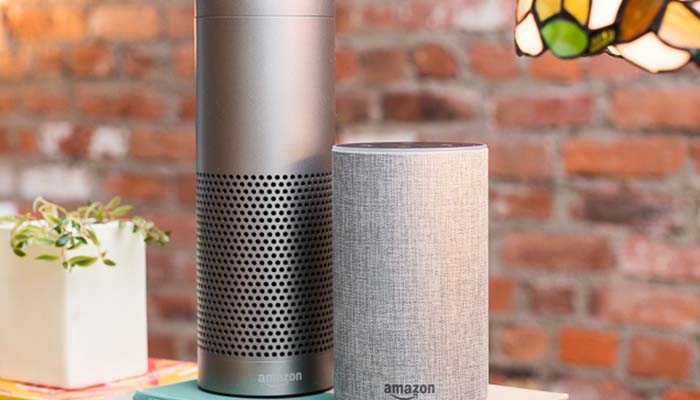
    Everyone’s worst fears about Amazon Echo were confirmed this week when Amazon admitted that its employees review audio the devices record. When Amazon introduced the smart speakers, concerns over security dubbed it a “self-imposed listening device”. Now, it turns out, the jokes were spot-on. However, is the recording egregious, or is it in line with Amazon’s promises about the device?

    Fears over Alexa Seemingly Confirmed

    Bloomberg Report

    Bloomberg reported this week that, though most of the audio taken in by Alexa devices is run through a voice recognition software only, some snippets are sent to real people. The employees are sent short snippets of audio picked up by Alexa in order to add annotations.

    According to Amazon, these annotations are strictly to help Alexa get better at listening to commands and responding. However, the presence of real people potentially overhearing their conversations has made some customers leery. What’s to stop Alexa from flat-out spying on you?

     Amazon’s Statement

    “We take the security and privacy of our customers’ personal information seriously,” Amazon emailed to Bloomberg. “We only annotate an extremely small sample of Alexa voice recordings in order [to] improve the customer experience.”

    “Employees do not have direct access to information that can identify the person or account as part of this workflow,” and Amazon spokesperson elaborated. “All information is treated with high confidentiality and we use multi-factor authentication to restrict access, service encryption and audits of our control environment to protect it.”

    Workforce

    According to the Bloomberg report, it’s a rather substantial number of Amazon employees doing this annotation work. The work, not dissimilar from work in call center, has employees interpreting thousands of snippets a week, annotating them and marking them down for further study.

    While Amazon assures customers that there are security safeguards in place to protect privacy, they’ve hardly been forthcoming about the human review process until now. Mistrust of large data-gathering corporations is at an all-time high, so this is a strange look for the massive company. Many consumers are anxious that their conversations are being sold to advertisers, or that their information is otherwise compromised by their own smart speakers.


  • How to Get Better Sleep: Conquer Your Restlessness

    How to Get Better Sleep: Conquer Your Restlessness

    Inability to fall asleep or stay asleep all night is rather common. Over half of all adults in the US report that they often have difficulty getting to sleep or staying asleep. If this is you, maybe you’re looking for some good ways to fight restlessness that don’t involve medication. Here are some of our top tips.

    Fighting Restlessness

    Hit the Gym

    After a long day at work, you might be feeling mentally tired. If your job isn’t physical, however, this might not extend to your body. If your body is still pumped up and ready to get out energy, then you’re likely going to find it hard to sleep.

    Consider getting a gym membership or getting into jogging. When it comes to your body’s energy, you need to figure out how to get it burned down effectively. The last thing you need is to be up late with restless energy just because you didn’t hit the gym.

    Quit Caffeine

    The cup of coffee in the morning hits just right, huh? Well, quit drinking it. Caffeine can seriously disrupt your body’s circadian rhythms, which could be contributing to your sleeping problems. If you have trouble sleeping, stop ingesting a chemical that wakes you up. It’s that simple.

    Lights Out

    That TV in your bedroom has got to go. If you’re laying in bed watching TV, you’re not sleeping. “Resting your eyes” isn’t sleeping. Take the TV out of your bedroom, because all its doing is making you restless. The bedroom should be where you sleep, that’s it. Don’t make it a place where you do recreational activities.

    This goes for your phone, computer and other distractions, too. If you’re constantly checking your phone or scrolling while you’re in bed, stop it. Put a hard bed-time on yourself that you stop electronics use after.

    Bottom Line

    Take control of your own space and your own sleep. This is no one’s life but yours, so live it for no one else. It’s time to take back your space and take back your sleep. Don’t let negative behaviors spill over into your sleeping habits. You’ll feel so much better when you’re well-rested.

  • Nintendo Adorably Introduces VR to the Switch

    Nintendo Adorably Introduces VR to the Switch

    When Nintendo introduced Labo, the adorable toy-craft add-on for Nintendo Switch, most people thought it was a fun diversion for the kids. Now, Nintendo has released a full-blown VR experience that the user builds out of the Labo Toy-Con kits. How does it stack up against dedicated VR?

    Nintendo Labo VR

    Construction

    The most notable departure from standard VR experiences here is that you have to build the entire VR device yourself. From cardboard. If you love arts and crafts, this is quite a fun experience. If you’re not as big on the paper-craft, this might be a bit of drag for you.

    In either case, it doesn’t take too long to build your own VR headset that your Switch tablet slots straight into. There are tons of other “Toy-Cons” that you can build out of the kit, too. It’s all delightfully fun and simple, and the on-screen “Build” mode walks you through the process step-by-step.

    The VR

    While dedicated hardware is going to be putting out more impressive visuals than the Switch, it’s downright charming to use the “Play” mode of Labo VR. Inventive and creative uses for the technology abound, transporting the player to the fun-filled world of Nintendo in no time at all.

    Various, silly controllers like a blaster with real kick-back (thanks to some rubber bands and cardboard) and a camera that makes a fun zoom-in, zoom-out sound, make the VR tactile. It feels so real and immersive to fire grenades at goofy aliens in the Blaster game.

    Bottom Line

    For $80 you can get all of the Toy-Cons and software needed to play with Nintendo Labo VR. It’s a fun experience, made all the better by the joy of building silly cardboard controllers. Is it going to blow away die-hard fans of the Oculus Rift? Maybe not.

    But the inventive controllers, fun building aspect and downright charming games all make this the most user-friendly VR experience to yet hit the market. If anyone can sell the odd experience of VR to a mass-market, it’s Nintendo.

  • YouTube TV Adds More Channels, Goes Up in Price Again

    YouTube TV Adds More Channels, Goes Up in Price Again

    Despite being touted as one of the more accessible ways to watch Internet TV, YouTube TV is being less so. This month marks yet another price increase for the service. When it launched a short two years ago, YouTube TV was a respectable $35 per month. Now, it’ll cost $50, a 40 percent increase in two years.

    YouTube TV Price Hikes

    Pricing History

    When YouTube TV launched, it cost a solid $35. That’s not the best price in Internet TV, but it was pretty solid to get access to YouTube Originals. Essentially, if you wanted Internet TV and really like Cobra Kai, this was a good deal.

    In March of 2018, however, YouTube TV went up to $40, making it one of the more expensive options for Internet TV, but not a terrible option. With the most recent price hike taking it to $50, however, it’s starting to become comparable in price to simply having cable through your ISP.

    Why This Matters

    For half the price of what YouTube TV is charging, you can get Sling TV, a $25 subscription that includes over 30 channels. For that matter, those who want to watch TV but not spend a dime can get Pluto TV. If Google intends for YouTube TV to be a serious competitor, a 40 percent increase in price every two years hardly inspires confidence.

    Channels Added

    The service added Discovery Channel, HGTV, Food Network, TLC, Investigation Discovery, Animal Planet, Travel Channel, and MotorTrend to support this raise in the price. They also plan to add the Oprah Winfrey network later this year.

    However, this flies in the face of the marketed reason why Internet TV was created in the first place. Customers sick of paying for tons of channel packages they didn’t want opted for Internet TV to cut their bills down and get just the channels they want.

    Alternatives

    Alternatives to YouTube TV are prevalent, including Hulu’s live service, which starts at $40 per month. PS Vue, from Sony, is another option, though at $45 per month, it’s hardly a steal. The aforementioned Sling TV starts at $25 per month for those looking to save a bit more.

  • Disney Plus: What We Know

    Disney Plus: What We Know

    Disney Plus is promising to carry all of Disney’s movies, including their animated family fare, Star Wars and even the MCU films. What this means for other streaming services is that they’ll have to fight the combined might of Disney’s industrial hype complex with their own programming.

    What does this mean for the consumer, though? Well, if you like Star Wars, Marvel or Disney cartoons, it means you’re getting yet another subscription to watch them.

    Disney Plus

    Release and Pricing

    At present, we know only a little about the potential release window and pricing of Disney’s new streaming service. Disney has stated that they want the service to be live by “late 2019”. It’s unclear whether this means as soon as August or as late as December, though we’d expect it to hit some time in November.

    As for price, Disney CEO Bob Iger has been clear that Disney knows their service will be content-light compared to the likes of Netflix and Amazon Prime. As such, Iger stated that consumers can expect the price to reflect that. What, exactly, this means for the price has yet to be seen, though we’d guess somewhere in the range of $8-$10 per month.

    Content

    When Disney Plus launches, it’s expected to have a few standout TV shows exclusive to the platform. Namely, a Star Wars series called The Mandalorian, as well as a pair of Marvel shows centered on Loki and Scarlet Witch, respectively. Also expected to be present at launch are all of Marvel’s films, including Captain Marvel and Avengers: Endgame.

    On the cartoon side, Disney has stated that even animated films currently in “the Vault” will be brought out for viewing on the Disney Plus service. That means that you can watch Little Mermaid or Beauty and the Beast even if they’re not out of “the Vault”, which is a new approach for the legacy company.

    Another Subscription

    Thanks to the Fox merger, Disney now also own Hulu. This means that diehard Marvel fans who want to see everything will need to have Hulu, too, as Marvel’s more adult-oriented shows are heading there. It seems like this is the future of media distribution, as each company scrambles to match Netflix as a streaming content producer.

    Disney Plus is the latest in a long line of such platforms. CBS All Access and ESPN Plus are both examples of yet more streaming services vying for your subscription dollars. You’ll have to decide whether yet another subscription is worth it when Disney Plus launches later this year.

  • Which Cordless Vacuum is the Best?

    Which Cordless Vacuum is the Best?

    Everyone hates vacuuming. I know I do! One thing that makes it a bit more bearable, though, is having a cordless vacuum. Not having to pick around chairs and tables to get to those out-of-the–way spots is a great feature, to be sure! The question is, which cordless vacuum is the best bang for your buck? You don’t want to buy a lemon and have to return it, so we’ve got a list of our favorites. If you’re looking to clean up with no cord, check out our roundup: it doesn’t suck, I promise!

    Shark Navigator Freestyle SV1106

    For an impressively low $130, you can pick up this excellent stick vacuum from Shark. It’s quite light and very easy to use and store! It’s also very powerful, great for big messes, and possesses two distinct brush speeds. This lets is work optimally on both carpet and hard floor! While it’s not quite as powerful as most upright vacuums, the low price and great versatility easily make up for it. If you have pets that shed a lot, this is a great choice, is it’s powerful enough to suck up pet hair. That all said, you can’t beat that price!

    Hoover Linx BH50010

    Hoover’s a respected name, and for good reason. This entry to our list retails for $200, which is a fine price, all said. While this vacuum has a shorter handle and no bag, it’s a very modern and useful appliance. It’s got edge-to-edge brush bristles and works great on carpet and floor. This one’s powerful and sports great performance even on rough messes. Not to mention, that shorter handle can recline all the way back to help you get those very out of the way spots. A great buy for the money, and well worth your consideration!

    Electrolux Ergorapido EL2055B 2 in 1

    For $279, this upright vacuum is a great deal. It’s super lightweight and very easy to maneuver around corners. It’s got great detachable tools for getting under sofas and close to walls, too! THat said, it’s not all sunshine and rainbows. For one thing, it only takes name-brand Electrolux filters. That’s an odd feature for a household appliance in 2018, to be sure. What’s weirder, it only works with name-brand accessories. What gives, Electrolux? More importantly, though, the vacuum isn’t as good on carpeted surfaces as we’d hoped. That said, this is still a fine pick if you’re looking for a great, light vacuum.

    Our Favorite Cordless Vacuum: Shark IONFlex 2x DuoClean IF251

    Easily the most expensive on the list, this entry from Shark retails for $450. However, it’s worth every penny of that steep price: it’s a supremely high-end piece of household technology. It sports two battery packs that last a very long time, and while you’re using one you can charge the other. The vacuum has a handheld mode that helps you hunt down those out of the way messes. And, of course, it’s just a great vacuum and picks up dirt like no one’s business. In a crowded field, this high-end cordless vacuum is the best of them.

  • How to Manage Muscle Pain: Quick Tips to Fight Aches and Pains

    How to Manage Muscle Pain: Quick Tips to Fight Aches and Pains

    Working for a living has the unwelcome side effect of bringing on muscle pain, aches and soreness. No one likes being sore! Maybe you hit the gym to blow off steam or go on a hike to de-stress. These are fun activities, but they can also result in muscle pain.

    What are some of the best ways to fight muscle soreness or aches? Today we’re going over some quick tips to get you relief from that pain.

    Managing Muscle Pain

    Why Am I Sore?

    If you don’t normally experience sore muscles, but find yourself doing so now, there are a few reasons why this might have happened. When you overuse a muscle, or do a new activity that it’s not used to, you can cause tears in the muscle. Then, when your body repairs it, it become remade even thicker and stronger.

    The good news is, given time, most muscle soreness should go away as your body becomes more accustomed to the type of exercise that’s inflaming it. This, in turn, means that you’ll be building bigger, stronger muscles, which is never a bad thing!

    Indirect Ice

    One of the best ways to fight muscle soreness is with indirect ice. Get an ice pack and wrap it in a towel or something similar, then apply it to the affected area. The cold will reduce inflammation and cut down on your immediate pain. It’s best to start with ice, instead of heat, as the ice will help more in the long run if you start with it.

    Then Apply Heat

    After you’ve used ice to reduce the inflammation and lessen the pain, switch to a hot compress or heat pack. This will encourage blood flow to the area and could even relieve some mild joint pain you may have from exercise. Don’t start with heat, even though it feels great on a sore muscle! Start with ice, as it can help cut back on the swelling.

    NSAIDs

    Another common way to fight occasional muscle pain is with NSAIDs like Tylenol. Don’t overdo it on these, as they could contribute to causing liver problems if taken improperly. However, for infrequent muscle pain, taking an NSAID should help cut back on your general soreness. Accompany this with a cold and then hot compress to really bring on the relief!

    Make sure you consult your doctor before taking any new medicines, though. If you’re already taking medication, some NSAIDs could interact negatively with them.

  • Event Horizon Telescope Photographs Supermassive Black Hole

    Event Horizon Telescope Photographs Supermassive Black Hole

    Is there anything in the cosmos more mystifying and terrifying than a black hole? The Event Horizon Telescope array has managed to do the impossible and photograph a distant black hole in the M87 galaxy. Well, the array photographed the hole in space where the black hole should be. It devours all the light that passes the event horizon, of course.

    Event Horizon Telescope Photograph

    Supermassive

    The black hole in question is incredibly huge. It is so big, in fact, that it could envelop the entirety of our solar system. The object is estimated to be 3.5 million times the size of our planet. In order to image the supermassive black hole at the center of the M87 galaxy, the Event Horizon Telescope team used an array of eight telescopes.

    Imaging

    The team used radio imaging and very precise array movements to gather petabytes of radio signals. Yes, petabytes. The tremendous amount of data gathered by the team was, in fact, too great to be sent over the internet. Instead, each dish in the array had an on-site hard drive recording information.

    When the team had enough data across their eight dishes, they brought all eight hard drives to a supercomputer. In order to image the black hole properly, the supercomputer collated the eight data points and gave us our clearest view yet of the oddest objects we’ve ever observed.

    Einstein’s Theories

    According to the Event Horizon team, the images gathered support Einstein’s theories, proving the famous scientist right yet again. The image itself shows superheated gas being sucked into the black hole, resembling some demonic force consuming all that surrounds it.

    This image largely shows what physicists expected: black holes have their own set of rules. Einstein theorized that sufficiently massive object bend reality around them, altering gravity and light in the area. According to Einstein, as you approach the event horizon and get nearer to the singularity within, the very laws of physics begin to break down.

    What This Means

    Black holes fascinate us because they are so unlike any other objects in the cosmos. Their massive, light-obliterating profiles cast an odd shadow on our understanding of physics and reality. How can an object be so massive and so dense that it alters the nature of reality around itself?

    Surely, our thirst for knowledge as a species can never be quenched. What is truly impressive is the lengths to which we will go to learn more about the world around us.

  • Are You Spending Too Much Time on Your Phone?

    Are You Spending Too Much Time on Your Phone?

    Smartphones have changed the way we live our very lives. They’re alarm clock, timer, flashlight, calculator, game system, portable computer and, of course, phone, for the modern human. However, many people feel as though they may be spending too much time on their smartphones. When is it time to make a change?

    Too Much Time on the Smartphone

    Ignoring Family

    We’ve all been hanging out with friends or family and then noticed that no one was talking to anyone. Everyone was just scrolling through their social media, or reading an article, or texting. If you find you’re missing out on quality time with loved ones, make an effort to keep your phone in your pocket when hanging out.

    It’s easy to get sucked into your phone. Consider silencing notifications from social media apps, and even just leaving your phone off or on silent. In an emergency, people can reach you. Otherwise, why stay glued to the phone all day? You’ve got a life to live right in front of you.

    Wasting Time

    You know that slurping sound that Facebook makes when it siphons your free time? The feeling of the minutes whiling away as you scroll, infinitely, down the page makes your stomach sink. Stop doing it. There’s nothing new or exciting or interesting happening on your Facebook feed, your Twitter feed or your Instagram feed.

    These apps are designed to harvest your data and then sell it to ad agencies for a lot of money. That’s it. They’re mindless, they’re not keeping you “up-to-date” or “informed,” and they’ve been shown to have a negative effect on mental health. Just stop scrolling.

    Mental Health

    Yes, you read that right. Social media is linked to making people feel more insecure, more depressed and less fulfilled in their own lives. When you’re constantly exposed to clickbait media, fake news articles and manufactured outrage, it becomes grating. Why subject yourself to such a toxic mix of badly curated media?

    Social media can be great for keeping up with friends and current events. Seeing new pictures of family, updates on vacations and news blurbs are all great. However, aside from these highlights, there’s nothing to be gained by scrolling down the infinite feed forever. You’re just subjecting yourself to drivel for no reason.

    How to Quit

    Compulsively checking one’s phone is addicting. Consider getting a smartwatch, or a normal wristwatch. This gives you something to check for the time without pulling out your phone to suck up your hours. Another option is getting into a hobby that is engrossing and doesn’t leave time to constantly check your social media.

    In an extreme case, if you feel like you’re spending too much time on your phone and just can’t stop, take drastic measures. Uninstall your social media apps. Turn off your cellular data. Heck, just turn your phone off. You’ve got a life to live, so live it.

  • Galaxy S10 Too Pricey? Say Hello to LG G8

    Galaxy S10 Too Pricey? Say Hello to LG G8

    The Android phone market is rather saturated at the moment. Between Samsung’s numerous Galaxy handsets, Google’s Pixel line and ample competition from other third-party developers, Android users have a ton of options. The newest competition for Samsung’s Galaxy S10 flagship phone is the LG G8, a more budget-friendly Android heavy-hitter.

    LG G8

    Head to Head

    The LG G8 is expected to retail for around $820, a solid $80 less than Samsung’s own Galaxy S10. How does it stack up in terms of features, though? Well, the G8 sports a 6.1-inch display, gorgeous OLED screen and bright colors contrasted with deep blacks.

    The design is entirely water-resistant, like all modern smartphones, and it sports wireless charging capabilities. It runs on the same Android Pie operating system as the S10, and sports similar specs. The Snapdragon 855 chipset is as impressive as ever here, and the 3,500-mAh battery offers ample time away from the charger.

    What’s Different

    There are a few things going on here that set the G8 ThinQ apart from the competition. One such wrinkle is the presence of an actual headphone jack, something that premium smartphones haven’t sported for a couple of years. While most phones offer a dongle to convert your old-school headphones to USB-C, it’s nice to not need that.

    Is it Worth It?

    Samsung announced an astonishing five new phones while LG was launching the G8. Among them are the Galaxy Fold, the long-rumored folding phone that Samsung has been teasing for years. It’s clear that the LG G8 ThinQ has to go head-to-head with the Galaxy line.

    From price point to features, the G8 is clearly a direct challenge to Samsung. Can it stand up against the competition though? Aside from the headphone jack and a unique look, it doesn’t bring a lot to the table. Its features are largely found elsewhere, done better and with more style.

    Bottom Line

    The Samsung Galaxy S10 is a bit pricier, but only a bit. For an extra $80 you can upgrade to the best Android phone money can buy. If the LG G8 cost $700, or maybe $600, this would be a different article altogether. However, for the surprising sticker price of $820, it’s simply not worth it.

    Everything you find here is solid, but is done better on other phones in the same price range. After all, you could spend a similar amount of money on a Google Pixel 3 and end up with a much superior product. Sadly, this is a phone for no one: not high-end enough to beat Samsung, not inexpensive enough to be a budget option.