Author: Christine

  • New Smart Wall for Smart Homes

    New Smart Wall for Smart Homes

    Smart homes are getting smarter and smarter. The Wall++ offers a new way to control smart homes, one that doesn’t involve repeating phrases to a smart speaker.

    Wall++

    The Wall++ was developed by researchers at Carnegie Mellon University and Disney Research. They created a way to make the walls of a smart home into gesture-sensing touchpads. They used conductive paint and a custom sensor board to create electrodes to turn walls into an “electromagnetic sensor to detect and track electrical devices and appliances.”

    What’s so great about a smart wall? Researchers say the wall system could monitor activity in rooms, send alerts when an appliance goes off, adjust lights, and control televisions. It can also track people who are wearing certain electronic devices that emit an electromagnetic signature.

    The Wall++ is an idea that built off of Carnegie Mellon’s previous work in a system called Electrick. Electrick took the first step in spraying conductive paint onto smooth surfaces to enable touch controls.

    Smart Wall Could Replace Smart Speaker Systems

    Home smart speakers are popular, but Carnegie Mellon researchers predict the smart wall could be an improvement and become more popular.

    It will be some time before the Wall++ is available to the public, however. Researchers are currently installing prototypes by putting a sensor board in the wall’s baseboard, but they think they can make improvements for easier installation. They also have aims to optimize the Wall++’s energy consumption. Overall, the Wall++ is looking to be extremely promising for the future of smart homes.

  • Sprint Plans to Merge with T-Mobile

    Sprint Plans to Merge with T-Mobile

    Two major wireless carriers in the United States are about to merge into one company. The combined company will be called T-Mobile and will be based in Bellevue, Washington. The current T-Mobile CEO John Legere will run the company, and T-Mobile’s current COO Mike Sievert will be the new company’s COO and President.

    Merger Plans to Lower Prices

    By combining into one company, Sprint and T-Mobile believe they will be able to lower their prices. They also hope they will be able to pursue overtaking their competition, AT&T and Verizon.

    T-Mobile and Sprint have been in talks for quite some time. Sprint originally broached the idea of buying T-Mobile back in 2014, but nothing came of their proposal. Talks between the two companies resumed, however, in May of 2017.

    Both Sprint and T-Mobile batted the ball back and forth on which company would buy which. Sprint’s offer was tabled in October 2017, followed by an offer by T-Mobile that failed in November 2017.

    But it looks like Sprint and T-Mobile have finally come to a decision. CNBC said that the two companies were closing in on a merger on Friday. The merger is worth $26 billion.

    Deutsche Telekom, T-Mobile’s majority owner, will hold a 42 percent stake in the new company, and Sprint majority owner SoftBank will hold 27 percent. Public stakeholders will hold the rest. Sprint CEO Marcelo Claire and SoftBank SEO Masayoshi Son will sit on the new company’s board.

    This merger comes in an opportune time when T-Mobile and Sprint are ready to send out their new 5G network across the U.S. The new company will serve almost 100 million customers.

  • Snapchat Spectacles V2 May Be the Wearable Tech You’ve Been Looking For

    Snapchat Spectacles V2 May Be the Wearable Tech You’ve Been Looking For

    On Friday, Snapchat debuted their new (and improved) Spectacles, a pair of sunglasses with built-in recording equipment. The glasses are a huge improvement over the first generation of Spectacles, which ended up being disappointing both to consumers and the social media company. But can Snapchat finally break the Google Glass curse with Spectacles V2?

    Improved Features

    The most immediately noticeable improvement over the V1 model is the design. Larger but lighter, the new Spectacles come in black, ruby, or blue frames with a variety of lens options, including prescription lenses with partner Lensabl. The new model also ditches the goofy-looking yellow circle around the camera, replacing it with a more subtle ring that lights up when you start recording.

    Spectacles record video and take photos in HD, and it’s much easier now to upload them to your phone. Using a Bluetooth connection, the syncing process is roughly 4 times faster than the first generation of Spectacles. Based on feedback from customers, Snapchat has also upgraded the new model to record underwater—although users probably shouldn’t try snorkeling with them. Save that for your GoPro.

    Streamlined Sales

    Snapchat claims that one of the reasons sales weren’t as robust as predicted for the V1 model was because they were available through too many retailers. This time, instead of elaborate vending machines, Snapchat is only selling Spectacles through their app. The company had to take a massive loss due to unsold units of the V1; although more than 200,000 people bought a pair of the glasses, Snapchat seriously overestimated the demand.

    Better Content

    Snapchat hopes to hold on to its user base and lure in new customers with Spectacles. The struggling company has lost ground to Instagram and other social media platforms. With the launch of the updated glasses, Snapchat is wisely reaching out to popular users and professional photographers to generate top-quality content. Most customers who purchased the V1 model ended up no longer using the glasses after about a month, so Snapchat needs to prove that these are more than just a novelty.

    Privacy Concerns

    One possible downside to the updated design of Spectacles V2 is that they look more like regular sunglasses. People like to know that they’re being photographed or recorded, and with a stealthy HD camera poised to capture images anytime, anywhere, you may not realize that the Spectacles are recording. We’ll see how—or if—Snapchat addresses these concerns in the future.

  • 10 Ridiculous Gadgets That Someone Actually Thought People Would Buy

    10 Ridiculous Gadgets That Someone Actually Thought People Would Buy

    The wheel. The light bulb. The Hot Pocket.

    History is marked by milestone inventions that revolutionized the way we live…but it’s also littered with bizarre devices, ludicrous patents, and as-seen-on-TV garbage. We’ve trawled the deepest, most shameful archives of regrettable ideas to bring you the 10 weirdest gadgets of all time.
     
    [adPH1]  

    10. The Selfie Toaster

    10-selfie-toaster

    Image credit: Time

    Do you literally have money to burn? Are you a desperate narcissist who needs to be the center of everything—even breakfast? Then have we got the perfect gift for you!

    The Selfie Toaster costs $75, and it clearly does not work. The gadget requires a custom laser-cut metal grilling plate, which you’ll get in the mail after sending the company a photo of yourself. Not only does the toast pictured look nothing like the example photo, but you can also easily imagine how bad it tastes: burnt in some patches, raw in others. We have so many questions. Are you supposed to serve toast stamped with a ghostly, nightmarish version of your face to friends and family? Or is this for lonely, late-night tea parties for people with more money than common sense? At least it comes with a removable crumb tray.
     
    [adTextOnly]

  • Experience the Magic of Harry Potter on Your Phone

    Experience the Magic of Harry Potter on Your Phone

    Twenty years after the first book was published, the world of Harry Potter continues to grow and thrive. (And yes, I felt old typing that sentence.) This week, developer Jam City released the latest chapter in the saga, the mobile game Harry Potter: Hogwarts Mystery.

    Same School, New Story

    The game, available on both Android and iOS, does not actually feature everyone’s favorite boy wizard. The story is set about ten years before the events of the books, so while we see some familiar faces such as Dumbledore and Snape, the main cast of characters is entirely new. However, much of the dialogue is lifted directly from the books and films, so there’s a comforting sense of familiarity despite the new faces.

    You play a brand-new Hogwarts student whose brother was expelled from the school several years earlier. Through a series of quests and conversations with NPCs (non-player characters), you must try to unravel the mystery of why he was kicked out and what happened to him after he subsequently disappeared.

    Custom Characters

    The character creation screen is impressive for a mobile game. Similar to The Sims, you’re given a range of skin tones, features, and hairstyles to choose from. “It was super important to us, that all Harry Potter fans feel like they can create a character that looks like them, and know that they belong in Hogwarts,” Matt London of Jam City explained. “So everything from lip shape, to eyebrow shape, nose shape, all these things are adjustable.”

    Additional customizations and outfits are unlocked as you play or available for in-game currency. Like many free-to-play games, you can either purchase this currency for real money or accrue it through quest rewards.

    Simple Mechanics

    Despite the massive amount of work that went into designing the game—including a script of over 200,000 words and two years of intensive development and programming—the actual gameplay is very basic. You are guided through the world of wizardry by quest givers who want you to tap on highlighted objects or trace simple paths on your screen to cast “spells.”

    If you’re looking for a challenging game, Harry Potter: Hogwarts Mystery is not it. Kids can easily play and follow the story, but grown-up fans of the franchise may want to wait for the forthcoming augmented reality game from the makers of Pokémon GO.

  • Smart Paper May Soon Be Coming to a Store Near You

    Smart Paper May Soon Be Coming to a Store Near You

    Science fiction stories promised us a lot of things that have failed to materialize—flying cars, space vacations, and hoverboards that don’t spontaneously burst into flames. But researchers at Carnegie Mellon University may have found a way to make cheap, mass-produced “smart” paper a reality.

    From Analog to Digital

    There have been a few attempts already at translating printed or written materials to the digital world. Smart notebooks that can capture your pen strokes and apps that can save your doodles and handwritten notes are already available, but the Future Interfaces research team at Carnegie Mellon recently took things one step further. Their touch-sensitive paper can track pressure from a fingertip, pen or stylus, making it possible to easily digitize handwriting, drawings, and more.

    Just Like Real Paper, Only better

    “For paper to still be paper, our method had to be low cost,” the team spokesperson announced in a video released earlier this week.

    The research team wanted to use real, everyday paper as the basis for their product. Through trial and error, they crossed several methods and materials off their list, but finally they found two ways to make the smart paper function. Both use a carbon-based coating—one in the form of a pre-fabricated sheet that can be adhered to any surface, and the other a paint or spray that can be applied to rolls of paper during production.

    This makes it possible to create the paper in bulk—something the team wanted to ensure in order to make the product financially viable. With the current method, each sheet would cost around $.30, but the team hopes to find ways to lower the price.

    Limitless Applications

    Right now, individual sheets of paper with the special coating on the back can be attached to a sensor that converts pressure to real-time digital input. They hope that the technology can be used to create smart notebooks as well. Some other possibilities include interactive worksheets for students, board games, smart Post-It notes, and even interactive newspapers that allow you to share articles on social media.

    While it’s not quite ready for consumers, the researchers are confident that this is the first step toward making cheap, disposable smart paper a reality, stating, “We believe this illuminates one possible approach for achieving low-cost, interactive, paper-based experiences in the future.”

  • Amazon Wants to Get into Your Car

    Amazon Wants to Get into Your Car

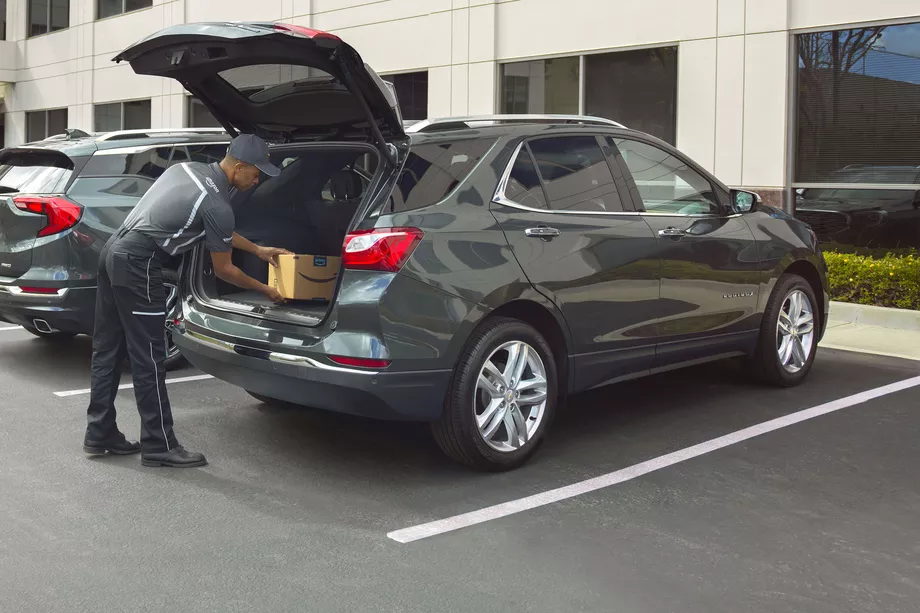
    What if you could have your Amazon order delivered to your car?

    Last year, Amazon asked for permission to unlock your front door so it could leave packages inside your home and a certain number of extremely trusting Amazon Prime subscribers said okay. Now, the tech giant wants to do the same thing with your car.

    The Amazon Key In-Car service is designed to deliver packages quickly and more securely than traditional services. Instead of driving home to get your package in the middle of the day or hoping that it won’t be stolen from your doorstep or mailbox, you can have your order dropped off in the trunk of your car. Sound good? Well, there’s a catch (or two).

    How It Works

    First, your car must be parked in a publicly accessible spot so that the driver can reach it. Your trunk will be unlocked using an app on the driver’s phone, so the delivery driver never actually gets a key or access code to your car. (One wonders why it’s called Key In-Car, since no keys are involved, but that’s a question for another day.) Finally, you’ll get a notification on your phone when your package has been delivered.

    Safety Concerns

    Amazon’s newest innovation is an expansion of their controversial Amazon Key delivery service, which allows delivery drivers to access your home using a specially installed keypad and security camera. Some customers—particularly women—were understandably nervous about allowing strangers into their homes.

    You can use the app to block access to your car at any time, for any length of time. As an alternative to in-home deliveries, the Key In-Car service is potentially less intrusive and holds fewer safety concerns.

    [adPlaceHolder]

    Ready to Get on Board?

    In order to take advantage of Amazon car-based deliveries, you’ll need to meet several criteria. The pilot program is only available to Prime subscribers in 37 cities in the US.

    For now, the service is limited to customers with GM vehicles (Chevrolets, Buicks, GMCs, and Cadillacs) or Volvos produced after 2015. Amazon Key In-Car delivery also requires your vehicle to have an internet-based support function, like OnStar or Volvo On Call, in order to let the drivers remotely unlock your trunk. With these limitations, it’s only for a select few. There’s no word yet on how Amazon may expand the program in the future.
    Final Thoughts

    Some people will automatically be turned off by this service, especially after reading that security researchers discovered that Amazon’s cloud-connected camera for in-home deliveries can be disabled and frozen from a program run from any computer within Wi-Fi range. While Amazon’s cloud-connected camera provided a layer of security for those who would want to monitor their in-home deliveries through Amazon Key, the in-car deliveries offer no similar video feed. Amazon says that multiple notifications, plus the option to block access at any time, ensures the customer remains in control of the process.

    If anything, potential customers may find the in-car deliveries more attractive from a cost perspective. To sign up, you aren’t required to spend $250 on a smart lock and camera like with in-home deliveries, and there’s no installation required. All you need is the right car and the willingness to let Amazon’s delivery employees unlock your vehicle. Frankly, we’re still holding out for drone delivery.

  • The Best Tablets for Kids

    The Best Tablets for Kids

    Screen-time for kids may be a controversial topic, but plenty of parents have discovered fun, educational ways to integrate technology into their children’s lives. We’ve rounded up the best tablets for kids of different ages so that you can make an informed decision about which one to purchase.

    Why Buy a Kids’ Tablet?

    Unlike “grown-up” tablets and smartphones made by Samsung or Apple, devices designed for kids have more robust designs to withstand rough handling and more options for parental controls to limit or block certain functions. Many kids’ tablets come pre-loaded with age-appropriate apps; for example, the kid editions of the Amazon Fire tablets are bundled with a subscription to FreeTime.

    Best Tablets for Ages 3 to 6

    For the littlest ones, a kid-friendly tablet like those made by Leapfrog is your best bet. The LeapFrog Epic is tough but basic, with an intuitive Android OS that can run either the premium proprietary apps from LeapFrog or third-party apps from Amazon. One downside to the Epic is the battery life, which only lasts about five hours. If you’re planning a trip and need to keep the kiddos entertained, make sure to bring the tablet’s charger!

    Best Tablet on a Budget

    Although it doesn’t have as many bells and whistles as the newest model, the Amazon Fire 7 Kids Edition is the best value on the market. We love the sturdy, bright case that comes with the Kids Edition, as well as the year-long subscription to Amazon’s FreeTime Unlimited, which is stocked with plenty of games, books, videos, and other digital delights. Best of all, Amazon offers a two-year replacement plan, so if accidents happen—and with kids, they often do—you will be covered.

    Best Tablet for Work and Play

    The Kurio Smart is an interesting hybrid of kids’ tablet and basic laptop. The detachable keyboard and Windows 10 operating system lets the Kurio Smart function more like a simple laptop, which is great for kids who need to browse the internet and use Microsoft Office products for schoolwork. It performs equally well as a tablet for reading and games once the homework is done.

    Best Tablet to Grow with the Child

    If you have the budget for it, the iPad Mini is the most versatile tablet on the market. While we wouldn’t recommend it for toddlers, elementary school kids can get years of use out of an iPad as their educational and entertainment needs change. Though more fragile than the tablets made just for kids, the iPad Mini can also do a lot more. Great display, long battery life, and top-notch support from Apple make the iPad Mini a worthwhile investment. Just make sure you also purchase a kid-friendly plastic case and a screen protector—you’ll want this tablet to last!

  • An Easier Way to Sell on eBay

    An Easier Way to Sell on eBay

    The updated mobile app from the veteran online marketplace will make it much easier to upload your stuff. The new eBay app, which has already rolled out on both iOS and Android, allows users to upload an item in a just a few seconds.

    Scan and Go

    The biggest change to the app is the addition of a barcode scanner, along with a product search feature. The app works best if you have the original box since you can simply scan the barcode. However, if you didn’t hang on to the box, never fear! You can still look up the name of the product in eBay’s extensive database and pull up the necessary information.

    The app fills out the majority of the fields for you although you’ll still need to enter the item’s condition. For many items, eBay is even able to provide images from its library, suggest a price, and calculate shipping costs. You can edit any of the pre-populated fields as needed.

    The Power of Data

    The new app builds on the simplified selling tools debuted by eBay last year. Using structured data and predictive analytics, the platform draws on its vast database of listings to cut down on the time it takes to upload an item. They hope that the streamlined process will make the platform more appealing to current sellers and newbies alike.

    “At eBay, we’re dedicated to delivering a seamless and efficient selling experience for both first-time and seasoned sellers alike,” says Kelly Vincent, eBay’s VP of Consumer Selling Product & Engineering. “This is one of many enhancements we’ll be making this year. We’ll continue to leverage structured data and new technology developments to help our sellers ‘get it sold.’”

    Limited Features

    Unfortunately, sellers who trade in vintage or unique items will find that the new app has limited functionality. The lack of barcodes on vintage items and the variability in condition means that these sellers will still need to enter most of their information by hand and upload their own photos instead of using the provided stock images available for newer mass-market products.

    Increased Competition

    When it arrived on the scene over 20 years ago, eBay was a revolutionary way to sell online. Since then, resale apps like OfferUp, Poshmark, LetGo, and ThredUp have emerged to pose serious competition. Facebook’s Marketplace has also claimed a piece of the online resale pie, focusing on connecting local sellers and buyers.

    Although there are over 13 million listings added to the site each week using the mobile app, eBay is betting that their faster, simpler uploading process will keep the platform competitive.

  • Battle of the Smartwatches: FitBit Versa vs Apple Watch

    Battle of the Smartwatches: FitBit Versa vs Apple Watch

    The current smartwatch market has some serious competition with the Pebble Watch, Apple Watch 3, Samsung Gear 3 and now the new FitBit Versa smartwatch and fitness tracker.

    In terms of brand notoriety the Apple Watch is the clear #1 smartwatch out there so any new product has to compete with the tech giant’s dominance in this sphere.

    fitbit versa

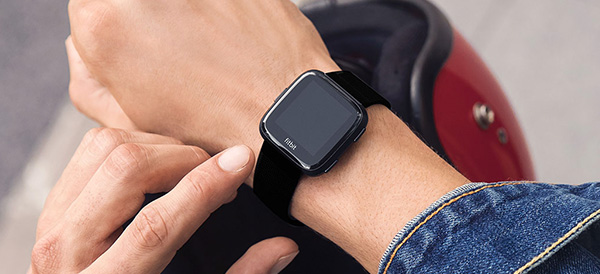
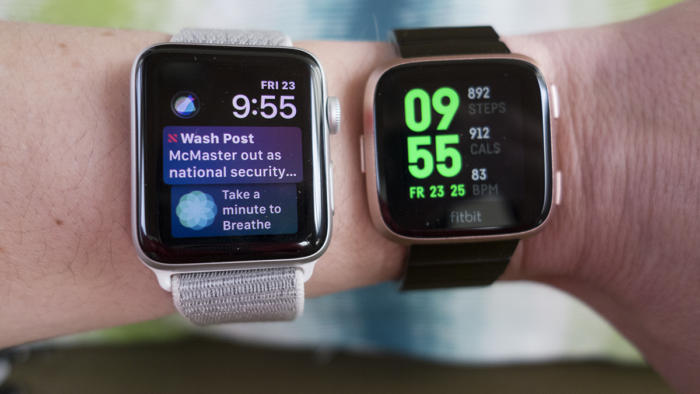
    At first glance, you might mistake the FitBit Versa for an Apple Watch. With a gently rounded square face of beveled glass, the Versa’s design mimics the original Apple Watch, but there are some key differences between the two gadgets. Which smartwatch is right for you?

    Design

    fitbit versa
    Aesthetically, there isn’t much to choose between the two smartwatches. Both share a similar design, interchangeable straps, a selection of metal finishes and a variety of watch faces to customize the look. The Versa is lighter and slimmer than even the smallest Apple Watch, but users have reported that the band on the Versa is much more difficult to swap out. The digital watch faces, which allow you to customize the look of your smartwatch, are finicky to search and install when it comes to the FitBit Versa, and the quality of the designs is uneven.  The FitBit Versa is really comfortable to wear because it’s so thin and light. The Apple Watch depending on your wrist size, can be uncomfortable and dig into your skin when the strap is pulled tight.