Author: Nick McLane

  • How LinkedIn Can Help You Find a New Job

    How LinkedIn Can Help You Find a New Job

    There’s no way to sugarcoat it: trying to find a new job is really, really difficult. It’s hard to even know where to begin. Who’s hiring? Who has good benefits and a good work environment? If you’re not using some kind of job board or have a ton of connections, you’re running in blind.

    That’s where LinkedIn comes in. More than just being a simple job board site, LinkedIn is the best social media app for meeting professional connections. After all, it’s much easier to get ahead in a crowded job market when you know the right people. Here’s how to have LinkedIn work for you.

    LinkedIn

    Take it Seriously

    LinkedIn might be a social networking site, but you should take it seriously. It’s not quite the same as Facebook or Instagram. It’s an opportunity to present yourself in a professional and well-curated way for potential employers and colleagues.

    As such, you should make sure you present your best self on LinkedIn. Make sure your pictures aren’t ones of you and your buddies hanging loose and partying. Make sure you’re well-dressed and well-groomed in your pictures!

    Use it Often

    Make sure to use LinkedIn often. Even if you’re employed and like your job, it’s good to have connections that you cultivate. If you only use the app when you’re looking for a new job, you’ll be out of luck. It’s not enough just to run to it in an emergency: you need to keep up to date!

    By using the app often, you ensure that you’ve got a presence online that potential employers and professional connections can see. This is essentially an ad for yourself as an employee. Take pride in it, and make sure everyone knows just how good of an employee you are.

    Resume

    Make sure you keep a well-formatted, up-to-date copy of your resume easily accessible on your LinkedIn. You never know when a recruiter or hiring manager might come along and see your profile. If they do, you want to make sure your info is all up-to-date and accurate!

    There’s no reason to potentially miss out on a great job just because you’ve got some goofy typos on your resume. Make sure you keep everything connected to your business page tight and well-formatted. This is an easy step to take that will take you only a few minutes, so don’t put it off!

    If you’re looking to make lasting businesses connections, LinkedIn is where it’s at. Get your profile active and looking great today.

  • The Best iOS Photo Apps for Shooting and Editing

    The Best iOS Photo Apps for Shooting and Editing

    Everyone loves to snap pictures! Every smart phone is equipped with great camera functionality, but they lack a decent photo app to go with it. Whether you’re looking to send pictures to family or post them to show your friends, you’re probably wondering which photo apps are the best! Here’s a round-up of our favorite photo apps!

    Snapseed

    Snapseed is a user-friendly photo editing app for iPhone. Allowing for different filter types and tools for adjusting exposure and sharpness, Snapseed allows for professional-style photo editing from your iPhone. You’re also able to edit only selected parts of a photo, letting you fine-tune images to your taste! It even has a healing tool like Photoshop. Best of all, this app is free! Snaseep is our favorite iOS photo editor.

    Cortex Camera

    This app is fantastic for shooting in low-light or nighttime situations. Using a really neat process, Cortex Cam is able to cut down of visual grain that is so common in low light pictures. Typcally, when taking pictures in low light, your phone camera will increase the ISO to attempt to squeeze more light into the lens. This has the side-effect of creating grainy images. Cortex Cam combats this by taking a large number of images in a short span of time and collating them into one image, eliminating that visual noise. This is easily the best app for low-light shooting!

    Superimpose

    Another Photoshop-like app, Superimpose allows two pictures to be blended together. If you want an app to blend together two photos from your phone, this is the app for you! This app has gradient masks that allow for one photo to mask the dark aspects of another with its own light aspects, allowing for interesting artistic projects. Superimpose can also be used for double exposure-style pictures, like using a foreground from one photo and a background from another. Superimpose is $1.99 on the app store, but you get a ton of awesome functionality for that price. If you’re looking to make compositions from your phone, Superimpose is a great app for you!

    Our Favorite Photo App: Camera+

    This app is exactly what is says it is: an enhanced version of the iPhone’s existing camera app. This app gives shutterbugs precise control over their phone’s camera functionality. Between altering shutter speed and white balance, this app is a must-have for smartphone camera enthusiasts. Camera+ has a manual focus function that is especially helpful for photographing extremely close objects, which is great!  It also has a handy 30-second delay feature for those who want to take pictures with themselves in the frame.If you have the technical know-how, or want to develop it, this app is a great choice for you!


  • Which Laptop is the Best for Photographers?

    Which Laptop is the Best for Photographers?

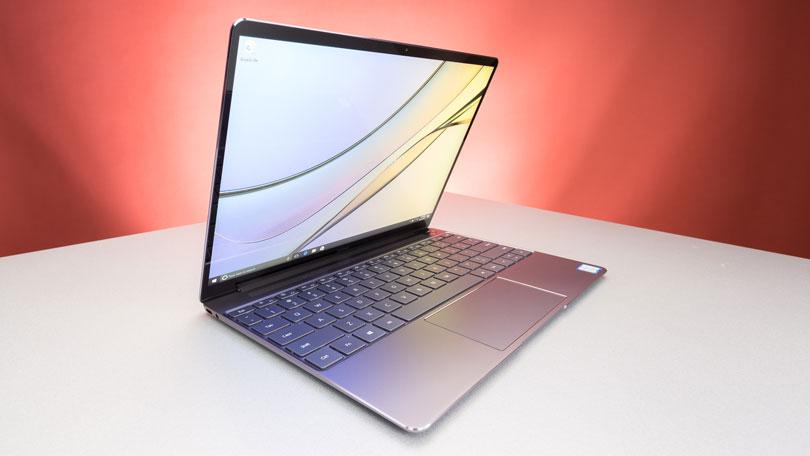
    If you’re a photographer, or an aspiring photographer, you’re certainly going to be using photo editing software. You’re also going to want that software to be accessible on the go, so you can edit while you’re shooting. With that in mind, the photographer’s best friend is their laptop. Which laptop is the best for editing on the go? Read on to find out our favorites! 

    Dell XPS 15 

    Dell’s XPS 15 is a great non-Apple choice for photographers. If you want a laptop that excels for photo editing and runs on Windows, this one is a great choice. It sports InfinityEdge technology, meaning it has a huge screen size for how small of a machine it is. Its display is color-accurate and has a 4K resolution, meaning your photos will look accurate while you’re editing.  

    The XPS 15 is a bit expensive, although that’s par the course for laptops with displays strong enough for photo editing. It retails for around $1,000, but you can often find it on sale for around $750. Consider this one if you heavily prefer Windows over Mac OS. 

    Apple Macbook Pro 13 inch with Retina 

    Unsurprisingly, Apple’s flagship laptop remains a fantastic choice for photographers. If you needed any reminders: Retina display is amazing, the battery life is great, and Mac OS was made with content creators in mind. Unsurprisingly, the Retina display remains the best laptop display on the market. With the best colors, contrast and saturation available on a laptop, you won’t be disappointed in this choice. 

    On the negative side, the Macbook is pretty expensive no matter where you go. It can be found anywhere from $900-$1,000, depending on sales and the like. It also doesn’t have a great deal of storage, which is a bit disappointing for photographers. That said, this is still a great pick. 

    Our Favorite Laptop for Photography: Apple Macbook Pro with Touchbar

    The step up from the older Macbooks, this new one sports the handy new touchbar technology. The touchbar is an OLED display above the keyboard that allows for quick access to tons of shortcuts. The toucbar has a number of applications across the OS, like suggested word selection and scrolling. The great use for photographers is the shortcuts in Photoshop, making Adobe’s robust suite even easier to use. Additionally, all the positives about the previous Macbook still apply, with the exception of the battery life. 

    Unfortunately, battery life isn’t nearly as impressive on this one; it seems the touchbar really saps the power from the laptop. Jokes aside, it is markedly lower than its predecessors. Additionally, this one is tremendously expensive: you can usually find it around $1,500.  


  • Which Cloud Storage Service is Right for You?

    Which Cloud Storage Service is Right for You?

    There a ton of great options when it comes to cloud storage! Many of them are free, but some offer some interesting paid features. If you have a lot of storage needs, whether it be for business or personal use, consider these great options for cloud storage!


    Google Drive: Google Drive is part of Google’s office suite, and it’s surprisingly competitive with Microsoft’s offerings. For having a Google account, you get 15GB of storage for free. For documents and pictures, 15GB is a good bit of storage! Google also offers a few packages for higher amounts of storage. For 100GB, 1TB and 10TB, you pay $2, $10 or $100 per month, respectively. Given the free Google Office suite that comes welded to this service, many offices are opting to use it.  

    Google Drive has Android, iPhone and Windows apps, too! This makes it easy to sync files across multiple devices. Google Drive is ideal if you have a Chromebook, but it’s a great choice for eveeryday use too. You can’t go wrong with this one! 

    Amazon Drive: Amazon Drive is a great service if you already have Amazon Prime. Annual pricing is pretty reasonable for the cloud storage, but Prime members get unlimited photo storage as part of their membership! Those who just want to store stuff get 5GB for free and can upgrade to 100GB for $12 per year. If you really need more than that, they also offer 1TB of storage for $60 per year. If you need to store every film ever released, a 30TB option is available for $1,800 per year.  

    Amazon Drive uses a “delta sync,” like DropBox. This means, when you upload a file and then upload a changed version of the same file, it only saves the changes. This means it just makes alterations to the file rather than redownloading the whole thing. This saves time and bandwidth! You can also elect to throttle upload speed if you need to balance what’s using bandwidth. Bottom line, if you’re already using Amazon Prime, this is a great choice. Otherwise, there are better options. 

    NextCloud: If you don’t like the idea of Google or Microsoft or someone having access to your files, try NextCloud. You set up your own cloud storage through NextCloud, using your own server. While this might sound daunting to some, for tech-savvy users this is a great option. If you really want to exert total control over your cloud storage and backups, this is the way to go. The code is all open-source, so savvy users can run it all themseves. The service also offers private web messaging and conferences through NextCloud Talk and NextCloud Groupware. If you want to run a business and control everything from your own servers, this is the way to do it! 

    OneDrive: Microsoft’s answer to cloud storage is a great platform. Windows users have access to it as just another computer directory! It’s quite easy to access and offers 5GB of storage free to anyone. Just like Google Drive works closely with Google Office Suite, OneDrive works with Microsoft Office. If you commonly use Microsoft Word, PowerPoint and the like, OneDrive is a great option for you.  

    If you have an Office 365 subscription, you get an extra terabyte of storage for OneDrive too! For businesses, there’s also OneDrive for Business that grants access to both storage and Microsoft Office. It’s just under $9 per person per month, which is actually a pretty good rate!  If you already use a lot of Microsoft’s Office Suite, OneDrive is for you! 

    Most Generally Useful Cloud Storage: DropBox

    DropBox is a very well-known cloud storage platform for good reason. It can be accessed from pretty much any platform and is quite easy to use. You get 2GB of free storage, as well as a few extra GB for syncing your phone to your DropBox. By recommending friends you can get extra storage, too. You can spend $10 per month for an extra TB of storage, or you can get it for $100 per year.  

    The bottom line is that DropBox is easy and system-agnostic. It’s not married to any particular operating system or company. If you need a solid, dependable cloud storage platform that works on every device, DropBox is for you. 


  • Best Dental Chews for Dogs

    Best Dental Chews for Dogs

    When it comes to dental health, it can be difficult to get your dog to sit still long enough for a proper teeth cleaning. However, there are tons of great options for dental chews for dogs! These are great, because dogs love chewing, and they help clean their teeth!

    Your dog’s dental health is important, but it isn’t always easy getting him to sit still long enough to brush his teeth on a regular basis. Dental treats that are meant to help with the brushing process can make a big difference. They help remove plaque and freshen your dog’s breath. They also make her happy as she sees them as just another treat to be enjoyed.

    Best Dental Chews for Dogs

    MilkBone

    Dogs love the taste of MilkBone brand chews. These chews have nubs and a twisted design, so it makes them great for cleaning teeth. Thanks to the easy-to-grip design, dogs can really gnaw on MilkBone chews. This ensures that they clean crevices and hard-to-reach parts of their mouth!

    MilkBone chews are also loaded with calcium. That means that not only will they help your dog clean their mouth, but also stay healthy! There’s nothing better than making sure your dog is happy and healthy with a mouth full of clean teeth!

    Oravet

    Oravet chews are well-known for their unique bacteria-barrier properties. These chews release an ingredient that bonds to your dog’s teeth, developing a bacteria-resistant barrier. The chews have what is described as a mild, vanilla flavor.

    Oravet chews are also good at cleaning plaque and tartar from your dog’s teeth! Their design makes them ideal for getting the hard-to-clean gunk off of your pup’s teeth! It’s recommended that you give your dog one of these chews daily to see the best results.

    Dentastix

    Dentastix are a favorite dental chew due to their unique shape and flavor that dogs love. They sport a chicken flavor that encourages tons of chewing, meaning they really help to clean your dog’s teeth. Additionally, they come in a variety of sizes for all types of dogs!

    Dentastix aren’t for dogs under 15 pounds, though Pedigree does make a puppy version. Dogs of all sizes love Dentastix for their flavor, so make sure you pick the right one for your dog! Additionally, dog owners love Dentastix for their shape. Their unique X-shaped design has ridges that help to really clean dogs’ teeth. However, the chews are soft enough that they won’t hurt when chewed on by over-excited dogs!

    Greenies

    Greenies dog treats come in three flavors, original, chicken and parsley, and cheese. This is a variety that is sure to please nearly any dog. The cleaning action works on both teeth and gums and it also freshens breath. These treats are made with natural ingredients that are highly soluble, making them easy to digest. Added vitamins and minerals make them even healthier for your dog. One treat a day will keep your pet’s teeth free of plaque buildup that can result in tooth and gum problems.

    Whimzees
    Whimzees dog dental chews are made from six natural ingredients and contain no artificial colors or flavors. They are GMO, gluten, and grain-free, making them some of the healthiest on the market. The variety of shapes make them a fun treat for your dog. They are even designed with a “paw pad” to help your dog hold them more comfortably. They chewy texture creates a brushing action that helps keep teeth and gums healthy when given daily.
    dental%20chews%20for%20dogs


  • Best Dog Food Brands for Discerning Owners

    Best Dog Food Brands for Discerning Owners

    If you’re a dog owner, you know that picking the right dog food can be incredibly difficult. There are a number of competing brands looking for your dollars, and not all of them are best for your dog. However, finding which one is the best can be stressful: you don’t want to subject your dog to food that isn’t good for them just to find out which one is the best.

    There are a number of brands that use sub-par ingredients, fillers and various other negative contents that could be bad for dogs. Ideally you want to find dog food that has no harmful igredients, above-average meat content, acceptable carb amounts and a good amount of fats when compared to proteins. Let’s take a look at some of our top picks for taking care of your dog’s dietary needs.

    Instinct Original

    Instinct Original Dry Dog Food is a great dog brand for all adult dogs and puppies, across any breed. Whether you have a tiny chihuahua puppy or a fully-grown Great Dane, Instinct Original Dry Dog Food is a great pick. The food offers a great protein-to-fat ratio, and has a good amount of real meat in the ingredients. It includes beef as well as chicken meal and white fish meal, and is filled out with peas.

    If you’re worried about your dog getting enough protein for their amount of exercise, then Instinct is a great choice for you. While most lower-quality dog food brands fill out the bulk of their food with grains or other low-nutrition fillers, Instinct is primarily composed of protein and lower on fat and carbs than most competitors. This makes it a great pick if you’re trying to keep your dog on a diet, too!

    Dr Tim’s Pursuit Active Dog Formula

    Many active people love keeping their dogs with them when they go out. It’s fun to get outside and get active with your dog: they love the exercise and you love the time spent bonding. If you’re always going on jogs, hikes and runs with your dog, they need to be getting the right fuel to help them stay in shape. That’s where a brand like Dr. Tim’s comes in. Dr. Tim’s Pursuit Active Dog Formula carries all the nutrients and protein your dog needs to keep up with an active lifestyle.

    The best thing about keeping your dog active is that it’s good for their long-term health. Everyone wants their dog to live longer and be healthier in the long run. The best way to look out for your dog’s long-term health, of course, is to help them stay active with you! This food is good for all dog breeds, and is okay for puppies if they’re from small or medium breeds.

    Victor Hi-Pro Plus

    You might not have heard of Victor Hi-Pro Plus dry dog food, but it’s a great brand for all adult dog breeds and small or medium breed puppies. The budget is right for food of this quality too: if you’re worried about breaking the bank, this is a good high-quality dog food for a reasonable price. You can rest assured knowing you’re not skimping out on your pup, as the main ingredients in this dog food are beef meal, chicken fat and pork meal.

    The fat-to-protein ratio is about 67%, making it a significant upgrade over lower-quality brands of dog food. Whether you’re switching your dog over to this food to get them on a healthier diet or starting a puppy out right, it’s hard to go wrong with Victor Hi-Pro Plus dry dog food. It’s simple, it’s quality and it’ll keep your dog in good health.


  • Top Health and Fitness Apps: Get Active, Stay Active

    Top Health and Fitness Apps: Get Active, Stay Active

    It’s getting warm outside and you’re thinking about getting in shape in time for summer. That’s cool, and a really reasonable pursuit. Maybe you’re not sure how to get fit, though.

    Today we’re going to break down some of the best health and fitness apps. It’s time to get active and stay active!

    Top Health and Fitness Apps

    Fitbit Coach

    If you’re getting into app fitness, you might have a smartwatch. If your smartwatch is the Fitbit tracker, then Fitbit Coach is for you. This app offers guided workouts via both audio and video, helping show you the best ways to tackle your fitness.

    There are workouts for the gym, for outside and for at home. That makes the Fitbit Coach app one of the most flexible fitness apps, allowing you to tailor your workout routine to your work and home life. Remember, getting fit doesn’t have to make you change your schedule!

    Aaptive

    There’s a lot to love about Aaptive. This fitness app is audio-based and gives you access to fitness trainers and fitness programs that are top-notch. If you want an app version of a top-level fitness program then this is for you.

    Aaptive is great for those who want to be able to have an instructor and a gym-like program but can’t afford the time or money for a gym membership. There’s no compromise with Aaptive: it’s the full gym experience, just delivered to your phone and available at home.

    ROMWOD

    ROMWOD is an app that gives you access to tons of great stretches and cooldown exercises. If you often exercise but feel yourself being stiff and tight afterward, you could use this app. Its numerous features are all available through the iPhone app, so you can start stretching and keeping your muscles limber right away from your phone.

    Jefit

    There are a ton of exercises out there, and they all target different parts of the body. With all these muscles to try to tone and all the various exercises, how do you keep track of everything? That’s where Jefit comes in. This app functions like a fitness library.

    There are tons of exercises for various muscles and muscle groups that you can access, and you can even store your workouts for later reading. There’s a large social aspect, too, where you can share your exercises with your friends and with the Jefit community. This is a great app for fitness nerds who love the science of getting into shape!


  • Top Apps for Encouraging Mental Health

    Top Apps for Encouraging Mental Health

    Mental health is a serious issue. Medical studies report that mood disorders like anxiety and depression are the third-highest cause for hospitalization among adults 18-44. A few steps anyone can take towards bettering their mental state include regular exercise and a healthy diet. However, there are other steps available too. As always, if you are able, seek professional help for mental disorders that are negatively impacting your quality of life. None of these apps should be considered a substitute for a doctor. That said, these apps all make great companions to help you promote healthy mental health habits!


    Pacifica 

    Photo Credit: Routine Coach 

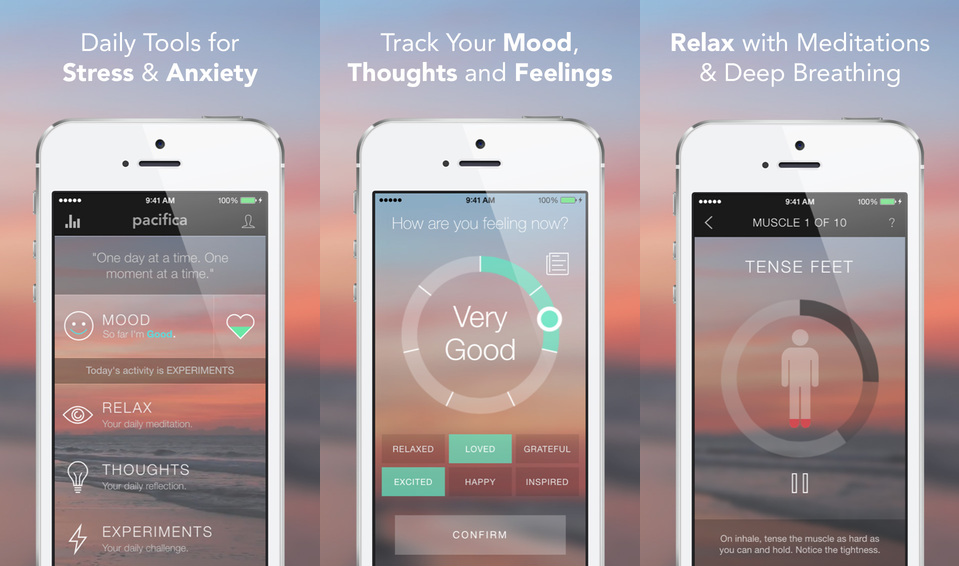
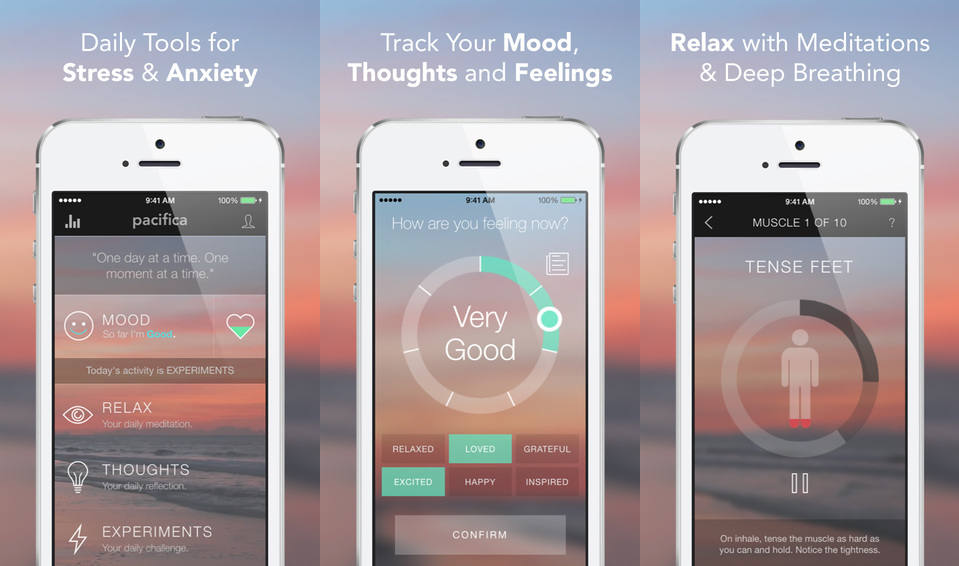
    Stress and anxiety are the main focus of Pacifica. Connecting users with a community of supportive people experiencing similar things, Pacifica is a great platform. The app also offers audio lessons to help with relaxation and mindfulness. Meditation and relaxation are also part of the app’s repertoire. Pacifica is described as an app that “helps break cycles of unhealthy thoughts.”  


  • An Easier Way to Sell on eBay

    An Easier Way to Sell on eBay

    The updated mobile app from the veteran online marketplace will make it much easier to upload your stuff. The new eBay app, which has already rolled out on both iOS and Android, allows users to upload an item in a just a few seconds.

    Scan and Go

    The biggest change to the app is the addition of a barcode scanner, along with a product search feature. The app works best if you have the original box since you can simply scan the barcode. However, if you didn’t hang on to the box, never fear! You can still look up the name of the product in eBay’s extensive database and pull up the necessary information.

    The app fills out the majority of the fields for you although you’ll still need to enter the item’s condition. For many items, eBay is even able to provide images from its library, suggest a price, and calculate shipping costs. You can edit any of the pre-populated fields as needed.

    The Power of Data

    The new app builds on the simplified selling tools debuted by eBay last year. Using structured data and predictive analytics, the platform draws on its vast database of listings to cut down on the time it takes to upload an item. They hope that the streamlined process will make the platform more appealing to current sellers and newbies alike.

    “At eBay, we’re dedicated to delivering a seamless and efficient selling experience for both first-time and seasoned sellers alike,” says Kelly Vincent, eBay’s VP of Consumer Selling Product & Engineering. “This is one of many enhancements we’ll be making this year. We’ll continue to leverage structured data and new technology developments to help our sellers ‘get it sold.’”

    Limited Features

    Unfortunately, sellers who trade in vintage or unique items will find that the new app has limited functionality. The lack of barcodes on vintage items and the variability in condition means that these sellers will still need to enter most of their information by hand and upload their own photos instead of using the provided stock images available for newer mass-market products.

    Increased Competition

    When it arrived on the scene over 20 years ago, eBay was a revolutionary way to sell online. Since then, resale apps like OfferUp, Poshmark, LetGo, and ThredUp have emerged to pose serious competition. Facebook’s Marketplace has also claimed a piece of the online resale pie, focusing on connecting local sellers and buyers.

    Although there are over 13 million listings added to the site each week using the mobile app, eBay is betting that their faster, simpler uploading process will keep the platform competitive.


  • Discount Pet Medication: Best Places to Save Big

    Discount Pet Medication: Best Places to Save Big

    When it comes to your pets, you want only the best. If your pet is sick, you want to make sure you’re getting the best quality medicine to help them get better.

    However, medicine can be prohibitively expensive. If you want to make sure you can afford the best for your pet, you might need to pick up their medications with a discount.

    What are the best ways to save on pet meds, though? Today we’re walking you through some of the best ways to save money on your pet’s medications.

    Discount Pet Medications

    Shopping Online

    It can often be much more affordable to shop for your pet’s medicine online, as opposed to vet’s offices. Vet’s offices, while important in animal health, are often unable to match the prices found on wholesale sites. They often have to include more markups in their medication, making it difficult for them to match online prices.

    Online prices, however, aren’t everything. When you shop online, make sure you’re shopping through wholesale sites to get your discounts. If you’re buying medicine from disreputable vendors or from shady, overseas sellers, you might find you’re getting sub-par medicine for your pet.

    What to Look For

    The last thing you need is to support a shady vendor. When you’re looking for the best deal on pet medication, make sure the site is reputable. You’ll want to only buy medication from VIPPS-approved sites that require prescriptions. It can be a pain to make sure you always have a prescription for medication, but it ensures the site is trustworthy.

    You’ll also want to make sure that the site is verified and secure. Some disreputable discount pet med sites are actually elaborate scams and have no intention of sending you real medication. Even those that do could be selling your information to identity thieves.

    Non-Prescription

    Even with non-prescription medication, you need to be careful. If a deal is too good to be true, it is. When you receive medicine in the mail, check the sell-by date to make sure you’re not giving your pet outdated medicine.

    Likewise, make sure any medication you buy online hasn’t been tampered with. Keeping your animal happy, healthy and safe is your first priority, so accidentally harming them is something you need to avoid.

    Remember, when in doubt, go through reputable sites, even if it means spending a bit more money. There’s no reason to let harm come to your pet just to save a few bucks.