Category: Apple

  • Best All New Wireless Headphones for 2021

    Best All New Wireless Headphones for 2021

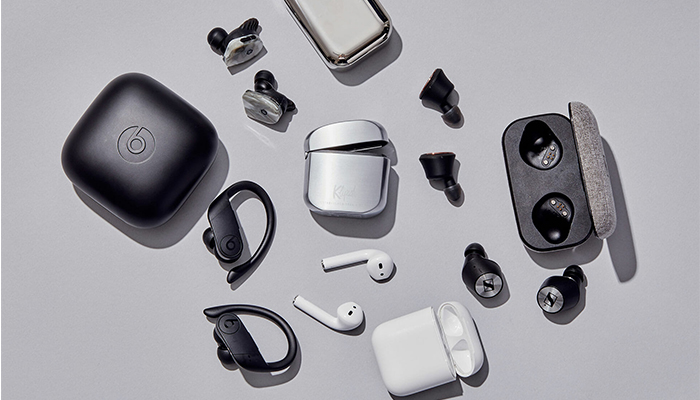
    Whether you’re looking for a good pair of headphones for working out or just something to wear while drowning out sounds during your commute, not having to fuss with wires is a huge plus. No one wants to worry about the tangle of wires in their pocket or bag, or their cord snagging on something and damaging their headphones. Thankfully, there are some stellar Bluetooth headphones on the market. Here are some of our top picks.

    Jabra Elite 75t

    If you like having wireless earbuds for sports activity, we can highly recommend the Jabra Elite 75t. These new earbuds fit snugly in most ears, and they have a great sound quality for their small size. The drivers are solid, offering punchy bass, good mid-levels, and decent overall sound: while these won’t be beating any dedicated audiophile headphones, they’re good for their price point and size.

    A notable draw to the Jabra Elite 75t is their microphones. They work incredibly well as a headset for taking phone calls, doing a great job of filtering out background noise. If you like wearing earbuds while jogging, cycling or other types of activity, this is a great draw. Taking a call while getting in your workout is a great two-in-one feature for busy professionals.

    Sony WF-1000XM3

    Sony has finally taken its wildly successful WF series headphones and put them into a smaller package. The WF-1000XM3 takes the quality of their full-size headphones and puts them into a smaller earbud form factor.

    Sennheiser Momentum True Wireless

    If you’re looking for the intersection of portability and sound quality, you’re looking for the Sennheiser Momentum True Wireless earbuds. These wireless earbuds offer incredible sound quality and accurate reproduction of recordings. They’re incredibly light: you might even forget they’re in your ears. When you need a good set of earbuds for taking with you on trips or to work and back, these are a great go-to.

    While they’re not the best for sports or activity, the Sennheiser earbuds are great for daily activities like walking or commuting. For the person who wants portable wireless earbuds that can be tucked into a pocket but still wants the best sound quality, these physics-defying little earbuds are the best option.

    AirPods Pro

    If you’re already in the Apple ecosystem, these are a no-brainer. Their intuitive gesture controls allow you to change the song, adjust the volume and answer calls quickly and without having to pull your phone out.

    The 2020 update brings even more useful tricks to the AirPods Pro. With Apple’s propriety H1 chip they feature snappier Siri integration. You can send messages, start playlists and ask for internet searches all while jogging, cleaning or whatever you’re doing while wearing the AirPods. If you love high-tech integration and cool fashion statements, the AirPods are a great pick for you.

    Beats Solo Pro

    Apple has finally stepped up the quality of their Beats headphones. The Beats Solo Pro is a set of over-ear, active noise canceling, headphones. They used the same noise-canceling technology featured on their more premium, over-ear, Studio3 Wireless. The H1 wireless chip makes sure they are easy to connect to your phone and feature full Siri support. They’re a bit more expensive than the average headphones, but their great technology integration and stellar sound quality on phone calls makes them great for people on the move.

    PowerBeats Pro

    If you love the idea of the AirPods but want a more fitness-oriented set of wireless earbuds, the Beats Powerbeats Pro are for you. The same technology that went into the second generation AirPods is on display in the PowerBeats Pro, just in a more fitness-oriented shape. The over-ear design on display here helps the earphones stay on your ears while your exercise, making them great for any active person.


  • Best VPN for iPhone

    Best VPN for iPhone

    While it might sound weird that you’d want a VPN for a phone, it’s not a bad idea to have one. While iOS is great at protecting user security, it’s not able to help you when you’re surfing the web. The real reason you’ll want one of these is if you use public Wi-Fi often. Public networks are often unsecure, and any data sent to and from your phone while on them could be intercepted by hackers. If you want to keep your encrypted info safe from prying eyes, try these VPNs! They offer great protection for your mobile browsing.  

    Golden Frog VyprVPN 

    Golden Frog is a clean, well laid-out VPN with a lot to offer. While it doesn’t offer as many licenses per subscription as some of the competition, it’s a solid pick. It’s ten dollars to start and five bucks a month. Sadly, it doesn’t offer any ad-blocking. What it does offer, though, is a free trial and a ton of servers. Your server speeds on this one will be blisteringly fast! If speed is your bag, try Golden Frog. 

    Cyber Ghost VPN 

    Offering seven licenses per $2.75 a month subscription, Cyber Ghost is a good choice. The interface is unique and weird in a good way. Privacy is a major concern of this one, and it does a good job logging very little user data. You can’t location spoof while streaming, though, so if you’re trying to appear as though you’re somewhere else, this isn’t the right VPN. That said, this is still a fine VPN, and it costs $12 to get started. The $2.75 per month deal is limited time, though, so check it out soon! 

    Nord VPN for iPhone 

    If you’ve ever looked into VPNs, you’ve definitely seen the name Nord. They’re well-renowned for a reason, and it’s because they’re good. Their VPN for iPhone offers a ton of servers and great features. Just like Cyber Ghost, it’s $12 to get started and $2.75 per month. Also, like Cyber Ghost, that’s a limited time price. That said, if you’re looking for a strong iPhone VPN, this is a great pick. Offering six simultaneous connections and blocking ads is a pretty mean feat on an iPhone. The app and layout are both friendly and welcoming, too! Great for first-time VPN users. 

    Our Favorite VPN for iPhone: KeepSolid VPN Unlimited 

    Starting a $8.99 per month, this is a fantastic VPN for the money. It supports Open VPN and sports great speeds. KeepSolid boasts servers specifically tooled for streaming, which is awesome. It also offers a personal VPN server for users! That said, it has no free trial, which is a bummer. Compared to Nord it has a small number of servers, too. That said, the interface is excellent, and the user experience is top-notch. If you’re looking for a fantastic VPN for iPhone, this is the one for you! 


  • iPhone vs Android: Which is Right for You?

    iPhone vs Android: Which is Right for You?

    One of the fiercest rivalries in the tech world today is the ongoing feud between Google and Apple over control for the soul of the smartphone. Despite ostensibly designing the first true smartphone with 2007’s iPhone, Apple doesn’t enjoy the majority market share that Google’s Android does today. What’s the deal with the Android versus iOS feud? Which of the two big operating systems is better for you, and why?

    Today, we’re going to look at the two OS’s, what makes them different, and whether you should be “taking a side” in this battle. We’ll be looking at features, phones and corporate cultures in order to give you a full picture of the battle of the smartphones.

    Design Ethos

    Google and Apple have very different design strategies when it comes to their operating systems. Much like Apple’s own Mac line of computers, iPhones operate in a sort of “walled garden.” There’s less software available on Apple products overall, but the company curates the selection very diligently. Ostensibly, you won’t find shovelware on the App Store, nor will you be at any risk of ever happening upon a virus.

    However, with Apple, you’re stuck playing inside the wall: you’ll likely not find the same breadth of customization and modularity you see on Android. Google’s more hands-off approach to their OS has made it very wide-ranging in appeal: manufacturers from Samsung to Huawei all create phones that run on some variation of the Android OS. The more open, customizable user interface of Android is more popular with some users who like to fine-tune their own experience.

    “It Just Works”

    Apple is often described as “high technology for people with low tech tastes,” and this is often true in practice. Apple’s products tend to be bleeding edge, top-of-the-line, and terribly expensive. Their user interface tends to be easy-to-navigate and aesthetically pleasing, and people who even have little tech knowledge are usually able to easily find what they’re looking for. In short, it just works.

    Android is a different story. Less tech-savvy users might find it difficult to navigate Android’s more open-ended operating system: there is little structure or direction unless the phone manufacturer has installed their own proprietary launcher. Launcher, in turn, can be downloaded for any Android device to help tailor your phone more explicitly to your tastes and preferred experience.

    Security Features

    This might come as a surprise to Android users, or be a strange statement if you’re an iOS user, but the iOS platform only has one app store. It’s just called the App Store, and it’s locked down tight. Apple strictly controls what can be put up for sale or download on the App Store, meticulously combing for any potential security threats to their users. Viruses on Apple devices are literally unheard of for this reason.

    Likewise, Apple users might be shocked to hear that Android devices actually have several third-party app stores available. As such, viruses are a reality on Android devices. They’re far from common, and you’d be hard-pressed to get one unless you were being careless, but they’re still a cause for some concern. The more pressing reality of Android’s open-ended style is that more apps are allowed in, but there’s less quality control.

    Cognitive Load and User Functionality

    On a more academic note, researchers have found that Apple’s clean, no-frills design ethos lessens cognitive load when using their devices when compared to Android. Android home screens can be done up with tons of widgets and information, making them significantly more likely to overwhelm some users.

    However, this isn’t to say Android is inferior: far from it! However, Android and iOS are simply designed for different types of buyers. In the end, Android remains more popular primarily because it’s available on a wider variety of devices. Further, those devices run the gamut from high-end flagship phones to budget handsets, while Apple’s iOS is only available on the premium-priced iPhone line.


  • The Best iOS Photo Apps for Shooting and Editing

    The Best iOS Photo Apps for Shooting and Editing

    Everyone loves to snap pictures! Every smart phone is equipped with great camera functionality, but they lack a decent photo app to go with it. Whether you’re looking to send pictures to family or post them to show your friends, you’re probably wondering which photo apps are the best! Here’s a round-up of our favorite photo apps!

    Snapseed

    Snapseed is a user-friendly photo editing app for iPhone. Allowing for different filter types and tools for adjusting exposure and sharpness, Snapseed allows for professional-style photo editing from your iPhone. You’re also able to edit only selected parts of a photo, letting you fine-tune images to your taste! It even has a healing tool like Photoshop. Best of all, this app is free! Snaseep is our favorite iOS photo editor.

    Cortex Camera

    This app is fantastic for shooting in low-light or nighttime situations. Using a really neat process, Cortex Cam is able to cut down of visual grain that is so common in low light pictures. Typcally, when taking pictures in low light, your phone camera will increase the ISO to attempt to squeeze more light into the lens. This has the side-effect of creating grainy images. Cortex Cam combats this by taking a large number of images in a short span of time and collating them into one image, eliminating that visual noise. This is easily the best app for low-light shooting!

    Superimpose

    Another Photoshop-like app, Superimpose allows two pictures to be blended together. If you want an app to blend together two photos from your phone, this is the app for you! This app has gradient masks that allow for one photo to mask the dark aspects of another with its own light aspects, allowing for interesting artistic projects. Superimpose can also be used for double exposure-style pictures, like using a foreground from one photo and a background from another. Superimpose is $1.99 on the app store, but you get a ton of awesome functionality for that price. If you’re looking to make compositions from your phone, Superimpose is a great app for you!

    Our Favorite Photo App: Camera+

    This app is exactly what is says it is: an enhanced version of the iPhone’s existing camera app. This app gives shutterbugs precise control over their phone’s camera functionality. Between altering shutter speed and white balance, this app is a must-have for smartphone camera enthusiasts. Camera+ has a manual focus function that is especially helpful for photographing extremely close objects, which is great!  It also has a handy 30-second delay feature for those who want to take pictures with themselves in the frame.If you have the technical know-how, or want to develop it, this app is a great choice for you!


  • Which Laptop is the Best for Photographers?

    Which Laptop is the Best for Photographers?

    If you’re a photographer, or an aspiring photographer, you’re certainly going to be using photo editing software. You’re also going to want that software to be accessible on the go, so you can edit while you’re shooting. With that in mind, the photographer’s best friend is their laptop. Which laptop is the best for editing on the go? Read on to find out our favorites! 

    Dell XPS 15 

    Dell’s XPS 15 is a great non-Apple choice for photographers. If you want a laptop that excels for photo editing and runs on Windows, this one is a great choice. It sports InfinityEdge technology, meaning it has a huge screen size for how small of a machine it is. Its display is color-accurate and has a 4K resolution, meaning your photos will look accurate while you’re editing.  

    The XPS 15 is a bit expensive, although that’s par the course for laptops with displays strong enough for photo editing. It retails for around $1,000, but you can often find it on sale for around $750. Consider this one if you heavily prefer Windows over Mac OS. 

    Apple Macbook Pro 13 inch with Retina 

    Unsurprisingly, Apple’s flagship laptop remains a fantastic choice for photographers. If you needed any reminders: Retina display is amazing, the battery life is great, and Mac OS was made with content creators in mind. Unsurprisingly, the Retina display remains the best laptop display on the market. With the best colors, contrast and saturation available on a laptop, you won’t be disappointed in this choice. 

    On the negative side, the Macbook is pretty expensive no matter where you go. It can be found anywhere from $900-$1,000, depending on sales and the like. It also doesn’t have a great deal of storage, which is a bit disappointing for photographers. That said, this is still a great pick. 

    Our Favorite Laptop for Photography: Apple Macbook Pro with Touchbar

    The step up from the older Macbooks, this new one sports the handy new touchbar technology. The touchbar is an OLED display above the keyboard that allows for quick access to tons of shortcuts. The toucbar has a number of applications across the OS, like suggested word selection and scrolling. The great use for photographers is the shortcuts in Photoshop, making Adobe’s robust suite even easier to use. Additionally, all the positives about the previous Macbook still apply, with the exception of the battery life. 

    Unfortunately, battery life isn’t nearly as impressive on this one; it seems the touchbar really saps the power from the laptop. Jokes aside, it is markedly lower than its predecessors. Additionally, this one is tremendously expensive: you can usually find it around $1,500.  


  • Biggest Mistakes People Make When Buying Laptops

    Biggest Mistakes People Make When Buying Laptops

    If you’re shopping for a laptop for your kids going back to school, or just looking for something to help you with productivity, there’s a lot to choose from. It’s becoming increasingly difficult for laptops on the lower end to distance themselves from competition in the form of tablets and even smartphones. As such, tons of weird gimmicks have started showing up on laptops across the entire market, and they can be hard to sift through.

    When you’re shopping for a new laptop, there are a few basic mistakes you’ll want to take care to avoid. Whether they’re experienced tech junkies or relative newcomers, here are the basic mistakes that people make when they’re shopping for a new laptop.

    Paying too Much

    Some of the higher-end laptops you’ll find are downright amazing. However, that doesn’t mean that every expensive laptop is a good deal. If a laptop feels like it’s straining your budget for you to fit it into your purchases, it’s likely rocking some features that are completely unnecessary. Don’t get suckered in to paying a huge upcharge for a 4K display, 4TB of memory and 12GB of RAM when the laptop is going to be used for taking notes and watching YouTube videos.

    Along this same line of reasoning, make sure you know what display resolution you’re comfortable with. If you want to use a laptop for lots of Netflix streaming, video games and photo editing, you might want to opt for the full 4K resolution. However, if you’re buying for a student so they can write research papers and check their email, then you might go for a 720p screen that costs less than half the price.

    Undershooting Your Needs

    On the flip side, if you buy a laptop entirely based on “oh, this is the cheapest one I could find!” then you’re likely going to get what you pay for. If your laptop barely has any storage or RAM, then you’ll find it quickly running out of usefulness for you. Likewise, if you need a lot of applications running at once but opt for a dual-core processor over a quad-core processor, just because the dual-core was cheaper, you’ve only short-changed yourself.

    When you’re buying a laptop, have a good idea of your needs. When you know what you need, then it’s easier to set your price point. If you undershoot what you need, then you’ll have issues on you hands that you won’t be able to fix until you just buy the laptop you should have bought in the first place. Likewise, if you overshoot and buy something hilariously overpowered for what you need, then you’ve wasted a ton of money on bells and whistles that aren’t helping you.

    Not Trying it Out

    Would you ever buy a car without test driving it, or a home without touring it? If you would, then, congratulations on your huge piles of disposable cash. However, people with normal budgets try things before buying them, and your laptop should be no exception. The prevalence of online buying has made this a bit less common in recent years, but this is a disturbing trend. It’s important that you try out any complex piece of technology before you buy it.

    The feel of the keyboard, the speed of the processors and the appearance of the resolution are all important things to see in person. Even minor touches, like the shape and weight of the laptop, are hard to gauge just by looking at stats and dimensions on a cold web page. Little things like the sensitivity of the touch pad or the lack of certain features might not jump off the page at you, but would be immediately apparent if you tried the device in-person.


  • The Gift of Music:  How to Do It the Right Way

    The Gift of Music: How to Do It the Right Way

    Everyone has those people in life that are very hard to shop for. I mean what are you to get the person that has everything? Music. Music is always the best gift,  and for the people that have everything, it’s often the only gift. Music is universal and received by everyone. No one can have all of it or appreciate all of it,  which makes it such a great gift.

    The best part about giving music as a gift is there are so many different ways to do it. You can give equipment, earbuds, speakers, listening peripherals, or just new music that you think they would enjoy. The options are virtually endless. Let’s take a look at some of the best music gift ideas you can give your friends, family,  and loved ones.

    Streaming Subscriptions

    When gifting music the first place to start is the easiest place to start. That is a subscription to new music. Starting at $9.99 a month there is a plethora of streaming music subscription services. The subscriptions will allow you to stream, download, and listen to unlimited music, new, retro or classic. Whatever you wanna hear, whenever you wanna hear it.

    The first one I would mention is Apple Music. Apple Music has the largest subscription-based of users as well as the largest database of music. They’ve been compiling music in their iTunes software since the beginning of digital music. Almost all the music you could ever want to listen to is there is a very easy to use, intuitive,  user-friendly platform that syncs perfectly amongst all your iOS devices.

    The next option is Amazon’s Prime Music. Prime Music functions mostly like the Apple subscription services. Prime music will sync across all your Amazon prime devices,  you can even download the prime music app to your iOS or Android devices.

    This provides flexibility in your multiple and various OS mobile devices. There are also services like Iheartradio, Pandora, and Spotify. All the services will run you $9.99 a month and make an excellent gift for anyone who doesn’t have unlimited streaming music service.

    Harmonica?

    Maybe you want something tangible to give? Another great option to give somebody is the gift of a musical instrument. Regardless of talent level, Giving the gift of a musical instrument is always welcome. This will give you some options as well, the classic iconic instrument, a keyboard or guitar,  or you can get interesting like a banjo or harmonica. It’s fun, always remembered, and just may improve someone’s life.  If that’s not exactly what you been looking for, Here are some specific music listening devices that will make great gifts.

    Amazon Echo

    The Amazon Echo is one of Amazon’s premier speaker systems. It is an elegant and easy to use this quality speaker. It doubles as a speaker for most of your devices and comes with Amazon’s Alexa voice-enabled assistant fully built in. Full cloud sync-ability to prime music,  you can add in that subscription for a total music package. Synchronization across your devices lets the Amazon echo provide the ultimate in home music listening enjoyment. The Echo gives the gift of high-quality speaker along with the content to play through it.

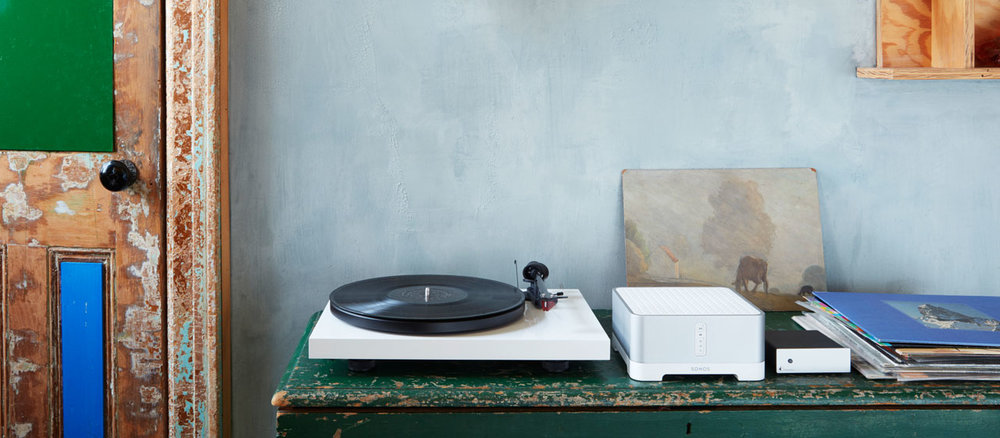
    The Sonos Vinyl Set

    Are you looking for a gift for someone who likes that hands-on music experience? Do they like the sound they can feel and touch? At the same time want to have that digital proficiency and quality without suffering the nostalgic sound of crackles and pops. Look no further than Sonos’s new vinyl set. Picture this, the Play:5, the best-sounding, most powerful speaker, matched with the Pro-Ject vinyl record player, allowing you to stream your vinyl to every room. Masterful.

    Did I mention, the Pro-Ject includes built-in phono preamp. Outstanding. They will be able to just plug in any audio device, from a record player to a friend’s phone, and listen to their favorite music on the fantastic Play:5. Like all Sonos speakers, it is expandable.  The Sonos vinyl easily let you go from streaming your favorite music and high-quality sounds to spinning from your own record collection.

    Give the gift of streaming vinyl across the connected Sonos speakers to every room in a pure, balanced sound,  unmatched by anybody else in the industry. Give the gift of their own musical completion, The Sonos Vinyl set.

    Beats Studio3

    You could just try keeping it simple and just go with the old trusty Beats headsets. When you want to give the gift of quality music look no further than beats headphones. The best of the beats headphones are the Beats. Featuring intuitive balanced, pure noise canceling functionality in the most robust and authentic sounding headphones on the market.

    These headsets function flawlessly regardless of the situation or noisy environment that you’re in,  always providing the perfect pure balance sound and they look pretty great.


  • Apple iPad Air Review

    Apple iPad Air Review

    Apple will release its fourth generation of the iPad Air line this October. There is much anticipation for this roll out because of the A14 Bionic System. The device was unveiled in September, along with Apple Watch 6 and Apple Watch SE. Unlike its predecessor, the latest iPad Air has more features and affordable pricing. Its versatility is incomparable to the iPad Air 3. It is best compared to the iPad Pro 12.9. This fourth-generation Air iPad offers so much more considering how the iPad 3 Air was similar to the basic entry-level iPad. Apple has redeemed the Air line of product with this latest release. iPad Air 4 operates at the same level as the iPad Pro 2020.

    The specs for the iPad Pro 2020 include a 12-inch or 11-inch display and the A12Z bionic processor. It also does not come with the home button; users get to enjoy the edge-to-edge display.

    iPad Pro 2020 also comes with a LiDAR depth scanner for AR and the TrueDepth scanner for face identification. Users can also purchase accessories for use, including the Apple Pencil 2, the trackpad-fitted Magic Keyboard, and a Smart Keyboard Folio. The iPad Pro 2020 retails for $799 for the 128GB and $1,649 for the 1TB model.

    iPad Air 4 has a lower price compared to the iPad Pro 2020. It will cost $599 or $729, making it affordable considering the upgrades included. The third model of the Air series cost ranges between $499 to $649. Therefore, in regards to pricing alone, this latest release is reasonably priced.

    iPad Air Specs

    ● It comes with a 10. 9-inch Liquid Retina IPS LCD; the most advanced display technology in an Apple device
    ● It has a P3 wide color gamut and TrueTone.
    ● Has a display resolution of 1640 * 2360 pixels
    ● It has a scratch-resistant glass protecting the iPad from minor scratches and oleophobic coating, providing oily substances resistance.
    ● The primary camera is 12MP, similar to the iPad Pro, and has the HDR feature. It shoots videos at 4K, capturing images at 24 or 30 or 60 frames per second. It also captures images at 1080p at 30 or 60 or 120 frames per second.
    ● It has a Gyro-EIS feature, which improves low light photography. EIS provides a consistent frame compensating for handshaking.
    ● The FaceTime camera is 7MP with HDR and has a video quality of 1080p and captures 30 and 60 frames per second.
    ● It has a touch ID system that is mounted at the top, providing a larger display.
    ● It is fitted with an accelerometer, gyrocompass and barometer.
    ● It comes in silver, space gray, rose gold, green and sky blue.
    ● It has a USB-C port, Wi-Fi 6, stereo speakers and LTE
    ● It uses the second generation Pencil, Magic Keyboard, and Smart Keyboard Folio supported
    ● It possesses Apple’s latest A14 Bionic Processor.
    ● You get a free year of Apple TV when you purchase this device

    iPad Air Features: A Comparison

    Bionic Chip

    The new iPad Air comes with Apple’s latest A14 Bionic Chip. None of Apple products currently has the A14 Bionic chip. There are speculations that the chip will be available on iPhone 12.

    The A14 Bionic system will be the first 5-nanometer chip in the market. The size reduction allows Apple to pack in more transistors. It is now common knowledge that the A14 Bionic chip has 8 billion transistors compared to 8.5 billion transistors in the A13 Bionic system and 10 billion in the A12 Z series bionic system.

    The more the transistors, the better the chip is at multi-tasking and speeds. The chip makes iPad Air 4 excellent for gaming and AR.

    A14’s CPU
    Additionally, this latest bionic chip has a 6 CPU core with the perfect balance between energy-efficiency and performance. Two of the cores are high-performing Firestorm cores enabling the gadget to handle demanding tasks at impressive speeds. The remaining four are high-efficiency Icestorm cores which maximize the performance in different power budgets.

    What this means for the A14 Bionic chip provides faster performance and better power utilization. The A12 chip is 40% faster than A12 and 16% faster than the A13 chip. Therefore, this new iPad Air is expected to possess unprecedented speeds than any of Apple’s devices presently in the market.

    A14’s GPU

    Aside from the CPU, Apple has developed a GPU for the A14 Bionic chip. The purpose of this GPU is to maintain efficiency while saving energy. The GPU is a four-core graphics engine performs better than the A12 Bionic system by 30%. It works 8% better than the A13 chip.
    With this chip, users will get good performances while preserving battery life. The new chip enables tasks to be performed at a lower voltage frequency while the device maintenance peak performance.

    A14’s Neutral Engine

    Apple has included a silicon block in its SoCs called the Neural Engine. The hardware is an accelerator with machine learning and AI calculations functions. The Neural Engine is a product of continued innovation first introduced in the A11 Bionic Chip. Therefore, this next-generation chip is possibly more impressive than the original A11. While the A11 ANE performs approximately 600 billion operations per second and has the impeccable Face ID feature, the A14 chip does even better. A14 boasts of 16 cores, eight more cores than A12 and A11. It can perform 11 trillion operations per second.

    Apple is a master at integrating hardware and software on all its devices. Its inclusion of custom accelerators like the AMX and ANE is an ingenious way of improving learning. The AMX contains large-scale mathematical computations libraries for Apple’s developers to use without the need for low-level programming. Accelerate provides high-performance, energy-efficient computations on the CPU by leveraging its vector-processing capability.

    The Accelerates minimize room for errors and provides support for Apple’s novel hardware. The Neural Engine in the A14 chip is expected to perform ten times faster than the A13 chip and 20 faster than the A12 chip.

    Another big difference between the iPad Pro and previous releases from Apple is that the iPad Air 4 does not have Intel. It uses machine learning in the pace of Intel. In the current error of data analytics, machine learning applications are becoming increasingly important. However, the efficacy of Apple’s innovation remains to be evaluated.

    iPad Air Body -Comparison

    The new iPad Air is 9.57 inches long, 7.03 wide, and 0.24 thick. It maintains the same thickness as 2019’s iPad Air. However, iPad Air 2019 was longer by 0.03 inches and narrow by 0.18 inches. Both the previous and incoming iPad Air weigh 1.01lb. Both models iPad Air have a glass front and Aluminum back and frame. Compared with the iPad Pro, the latest iPad Air is small and 0.01 inches thicker. The iPad Pro is 11.05 inches long, 8.46 inches wide, and 0.23 inches thick.

    Display Features Comparison

    The iPad Air 2020 and 2019, and the iPad Pro have the same type of display features. They both use IPS LCD enabled touch screens with 16 million colors. However, iPad Air 2020 and iPad Pro have screens with an 85% screen-to-body ratio, while the iPad Pro has a 73.3% screen to body ratio. The iPad Air resolution is slightly inferior with 264 ppi density than iPad Pro’s and iPad Air 2019’s 265 ppi.

    All three iPad’s have a wide color gamut and TrueTone, but iPad Pro has a 120Hz refresh rate. While the lack of 120Hz ProMotion is a downer, it is a feature that can be done without unless you are using your iPad for drawing or video production.

    TrueTone adjusts your display lighting to accommodate your environment. The P3 wide color range makes your display, picture and video vibrant. Furthermore, the quality of the display is intensified with the 500 nits brightness for the iPad Air. iPad Pro has a 600 nits brightness while the iPad Air 2019 does not have this display feature.

    Nevertheless, the display features are standard with minor additions and subtractions. All in all, the three devices display high-quality images across the board.

    Camera, Photograph and Video Quality Comparison

    As for the Camera, both the iPad Pro and iPad Air 4 have a 12MP camera with dual-pixel PDAF. The feature uses all the camera pixels to autofocus; thus, it refines the focusing system’s speed and accuracy. However, the iPad Pro also has a dual-pixel and ultra-wide 10MP camera. Its camera features include a Quad-LED dual-tone flash and HDR, which provides light consistency resulting in a uniformly lit background and foreground. The Quad-LED feature enables you to shoot videos in low light.

    The iPad Pro also has Time-of-Flight sensors (ToF) and 3D Light Detection and Ranging (LiDAR) scanner for depth. LiDAR uses lasers to determine distances and depth. Although LiDAR is similar to ToF, used by Android devices, in function, ToF uses single pulse infra-red light to generate maps. On the other hand, LiDAR fires a train of laser pulses at different scenes over short time intervals giving an improved length of cover five meters and better object occlusion.

    The technology is currently in use by cars to determine how close they are to objects. Apple introduced the LiDAR scanner in iPad Pro and is expected to use the same technology in the iPhone 12. The feature is currently lacking in the iPad Air set to be released on 15th September.

    The iPad Air only has HDR, enabling you to get good photos and videos in high contrast situations. The iPad takes three pictures in succession and blends them, giving it better details in brightness and undertones.

    Nevertheless, the incoming camera iPad Air is an upgrade compared to the iPad Air 2019 camera. The iPad Air 2019 has an 8MP rear camera with an f/2.4 aperture. Pictures can only be shot in HDR. Both iPads have a 1.2MP shooter to a 7MP with an f/2.2 aperture that shoots in 1080p at 30frames per second. However, iPad Air 4 can also shoot 1080p at 60fps. The cameras on both devices can also shoot wide color capture in Photo and Live Photos.

    Apple Pencil and Keyboard Support

    All of Apple’s lineups support its pencil. In general, The Pro lineup released from 2018 uses Apple Pencils 2. The Air and mini lineups use Apple Pencil 1. However, the iPad Air uses Apple’s second-generation pencils. While the first generation of pencils supports abroad range of apple products, the second generation is the best of the styluses.

    Apple pencil 2 has a flat edge compared to the round-edged predecessor. The edges help prevent the pencil from rolling off. It also has a matte finish for better grip, an upgrade from Apple pencil 1, which has a glossy finish leading to slippage. Apple’s first-generation pencil picks up grease and leaves fingerprints.

    Both pencils have an 8.9 mm size, suitable for ergonomics compared to similar products in the market. Both pencils have good drawing performance.

    The iPad Pro and IPad Air fourth generation use the Magic Keyboard. The keyboard uses a Smart Connector. Additionally, it is a scissor-switch keyboard and a glass trackpad. The top layer of the keyboard looks like a piece of fabric that is water-resistant. The keys are printed with white paint.
    Smart Keyboard Folio only supports the fist and second-generation iPad Pro 11-inch and the third and fourth generation of the iPad Pro 12.9 inch. The iPad Air lineup does use the Smart Keyboard Folio except for its fourth generation. Additionally, the smart keyboard does not require Bluetooth to connect to the iPad. It uses a smart connector found on the iPad.

    iPad Pro Vs. iPad Air 4

    From the comparison, it is quite evident that the iPad Pro excels in many of the iPad features. However, the iPad Air offers the novel A14 Bionic chip with better performance and efficiencies. While we have to wait for the rollout to ascertain the A14 Bionic chip’s efficacy, it presently remains unmatched.

    Additionally, the iPad Air is much more affordable compared to iPad Pro. Therefore, if you are into staying ahead with technology, then the iPad Air is an excellent option. Similarly, if you are looking for a fast and energy-efficient device, the iPad Air 4 will serve you well. On the other hand, if you are into videography, gaming, or photography, the iPad Pro has better features.

  • They’re FINALLY Here! The Best 5G Smartphones:

    They’re FINALLY Here! The Best 5G Smartphones:

    5G technology is now here, we can finally see the first phones using the new tech. This is a huge moment for technology. Are you ready for the changes? Many have wondered which first phones will be using the tech, well we’re going to delve a bit deeper into 5G technology and the smartphones we can expect to take advantage of it.

    5G technology, for the uninformed, is the next step in wireless connections. If you remember back when 3G was phased out in favor of 4G LTE, you’re familiar with what this process looks like. Originally, 4G was only available in large metro areas and only on the newest and best smartphones.

    The roll-out of 5G tech is likely to track quite similarly. Much like 4G LTE, 5G is a huge step up in terms of speed and accuracy. It will likely first be rolled out to primarily large cities where it can service the largest numbers of users. Over time, it will be rolled out nationwide.

    5G Smartphones

    Most phones that are on the market today will not have 5G compatibility, so this likely won’t even affect you until you upgrade. You won’t need to upgrade for a bit unless you’re living in an early-access area like New York or LA, though.

    If you’re interested in future-proofing, you can pick up one of these 5G-enabled phones in the coming months as they become available.

    Samsung Galaxy S10 5G

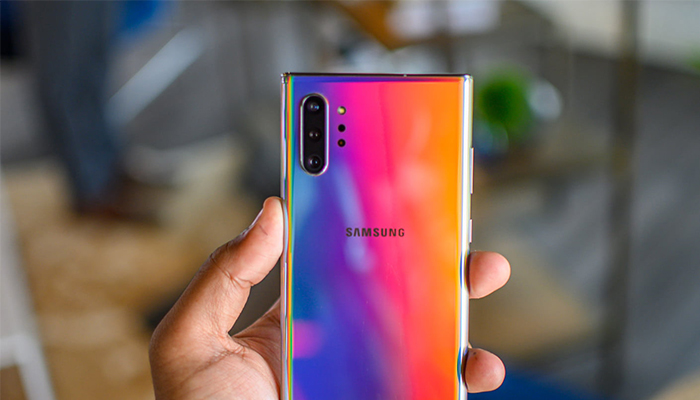
    Samsung come out of the gate strong with a 5G version of their Galaxy S10. What can we say about the Galaxy S10 that hasn’t already been said? It’s a great phone with a great suite of useful features, a beautiful display and a stellar processor. Add lightning-fast 5G speeds to that and you’ve got a real winner.

    iPhone 12

    We know what you’re thinking: iPhone 12? They just released the 11! Well, Apple did not roll out 5G integration on this year’s upgrade. Given the slow roll-out of 5G nationally, Apple’s focus won’t be on that tech until 2020, with the eventual launch of the iPhone 12.

    Huawei Mate X

    If you don’t mind importing, or dealing with a somewhat shady company, the Huawei Mate X will be releasing later this year. This folding, 5G-ready phone looks like a sci-fi device. The Chinese smartphone maker Huawei has been in hot water recently over some scandals, but they still make great phones.


  • Best All New Wireless Headphones for 2020

    Best All New Wireless Headphones for 2020

    Whether you’re looking for a good pair of headphones for working out or just something to wear while drowning out sounds during your commute, not having to fuss with wires is a huge plus. No one wants to worry about the tangle of wires in their pocket or bag, or their cord snagging on something and damaging their headphones. Thankfully, there are some stellar Bluetooth headphones on the market. Here are some of our top picks.

    Jabra Elite 75t

    If you like having wireless earbuds for sports activity, we can highly recommend the Jabra Elite 75t. These new earbuds fit snugly in most ears, and they have a great sound quality for their small size. The drivers are solid, offering punchy bass, good mid-levels, and decent overall sound: while these won’t be beating any dedicated audiophile headphones, they’re good for their price point and size.

    A notable draw to the Jabra Elite 75t is their microphones. They work incredibly well as a headset for taking phone calls, doing a great job of filtering out background noise. If you like wearing earbuds while jogging, cycling or other types of activity, this is a great draw. Taking a call while getting in your workout is a great two-in-one feature for busy professionals.

    Sony WF-1000XM3

    Sony has finally taken its wildly successful WF series headphones and put them into a smaller package. The WF-1000XM3 takes the quality of their full-size headphones and puts them into a smaller earbud form factor.

    Sennheiser Momentum True Wireless

    If you’re looking for the intersection of portability and sound quality, you’re looking for the Sennheiser Momentum True Wireless earbuds. These wireless earbuds offer incredible sound quality and accurate reproduction of recordings. They’re incredibly light: you might even forget they’re in your ears. When you need a good set of earbuds for taking with you on trips or to work and back, these are a great go-to.

    While they’re not the best for sports or activity, the Sennheiser earbuds are great for daily activities like walking or commuting. For the person who wants portable wireless earbuds that can be tucked into a pocket but still wants the best sound quality, these physics-defying little earbuds are the best option.

    AirPods Pro

    If you’re already in the Apple ecosystem, these are a no-brainer. Their intuitive gesture controls allow you to change the song, adjust the volume and answer calls quickly and without having to pull your phone out.

    The 2019 update brings even more useful tricks to the AirPods Pro. With Apple’s propriety H1 chip they feature snappier Siri integration. You can send messages, start playlists and ask for internet searches all while jogging, cleaning or whatever you’re doing while wearing the AirPods. If you love high-tech integration and cool fashion statements, the AirPods are a great pick for you.

    Beats Solo Pro

    Apple has finally stepped up the quality of their Beats headphones. The Beats Solo Pro is a set of over-ear, active noise canceling, headphones. They used the same noise-canceling technology featured on their more premium, over-ear, Studio3 Wireless. The H1 wireless chip makes sure they are easy to connect to your phone and feature full Siri support. They’re a bit more expensive than the average headphones, but their great technology integration and stellar sound quality on phone calls makes them great for people on the move.

    PowerBeats Pro

    If you love the idea of the AirPods but want a more fitness-oriented set of wireless earbuds, the Beats Powerbeats Pro are for you. The same technology that went into the second generation AirPods is on display in the PowerBeats Pro, just in a more fitness-oriented shape. The over-ear design on display here helps the earphones stay on your ears while your exercise, making them great for any active person.

    We are a participant in the Amazon Services LLC Associates Program, an affiliate advertising program designed to provide a means for us to earn fees by linking to Amazon.com and affiliated sites.