Category: Electronics

  • Artificial Intelligence Technology: What Does it Mean?

    Artificial Intelligence Technology: What Does it Mean?

    Science fiction has long been fascinated by the prospect of intelligent systems held within computers. Much like the strange science of biochemistry that gives rise to consciousness, we’ve wondered recently whether circuit boards and silicon could function as the brain for artificial intelligence.

    A mind like our own but held entirely within a computer.

    Artificial Intelligence Technology

    Is it Real?

    The advent of neural learning networks and lifelike virtual assistants has made many people wonder how close true artificial intelligence is. It seems inevitable, with our advances in technology, that we will soon have a completely autonomous, learning, self-aware digital intelligence on our hands.

    However, the reality isn’t that imminent. Human intelligence and consciousness is indescribably complex. In the observable universe, there is no system more complex than that of the human brain. The billions of connections found within, as well as the complex interplay of biochemical and electrical signals, give rise to our consciousness.

    Then When?

    So, we’re not going to see true artificial intelligence any time soon. Then, when will humans finally have someone else to talk to? It seems likely that someday we’ll create a digital brain that thinks as we do. However, the idea that we could create an artificial intelligence with comparable consciousness and thoughts to organic life is suspect.

    Computers as we know them function on binary functions. Ones and zeroes, yesses and noes. These two simple building blocks are stacked in their trillions to create computers like the one you’re using to read this. Such computers don’t “think” in the way you and I do. Instead, as their name suggests, they compute. They find answers to problems they are given.

    Us and Them

    A computer, then, is a system that gives you answers to problems you present it. However, it must have been programmed to know what output to give to specific inputs. As such, all computers we’ve created can only give you outputs that were created by other people. Truly “learning” artificial systems run into some issues when viewed through this lens.

    An artificial system can be given parameters and criteria and told how to deal with information it acquires. That doesn’t mean that it’s actually intelligent, though, as the processes it uses to acquire this information have to be created by people.

    The question remains: at what point does a learning algorithm become complex enough to be considered “intelligent”? That depends on your definition of intelligent. However, it seems unlikely that we’ll be finding out intellectual equals in our smartphones any time soon.

  • Cloud Backup Services: Which One is Right for You?

    Cloud Backup Services: Which One is Right for You?

    Nothing quite compares to the feeling of losing all of your files. All the pictures, documents, movies, games and other digital materials you had saved are just gone. How can you make sure your files are backed up and safe?

    Using the Cloud, you can have peace of mind and security for your files. Here’s how.

    Could Backup Services

    What is Cloud Backup?

    A Cloud backup service is a service that periodically scans your computer’s files and uploads them to the Cloud. The Cloud is the colloquial term for the interconnected system of off-site storage servers used by various network companies. Namely, Cloud storage is decentralized storage for your files that is kept online.

    Cloud backup services are typically paid services that you subscribe to, not dissimilar from renting a storage unit in the real world. You’re essentially paying a company to hang on to digital copies of all of your files. This is a great system if you have a number of files that you want to keep backed up in case of emergency.

    Examples

    A number of companies offer these types of services. AT&T, Carbonite, Rubrik, Oracle and more offer you to access their cloud backup systems. These services are all similar: they let you back up and store your files off-site. Businesses often prefer to use these types of services, as they protect against hacking, sabotage, break-ins and fires destroying important files.

    For residential use, these cloud backups are awesome if you travel a lot or use laptops primarily. For busy people who are often on the go, automated cloud backups are a life-saver. You don’t have to even think about them: your files are just backed up. If you lose your laptop or it gets destroyed, you’re covered. Well, you need a new laptop, but, you know.

    Alternatives

    Cloud backups aren’t your only option, though. You can also opt to back up your files manually on an external storage drive. This requires you to actually sit down and manually make copies of the files to the external drive, though, so it’s not as “clean” as automated cloud backups.

    However, for those who want backups without having to pay a fee for cloud services, this is a good option. As long as you remember to back-up your files once per month or so, you’ll have a pretty good backlog of your own files. Then, if your files get lost, you can simply re-upload them from your external drive.

  • How to Save Big on Printer Ink

    How to Save Big on Printer Ink

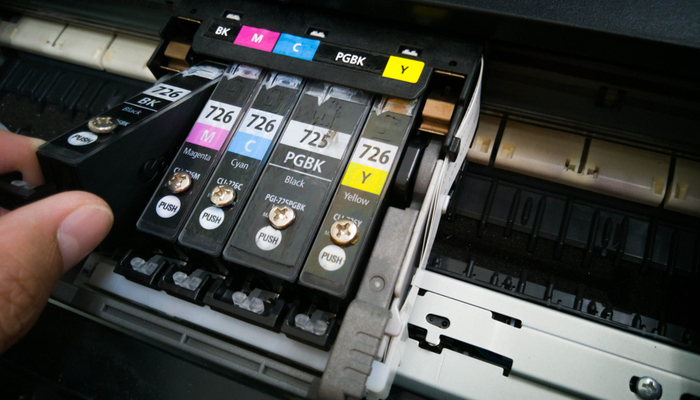
    Don’t you hate that feeling when you hit “print” and the page comes out spotty and washed-out? The printer ink cartridge is getting low, again, meaning you’re about to have to spend a small fortune.

    While there are a number of reasons that printer ink is expensive, that matters less to us than helping you save money. Today we’re going to help you save big on printer ink.

    How to Save on Printer Ink

    Wholesale

    Wholesalers are able to confer some degree of savings to the end user if you know where to look. Online sites that focus on buying in bulk are a good start, as they’re often able to use that bulk discount to offer you lower prices. It can be difficult to find uncommon types of ink, however, such as ink for outdated printers, through these sites.

    Another option is to go through warehouse stores like Sam’s Club or Costco. Much like with discount websites, the savings in these stores comes from their ability to buy in bulk. The economy of scale is at play in these places. While you might not find terribly inexpensive single cartridges, you might find stellar deals on packs with three or five cartridges in them.

    Remanufactured

    An environmentally friendly, and less-expensive, way to buy ink is to go through remanufactured ink companies. Remanufactured ink cartridges are older cartridges that are refilled by a different company. This offers a few benefits for consumers.

    For one thing, remanufacturers are able to sell cartridges for much, much less than first-party ink-makers. They’re not subject to the same overhead and price wars that companies like HP and Dell are, so they’re able to pass that on as large savings to the consumer.

    For another thing, this also means that there will be less waste in landfills. Metals and plastics are very bad for the earth when dumped in landfills and using remanufactured printer cartridges is just one more way to avoid wastefulness.

    Remanufacturing Notes

    It’s also worth noting that remanufacturers often fill the cartridges up to capacity. This has long been a sore spot for consumers who have noticed their cartridges seem to be only partially filled up, even when brand-new.

    However, be aware that you should research any third-party remanufacturer before ordering from them. Make sure they have good ratings and high praise from actual customers. Especially check them with the Better Business Bureau to make sure they’re the real deal, and not a scam!

  • Android: The Story of the Biggest Mobile Operating System

    Android: The Story of the Biggest Mobile Operating System

    When Apple unveiled the iPhone in 2007, it started the smartphone revolution. It’s hard for some people to remember a time before smartphones, in fact.

    However, for those who kept up with technology back in the late 2000s, it was like watching history unfold before one’s eyes.

    Shortly after the introduction of the iPhone, Google purchased Android, Inc., a company hard at work on their own mobile operating system.

    The Android system would function as a platform-agnostic OS for use by any third-party phone manufacturer. The rest, as they say, is history…

    The Story of Android

    Beginnings

    Android Inc. began work on the Android OS in 2005, a full two years before their acquisition by Google. When Apple up-ended the mobile phone market with the iPhone in 2007, Google moved quickly to get their slice of the pie. They snatched up Android, Inc. and unfurled plans to license the OS for third-party phone manufacturers.

    In this way, Android is not dissimilar from Microsoft’s Windows operating system. Much like Windows, Android can be used on third-party hardware, is more “open,” and competes directly with a proprietary Apple system.

    Hardware

    The very first commercially-available Android device was the HTC Dream, released in September 2008. This began the long-lasting association between HTC and Android, as HTC’s flagship phones defined the Android platform for years.

    However, HTC’s dominance in the field would wane eventually. In recent years, HTC has been eclipsed by Samsung’s Galaxy line of phones. Likewise, Google’s own Nexus line of devices has since given way to the Google Pixel lineup. Countless other devices have used the Android OS, from Motorola to Huawei, and the platform runs nearly unopposed in the Chinese smartphone market.

    Today

    In the modern era, Android supports 2 billion users, making it the largest mobile OS in the world by a wide margin. This is due to a few factors. For one thing, it has no meaningful competition outside of Apple’s iPhone line of products. While some competitors, like Windows Phone, have appeared, they’ve largely been unable to make a dent in Android.

    While iPhone’s Apple OS is a solid and user-friendly mobile OS, its biggest limitation is also its biggest strength. It’s closed-off and appears only on Apple devices. Android, on the other hand, is an open OS that can appear on pretty much any manufacturer’s phones. This gives it reach that Apple’s OS simply can’t have, as only so many iPhones will be sold.

    The future today seems to be quite bright for the Android OS. As it stands, it seems unlikely any other mobile OS could overtake the dominant Android. Even Apple, with their highly successful iPhone, isn’t in any danger of being overtaken by a new competitor. Time will tell, however, what new permutations the Android OS takes as phone change and evolve with new technology.

  • Accounting Software: Which One is Right for Your Business?

    Accounting Software: Which One is Right for Your Business?

    When it comes to running your business, nothing is quite as important as your accounting software. Whether you’re selling ice cream or life insurance, you’ve got to have accurate bookkeeping.

    The question remains, however, which accounting software is right for you business? Today we’re going to help you narrow it down.

    Which Accounting Software is Right For You?

    Sage50 Cloud

    Designed primarily to help mid-to-small sized businesses, Sage50 Cloud is a great accounting software suite. It helps businesses to stay up on their taxes, keep their bookkeeping clear and concise, and generally stay compliant. Payroll, budgeting, inventory and more can all be tracked through the software.

    As the name suggests, Sage 50 utilizes the cloud to keep your information all backed up. This allows you to have the peace of mind that comes with knowing all of your important accounting information is saved and backed up. You can even track purchases and pay vendors all through this software!

    Sage50 Cloud has a variety of pricing options, which start around $45 per month. Depending on your needs, you can opt for more complex packages at higher rates.

    Freshbooks

    The streamlined, seamless and easy-to-use Freshbooks software is one of the top picks for accounting software. Whether you’re running a large business or a small one, Freshbooks as an accounting suite is a strong choice. You can easily set up recurring invoices to pay out to various contractors, record your expenses easily and import to other software in a flash.

    The dashboard makes it easy to find what you’re looking for, while the easy-to-navigate menus and options make it impossible to get lost. Accounting can be quite difficult, but Freshbooks takes a lot of the difficulty out of the equation! Pricing for this software starts at $15 per month.

    NetSuite ERP

    Another user-friendly and well-presented suite, NetSuite ERP is great for businesses of all sizes. Including integration for marketing, sales and customer relations, NetSuite is a rather robust accounting software. You can even handle your stocks through the excellently-designed suite!

    NetSuite ERP offers integration through inventory management tools, as well as a shipping module to keep track of all of your orders. The easy-to-use interface is available even on mobile devices! You don’t need to be an accounting expert to use the software, and it’s easy to find what you’re looking for through the simple dashboard.

  • Best HTC Phones for Android: Our Take

    Best HTC Phones for Android: Our Take

    HTC was once the big name in Android phones. In recent years, they’ve fallen off a lot in favor of Samsung’s seemingly unstoppable Galaxy line of phones. However, HTC still has a lot to offer in the Android space for people looking for a great phone. Today we’re going to break down some of the best HTC phones you can find today.

    Best HTC Phones

    HTC 10

    The HTC 10 was released way, way back in January of 2017, making it a bit of a dinosaur by smartphone standards. However, as many people have noted, phones have largely plateaued in the intervening two years, and even phones from early 2017 are still viable for many people.

    The HTC 10 retails for around $500, making it a great budget pick for Android users. The phone’s build is sturdy, and it’s got a great design that makes it attractive and durable. If you’re looking for an affordable smartphone with a great camera and solid battery life, the HTC 10 is a great pick for you.

    HTC U11

    The HTC U11 first made it on to the scene in December of 2017, making it nearly a full year younger than the HTC 10. There’s a lot to love about the U11. It’s very colorful, glossy and flashy, making it a flagship-looking phone at an affordable price. You can still pick this phone up for somewhere in the range of $650.

    The first waterproof HTC flagship, the U11 has a lot to offer for Android lovers. The specs under the hood are comparable to other major Android releases, making this a great pick for those looking for power. It also sports an interesting feature called EdgeSense, which is a squeezable “button” with some interesting uses.

    HTC U11+

    While the HTC U12 is out, it’s got its share of problems. As such, we’re giving the nod for best HTC phone at the moment to HTC U11+. The 128GB of internal storage, the great processor and the stellar screen quality all give the HTC U11+ the edge. If you like a large phone with a big screen, the U11+ is a great pick for you.

    The notable thing about the U11+, though, is that it’s a bit underwhelming in the wider market. If you consider what the phone brings to the table, there are other Android phones that give you a similar (or better) experience. That said, you can often find the U11+ for cheaper than the competition, making it a good budget pick for Android fans.

  • The Best-Selling Android Phones: What’s Popular?

    The Best-Selling Android Phones: What’s Popular?

    People love their Android phones. Android is a very open and malleable operating system and allows for people who love the finer points to make their phone their own. That’s a lot of the reason why Android phones sell so well! Which one is the king of the hill, though? Today we’re looking at the best-selling Android phones of the last year.

    Best-Selling Android Phones

    Samsung Galaxy S9 Line

    The S9 line of Galaxy phones cleaned up over the last year. Of the top five selling Android phones, the S9 line of phones picked up three of those slots. The Galaxy S9 Lite sold 4 million units, coming in as the lighter, cheaper option for Samsung fans. The S9 Plus, on the other end of the spectrum, sold 8 million units, doubling its tiny cousin.

    The standard-sized Galaxy S9, one of our favorite Android phones on the market, sold a cool 10 million units, making it one of the best-selling phones of the year. It actually tied for second place with the next phone on our list. So, what made the S9 line just so popular?

    In short, Samsung knows how to make a great smartphone. The S9 line offers a huge, beautiful screen with hardly any bezels. These phones have great battery life and stellar processor performance. There’s a lot to love with these phones.

    Huawei P20

    Selling a 10 million units, and tying with the S9, the Huawei P20 managed to keep pace with Samsung. That number would have been much higher if Huawei could sell phones in North America, but that’s a story for another day.

    The Huawei P20 is a great smartphone, manufacturer notwithstanding. The screen is huge and colorful, bringing tons of vibrancy and life to bear. It also sports great cameras, snapping shots like a high-end photographer’s camera.

    Samsung Galaxy Note 9

    Samsung absolutely cleaned up the last year in Android phone sales. The Galaxy Note 9 posted a stellar 30 million units sold, making it far and away the best-selling Android phone. The huge phablet, complete with the S Pen and a huge battery, has a lot to offer.

    For productivity, there’s not a better Android phone out there. The blistering-fast processor, the S Pen for notes and the massive screen all make this a great phone for professionals. Beyond that, it’s one of the bulkiest and most powerful phones on the market, Android or otherwise.

  • Wireless Security: Protect Your WiFi Signal

    Wireless Security: Protect Your WiFi Signal

    If you’re worried about your wireless signal, you’re probably looking into the best ways to protect your WiFi. Well, we’ve got the article for you. Today we’re going to break down the differences between various encryption types and the different ways you can keep your signal private. Here are the best ways to protect your signal.

    Wireless Security

    Password Protection

    You need to make sure your wireless signal has password protection. Setting up your wireless router normally includes setting up password, so this shouldn’t be an issue. However, you need to make sure you keep your password complex and impossible to guess. Generally, you don’t want to include easy-to-guess things like pet names, birthdays or phrases.

    Setting up your password, come up with a random, impossible-to-guess string of letters and numbers and write it down somewhere. You don’t want to misplace that code, so make sure you save it and know where to find it!

    Wireless Encryption

    There are three major types of wireless encryption. WEP, WPA and WPA2 are all varying degrees of encryption, and each has their strengths. However, WPA2, the newest encryption, is the preferred of the three. Let’s break down their differences.

    WEP

    WEP is the oldest encryption style, and it’s also the weakest. Created in 1999, the protocol is a known security risk. It’s easy to hack into and open to a ton of exploits. As such, the protocol was dropped by the official Wi-Fi alliance in 2004 in favor of WPA.

    WPA

    WPA replaced WEP in 2003, bringing a “pre-shared key” or PSK for encryption. While not the strongest form of encryption, WPA is much preferred to WEP. The major issues with WPA are related to the way it was rolled out. This is because, at the time, it was being rolled out piecemeal as updates for WEP-enabled devices.

    As such, the WPA encryption has a lot of similar loopholes to WEP. It needed to be built on existing WEP infrastructure, so it’s not as secure as it could be. It’s unlikely any router you buy today will use either WEP or WPA, though.

    WPA2

    The Advanced Encryption Standard, or AES, found in WPA2 makes it the golden standard for Wi-Fi encryption. Rolled out in 2004, WPA2 wasn’t based on the WEP infrastructure. As such, it doesn’t sport any of the same loopholes and is much more secure.

    It’s most likely that any router you buy today will have WPA2 built in. As such, odds are good you’ve already got the best encryption you could ask for on your router.

  • Best Call Center Software: Which One is Right For Your Business?

    Best Call Center Software: Which One is Right For Your Business?

    There are countless suites of call center software. It can be difficult narrowing these many, many options down. After all, it’s not like you can afford to just try all of them. What are you to do, then? Thankfully, we’ve got your back. Today we’re looking into some of the best call center software suites so you can make sure you make the right pick.

    Best Call Center Software

    What is Call Center Software?

    Before we get started, let’s look into some of the basics. What exactly is call center software? Well, simply put, it’s software that allows your business to function as a call center. Customer support, marketing, phone, email, instant messaging and social media are all typically handled through call center software.

    Auto-dialers, call analytics, computer telephony integration. Interactive voice response, call accounting solutions and automatic call distributors are some of the types of software you might find. Customer service systems offer features for submitting tickets to help customers with issues they’re having.

    Other features, like call recording, web callback, social media support, and quality monitoring are all important aspects of any good software suite. Now that you know what you’re looking for, let’s look at some examples.

    Freshcaller

    One of the most highly-rated software suites in the call center software world is Freshcaller. This software is unmatched when it comes to user-friendly interface, and it’s rather robust when compared to the competition.

    Ytel

    Ytel is a relatively new, but highly-rated, software for call centers. Ytel offers a number of helpful features, especially for smaller offices, and brings a lot of tools to the table. Integration with phone, messaging and email make this a very flexible and robust call center suite.

    RingCentral Contact Center

    Another highly-rated software suite is the excellent RingCentral Contact Center software. Customer relationships are an important focus of any business, and that’s what RingCentral focuses on. Bringing a number of tools for customer engagement to your business, RingCentral is a great suite for small and medium sized businesses.


  • Best Android Phones of 2019

    Best Android Phones of 2019

    Android is a fantastic platform for mobile phones, and many users prefer Google’s operating system over other phone OS’s. However, Android is on so many phones that it’s hard to tell which is the best choice for you. Today we’re going to break down some of the best Android phones available on the market right now.

    Best Android Phones of 2019

    Samsung Galaxy S9

    While the Galaxy S10 is out, the S9 remains an excellent choice for those looking for a stellar Android phone. The price point is right, as you can often find the S9 for less than $600, while the S10 is $1,000 at the lowest.

    The nearly bezel-free display, the fast processor and the excellent AMOLED screen all make this a killer phone. When it comes to Android, it’s hard to beat Samsung’s flagship phones. The Korean phone manufacturer really knows what it’s doing.

    Huawei Mate 20 Pro

    This phone is a bit hard to find in the US, but you can snag it off of Amazon for $900. It’s easily the best Huawei phone ever made, and one of the best Android phones. The huge QHD screen, the blazing fast processor and the great battery life all add up to make this one well-worth the price.

    Huawei might not be a name you know well. That’s because they’re a Chinese phone manufacturer that doesn’t market to the US or sell phones here. That doesn’t mean this is a bad phone, though. In fact, the Mate 20 Pro sports some of the best cameras on an Android phone, in addition to 8 GB of RAM and 256 GB of storage.

    Google Pixel 3

    Google’s own Pixel range of phones is also stellar. When you made the operating system, it’s not hard to make the phone, as it turns out. This goes double for the newest incarnation of the Pixel. It’s a beast. Sporting a huge, gorgeous display and a smooth design that would make anyone jealous, it’s easy to see why people love this phone.

    Coming in at $700, it’s on the high side, but this is a luxury phone. When it comes to the bright colors, fast processing and killer functionality, you’ll be glad you went with Google’s flagship phone. It’s hard to beat how good this phone is at its price point, unless your name is Huawei.