Tag: streaming

  • The Gift of Music:  How to Do It the Right Way

    The Gift of Music: How to Do It the Right Way

    Everyone has those people in life that are very hard to shop for. I mean what are you to get the person that has everything? Music. Music is always the best gift,  and for the people that have everything, it’s often the only gift. Music is universal and received by everyone. No one can have all of it or appreciate all of it,  which makes it such a great gift.

    The best part about giving music as a gift is there are so many different ways to do it. You can give equipment, earbuds, speakers, listening peripherals, or just new music that you think they would enjoy. The options are virtually endless. Let’s take a look at some of the best music gift ideas you can give your friends, family,  and loved ones.

    Streaming Subscriptions

    When gifting music the first place to start is the easiest place to start. That is a subscription to new music. Starting at $9.99 a month there is a plethora of streaming music subscription services. The subscriptions will allow you to stream, download, and listen to unlimited music, new, retro or classic. Whatever you wanna hear, whenever you wanna hear it.

    The first one I would mention is Apple Music. Apple Music has the largest subscription-based of users as well as the largest database of music. They’ve been compiling music in their iTunes software since the beginning of digital music. Almost all the music you could ever want to listen to is there is a very easy to use, intuitive,  user-friendly platform that syncs perfectly amongst all your iOS devices.

    The next option is Amazon’s Prime Music. Prime Music functions mostly like the Apple subscription services. Prime music will sync across all your Amazon prime devices,  you can even download the prime music app to your iOS or Android devices.

    This provides flexibility in your multiple and various OS mobile devices. There are also services like Iheartradio, Pandora, and Spotify. All the services will run you $9.99 a month and make an excellent gift for anyone who doesn’t have unlimited streaming music service.

    Harmonica?

    Maybe you want something tangible to give? Another great option to give somebody is the gift of a musical instrument. Regardless of talent level, Giving the gift of a musical instrument is always welcome. This will give you some options as well, the classic iconic instrument, a keyboard or guitar,  or you can get interesting like a banjo or harmonica. It’s fun, always remembered, and just may improve someone’s life.  If that’s not exactly what you been looking for, Here are some specific music listening devices that will make great gifts.

    Amazon Echo

    The Amazon Echo is one of Amazon’s premier speaker systems. It is an elegant and easy to use this quality speaker. It doubles as a speaker for most of your devices and comes with Amazon’s Alexa voice-enabled assistant fully built in. Full cloud sync-ability to prime music,  you can add in that subscription for a total music package. Synchronization across your devices lets the Amazon echo provide the ultimate in home music listening enjoyment. The Echo gives the gift of high-quality speaker along with the content to play through it.

    The Sonos Vinyl Set

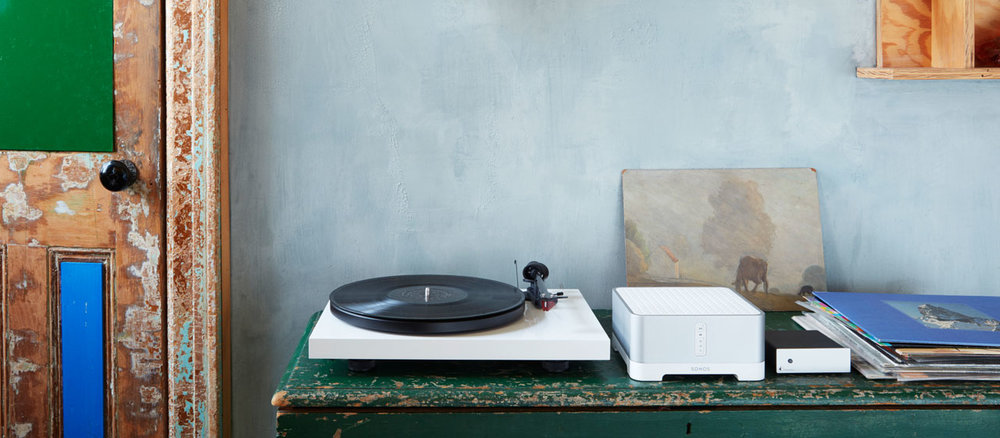
    Are you looking for a gift for someone who likes that hands-on music experience? Do they like the sound they can feel and touch? At the same time want to have that digital proficiency and quality without suffering the nostalgic sound of crackles and pops. Look no further than Sonos’s new vinyl set. Picture this, the Play:5, the best-sounding, most powerful speaker, matched with the Pro-Ject vinyl record player, allowing you to stream your vinyl to every room. Masterful.

    Did I mention, the Pro-Ject includes built-in phono preamp. Outstanding. They will be able to just plug in any audio device, from a record player to a friend’s phone, and listen to their favorite music on the fantastic Play:5. Like all Sonos speakers, it is expandable.  The Sonos vinyl easily let you go from streaming your favorite music and high-quality sounds to spinning from your own record collection.

    Give the gift of streaming vinyl across the connected Sonos speakers to every room in a pure, balanced sound,  unmatched by anybody else in the industry. Give the gift of their own musical completion, The Sonos Vinyl set.

    Beats Studio3

    You could just try keeping it simple and just go with the old trusty Beats headsets. When you want to give the gift of quality music look no further than beats headphones. The best of the beats headphones are the Beats. Featuring intuitive balanced, pure noise canceling functionality in the most robust and authentic sounding headphones on the market.

    These headsets function flawlessly regardless of the situation or noisy environment that you’re in,  always providing the perfect pure balance sound and they look pretty great.


  • Cutting the Cord Without Breaking the Bank

    Cutting the Cord Without Breaking the Bank

    Ostensibly, the whole point of not having cable and using Internet TV is to keep your monthly costs down. After all, cable is prohibitively expense for the average person, so there’s no reason to have a cable subscription. However, if you’re subscribed to Hulu, Netflix, Sling and more, you’re going to see those monthly bills getting to a similar place as that cable bill.

    There’s good news though: there are plenty of free streaming services you can start using today. There’s no great reason to spend a ton of money on entertainment when so much is available for free, right now, on the internet. Let’s keep it inexpensive!

    Pluto TV

    Pluto TV is an internet streaming service available on most streaming platforms. If you have Roku, Apple TV, Fire TV, whatever: you can run Pluto. It works by aggregating content from the internet and grouping it into channels of like content. For instance, if you like anime, there’s tons of websites that have free episodes of anime, and Pluto uses those to create an all-anime channel. Similarly, if you’re into gaming, there’s a channel for that.

    Most of what you’ll see on Pluto is older re-runs of shows from major networks or online content from larger websites. There are commercials, which is how the thing gets monetized, but it’s completely free to download and use. When it comes to completely free television, Pluto is a great option.

    The Roku Channel

    If you run your streaming services through Roku, you can access the Roku Channel. This free streaming channel is operated by Roku themselves and offers classic and modern movies, news streaming and more. Essentially, it’s a great companion to whatever other content you watch on Roku. The channel also offers older streaming TV content, making it a bit of a grab-bag when it comes to entertainment.

    You can also manage your other subscriptions through the Roku Channel. For instance, if you have HBO or Shotime subscriptions, you can manage them through the Roku Channel, streamlining your bill while allowing you to find your content all consolidated to one place. If you use Roku, this is a great free TV option.

    Kanopy

    One of the coolest things about living in the modern world is public goods like parks, public transit and libraries. You’ve already paid for it through your local taxes, after all, so you might as well enjoy these public goods. Kanopy is one such public good in this category: it connects to your local library to allow you to rent movies, though the number you can “borrow” digitally could differ from library to library.

    Once you have the app downloaded, you enter your library card and then create a Kanopy account. Then, like that, you’re hooked up to watch free movies, courtesy of your local library. While you’re at it, consider heading by your library and checking out some books: there’s tons of great stories to be found within!

    Crackle

    The long-running service from Sony, Crackle, has been around in some form or another since 2004, long before Netflix was offering streaming content online. Interestingly, Crackle has a lot in common with Netflix. There are tons of older sitcoms and 90’s cult classic movies available on-demand, and there’s even original programming like The Oath that you can watch. Like Netflix, the selections are updated regularly and you can almost always find something to watch you haven’t seen before on Crackle.

    Unlike Netflix, however, Crackle is totally free. There’s no catch to it: the content streaming on the service costs nothing to view. Why not give it a shot? You can binge some of your favorite old sitcoms today, for free, through Crackle.


  • Disney Plus: What We Know

    Disney Plus: What We Know

    Disney Plus is promising to carry all of Disney’s movies, including their animated family fare, Star Wars and even the MCU films. What this means for other streaming services is that they’ll have to fight the combined might of Disney’s industrial hype complex with their own programming.

    What does this mean for the consumer, though? Well, if you like Star Wars, Marvel or Disney cartoons, it means you’re getting yet another subscription to watch them.

    Disney Plus

    Release and Pricing

    At present, we know only a little about the potential release window and pricing of Disney’s new streaming service. Disney has stated that they want the service to be live by “late 2019”. It’s unclear whether this means as soon as August or as late as December, though we’d expect it to hit some time in November.

    As for price, Disney CEO Bob Iger has been clear that Disney knows their service will be content-light compared to the likes of Netflix and Amazon Prime. As such, Iger stated that consumers can expect the price to reflect that. What, exactly, this means for the price has yet to be seen, though we’d guess somewhere in the range of $8-$10 per month.

    Content

    When Disney Plus launches, it’s expected to have a few standout TV shows exclusive to the platform. Namely, a Star Wars series called The Mandalorian, as well as a pair of Marvel shows centered on Loki and Scarlet Witch, respectively. Also expected to be present at launch are all of Marvel’s films, including Captain Marvel and Avengers: Endgame.

    On the cartoon side, Disney has stated that even animated films currently in “the Vault” will be brought out for viewing on the Disney Plus service. That means that you can watch Little Mermaid or Beauty and the Beast even if they’re not out of “the Vault”, which is a new approach for the legacy company.

    Another Subscription

    Thanks to the Fox merger, Disney now also own Hulu. This means that diehard Marvel fans who want to see everything will need to have Hulu, too, as Marvel’s more adult-oriented shows are heading there. It seems like this is the future of media distribution, as each company scrambles to match Netflix as a streaming content producer.

    Disney Plus is the latest in a long line of such platforms. CBS All Access and ESPN Plus are both examples of yet more streaming services vying for your subscription dollars. You’ll have to decide whether yet another subscription is worth it when Disney Plus launches later this year.

  • Will Streaming Replace Everything?

    Will Streaming Replace Everything?

    Netflix streams movies and TV shows straight to your TV. Spotify and Apple Music stream music from your phone, through your car and into your headphones. Google Stadia promises to stream video games for you, Marvel and DC offer digital comic books and Amazon sells ebooks by the millions. Will streaming swallow up all physical media?

    Streaming and Physical Media

    Convenience

    Some people will trade anything for convenience. Ownership, affordability and quality are all negotiable as long as the thing in question can be acquired conveniently. Consider the success of apps like Uber and Airbnb. The quality of the service or product isn’t as important, to some, as the sheer convenience of it.

    The same goes for media. In 2019, one need not own any hardware aside from a television and a smartphone, and they can still experience the breadth of entertainment. Music can be streamed, TV shows and movies can be beamed right in. Soon, even video games will be streaming right to your TV, no hardware needed.

    What You Lose

    The only problem with this distribution model is that, in the end, the consumer owns nothing. No albums they can collect, no DVDs or Blu-Rays they can go back and watch. When the streaming platform they use loses the rights to their favorite media, it’s just gone.

    Not only that, but you have no resale value. Spending money on streaming subscriptions nets you nothing real. You get the experience of the content you’d like to stream, of course, but when all is said and done, you can’t sell the old media. You don’t own any media: you’ve spent hundreds and have nothing to show for it.

    Is This Worth It?

    In some cases, it’s not that big of a deal. You would likely spend much more than a Netflix or Spotify subscription to experience all the movies and music you’ve experienced just to own the physical media. But what do we lose when we give up ownership of everything? If you own no books, no movies, no music, the content you consume becomes curated.

    The Future

    It seems unlikely that the future will be streaming-only. Streaming services certainly aren’t going anywhere any time soon: they’re multibillion-dollar enterprises. However, physical media isn’t going extinct, either. People love their stuff. Holding a book, or a record, or a DVD case in your hand has a certain inimitable quality that streaming will never replace.

  • Apple TV in 4K

    Apple TV in 4K


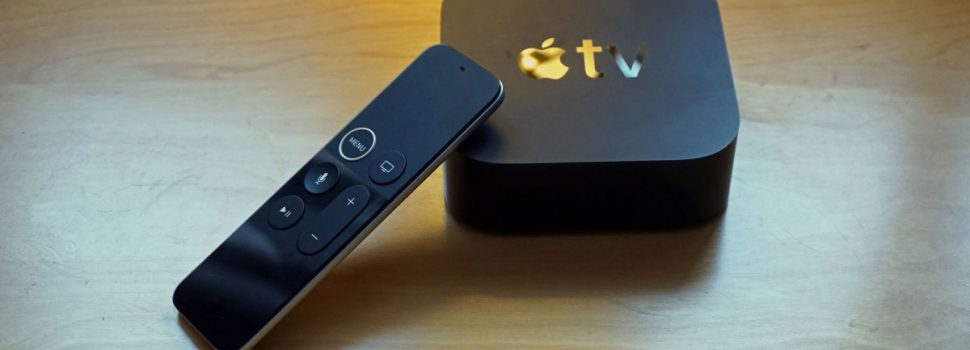
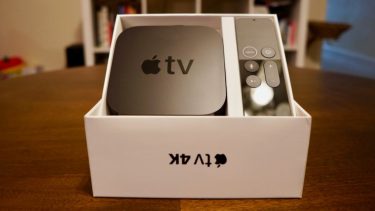
    Apple TV 4K is a high quality smart video system that connects your TV to life. It makes all your favorite TV shows and movies even more amazing. Videos play in stunning detail with picture quality that’s more true to life. Enjoy content from iTunes and apps like Netflix, Hulu, and ESPN — or use the Siri Remote to find just what you want.


    The Great

    • Best streaming video available to compatible 4K
    • Greatest remote on the market
    • Fantastic Siri voice capability
    • Mirror mode from IOS devices
    • TvOS is smooth, intuitive and interactive.
    • Sleek interface looks great in 4K
    • Can control your Homekit devices


    The Not

    • Expensive compared to competition
    • No 4K YouTube
    • No Dolby Atmos
    • Non-4K owners no real advantage over the previous model
    • Occasional lag while switching apps

    The Conclusion

    If you have the dough and live in the apple eco-system I highly suggest in picking one up.. It is so choice.


    The Picture Quality

    In three words. Breathtaking, Amazing, Perfection. The 4K gives you a crisper picture using four times more pixels than standard HD and (HDR) delivers brighter, more realistic colors and greater detail. The colors are amazing and the crisp lines make it far better than regular HD. I use iTunes as my main source of purchasing video and Older movies I had purchased such as The Princess Bride, or the James Bond movies have started showing up as 4K content. Combined with the newly available tvOS settings to match content frame rate, and HDR settings, older movies are much improved especially when HDR is captured. The black levels and popping colors of older film movies, along with the loss of frame conversion judder can result in a nearly transformative viewing experience. On the downside, telling the TV to switch display mode does result in a frustrating couple seconds of black screen as playback begins.

    The Remote

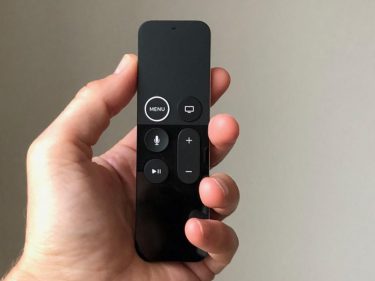
    It’s small, intuitive, and so easily lost. The remote has rechargeable battery last forever, so much so that many don’t realize it’s rechargeable, they think it’s just gone bad after a year. The Apple TV 4K remote has also been subtly redesigned: there’s a white ridge around the menu button now, which makes the thing far easier to pick up correctly in the dark, and there’s a new three-axis gyroscope in it for better motion tracking. It’s still very sensitive and the touchpad is still frustrating. I manage to overshoot constantly.


    The Final Thought

    Apple has smashed the best streaming video quality available today, Dolby HDR, with the slickest, most intuitive, completely refined, and elegant feel. Add in Siri and Total iOS it’s destroys any streamer around. If you just bought an expensive 4K HDR TV, accept no substitutes. I mean the price of stepping up to an Apple TV seem like your only true option.

    While is quality is so superb there are some caveats. Apple TV doesn’t support Atmos and it doesn’t support YouTube in 4K HDR and it doesn’t have Disney or Marvel movies in 4K HDR and it makes some 1080p content look funky.