Author: GoodFind

  • 7 Ways to Fly for Cheap

    7 Ways to Fly for Cheap

    Cheap airfare, it’s something we’re all looking for. Finding decent prices on flights can be difficult though. It is human nature to want to travel, to explore your horizons and see new places, or perhaps, to return to the places you once knew.

    Whether you want to visit home or see an exotic location, airline travel is fast, but costs a lot of money. What is the best way for finding cheap airline tickets? How do you even start? Whether you are traveling for work, for vacation, or to visit family or friends, finding cheap airfare can help you save on what’s often the largest expense of your trip.

    If you’re trying to take a trip and keep finding it difficult to get a decent price, you’re probably looking for some new travel hacks to help you save some money. Well, the good news is that we’re here to help. Let’s talk about the best ways to fly for cheap! Read more below to learn about who is offering the best rates at an amazing price $73 and $39 for one-way flights!

    Best Ways to Fly for Cheap

    Compare Airfares

    Airfares vary widely, and discount airfare is out there for those who know where to look. The most important thing is that you make sure to compare airfares. The rates offered by one airline may be much higher or lower than the rates of another. If you use one of the popular travel sites, you can easily compare airfares from different airlines.

    Also, if you have any flexibility in your schedule, try putting different dates into the sites’ ticket finders to see if that makes a difference. For example, currently, Southwest Airlines is offering flights as low as $73, and Delta is offering flights as low as $39 during the holiday season.

    Use Reputable Flight Search Engines

    Some flight search engines actually get a cut from airlines when they help generate sales. That means that you could search for “budget flights” and have normal or even premium flights show up. In order to counter this, use reputable search engines that don’t mislead you. Great options are Skyscanner, Momondo, AirWander and JetRadar. Like we said previously don’t be afraid to shop around to find the best price.

    Get Tickets Early

    Get your tickets early — but not too early. You may think it would be smart to buy tickets six months in advance, but in fact, getting tickets more than five months before you need them may keep you from getting the best fares. Aim for two to four months in advance, if possible. If you can’t plan that far in advance, at least try to avoid the two-week period right before a flight, when ticket prices tend to go up.

    Specialty sites like “air fare watch dog” provide a medium for you to search for deals between two specific locations, and also can send you alerts when prices drop to a much more affordable rate. This is perfect for those who know where they want to travel, just are not too concerned about when. They can snag a great deal and plan their trip once they get that informative e-mail from the website.

    Airport Selection

    Fly in or out of airports that are not in your destination city. If you are flying into New York City, you may be able to get cheaper fares at the Newark airport than you would in New York City’s JFK Airport. If you are going to or from San Francisco, try the Oakland or San Jose airports. Many other cities also have airports that are nearby but outside of the city limits. Flying out of an alternate airport isn’t even necessarily a hardship. For example, If you are going to some parts of Manhattan, ground transportation may get you there faster from Newark than from JFK.

    You will benefit on price, though, because not as many people will think of using the other airports, so the seats won’t sell out as quickly. Always think in terms of supply and demand when trying to find cheap airfare.

    Non-Direct Flights

    Accept a little inconvenience in exchange for a cheaper price. You may be able to save money on long trips by taking routes where you change planes rather than taking a non-stop flight. If you’re not in a hurry, you don’t need to pay a premium for the faster route. Try traveling lighter to avoid the luggage fees that so many airlines are charging now. Be creative in figuring out how to get by with fewer things on your trip.

    Incognito Mode

    Lock up your search history tight and don’t look back. When you start looking at flights and trips, make sure you’re in incognito mode. When you search for flight prices, sites use cookies to track how many times you’ve looked at the flight. Each new time you look, the price goes up. Why? Well, to get you to buy as soon as possible so you “lock in the lowest price.” Yeah, it’s dirty, but you can fight back!

    By browsing incognito, you won’t have any cookies tracking you. This allows you to bypass this dirty trick and get a better price for your flight!

    Find the Cheapest Days to Book

    Try to fly on a Tuesday or a Wednesday, if possible. Those are often the cheapest days of the week. If possible, avoid Fridays and Sundays, when rates tend to go up. Flying right before a major holiday, like Thanksgiving or Christmas, is going to be very expensive. But if you are able to fly on the day of the holiday itself, you can usually pick up some very cheap fares because not many people want to fly then.


  • Top Things to Know About Assisted Living

    Top Things to Know About Assisted Living

    It can be nerve-wracking when you’re trying to find assisted living for yourself or someone you love. There are a ton of things about assisted living facilities that you won’t be told up front. The contracts you sign are usually complex and full of fine print that you might overlook.

    In order to help you prepare yourself for this process, we’ve got a few tips for you to help navigate this process. This should prepare you for some of the things to come.

    Pricing Will Be Higher Than You Think

    This is the sad reality of assisted living facilities. They’re expensive, and the base fees for rent go up every year. This is due to inflation, of course, and the ongoing upkeep costs of the facility. There are also a number of fees you might not expect. For instance, if someone needs food delivered to their room, or outside transportation, that will have an associated fee. Don’t be afraid to try to negotiate for a better price and make yourself aware of any fees that are hiding. Just ask the facility if there are any fees you haven’t been told about yet before you sign anything.

    Medicare

    Not every community will accept Medicare, but those that do can’t turn someone away for using it. However, communities aren’t eager to take in Medicare residents, as they get less money from them than those who pay on their own. As such, a number of facilities have limited “Medicare Beds,” and will often use that number to limit Medicare residents. However, if a resident gives three months of advanced warning that they will be transitioning to Medicare, this usually circumvents the bed limit.

    There Are No Doctors at the Facility

    Most communities simply don’t have a doctor on-site. Some have nurses on staff, but that’s not a given, so it’s a question worth asking. Generally speaking, most nursing homes will have a doctor on-call. This doctor isn’t located in the facility, so be aware of that when making a decision.

    Residents Can Be Removed Anytime

    All a facility has to do to remove a resident is tell them that the facility can no longer meet their needs. Make sure you read the contract very closely to understand the types of things residents can be removed for. Behavioral issues and needs that are too specific for the facility are some of the more common reasons given. Review these carefully before you make a decision.

    You Could Be Stuck with the Assisted Living Bills

    If you’re signing the contract on the behalf of a parent, and you sign your own name, you could be stuck with the bills should they be unable to pay. In order to prevent this, sign the name of your parent on the contract. Then, make sure to add “by (your name) acting as power of attorney,” and then the date. This will keep you from getting pinned with bills just for trying to help your parent.


  • Tips on How to Quit Smoking

    Tips on How to Quit Smoking

    It’s neither controversial nor shocking to say that cigarettes are bad for you. It’s now no secret that smoking can cause heart problems, lung disease, a stroke and cancer. Nearly everyone who smokes is fully aware of the nature of just how bad cigarettes are for your body.

    Your risk of cancer, lung and heart problems and issues with your kidneys and intestines are all increased by smoking. However some smokers still fail to accept these proven risks and give up cigarettes. People who smoke die an average of 13 to 14 years sooner than nonsmokers. Smoking can also cause sexual and reproductive issues. Pregnant women who smoke risk the health of their unborn child as well.

    Quitting can be extremely difficult though and nicotine and smoking has been proven to be highly addictive. What is the main reason why you want to quit smoking? It is important to establish why you want to quit to stay motivated during what could be a long process.

    Tips on How to Quit Smoking

    Talk to People About It

    You don’t have to go it alone. In fact, if you try to handle this by yourself, you’re likely going to relapse. So, to prevent the likelihood of that, tell people in your life that you’re trying to quit. Talking about things helps to make them feel more real. It’s harder to stay consistent if there’s no one to hold you accountable. Get the people closest to you on board in this process!

    Get Help

    Whether it’s medical help or therapy, you should look beyond just moral support of friends and family. Addiction is a serious thing, and it takes some serious work to undo the claws tobacco products have in your central nervous system. Things like nicotine gum, patches and support groups are all excellent steps to combat the issue.

    Eliminate All Traces of Smoking from your Personal Space

    This one might seem obvious, but it goes deeper than you think. Start by throwing away or giving away all of your cigarettes, ash trays, lighters and matches. Then, shampoo your carpets, clean your drapes and do everything you can to eliminate the smell. You don’t want that smoke smell welling up and driving your desire to light one up.

    Find Healthy Alternatives

    Even if you’d prefer to not use nicotine in your efforts to quit smoking, look for other ways to relax. The biggest draw to smoking is the relaxation that follows a cigarette as nicotine sinks into your system. In order to combat the worst cravings, seek out other relaxing activities.

    Meditation, yoga, tai chi and hobbies like painting, drawing or making music are all great alternatives. If you can afford it, getting professional massages hits similar mental notes as smoking a cigarette! These activities are good for your mental health as well as your physical health.

    Don’t Give Up

    If you slip up and smoke a cigarette after weeks of being smoke-free, it’s not the end of the world. Don’t sweat the small lapses like that, and don’t let them convince you to pick smoking back up. No one is perfect: small mistakes don’t define you. Keep up the good effort and follow the advice in this article. You’re strong enough to quit smoking, so keep at it!


  • Google Pixel 3 and Pixel 3 XL Breakdown

    Google Pixel 3 and Pixel 3 XL Breakdown

    The third iteration of Google’s flagship phone isn’t a huge leap forward. There’s no in-display fingerprint scanner, 3D facial recognition or ridiculous specs. Instead, the search engine giant is doubling down on what it does best.

    The Pixel 3 and 3 XL got Google’s start treatment on Tuesday at a launch event in New York, and we got straight to work checking them out. Already, the phones reject major smartphone trends. First, there’s one camera on the back, not two or even three (but you do get two on the front). Second, they start at under $1,000 each. Third, there’s no wild color; the “craziest” still looks kind of white. And finally, there’s no gimmicks to speak of. Google is clearly focused on functionality rather than just things that sell.

    Pixel 3 & Pixel 3 XL

    On paper, these flagships make the jump when it comes to hardware and software, but otherwise just riff off of 2017’s Pixel 2 ($649 at Google Store). And then I picked them up. Holding the 5.5-inch Pixel 3 and 6.3-inch Pixel 3 XL in my hand was a different story. These are sleek, almost slippery devices with rounded edges and thoughtfully curved elements, like the slightly tacky clear panel on the back.
    The Pixel 3 and 3 XL are undoubtedly Google’s most refined Pixel phones yet. If performance holds up during our testing, I can see how this could be a go-to phone for Android fans, not because they’re innovative, but because they’re both appealing to hold and use due to the buttery smooth stock operation system, Android P.

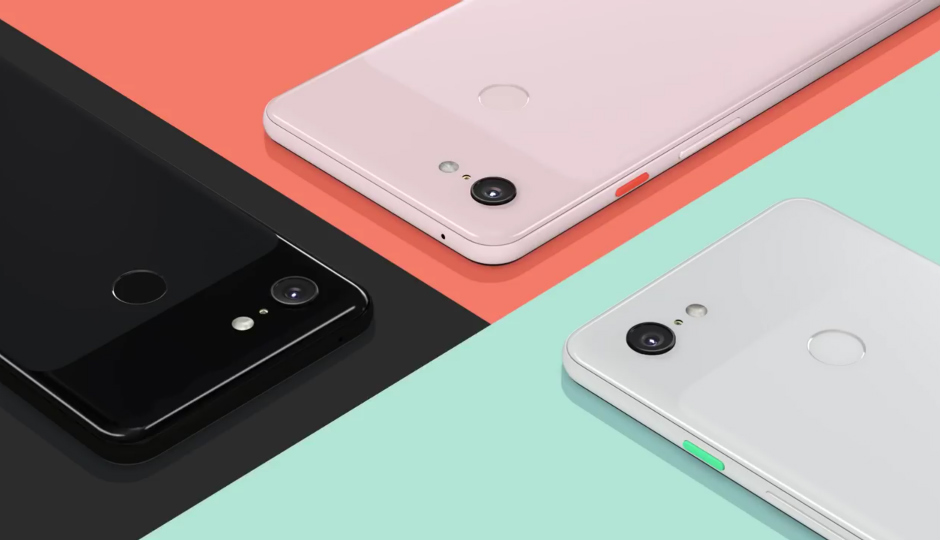
    You can buy the new Pixel 3 phones in black, white and “Not Pink.” The glossy plane on the Pixel’s signature two-tone backing has shrunk over the years, and slightly curves down at the corners rather than cut straight across. In fact, nearly everything about the Pixel 3 is subtle, and that could very well be the phone’s main strength.

    New Pixel 3 features that matter
    Larger, 5.5-inch (Pixel 3) and 6.3-inch (3 XL) displays
    Pixel 3 XL has a notched screen; Pixel 3 does not
    Two front-facing cameras
    Qualcomm Snapdragon 845 processor
    4GB RAM
    Android Pie
    Slightly larger battery capacity for both phones compared to Pixel 2 devices
    Portrait mode shots can also save photos without the portrait filter effect
    Wireless charging support with $79 (£69) Pixel Stand
    Use AI voice assistant to field unwanted calls
    Turn the phone over to silence incoming calls
    Titan M security chip exclusive to Pixel 3 phones

    Pixel 3’s most interesting camera tricks are under the hood
    Google’s Pixel cameras have always been less about flashy gimmicks and more about the kind of software processing that Google can milk from its equipment. After all, Google is a software company at its core. Computer learning and camera AI are major ingredients in the Pixel 3. Both phones have a single 12.2-megapixel rear camera and two 8-megapixel lenses on the front.

    Here are some camera highlights:

    Super Res Zoom: Promises sharp, clear detail when you digitally zoom in to a scene — that’s without a telephoto lens.
    Night Sight: Google promises clear, bright low-light photos without the need for a flash, which can blow out shots or make them unnaturally bright. This will build off Google’s already considerable low-light strength.
    Photobooth mode: Turn on this setting and the Pixel 3 will snap photos when the subject smiles or makes a funny face.
    Top Shot: When motion capture is turned on, Top Shot, which arrives “later,” will recommend a better version of a shot you may have missed. It’s intended for correcting candid photos, like someone cannonballing into a pool. You can also choose your own from what the phone grabbed while the motion capture was on.
    Group selfie: This isn’t so much a convenient mode or button you press as you flipping the camera toward yourself and manually zooming out to the wide-angle lens.
    Playground: For AR enthusiasts, swipe a button in the camera to toss characters, including Star Wars’ BB-8, Marvel’s Iron Man and Childish Gambino (aka Donald Glover) into the landscape you see through the viewfinder.


  • Which Mobility Scooter is Right for You?

    Which Mobility Scooter is Right for You?

    So your mobility isn’t what it used to be… no problem! Today, some insurance companies will actually help with coverage on a mobility scooter, or even pay for the whole thing. Check it out for yourself! Either way, it may be worth checking them out and seeing if it fits your lifestyle. With that in mind, let’s look at the top ten mobility scooters.

    Drive Medical Phoenix Heavy Duty

    A heavy, sturdy scooter for a great price, this one is a good pick. This one has a headlight, which is good for darker areas. It also has a basket in the front for carrying things, making it great for grocery store trips! The seat is customizable, broad and comfortable. For $1,200, this is a great heavy-duty pick.

    Pride Mobility Go-Go Sport

    This scooter is notable for its four-wheel drive and durability. It’s not terribly fast, topping at 4 MPH. That said, it’s rugged and durable, and works great when outdoors! If you like being outside and enjoying the sunlight, this is a great pick! For a combination of durability and mobility, check out the Go-Go Sport!

    E-Wheels EW-72

    A stylish and slick scooter, the E-Wheels EW-72 has a look inspired by classic cars! For those looking to really zoom, this scooter has a top speed of 15 MPH! As a heavy-duty scooter, it works quite well, as it has a top weight rating of 500 pounds! If you’re looking for a great, stylish, heavy-duty scooter, this is a great choice for you!

    Transformer Electric Folding Mobility Scooter

    Another great choice for carrying in a trunk and carrying around with you, this transforming scooter is pretty neat. It folds up into a nice, compact shape so it can go anywhere with you! The battery is airline compliant, so it can fly with you, which is great for those who fly often. If you’re on the move and need a scooter that can keep up, this is the one for you!

    E-Wheels Jellybean Electric Scooter

    The second E-Wheels scooter on our list, this one is also quite heavy-duty! This one is three-wheeled, though, so it’s got a bit of a different construction from some others on this list. The best thing about this scooter, though, is the high speed! It tops out at 18 MPH, which makes it a serious scooter! It has a great battery, too, offering up to 45 miles on a single charge. This one also has an anti-theft alarm, which is great! It sports a huge back-mounted basket, perfect for trips to the market.

    Spitfire 420 Ex

    Another great scooter, this one has interchangeable panels in different colors. The panels come in red, blue and silver, and are easy to change out! It also boasts quick-connect batteries, a comfortable seat and padded armrests. The wheels are anti-tip, which makes this a very safe pick. The front-mounted basket even has an interior lining, which is great for shopping. If you’re looking for a good mobility scooter for medical reasons, such as old age, this is a good pick.

    SmartScoot Lithium Foldable Travel Scooter

    This folding scooter is great to throw in the trunk or backseat and carry with you to a destination. The best thing about this scooter: the battery! It has great battery life for how portable it is for travel. It lasts for up to 12 miles! It also breaks down into three parts, and only weighs 27 pounds.

    Drive Medical Scout 3 Wheel

    At the very low price of right around $600, this three-wheeled scooter is a popular choice. A little less expensive than its four-wheeled counterpart, this one is a good value. The drawbacks to this scooter include its three-wheeled construction, slightly low battery life and make. There are more comfortable, high-end scooters, but if you’re looking for a good bargain, this is it. This scooter is the most affordable on our list!

    Best Value: Drive Medical Scout Compact 4 Wheel

    For those on a budget, the Drive Medical Scout Compact is a very popular choice. At $700, it’s a fantastic value, and it shows in its popularity. It’s a good scooter, with all the trimmings you’d expect from a medical mobility scooter. Older customers on a fixed income love the low price, and the price doesn’t compromise the quality. This one also has interchangeable panels in red and blue, so you can change your style! A great value for the money for those looking to save.

    Best Overall Mobility Scooter: Shopride Sunrunner

    If you’re looking for an especially comfortable scooter, look no further than the Sunrunner! It has a 300-pound capacity and a huge 25-mile battery. You can opt for a headlight, which is quite useful. It has a front basket, perfect for shopping. The star of the show is the big, comfortable seat, though. You can’t beat the level of comfort on display here! It’s hard to find something this premium and high-quality for this price! It retails for $1,500 but can often be found on sale for less.


  • Google Pixel 3 and Pixel 3 XL Breakdown

    Google Pixel 3 and Pixel 3 XL Breakdown

    The third iteration of Google’s flagship phone isn’t a huge leap forward. There’s no in-display fingerprint scanner, 3D facial recognition or ridiculous specs. Instead, the search engine giant is doubling down on what it does best.

    The Pixel 3 and 3 XL got Google’s start treatment on Tuesday at a launch event in New York, and we got straight to work checking them out. Already, the phones reject major smartphone trends. First, there’s one camera on the back, not two or even three (but you do get two on the front). Second, they start at under $1,000 each. Third, there’s no wild color; the “craziest” still looks kind of white. And finally, there’s no gimmicks to speak of. Google is clearly focused on functionality rather than just things that sell.

    Pixel 3 & Pixel 3 XL

    On paper, these flagships make the jump when it comes to hardware and software, but otherwise just riff off of 2017’s Pixel 2 ($649 at Google Store). And then I picked them up. Holding the 5.5-inch Pixel 3 and 6.3-inch Pixel 3 XL in my hand was a different story. These are sleek, almost slippery devices with rounded edges and thoughtfully curved elements, like the slightly tacky clear panel on the back.
    The Pixel 3 and 3 XL are undoubtedly Google’s most refined Pixel phones yet. If performance holds up during our testing, I can see how this could be a go-to phone for Android fans, not because they’re innovative, but because they’re both appealing to hold and use due to the buttery smooth stock operation system, Android P.

    You can buy the new Pixel 3 phones in black, white and “Not Pink.” The glossy plane on the Pixel’s signature two-tone backing has shrunk over the years, and slightly curves down at the corners rather than cut straight across. In fact, nearly everything about the Pixel 3 is subtle, and that could very well be the phone’s main strength.

    New Pixel 3 features that matter
    Larger, 5.5-inch (Pixel 3) and 6.3-inch (3 XL) displays
    Pixel 3 XL has a notched screen; Pixel 3 does not
    Two front-facing cameras
    Qualcomm Snapdragon 845 processor
    4GB RAM
    Android Pie
    Slightly larger battery capacity for both phones compared to Pixel 2 devices
    Portrait mode shots can also save photos without the portrait filter effect
    Wireless charging support with $79 (£69) Pixel Stand
    Use AI voice assistant to field unwanted calls
    Turn the phone over to silence incoming calls
    Titan M security chip exclusive to Pixel 3 phones

    Pixel 3’s most interesting camera tricks are under the hood
    Google’s Pixel cameras have always been less about flashy gimmicks and more about the kind of software processing that Google can milk from its equipment. After all, Google is a software company at its core. Computer learning and camera AI are major ingredients in the Pixel 3. Both phones have a single 12.2-megapixel rear camera and two 8-megapixel lenses on the front.

    Here are some camera highlights:

    Super Res Zoom: Promises sharp, clear detail when you digitally zoom in to a scene — that’s without a telephoto lens.
    Night Sight: Google promises clear, bright low-light photos without the need for a flash, which can blow out shots or make them unnaturally bright. This will build off Google’s already considerable low-light strength.
    Photobooth mode: Turn on this setting and the Pixel 3 will snap photos when the subject smiles or makes a funny face.
    Top Shot: When motion capture is turned on, Top Shot, which arrives “later,” will recommend a better version of a shot you may have missed. It’s intended for correcting candid photos, like someone cannonballing into a pool. You can also choose your own from what the phone grabbed while the motion capture was on.
    Group selfie: This isn’t so much a convenient mode or button you press as you flipping the camera toward yourself and manually zooming out to the wide-angle lens.
    Playground: For AR enthusiasts, swipe a button in the camera to toss characters, including Star Wars’ BB-8, Marvel’s Iron Man and Childish Gambino (aka Donald Glover) into the landscape you see through the viewfinder.


  • iPhone XS, XS Max and XR Breakdown

    iPhone XS, XS Max and XR Breakdown

    There has been months of speculation and hype about new iPhone X models rumored to be coming. “Today, we’re going to take iPhone X to the next level,” CEO Tim Cook said during the presentation and unveiling of new iPhone models.

    The iPhone X released last year was a total rethinking of the iPhone with features like Face ID and a edge to edge screen. Anticipation was high among iPhone fans and the day is finally here, and we have all the recaps.  Apple finally took the wraps off its new iPhones, including the iPhone Xs Max, its largest iPhone ever. With 3 new phone announcements, let’s take a look at what makes them different and sort through all the new details and features.

    iPhone Xs and Xs Max

    First off Apple  introduced the 5.8-inch iPhone Xs, which also has an OLED screen. The iPhone Xs is made of surgical-grade steel, is covered in new glass and comes in gold, silver and space gray. With the new A12 chip, more on this later, it allows the storage to be increased to 512 gb. The Xs will have 3 size options, 64gb, 256, or 512gb. The smaller 64gb is cutting a little close these days but 256gb should still be more than enough for 99% of the users out there.

    The iPhone XS will also incorporate more real-world machine learning for features such as augmented reality and FaceTime. The iOS upgrade will also open the door for Siri shortcuts, which users can customize.  For all the Instagram photographers out there the back camera has a 12-megapixel wide-angle camera and 12-megapixel telephoto camera, along with improvements to flash. For the selfie lovers the front camera will feature 7 megapixels.

    Both devices are identical with only one difference, the iPhone Xs is 5.8 inches, the iPhone Xs max is 6.5 inches. There also have been improvements to the overall strength of the glass screen, which is a great improvement for those of us with butter fingers.

    The iPhone XR

    Alongside with the Xs models Apple also revealed it’s midrange iPhone model, the XR.  The XR is the  bargain model that will be more affordable with most of the same features as the Xs. The iPhone XR has an LCD display called liquid retina and it features a 6.1-inch screen. It’s the same size as the iPhone 8 Plus, but with a larger screen because of it’s edge to edge screen.  The iPhone XR will also feature Face ID, and include the A12 Bionic chip like the XS. The big difference among these phones is the back camera: a single 12-megapixel wide-angle camera for the XR. The front camera will feature the same true depth features as the XS.

    On battery life, XR will offer an hour and a half more on one charge than the iPhone 8 Plus. Specs-wise, the XR is notable for matching many of the specs of the new XS, but one notable omission is 3D Touch, which  isn’t available with XR model. 

    While the 6.1-inch display seems large, the reduced bezels above and below the display  will make the XR slightly smaller than a traditional “Plus” iPhone and only slightly larger than the 5.8-inch iPhone XS. The iPhone XR will be available in a variety of colors including black, white, blue, coral, yellow and red.

    Pricing

    The iPhone XR will come in three sizes: 64GB, 128GB, and 256GB, and start at $749. Pre-orders arrive October 19, and ships October 26. XS available in 64GB, 256GB and 512GB starting at $999. The XS Max will start at $1,099. Both Xs models are available for pre-order immediately with shipping to begin on September 21st.


  • Apple Event: Updates to the iPad Pro

    Apple Event: Updates to the iPad Pro

    Apple is having another event this month to introduce new products and provide updates. This is the follow up event to the iPhone XS event early last September. We are expecting even more great new products and some updates to our favorites.

    The event has come to be known as “There’s more in the making” so you know something special will be unveiled. Apple sent out unique and individualized invitations and the event is always a must attend for the tech world. We will bring you all the updates and juicy details from the event.  Let’s take a look at what we got coming out, especially updates to the iPad Pro!

    The Updates to the iPad Pro

    Apple unveiled what it’s calling the biggest change to the iPad since its inception eight years ago. Its new features play in to Apple’s mission to make the tablet more adaptable and appealing to a larger audience.

    Apple announced their new and bigger 11-inch and 12.9-inch iPad Pros in New York today, which now come with Face ID, a USB-C charging port, and a new “Liquid Retina” display. With 5.6 million pixels, iPad Pro features the highest-resolution Retina display of any iOS device. The 12.9-inch screen makes everything you do — editing 4K video, designing presentations, running a business — easier, faster, and more engaging. And the Multi-Touch subsystem has been re-engineered, expanding the ways you can interact with iPad. Aesthetically, they’ve got slimmer bezels that only come in black, like the new MacBook Airs. The black bezels, when paired with the Smart Keyboard Folio, make the iPad Pro look closer to a laptop than it ever has before. They also allow for the 11-inch model display to fit a bigger screen into the same overall dimensions as the prior 10.5-inch model.

    There’s a new iPad Pencil stylus with support for gestures that let you switch between the different digital brush styles. You won’t lose this one as easily as last year, since it clips to the side of the iPad with magnets. It even wirelessly charges when attached to the iPad, an improvement over the silly Lightning plug from last year.You’ll pay more for the iPad Pencil and a keyboard, though, which cost $129 and $179, respectively.

    The new iPad Pro is 5.9 mm thinner — about 15% slimmer than its predecessor. And that Home button….Gone. It has been updated with the iPhone x gesture controls. The iPad Pro also features a nearly edge-to edge-display and rounded corners. Its beautiful and very sharp looking. You can also charge your iPhone, essentially turning it into your own personal power bank. At the heart of iPad Pro lies the new A9X, a third-generation chip with 64-bit desktop-class architecture. It delivers up to 1.8 times the CPU performance and double the graphics performance of iPad Air 2. So even the most demanding apps run effortlessly.

    iPad Pro runs iOS 10, the world’s most intuitive, advanced, and secure mobile operating system. And with improved built-in apps and multitasking features like Slide Over, Split View, and Picture in Picture, iOS 10 helps you get more done in powerful yet simple ways. Whether you’re researching on the web while writing a book report or browsing your photos while creating a presentation, you’ll get more out of your iPad than ever before.

    There’s a new iPad Pencil stylus with support for gestures that let you switch between the different digital brush styles. You won’t lose this one as easily as last year, since it clips to the side of the iPad with magnets. It even wirelessly charges when attached to the iPad, an improvement over the silly Lightning plug from last year.

    For work, you can attach a keyboard. It felt just like the keyboard Apple launched with last year’s iPad Pro 10.5 but can adjust the screen to two different viewing angles, which is a nice touch.

    The Final Thought
    It’s the company’s first iPad not to include a home button, which allowed Apple to extend the screen vertically for a much more immersive experience. The bezels have been downsized on all four sides. Like the iPhone XR, Apple is referring to this screen as a Liquid Retina Display.The new iPad Pro comes in two screen sizes: 11 inches and 12.9 inches. The 11-inch model has essentially the same proportions as the prior 10.5-inch model. And the 12.9-inch model puts the same-sized display into a much smaller form factor. The new iPad Pro starts at $799 for the 11-inch and $999 for the 12.9-inch. Preorders begin today, and it ships on November 7th.


  • Smartphone Spotlight: Galaxy Note 9

    Smartphone Spotlight: Galaxy Note 9

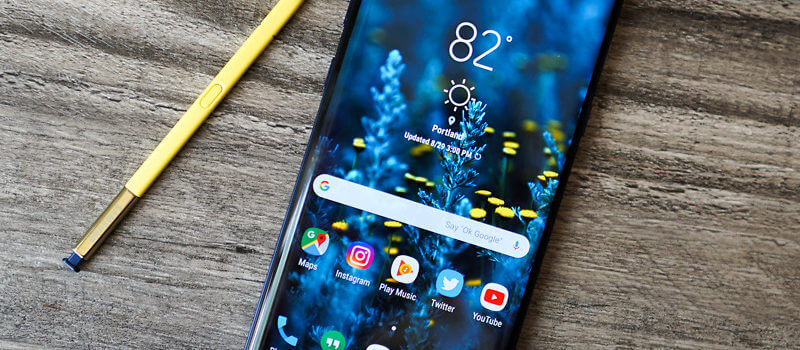
    The 128GB Galaxy Note 9 can be purchased through carriers including AT&T, Sprint, T-Mobile, U.S. Cellular, Verizon Wireless and Xfinity, along with Best Buy, Costco, Sam’s Club, Straight Talk Wireless, Target, Walmart, Samsung.com and the ShopSamsung app.

    The Great

    • Slamtastic Screen
    • Instalike worthy camera
    • Adequate long battery
    • Interesting new S-Pen tricks
    • All the Specs needed

    The Conclusion

    The Galaxy Note 9 is Samsung’s Ultimate cry for tech geek attention. It has all the specs, a gigantic, magnificent, Fortnite worthy screen, a Bluetooth-powered S Pen, and a headphone jack… you know just all the essentials on the checklist for the kind of Android user that Samsung is targeting with a Note update. It’s a Phablets lover’s dream come true!

    I’m sure we all remember the note 7 scandle, but that is all history for the Galaxy Note brand. That was two years ago, this is the Note 9 we are talking about today.

    Galaxy Note 9 puts powerful technology in the hands of the tech geeks and gamers who demand more powerful and more screen from their smartphones. It certainly boast Innovative features and design make it the only phone to keep up with the next generation of users. Yes the rumors we have been telling you are true. Packed with a huge battery, a massive screen, and a powerful stylus, the Note 9 has more of everything than any other phone on the US market.

    How does it look and feel

    It’s large, I mean this phone is obscenely large. And when you put it in a case, it will become a liability. This is not a one-handed phone for any but the largest hands. Samsung moved the fingerprint sensor so no longer will the Note 9 fit into Note 8 case. On the bright side no more inadvertently smudging the camera lens.

    The Galaxy Note 9 has a 6.4-inch quad HD Super AMOLED curved screen, and USB-C and standard headphone jacks, it is IP68 Waterproof. We have been through this, the checklist of required wants and needs are covered. Not only that but it is stunning, think Charlene Theron on the red carpet elegant.

    No 5g on The Galaxy Note 9

    We have talked about 5G coming next year, Don’t get hung up on that; it will be another year before 5G is widespread and before chipset makers work out the power-management kinks that come with new wireless data systems. Yes write that down you are hearing it here first. Next year’s Note 10 will be 5G. Wanna wait that long? Anyways, The existing X20 modem get speeds up to 700Mbps with the right carrier setup, showing there’s still plenty of room in 4G. That’ll do, That’ll do just fine.

    Sounds and Stuff

    The Note 9 brings the S9+’s dual speakers to the Note line. The two speakers are by the earpiece, and along the bottom. Compared to the previous Note 8’s single bottom speaker, the speakers here aren’t much louder but clarity and treble are off the charts. Outside of the iPhone X I don’t think I have heard a better device speaker.

    The Biggest Difference

    The Galaxy Note 9’s biggest upgrade is its enhanced and gargantuan 4,000mAh battery hit it with a 10-hour battery test video. Yes you know the one where I leave it on the10 hour loop of He-Man singing 4 non blondes “what’s going on”. Results, 13% left, astounding. This leads me into projecting screen-on battery life out to 12 and half hours. That Destroys all other flagship smartphone on the market. The battery is significantly larger than the one in the Galaxy S9+ (3,500mAh, 10+ hours), the Galaxy Note 8 (3,300mAh, 6 hours), or the Galaxy Note 5 (3,020mAh, 8 hours and 30 minutes).

    Quick Speck Look

    • Graphics Mali-G72 MP18
    • Processor Octa core (2.7 GHz, Quad core, M3 Mongoose + 1.7 GHz, Quad core, Cortex A55)
    • Architecture 64 bit
    • Ram 6 GB
    • Audio Features Dolby Atmos, Dolby Digital, Dolby Digital Plus
    • Display Type Super AMOLED
    • Aspect Ratio 18.5:9
    • Screen Size 6.4 inches (16.26 cm)
    • Screen Resolution 1440 x 2960 pixel

    The Final Thought

    The screen alone will improve your Fortnite results instantly giving you an unfair advantage over any other player on a regular smartphone.


  • Best 5 Laptops Under $500 in 2018

    Best 5 Laptops Under $500 in 2018

    Laptops are very essential these days- for school, work, or just personal use. The price of a premium new laptop can cost up to $1,000, which is pricey for anyone. Numerous companies have made laptops more affordable while keeping the quality and capabilities of more expensive laptops.

    You don’t have to feel like you’re settling when shopping for a laptop under $500. There are value-priced notebooks that include full-HD displays, solid performance and long battery life, plus all the ports you need. We picked all the best all-purpose laptops in $500 price range which we think are best laptops to suit the wide range of requirements of people. Here is a list of the best five laptops under $500!

    1. Dell Inspiron i3567 Laptop

    The latest version of this Dell laptop has a powerful system in place with 8GB of memory and a 128GB hard drive and a Intel Core i3-7100U 2.4GHz processor. It has a professional feel in it’s all black look with a 15.6-inch laptop with a screen resolution of 1366 x 768. The operating system runs smoothly with Windows 10 and is backed with a 12 month warranty, with 12 months of tech support.

    • A new, powerful hardware system
    • Has many ports and slots to use your external devices
    • 8 GB Ram
    • 7th Gen Intel Core i5 processor
    • It is not backlit enabled
    • Battery life up to 5 hours

    2. Acer Aspire A515-51-50RR Laptop

    The Acer Aspire 5 is one of the best budget full-size laptops you can find in stores today. It checks most of the right boxes: well built, slim and fairly light, gets a decent keyboard, an IPS screen and modern hardware, performs well, runs cool and quiet and lasts for a long while on a charge. This slim and sleek laptop is a great all round performing laptop, especially for the price. The visuals are spot on with vivid, bright colors.

    • LCD display and is backlit
    • 2.50 GHz Intel Core i5-7200U processor
    • Storage: 1TB hard disk
    • Intel HD 620 graphics
    • Battery life up to 7 hours
    • All-plastic chassis

    3. HP 15-ay191ms Laptop

    The HP 15-ay191ms, a signature edition laptops that comes with a seventh-generation Intel Core i3 processor, 8GB DDR4 system memory, 1TB of storage and a touchscreen, but still remains insanely affordable. It’s one of those laptops you’d buy without a second thought if you find inexpensive chromebook attractive, but really, really need Windows. If you love touchscreen, this one’s for you! This laptop contains the Kaby Lake processor which makes this laptop consume little power. Apps are not an issue here, they all run very smoothly.

    • Touchscreen
    • Intel Core i3-7100U processor
    • 8GB RAM
    • 1TB hard drive
    • Lag-free performance
    • Battery life up to 6 hours

    4. Dell Inspiron i3567-5185BLK Laptop

    Yet another Inspiron made this list! This version comes in different color options and a textured finish.  Packed with a large 15.6 Inches display and a decent 7th Gen Intel Core i5-7200U up to 3.1GHz CPU processor. This Dell laptop model would work well for portability with its 4.85 Pounds lightweight design and sleek black look. Great for school work or the family computer. A huge bonus with this laptop is it doesn’t heat up much!

    • 2.4 GHz Intel Core i3-7100U processor
    • 8GB RAM
    • TB hard drive
    • LED display with a built-in webcam and mic
    • Battery life is up to 6 hours

    5. ASUS Chromebook Flip

    This is one of the best convertible laptops on the current market. The Asus Chromebook Flip C302 is worthy of its premium stature with a gorgeous screen, tactile keyboard and a classy design that’s equally as comfortable to use in tablet mode or as a traditional laptop. The screen is a full HD touchscreen and can be converted from a laptop to a tablet by turning the screen. A top pick for a college student!

    • Intel Core m3 processor
    • 4GB RAM
    • 64GB of SSD storage
    • Battery life of up to 10 hours