Author: Christine

  • Intel Aims to Improve Performance by Moving Virus Scanning to GPU

    Intel Aims to Improve Performance by Moving Virus Scanning to GPU

    Intel is going to open the doors for virus scanners to use integrated graphics chipsets for scanning instead of relying solely on the CPU. This could mean better performance and battery life.

    Accelerated Memory Scanning

    “With Accelerated Memory Scanning, the scanning is handled by Intel’s integrated graphics processor, enabling more scanning, while reducing the impact on performance and power consumption,” said Intel’s platform security division vice president Rick Echevarria. “Early benchmarking on Intel test systems show CPU utilization dropped from 20 percent to as little as 2 percent.”

    Since typical machines do not fully utilize their onboard graphics chips, Intel is making a smart move to offload threat protection.

    Supported Processors

    The supported processors go back to the 6thgeneration of Intel, meaning that three generations of processors will allow the offloading of virus scanning. This should cover a very wide variety of computers that are already in the field.

    Skylake, the earliest supported Intel processor, was launched in 2015. If you purchased your computer before then (or if your computer uses AMD instead of Intel), then you will not be able to use the new offloaded virus scanning feature.

    Supported Virus Scanners

    Microsoft’s Windows Defender Advanced Threat Protection (ATP) will be the first to offer this new feature… as soon as later this month. Intel has also been working with other antivirus developers to help facilitate the change. Keep an eye open for news from your preferred vendor.

    Spectre Protection

    Last month, Intel said that they are redesigning their processors to prevent another Spectre-like attack. Changes that Intel had to make to protect applications after Spectre cause a performance hit but updating the silicon itself will restore performance and provide better protection.
  • Samsung Has Released an Internet-Free Smartphone

    Samsung Has Released an Internet-Free Smartphone

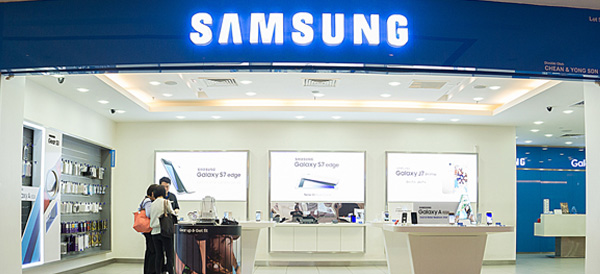
    Samsung has released the Galaxy J2 Pro, which appears to be a standard budget smartphone, but there’s one major feature (or lack thereof) – it cannot connect to the internet.

    The Galaxy J2 Pro

    Connecting to the Internet is an impossibility on the Galaxy J2 Pro. There is no Wi-Fi, no LTE, no 3G… nothing.

    Why would Samsung release a phone with no Internet capabilities? They’ve decided to cater to students or senior citizens who want to make calls and use some apps without the distraction or confusion of internet connectivity. It may also be a solid choice for parents who want to give their youngsters a way to keep in contact. Smartphone addicts looking to break free from the always-connected culture may also be intrigued by the J2 Pro.

    Features

    So, what can a smartphone that doesn’t connect to the internet do? In a nutshell, it can make phone calls, send text messages and take photos.

    • 5-inch display (qHD AMOLED)
    • 4GHz quad-core processor
    • 5GB of RAM
    • 8-megapixel rear-facing camera
    • 5-megapixel front-facing camera
    • MicroSD card slot
    • 2,600mAh removable battery

    Budget Friendly

    The Galaxy J2 Pro is nothing like Samsung’s most popular Galaxy phones like the Galaxy Note 8 or Galaxy S9. It aims to cover a different segment of the market. And unlike their big name phones, the price of the Galaxy J2 Pro is much, much cheaper.

    Right now, the J2 Pro is only available in Korea and Samsung has made no announcements on whether it will release in other countries. The price of the phone converts to around $185.

  • AMD Releases New Ryzen Processors

    AMD Releases New Ryzen Processors

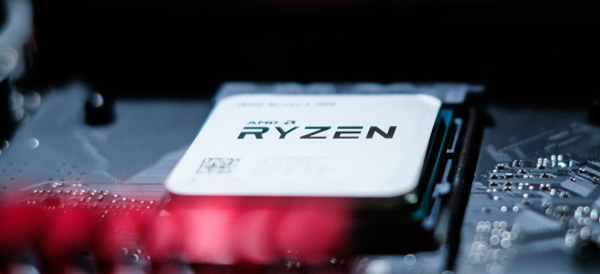
    Last year, AMD made a successful re-entry into the high-performance world of desktop computing with their Ryzen processors. Now, they have announced the second generation of their fiercest competition to Intel in years.

    Ryzen Generation 2

    At the upper end of the new Ryzen chips is the Ryzen 7 2700X. The 2700X replaces both the 1700X and 1800X chips from the first-generation Ryzen processor lineup – those two older chips were extremely similar.

    The base clock of the 2700X is 3.7GHz with a boost up to 4.3GHz, which makes it up to 300Mhz faster than the 1800X. The price has also come down, with the 2700X selling at $329 compared to the 1800X’s $499 price point. This puts the price close to Intel’s six-core i7-8700K.

    Their budget offering is the Ryzen 5 2600, a six-core chip with will sell for $199. The base clock on the 2600 is 3.4GHz with a boost up to 3.9GHz. The most similar Intel chip is the Core i5-8500.

    The Lineup

    Ryzen 7 2700X – 8 cores, 16 threads, 3.7 to 4.3GHz, $329

    Ryzen 7 2700 – 8 cores, 16 threads, 3.2 to 4.1GHz, $299

    Ryzen 5 2600X – 6 cores, 12 threads, 3.6 to 4.2 Ghz, $229

    Ryzen 5 2600 – 6 cores, 12 threads, 3.4 to 3.9GHz, $199

    Up Next?

    AMD will debut their new platform, Zen 2, next year. So far, they have been mum on details but there are a few knowns. The new Zen chips will run on their new 470 AM4 chipset and they’ll support its StoreMI technology which links SSDs, platter hard drives and RAM together, increasing performance.

  • ESPN+ Opens Their Subscription Streaming Service

    ESPN+ Opens Their Subscription Streaming Service

    Yesterday, ESPN launched their subscription streaming service to the masses. It’s their first push into subscription streaming. It’s also Disney’s first streaming launch since acquiring a majority stake in BAMTech in 2017.

    The New Service

    The service will have two options for subscriptions, either $4.99 per month or $49.99 per year. American Express is sponsoring a 30-day free trial.

    “I consider these offerings the beginning of a new era of innovation at ESPN,” said Jimmy Pitaro, President of ESPN.

    A Different Kind of Service

    ESPN is not looking to mimic some other channels’ subscription offerings. HBO Now, for instance, mirrors content between the television channel and the subscription service. ESPN+ is going a different direction.

    Rather than serve as a replacement, it will be a complementary addition to ESPN’s cable network channel.

    “We’ve been very clear that the service is meant to be complementary and additive to what you’re getting on linear television,” Pitaro said.

    Because of this angle, ESPN and BAMTech aren’t marketing ESPN+ as a cord-cutters service. It’s for people who are hungry for more sports.

    “I don’t know how to program to cord cutters,” said BAMTech CEO Michael Paull. “I do know how to program to sports enthusiasts.”

    Offerings

    There will be plenty of live game offerings, including a daily MLB game, more than 180 NHL games, and more than 250 Major League Soccer games, college sports, golf, cricket, ruby and matches from three different tennis Grand Slams.

    Outside of games, there will be original shows like Detail (a basketball show hosted by Kobe Bryant) and the 30 for 30 documentary series. There will also be other original ESPN content offered on the streaming service.

  • Goodbye 32-Bit Apps: How to Check Your Mac Apps for 64-Bit Compatibility

    Goodbye 32-Bit Apps: How to Check Your Mac Apps for 64-Bit Compatibility

    Apple has announced that an upcoming update to MacOS will end support for 32-bit applications. This could leave users and developers in the lurch, trying to determine how to either upgrade or replace needed software.

    Luckily, there are some simple ways to check your most commonly used apps to determine if they will still work after the transition.

    The Pop-Up Alert

    If you’ve upgraded to 10.13.4, then you may have already seen a one-time pop up upon starting a 32-bit app. The pop-up box reports that your app “is not optimized for your Mac.” And goes on to say that it will need to be updated by the developer to improve compatibility.

    There’s no mention that the app will stop working in the future, but that is exactly what will happen.

    System Report

    The system report feature will also list all of your apps and give you an easy way to check everything for compatibility going forward.

    From the Apple menu, click About This Mac and then scroll to the System Report button. Under Software, choose Applications. When you choose an individual application, all you need to do is check the ’64-bit (Intel)’ field to see if it’s marked ‘yes.’

    If so, you’re good to go and your app will continue to work after the transition. If it’s marked ‘no,’ then it’s time to check with the developer to see if there is an updated version. Otherwise you will need to find an alternative application and make a permanent switch.

    Or, of course, you could simply avoid updating MacOS, but with all of the security fixes and features that are added, that’s not a path that we recommend.

  • Top 10 Cars With the Best Mileage in 2018

    Top 10 Cars With the Best Mileage in 2018

    Whether you want to save some money or save the environment, a gas saving car is something that interests many people. There are even cars on today’s market that are hybrids that you can plug in and run on electricity. Below is a list compiled of ten cars with the best mileage today.

    10) 2018 Kia Niro FE – 52 mpg city/49 mpg highway/50 mpg combo

    This Kia is subcompact SUV with a great deal of cargo space. It has many extra technology features and is one of the most efficient on the market. The Kia Niro FE is a hybrid vehicle, meaning you can use gasoline and plug it in to charge.

    9) 2018 Toyota Camry Hybrid LE 51 mpg city/53 mpg highway/52 mpg combo

    This hybrid Camry is one of the most powerful hybrids available on today’s market. Combined, the gasoline and electric puts out a 208 horsepower. A great addition to this car, it has a safety feature to warn of potential collisions and pedestrians, called Toyota Safety Sense.

    8) 2018 Toyota Prius Eco 58 mpg city/53 mpg highway/56 mpg combo

    This pick is completely gasoline run, and it has one of the best fuel economies. The safety score reigns high, as it also has the Toyota Safety Sense and other safety features. The score for this vehicle overall is great with almost a 9/10.

    7) 2018 Hyundai Ioniq Blue 57 mpg city/59 mpg highway/58 mpg combo

    Another top choice that is a great hybrid, it gets almost sixty miles per gallon just based off gasoline. That is insane! The price is an amazing one for a hybrid vehicle, if you are wanting something that is not going to break the bank, here is your best bet.

    6) 2018 Kia Optima PHEV 103 mpg-e/40 mpg combo

    Without using any gasoline, the Optima can travel up to 29 miles using electricity. This car is high-quality and has an amazing sound system. You can even hook up your phone to the car to the 10-speaker Harmon Kardon sound system.

    5) 2018 Kia Niro PHEV 105 mpg-e/46 mpg combo

    The crossover body style of this vehicle allows for more cargo space! This hybrid allows up to 26 miles of electric range. You are able to use Kia’s UVO eco infotainment system to do things like set up to charge your vehicle and even to heat the steering wheel!

    4) 2018 Chevrolet Volt 106 mpg-e/42 mpg combo

    One of the first vehicles to come out with a hybrid system, it has a perfect safety score of 10/10. You can’t beat the 53 miles this car runs solely on electricity. It is packed full of great features, the Chevy’s Teen Driver system being a unique one.

    3) 2018 Honda Clarity PHEV 110 mpg-e/42 mpg combo

    Honda is a very popular pick for a car, this hybrid can travel 47 miles just on electricity. The gasoline engine is strong with an amazing 212 horsepower. This car has many safety features like the LaneWatch camera and an adaptive cruise control.

    2) 2018 Hyundai Ioniq PHEV 119 mpg-e/52 mpg combo

    This version of the Ioniq has a more high class look to it yet has great cargo space. It is also a lot more economical than you may think; it can travel up to 29 miles alone on just electricity.

    1) 2018 Toyota Prius Prime 133 mpg-e/54 mpg combo

    Last, but not least, this car is the best pick of all hybrid vehicles. It has two electric motors and can run on that electric for up to 25 miles. Between charging this car and filling up on gas, the Prius Prime will last 640 miles! Other ways to help get the most of your miles in this car are to use the Entune Prime App to adjust the climate control.

  • HP Caters to Budget-Conscious Gamers with New PC Lineup

    HP Caters to Budget-Conscious Gamers with New PC Lineup

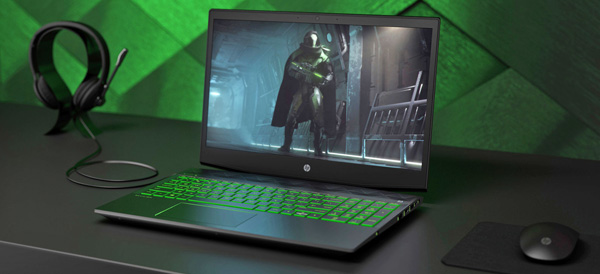
    Sure, there are some folks who don’t mind throwing three grand at a new computer rig that will run every game in existence at ultra-high 4K settings. But some of us have tighter budgets to deal with, and HP just released a new line of gaming computers with us in mind.

    Desktop Entries

    The Pavilion Gaming towers (690 and 7900 are aimed at gamers not interested in mobility or custom-building a rig. The swing-out hard drive trays make upgrading drives easy and the dual fans should be adequate for standard cooling.

    The desktop price range for the 690 starts at $549 for an entry level system: 3.5GHz Ryzen 3, Radeon RX550, 8GB of RAM and a 1TB platter hard drive. Buyers can scale the price up to $1,699 for the 790 for an uptick in performance: a 3.2GHz Core i7, GTX 1070 video, 32GB of RAM, a 256GB SSD and a 2TB platter disk.

    There are options for even higher-end video cards such as the RX580 and GTX 1080. Hard drive space can be maxed out at 3TB and more RAM can be added. The 690 tops off at 16GB while the 790 can go up to 64GB.

    Laptop Entries

    The Pavilion Gaming laptop starts at $799, featuring a 2.3GHz quad Core i5, Radeon RX560X, a 1080p display, a 1TB platter drive and 16GB of Optane storage. If you want to bump your spend to $1,019, you can get a six core 2.2GHz Core i7, GTX 1060 graphics and a 1080p screen at 144Hz.

    Other options can move the screen up to 4K resolution and a storage combo that pairs a 128GB SSD with 2TB of platter storage.

    Non-Gaming Entries

    HP isn’t only catering to gamers, however. There’s also a new version of the 14-inch Pavilion x360 with a fresh design that features a smaller bezel and a fingerprint reader. The standard Pavilion desktops and laptops also got a design refresh and performance boost.

    Look out for all of these new computers sometime between May and June!

  • New VIZIO Home Theater Sound System Lineup Includes Dolby Atmos Support and Other Features

    New VIZIO Home Theater Sound System Lineup Includes Dolby Atmos Support and Other Features

    VIZIO revealed their new 2018 Home Theater Sound Systems with Dolby Atmos support. These new sound bars also feature other smart home features powered by Google.

    Sound System Configurations

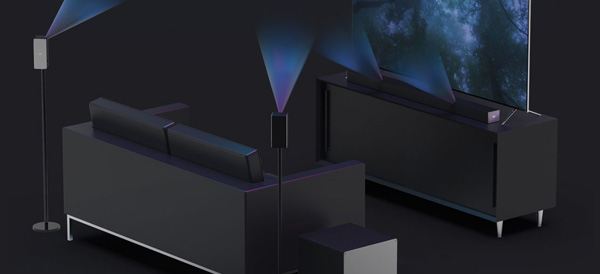
    The new sound bars come in three configurations: a 46” 5.1.4 sound bar, a 46” 3.1.2 sound bar and a 36” 5.1.2 sound bar. They have also added a new 36” 2.1 sound bar with built-in dual subwoofers.

    Dolby Atmos 5.1.4

    This immersive cinema sound experience features a total of 10-channels. This is a 5-channel sound bar with up-firing speakers to bounce sound off the ceiling. It also features two rear surround speakers with 2 up-firing speakers and a wireless subwoofer.

    Dolby Atmos 3.1.2

    Another great cinema experience with a total of 6-channels. The sound bar features 3-channels with 2 up-firing speakers. Like the 5.1.4, the system features two rear surround speakers and a wireless subwoofer. However, the rear surround speakers in this set to not include up-firing speakers.

    Dolby Atmos 5.1.2

    Splitting the difference between the previous two offerings is the 5.1.2 system. It features the same sound bat as the 5.1.4, with 5-channels and 2 up-firing speakers. The rear surround speakers are the same as the 3.1.2 set with no up-firing speakers. And of course, the wireless subwoofer is included.

    Smart Features

    Chromecast and Bluetooth support means that you can stream your favorite artists and apps directly to the sound bar. Just connect your phone or tablet and you have an instant audio entertainment center! You can also stream over Wi-Fi.

    Another new feature is the ability for your VIZIO sound bar to work with Google Assistant. This means that you can use your voice to control the sound bar.

    New 2.1 Sound Bar

    For those needing something more compact, the 2.1 sound bar has you covered! You’ll get to experience a sound bar with 2 built-in subwoofers to ensure that your cinematic experience gets that deep bass it deserves.

  • Four Free Microsoft Office Alternatives

    Four Free Microsoft Office Alternatives

    Microsoft Office may dominate the standard office application world, but that doesn’t mean you have to shell out money to Microsoft to meet your needs. There are more than a few alternatives to Microsoft’s ubiquitous word processor, spreadsheet and more.

    LibreOffice

    This free and open source office suite is fully compatible with Microsoft Office and features six apps. Writer (word processor), Calc (spreadsheet), Draw (vector diagrams), Math (complicated mathematical functions) and Base (database program). Base is of special note to some users who may be looking for an alternative to Microsoft Access.

    LibreOffice is available for Windows, Mac and Linux. There are no official mobile versions aside from a document viewer on Android, but if your computer is still your home base, then LibreOffice may be the replacement office suite you need.

    Google Docs

    It’s hard to talk about Microsoft Office replacements without mentioning Google Docs. The search company’s collection of online office apps should meet most user needs. The fact that every document you ever create is safely stored in the Google cloud can be a lifesaver.

    You won’t find some of the advanced tools like you’d see in Microsoft Office or even LibreOffice. Compatibility can also be a bit tricky when you try to open Microsoft formats – the conversion doesn’t always look pretty.

    But if you are a basic office suite user who needs to simply create some text documents or simple spreadsheets, then Google Docs may be your best bet.

    Microsoft Office Online

    Microsoft wasn’t keen to stand by and watch Google Docs take a bite out of their user base. So they decided to release their own free versions of Microsoft Office apps.

    These stripped-down versions of their desktop program counterparts are similar to Google Docs in that they are missing some advanced features. But if you are living in a world of Microsoft formatted files and you don’t want the hassle of converting them all to Google Docs, then Microsoft Office Online has you covered.

    Zoho Workplace

    Zoho is a fairly new and exciting addition to online office applications. The new-look word processor ditches the classic Microsoft Word-style interface and uses a formatting sidebar instead. The spreadsheet similarly features a unique interface. Both can produce professional-looking documents.

    Zoho also offers a site creation tool, a file management solution and collaborative tools. If you are starting a small business, then Zoho might have all of your needs covered.

  • Three of the Best Budget-Friendly 3D Printers for Beginners

    Three of the Best Budget-Friendly 3D Printers for Beginners

    The market for 3D printers has exploded over the last few years. There are plenty of options now for rookie tinkerers and experts alike. Today, we are going to round up some of the best options for people who want to dip their toes into the world of 3D printing.

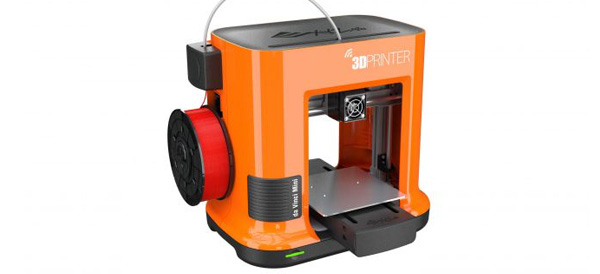
    XYZprinting da Vinci Mini – Around $200

    This is the best budget 3D printer on the list. It’s an extremely affordable way to get into 3D printing. It’s also one of the easiest to use thanks to its interface. Don’t worry that quality was sacrificed, the 3D objects that this printer creates are very good considering the price.

    Its compact size also lends itself to beginners, as it is easy to put on your desk without taking up too much space.

    The da Vinci Mini uses fused filament fabrication and has a minimum layer resolution of 100 microns (maximum 400 microns).

    M3D Micro 3D Printer – Around $350

    Another great option for a starter 3D printer, the M3D Micro 3D Printer is a compact cube that can sit easily on your computer desk. It looks nice, runs impressively quiet and generates very decent small models. This is another great first 3D printer choice.

    The M3D uses fused filament fabrication and has a minimum layer resolution of 50 microns (maximum 350 microns).

    LulzBot Mini – Around $300

    If you enjoy tinkering with hardware, then this may be the 3D printer for you. The hardware is open source, so the community of users are able to create various add-ons for the printer. It’s not as stylish as the M3D or da Vinci Mini, but it is reasonably priced and if tinkering is important to you then looks may not matter as much.

    It does run a bit slower than the other models listed here. The LulzBot Mini uses fused deposition modeling and has a minimum layer resolution of 50 microns (maximum 500 microns).