Author: Cameron

  • 2020 Toyota Tacoma: First Look

    2020 Toyota Tacoma: First Look

    If you’re in the market to buy a pickup truck, your cup runneth over with options. From new vehicles like the Jeep Gladiator and returning favorites like the Ford Ranger to old stalwarts like the Ford F-Series and the Toyota Tacoma, it’s hard to make a decision. The new 2020 Tacoma wants to make that decision a little more clear-cut with a glut of new features that make the quality-of-life with this truck that much nicer without completely redesigning the vehicle.

    2020 Toyota Tacoma: First Look

    What’s New?

    All trim levels excepting the base SR trim are getting a new 8-inch infotainment touchscreen. The SR trim keeps the old 7-inch screen, but that’s to be expected. While the rest of the car world has been quick to pick up Android Auto and Apple Carplay, this is the first time the Tacoma has sported these features. It’s better late than never, though! Also new to the 2020 model is the inclusion of Amazon Alexa, allowing for voice controls out of the box.

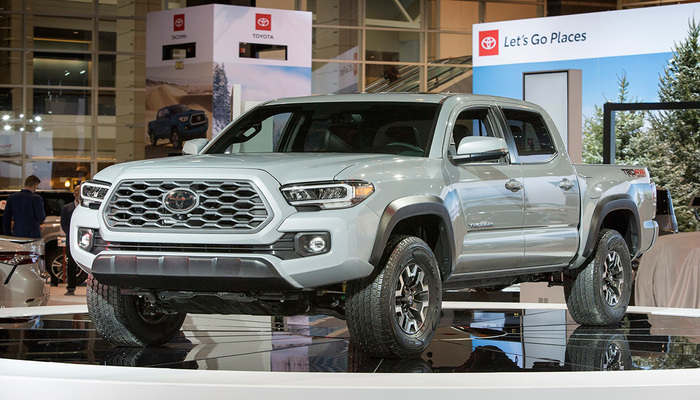
    Other big additions are outside the cab, such as the new LED headlamps, a new grille design and some slightly altered taillights. In short, many of the exterior design changes are aimed at making the vehicle look that much more modern and newer. This includes three-dimensional looking sequential turn signals, a few updated body lines and a more modern-looking front grille.

    Quality of Life

    The addition of a power driver seat in all but the SR trim is a welcome one. Additionally, the comfortable design of the seats makes the ride quality that much nicer, even when taking the truck off-roading. Terrain-select features are far from the norm in the truck world, so it’s great to see the feature on display here. The TRD and TRD Off-Road trims offer a terrain-select feature that includes options for rock and dirt, loose rock, mud and sand and more.

    Also on display in the TRD and TRD Off-Road is an active multi-terrain monitor that helps you keep an eye on what’s happening beneath the wheels. This is great, since it’s often hard to tell where your wheels are in the massive Tacoma, what with its giant hood in the way and the high driving position you’re in. In short, if you’re looking to take a truck off-roading, the 2020 Toyota Tacoma is going to be a solid choice in the TRD and TRD Off-Road trims.

    Under the Hood

    The base SR trim sports a 2.7-liter four-cylinder engine with only 159 horsepower and 180 pound-feet of torque, which isn’t exactly great for heading off-road. If off-roading is your thing, both TRD trims offer a great engine for doing just that. The engine on display under the hood of these trim levels is a 3.5-liter V6 engine sporting 278 horses and 265 pound-feet of torque.

    With the right equipment, the Tacoma can haul 1,600 pounds in the bed, or tow up to 6,400 pounds. While that’s not the best-in-class when it comes to hauling or towing, it’s impressive when you look at the frame the Tacoma sits on and the age of the base build. Whether or not this is a dealbreaker, of course, depends on how much you plan to tow.

    Safety Features

    The tech running in the 2020 Tacoma is impressive, to say the least. Driver safety features like automatic emergency breaking, pedestrian detection, lane-keeping assist and adaptive cruise control will all be shipping standard on the Tacoma line. Rear cross-traffic alerts and blind-spot alerts will also be shipping standard on TRD Pro and Limited trims, as well as being available on the other two trims as options.

    In short, this is the same Tacoma you know, now with even more great technology running under the steering wheel. It’s hard to go wrong with the new Tacoma if you’re interested in off-roading!



  • MacBook Deals: Why are They so Cheap Right Now?

    MacBook Deals: Why are They so Cheap Right Now?

    It’s back to school season, which means it’s time to get all the best supplies. If you’ve been holding out for great deals on back-to-school tech like laptops, then the recent price trends of the 2019 MacBook Air and MacBook Pro should have you excited. Both devices have seen steep price cuts only a few weeks after hitting the market. But why is that, and how can you take the best advantage of it? Let’s take a closer look.

    MacBook Deals: What’s Going On?

    The Deals

    The newest MacBook Air, which dropped in July of this year, started off at $1,100. However, over the weekend, the device has been spotted on sale for as low as $900, and that’s before even considering back-to-school events that could help you save even more. Likewise, the 2019 MacBook Pro, which started around $1,900, can be found on sale for up to $300 off at several retailers. Again, this is before factoring in back-to-school sales.

    MacBooks are ideal for college students, as they are both easy-to-use and well-tuned for creative endeavors. The sleek interface is top-notch, the software is snappy and reliable, and you don’t have to worry about any viruses sneaking into the airtight Mac OS. As such, if you’ve been holding out to pick up a new laptop for heading off to college, the MacBook is the one you want, especially in light of these deals.

    Why the Price Cuts?

    Apple isn’t exactly a budget brand, so many are wondering what exactly is going on with these price slashes. After all, the 2019 MacBook Air landed just five weeks ago, and it’s already seeing serious price cuts. What gives? Is something wrong with these laptops?

    Well, there are a few factors at play. Firstly, Apple is seeing their products sitting on store shelves for longer than retailers would like. The company shipped a lot more MacBooks to retailers than they normally would for a first shipment in order to get out ahead of projected tariffs on goods assembled in China. Keep in mind, tariffs apply on the import date, not the sale date.

    Since retailers have tons of these MacBooks on shelves, they’re eager to move some units. However, as we’ve established, Apple products are really expensive. So expensive, in fact, that many people would just as soon buy a Windows laptop or a Chromebook of similar build quality for several hundred dollars less. Low demand and high supply tends to have the effect of squeezing the price of a product down.

    Why This is a Big Deal?

    Apple’s products don’t usually go on sale at all. If you were lucky enough to find a discounted Apple product, it would be an older model that a retailer was trying to offload. It’s almost entirely unheard of to see brand-new Apple products getting $300 price cuts. One could compare Apple to Nintendo, another company who’s products almost never see price cuts until they’re obsolete, or Disney, who sells eighty-year-old movies for full retail prices.

    While some may argue that Apple’s products should start out closer to this price point, it’s hard to deny the superb build quality and excellent user interface of MacBooks. The perfect storm of economic pressures and unusual political climates have made for a great moment for buyers. Whether you’ve used a MacBook before or you’re just looking for a great laptop to carry off to school with you, there’s never been a better moment to snap up a brand-new Mac.


  • It’s International Cat Day! Fun Facts About Cats

    It’s International Cat Day! Fun Facts About Cats

    The internet is really only good for two things. Reading articles on your favorite website, and looking at pictures of cats. Since today is international cat day, there are even more cats on the internet than usual. In honor of our furry friends, today we’re going over some fun facts and trivia about the fuzzy little jerks we love. No dogs allowed, it’s International Cat Day!

    Cat Facts

    Popularity Contest

    We’re not saying it’s a contest, but cats are totally more popular than dogs. In fact, the only pet that’s more popular in America than cats are fish! Over 94 million cats are happily living with their humans in the US, making them more popular than dogs, rabbits, ferrets and pretty much every other pet animal.

    We’re not saying cats are better, but we are saying that cats have almost twice as many neuron connections as dogs do. If you’ve ever seen your cat do something that would have required much more intelligence than you’d expect them to possess, then you were likely seeing the 300 million neurons in their frontal cortex going to work.

    Purring Mysteries

    Scientists are actually unsure about how, exactly, cats purr. Everyone who’s had a happy cat in their lap can tell you that the fuzzy little balls of love vibrate when they’re content, but we’re not sure what the actual mechanism of this calming habit is. What we do know is that kitties purr in a variety of situations, from contentedness to distress, and often for conflicting reasons. Some cats have even been known to purr while injured, or while recovering from injury.

    As it turns out, some tests have shown that cats’ purrs are at the exact frequency that helps to stimulate muscle and bone growth and healing. As such, the old adage about cats having nine lives might have more truth to it than we though. Even if a cat sustains a fall from a high location or gets injured in a fight, they can recover better than comparable animals of a similar size.

    Meow Meanings

    Domestic cats meow loudly to attract the attention of humans. This is adorable, of course, but it’s also a bit of a window into the behavioral psychology of cats. In nature, cats only meow when they’re kittens, just to attract the attention of their mothers. Once they’re fully grown, cats almost never meow at one another. As such, cats’ penchant for meowing at humans indicates that they are more kitten-like than adult cats that grew up outdoors.

    This arrested development could also explain why domestic cats are so much gentler and sweeter than their feral counterparts. Where adult feral cats are terrified of humans and run from them, domestic cats seem to not mind the huge size difference between their caretakers and themselves. This is likely because they simply view their humans as parents, and themselves as permanent kittens.

    Big Cat Connections

    A number of behaviors observed in house cats can also be seen on display in big cats like lions and tigers. Love of boxes, purring, chasing string around: these are all common indicators of an essential “cat-ness”. Even innocuous connections, like the love of catnip and the propensity to rub their faces on things they like, indicate a close connection between these dramatically different-sized cousins.

    Southpaws

    Unlike humans, who are right-hand-dominate 90% of the time, cats appear to be left-paw-dominant in nearly all cases. Only a few cats seem to show a preference for their right paws over their left paws. Anecdotally, some people claim that lefties are better with cats, or are more likely to be cat people, though the overall popularity of cats shows that this isn’t a requirement.


  • Foldable iPad on the Horizon? Rumor Mill

    Foldable iPad on the Horizon? Rumor Mill

    By now, if you haven’t heard of the Samsung Galaxy Fold, you’ve done a great job avoiding the folding smartphone hype that Samsung has generated. Many Apple fans have been left wondering: does this new folding phone hype mean that a foldable iPhone could be coming?

    According to insider info from an investor note reported by CNBC, it’s more likely we first see a folding iPad before the tech comes to the smartphone line that started the smartphone craze. The note indicates that Apple is “steadily working” on a folding iPad, and expects to release the device in 2020.

    Foldable Craze

    For a brief moment after the April delay of the Samsung Galaxy Fold, it looked like the folding phone hype might die before the first example of the technology even hit the market. However, Samsung seems to have course-corrected the beleaguered device and is set to launch it properly by the end of September. The hype surrounding this device can’t really be overstated.

    The biggest draw to these folding handset designs, like what we’ll also see on the Huawei Mate X, is that they pack the size of a tablet into the portability of a smartphone. That, alone, is a big reason to be excited about this tech getting traction. However, there are some serious hurdles to overcome in order to make the folding designs of these touchscreen devices a possibility.

    Folding Screen Hardware

    One of two things is required for a folding smartphone or tablet to become a reality. That’s either a firm, foldable plastic, or an as-yet undeveloped bendable glass to use as a display. The Samsung Galaxy Fold, for example, is using a durable, pliable and strong plastic for its display. It’s likely Apple will be utilizing similar materials for their folding devices, though they could be waiting for the much-rumored folding Gorilla Glass to become a reality.

    Another issue that Apple is likely looking to avoid is the same PR backlash that hit Samsung when the Fold was delayed. Review models of the Fold were reported to have serious hardware issues, including the screen flickering, debris working under the display and causing bulges, and a thin membrane that could be peeled off the display resulting in a complete screen failure. Apple will likely be more patient than Samsung in developing their own folding devices.

    Why iPad First?

    The news that Apple will focus on iPad before bringing folding tech to the iPhone is interesting. While Samsung has more interest in making their smartphone screens larger, Apple seems to want to start by making their larger devices more portable.

    It’s unlike Apple to roll new features to the iPad before the iPhone, though, in this case, the company could be hedging their bets. After all, folding displays have more hurdles to overcome than just hardware. There’s also the issue of hardware cost.

    Hardware Cost

    It’s no secret that smartphone tech is getting more expensive as the years go by and manufacturers are cramming more and more high-tech features into them. However, the eye-watering $2,000 price tag of the Samsung Galaxy Phone has even power users thinking twice before reaching for their wallets. It was already difficult for many to reconcile a $1,000 smartphone, but doubling that might be a bridge too far for some users.

    As such, it’s not surprising that Apple might test the waters with a folding iPad, first, to gauge interest. After all, the iPad tends to have a higher starting cost than the iPhone. Adding a few hundred more dollars to that cost to include a folding hinge might not be as big of a turn-off for iPad buyers as it would be for iPhone buyers.


  • Kia Seltos First Look: A New Crossover Niche for Kia

    Kia Seltos First Look: A New Crossover Niche for Kia

    It would be a serious understatement to say that SUVs are red-hot right now. Where once sedans were the workhorse car for the family, SUVs are now the go-to for a busy family with lots of driving to do. Among carmakers, Kia is one of the best for lovers of crossovers and SUVs: the Sorento, the Sportage, the Telluride; the list goes on. With the new Kia Seltos, that list is about to get even longer.

    Kia Seltos First Look

    The New Niche

    Kia just lit up competition like the Traverse and Atlas when it released the massive Telluride SUV recently, but now it’s gunning for some very different SUVs. The Seltos is more of a crossover SUV, a bit smaller and sportier, and is looking to compete with vehicles like the Honda HR-V. Ostensibly, this puts the Seltos as being a bit beefier than the Soul, but a bit slimmer than the Niro.

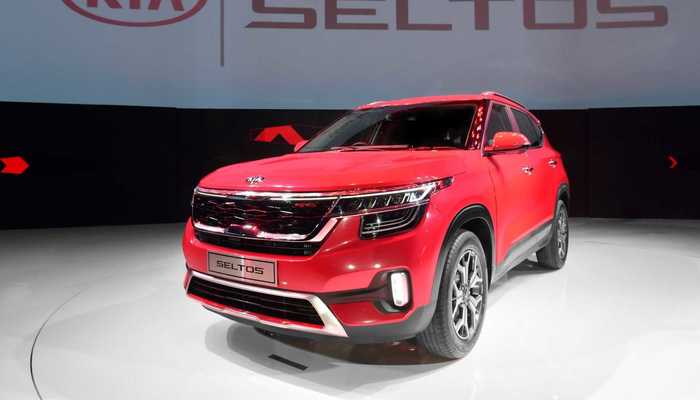
    To back up those “crossover” claims, the Seltos will have options for center locking differential and all-wheel drive, all while looking the part. The design is active and sporty, with a tall nose and some smooth lines around the body. The recognizable Kia “tiger-nose” grille is here and is as complex and busy as ever, complete with a fascinating stacked-LED headlamp design. In short, this car looks weird, interesting, and, most importantly, cutting-edge.

    Drive Quality

    The Seltos sports another tried-and-true Kia design: the rock-solid 1.6-liter, 175 horsepower engine you’d recognize from other Kia SUVs. While this engine won’t be winning any street races, it’s still a solid drive train for your daily driver, offering good acceleration to keep up with highway traffic. Power is smooth and pulls evenly, while the transmission shifts evenly when you’re asking it for more power.

    The ride quality is also stellar. Between the smooth suspension and clean handling, this is clearly a vehicle for people who need to do a lot of driving. For a busy person with a family who needs to drive around town a lot, these are some pretty great features. All of this goes hand-in-hand with a comfortable interior that is amply stocked with tech and safety features.

    Interior

    The materials on display in the Seltos’ interior are simple and straightforward, which all works well for the vehicle. Despite a more measured appearance than an SUV like the Telluride, the Seltos still manages to come across as refined and nice, if not exactly luxurious. There’s a lot of black plastic on display, but it all looks reasonably nice.

    A 10.2-inch touchscreen pulls infotainment duties, doing a good job of running Kia’s UVO infotainment OS. The interface is snappy, quick to respond and easy-to-use. As you might expect from a tech-focused company like Kia, the Seltos’ infotainment system is compatible with both Android Auto and Apple CarPlay, allowing you to use your smartphone’s features through the robust in-car system. The best thing about this interior, though, is the full complement of safety features.

    Safety Features

    Six airbags might sound like a lot, but you’ll be glad to have them if you get into an accident. Options for automatic braking in an emergency are available, as is rear cross-traffic alerts and pedestrian detection. There’s also an impressive and comprehensive suite of lane-keep assist technology. Kia’s marketing claims this feature is robust enough to keep you in your lane even when you’ve got your hands off the wheel. This system works in tandem with an adaptive cruise control to allow you to somewhat automate highway driving.

    The 2020 Seltos isn’t confirmed to be coming stateside just yet. However, given how impressive the little crossover looks, we’d be surprised if we didn’t see it here very soon.


  • New Samsung Galaxy 10 Details Leaked Only Hours Before Launch

    New Samsung Galaxy 10 Details Leaked Only Hours Before Launch

    Samsung’s Galaxy Note 10 is said to be one of the best and most powerful phones of 2019. The Note 10 is launching today, August 7, but that hasn’t stopped the leaks and videos – here’s everything we know.

    To announce the launch of the new Galaxy Note 10 today, August 7, Samsung is hosting a live press conference in the Big Apple, Brooklyn to be exact. The launch event kicks off at 1PM PST / 4PM EDT (9PM BST). Rumor has it that with all the leaks over the past few months combined, it is doubtful that Samsung will have very many surprises in store for us. Here’s what we know.

    Galaxy Note 10 Leaks

    Assuming the combined Galaxy Note 10 leaks are legitimate, Samsung will be announcing two versions of the new Galaxy Note today – The Note 10 and the Note 10 Plus. Equipped with 6.3-inch and 6.8-inch screens, the new smartphones will certainly not disappoint. According to the leaks, they will both be sporting an all new S-Pen, which will basically serve as your personal magic wand with air gestures for your new smartphone. But wait, there’s more!

    Alongside a rumored “Superfast Charge” that will feed the Note 10 hours of battery juice in just a matter of a few minutes, a Verizon ad campaign has gone live to promote the new smartphone, confirming it to include a 5G option when purchasing. This brings the total number of new Galaxy Note 10 to four options! What does 5G mean?

    5G Speeds

    5G is the latest and fastest version of cellphone technology, made to download and upload at lightning speed! So, whatever you are currently doing on your smartphone, you’ll be able to do it faster and better with the new Galaxy Note 10 5G option. But we know the real question you’re wondering – How much will this cost you?

    Cost

    Well, there is no getting around the fact that with every new smartphone that comes out, the higher the price tag that comes with it. When we look at the Note 9, there is no doubt that it is a very, very expensive phone, and we are not expecting the Note 10 to be any less pricey. While the price has not yet been officially confirmed, we have the scoop.

    According to Droid-Life, we should see the Galaxy Note 10 start off around $950 and the Galaxy Note 10+ to start off at $1,100. On the contrary, a leak from Russia indicated that the Note 10 will at a price point between $1,100 – $1,200. Is it worth it?

    Features

    While the Galaxy Note 9 was jam-packed with worthwhile features, in many ways it felt like only a small upgrade from the Note 8, released just the year before. We have high hopes from the Samsung Galaxy Note 10 to justify the hefty price tag that comes with it.

    While all recent Samsung smartphones have included water resistance, the Galaxy Note 10 is equipped with protection that is expected to have a significantly stronger defense against high-pressure and high-temperature water. That’ll come in handy the next time you drop your phone in some water.

    Video Leak

    In the leaked clip, it appears that the Galaxy Note 10+ comes with a small punch-hole cut out for the front camera. While the top smartphones that are currently in the market have the capability to record with HDR video, the Galaxy Note 9 does not. This is a very weak point to an otherwise great camera.

    We are hopeful that the Galaxy Note 10’s high price point will include not only HDR recording, but like many competitors a 4K HDR recording feature. Could the imminent release of the new smartphone race to the top of the best Android Phones? There is not a long wait to find out.


  • Toyota 4Runner Review: Most Rugged Mid-Size SUV?

    Toyota 4Runner Review: Most Rugged Mid-Size SUV?

    Toyota is a company known for making family-friendly vehicles that are reliable, if a little plain. One of their most well-known SUVs, the 4Runner, is a favorite among those looking for a rugged-but-practical vehicle. It’s great for going around town, going to soccer games and going on trips. Today, we’re taking a closer look at the design and features of the 4Runner to help you decide if it’s the right vehicle for you and your family.

    Toyota 4Runner

    Design

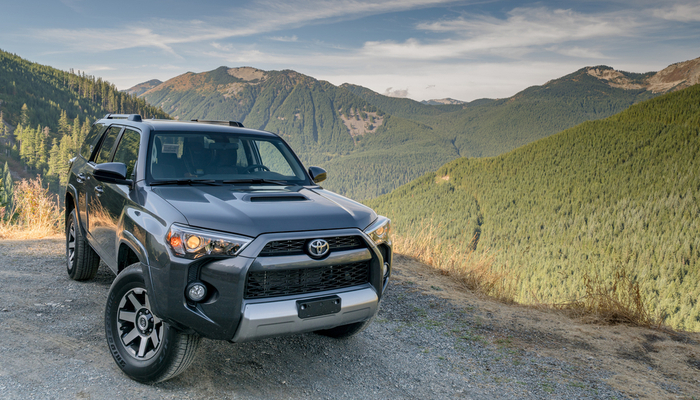
    The 4Runner has a very angular, boxy design that looks right at home among the rugged designs of companies like Jeep or GM. It’s a far cry from the softer, smoother appearance of Toyota’s Corolla or Prius models, and it stands apart thanks to its large front grille, high wheel arches and rectangular headlamps. The design is a bit divisive: some people love the rugged look, while others prefer the softer appearance of competitors’ SUVs.

    It’s worth noting that the rugged look of the 4Runner is more than just an appearance. It’s actually a rather sturdy vehicle, with body-on-a-frame design that allows it to go off-roading with no issue. If you spring for AWD, this SUV is a great choice for straying far from the beaten path. Thanks to the ample interior room, you’ll also have tons of space to haul your camping or fishing supplies, too!

    Interior

    Speaking of the interior, the 4Runner is a bit of an odd vehicle when you’re in the cabin. It’s a little lacking on the tech side, offering a slightly outdated-feeling infotainment system with a small touch screen and a low screen resolution. The infotainment system’s interface is a bit sluggish, and it can take some time to connect to Bluetooth devices like smartphones.

    However, the ride is comfortable, and the seats are cozy. The suspension allows for a smooth ride even over rough terrain, which is great for a vehicle you’ll likely be taking off-roading. This makes for a great experience riding around town, too, as the vehicle handles even poor-quality roads well while you’re commuting. This is all bolstered by the great cargo space. You can even lay the back seats down to increase the amount of storage space, making the 4Runner a good choice for people who love going camping.

    Engine

    The engine, like much of the 4Runner, is old-school and tried-and-true. It’s sporting a 4.o-liter V6 with a 5-speed transmission, the same engine that was first seen back in the 4Runner in 2004. However, Toyota seems to be sticking to a strategy of “don’t fix what isn’t broken”, as this vehicle’s engine works great for what it wants to do. The acceleration and handling are nothing to write home about, but they feel nice on a vehicle of this size.

    The power response from the engine is very smooth, and the ride stays nice and relaxing even when you’re getting up to highway speeds. This solid engine offers a great amount of power for what you need it to do, though it won’t be winning any drag races. That said, the engine is a bit of a gas-guzzler, drinking down a gallon of gas to go only 17 miles in the city, or 21 mpg on the highway.

    Bottom Line

    The 4Runner is an old-school vehicle. It sports designs that date back over a decade, and it shows in the fuel economy and lack of tech in the cabin. However, for the starting price of $34,810, it offers a very rugged driving experience to those who want a straightforward and pure drive. If you’re the kind of person who doesn’t want bells and whistles, just a solid vehicle with solid construction, you can’t go wrong with the Toyota 4Runner.


  • Best Laptop for College Students: What to Look For

    Best Laptop for College Students: What to Look For

    When you’re shipping off for college, you want to make sure you’re bringing the best gear with you. Of course, you want only the best backpack, binders, pencils and such, but that’s not where you need to really worry about quality. The most important consideration you need to make for your college gear is in your laptop.

    When you’re studying, you’ll need to use your laptop to find the information. During class, when you’re taking notes, you’ll need to be able to quickly navigate your note-taking app and get everything in order while the professor is lecturing. When you’re writing essays, you need to be comfortable with the laptop’s keyboard. And, of course, you’ll want to make sure you’re aptly entertained when it comes time to unwind.

    Weight

    First off, when you’re shopping for a laptop for college, make sure it’s light and easy to throw in a bag and carry around with you. You’re already going to be sporting a ton of books and carrying all of your scrap paper and pencils to and from class. The last thing you need is to also have to worry about lugging a heavy laptop with all of this stuff.

    Remember, though, that a lot of your time using the laptop will involve typing and writing essays. This means you’ll want to have a good-sized trackpad and keyboard for the most ergonomic experience. If you do have to sacrifice on keyboard size to keep the laptop to a reasonable size and weight, of course, you can opt for a USB keyboard and mouse to keep in your room for heavy-lifting tasks.

    Screen

    You probably don’t need a massive, 17-inch OLED screen for the laptop you’re going to be using mostly for schoolwork. Also, per our last tip, you probably don’t want a laptop that big taking up so much space in your backpack. A 13- or 15-inch screen will likely be more than enough for scholastic purposes, so don’t go overboard when you’re looking at screens.

    If you’re looking for something to serve as a great entertainment device for when you’re back in your dorm, consider getting a Roku and a small HDTV. Alternatively, if you’re wanting to play video games, you could probably find a good deal on a Nintendo Switch, which would dramatically lighten your load compared to buying a full-fledged gaming laptop.

    Memory

    When you’re considering what kind of storage your laptop needs, make sure you’re getting a solid state drive. SSDs are more expensive than conventional hard drives, but they are well-worth the extra money. That’s because SSDs are stationary, unlike hard drives that spin in your computer, and so they travel much more safely. The less moving parts a portable computer has, the better!

    SSDs also load information significantly faster than hard drives. Keep in mind, however, that it’s hard to notice this bump for the types of tasks you’ll likely be using a school computer for. If you often use Photoshop or render graphics, such as for video games or design, however, you’ll see a marked improvement in speed for SSDs.

    Power

    Finally, we get to the big question. What kind of power should your school laptop have? Budget-conscious students will say “nearly none,” while gamers and tech fiends will say “all of it,” but neither is accurate.

    For the purposes of research, writing papers and browsing the web, all while not tearing too hard into the laptop’s battery life, the best option is more measured. A Coffee Lake processor, for instance, will offer a great balance of power and performance. However, if you’re looking for a more budget, school-focused machine, something like a Chromebook might be the best option.


  • Cord-Cutting: Which Internet TV Service is the Best in 2019?

    Cord-Cutting: Which Internet TV Service is the Best in 2019?

    It’s not hard to see why people don’t want to have cable services through traditional providers anymore. Cable bills are astronomical, and they charge consumers a ton for programming that goes mostly unwatched. If you’re looking to save money on your cable bill and watch TV without breaking the bank, your best bet is to use a Roku or Smart TV and connect to an Internet TV service.

    There are so many options on the market, though, and the pricing of all the different services seems to change every few months. Today we’re taking a look at the top Internet TV services to help you decide which one is the best for you. Here are our top picks for the best Internet TV in 2019.

    Sling TV

    The first service to hit with the current business model of being an internet-based TV service, Sling debuted in 2016. Owned by Dish Network, Sling costs only $25, though it offers a number of channel packages and add-ons that can increase that price pretty quickly. Notably, there are two channel packages for the base $25: you choose either Orange or Blue, which essentially is a decision between Fox or Disney and ESPN.

    Notably, Sling recently lost regional Fox Sports in a high-profile contract dispute, which inconveniently also fell right in the middle of baseball season. This frustrating turn of events is due, in part, to Sling’s avowed dedication to keep their price steady at $25 per month. If you’re looking for a good budget TV service, it’s hard to go wrong with Sling. However, the lack of local channels and regional sports can be a turn-off for some viewers.

    PlayStation Vue

    PlayStation Vue might sound like a new video game console from Sony, but it’s actually an Internet TV service like Sling. It’s a more “premium”-style service, as even its base package, called “Access” costs $50 per month. However, Vue offers local channels that aren’t offered on budget services like Sling or Philo, making it a strong choice as a strict cable-replacement.

    The interface for Vue is clean, snappy and similar to many major cable providers. DVR is built in and stores shows for up to 30 days, and normal on-demand content is available through the service. The $55 per month “Core” offers up even more robust sports coverage, and the high-end “Ultra” package, which is $85 per month, adds Showtime and HBO to the channel lineup. Notably, Sony doesn’t carry any Viacom channels, like MTV, Comedy Central and Spike.

    Pluto TV

    If you’re looking to slide in for the low, low price of free with your Internet TV, we’ve got good news. Pluto TV is totally free, though you get what you pay for. The service is more akin to a curated selection of already-available content from the internet, comprising mostly reruns of shows from a few years ago and original content from websites like IGN.

    One of Pluto’s strengths is that it offers incredibly focused channels that are collections of very specific interests, like Gaming or Anime. If you’re just looking for something to throw on to watch idly without giving the content much thought, Pluto is a great option. After all, the content is free and it’s entertaining. If you’re looking to catch current sports games, local channels or new content in general, though, it might be worth springing for a paid TV service.

    HD Antenna

    If you’re looking to catch local channels but don’t have a service that carries them, you can also opt to use an HD antenna. Once you buy one, it picks up HD signals over the airwaves and allows you to watch local channels, including the news and the Big Three. HD antennas can be paired with Sling or Pluto to create a low-cost TV-watching solution without giving up too much content.


  • Protect Your Identity Online With These Tools

    Protect Your Identity Online With These Tools

    Whether it’s another big data breach or someone trying to steal your passwords, there’s always something to watch out for online. However, there are a number of tools you can use to protect your identity and browse without worrying. Today we’re taking a closer look into some of these tools to help you understand what you need to surf the web worry-free.

    Protect Your Identity Online

    VPN

    A VPN, or a virtual private network, is a fancy-sounding name for a relatively simple service. Originally created to allow people to access their work intranet while working from home, a VPN allows you to “tunnel” your internet traffic to an external server. Essentially, a VPN hides who you are when you’re browsing online by making it look like traffic from your computer is coming from somewhere else. By tunneling your traffic to another server, your traffic can appear to be coming from a distant country, and your identity is hidden from websites you visit.

    This offers you some unique benefits. For instance, it allows you to access websites that might be blacked out in your area. You can sidestep local blackouts on sites like Netflix, on regional sports teams you want to watch and even on banned content in your area. While doing this is technically against the user agreement of the sites in question, the ethics of doing so are left for you to decide for yourself. In either case, a VPN is a great way to hide your identity online and protect your activity from prying eyes.

    Password Manager

    Everyone knows the first rule of making passwords for your online accounts is that you need to make each site have a different password. If you’ve got tons of logins for various websites, such as online banking, paying bills and social media, it can be hard to keep track of all your passwords, though. That’s where cloud password managers come in. These convenient and time-saving services are also incredibly good at securing your online information.

    A password manager service allows you to hide all of your passwords on a remote server that you access with one master password. This allows you to keep track of all of your passwords easily, while also hiding them from potential keystroke-monitoring programs or simply people watching your fingers while you input them. While it might sound risky to keep all of your platforms saved on one server, it’s actually much safer to keep them encrypted in this way than to store them in a text file on your computer, or on a physical piece of media that can be stolen.

    Careful Browsing

    Scammers and phishers are everywhere online. The illusion of anonymity emboldens con men and grifters to try to steal your information, your credit and your money. As such, you need to be careful when you’re browsing online. Even a strong VPN and encrypted passwords can’t keep your identity safe if you fall for a phishing scam. Make sure you’re vigilant about the sites you visit, and never input your personal information into a site you don’t trust.

    If you get an email or see an offer online that’s too good to be true, it is. Never give someone your password, you Social Security number or your credit card information online. The only exceptions to this are verified government websites, sites you pay your bills through and known online sellers like Amazon or eBay. A fishy site with a strange domain name and broken English in all of the item descriptions is probably not the site you should be shopping on. Remember: if it looks suspect online, don’t input any personal information.