Author: Cameron

  • New Trademark Suggests Nintendo is Working on N64 Classic

    New Trademark Suggests Nintendo is Working on N64 Classic

    After the resounding success of the NES and SNES Classic systems, it comes as no surprise that Nintendo would push forward with more mini classic systems. Nintendo has filed a trademark that suggests they may have plans to create an N64 Classic system. This is exciting news, especially given the recent news that the Switch will not have a Virtual Console. 

    Everything Old… 

    The NES and SNES Classic systems sold out on their first productions, proving to be wildly successful. Nintendo surely seeks to emulate that success with their next mini console, but there are still some questions.  

    Will supply finally meet demand? Thankfully the original two classic mini systems are getting reissues in late June, so maybe Nintendo has learned their lesson? The other pressing question is, which games would an N64 Classic even have? 

    …Is New Again 

    Rare, the company responsible for Banjo-Kazooie and Goldeneye 007, is now owned by Microsoft. This could lead to some odd inclusions for games for a potential N64 Classic. Nintendo famously was the main developer releasing quality titles for the system: most of the great games were either first party or Rare.  

    If Nintendo is able to secure the rights to re-release Rare’s games, the system could have an amazing library. Thankfully, Microsoft has shown willingness in the past to work with Nintendo over older Rare games.  

    When Might We See the N64 Classic? 

    It seems unlikely that the system would be out anytime in 2018. Nintendo is already set to have a big Fall season. Super Smash Bros and Pokemon for are both confirmed for this year. However, the yearly games conference, E3, is in a few weeks. We’re likely to hear news of a new Classic system there first, even if it is just an announcement and a teaser. We’ll likely even see a release window, if the system materializes. We’ll have to wait and see what the big N has in store! 

  • 10 Things You Never Knew About Your iPhone

    10 Things You Never Knew About Your iPhone

    Do you fancy yourself as being tech savvy? How much do you really know about your phone? If you know all ten of these iPhone tips and tricks, you may really be a tech wizard! Check out these 10 crazy things you never knew your iPhone could do! 

    10. Snap Pictures with Your Volume Button 

    This one is cute, letting you snap a picture with your phone like it’s an old-school camera with a top button. You don’t have to do anything to enable this, it’s just already on out of the box! Have fun snapping pictures! 

  • Top Tech Conference: Which Ones Should You Be Watching For?

    Top Tech Conference: Which Ones Should You Be Watching For?

    Whether you’re a tech enthusiast or savvy investor, you’re likely to keep your eyes peeled for all news regarding tech. The best place to look when companies have new products coming down the pipe? The first place to look is the multitudinous tech conferences that are held every year. Which tech conference is worth looking out for? Rounded up for you here are the hottest tech conferences coming in the next few months!

    Machine Intelligence Summit 

    Artificial intelligence and machine learning are sure to be the technology of the future. It seems that more companies are focused on pushing for true artificial learning now than ever before. What’s the next place we’re likely to hear of huge breaks in AI learning? 

    Being held in Hong Kong from June 6th to the 7th, the Machine Intelligence summit is sure to be home to a ton of news regarding the future of AI. With confirmed speakers from the likes of Alibaba and NASA, this is sure to be an event worth watching.   

    AI Summit London 

    The AI Summit, now in its third year, is the next large event showcasing artificial intelligence. Unlike the Machine Intelligence Summit, this one is more focused on the business applications of AI. Things like practical increases in productivity and real-world application for AI in business are the focus of the AI Summit. This one is certainly worth watching out for: it’ll happen on June 12th-14th in London. 

    Blockchain Summit London 

    The technology behind cryptocurrencies like Bitcoin, blockchain technology is sure to be a driving factor of the internet economy for years to come. The Blockchain Summit is the largest dedicated event when it comes to the titular technology, so any big movements in the world of cryptocurrency will hit here first. If you’re a crypto miner or investor, or just find the whole thing fascinating like me, this is a conference to look out for! Check it out when it comes to London on June 26th-27th. 

    The Hottest Tech Conference in the Near FutureFutureTech Expo 

    Coming to Dallas on September 14th-16th, the FutureTech Expo is sure to be a memorable conference. This expo promises to highlight the biggest trends and hottest companies in fields like blockchain, machine learning and quantum computing, For those interested in seeing what the future of technology will hold, look no further than this tech conference! You’re sure to learn something exciting regarding a field that fascinates you! 

  • Which Laptop is the Best for Photographers?

    Which Laptop is the Best for Photographers?

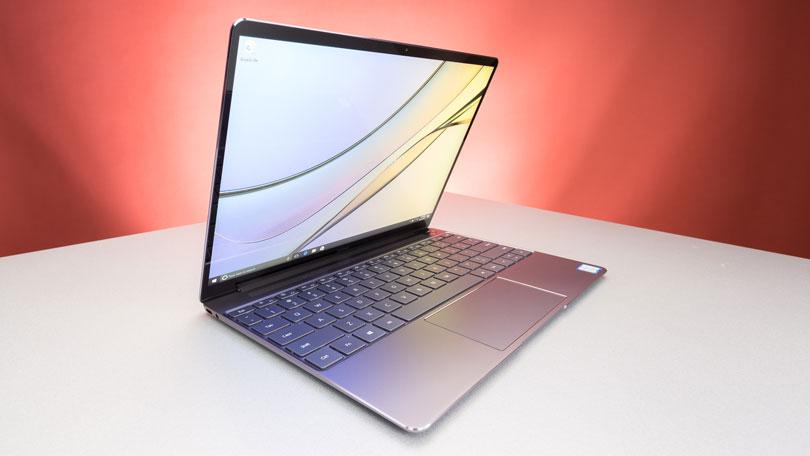
    If you’re a photographer, or an aspiring photographer, you’re certainly going to be using photo editing software. You’re also going to want that software to be accessible on the go, so you can edit while you’re shooting. With that in mind, the photographer’s best friend is their laptop. Which laptop is the best for editing on the go? Read on to find out our favorites! 

    Dell XPS 15 

    Dell’s XPS 15 is a great non-Apple choice for photographers. If you want a laptop that excels for photo editing and runs on Windows, this one is a great choice. It sports InfinityEdge technology, meaning it has a huge screen size for how small of a machine it is. Its display is color-accurate and has a 4K resolution, meaning your photos will look accurate while you’re editing.  

    The XPS 15 is a bit expensive, although that’s par the course for laptops with displays strong enough for photo editing. It retails for around $1,000, but you can often find it on sale for around $750. Consider this one if you heavily prefer Windows over Mac OS. 

    Apple Macbook Pro 13 inch with Retina 

    Unsurprisingly, Apple’s flagship laptop remains a fantastic choice for photographers. If you needed any reminders: Retina display is amazing, the battery life is great, and Mac OS was made with content creators in mind. Unsurprisingly, the Retina display remains the best laptop display on the market. With the best colors, contrast and saturation available on a laptop, you won’t be disappointed in this choice. 

    On the negative side, the Macbook is pretty expensive no matter where you go. It can be found anywhere from $900-$1,000, depending on sales and the like. It also doesn’t have a great deal of storage, which is a bit disappointing for photographers. That said, this is still a great pick. 

    Our Favorite Laptop for Photography: Apple Macbook Pro with Touchbar

    The step up from the older Macbooks, this new one sports the handy new touchbar technology. The touchbar is an OLED display above the keyboard that allows for quick access to tons of shortcuts. The toucbar has a number of applications across the OS, like suggested word selection and scrolling. The great use for photographers is the shortcuts in Photoshop, making Adobe’s robust suite even easier to use. Additionally, all the positives about the previous Macbook still apply, with the exception of the battery life. 

    Unfortunately, battery life isn’t nearly as impressive on this one; it seems the touchbar really saps the power from the laptop. Jokes aside, it is markedly lower than its predecessors. Additionally, this one is tremendously expensive: you can usually find it around $1,500.  

  • Time to Jam! Which Music App is the Best for You?

    Time to Jam! Which Music App is the Best for You?

    Everyone loves to put their headphones in and jam sometimes. Sometimes you want to play music for your house guests, and other times you want to listen to your tunes through your car stereo. Which music app do we love the most? Check out our roundup to find out! 

    Google Play Music 

    Offering a free version and a $10 per month subscription, Google Play Music is an awesome choice for listening on the go. Allowing you access to all of their cloud-based music library, the subscription is really the way to go. The subscription also comes with personalized radio stations and recommendations based on your music tastes. 

    Google even throws in a YouTube Red subscription, to boot! If you haven’t watched Cobra Kai yet, you should! 

    Apple Music 

    While Apple doesn’t offer a free version like Google Play Music, all the primary functionality of Google’s app is behind its paywall, so this doesn’t really change much. That said, Apple’s subscription also sports access to streaming internet radio stations (including the phenomenal Beats1 Radio) and access to millions of songs. You can even download songs straight to your device to save on your data plan! 

    Google and Apple provide two very similar apps. The main differences are Apple’s slightly wider selection and access to Beats1 and exclusive content, and Google’s YouTube Red subscription. It’s really a toss-up between these two, but neither is a bad choice. 

    Shazam 

    Shazam, well-known for its ability to detect songs and name them for you, is also a great music streaming app! Once it has recognized a song, you can buy it through Shazam to add to your collection. While it doesn’t make a great streaming app by itself, Shazam makes a great companion to someone who constantly hears tracks out and about they want to add to their collection.  

    Shazam works in seconds to identify music, and does pretty well even in noisy, crowded areas. For those who often go to venues or hear music on their walks to work, Shazam is a great pick! 

    Our Favorite Music App: Spotify 

    Offering both a free version and a $10 monthly subscription, Spotify is a well-known music app. Featuring the ability to create and share custom playlists, Spotify incorporates an awesome social element. Sharing playlists with your friends is akin to making mixtapes, and helps you feel more connected to your music. 

    Spotify also boasts millions of songs, rivalling Apple Music in terms of selection. The subscription is really the right way to go here, especially if you hate ads. For audiophiles looking to just get lost in the music, Spotify is the right music app for you. 

  • Mobileye Self-Driving Car Runs Red Light During Demonstration

    Mobileye Self-Driving Car Runs Red Light During Demonstration

    Is a complex mathematical treatise a sufficient substitute for real-world safety testing? Israeli company Mobileye, owned by Intel, is seeking to show that its unique approach to self-driving cars is more practical and effective than methods employed by companies like Waymo. Their CTO, Amon Shashua, wrote in a blog post in October: “We target a vehicle that gets from point A to point B faster, smoother, and less-expensively than a human-driven vehicle; can operate in any geography; and achieves a verifiable, transparent 1,000-times safety improvement over a human-driven vehicle without the need for billions of miles of validation testing on public roads.” Is this likely, or are these bold claims by the unorthodox company? 

    Mobileye’s Self-Driving Cars 

    While most self-driving cars rely heavily on lidar and radar systems in order to read their surroundings, Mobileye favors an all-camera set up. According to Mobileye, their self-driving cars use cameras to make a 3D model of the real world and then use software to decide what to do with that information. This is in contrast to other, more conventional vehicles in this same industry that don’t rely on cameras alone.  

    Sensor Fusion as An Alternative? 

    “Sensor fusion,” a process by which a self-driving car could be made to use both cameras and lidar, is an end goal for Mobileye. Whether their proposed method of designing these cars will work or not is uncertain. Recent demonstrations have shown Mobileye-powered cars even speeding through red lights, which is more than a little troubling.  

    It would seem that Mobileye has banked heavily on sensor fusion being a foolproof way to ensure their vehicles are safe. This rides on the assumption that cameras will only fail in situations that lidar will succeed in, and vice versa. However, this assumption itself seems erroneous: what about situations where neither sensor works? Not to mention the hassle of coding to get the two sensor types to cooperate. And, as every programmer knows, the more lines of code something has, the more likely it is to have bugs. 

    Responsibility-Sensitive Safety 

    Where Waymo and similar companies prefer hours of real-world road testing for safety, Mobileye has shown a desire to prove their cars are safe via math and statistical models. Mobileye has even gone so far as to create a Responsibility-Sensitive Safety, or RSS, model that attempt to mathematically quantify all the ways a vehicle could be at fault in an accident. By putting this RSS model in all their vehicles, Mobilieye claims it would then be impossible for them to be at fault in an accident. 

    The logical gaps in this are pretty clear: the model can’t possibly cover every scenario that could occur. Or, even if it does, it can’t be implemented by every self-driving car all the time. The real world simply doesn’t allow for clean, clinical, one-hundred-percent-accurate models. So why would Mobileye push for this shortcut instead of just safety testing their technology? 

    Business Model Influencing Safety Model 

    Waymo, as an example, is making their self-driving cars in order to operate a driverless taxi service. They aren’t beholden to any specific deadlines and they aren’t selling their technology to anyone else. Mobileye, on the other hand, is: they sell parts to many major car manufacturers. To this end, it is important to them to have marketable, safety-tested self-driving technology quickly. Spending excess time on real-world testing must seem a waste to a company on a deadline.  

    This doesn’t even account for climate and surroundings. Mobileye’s parts have to work in nearly any climate, whether that be snowy, sunny or rainy. Waymo, by contrast, has the luxury of rolling out their taxi service wherever they please. This allows Waymo to choose ideal conditions, where Mobileye has no such luxury. While this doesn’t excuse lax safety standards, it at least explains them. 

    Here’s hoping that their self-driving technology is up to snuff by the time it goes live. Mobileye wants to make money, certainly, but if it comes at the cost of more motorists or pedestrians being killed by software or hardware malfunctions, then it’s not worth it. 

  • OnePlus 6: A Great Phone (For the Price)

    OnePlus 6: A Great Phone (For the Price)

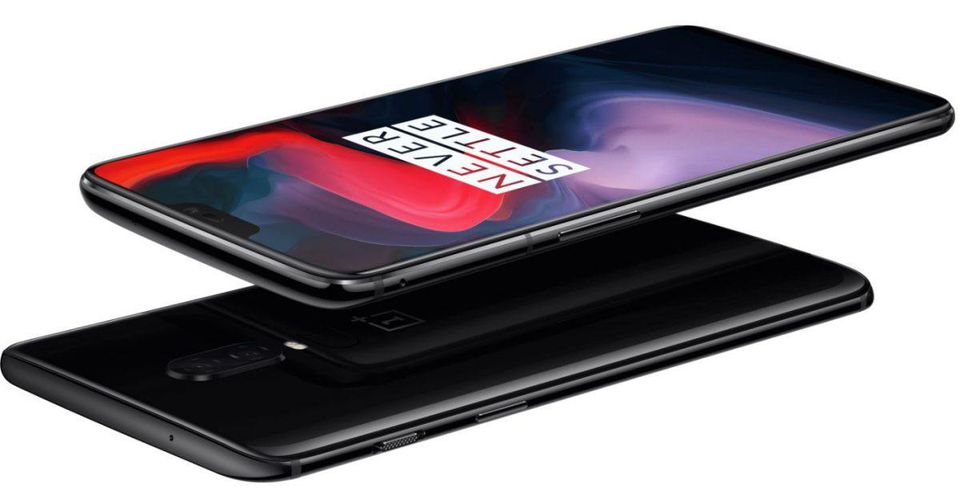
    OnePlus has made something of a name for themselves as makers of cheap alternatives to Samsung and Google phones. The OnePlus 6, their 2018 flagship, is no different. Retailing for a cool $529, and sold unlocked on their website, the OnePlus 6 is a great budget choice for a premium-feeling smartphone.  

    Top Notch (Or Not) 

    The newest trend among premium smart phones is the inclusion of a top screen notch. This has been talked to death, and many Android users can’t stand the iPhone-looking notch design. The idea, of course, is to maximize screen size without increasing handset size. However, as the screen takes up most of the front face, normal hardware like the earpiece and the front-facing camera have to go somewhere, thus the notch.  

    This is an interesting look, but many are not sold on the odd break in the display. These users will be pleased that the OnePlus 6 offers a feature that blackens the screen all around the notch, giving the illusion of a standard phone display. Both modes look great, to me, and I would find neither to be particularly distracting. 

    OnePlus 6 Eschews Metal Back 

    OnePlus models predating the 6 all had a unique construction that included a metal back. Many other phone manufacturers have now switched to using a glass back. The glass back decision has largely been in order to facilitate wireless charging. The OnePlus 6 has no support for wireless charging, though. Instead, it seems, OnePlus chose to make their new flagship glass-backed just to look like the competition. 

    All-glass constructions like this are worrisome, due to their fragility. While most users will have their phones in a protective case, it is still disappointing to see OnePlus ditching their unique design in favor of a more generic appearance.  

    Some Disappointing Features 

    The OnePlus 6 is certainly not a perfect phone. The fingerprint reader on the back is tiny. So tiny, in fact, that it is often difficult to get an accurate scan of your finger. This is disappointing, given that fingerprint scanning technology has been standard on smartphones for more than four years now. The other disappointment is the phone’s relative lack of waterproofing: the website says the phone isn’t rated for any submersion. 

    Bottom Line? It Doesn’t Hurt Your Bottom Line 

    The most impressive thing about the OnePlus 6 is just how many things it does right, though. It is a snappy, quick phone with a great build (in spite of its glass back and small fingerprint scanner.) Its shortcomings can be forgiven in light of its price. Given that it’s a full $300 cheaper than a lot of its competition, it’s alright to overlook a few minor gripes. If you’re in the market for a great looking phone for a great price and can overlook some small issues, consider the OnePlus 6. 

  • Interested in a New Soundbar? Find Out Which One is the Best!

    Interested in a New Soundbar? Find Out Which One is the Best!

    As TV panels get more impressive and their cases get ever thinner, their speakers become less and less impressive. Most new 4K TV panels have pretty laughable sound quality. To remedy this, many turn to soundbars in order to help their shows and movies sound more impressive! If you’re looking to upgrade your living room sound experiences, look no further! We’ll tell you which soundbar is our favorite! 

    Philips Fidelio B5 

    If you really like the idea of having a surround sound system but really hate the idea of installing a surround sound system, this is the soundbar for you. The Fidelio B5 has detachable satellite speakers that can be pulled free of the main bar to quickly set up a surround sound experience. This combination of convenience and sound quality is the entire point of soundbars, so the Fidelio certainly gets its niche right. 

    This one will set you back about $700, though, so it’s definitely a consideration for audiophiles and movie buffs more than casual viewers. If you’re looking for great surround sound and convenient set up, though, you can’t go wrong with the Fidelio B5. 

    Sony HT-ST5000 Soundbar 

    Sony’s entry on this list is definitely priced and marketed as a premium product. One solid indicator of that is its support for Dolby Atmos, giving this soundbar way bigger sound that it looks like it could put out. This soundbar puts out some incredible spatial sound, consistently impressing in everything from movie audio to Spotify playlists over Chromecast.  

    The only thing holding this entry back from being our pick for favorite is its steep price. This one retails for around $1500 dollars, setting it firmly in the “premium item” price range. However, if that price isn’t an issue for you, this is absolutely the best soundbar on the market, no questions asked. 

    Our Favorite Soundbar: Samsung HW-MS650 Soundbar 

    While the Sony HT-ST5000 is the most impressive soundbar out there, it’s also impressively expensive. If you’re looking for audio that is nearly as good (and I mean nearly) for a third of the price, this one is for you. Samsung’s entry on this list is jaw-dropping. The balance and bass are also absolutely stunning considering how small the bar is.  

    This one is a steal: $500 gets you one of the very best soundbars out there. It also supports a ton of inputs and is super easy to set up. If you’re looking for a great soundbar and don’t want to break the bank with Sony, this Samsung is the right one for you. 

  • Which is the Best Gaming Headset? Let’s Find Out!

    Which is the Best Gaming Headset? Let’s Find Out!

    Whether you’re looking to tackle a huge, single-player adventure or help your teammates secure victory in a team-based game, you’re going to want a good sound experience. Some people want headsets for their promise of great, surround-quality sound. Others want them so they can communicate with teammates. In either event, we’ve got a gaming headset list right here to help you pick which one is right for you. 

    Razor ManO‘War 7.1 

    This gaming headset doesn’t disappoint. Retailing for $120, this oversized monster delivers huge sound. The massive size of the earcups is really the only drawback, unless you dislike wired headsets. The ManO’War  sports a sleek microphone that is easy to slide back into the headset and has great sound quality. This is an overall fantastic headset, if a little lacking in portability. 

    Astro Gaming A50 

    The Astro A50 is pretty expensive, retailing for $300. That price tag comes with a bevy of great features, though! Representing a tremendous step up over the A40, the A50 is the new (now wireless!) flagship gaming headset for Astro. The A50 has fantastic surround sound and sports a handful of equalizer modes to help maximize your sound experience. 

    The A50 also boasts a unidirectional mic, ideal for picking out your voice from background noise. This helps alleviate a problem many have to turn to push-to-talk self-muting to fix. The headset also has great battery life, and a battery-saving auto-off function! 

    HyperX Cloud Revolver X 

    The Revolver X is a great choice based on versatility alone. With great sound performance out of the box and fantastic equalizer levels, the Revolver X is a great pick for users who plan to jump between consoles, PC and whatever else. This headset supports USB, 3.5mm and dual 3.5mm, making it incredibly easy to plug into any device.  

    The Revolver X is also a beast of a headset, boasting 7.1 surround sound and great mic quality. All of this is a great deal, too, as you can usually snag this headset for $100.  

    Our Favorite Gaming Headset: SteelSeries Arctis Pro 

    SteelSeries continues to impress time and again with the Arctis Pro. This headset boasts a killer design, mimicking headphone like Sony or Bose might make, making them a great choice aesthetically. They also sport both wireless USB and 3.5mm wired connection, allowing them to be used on both PC and console.  

    Whether you meant to use the Arctis Pro for console or PC, though, it sports fantastic sound quality. On PC, you can use SteelSeries proprietary sound control panels to fine-tune your listening experience. Even better, the Arctis Pro is plug-and-play, ready to be used on just about any device right out of the box. This one is easily our favorite gaming headset! 

  • Looking for a Weird Game? Here’s the Ten Weirdest Games for iOS

    Looking for a Weird Game? Here’s the Ten Weirdest Games for iOS

    Sometimes you don’t want to play by the rules and do normal stuff. Sometimes you want to let loose and be a little weird. If you’re looking for something delightfully odd and wickedly weird, we’ve got something for you! Check out our list of the top ten weird games to ever release on iOS. Let’s get weird! 

    10. Bear vs Art 

    Photo Credit: bearvsart.com 

    In this odd commentary on gentrification, a bear fights off pretentious millionaires who hang bad art up in tacky galleries. This one is somewhat simple at first glance, featuring grid-based puzzle gameplay. You’ll avoid security guards and motion-sensing lasers, stop art thieves and roll over art critics. It’s pretty silly, and certainly worthy of the title “weird game.” Great for haters of snobby art critics! 

    9. I Am Bread 

    Photo Credit: Wikipedia 

    In this game, you become bread. And as this bread, you will attempt to become toast. As this piece of bread, you have to navigate the unforgiving space of the kitchen in an attempt to make it to the toaster. The catch is, if you fall in the floor, you fail. This one is rather addictive and fun, considering how ridiculous its premise is. If you’ve always wanted to know what it’s like to be bread, this game is for you! 

    8. Giant Boulder of Death 

    Photo Credit: Touch, Tap, Play 

    Have you ever wanted to be a giant boulder and rampage down a mountain? If so, this game will certainly help you live that fantasy. GBOD is an arcade-style autorunning game where you try to wreak as much havoc as possible before you are inevitably stopped. Hunting high scores and challenging your friends via the leaderboards is a fun way to kill some time with this supremely weird game! 

    7. CATS: Crash Arena Turbo Stars 

    Photo Credit: Zepto Lab 

    Ingredients for a weird game: adorable backronym, weird robot-building mechanics, cute cats piloting said robots. Throw them all together and you have a fun robot-building game starring some adorable felines! FCATS features tons of customization options for robots and fun player versus player modes. CATS is a great game for robot enthusiasts, cat people, or both! 

    6. Office Jerk 

    Photo Credit: Google Play 

    Everyone who has worked in an office has wanted to pelt that one annoying guy who works there. This oddly cathartic weird game has you lobbing random stuff at some jerk who works in your office. Or maybe you’re the jerk, since you’re the one tossing all this junk at the dude across from you. In any event, this one is fun, and you’ll probably get some kicks out of breaking his monitor or giving him a big old lump. 

    5. Robot Unicorn Attack 2 

    Photo Credit: The Gameological Society 

    It doesn’t get much weirder than being a robot unicorn. Well, it does: being a robot unicorn while running endlessly and listening to power metal. This one has been around for a while, but it’s still quite fun. And it is still a seriously weird game. Its gameplay consists of running endlessly, avoiding obstacles and being awesome. It’s a very addictive game, with emphasis on setting high scores and beating your best. You can also customize your unicorn and give it upgrades to help set higher scores! 

    4. Sausage Bomber 

    Photo Credit: Google Play Store 

    In this weird game you are tasked with repelling invading forces the only way you know how: by dropping your meat on them. What? I’m serious! You’re equipped with all manner of meat and have to bomb your opponents with it! This game features a ton of missions and a great difficulty curve. This one is made fun by just how much each level challenges you to up your game to progress. It’s also deliciously weird. 

    3. Booger Boing 

    Photo Credit: iTunes 

    First of all, gross. Alright? This game is nasty. You’re trying to navigate boogers around in a nose. Just, yuck, man. This must’ve been made by folks who loved that Garbage Pail Kids thing. Jokes aside, this one is in the same gameplay camp as something like Angry Birds. Featuring gross-but-cute graphics and a happy, upbeat soundtrack, Booger Boing is actually a fun little game. If you can get past just how freaking gross it is. 

    2. Amateur Surgeon 

    Photo Credit: Touch, Tap, Play 

    There are actually four games in this weird game series, and they’re all actually great. Something of a riff on surgeon simulators like Trauma Center, Amateur Surgeon puts you in the role of the titular ill-equipped “doctor.” With levels ranging from seriously gross to hilariously ridiculous, you’ll find a lot to love in this long-running and weird series. As long as you don’t mind performing a ton of dubious procedures on cartoon characters and being seriously grossed-out by some of them. 

    1. Our Favorite Weird Game: Goat Simulator 

    Photo Credit: Humble Bundle 

    Certainly, you’ve heard of this supremely weird game? If not, here’s a quick description. It’s a goat simulator. You live a day in the life of a totally normal goat. Who goes on a destructive rampage through the city. And isn’t beholden to the laws of physics. And has a seriously sticky tongue. Okay, maybe it’s not a totally normal goat. In any case, this game is riotous, weird fun and remains awesome after all this time. If you want a seriously weird and hilarious game to spend a few hours on, look no further than Goat Simulator.