Author: Cameron

  • Best Video Chat App for Staying Connected

    Best Video Chat App for Staying Connected

    Everyone loves to stay connected. It’s why we love the internet! If you want a way to stay connected with your friends and family even when they’re not around, you probably like to use a video chat app. If you’re looking for a fantastic app with great functionality for chatting, keep reading! We’ve got a countdown of video chat apps we love! 

    Google Duo 

    Google Duo, standard with Android phones, can also be installed on iOS devices, which is great! Since iPhone users often have friends and family on Android devices they want to chat with, this is a great pick. Duo has a really simple, clean UI that is easy to use. It also has a neat “Knock-Knock” feature, allowing the person being called to see a video preview of who’s calling them. This is a cool little touch! 

    Duo is a great choice if you like clean, simple interfaces, one-touch calling and communicating across iOS and Android platforms. 

    Skype 

    Everyone knows Skype, thanks to its comparative age. Having launched in 2003 as a desktop application, Skype has seen quite a bit of history for a video chat app. Featuring great integration on Windows PCs and sporting a solid mobile app, Skype is a fine choice. If you like calling from a desktop to a cell phone, or vice-versa, Skype is for you!  

    Skype is also handy at synching with your contacts and helping you stay connected with all your friends. Skype remains one of the best chat apps, even after more than 15 years on the market! 

    Kik 

    Kik, primarily known as a text-chat app, has recently dipped its toes in the video chat app pool. The new video functionality is unique, earning its spot on the list be being different and endearing. The video functionality has a small thumbnail-style window of video for both participants and keeps the large text window open for text chatting.  

    This unique emphasis on text with a slight implementation of video is cute. It allows for a very casual chat setting, ideal for emulating a “just chilling” environment. Kik is a great choice for video chatting for a few hours with a good pal, just kicking back and doing a lot of nothing. 

    Our Favorite Video Chat App: Facebook Messenger 

    Facebook Messenger, believe it or not, tops our list! Primarily, we chose this one because it is easy to use, clean, and ubiquitous. Who doesn’t have Facebook? If you want to video chat with a friend, Facebook messenger is great, because they probably already have it. It’s so much easier to just go into an existing app and start chatting, rather than open the app store and download one. 

    Facebook Messenger is also simple and concise, using a great interface to help you get into calls with no fuss. An all-around great pick, and easily our favorite video chat app! 

  • Fahrenheit 451 Heats Up HBO

    Fahrenheit 451 Heats Up HBO

    Out May 19th, HBO’s new Fahrenheit 451 film adapts the 1953 Ray Bradbury sci-fi novel for modern audiences. As prescient and haunting as ever, this new take hits surprisingly close to home. Starring the phenomenal Michael B. Jordan as fireman Guy Montag, the film depicts a future where Firemen burn books instead of dousing flames. Michael Shannon stars alongside Jordan as mentor-turned-antagonist John Beatty. 

    Burn, Baby 

    In the film’s not-so-outlandish future, technology is your friend and books are your enemy. At least, that’s what the Ministry says. The populace has somewhat willingly thrown away moral complexity and higher thought for internet-fueled entertainment. Crowds of people never see one another as they stumble along with VR headsets. People watch livestreams of the Firemen raiding secret caches of forgotten literature. The Ministry watches on through everyone’s personal assistant AI. And the treasured knowledge of the past goes up in flames. 

    Dark Reflections 

    Jordan is at his best when he’s conflicted, and in this film, we see him in rare form. As Montag, he chews on his indecision: why does he do this? What does it accomplish? Does any of this mean anything, or truly benefit society? The viewer is made to face the same questions. How willingly do we give up our privacy? How willingly do we throw away the wisdom of previous generations? This film will definitely make you shoot a sidelong glance at your Echo or Google Assistant.  

    Smokin’ 

    This is a film sure to capture your attention and make you reflect on your relationship with technology. Gorgeously shot and oozing heat from every scene, Fahrenheit 451 remains just as relevant and pressing in its new form as it ever was in book form. The irony isn’t loss on this adaptation that is has, by its very existence, burned the book that spawned it. A gripping and thought-provoking tale, this is sci-fi in its oldest and purest form: as cautionary tale and explosive entertainment in one. 

  • Which is the Best Map App to Get You Where You’re Going?

    Which is the Best Map App to Get You Where You’re Going?

    Your phone may have come included with a map app, but that doesn’t mean it’s the best one out there. If you’re looking for some better ways to navigate, we’ve got some good news for you! We’ve got a quick round-up of some of our favorite map apps. 

    Co-Pilot GPS 

    Normally I wouldn’t recommend paid map apps when there are perfectly good free alternatives. This one is a unique exception, though. Co-Pilot can be used offline! Once you’ve downloaded the maps for your area (over Wi-Fi to save data, of course) you can navigate in offline mode. This is awesome for navigating overseas or if you need to use a navigation app for work.  

    Preserving the precious data plan is the name of the game here! Other awesome features include warning you when you’re speeding, showing you where speed cams are, and 12 months of ActiveTraffic. The ActiveTraffic subscription helps route you based on live traffic updates! 

    Google Maps 

    Google, always rock-solid on the software and hardware sides of things, has a winner with their map app. Great for everyday navigation, Google Maps just works. While Android users have this pre-loaded, iOS users can download it after the fact. This app even has a handy “explore nearby” feature to find new places near you! 

    Google Maps also allows for downloading maps to use in offline mode. However, this app has the maps disappear after 30 days, so you need to make sure you keep updated. It’s a neat feature but consider Co-Pilot if you’re going to be driving without data often. 

    inRoute Route Planner 

    If you plan on going for long road trips, this is a great choice. Boasting a suite of features excellent for long round trips, this one is for you if you’re in for a long haul. This app lets you drop pins along your journey and find motels and gas stations near them. It also offers turn-by-turn directions if you opt for the paid version ($15), and you can even export routes you plan in this app to other map apps with the premium version. 

    Our Favorite Map App: Waze 

    Waze is a crowd sourced-style app designed for dodging traffic and other speed bumps. Users can report the presence of accidents, traffic jams, cops waiting to pull people over, and tons more. Its motto seems to be “we’re all in this together,” and it can be nice driving with a whole cadre of people watching your back.  

    If you hate traffic jams, or just wanna freaking move, Waze is a great app for you. I know I hate coming to a standstill, so this one is my go-to app for ducking slowdowns. 

  • Top Ten Retro Consoles Millennials Will Never Forget

    Top Ten Retro Consoles Millennials Will Never Forget

    If you were a kid before the turn of the century, it’s pretty likely you played some console now considered retro. If you’re looking for a trip down memory lane, we’ve got you covered! Today, we’re rounding up the ten best retro consoles that you’re never going to forget! Did your favorite make the list? Read on! 

    10. Playstation 
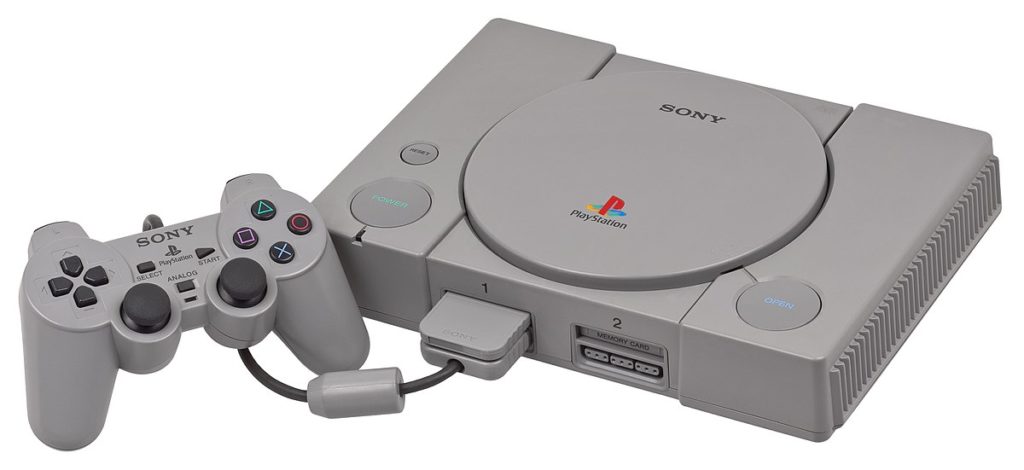
    Photo Credit: Wikipedia 

    Sony’s first foray into the gaming industry was certainly a memorable one. The PlayStation, released in late 1995, promised to be a more mature, adult-friendly console than Nintendo’s N64. To be fair, in many ways, it was. Boasting games like Twisted Metal, Metal Gear Solid and Tomb Raider, the original Playstation solidified itself as a real competitor for Nintendo.  

    Notably, Nintendo’s N64 console opted to use cartridges, instead of CD’s, for storing games. However, this led to some developers, like Square Soft, opting to make games for the Playstation instead of the N64. For instance, the ground-breaking Final Fantasy VII, initially slated for an N64 release, went to the Playstation. This migration of third party developers would go on to really sting for Nintendo in the coming console generations.  

    9. Sega Dreamcast 
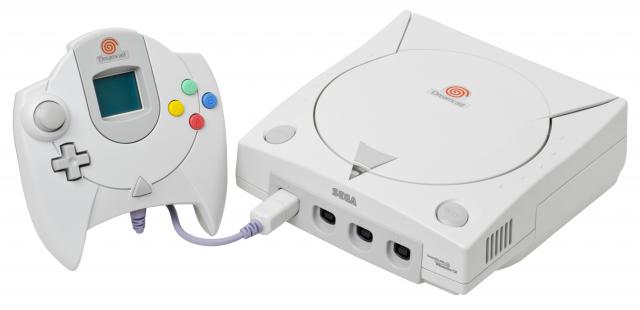
    Photo Credit: VG Chartz 

    The ill-fated Dreamcast remains a favorite of many gamers. It is largely considered one of the most-often forgotten retro consoles. The Dreamcast is largely remembered for being Sega’s last game console. Following a reasonable release, the Dreamcast lost ground to the Playstation 2. So, Sega decided to cut their losses and become a game publisher instead of a console manufacturer.  

    Yet Dreamcast had an eclectic library of unique games. While considered by many to be ahead of their time, many of these games are cult classics now. Jet Set Radio, Shenmue and Crazy Taxi are all considered to be examples of the interesting and new designs Sega was exploring. Also unique for the time was the Dreamcast’s built-in modem for supporting online play. However, due to the release of the PS2 and increasing competition in the industry, the Dreamcast was to be Sega’s last console.

    8. Game Boy Color 
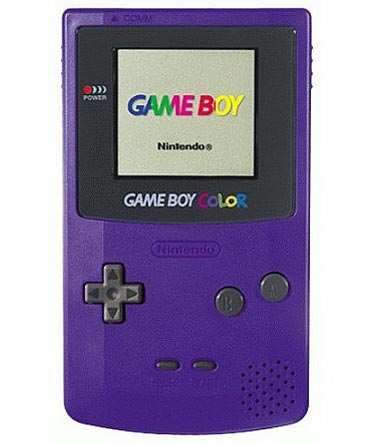
    Photo Credit: Lukie Games 

    While the original Game Boy sold an absurd number of units, its successor is largely remembered by millennials as their first handheld console. The Game Boy Color boasted graphics in color (gasp!) on a handheld system, a first for Nintendo. Handheld versions of classic Nintendo series like the Legend of Zelda and Mario helped solidify the Game Boy Color as a must-have retro console. 

    A conversation about the Game Boy can’t leave out the juggernaut that is Pokemon. Originally a fun, cute little RPG about training little monsters became an international phenomenon. Millennials are united by their shared memory of how freaking huge Pokemon was. Between the card games, the cartoon and the video games, you couldn’t escape Pokemania. The first Pokemon Games were technically original Game Boy games, but Pokemon Yellow was a Color exclusive so we’ll count it. 

    7. Sega Saturn 
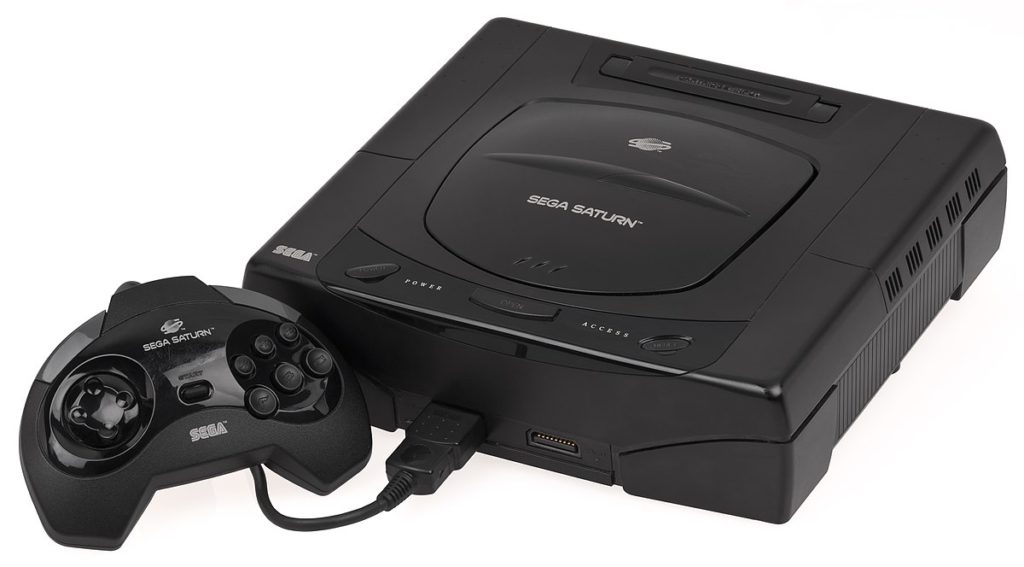
    Photo Credit: Wikipedia 

    The Saturn was created as a competitor to the then-aging Super Nintendo. Sporting more “mature” titles like Virtua Fighter and Panzer Dragoon, the Saturn tried to set itself apart from Nintendo. Well remembered for its faithful ports of many arcade fighting games, the Saturn was a must-have for fighting enthusiasts. 

    While the Saturn would go on to be eclipsed by the more powerful Playstation, it is still fondly remembered by many as home to many interesting games and great ports. In addition, notable non-fighting games on the system included Nights into Dreams, a trippy rail-shooter, and the blisteringly-hard Panzer Dragoon series. 

    6. Xbox 
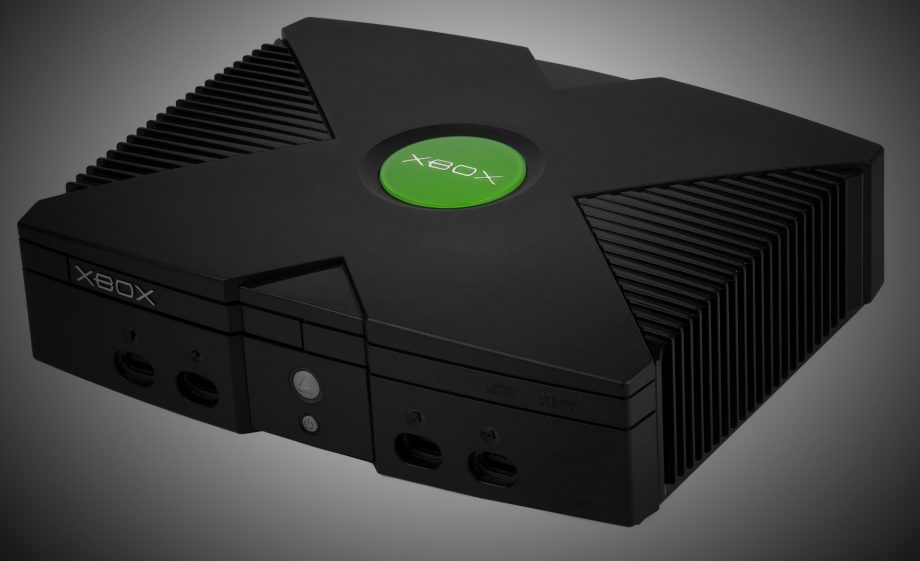
    Photo Credit: Trusted Reviews 

    While consoles released after 2000 might not feel like retro consoles, they still fit the bill for this list. The original Xbox, released in 2001, marked Microsoft’s entry into the console wars. Buoyed considerably by the phenomenal Halo: Combat Evolved, the Xbox defined its niche as a serious-minded console. Sony’s Playstation 2 was viewed by many as a direct competitor with the Xbox, while Nintendo’s GameCube was somewhat relegated to “kiddy-console” status.  

    The Xbox is largely remembered for its humongous controller and as being something of a successor to the Sega Dreamcast. Sega released a sequel to Jet Set Radio, called Jet Set Radio Future, and another entry in the Panzer Dragoon series on the Xbox. However, Halo can’t be overstated: many millennials fondly remember LAN parties playing Halo. Additionally, when the sequel, Halo 2 was released, it pioneered Microsoft’s Xbox Live online service, showing a glimpse into the future of gaming.  

    5. Playstation 2 
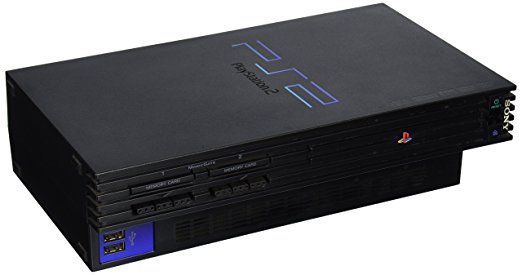
    Photo Credit: Amazon 

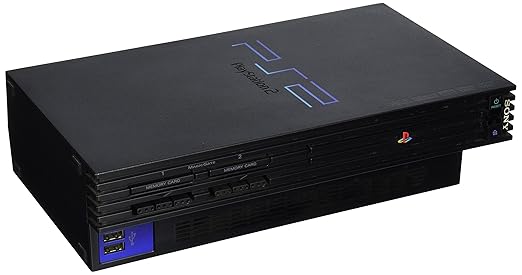
    Sony’s successor to the Playstation would go on to become one of the best-selling consoles of all time. Home to countless incredible first- and third-party games, the Playstation 2 is considered by many a high-water mark for video games. From racing games to fighting games to first person shooters, the PS2 had something for absolutely everyone. Almost everyone had one of these things. Heck, they even played DVDs back in the days when DVD players were pretty expensive! 

    With a library encompassing Ratchet & Clank, Jak & Daxter, Sly Cooper, Shadow of the Colossus, Okami and numerous other masterpieces, it’s no wonder so many millennials remember this retro console.  

    4. GameCube 
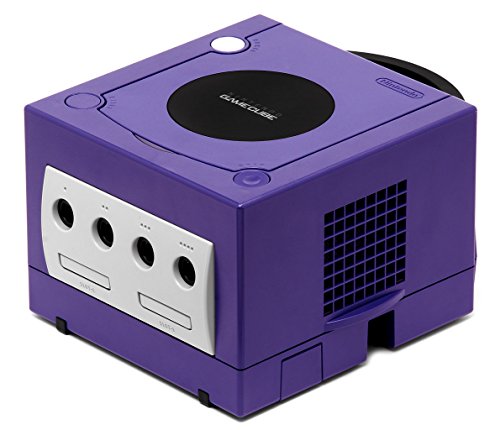
    Photo Credit: Amazon 

    The successor to the N64, the GameCube was Nintendo’s first console to use an optical drive. For some inexplicable reason they chose to use mini-DVDs for storing games. This marked the second generation in a row that Nintendo chose to forego the industry standard for game storage. While the PS2 had countless games from 3rd party devevlopers, the GameCube is an example of how strong first-party support can make a console. Hence, beloved games like Wind Waker and Super Mario Sunshine helped the console prove its pedigree. 

    Yet as the console wars wore on in this generation, it became clear that Nintendo was moving more into their own space. While this allowed Sony and Microsoft to duke it out, Nintendo was making “purer” games, forgoing the flash and glitz of their competition. While this was met with mixed success, not all gamers loved it. Many found it refreshing that Nintendo stuck to their guns as a family-friendly developer. Others found this frustrating and longed for a more serious Nintendo.  

    3. Nintendo 64 
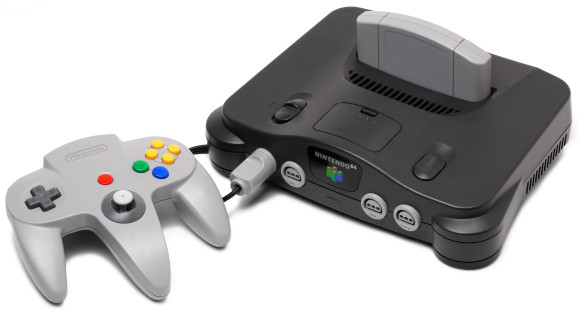
    Photo Credit: Venture Beat 

    How many strange decisions can a console manufacturer make and still create one of the greatest systems of all time? Let’s check the N64 to find out. Giant, three-pronged controller with odd button layout? Check. Uses cartridges instead of CDs for physical media? Check. Near-total lack of third-party support? Check.  

    Jokes aside, if you thought the GameCube got along on first-party support alone, the N64 is the poster child of the “Nintendo-machine” stereotype. However, Rare Games released game after awesome game in this era. For instance, Banjo Kazooie and Diddy Kong Racing are examples of Rare’s excellent design. However, nearly every other notable game was Nintendo-made. Pokemon Stadium, Ocarina of Time, Star Fox 64, the list goes on. 

    Rather than blemish its memory, however, this is one of the coolest retro consoles of them all, and it easily earns its high spot. 

    2. Game Boy Advance 
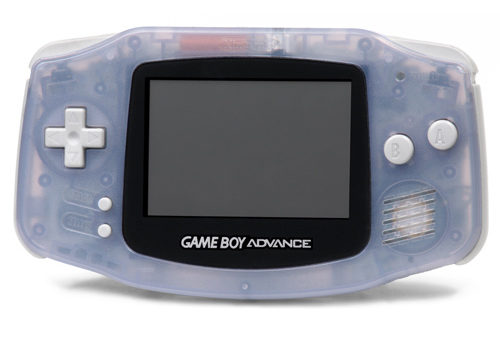
    Photo Credit: iFixit 

    If you’re a millennial there is a 95 percent chance you owned a GBA. This thing was huge. It’s far and away the best-selling console of all time, and for good reason. The GBA represented a renaissance of the 16-bit era, and developers were in rare form on the console. After spending a whole generation perfecting 16-bit design on the Super Nintendo, Nintendo’s developers were clearly poised to flex their design muscles. Therefore games like Metroid: Zero Mission, Pokemon Ruby and Sapphire, Golden Sun are examples of some of the greatest games ever.

    In addition to introducing a whole generation of gamers to gaming in general, the GBA also had a great series of ports. Older games like Link to the Past and the NES Classics series introduced a ton of millennial gamers to an era they might have otherwise overlooked. Because of its ubiquity, it’s impossible to overstate just how popular and influential the GBA was. Most of all, the GBA is remembered as the greatest of the handheld retro consoles.

    The Best of the Retro Consoles: The Super Nintendo Entertainment System 
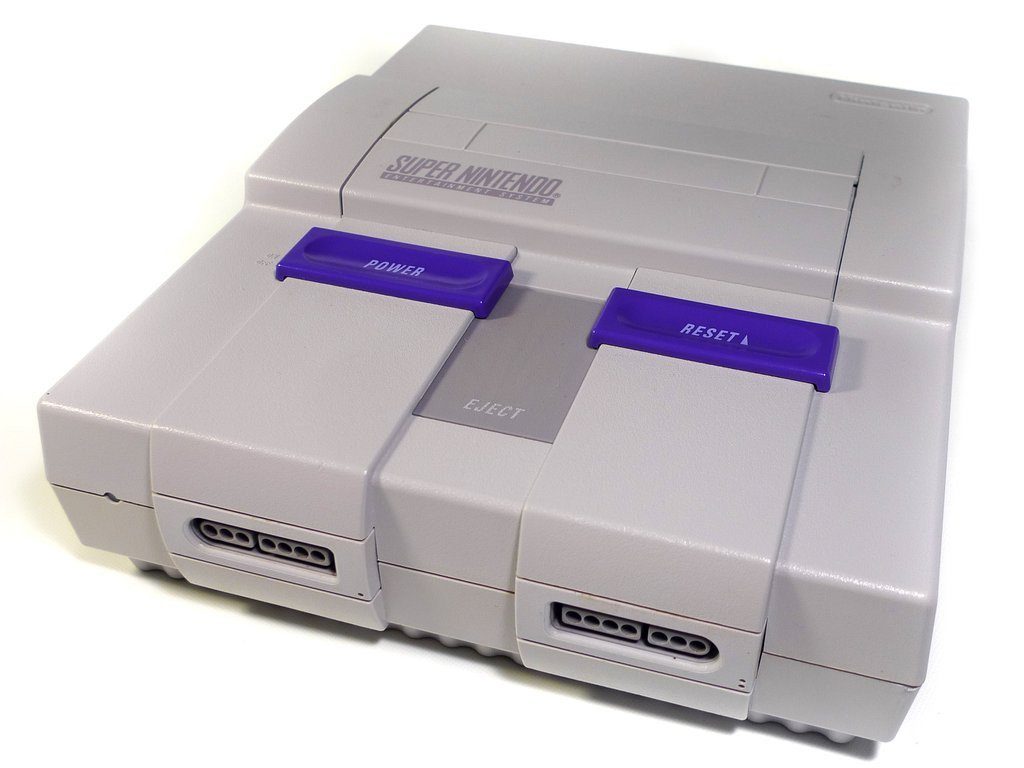
    Photo Credit: Retro Fixes 

    Nintendo easily swept the top half of this list, and it’s not hard to see why. Because the consoles they released in these eras were defining, helping usher tons of kids into the hobby. The Super Nintendo is the most impressive of them all. With a revolutionary controller layout that would go on to define every gamepad that followed and some seriously impressive hardware for the time, the SNES left its mark. 

    This generation served as a golden age for 2D-platforming and RPGs. Super Mario Land and Donkey Kong Country represent the very greatest of the former. Secret of Mana, Chrono Trigger and Final Fantasy III are the prime examples of the latter. Other notable games, like Star Fox and F-Zero, showed off what the future of 3D games might end up looking like.  

    In retrospect, it’s incredible just how many mind-blowing games were on the SNES. Looking back, you can see the seeds for modern game design taking root for the first time in this era. The legacy of this generation lives on today in the design philosophy of all major studios. It also lives on forever in the memories of the kids who grew up playing these amazing games.  

  • New FDA Website To Begin Outing Companies Blocking Cheaper Medicine

    New FDA Website To Begin Outing Companies Blocking Cheaper Medicine

    In a bold move to support the Hatch-Waxman Act related to the operation of pharmaceutical companies, the FDA has announced a new website. The proposed site hosts the names of branded medicine manufacturers blocking generic versions of their medicines. This move, announced by FDA Commissioner Scott Gottlieb, seems to be directly aimed at shaming companies for unethical practices.  

    Gottlieb’s Take 

    “I don’t think this is publicly shaming,” Gottlieb was quoted as saying by S&P Global Market Intelligence. “I think this is providing transparency in situations where we see certain obstacles to timely generic entry.” However, Gottlieb has publicly stated he wouldn’t be against legislation to shame companies acting in ways that were unethical.  

    How Did they Get Away with This? 

    How were these companies keeping their competition from developing generics? One way was blocking samples of their drugs being given to generics makers by hiding behind risk evaluation and mitigation strategies (REMS). REMS allow drug makers to identify which of their drugs have potentially harmful side effects and thus limit who can be given samples of them.  

    The other method for sidestepping the generic process involves contracts with distributors that block sample delivery to generic makers. Both of these practices, according to Gottlieb, violate the spirit, if not maybe even the letter, of the Hatch-Waxman Act. 

    The FDA Flexing Their Muscles 

    This turn of events is potentially quite good for consumers. This move makes it easier to develop cheaper, more accessible drugs. By making it harder for drug makers to hide behind misinformation, the FDA makes it more likely that companies act more ethically. Many commenters view this move as a bold one on the part of Gottlieb. 

    The drug makers themselves have had little response to the proposed website, which launches on May 17th. This turn of events must be frustrating for these manufacturers, though. The agency that oversees you publicly shaming you has to sting.

  • Windows 10 April Update Crashing Intel Solid State Drives

    Windows 10 April Update Crashing Intel Solid State Drives

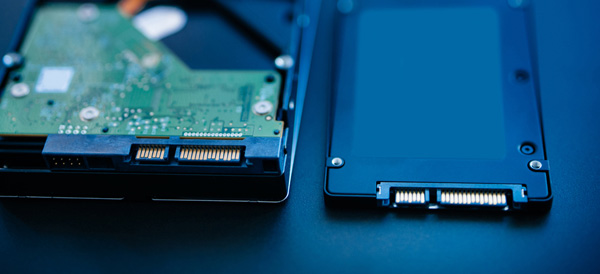
    Microsoft is blocking the rollout of the April Windows 10 update to certain users. Windows users with Intel Solid State Drives are being blocked from the update in order to protect them from a system-crashing series of bugs. Specifically, the Intel SSD 600p Series and Intel SSD Pro 6000p Series are encountering the bug, according to a report by Ars Technica. 

    Solid State Drives Causing Woes? 

    This isn’t the first time new OS updates have caused issues with SSD users. The unique drivers incorporated by SSDs often clash in unexpected ways with operating systems. Linux users experienced similar issues last year, with the new OS’s power management features attempting to override the primary functions of the SSD drivers. 

    What’s the Deal? 

    The details of this bug are currently unknown. It seems unlikely this issue will be terribly massive: a simple fix already exists. Users need only rollback the update from the Safe Mode screen to recover their PCs. However, this is frustrating, given the ubiquity of Intel SSDs and the massive size of Microsoft. How is it that no beta testers found this bug? Or, if they did, why wasn’t it addressed before the updates went live? 

    Sign of Things to Come? 

    This update was already delayed after bugs causing blue-screens were identified by beta testers. The update went back to the developers for fine-tuning, but somehow still went live with computer-crashing bugs. Thankfully these bugs aren’t fatal, but they are still troubling. How does a company as big as Microsoft miss something as big as this? 


  • Fitness Tracking App Round-Up: Which Ones Fit your Lifestyle?

    Fitness Tracking App Round-Up: Which Ones Fit your Lifestyle?

    Staying motivated to exercise is important. One of the best ways to do that is to use a fitness tracking app! Helping you stick to your routine and achieve your goals, these apps make great companions for busy people looking to stay fit. Which ones fit your lifestyle the best? We’ll help you narrow it down with this round-up! We only picked apps available on both iOS and Android, so don’t sweat which kind of phone you have! 

    JEFIT 

    JEFIT is great for anyone who wants to be spending time in the gym. Designed to be great for users of all skill levels, JEFIT lets you record you reps and weights and keep track of your progress. The app allows you to choose from tons of user submitted workouts to help keep things fresh. On the downside, the app doesn’t have routine planning, but this is a small gripe for a free app. Not to mention, the app’s other functionality is good enough to make it a great pickfor fitness tracking app.  

    Keelo 

    This fitness tracking app is great for those who want to do quick, one-off style workouts on the fly. Utilizing the HIIT strategy for workouts, Keelo is great for really busy users. If you can set aside between 10 and 20 minutes three or four times a week, this is the app for you. These fast-paced workouts are meant to get your blood pumping and show results in a few weeks! Did I mention the app is free? Because that’s worth mentioning! 

    Sworkit 

    If you really want to get in shape and really don’t want to (or can’t) go to the gym, Sworkit is your fitness tracking app. You tell the app what your fitness goals are and tell it how much time you can dedicate to a routine. The app then builds you a personalized regiment for a six-week program. It’s surprisingly in-depth for being a free app. You can also spring for the premium subscription ($60 per year, or $30 per 4 months) that gives you access to more features. Real fitness trainers and exclusive workours are available to premium users, too.  

    Our Favorite Fitness Tracking App: Aaptive 

    Aaptive is a cool app: you pay either monthly ($15) or yearly ($100) for access to thousands of audio fitness classes. New classes are added by the trainers each week, so you’ll never run out of engaging exercises. There are classes for lifting, cycling, running and more. If you’re really serious about fitness and don’t mind spending money on a subscription, you’ll find Aaptive a great app for working out.  

  • Which Tablet is Worth your Money?

    Which Tablet is Worth your Money?

    Smart phones are nice, but sometimes you want a bigger screen for your smart device. Whether you’re drawing, looking at photos, watching movies or playing games, tablets are awesome addition to your smart device arsenal. When you just want that bigger screen for a handheld touch device, nothing else will do!

    Nothing says quality, solid build and premium design more than our 5 best premium tablets. From major manufacturers such as Apple, Samsung, Amazon, Microsoft and Google these tablets carry the state of art in technology and design. With that in mind, let’s check out some of our favorite premium tablets!

    Microsoft Surface Pro

    This tablet is so premium that it’s also a laptop. The Surface Pro made our list of best touchscreen laptops, too, which might sound weird until you see one in person: it really is both. With a stellar screen and great form factor, you can’t get a much cooler 2-in-1 tablet. Retailing for $659, it’s not too pricey.

    There are only a few real downsides for the Surface Pro. The very incremental advances it possesses when compared to its predecessors are slightly disappointing.  Additionally, the design is a little too minimalist: there is no USB-C port! Then again, it’s still a great tablet, so it’s a small nitpick.

    Google Pixel C

    Your favorite Android tablet, the Google Pixel C performs like a giant version of its phone siblings. The Pixel C also has an optional magnetic keyboard that is quite solid, letting the tablet act as a laptop. This is easily the most powerful Android tablet that exists, for what it’s worth. The tablet performs great while multitasking and rarely suffers stutters or slowdown.

    If you need a tablet for work or just like pushing your technology to its limit, this is a great pick for you. On the other hand, this one is a bit expensive, retailing for $950. Additionally, many users see Android as a drawback instead of a feature. Many apps are released on iOS first and often perform better there to boot.

    The Samsung Galaxy Book

    This tablet rightfully belongs on the quickly growing list of impressive Microsoft Surface Pro contenders. The Samsung Galaxy Book is a top-shelf Windows tablet with a price to match. Its robust processing power, high-end display and essential add-on accessories make it one of the best tablet-hybrids.

    It’s a Windows 10 tablet with a stunning 12-inch Super AMOLED display, Intel’s latest processors and detachable keyboard cover with stylus. It starts at $1,130 for the Wi-Fi-only version and $1,300 for the LTE model, sold via Verizon, which was the configuration we reviewed. Samsung offers a 10-inch variant that runs for $630, but this review is of the 12-inch model.

    iPad Pro

    No list of premium tablets would be complete without Apple’s contender in the mix. And this time around, unsurprisingly, Apple is our favorite. The iPad pro is a rock-solid tablet, with a gorgeous Retina display and fantastic performance. Many users have a preference for iOS, and for good reason. Slowdown is almost nonexistent, and app support is fantastic.

    If there are any drawbacks, they’re the same ones that apply to all Apple products: expensive peripherals and proprietary charging. If you want the Apple Pencil or proprietary keyboard to go with it, this one will run you some serious cash. For just the iPad itself, you’ll be spending around $600.


  • These Tech Startups Are So Dumb You May Never Unroll Your Eyes

    These Tech Startups Are So Dumb You May Never Unroll Your Eyes

    The wide world of technology is rife with start-ups and venture capitals. Companies are all vying to be the next Apple, always pushing the envelope and redefining themselves. Or, at least, they’re trying to do these things. Sometimes they’re hit with the rough wake-up call that their ideas are just freaking weird, man. Sometimes that might be a good thing, and other times it’s… well, you’ll see. Check out the ten weird tech developments we could find. You won’t be disappointed, but the investors might! 
     
    [adPH1]  

    10. Rapt.fm 

    Photo Credit: Forbes 

    This one is odd yet endearing. Rapt.fm is a social platform dedicated to teaching people how to rap. And it has 50,000 users. Color me impressed! Now, this isn’t the odd part, rap is tremendously popular, and it makes sense that people would want to learn. The odd part is the venue the startup got their footing in.  

    The CEO, Erik Torenberg (catchy rap stage name), got the initial money for the platform in an unusual way. Originally, he and his team taught employees at businesses like Fathead, Chalkfly and Quicken Loans. What? Yeah, they were marketed as “team-building” exercises. Corporate America is weird, guys. Look no further than white-collar worker-turned-rapper Little Dicky to see more evidence of this. Textbook weird tech. 
     
    [adTextOnly]

  • Looking to Organize? Find Out Our Favorite To-Do App!

    Looking to Organize? Find Out Our Favorite To-Do App!

    Everyone knows how hard it can be to stay organized during your busy day. Between all the things you have to remember and fighting traffic, simple errands can get left behind pretty easily. How do we recommend you organize your schedule? One way is with a handy to-do app! We love the ones we’ve rounded up here, you just might too! The apps we’ve picked are all available on both Android and iOS! 

    Todoist 

    Available in both premium and free forms, Todoist is a great app for everyday use. This app has a clean interface and great readability. For those who don’t mind paying around $30 a year, the premium version of the app has great functionality. Projects for increasing productivity, labels and the ability to share projects with other users are all pluses for this app.  

    This app also sports some really cool productivity charts and sharable progress trackers. It doesn’t have quite the same collaborative suite as, say, Asana (I’ll get to that) but it’s certainly cool funcitonality. 

    Remember the Milk 

    A great to-do app for household use, Remember the Milk offers a lot of functionality even in the free app. This app works offline and offers some great collaborative functionality, helping married couples or roommates organize chores and errands. The premium version, that boasts more general functionality, runs around $40 a year. This is a bit pricier than the competition. 

    This app doesn’t feature location-based reminders, which is a bit of a bummer. It also doesn’t have UI quite as clean or user-friendly as Todoist or Asana. These small gripes don’t hold it back from being a great to-do app, though! 

    Our Favorite To-Do App: Asana 

    If you’re trying to collaborate with a large group to increase productivity, Asana is for you. Featuring a great user interface and some downright awesome collaboration tools, this to-do app earns our spot for favorite. Exceptional for workplace productivity, consider this one if you want to help your office get organized.  

    While Asana doesn’t sport a desktop app, it makes up for it in its incredible shared functionality. The premium version, which goes for around $12 per month, allows you to access a large suite of functions. Advanced dashboards, search functionality and teams numbering much higher than the base 15-person cap. That all said, Asana is comparatively expensive, and if you want something a bit more affordable we recommend Todoist.  

    Those small nitpicks aside, Asana is a great app, and we recommend you try out the free version with your team and see if its right for you!