Blog

  • Apple TV+ News: What We Know

    Apple TV+ News: What We Know

    It’s 2019, and it seems like everyone wants a piece of that sweet, sweet streaming money. When Netflix started streaming some select content on their website over a decade ago, it seemed like a novelty that would do little to disrupt the way cable companies operated. Now, however, nearly every media company is trying to get a piece of the streaming pie. Between CBS All Access, Disney Plus, DC Universe and numerous others, the streaming field is extremely crowded.

    Yet another huge name is entering the streaming world, with Apple TV+ announced to be landing before the end of the year. While pretty much every streaming service offers good video quality and great streaming content, the important differentiators between them are their exclusive content. So, what is Apple TV+ bringing by way of exclusive content to attract users away from Netflix and Hulu?

    The Service

    Apple has long been spinning up to become more “service-focused,” as they themselves have stated at numerous tech shows and investor calls. Apple TV+ is clearly the biggest part of that, and is meant to go hand-in-hand with other Apple subscription services like Apple Music. At present, many details about the service are unknown. However, speculation holds that it will likely cost less per month than Netflix in order to combat the streaming juggernaut.

    Hard details, like the exact price, release date and availability, are all being kept under tight wraps for now. It’s safe to assume that the service will be available on Apple TVs, on iOS devices and on Macs. However, it’s unclear whether it will be available on other streaming platforms, like Amazon Fire TV, Roku, or Android TV devices. However, we do know some details about noteworthy shows we’re going to be seeing on the service. Read on for details.

    The Morning Show

    One of the biggest marketing pushes we’ve yet seen for Apple TV+ has been for “The Morning Show.” While looks on its face like an actual morning show in the advertisements, it’s actually a scripted drama based around characters who work for a morning TV show. Reese Witherspoon, Jennifer Anniston and Steve Carrell are all set to star. The series will mark the return of Steve Carrell to TV after the end of The Office.

    Interestingly, Apple seems to be betting big on The Morning Show, having already ordered two seasons of the show. It’s likely to be a cornerstone of the advertisements for Apple TV+, as the star power involved is tremendous. That said, the quality of the show alone will likely dictate how it performs. If it’s the smash-hit Apple is expecting, it could likely drive users to the service.

    See

    Speaking of star power, the fantasy epic “See” will be starring Jason Momoa and Alfre Woodard. Leveraging Momoa’s history of portraying fantasy characters and Woodard’s exceptional work with Marvel, the series will likely serve as a huge talking point for the service. “See” is set in a world where a virus has decimated most of humanity and left only a few million survivors behind. Those survivors have all been rendered blind by the virus. The show is set to take place centuries after the current day.

    For All Mankind

    If “See” is the service’s keystone fantasy series, then “For All Mankind” is set to be the sci-fi end of the spectrum. The series will be helmed by Ronald D. Moore, of Battlestar Galactica fame, and will center on an alternate-history version of our own world. The series asks the question: what would happen if the space race had continued long after it ended in our own world? The speculative series will likely serve as the main sci-fi series for the service to round out the major pillars of TV favorites.

  • Mazda CX-5: A Crossover Contender?

    Mazda CX-5: A Crossover Contender?

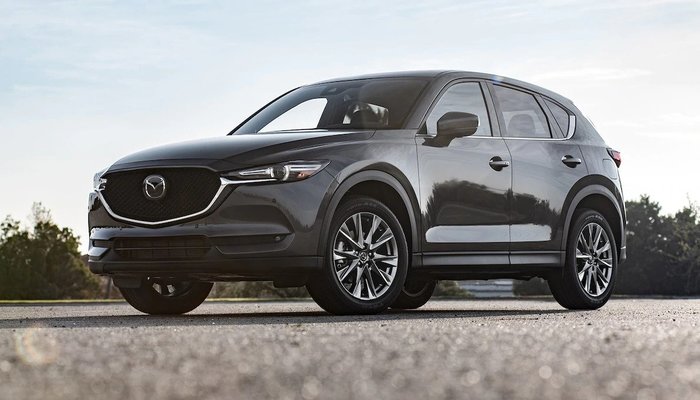
    The Mazda CX-5 is a big contender in the world of crossovers. It’s positioned right between being a mainstream, everyday vehicle at its lower trim levels and a serious example of luxury in its high-end Signature trim level. Is it a worthwhile purchase for your family, though? Let’s take a closer look.

    Mazda CX-5

    Design

    Crossovers need to look like they’re a few feet off from being actual sports cars, and the CX-5 doesn’t miss that mark. Where many competitors have bland and boring designs on their crossover SUVs, the CX-5 looks athletic and ready to pounce. The design is simple and straightforward, not drawing too much attention to itself while still looking stylish enough to impress. The massive grille and interestingly-smooth body make for a distinct appearance that doesn’t distract from the important design elements.

    Oddly, the Signature trim doesn’t get a lot of visual distinctions from the rest of the range. The 19-inch wheels on the Signature are a dark silver color, which differs from the lower entries, though that’s the only difference aside from the discreet “Sg” badge. That badge is easy to miss, and, unless you know what you’re looing for, could be overlooked altogether. However, it’s what’s on the inside that counts.

    Interior

    If you opt for the Signature upgrade, you get everything. Literally every option available for the CX-5 is on if you get the top trim level. This includes everything from a unique heads-up display, heated and cooled seats, a heated steering wheel, a Bose sound system and more. The seats get Nappa leather for the upholstery, you get slick ambient lighting all over, and even a sleek leather wrapping for the steering wheel.

    What is notable, of course, is the lack of a few features we’d expect on a trim level set to be competing with luxury rivals. There’s no wireless charging for cell phones, no remote start option, and no automated hatchback that you can swing your foot under to open. That said, there’s a lot to love in the interior of the vehicle for those looking for serious luxury.

    Tech

    When you’re shopping for a nice, new SUV, the tech on display is a huge consideration. The Mazda CX-5 offers up some great tech, but it’s a bit sluggish in places. For instance, the infotainment system is wonderful, with a big and bold 7-inch display. However, it can take a long time to boot up, and it’s a bit slow to react to inputs or connect to Bluetooth.

    Additionally, as soon as you’re in motion, the touch screen is locked and you have to use the rotary dial on the center console; this only adds to the frustration of using the system. That all being said, the screen looks great and the sound system, especially in the Signature trim level, is exemplary. Thankfully, the system also incorporates both Android Auto and Apple CarPlay, which is a much-needed feature in 2019.

    Engine

    Under the hood, the CX-5 is rather impressive at the Signature trim level. The turbocharged 2.5-liter inline-four is a bit of a beast, rocking 250 horses and 310 pound-feet of torque. It goes zero to sixty in only 7.3 seconds, which is impressive for an SUV. This all means that you can actually get up and go, accelerating ahead in traffic and navigating crowded highway traffic more efficiently. No one likes getting left in the dust, so this is a welcome update.

    Bottom Line

    While the CX-5 technically starts at $24,350, we recommend the Signature trim level highly. If you’re in the market for a more budget-friendly crossover, the Honda CR-V is probably a better bet. That said, if you want a compromise between budget and luxury, the Signature trim level, which goes for $37,885, is what you’re looking for. In that configuration, it’s a pretty solid vehicle.


  • Which Galaxy is Which? Our Guide to the Crowded Samsung Phone Lineup

    Which Galaxy is Which? Our Guide to the Crowded Samsung Phone Lineup

    Samsung has been pretty busy making smartphones in their Galaxy family of phones. No fewer than nine Galaxy devices are new for this year, so it might be difficult deciding which is right for you. Thankfully, we’ve got the lowdown for you: here’s our guide to the Galaxy family of phones.

    Samsung Galaxy Guide

    Samsung Galaxy S10

    For starters, the Galaxy S10 is the flagship phone of the Galaxy line. It offers the most standard-style experience, with a medium screen size, solid build quality, great battery life and a sharp display. Lots of unique features, like the in-display fingerprint scanner and the ability to wirelessly charge, aren’t quite as new and flashy as they once were.

    However, just because its family of phones offers some of its cool features elsewhere doesn’t mean you should write off the S10: at $900, it represents a great price for the mainline Galaxy phone lineup. For those looking for a great, standard-style handset with the best build quality and don’t mind a high price tag, the S10 is one of the best Android phones out there.

    Galaxy S10 Variants

    The S10E is the budget version of the Galaxy S10, occupying a similar space to the iPhone XR and Pixel 3A. Unlike its bigger brother, the S10E retails for only $750, and it sports a smaller overall display and handset size. If you’re looking for a phone with a lot of features and a smaller profile that fits easily in a pocket, the S10E is a good option. However, if you love massive displays and cutting-edge tech, consider looking into the full-fledged S10 line.

    On the other end of the spectrum from the budget S10E is the S10 Plus, a $1,000 smartphone with a 6.4-AMOLED screen that looks downright amazing. Fans of huge screens and long battery life should consider the S10 Plus a must-buy, as it offers both in abundance. If you can swing the huge price, this is easily the best S-line Galaxy phone that Samsung has yet made, though its massive size might be a bit of a drawback for those who prefer smaller handsets. A 5G-enabled version of the S10 Plus is also available for $1,300.

    Samsung Galaxy Note 10 Line

    The Note line of phones popularized the massive “phablet” size handsets that are commonly sold as “Plus” or “XL” models of other flagship lines. Ironically, despite the note being the “plus size” Galaxy phone, the Galaxy S10 Plus offers a bigger screen than the Note 10. The main difference, however, is that the Note sports the excellent S Pen, a productivity aid that doubles as a Bluetooth trigger for the camera. Coming in at $950, the Note 10 actually slots comfortably between the S10 Plus and the standard S10.

    Samsung Galaxy Note 10 Plus sports an extremely massive 6.8-inch display that easily bests every other Galaxy device (barring, of course, the Galaxy Fold). It retails for $1,100, making it the most expensive non-folding Galaxy device as well as the largest. Unlike the standard Note 10, the Plus offers expandable memory with an SD card. There is also a 5G-enabled Note 10 Plus, retailing for $1,300.

    Samsung Galaxy A50

    The discount-priced Galaxy A50 is one of our favorite budget Android phones. The A50 sports an in-display fingerprint scanner, a big 6.4-inch screen and three great cameras. For the old-school users, this phone also sports a conventional 3.5mm headphone jack! For only $350, this is a great entry-level, budget smartphone. If you’re looking for something with lots of new bells and whistles, though, the A50 might not be the best choice for you.

    Samsung Galaxy Fold

    The yin to the Samsung Galaxy A50’s yang, the Galaxy Fold will retail for $1,980 and offers a tremendous 7.3-inch, tablet-like inner display. The front face of the folded device is only 4.6 inches, though its far from the main attraction on this stylish and futuristic phone. If you’re looking for the fanciest and craziest smartphone in the world, the Fold is what you’re after. That is, of course, if you can swing the two thousand bones to buy the thing.


  • 2020 Hyundai Palisade: A Refined SUV

    2020 Hyundai Palisade: A Refined SUV

    For those looking to cart a whole bunch of kids and adults all over town, having a three-row SUV is a must. However, most three-row SUVs are a little boring in appearance and a lot boring to drive. That’s why the newest offering from Hyundai, the Palisade, is exciting: despite being a massive SUV that can seat the whole family, it’s also got tons of luxurious tech and a great ride. Let’s take a closer look at the newest family-mobile from Hyundai.

    2020 Hyundai Palisade

    Design

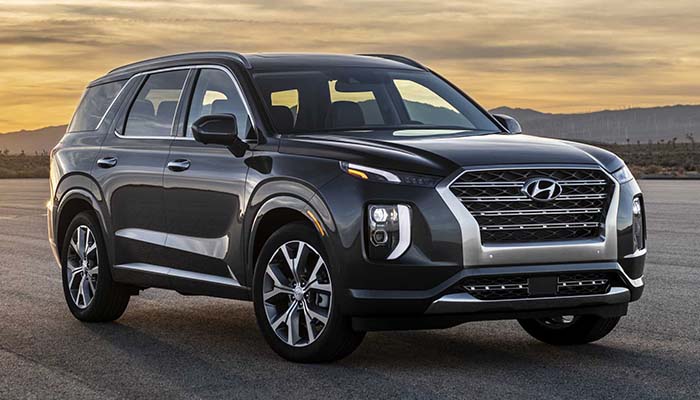
    Much like other new Hyundai models like the Kona and Santa Fe, the Palisade features and unusual front grille and some strange body lines. It looks decidedly strange at first glance, and hardly fits the mold of most modern SUVs. However, this isn’t to say it looks unappealing: it’s a rather intriguing design, with top-mounted headlights, a tapered, stair-step grille and a general “folded” feel in the design.

    It’s also worth noting that this car is a gigantic beat. It’s actually the biggest Hyundai to ever come off the production line: it’s a solid four inches longer and three inches wider than the Santa Fe XL. As it turns out, the Palisade is taking over for the retiring Santa Fe XL, as it does the latter car’s job significantly better. The enormous size comes into play in a big way when you see the ample space and leg room for pretty much every seat.

    Under the Hood

    The Palisade is no race car, but it does offer some excitement under the hood. The 3.8-liter engine is a V6 with a surprisingly attentive eight-speed transmission. The engine will surprise many drivers with its 291 horses and 262 pound-feet of torque, offering up smooth and responsive performance. Acceleration is ample but not jarring, offering a smooth ride that keeps the kids in the back from feeling like they’re on a rollercoaster when you need to get up to highway speeds.

    As you’re likely not interested in burning up the roads in the Palisade, this is likely all good news. The smooth performance from the engine feels like it was tailor-made to keep spills and motion sickness in the back to a minimum. While the Palisade is significantly more stylish and fun than a minivan, it clearly knows its place in the world as a kid-friendly family-wagon. It gets a respectable 19 MPG in the city and 26 MPG on the highway, making it pretty standard for a “mid”-sized SUV.

    Interior Comforts

    One of the most important things when it comes to a three-row SUV is the comfort level. The cabin needs to not only be comfortable for the driver, but also the passengers. While the kids need tons of room for all their toys and car seats and whatnot, the driver also wants a suitably peaceful and comfortable cabin for when they’re dealing with all the kiddos. That’s where the luxury of the Palisade comes in.

    If you opt for the Limited trim, you get quilted Nappa leather, though all trim levels get heated first- and second-row seats. The second row is elevated for better visibility, which is great for kids who can get car sick to be able to look straight ahead. All in all, the Palisade punches way above its weight class in terms of cabin comfort. While this isn’t priced or marketed as a luxury vehicle, it does sport luxury-feeling materials, especially at the limited trim level.

    Bottom Line

    If you’re looking for a kid-hauling family SUV that feels luxurious without a luxury price tag, the 2020 Hyundai Palisade is a fine vehicle. Between the stylish design, smooth engine performance and gorgeous interior, it’s hard to go wrong if you’re looking for a good way to schlepp the kids around town.


  • Back to School Tips: What to Buy and How to Save

    Back to School Tips: What to Buy and How to Save

    When you’re shipping your little ones off to school, the last thing you want is for them to be underequipped. In the modern classroom, things are fast-paced, interconnected and competitive. Getting high marks is harder now than ever before, so making sure your kids are outfitted with the best gear is a must to help them stay competitive. Today we’re going over the must-have tech and best deals you can find on back-to-school gear.

    Back to School Tips

    Only Shop Deals

    Between buying back-to-school clothes, school supplies and new tech the kids might need for school, you might find yourself spending a lot of money on them. This is why we highly recommend you only shop for deals this time of year. If you just buy the first thing you see every time you walk into a store, you’re going to find yourself seriously strapped for cash in no time.

    Make sure you’re getting deals on all school supplies that start around at least 40% off. For clothes, buy either steep discounts, like 30% off or better, or buy secondhand clothes that are significantly cheaper than brand-new. When it comes to tech, it’s okay to buy laptops or tablets that are a few generations behind to save a few hundred bucks. Make sure you make that cash last!

    Don’t Get Distracted

    There are tons of gadgets and gizmos that you might think the kids could need for school. Things like e-readers might seem like sensible purchases until you realize that a tablet does the same thing, but can also double as a notepad and research aid. Don’t let marketing hype trick you into buying tons of stuff that your kid doesn’t actually need for school.

    Another example of this is stores selling back to school clothes in big “sales events” without actually offering significant discounts. Remember, there are tons of stores you can go to in order to find deals on clothes. If you go to a department store and see absurdly high “sale” prices on clothes, it’s best to leave and look for better deals elsewhere.

    Power vs Convenience

    If you plan to buy your kid a laptop for school or for college, it’s best to know what you’re looking at. A lot of high-end laptops might look like they’re great for students, but think critically. How much power does a student really need to write research papers and type notes? A super high-end processor and a 4K screen might be a bit of overkill on a device meant to help with studies.

    We recommend prioritizing a smaller laptop, something like a Chromebook or a netbook. These are less expensive than high-end gaming laptops, offer a smaller, more portable profile, and don’t guzzle battery charge as quickly. These things all make them ideal for putting in a school bag and carrying from class to class to take notes. Your tech-savvy youngster might be begging for a super-powered laptop with tons of RAM and great graphics, but they’ll appreciate not lugging that heavy beast all over campus.

    Fitness Tracker

    If you’re sending a kid off to college and they seem interested in fitness, it might be worth looking into getting them a fitness tracker. Examples like the FitBit and Apple Watch are great for keeping track of time spent exercising and calories burned. They can also serve as handy ways to keep from opening the smartphone and scrolling ad infinitum when it’s study time!

    Many people who use smart watches or fitness trackers that pair with their phones have noted their time saving functionality. Since you don’t have to open your phone to see the time or check an incoming message, you don’t have the same desire to start scrolling through your social media feeds. This frees up that much more time to study and do schoolwork!


  • Cool Uses for Your Old Smartphone: What to do When You Upgrade

    Cool Uses for Your Old Smartphone: What to do When You Upgrade

    When you upgrade to a new smartphone, it can be hard to decide what to do with your old phone. You don’t want to just toss it in a drawer, as it’s a great piece of technology. You could sell it, though doing so is a huge hassle and you normally don’t even get back half of what you paid for it. So, what are you supposed to do with an old smartphone to keep it useful even though you’ve got a better handset?

    Today we’re going over some fun and useful things you can turn your old phone into. Whether you’re looking for a new computer mouse or a game system, you’d be surprised at just how useful your old, worn-out smartphone can still be. Let’s get started!

    Wireless Mouse

    If you’ve got an old smartphone, why not turn it into a wireless mouse? No, seriously! If you download an app like Remote Mouse, you can use the phone’s gyro sensor to simulate the movement of a mouse. You connect your phone to your computer over the same wi-fi network, and then the phone functions as a mouse. It’s pretty simple!

    For instance, if you often use a laptop and want to keep a mouse with it, but don’t feel like buying any new pieces of technology, you can just use your old cell phone! This allows you to keep it in the same bag as your laptop and easily bust it out for when you need it. Not bad for something that was going to sit in a desk drawer!

    Universal Remote

    There are a lot of devices on your wireless network that can be controlled via a universal remote. For example, if you have a Roku, a Smart TV or a game console like an Xbox One or a PS4, you can control them all from a universal remote. However, proper universal remotes can be relatively expensive, and your old phone can do this just fine!

    Download an app like iRule, which offers an interface for proper universal remote control, and sync it with your wireless devices. You can even control your smart home tech, like your smart bulbs or smart locks, from this universal remote. Just dedicate the old phone to sitting on the coffee table to control all of your home’s functions, and you’re good to go!

    Game Boy

    Our favorite use for an old Android phone is easily to convert it into a Game Boy emulator. The HyperKin Smartboy Mobile Device is $50 from the HyperKin website, and it can convert most older Android devices into a proper, functioning Game Boy. If your phone is compatible with the device, you simply plug your phone into the device via the USB-C connector, and then plug and run your own Game Boy cartridges.

    The Hyperkin is fully compatible with both original Game Boy and Game Boy Color cartridges, allowing you to play hundreds of old games just like you used to on your old handheld! If you’ve got an old Android phone and some Game Boy cartridges lying around but nothing to play them on, the HyperKin Smartboy is the device for you.

    Google Home

    If you have an older Android device that is up-to-date on firmware, you can get a charging stand for it, connect it to a Bluetooth speaker, and create a Google Home yourself. While Google Home devices are $130, a Bluetooth speaker could cost you half as much or less and sound just as good. Just like that, you’ve built your own Google Home smart speaker to work as your smart home hub! It’s significantly less expensive if you already have the old Android phone lying around, and it works just as well as a proper smart speaker!


  • 5 Best Features in the Samsung Galaxy Note 10 and Galaxy Note 10 Plus

    5 Best Features in the Samsung Galaxy Note 10 and Galaxy Note 10 Plus

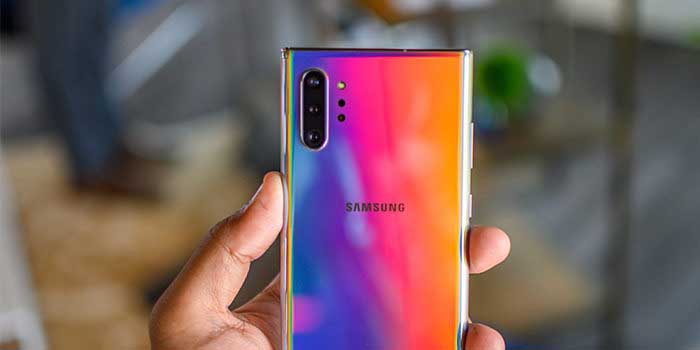
    To kick off the unveiling of the new Samsung Galaxy Note 10 and Galaxy Note 10 Plus, we’ve gathered a list jam-packed with the 5 coolest features included in the new smartphones. The Galaxy Note 10 is not just a new smartphone, it’s a gaming console, a film studio, a computer, comes with your own personal magic wand – and its all in one device!

    1. Smaller – and bigger
    The Samsung Galaxy Note has always been identified as a “big phone.” Users are pleased to see a smaller, hand-friendly version of the Note 10. It is about 0.2-inches smaller than the Note 9 and the Note 10+. 0.2-inches may not sound like much, however it makes a significant difference when it comes to fitting in your hand. On the contrary, this is the first time Samsung has rolled out two versions of the Note to include the Note+ for those who prefer a bigger smartphone.

    2. 3D Scanning
    While Samsung is not the first to roll out 3D scanning, they came up with a cool application for 3D scanning with Augmented Reality. Consumers can now 3D scan objects and drop them into their photos and videos. It doesn’t stop there; consumers can even animate them using motion capture. This will be huge for consumers that put out content on social media platforms such as Instagram and TikTok.

    3. Super-fast charging
    Long gone are the days where your smartphone battery dies a few hours after charging. With a quick 30-minute charging session, the Galaxy Note 10 will hold battery juice all day long. Samsung did this by including a 45W charger to amp up the wattage in comparison to competitors that have a 30W charger.

    4. S-pen
    Say goodbye to selfie sticks and self-timers because the Galaxy Note 10 comes with an S-pen that will allow consumers to take remote photos. It gets even better, with an accelerometer and gyroscope in the S-pen, consumers have their own personal magic wand with gesture-recognition technology.

    5. 5G
    The future is here – 5G is the latest version of cellular networks. This is a once in a decade upgrade to the way consumers can wirelessly deliver data, making the Galaxy Note 10 one of the fastest and most powerful smartphones in the market. Just how much faster? In this new era, the Galaxy Note 10 with 5G will average out to be roughly 20 times faster than the traditional 4G network you are currently using.


  • Top 3 Affordable Luxury Car Interiors in 2019

    Top 3 Affordable Luxury Car Interiors in 2019

    You spend a lot of your time inside your car and we know the impact the interior has on your overall driving experience. Luxury car interiors have shifted gears and broken barriers in comfort and technology during the past decade. But just how nice of a car can you get for your dollar? We have the scoop.

    1. Audi A4

    Source: Audi USA

    Starting at $39,200

    Cutting-Edge Technology

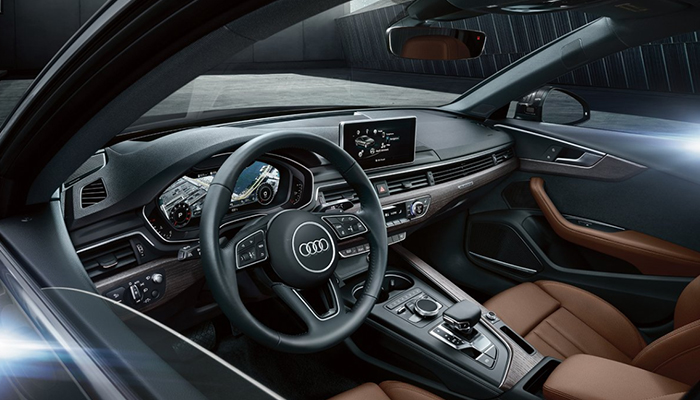
    While the Audi has always offered an exceptional interior experience, the A4 takes luxury interiors to the next level. They offer cutting-edge technology, starting with virtual cockpit set in a whopping 12.3-inch display. Here the driver can customize information, such as navigation, radio, and even Google Earth imagery.

    MMI® touch

    An amazing detail that many competitors at the A4’s price point do not offer is the available 8.3-inch center display. This includes MMI® touch with handwriting recognition technology which allows drivers to write their destination quickly without distractions rather than trying to navigate the screen using their finger on the touchpad.

    Pre sense®

    Audi’s goal is to raise the bar on the driver’s experience – and awareness. The A4 is equipped with pre sense® to protect the vehicle in unusual or emergency movements as an effort to increase the drivers’ awareness and help prevent accidents. It will help to detect other cars or pedestrians while automatically initiating the emergency breaks at up to 52 mph!

    Easy on the eyes

    Sporting high-quality leather upholstery, the A4 comfortably seats up to five people. In addition to comfort and support, the seats are ventilated and heated in both the front and rear, setting this 5-star vehicle up for success during anytime of the year!

    2. BMW X3

    Starting at $42,450

    Passion for performance

    BMW owners are notorious for their loyalty to their luxury vehicles. The X3 is a cost-effective model that includes all the luxury touches that are non-negotiable for BMW drivers. With technology such as rain sensing wipers, front and rear parking sensors, automatic emergency breaking and driver drowsiness monitoring, the X3 is crafted to sharpen the driving experience.

    Distinctive design

    Hop inside the X3 and revel in the high-quality materials used throughout the modern interior. The X3 seats up to five people across two surprisingly spacious rows dressed in upscale leather. With intelligent connections the X3 offers a seamless interface to include the latest version of iDrive that responds to touch, voice commands, and even gesture detection technology.

    Heads-up display

    Another key feature that helps this luxury vehicle stand out from the competition within its price point is the Heads-up Display. This feature offers holographic projection on the drivers windshield that provides vital driving information such as speed limits, navigation guidance and emergency warnings all while keeping your eyes on the road.

    Stay connected

    Always one step ahead BMW has included wireless charging and a wifi hotspot that allows your passengers to connect at ease. To put the cherry on the cake, the X3 includes a 3D Surround View App that lets you remotely view it from every angle, from anywhere. This feature is meant to give you peace of mind by allowing you to make sure your X3 is safe – and right where you left it.

    3. Volvo XC90

    Starting at $47,000

    Scandinavian design & Swedish craftmanship

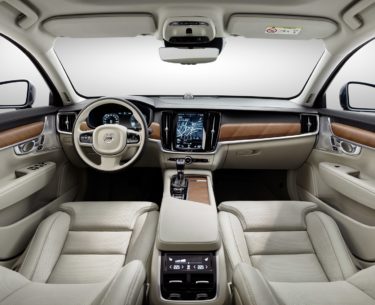
    Volvo doesn’t shift gears very often, but when it does, it makes it count. The XC90 breaks barriers with its cutting-edge safety and timeless design. This luxury SUV is crafted with clean, minimal Scandinavian designs as genuine walnut wood inlays and seats that even offer massage and ventilation options!

    A place to relax

    With word-class legroom, the X90 accommodates all your passengers in luxury and comfort with seven standard seats. Similar to a movie-theater design, the third-row seats are raised to give its passengers a better view. They can even be folded from the trunk with just a simple touch of a button.

    The power of touch

    The technology in the XC90 has been crafted to keep you in control all while making your life easier. Volvo wanted to display the most important features right at your fingertips by including their Digital Driver Display behind the steering wheel. This feature automatically adjusts the brightness according to the surrounding outdoor light and even projects a hologram with vital driver information on the windshield.

    Get a better view, all around

    The 360 Surround View Camera that gives you a bird’s eye view of the XC90 and its surroundings. Connection is made easy in the XC90 so you can seamlessly connect your smartphone to Apple CarPlay and Android audio quickly and easily, every time. Use your voice to turn your XC90 into your personal assistant with capability to access your music, send messages or take calls.


  • 2020 Toyota Tacoma: First Look

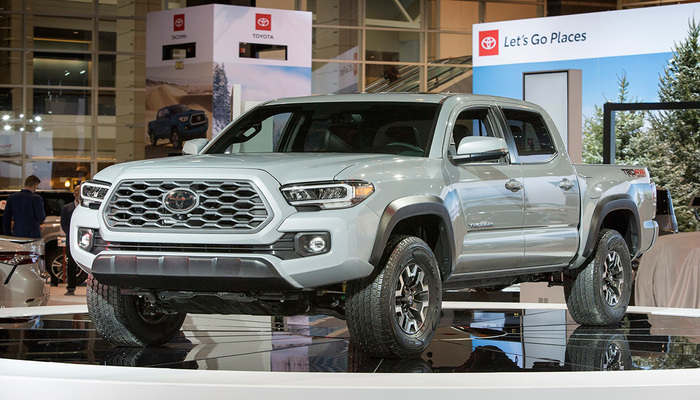
    2020 Toyota Tacoma: First Look

    If you’re in the market to buy a pickup truck, your cup runneth over with options. From new vehicles like the Jeep Gladiator and returning favorites like the Ford Ranger to old stalwarts like the Ford F-Series and the Toyota Tacoma, it’s hard to make a decision. The new 2020 Tacoma wants to make that decision a little more clear-cut with a glut of new features that make the quality-of-life with this truck that much nicer without completely redesigning the vehicle.

    2020 Toyota Tacoma: First Look

    What’s New?

    All trim levels excepting the base SR trim are getting a new 8-inch infotainment touchscreen. The SR trim keeps the old 7-inch screen, but that’s to be expected. While the rest of the car world has been quick to pick up Android Auto and Apple Carplay, this is the first time the Tacoma has sported these features. It’s better late than never, though! Also new to the 2020 model is the inclusion of Amazon Alexa, allowing for voice controls out of the box.

    Other big additions are outside the cab, such as the new LED headlamps, a new grille design and some slightly altered taillights. In short, many of the exterior design changes are aimed at making the vehicle look that much more modern and newer. This includes three-dimensional looking sequential turn signals, a few updated body lines and a more modern-looking front grille.

    Quality of Life

    The addition of a power driver seat in all but the SR trim is a welcome one. Additionally, the comfortable design of the seats makes the ride quality that much nicer, even when taking the truck off-roading. Terrain-select features are far from the norm in the truck world, so it’s great to see the feature on display here. The TRD and TRD Off-Road trims offer a terrain-select feature that includes options for rock and dirt, loose rock, mud and sand and more.

    Also on display in the TRD and TRD Off-Road is an active multi-terrain monitor that helps you keep an eye on what’s happening beneath the wheels. This is great, since it’s often hard to tell where your wheels are in the massive Tacoma, what with its giant hood in the way and the high driving position you’re in. In short, if you’re looking to take a truck off-roading, the 2020 Toyota Tacoma is going to be a solid choice in the TRD and TRD Off-Road trims.

    Under the Hood

    The base SR trim sports a 2.7-liter four-cylinder engine with only 159 horsepower and 180 pound-feet of torque, which isn’t exactly great for heading off-road. If off-roading is your thing, both TRD trims offer a great engine for doing just that. The engine on display under the hood of these trim levels is a 3.5-liter V6 engine sporting 278 horses and 265 pound-feet of torque.

    With the right equipment, the Tacoma can haul 1,600 pounds in the bed, or tow up to 6,400 pounds. While that’s not the best-in-class when it comes to hauling or towing, it’s impressive when you look at the frame the Tacoma sits on and the age of the base build. Whether or not this is a dealbreaker, of course, depends on how much you plan to tow.

    Safety Features

    The tech running in the 2020 Tacoma is impressive, to say the least. Driver safety features like automatic emergency breaking, pedestrian detection, lane-keeping assist and adaptive cruise control will all be shipping standard on the Tacoma line. Rear cross-traffic alerts and blind-spot alerts will also be shipping standard on TRD Pro and Limited trims, as well as being available on the other two trims as options.

    In short, this is the same Tacoma you know, now with even more great technology running under the steering wheel. It’s hard to go wrong with the new Tacoma if you’re interested in off-roading!


  • MacBook Deals: Why are They so Cheap Right Now?

    MacBook Deals: Why are They so Cheap Right Now?

    It’s back to school season, which means it’s time to get all the best supplies. If you’ve been holding out for great deals on back-to-school tech like laptops, then the recent price trends of the 2019 MacBook Air and MacBook Pro should have you excited. Both devices have seen steep price cuts only a few weeks after hitting the market. But why is that, and how can you take the best advantage of it? Let’s take a closer look.

    MacBook Deals: What’s Going On?

    The Deals

    The newest MacBook Air, which dropped in July of this year, started off at $1,100. However, over the weekend, the device has been spotted on sale for as low as $900, and that’s before even considering back-to-school events that could help you save even more. Likewise, the 2019 MacBook Pro, which started around $1,900, can be found on sale for up to $300 off at several retailers. Again, this is before factoring in back-to-school sales.

    MacBooks are ideal for college students, as they are both easy-to-use and well-tuned for creative endeavors. The sleek interface is top-notch, the software is snappy and reliable, and you don’t have to worry about any viruses sneaking into the airtight Mac OS. As such, if you’ve been holding out to pick up a new laptop for heading off to college, the MacBook is the one you want, especially in light of these deals.

    Why the Price Cuts?

    Apple isn’t exactly a budget brand, so many are wondering what exactly is going on with these price slashes. After all, the 2019 MacBook Air landed just five weeks ago, and it’s already seeing serious price cuts. What gives? Is something wrong with these laptops?

    Well, there are a few factors at play. Firstly, Apple is seeing their products sitting on store shelves for longer than retailers would like. The company shipped a lot more MacBooks to retailers than they normally would for a first shipment in order to get out ahead of projected tariffs on goods assembled in China. Keep in mind, tariffs apply on the import date, not the sale date.

    Since retailers have tons of these MacBooks on shelves, they’re eager to move some units. However, as we’ve established, Apple products are really expensive. So expensive, in fact, that many people would just as soon buy a Windows laptop or a Chromebook of similar build quality for several hundred dollars less. Low demand and high supply tends to have the effect of squeezing the price of a product down.

    Why This is a Big Deal?

    Apple’s products don’t usually go on sale at all. If you were lucky enough to find a discounted Apple product, it would be an older model that a retailer was trying to offload. It’s almost entirely unheard of to see brand-new Apple products getting $300 price cuts. One could compare Apple to Nintendo, another company who’s products almost never see price cuts until they’re obsolete, or Disney, who sells eighty-year-old movies for full retail prices.

    While some may argue that Apple’s products should start out closer to this price point, it’s hard to deny the superb build quality and excellent user interface of MacBooks. The perfect storm of economic pressures and unusual political climates have made for a great moment for buyers. Whether you’ve used a MacBook before or you’re just looking for a great laptop to carry off to school with you, there’s never been a better moment to snap up a brand-new Mac.