Blog

  • Google Home vs Amazon Echo: Which Smart Home Hub is the Best?

    Google Home vs Amazon Echo: Which Smart Home Hub is the Best?

    If you’re considering jumping into the world of smart home devices, then your first big decision is which hub you want to go with. While Apple offers a hub through their HomePod, the Siri-powered device is much more expensive and limited in features than Amazon and Google’s offerings, respectively. Between the two smart home juggernauts, which is the best for outfitting your home?

    Google Home vs Amazon Echo

    Smart Hub Overview

    A smart hub is a device that coordinates all of your smart home devices. Typically, these hubs are also “smart speakers.” This means that they’re capable of music playback, and both Google and Amazon’s smart speakers contain virtual assistants that help you use your smart home features. For example, if you want to listen to a song, you can use voice commands to ask the virtual assistant to play it for you.

    The other major use of a smart home hub is calling on the virtual assistant to perform smart home tasks. This could include turning on smart lights, preheating smart ovens or tuning smart thermostats. All of these functions are controlled by voice commands, making them very satisfying for tech fans and very helpful for busy professionals. If you need to know what the traffic report is, you can ask your virtual assistant. If you want to lock your front door with a smart lock, tell your virtual assistant.

    Google Home

    Google Home is a bit newer to the market than Amazon’s Echo devices, but it quickly made up for lost time. Distinct from Amazon’s device in a few ways, the Google Home Mini is a great intro smart speaker for people looking to get into the smart home world. Google Assistant, the virtual assistant that powers the device, has a warm and conversational voice, and sounds only slightly robotic. It’s capable of controlling a wide variety of smart devices from many different manufacturers.

    Notably, Google’s Pixel phones can be used as Google Home devices when paired with smart home technology you have. As such, if you have a Google Pixel, you essentially already have a Google Home device. The Google Assistant that is on Pixel phones is the same software that is housed in Google Home speakers. If you’re already in Google’s ecosystem with devices like Google Wi-Fi, Google Pixel or the like, then Google Home is a great choice for you.

    Amazon Echo

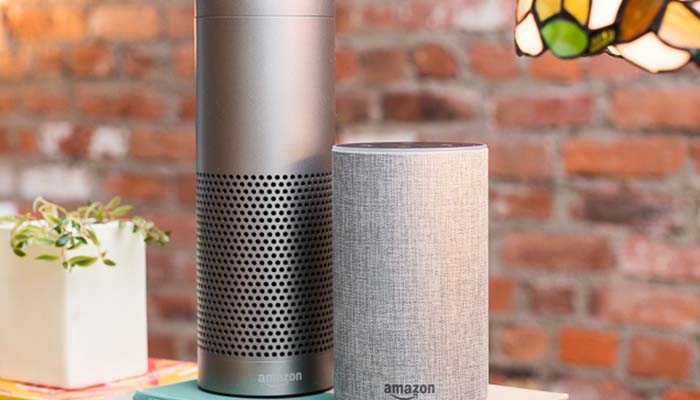
    The originator of the current smart speaker market, Amazon’s Echo devices hold the largest market share. They’re the most “generic” of the smart speakers you’ll find in stores and offer a wide variety of compatible smart home devices. Alexa, the virtual assistant that powers the Echo, is a very flexible and easy-to-use software. It responds quickly and accurately to a number of commands and can usually decipher even thick accents.

    The Echo Dot is priced similarly to the Google Home Mini, and the two are of comparable usefulness in everyday scenarios. In fact, the two devices are so similar that it’s hard to recommend one over the other. The main differences between the two is the performance of the virtual assistant. Google’s is a bit more robotic and colder, while Alexa is a bit livelier.

    Bottom Line

    Both Google Home and Amazon Echo are fine platforms for smart home hubs. If you like the idea of using a Google-based ecosystem for your home, of course, the Google Home is ideal for you. However, if you would rather have a more general and widely-applicable virtual assistant, the Amazon Echo is a bit more flexible. Both are excellent devices in the same price range, however, so it really comes down to personal preference.
  • Getting the Most for Your Old Smartphone: Smart Selling Tips

    Getting the Most for Your Old Smartphone: Smart Selling Tips

    When you purchase a cell phone, it begins to depreciate in value rather rapidly. This is somewhat like what happens to brand-new cars. The resale value of phones and new cars both drops dramatically as soon as you begin using either of them. In the case of phones, we’ve got some tips for ways you can keep this depreciation to a minimum. This way, when you go to sell your phone, you get the most you possibly can for it.

    Smartphone Selling Tips

    Phone Case

    Get a phone case as soon as you purchase a new phone. Make sure that as soon as you open the box you’ve got the phone in the case. Carrying the phone around without a case for any length of time is a surefire way to have the phone get cracked or scuffed when you inevitably drop it. Yes, we understand that many modern smartphones are gorgeous and feel great in the hand. This doesn’t mean you shouldn’t get a case.

    Your phone’s case is its first line of defense against being out in the world. Dropping it, banging it into things and scratching it can all be ways to reduce your phone’s value. One you’ve got a case on it, don’t stop there: unless the case is a full-enclosure that covers the screen, you need a screen protector. This acts as a second screen, protecting the actual screen from scratches and cracks. Ideally, you should grab a glass screen protector, as they’re more durable and can absorb more shock than plastic covers.

    Original Packaging

    When you get a new phone, don’t discard the original packaging. Set it carefully to one side, and keep as much of the original material that came with it as you can. When you go to resell the phone after you’re ready to upgrade, you’re going to want to have this stuff on hand. The same goes for the original charger and headphones that come with the phone.

    This is because you get the most money from your old phone by selling it yourself on Craigslist or eBay. Instead of selling it to your phone carrier, selling it to a private individual allows you to set the price to whatever you think is fair. Then, by including the original packaging, headphones and charger, you can charge a good bit more than other sellers who are just selling the handset. You could even include the case and screen protector as part of the price, too.

    Clean it Up

    No one wants to buy a grungy old handset. This is another huge plus to having a case: typically, your phone’s case will keep the handset from getting too dirty. However, if you intend to sell the phone and its case, both need to look pristine. There are a number of ways to safely clean electronics, so make sure you clean your phone carefully. Don’t use dish soap or harsh cleaners: specialized electronic cleaning solution and a microfiber cloth are what you’re looking for.

    Repairing the Screen

    Do a bit of research if the screen of your phone is cracked. If you find that people selling the phone with a cracked screen are fetching a much lower price than a pristine phone, you need to look into repairing the screen. Find out whether it’s more expensive to get the screen repaired than the difference in price the phone would fetch.
    For instance, if people are selling the same phone as you for $500 used, but phones of the same model with a crack are selling for only $400, then an $80 screen repair nets you an extra $20. We’d call that a good value.


  • Wi-Fi 6: Should You Upgrade Now, or Wait?

    Wi-Fi 6: Should You Upgrade Now, or Wait?

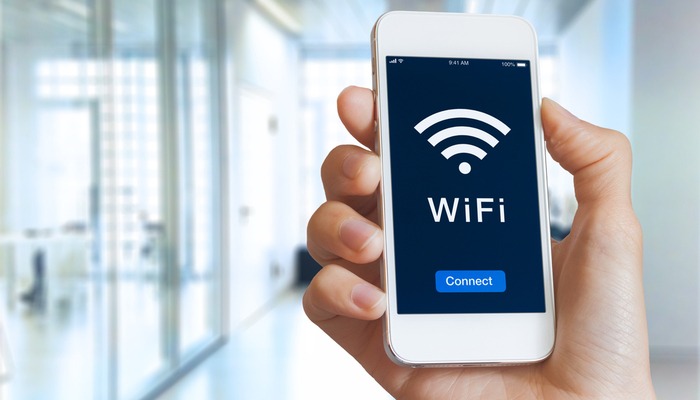
    The newest certification of Wi-Fi speeds, Wi-Fi 6, is now a reality. Next-generation routers like the Netgear Nighthawk AX12 are capable of speeds up to thirty percent faster than the top-of-the-line Wi-Fi 5 routers that are the current standard. What does this mean for the average consumer? Is it time to upgrade, or will your existing router be good for a while longer? Let’s take a closer look.

    Wi-Fi 6

    How Fast is it?

    The first question that needs to be asked of the new wireless standard is “just how fast is it?” Unsurprisingly, the answer is that it’s absurdly fast. In preliminary testing, Wi-Fi 6 routers have shown themselves capable of speeds pushing 1.2 gigabits per second. This means that the newest wave of routers would have the transfer speeds required to allow for incredibly smooth streaming video and games, as well as download speeds that sound unreal.

    At present, the fastest Wi-Fi 5 rated routers aren’t capable of pushing 1 gigabit of speed. This means that anyone with a direct fiber internet connection capable of putting out a gig of speed aren’t able to get all of the speed they’re paying for! As such, if you’re already paying for fiber speeds, it might be time to consider upgrading to the cutting edge of routers.

    What This Means

    This new Wi-Fi certification means more than just blisteringly fast speeds. Thanks to the increased power offered by the new standard, public Wi-Fi will likely get better in the coming months and years. Wi-Fi 6 routers can cover a much broader area than their Wi-Fi 5 cousins, and they can also connect to more devices at once without compromising speeds.

    Notably, Wi-Fi 6 routers are backward-compatible with Wi-Fi 5 devices. This means, essentially, every device you own that can use a Wi-Fi connection, from your phone to your tablet to your laptop. However, most devices that are rated for Wi-Fi 5 won’t be able to take full advantage of the speeds offered by Wi-Fi 6. That said, the routers themselves will be able to service more devices at once, meaning they’ll be useful even for older devices.

    High-Speed Internet

    One of the most important things to keep in mind when you consider router transfer speeds is that they’re only one link in a chain. Think of it like being on an assembly line making widgets. If you can make thirty widgets in a minute, that’s great! However, if the person to your left, who hands you completed wodgets to make into widgets, can only make ten wodgets in a minute, then you’re bottlenecked. As such, you can only make as many as the slowest person in the chain.

    The same thing occurs with Wi-Fi routers. Even if you had a brand-new Wi-Fi 6 router capable of transferring data at over a gigabit per second, that wouldn’t do you any good if your ISP is only sending you speeds at 100mbps. As such, most houses that are getting the average internet speed actually aren’t going to be interested in the newest Wi-Fi 6 routers right away. That is, of course, unless they want to future proof.

    Future Proofing

    In the years to come, it’s expected that average internet speeds will continue to rise steadily. As direct fiber connections become more common, speeds exceeding one gig will become the norm. This means that in the next few years, it’s likely that most Wi-Fi 5 routers will become outdated and unable to keep up with average transfer speeds.

    In short, that means that most homes won’t need a Wi-Fi 6 router right away. However, if you already get fiber internet speeds, you might see a bump in your Wi-Fi speeds with these new routers. Similarly, if you want to future-proof your home for the coming increases in internet speeds, you could opt for a Wi-Fi 6 router now. In either case, you’ll be picking up one of these new routers sooner or later as Internet speeds increase across the board.


  • Samsung Still Makes Tablets? Galaxy Tab S6 Review

    Samsung Still Makes Tablets? Galaxy Tab S6 Review

    Believe it or not, Samsung still makes tablets. The newest Galaxy tablet, the Tab S6, offers a number of exciting new features to differentiate itself from the pack. While general interest in tablets may be down, Samsung seems to want to change that.

    While tablets were all the rage in 2013, the interest in them has cooled notably in the past few years. More and more phones are getting huge screens, while laptops are getting smaller, lighter and more affordable. Tablets are just being squeezed from too many directions. However, the Galaxy Tab S6 is here to prove that there’s still innovation to be found in the world of tablets.

    Under the Hood

    As you’d expect from any premium tablet, this thing is a beast in terms of processing power and overall strength. A Qualcomm Snapdragon 855 powers the device, allowing it some serious chops when it comes to rendering graphics, multitasking and playing games. In general, if you’re looking for the strongest Android tablet on the market, the Tab S6 has you covered.

    The screen is a huge, gorgeous AMOLED, coming in at 10.5 inches and sporting bright, vibrant colors. Much like the Galaxy S10, the screen is so crisp and clear that it gives you plenty of real estate to appreciate just how good the excellent camera on the device is. Quad speakers on the Tab S6 offer a ton of sound quality, creating a sonic landscape that is encompassing and deep without even needing headphones.

    New Features

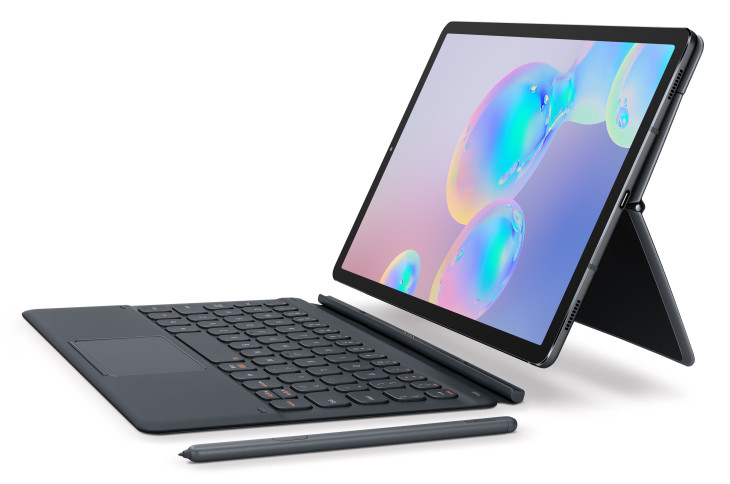
    The S Pen that works with the tablet is great, as usual. It’s tremendously useful for productivity tasks, taking notes and thumbing through presentation slides. It’s also useful as a long-range camera shutter, allowing you to take pictures from your tablet even if you’re across the room from it. The strong magnets in the back of the Tab S6 allow you to slap the S Pen on there to get a charge. About ten minutes of charge should get you through a day of use, according to Samsung.

    The Book Cover Keyboard accessory makes the Tab S6 feel almost like an Android-powered laptop. It’s stellar for productivity, allowing you to use your tablet like a powerful, small computer for tasks like composing emails or writing essays. Combined with the excelled DeX desktop interface that comes with this version of Android, and you’ve got a very powerful, versatile device.

    DeX has mouse support, and, as such, the new Book Cover Keyboard has a trackpad. This allows you to use the Tab S6 essentially just like a laptop. Unlike most two-in-ones, which are laptops pretending to be tablets, the Tab S6 is actually a tablet doing a good laptop impersonation. While it won’t be replacing your MacBook for editing videos, it’s a great device for people who need to tackle everyday tasks.

    Other Goodies

    Thanks to the super-powerful processor running under the hood, the Tab S6 seems positioned to be a strong mobile gaming platform. Thanks to a partnership with Discord, Android promises you’ll be able to use the Game Launcher overlay to chat with your friends even while you’re gaming. The high resolution display and powerful processor have the Tab S6 well-suited to even the most demanding of Android games on the App Store. Simply put, this thing could crush some Fortnite.

    The on-screen fingerprint scanner and USB-C compatibility are just icing on the cake. The tablet comes in a variety of colors, including gray and blue, and will retail starting at $650. It comes with the S Pen, but the Book Cover Keyboard is an extra $180. Later this year, Samsung promises to launch a version of the Tab S6 with LTE built-in.


  • Is $1000 too Much for a Smartphone? Price Trends

    Is $1000 too Much for a Smartphone? Price Trends

    In the last few years, we’ve seen premium smartphone prices get a little out of control. When Apple unveiled the iPhone X and the public found out it would cost a cool $1,000, people were a little shocked. Likewise, when the Samsung Galaxy S9 was announced to be at that same price point, people were concerned about the trajectory of smartphone prices.

    The latest move in this direction has been the absurd asking price for the upcoming Samsung Galaxy Fold. The super-premium smartphone will retail for nearly $2,000, making it twice as expensive as the line that many feel is too high for smartphones. In addition to this, smartphone sales are lagging across the board. What does this mean for the industry?

    Sales Trends

    Apple has been posting consistently slumping sales for the iPhone line. This isn’t due to the quality of the phones: ostensibly, the iPhone XS is the best iPhone ever. The XR, it’s less-expensive cousin, has sold far better, though, despite having notably weaker hardware under the hood. This is because it costs a solid $250 less. It seems consumers don’t mind shelling out $750 on the high end, but $1,000 is simply unreasonable for the average consumer.

    Samsung has experienced similar sales trends. Their tremendously expensive Galaxy S9 and Galaxy S10 handsets have sold poorly when compared to their predecessors, though Samsung’s A-series of more budget-friendly phones has sold incredibly well. If this has taught phone manufacturers anything, it’s that less-expensive phones are the preferred type in the modern landscape. But why is that?

    Stronger Phones, Longer Lifespans

    There was a point in time when people would trade their phones out for the newest model once every two years or so. This cycle was so consistent that manufacturers literally had strong years and weak years to incentivize it. Today, though, the average consumer is waiting three years or more before they trade their phone up for a new one. Phones aren’t just more expensive, they’re better across the board than in the past.

    In general, smartphones are better now than ever before. Crisp screens, unbelievable cameras, fast processors. Even phones in the $500 to $750 range are unbelievably powerful. For the average consumer, a strong phone with a good camera that gets tons of software updates is just as good as the hottest new thing. Besides, why shell out $1,000 for a new phone when your current phone works fantastically well?

    Software, not Hardware

    Hardware revisions in recent years have slowed in intensity greatly. At one point in time, each new generation of phones brought huge increases in power and speed. Now, each new model year is iterative instead of revolutionary. There’s not a lot distinguishing the iPhone X from the XS, or the Galaxy S9 from the S10.

    Instead, software updates are the meat of the current smartphone cycle. Android is polishing their next OS update, Android Q, while Apple is hard at work on iOS 13. These two are likely to be bigger news than whatever new handsets the two companies drop this September. After all, iPhones all the way from the SE can use the new iOS, making them feel like they have a new lease on life.

    What Will Change

    It wouldn’t surprise us if the big phone manufacturers slowed down significantly on hardware production. Rather than trying to dress up minor revisions as brand-new handsets, it’s more likely we’ll see them issue a main flagship phone, its budget sibling and an XL version, and hold on to those for around three years. Then, when a major shift does come along, they can push out their newest handset, organically picking up new users along the way with software updates.

    Or maybe they’ll keep throwing $2,000 folding phones at us. Who knows?


  • Anker Soundcore Liberty Air: Discount Price AirPod Killers

    Anker Soundcore Liberty Air: Discount Price AirPod Killers

    If you love the idea of wireless earbuds for your runs and walks, you’re likely intrigued by Apple’s AirPods. They’re stylish, they have great sound quality and they’re truly wireless. There’s a lot to love about them, except for that tremendous price tag. Coming in at around $160, the AirPods are seriously expensive for being small earbuds that don’t do a great job of blocking out other sounds.

    That’s where high-quality alternatives come into play. Anker’s Soundcore Liberty Air come in at the low price of $80, making them literally half the price of Apple’s offering. However, are you getting half the value when you go with Anker, or do the Soundcore Liberty Air earbuds live up to their “Airpod Killer” nickname?

    Sound Quality

    Of course, one of the first considerations when you’re looking at a pair of earphones is the sound quality. Thankfully, the Soundcore Liberty Air earbuds aren’t lacking on that front. The drivers, though small, pack a ton of punch. The bass levels are rich and smooth, not booming by any stretch but powerful in their own way. Mid-tones sound even and clean, and the higher register is audible even on loud, highly-compressed songs.

    One of the biggest strengths of the sound quality of the Soundcore earbuds is that they sport a rubber ear tips, creating a seal with the inside of your ear. This not only helps them stay put when you’re running or jogging, but it also helps them to block out outside sounds and makes the listening experience more encompassing. This is a marked improvement over the AirPods, which don’t do a great job keeping sound out.

    Design

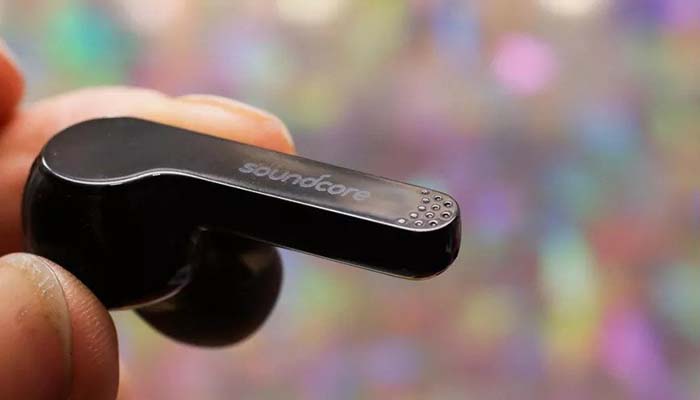
    If you’re not a huge fan of the “hair dryer” design of the AirPods, you’re likely going to like the look of the Soundcore Liberty Air earphones. They sport a shorter, flat tail, as opposed to the long, cylindrical tail of the AirPods. The back of both earbud is actually totally flat, making these discreet and stylish earbuds. As we mentioned earlier, they sport rubber ear tips that allow them to make a seal with your ear. Not everyone loves this earbud design, but if you do, these are great.

    They fit snugly in their charging case, which offers an excellent storage solution while also providing up to an extra three charges. Since each charge lasts around five hours, this means you’ll likely get a solid twenty hours if the earbuds and the charging case are both totally topped off before you leave the house. That’s a lot of juice for these little earbuds, making them a great companion for a commute or a long plane ride.

    Minor Quibbles

    On the negative side, if you don’t like the rubber ear tips, then you really don’t like them. They’re integral to the sound quality of these earbuds, as getting a good seal is how they deliver their sound. If you can’t get a good seal due to the shape of your ears, then you’re going to find these to be absolutely worthless earphones.

    Another small quibble is the charging case: it uses Micro USB instead of USB-C, making it a bit outdated in that regard. It also means the case charges a bit more slowly than it would if it used a more modern power cable.

    Bottom Line

    That all being said, the Anker Soundcore Liberty Air earphones are a great deal at $80. If you’re in the market for good true-wireless earbuds, then these are a great pickup. The only real concerns are the ear tip design and the somewhat-dated charging case. All-in-all, these earbuds are close to deserving their nickname of “AirPod Killers”.


  • Saving on Back to School Shopping: Tax-Free Weekend and More

    Saving on Back to School Shopping: Tax-Free Weekend and More

    There are a number of schools of thought when it comes to saving money on school supplies. On the one hand, there’s people who just buy any and every supply under the sun and don’t even check the price tag. Other parents carefully pick and choose which items, and which brands, they’ll be sending their young ones to class with in order to save every penny they can.

    What if you could have the best of both worlds? Shopping for every school supply your kids could possibly need can be pricey, but it ensures they’re well-prepared. Likewise, saving money on supplies is great, but you don’t want your kids to be at a disadvantage in school. Thankfully, you can have your cake and eat it too with our back to school shopping tips!

    Tax-Free Weekend

    Many states offer tax-free weekends around the time back to school shopping season starts. This is usually in early August, so it’s nearly upon us in most states. Check your state online to see if there’s a tax-free weekend coming up. This is the best time to stock up on back to school supplies, though you may need to contend with a bit of a crowd.

    Of course, tax-free is only a portion of the savings you could find when you’re hitting up the stores for discounts. There are many other ways you can find some substantial discounts on your supplies, though you might need to be a bit more careful in your planning than just “I’m shopping on tax-free weekend.” Here are some other ways you can save big while you’re stocking up.

    States that Have Tax-Free Weekends

    The majority of states that have tax-free holidays are in the Southeast. The only exceptions are Georgia and North Carolina, neither of which offer any tax-free holidays. Missouri, Iowa, Wisconsin, Ohio and Connecticut are examples of non-Southern states that have tax-free weekends, as well.

    Weekly Ads

    Make a plan of attack for how you’re saving money by checking out the weekly ads for whatever stores you’re hitting up. Compare and contrast prices between places like Staples, Target and Walmart, and make sure you’re getting the best deals. Be ready to get there early on Saturday morning so you beat out everyone with the same idea as you: otherwise you might miss out on the deal altogether!

    Don’t be afraid to plan to hit multiple stores, either. If one store has a great deal on pencils, but another store has great notebook prices, you’ll want to make sure you go to both and stock up. There’s no reason to pay more in one place if you can get the same items for half the price somewhere else!

    Coupons

    If you really want to pile on the savings, you can go in for coupons. This will require even more forward planning than just selectively buying from the weekly ads, though the potential savings are tremendous. Many retailers get into price wars around this time of year, and their coupons are a big part of that. As such, you’re likely to find incredibly steep discounts on things like binders, calculators and highlighters through coupons during this time of year.

    If you’re able to find a combination of deals that are at the lowest price through both the weekly ads and through coupons, you’re likely going to need to keep track of all of the deals with some kind of list or planner. However, the prep work pays for itself when you can get out with deals as good as half off or better! Stack all of these savings with the tremendous savings you could get from a tax-free weekend and you’re looking at some serious savings.


  • Best Back to School Tech: Keys to Academic Success

    Best Back to School Tech: Keys to Academic Success

    There’s something magical about the first day back at school, isn’t there? Popping new line paper in your binder, busting out freshly sharpened pencils and getting to know all of your new classmates. In 2019, however, there’s more to it than just that: you need to have the right tech for success. What do you need to excel this year at school?

    From the best laptops for taking notes and doing research to the best entertainment devices, we’ve got you covered. Whether you’re buying for yourself before you head back to college, or you’re a student asking your folks to get you the hottest new tech, the goal is to save money while getting an edge on the coursework. Let’s take a look at some of the best back to school tech.

    Best Laptop: MacBook

    There’s nothing quite like being able to take notes at the speed you type. While writing is more direct, typing is faster by a wide margin: that’s where a good laptop comes in. Whether you’re a freshman just going into college or a grad student heading in for your doctorate, there’s nothing quite like having a good station to take notes from. What’s more, the newer MacBook models are thin and light, fitting easily in a backpack.

    The bright screen, responsive keyboard and robust suite of creative programs available to Macs are a huge draw for students, as well. If you need to edit photos or videos, record your music or other such creative endeavors, a Mac is the right tool to have on hand. Not to mention, your classmates will likely appreciate the stylishness that the Mac brings to your study time!

    Best Apps: Chegg and Calendar

    Whether you’re an Apple or Android user, the most important app in your phone for going back to school is your calendar app. There are also third-party apps for to-do lists and reminders, though both Android and Apple have such functionality baked into the core of their OS. Make sure you put your class schedule in your phone, as well as reminders for test dates, club meeting times and other extracurricular activities.

    Another important app is Chegg, an online resource that is great for students. It’s replete with resources like books, test prep, study materials and more. It’s a bit pricey, so finding someone to split the cost with could be a good move. In any event, if you need someone on your side to help you with the more free-form feel of college, Chegg is a great resource.

    Best Storage Solution: Google Drive

    Remember: store everything on the cloud as well as on your hard drive. We prefer Google Drive for this, though iCloud is great for Apple fans, too. In either case, it’s important to have cloud backups of all of your materials in case something horrible happens to your laptop or thumb drive. In the event that your hardware is destroyed or lost, you can fall back on your cloud backups.

    Make sure you also save often. There’s nothing more soul-crushing than powering through thousands of words for an essay just to have the battery die on your laptop and you lose all of your hard work. Make sure you remember the shortcut for “save document” and save often! There’s no reason to put yourself at a disadvantage when the unexpected strikes.

    Best Tablet: iPad

    It’s nice to be able to kick back and watch some Netflix or YouTube to unwind from a long day of class and studying. That’s where your tablet comes in. We’re partial to the iPad, but there are other great options out there too. In either event, tablets are great for reading articles or books while relaxing in bed or between classes, and you can even keep up with your emails and planner if you synch the tablet with your phone’s apps.

    The big screen, powerful processor and connectivity features are what make the iPad such a great companion for a college student. When it’s the end of the day and you’re just trying to kick back and enjoy yourself, the tablet is a great way to pay a couple of games or watch a bit of your favorite show before bed.


  • Saving Money on Back to School Clothes

    Saving Money on Back to School Clothes

    Having kids is expensive, there’s no two ways about it. Between their school supplies and back to school clothes, they can be even more expensive around the end of summer. If you’re gearing up to send your kids back to school, you’re probably wondering about the ways you can keep the costs down while still outfitting your little one with some sharp clothes.

    Thankfully, we’re here to help. Today we’re going over some of our tips on how you can save money while shopping for back to school clothes for kids from grade school all the way up through college. Let’s talk saving money!

    Secondhand

    There’s nothing wrong with heading down to the thrift shop and picking up some secondhand clothes for your kids. Here’s the thing about fashion: it’s what you make it. You can find some stylish and inexpensive things at thrift stores without having to even look all that hard. A little bit of creativity can go a long way towards equipping your kid with some stylish new clothes for just a few bucks.

    There are also more “boutique” style secondhand shops like Plato’s Closet that take in secondhand designer clothes. This is a great way to pick up some very stylish clothing on the cheap. Another thing to keep in mind is that buying clothes secondhand is also great for the environment! The more clothes that are bought new, the more clothes get made. These clothes can often end up clogging up landfills when people decide they’re done with them.

    When to Shop

    If you’re going to hit up big department stores, you’re going to need to know when to hit the shops to get the best deals. In particular, you’ll want to hit the stores up on Tuesdays and Fridays for the best prices. Tuesdays, for whatever reason, are the days with the lowest foot traffic in department stores. This means that employees have more free time, sales are down, and managers are more likely to mark items down to get a few sales rolling in.

    Fridays, on the other hand, are when most department stores roll out their new week of sales. It’s also when most stores get their new shipments of clothes. This means that you’re more likely to get the drop on a good deal if you’re shopping on a Friday for new clothes.

    What to Look For

    As a general rule, when you’re shopping for back to school deals, the discounts you want to see should be around 40% off or so. Any discount for less than 40% is likely closer to a “standard” discount, but you’re not looking for the average, you’re looking for better than average. Around 40%, or even higher than that, and you know you’re getting a good deal.

    Make sure you don’t fall for “buy this, get that” deals that make you spend more money than you otherwise would. These look like “deals” but actually make you buy clothes you wouldn’t have even picked up normally.

    Gift Cards

    If you really want to make sure you get the absolute best deal possible for your back to school clothes shopping, you can use discounted gift cards. Typically, you can buy discount gift cards from wholesalers that offload recycled gift cards in bulk. This allows you to save a solid percentage on your shopping without having to fuss with coupons or deal-hunting.

    That being said, when you add all of this together, and even find some coupons on top of that, it’s likely you can get out of a big box retailer for a very low amount of money while still getting great clothes for your kid.


  • What’s Cooler than being Cool? Best Coolers for Your Pool Party

    What’s Cooler than being Cool? Best Coolers for Your Pool Party

    Who doesn’t love spending time out by the pool over the summer? Or going out on a picnic, or hosting a barbecue? No matter what your favorite outdoor activity is during the summer, you need to make sure you bring a good cooler to keep all of your drinks frosty in the sunshine.

    It’s tough to decide which cooler is the best, though. The top-of-the-line coolers are quite expensive, and the budget coolers might not keep your drinks cold. How can you narrow it down and find the best? No sweat! We’re here to help. We’ve done some extensive testing (who says work can’t be fun?) and experience has borne out a few clear winners. Here are some of our picks for the coolest coolers you should pick up this summer!

    Igloo MaxCold

    As far as value goes, you simply don’t beat the Igloo MaxCold. You can often find this cooler on sale for less than $50, and that makes it one of the best values as far as coolers go. It’s got great performance, even in direct sunlight, keeping drinks cold for hours. As for the negatives, it’s not as tough or durable as some of the competition, and it’s not rotomolded. That means that the plastic isn’t quite as good at keeping the cold air in as a comparably-sized rotomolded cooler.

    In spite of its outdated and somewhat dorky design, the Igloo MaxCold is still a great value. It’s far from a looker, and it’s not going to make anyone think you’re a high roller. However, most people aren’t going to be calling you anything mean when you’re rolling up with a cooler full of cold beers. For those on a budget who still need a hard-working cooler, this is the one for you.

    Orca Classic Cooler

    For something stylish, durable and rotomolded, check out the Orca Classic Cooler. This well-designed and tough cooler comes in at $300, which is a lot, but it’s well-worth that price tag. Consider it an investment in summer fun to come! For that price, you get what may be one of the best coolers on the market, in terms of size-to-price ratio for a cooler with as good of insulation as the Orca has.

    The Orca Classic Cooler has a lot of other things going for it, too. It look great and comes in a ton of awesome colors, so it’ll be stylish on your campsite as it keeps your beers cold all weekend. It’s also rather comfortable to carry, thanks to some smart design choices that make it ergonomic and hand-friendly, even when toting it around over long(ish) distances. It’s worth noting that this cooler is set in a tie with its direct competitor, the Cabela’s Polar Cap Equalizer Cooler.

    Cabela’s Polar Cap Equalizer Cooler

    Set in a complete tie with the Orca Classic Cooler is the also-wonderful Cabela’s Polar Cap Equalizer Cooler. It’s also rotomolded, durable and great at keeping the cold in. It’s also $300, and the two coolers have very comparable amounts of storage inside. The Polar Cap offers slightly more internal space, which is a slight bump in its favor, though.

    The other major differences between these two equally-priced coolers is that the Polar Cap is a little more uncomfortable to carry. The handle design isn’t great, and it’s a bit of a hassle to lug around. Incidentally, it also sports slightly less options in terms of colors, making it somewhat dorkier by comparison. To make up for this, the Polar Cap sports some nifty bottle openers in the rubber latches that close it up. As such, it’s sort of a wash: just pick the one you like the look of better!