Blog

  • Top Natural Pain Remedies: Try These New Approaches

    Top Natural Pain Remedies: Try These New Approaches

    Suffering with constant pain, such as that from arthritis or neuropathy, can be incredibly detrimental to your overall quality of life. However, there are ways to approach pain that can help it become more manageable. Today we’re looking at a few of the top ways to combat pain naturally without breaking the bank!

    Top Natural Pain Remedies

    Meditation

    The saying “mind over matter” comes to mind when someone mentions meditation. Meditative techniques involve a ritual of clearing one’s own mind in order to gain a positive mental and physical effect. In the case of pain management, meditation can help you to focus and push the pain to the edge of your perception, making it more manageable.

    Yoga

    Yoga is a semi-spiritual practice that incorporates meditative techniques with physical movements. Practitioners of yoga say that it is very calming, soothing and engaging. It’s also quite good for your physical well-being, as it doubles as low-impact exercise. Many with chronic pain swear by their yoga routine, as it helps to bring their pain to within tolerable levels.

    Tai Chi

    Another meditative practice, Tai Chi is a Chinese form of yoga-like movements designed to channel your inner “spiritual energy,” or Chi. Tai Chi, like yoga, is very popular as a form of low-impact exercise. The form is often used by older persons, as it has a notable effect on increasing balance and sure-footedness, making the likelihood of taking a fall much lower.

    Massage

    Visiting a massage therapist for a session can do wonders for pain. Massage therapy utilizes physical manipulation of muscles and tendons, helping to relax and energize the client. While massage therapy sessions can be a bit on the expensive side, they are both wonderfully relaxing and great for alleviating chronic pain.

    Turmeric

    Try cooking with more turmeric! The root-based spice is known for its anti-inflammatory properties. While you’re at it, try to avoid alcohol and processed sugars, as they can both act as irritants that inflame your body’s systems, leading to greater chronic pain.


  • Getting the Most out of Your iPad: Multitasking Functionality

    Getting the Most out of Your iPad: Multitasking Functionality

    The newest generation of the iPad implements two new functions that allow you to really multitask. If you’ve been wondering how you can get the most out of your iPad, it’s time to learn more about Split View and Slide Over. These new functions are some of the strongest additions to the iPad since it was launched nearly a decade ago. Let’s dig into them!

    iPad Multitasking

    Why Multitask?

    While your iPad might not be replacing your laptop for productivity tasks, the new multitasking features get it close. If you need to consult an image in one app and work on an email, you’re composing in another, the iPad can handle that. Maybe you’re stuck on a hard level in your favorite game and need a guide.

    Maybe you just want to watch a YouTube video while you work on something else in another app! No matter what your reasoning, there are a number of great applications for this multitasking tech.

    Slide Over

    Slide Over allows you to have one app running while another hovers above it in a pop-out panel. This is great for if you need to reference materials from one app while you’re doing complex tasks in another. For example, consulting a table for numbers while you compose an involved email. Another example would be drawing from a reference image without needing to switch between two apps over and over.

    Split View

    Split View, meanwhile, allows you to pin two apps open at the same time, allowing you to see more from the secondary app. This mode also allows you to do more work in the secondary app, such as composing a note in the Notes app while you’re researching things on Safari.

    Whichever multitasking method you prefer, the iPad works great as a smaller replacement for a laptop. All we need now is for Apple to fully implement mouse compatibility, and the iPad Pro can function as a proper miniature Mac!

  • Apple Loses Supreme Court Case over App Store Policies

    Apple Loses Supreme Court Case over App Store Policies

    In a surprising 5-4 decision, the Supreme Court has sided with four iPhone owners who sued Apple over alleged monopolistic App Store policies. According to the plaintiffs, Apple’s policies resulted in inflated prices for apps on the App Store, since iPhone users have no alternative for downloading new apps.

    Apple Loses Historic Supreme Court Case

    The Reason for the Suit

    The suit revolved around inflated prices on the App Store due to Apple’s policy demanding 30 percent of all revenue from third-party apps. Apple responded by stating that they don’t set the prices on the app store, and so any legal issues related to overpaying on apps should be directed as suits to the third-party sellers. Essentially, Apple washed their hands of the blame for consumers overpaying.

    Monopolistic Tendencies

    The opinion, written by Justice Brett Kavanaugh, holds that Apple’s policies enabled them to hide behind third-party sellers to avoid allegations of monopoly. “Apple’s theory would provide a roadmap for monopolistic retailers to structure transactions with manufacturers or suppliers so as to evade antirust claims by consumers.”

    This opens the doors for consumers and third-party developers alike to sue Apple over their App Store policies. At present it’s unclear which, if any, parties will seek damages against Apple in relation to this Supreme Court decision.

    What This Means

    It’s unclear what this will mean for Apple going forward. The company has not commented on this ruling at the time of this writing, though it seems likely they will have a statement soon. The company could be facing some serious damages in court, as antitrust suits can see the plaintiffs recovering up to three times the amount of the damages.

    Whether this will mean that Apple will have to amend its App Store policies, or allow for other platforms of app sellers on their phones, is unclear.

  • Adult Asthma: What You Should Know

    Adult Asthma: What You Should Know

    Asthma is often misconstrued as a children’s disease, the type of thing you grow out of. However, this is not the truth. Many adults actively struggle with asthma symptoms, and some adults don’t even realize what they are dealing with.

    Adult Asthma

    What is Asthma?

    Asthma is a respiratory condition caused by a sudden constriction of air passages in the lungs called bronchi. When these bronchi constrict, it makes it difficult to draw air into one’s lungs, resulting in coughing, chest pain and wheezing. Adults often notice these side effects when they’re exercising or otherwise respirating heavily.

    Many people who aren’t often active may even be unaware of their own asthma. These symptoms, to them, simply feel as though they are out of shape or short on breath. These people are often too embarrassed by their physical state to seek out help.

    Could You Have Asthma?

    Here’s the thing: asthma is a serious issue. If you feel like something isn’t right with your breathing, you need to seek help from your doctor. If you had asthma as a child, you’re at a much higher risk of having the condition as an adult. Some women are at higher risks of developing asthma after becoming pregnant or experiencing menopause.

    People with acid reflux are also at an increased risk of developing asthma. Additionally, if you experience seasonal allergies, you could be at a higher risk of developing the breathing condition. When you feel like something isn’t right with your breathing, it isn’t something you should ignore. See your doctor about any abnormalities with your respiration.

    Seeking Treatment

    Your doctor can diagnose what your breathing issues are. When you feel as though something isn’t right, don’t hesitate to see a medical professional. If you’re diagnosed with asthma, you may be prescribed an inhaler. Inhalers contain medication that is to be inhaled in order to relief the bronchial spasms that constrict breathing.

    Asthma attacks can be deadly if they lead to unconsciousness. Essentially, sufficiently serious asthma attacks cause the victim to suffocate. If you have an inhaler with you, however, you can simply administer the medicine to allow your lungs to return to a normal breathing pattern. This could be potentially life-saving!

  • Do You Need a Video Doorbell? The Facts

    Do You Need a Video Doorbell? The Facts

    Video doorbells are a relatively new trend among home security suites. If you’re often away from home, or worried about people coming up to your door, maybe you should consider a video doorbell. They allow you to see who’s at your door, offer you the option to speak to people through an app when they’re at your door, and even interface with your smart home system.

    Video Doorbell

    Which One is Right for You?

    There are a number of options when it comes to the top video doorbells. If you’re looking to get a video doorbell to secure your home, consider some of these options. Factors like budget, range, and which smart home hubs work with them are the biggest considerations.

    Nest Hello

    The Nest Hello is a solid all-around video doorbell. It has connectivity through both Bluetooth and Wi-Fi and can connect to Amazon Alexa-enabled devices. It sports a very standard 160-degree angle for its camera, and allow for both two-way audio and night vision, making it a great option for the average home. It falls right in the middle of pricing, coming in at $230.

    RemoBell S

    The best budget video doorbell on the market is the RemoBell S. If you’re looking for a great video doorbell that won’t break the bank, look no further. For a low price of $100, you can get set up with a video doorbell that offers Google Assistant and Alexa connectivity, two-way audio and night vision. It even sports a full 180-degree image! That’s a lot of band for your buck!

    Ring Video Doorbell Pro

    Our favorite high-end video doorbell is the Ring Video Doorbell Pro. This excellent option offers a full 1080p resolution camera, all the two-way audio and night vision support you’d expect, and a great app interface. Ring can be configured to work with Amazon Alexa, and can even be worked into greater home security ecosystems.

  • Coolest Things Seen at Google I/O 2019

    Coolest Things Seen at Google I/O 2019

    Google I/O 2019 has come and gone, and we’ve learned a lot about Google’s upcoming slate of products. Today we’re taking a look at some of the coolest headlines from that massive event, from gaming infrastructure to new Android operating system updates!

    Google I/O 2019

    Android Q

    The newest version of Google’s own Android infrastructure, Android Q, is coming up later this year. Aside from questions regarding what desert name starts with Q, Google’s answering some interesting questions with their new OS. For instance, the OS will offer support for foldable smartphones, out-of-app functionality through “bubbles” and further system privacy settings.

    Google Stadia

    Google’s upcoming cloud gaming infrastructure, Stadia, got name-checked at the event, as well. The system will allow high-end gaming on any screen that you can stream an internet signal to. While Google didn’t get into specifics, like release date or pricing, they spoke at length about the technical details of the system.

    Without getting too in-depth, Stadia will use a “streamer,” a program that helps to keep even a higher latency signal from appearing too stuttering or choppy. This is good news for people who were concerned about poor performance of the service on lower-end internet connections.

    Pixel 3a Line

    As everyone anticipated, Google launched the Pixel 3a line of affordable Pixel smartphones the day I/O started. The phones are some of the best budget Android phones on the market, making them a wonderful addition to Google’s lineup.

    The 3a sports the awesome cameras found on the Pixel 3, along with a huge screen and a great intro price of $400. If you’re looking for a low-price, entry-level Android phone, you can’t go wrong with the Pixel 3a.

    Google Duplex Updates

    Google Duplex will be receiving new functionality that will allow it to interface with websites as well as its existing phone applications. If you want to shop for something online, you can instruct Google Duplex to do so for you via your voice and it’ll simply get what you want without you having to take the hassle of the extra clicks.

  • So Long, Beef: Meet the Impossible Burger

    So Long, Beef: Meet the Impossible Burger

    While everyone loves a hamburger, there are some issues with eating animal meat. For one thing, some say its unethical to take the life of a living animal for food. Even if you don’t agree with that point, the science is clear that red meat is hardly good for you.

    But burgers are so good! Why can’t we have a burger that isn’t bad for you and doesn’t require cows to be slaughtered? Good news, compassionate burger-lovers: the Impossible Burger provides just that. A delicious, beef-like patty made entirely from plant matter.

    Impossible Burger

    What It’s Made From

    The Impossible Burger isn’t a soy or lentil or bean patty that’s just shaped like a burger. No, instead, it’s made in a lab setting, from potato and soy proteins, and made to look and taste just like animal meat. Included in the patty are coconut and sunflower oils, which act as the burger’s fat and let it sizzle on the grill.

    Meanwhile, the whole thing is held together by methylcellulose, a binding agent that also acts as a source of fiber. The burger then uses a type of heme, the oxygen-carrying molecule found in all living things, as a source of flavor. The lab uses soy heme, injected into yeast cultures and then harvested en masse, to give the burger a meat-like flavor.

    What it Tastes Like

    It tastes like beef, full stop. If you’re a vegetarian who misses burgers, or a meat-eater who wants to cut back on eating animals, this burger hits the spot. That’s a hard trick to pull off! In fact, we’ve seen people who are vegetarians actually find the Impossible Burger “gross,” and “hard to eat” due to its greatly meat-like consistency and flavor.

    The Cost

    Generally speaking, the Impossible Burger is a bit more expensive than a normal meat patty. For instance, many restaurants sell the Impossible Burger for $13, where the normal burger tends to be around $9. However, we feel its worth it to be kinder to your body and the environment. After all, every little bit helps.

  • Real HomePod Killer? Sony’s Smart Home Speaker Now Just $50

    Real HomePod Killer? Sony’s Smart Home Speaker Now Just $50

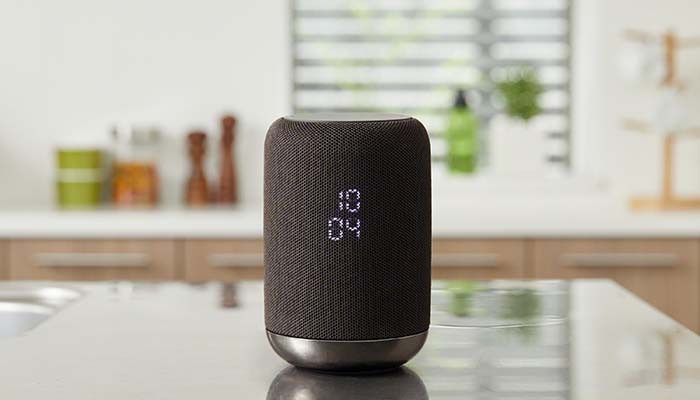
    Sony’s LF-S50G smart home speaker has recently received a price cut down to $50. The speaker started at $200, putting it at a comparable price point to Apple’s HomePod. With its new, reduced price, though, it’s a much sweeter deal than Apple’s expensive, ecosystem locked HomePod.

    Sony LF-S50G Speaker Now $50

    The Speaker

    The LF-S50G itself has stellar sound quality. Music, podcasts and audiobooks all sound great coming from this small, sleek speaker. Included in the device is Google Assistant, ready to help organize all of your smart home needs. In short, for only $20 than the Google Home Mini or Amazon Echo Dot, you get a speaker that’s far more powerful in sound quality.

    Google Assistant

    Google Assistant is helpful in a number of ways. You can ask the system basic questions, like for weather and traffic reports. If you have other smart home devices, like smart lights, locks, thermostats or the like, you can control them from your Google Assistant-enabled speaker. Most commonly, you can call out for the speaker to play your music for you.

    The Right Price

    If you’ve been looking to break into the smart home ecosystem, this is the speaker to do it with. The smart speaker is a small $20 more than the best budget smart speakers, and it packs way bigger, better sound into its small frame. It helps that this is all wrapped into a sleek, attractive package.

    The black finish and elegant styling makes this just as appealing as a piece of eye candy as it does a piece of tech. Did we mention this speaker sports 360-degree sound, like the HomePod? Nothing makes a room feel more alive when you have guests over than huge, room-filling sound coming from all directions.

    In short, this is a hard deal to pass up. For the low price of $50, it’s hard to beat the value of this smart speaker. The huge sound, small size and low price add up to make this the best deal on the smart speaker market right now.

  • 2019 Infiniti Q60: A Worthy Affordable Luxury Car?

    2019 Infiniti Q60: A Worthy Affordable Luxury Car?

    Infiniti is known for making luxury cars of exemplary quality with reasonable price tags for the average person. The 2019 Infinity Q60 is upon us, and it’s time to ask: is this a worthy affordable luxury car? Let’s look under the hood, inside the cab and at the specs and find out what makes this Infiniti stand out from the crowd.

    2019 Infiniti Q60

    Performance

    The most important thing about any luxury car is performance. If you’re starting a vehicle at $40,850, then it’s important the car is actually fun to drive. In the case of the Q60, it is satisfying, responsive and quick. The engine is a bit quieter than you might expect, but the acceleration and power on display here are certainly impressive.

    This goes double for the Red Sport 400 spec, which will run you an extra $15,000, bringing the starting price to $55,000. This trim level nets you a bump from 300 horsepower to 400, as well as a few minor aesthetic cues to differentiate the vehicle from its base trim.

    The Cab

    The ride is smooth and enjoyable, though the steering is a bit lacking in excitement. However, the notably lacking part of this luxury Infiniti is the infotainment system. For whatever reason, Infiniti’s outdated InTouch system is still in play here, sporting graphics from 2008 and features from 2012. The underpowered tech on display in the cab leaves us scratching our heads.

    Surprisingly, despite how quiet the engine is, the ride on the highway catches a ton of road noise. Crank up the tunes to drown this out, but it’s a bit of a drag to hear the road instead of the purr of the engine.

    Bottom Line

    Compared to some of the competition, like the Audi S5 and the Lexus RC, this Infiniti is a solid contender. If you don’t mind the underpowered tech or the quiet engine, there’s a lot to love here. However, unless you don’t get a lot of opportunities to gun it, we highly suggest you get the Red Sport 400 upgrade, as it makes the car a blast to drive.

    Noting that, bumping from $40,000 to $55,000 might take the vehicle out of the “affordable” price category. However, even the base trim offers a fun experience, if you’re looking for an affordable and stylish luxury vehicle.

  • Trouble Sleeping? Simple Tips for Getting Better Sleep

    Trouble Sleeping? Simple Tips for Getting Better Sleep

    It’s hard to get good sleep these days. There are a million little distractions all tugging at your attention. How is one to get some decent rest? Today we’re going to break down some of our simple tips for getting better sleep at night. Remember, the better the sleep you get, the healthier you’ll be.

    Getting Better Sleep

    Caffeine

    Try to avoid caffeine later in the day. While there are lots of benefits of caffeine, you still don’t want to drink it within six hours of going to bed. Caffeine amps up your body’s nervous system, making you much less likely to get good sleep.

    Stop Napping

    Nothing throws your body off more than taking long naps in the middle of the day. These long naps can seriously confuse your internal clock, making it harder for you to get to sleep or stay asleep. This results in a negative spiral, where you’re napping longer to make up for all the sleep you’re missing at night. Your best bet? Stop napping altogether.

    Get Out More

    Try to get out more during the daylight hours. Spend time out walking, in the sun, burning calories and wearing yourself out. When your body is exposed to more sunlight and activity, it makes your circadian rhythms react accordingly.

    Your circadian rhythms are the natural functions your body goes through to help you sleep well and wake up on time. Modern life, especially if you don’t get out enough, can lead to disruptions in your rhythms. So, try to get out more to encourage your normal body’s day/night rhythms.

    Less Blue Light

    You should also try to take in less blue light during the evening. Blue light makes your body wake up more, as it looks like light from the sun’s own rays. This makes your circadian rhythms work against you and keep you up later!

    Consider turning on Night Mode on your phone, installing a blue-light filter on your laptop, or even buying blue-light filtering glasses.