Category: Reviews

  • Get a Taste of Luxury with the 2019 Acura MDX

    Get a Taste of Luxury with the 2019 Acura MDX

    2019 will be remembered as the year of SUV. Trends in the automotive market show that everyone wants an SUV right now, and who can blame them? They’re spacious, offer a smooth ride and can carry you and your family all over! Not to mention, they’re great for carrying equipment and going camping. Acura hasn’t missed the signals, either, and has brought a pretty sweet new model for the 2019 year.  The 2019 Acura MDX, unveiled earlier this year, is a new entry-level SUV in Acura’s range. Don’t let its entry-level price fool you, though, it’s a sweet vehicle.

    2019 Acura MDX: A Modern Design

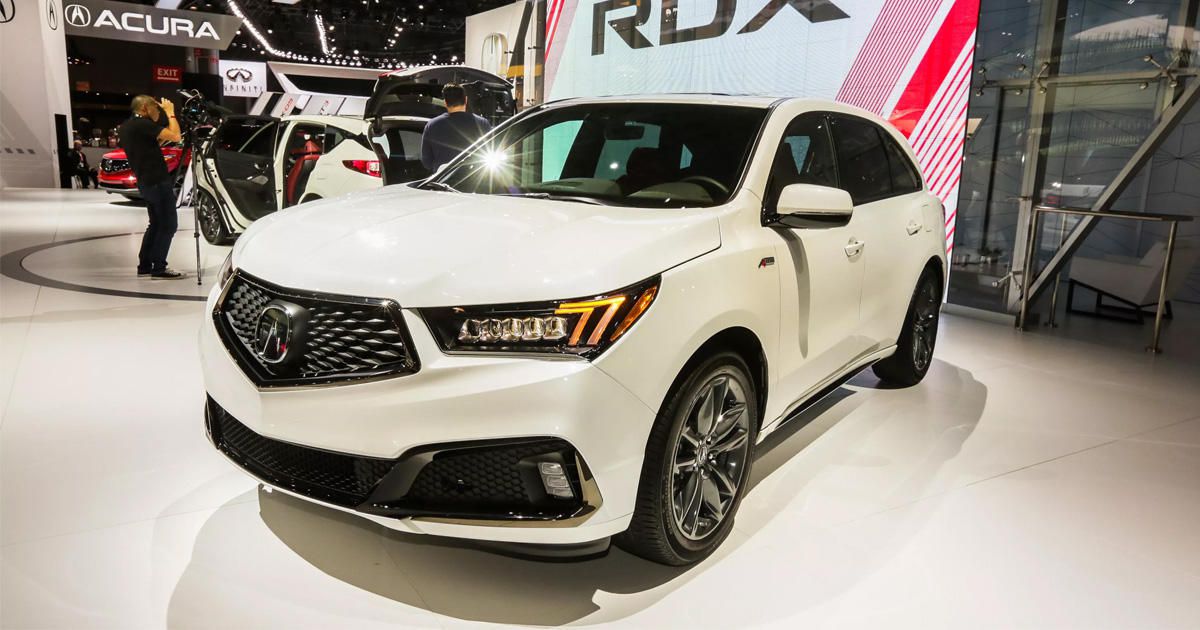
    While the MDX has been around since 2013, this newest entry is a slight overhaul. It now features LED-matrix headlights that are crazy bright, first seen on the TLX. Acura’s new diamond-pentagon front grille also makes an appearance here, looking mean and sleek all at once. The A-Spec has a pseudo-sporty look that underscores the combination of luxury and style. The interior boasts sports pedals, A-Spec gauges and incredibly comfortable seats. It’s really hard to beat the A-Spec!

    And A Modern Ride to Match

    The engine, a Honda-made 3.5-liter J series, has 290 horses and 267 pound-feet of torque. Those are impressive numbers for such a big, easy-riding vehicle. On top of that, the smooth suspension and clean braking give you an enviable ride that matches the MDX’s sleek looks. Whether you’re heading across town or across country, this vehicle will handle great and make the ride fun.

    High-Tech Amenities

    The MDX also sports a ton of high-tech accoutrements that you want to see in an SUV in this price range. For one thing, the MDX sports AcuraWatch, the company’s proprietary advanced safety features. These include things like lane keeping assist, cruise-control with radar guiding, braking assist and forward collision warnings.

    Pricing

    The 2019 Acura MDX has a starting price of $44,300, which sets it firmly in the “luxury” spectrum of SUVs. That said, you get a lot of bang for your buck! If you’re looking for a high-tech, luxury ride, look no further!

    Feature Image Credit: CNET

  • Best 5 Laptops Under $500 in 2018

    Best 5 Laptops Under $500 in 2018

    Laptops are very essential these days- for school, work, or just personal use. The price of a premium new laptop can cost up to $1,000, which is pricey for anyone. Numerous companies have made laptops more affordable while keeping the quality and capabilities of more expensive laptops.

    You don’t have to feel like you’re settling when shopping for a laptop under $500. There are value-priced notebooks that include full-HD displays, solid performance and long battery life, plus all the ports you need. We picked all the best all-purpose laptops in $500 price range which we think are best laptops to suit the wide range of requirements of people. Here is a list of the best five laptops under $500!

    1. Dell Inspiron i3567 Laptop

    The latest version of this Dell laptop has a powerful system in place with 8GB of memory and a 128GB hard drive and a Intel Core i3-7100U 2.4GHz processor. It has a professional feel in it’s all black look with a 15.6-inch laptop with a screen resolution of 1366 x 768. The operating system runs smoothly with Windows 10 and is backed with a 12 month warranty, with 12 months of tech support.

    • A new, powerful hardware system
    • Has many ports and slots to use your external devices
    • 8 GB Ram
    • 7th Gen Intel Core i5 processor
    • It is not backlit enabled
    • Battery life up to 5 hours

    2. Acer Aspire A515-51-50RR Laptop

    The Acer Aspire 5 is one of the best budget full-size laptops you can find in stores today. It checks most of the right boxes: well built, slim and fairly light, gets a decent keyboard, an IPS screen and modern hardware, performs well, runs cool and quiet and lasts for a long while on a charge. This slim and sleek laptop is a great all round performing laptop, especially for the price. The visuals are spot on with vivid, bright colors.

    • LCD display and is backlit
    • 2.50 GHz Intel Core i5-7200U processor
    • Storage: 1TB hard disk
    • Intel HD 620 graphics
    • Battery life up to 7 hours
    • All-plastic chassis

    3. HP 15-ay191ms Laptop

    The HP 15-ay191ms, a signature edition laptops that comes with a seventh-generation Intel Core i3 processor, 8GB DDR4 system memory, 1TB of storage and a touchscreen, but still remains insanely affordable. It’s one of those laptops you’d buy without a second thought if you find inexpensive chromebook attractive, but really, really need Windows. If you love touchscreen, this one’s for you! This laptop contains the Kaby Lake processor which makes this laptop consume little power. Apps are not an issue here, they all run very smoothly.

    • Touchscreen
    • Intel Core i3-7100U processor
    • 8GB RAM
    • 1TB hard drive
    • Lag-free performance
    • Battery life up to 6 hours

    4. Dell Inspiron i3567-5185BLK Laptop

    Yet another Inspiron made this list! This version comes in different color options and a textured finish.  Packed with a large 15.6 Inches display and a decent 7th Gen Intel Core i5-7200U up to 3.1GHz CPU processor. This Dell laptop model would work well for portability with its 4.85 Pounds lightweight design and sleek black look. Great for school work or the family computer. A huge bonus with this laptop is it doesn’t heat up much!

    • 2.4 GHz Intel Core i3-7100U processor
    • 8GB RAM
    • TB hard drive
    • LED display with a built-in webcam and mic
    • Battery life is up to 6 hours

    5. ASUS Chromebook Flip

    This is one of the best convertible laptops on the current market. The Asus Chromebook Flip C302 is worthy of its premium stature with a gorgeous screen, tactile keyboard and a classy design that’s equally as comfortable to use in tablet mode or as a traditional laptop. The screen is a full HD touchscreen and can be converted from a laptop to a tablet by turning the screen. A top pick for a college student!

    • Intel Core m3 processor
    • 4GB RAM
    • 64GB of SSD storage
    • Battery life of up to 10 hours

  • 2019 Chevy Corvette Grand Sport: Best of Both Worlds

    2019 Chevy Corvette Grand Sport: Best of Both Worlds

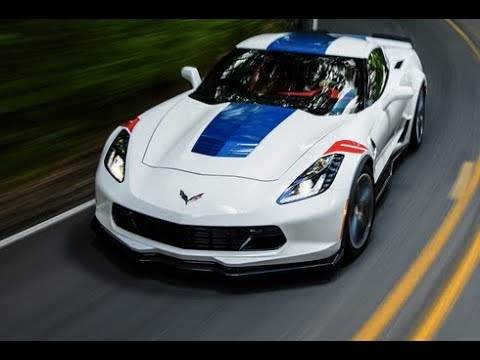
    Acting as the middle ground between the Z06’s massive power and the Stingray’s lower-end performance, the Grand Sport is an impressive balancing act. For many car buyers, power like that of the Z06 is just impractical. It’s awesome when you get out on the track, but how often do you really get to cut loose? At the same time, many enthusiasts want that stellar acceleration and speed for the times they get a long stretch of highway. If you want your car to be fun to drive but not put you in debt forever, the 2019 Chevy Corvette Grand Sport is your car. It brings power, style and panache to bear for a great price.

    Under the Hood

    The GM standard workhorse engine is in play here. That 6.2-liter LT1 V8 engine puts out 460 horsepower and 465 pound-feet of torque. You hear every bit of it, too, as this engine is loud and responsive. While some may prefer a quieter ride, the 2019 Grand Sport is not that.

    All-in-all, the Grand Sport has a fantastic ride. The suspension feels nice on the street and on the track, and the car handles beautifully around turns. Everything in the engine works in harmony around sharp turns, and you can really feel the power. The best part is the balancing act, though. When you’re stuck in traffic going across town, the car doesn’t feel impatient. When you hit a bump, the suspension doesn’t feel stiff. You get a lot of the fun of the track without many of the drawbacks.

    Design

    She’s pretty, and then some. This vehicle just looks downright mean, no matter how you slice it. If you like the classic Corvette look, it’s on display here, and its sexy as ever. Few cars match that raw, American, powerful look, and it really underscores the car’s strengths. It’s hard to see this vehicle sitting in your driveway and not want to take it out for a spin.

    Is the 2019 Chevy Corvette Grand Sport Worth it?

    Yeah, it’s absolutely worth it. It starts around $65,000, and it’s really the only thing like it in its price range. The closest vehicle in performance is probably the Jaguar F-Type, but that vehicle will set you back $100,000. That puts the Grand Sport in a rather underpopulated price bracket for cars with its kind of power. If you’ve been wanting a sports car that can handle the track or the street, the Grand Sport is for you.

  • Apple’s iPad vs Microsoft’s Surface Go: Which Tablet Wins?

    Apple’s iPad vs Microsoft’s Surface Go: Which Tablet Wins?

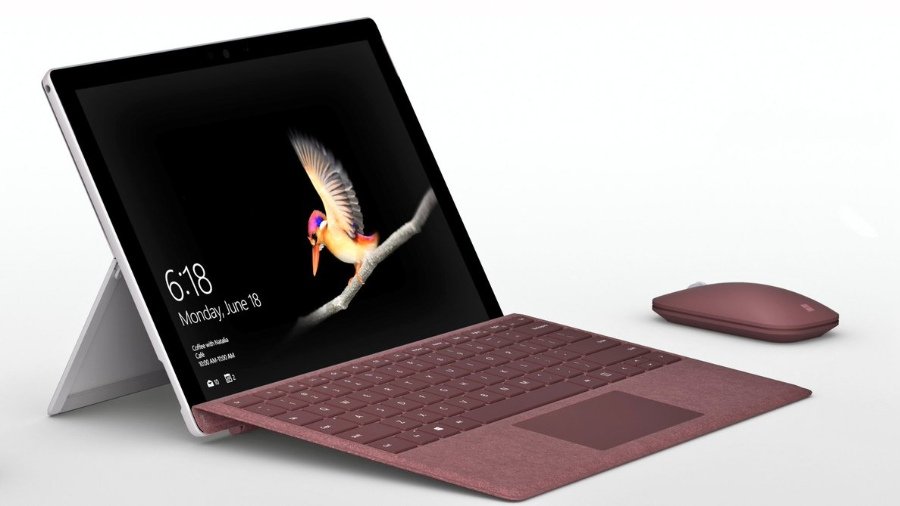
    With the Microsoft Surface Go taking on the iPad, many are wondering which tablet wins in a head-to-head. While neither is the most powerful in its respective hardware family, the two are both priced aggressively. The iPad is $329, while the Surface Go is $399, putting them in pretty direct competition. We’ll get into the pros and cons of each and see which the better buy is for your money!

    Apple’s Trusty iPad

    The iPad hasn’t changed too much since it was first introduced. While it now supports Apple Pencil and sports a retina display, the tablet is largely the same device it was when it launched the tablet craze. The 2018 model is slightly smaller and less expensive than the Surface Go, but they have similar power under the hood. That said, the iPad’s A10 Fusion chip is a bit more powerful than the Pentium Gold processor in the Surface Go. Similarly, the screen on the iPad is ever-so-slightly crisper and clearer than Microsoft’s 2-in-1.

    The iPad runs on iOS, the same as you’d find in an iPhone. That means you have access to the suite of apps from the App Store, but nothing resembling a full desktop ecosystem. iPad is compatible with both keyboards and the Apple Pencil, so you can use it as a pseudo-2-in-one.

    Microsoft’s New Hotness

    The Surface Go is definitely the new hotness on the tablet block. It has a few things on the iPad: firstly, it has more memory out of the gate. It sports 64GB of memory to the iPad’s 32GB, which is sizable. That means you can have more apps, photos, songs, whatever you please. Similarly, the Surface Go has double the RAM of the iPad, but that’s just a step up from 2GB to 4GB. How much difference that makes in day-to-day activities is hard to say, as neither is going to be running full AAA video games any time soon.

    The Surface Go is also capable of running Windows 10 in full desktop mode. It ships in 10 S, which is the tablet-style operating system that is an Apple competitor. If you want to upgrade it, you can do so for free, but its irreversible. However, many everyday users would likely prefer the full Windows 10 suite so that they can use more than just apps from Microsoft’s store.

    Which Tablet Wins?

    As all “this versus that” discussions between Apple and Microsoft, its hard to say which one wins. On the one hand, the iPad has the superior display and is much more stylish. The Surface Go, however, offers the full Windows 10 experience on a tablet, which is a big deal. They allow you to do similar things, but in different-looking ecosystems. It almost comes down to a “feel,” which is to say there is no right answer. Both are fantastic, but neither has a distinct edge. If one appeals to you aesthetically, or from a design perspective, go with it. They’re otherwise evenly matched!

  • Ticwatch Pro: Revolutionary Dual-Screen Smart Watch

    Ticwatch Pro: Revolutionary Dual-Screen Smart Watch

    The smartwatch field has been somewhat crowded for the last few years, but there has been little in the way of true innovation. Companies like Samsung, Fitbit and Apple have all iterated on roughly the same designs they’ve been using for years. Mobvoi has brought real innovation, however, with its newest smartwatch, the Ticwatch Pro. That innovation comes via the dual-screen technology that powers its two modes. More on that in a bit, though!

    Design

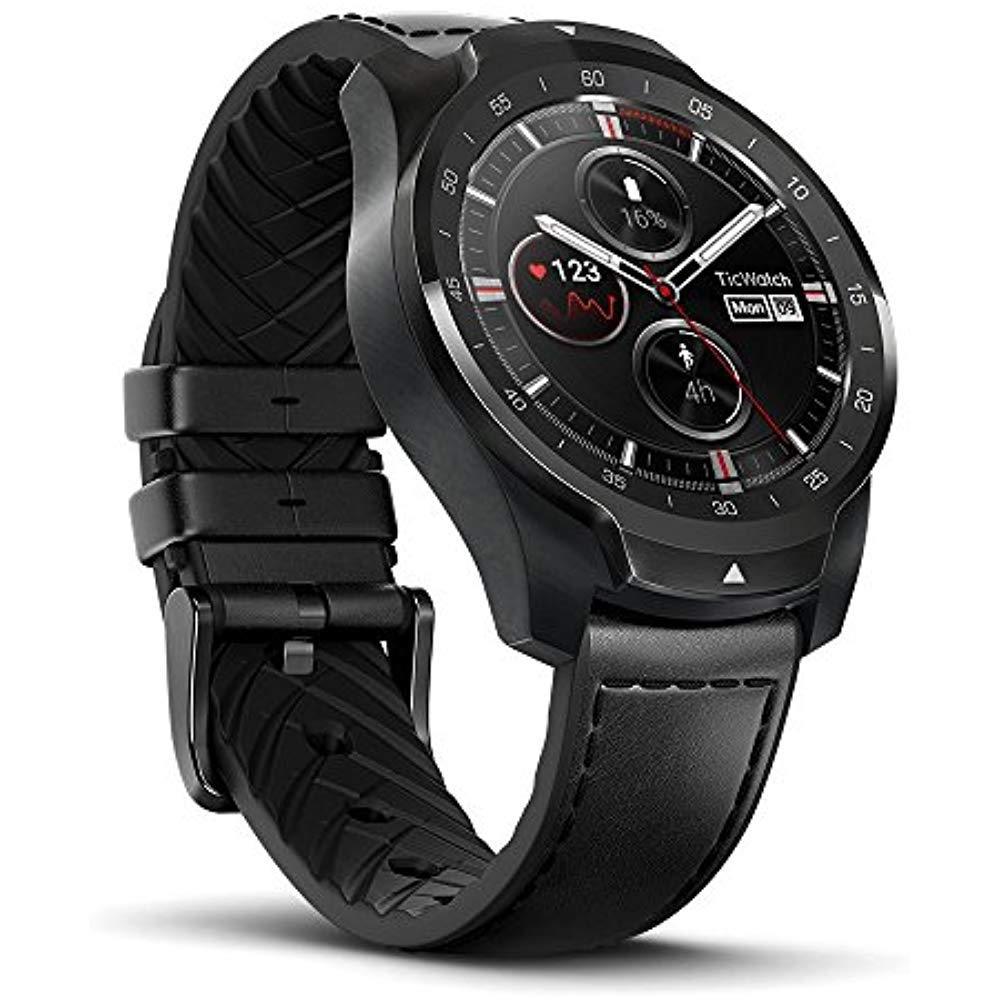
    While the watch’s internal mechanisms are quite impressive, the external design is also quite striking. The face is slightly recessed, and the bezels are contoured and rounded off ever-so-slightly towards it. Thankfully, the watch is water-resistant, rated IP68, meaning it’s fine for working out in or showering in. Mobvoi doesn’t recommend swimming with this device, though, even though the IP rating would suggest you probably could. While we won’t counter the recommendation of the manufacturer, it seems unlikely you would have any issues if your watch fell in the pool.

    The band, uniquely, is leather on the outside and silicone on the inside, making it the best of both worlds. If you intend to wear it to work or the gym, the band pulls double duty! Not having to swap bands to work out is certainly quite convenient.

    Ticwatch Pro: Dual-Screen Innovation

    That convenience and everyday usefulness extends to those dual-screens I was talking about earlier. You see, the Ticwatch has an LCD screen on top, and underneath it is an OLED screen. The OLED screen is the one you expect from a smartwatch: bold, vibrant and gorgeous. It’s easily on par with any other high-end watch on the market. The translucent LCD screen on top is key to the watch’s “Essential Mode,” by contrast.

    “Essential Mode” is a low-power mode that reduces the display to a few critical pieces of information. The time, your biometrics and other vital information is conveyed on the screen, which can last for weeks on a single charge. While you can engage Essential Mode yourself, it also activates when the watch’s battery gets too low. This is really quite useful, and sets the watch apart.

    Pricing

    The Ticwatch Pro is the most high-end smartwatch from Mobvoi, but it’s still rather inexpensive. As the company’s other smartwatches have been budget entries, this one is roughly middle-of-the-road. That refers to price, primarily, though, as the watch’s make is quite premium. It costs $250 through Amazon, but you need to have Amazon Prime to get one. That’s sort of a bummer if you’re not big on Amazon, but the company plans to explore other distribution methods soon.

  • Nokia 6.1: Resurrection of an Old Name

    Nokia 6.1: Resurrection of an Old Name

    While Apple’s iOS phone operating system is only available on their proprietary phones, Android is an open-source platform. As such, the Android OS is rife with competition. Some of the fiercest competition this year is coming for the Galaxy line of smartphones from Samsung. On the one hand, Google’s own Pixel smartphones are gunning for the throne. Even Motorola, once a maker of budget-friendly phones, is aiming to be the greatest high-end Android these days. One phone, however, is aiming to bring great power at a great value. And that phone is the Nokia 6.1, coming in at an impressive $269.

    The Specs

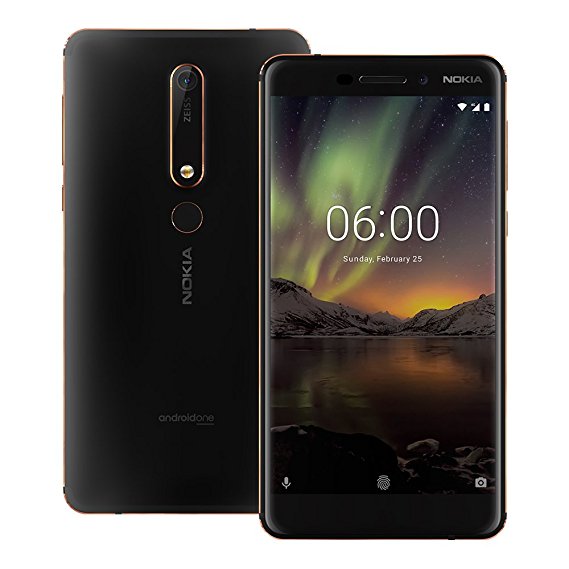
    The Nokia 6.1 is a technically impressive smartphone considering its cost. It’s powered by a Snapdragon 630 and sports a 5.5-inch 1080p display. It’s working with 3GB of RAM, and it rocks 32GB of internal storage. The rear camera has 16 megapixels, and the phone even sports a 3.5mm headphone jack. Like most modern smartphones, it charges with a USB-C port, which is nice.

    Design

    All of that is housed in a solid-feeling metal casing, giving the phone heft and making it feel durable. The flash is somewhat far from the rear camera, and the phone has a good bit of character. The design feels premium, if somewhat minimal. One would expect a phone in this price range to be bland and faceless, but the 6.1 is no such thing. It simply feels like a modernization of Nokia’s older design principals. That said, the design isn’t perfect: the rear fingerprint scanner is somewhat small. However, that’s a small gripe, as the phone otherwise carries that legendary Nokia durability.

    Nokia 6.1 Bottom Line

    If you’re looking for a good, clean Android phone with a lot of design purity, this is it. No frills, no gimmicks and no heavily-rebranded Android OS cloud this phone. The experience is minimal, the presentation is tasteful, and the price is right. If this phone is any indication of the types of things we’ll see from the new Nokia, then we can’t wait to see what they make next.

  • Apple’s 2018 MacBook Pro Brings Much Needed Facelift

    Apple’s 2018 MacBook Pro Brings Much Needed Facelift

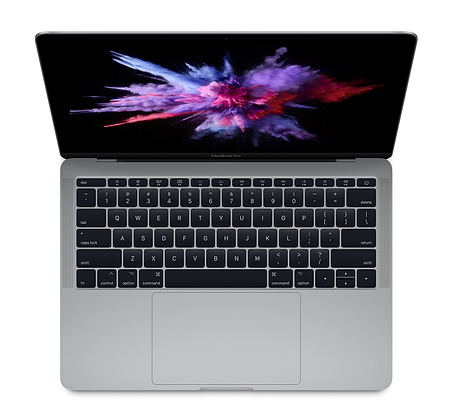
    The MacBook Pro line has been in serious need of some love. They’ve been struggling to make a name for themselves in the increasingly-crowded mobile device space. Between the Surface line from Microsoft, smartphone competition and increasingly affordable Windows laptops, MacBook has been in trouble. Thankfully, the 2018 MacBook Pro is the update the line sorely needed.

    2018 MacBook Pro: What’s New?

    There are a few new things going on with this year’s MacBook. The first, and most notable, of course, is the updated keyboard. The previous butterfly keyboard, with its “chiclet” style, had few fans. It got stuck often, was noisy and generally hard to type on. This redesigned keyboard, by contrast, is quiet, responsive and much more durable. You’ll likely find it a market improvement over the previous keyboard.

    The computer has received an under-the-hood overhaul, too. The 13-inch laptop comes with either an i5 or i7 processor, both of which are quad-core. The 15-inch option has either an i7 or i9 processor running the show, both with six cores. The 13-inch version has 2 TB of internal storage, while the 15-inch has 4 TB. That’s all pretty encouraging, to be sure!

    The 15-inch sports impressive graphics thanks to the AMD Radeon Pro GPU, while the 13-inch has integrated Iris Plus 655 graphics. While the 13-inch will put out a decent image, those with serious design tasks on their plates should opt for the 15-inch.

    A few other minor touches: the new laptops have the iPhone X’s True Tone technology. That means the screens will adapt to ambient light and match the lighting around you. The Touchbar (now standard on both 13- and 15-inch models) has True Tone as well. Neat!

    Oh, and the laptops now support “Hey, Siri!” Alright, that’s pretty cool, if a bit frivolous.

    Pricing and Release

    The pricing on these laptops remains unchanged from last year, which is stellar. The 13-inch model is still $1,300 and the 15-inch runs $2,400. Now, those numbers aren’t low, but the MacBook Pro isn’t a budget machine. Both models are out now.

  • Which Budget Gaming Laptop has the Most Bang for your Buck?

    Which Budget Gaming Laptop has the Most Bang for your Buck?

    Everyone loves to throw down with a great video game! What’s even better is getting to game on the go. What’s the best is saving money on a budget gaming laptop! Today we’re looking at the best gaming laptops that won’t break the bank.

    Lenovo Legion Y530

    Lenovo’s laptops are generally well-built, sturdy computers that don’t disappoint. Starting at $750 for a configuration that sports GTX 1050 graphics, or $840 for 1050Ti, it’s a solid price. If you just need a simple, sturdy laptop to play games on, this one is a solid pick. It’s got a minimalist design, a back-lit keyboard and a good display. This is an all-around solid pick and you can’t go wrong with Lenovo.

    Asus TUF Gaming FX504GD

    Asus is renowned for their balance of performance and price, and this one doesn’t disappoint. This laptop sports a comfortable, durable keyboard that’s great for gaming and will last for millions of keystrokes. In our opinion, the best configuration of this one is the $899 one with a 1050Ti GPU, a six cored i7 processor and a great display. It also boasts an edgy, industrial design that screams “awesome gaming laptop.”

    Acer Nitro 5

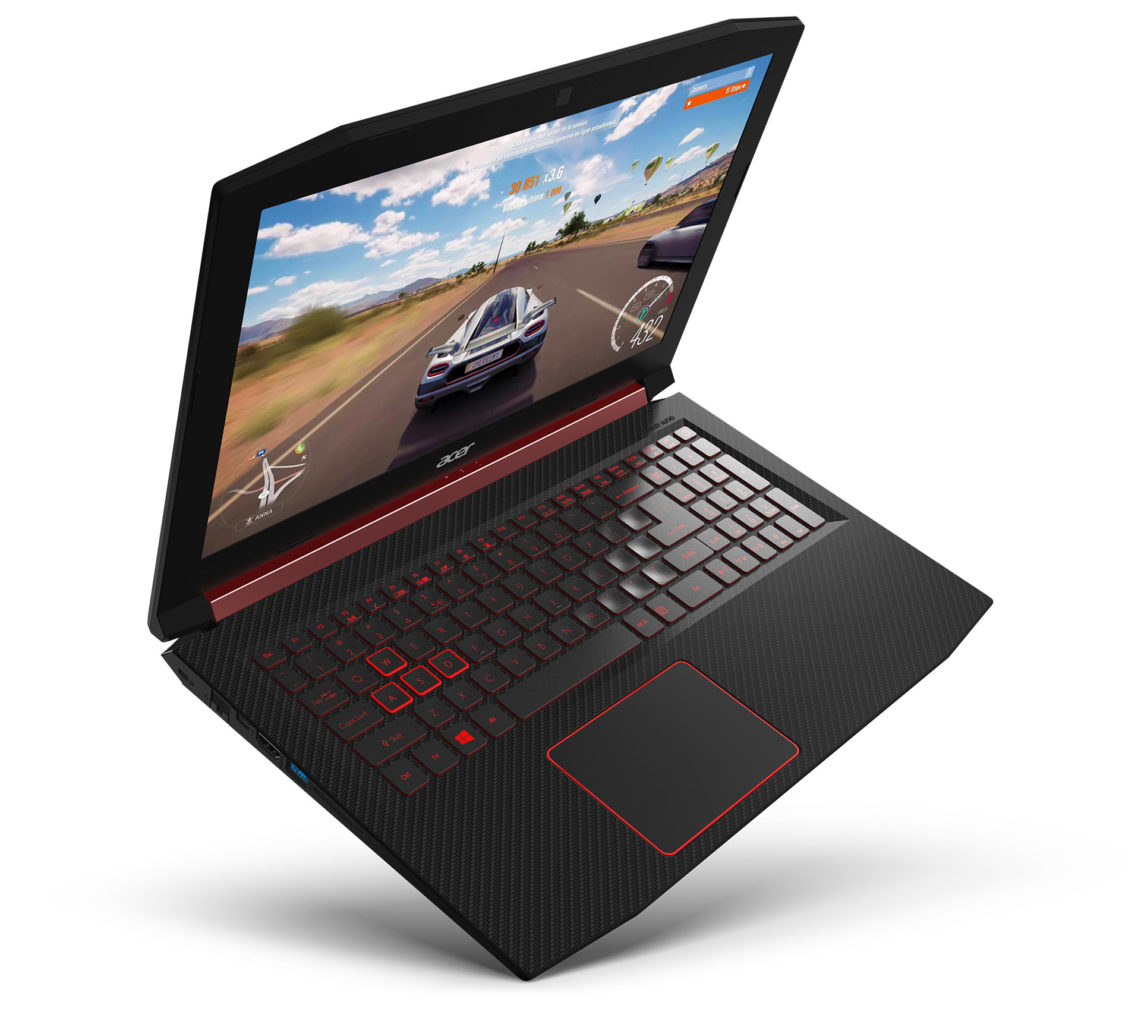
    The Acer Nitro 5 is a great budget gaming laptop for those who want a ton of performance on a small budget. For $650, you get GTX 1050 graphics, which is a really great deal, dollar-for-dollar. For a sight more, at $730, you get 1050Ti, which is also a great deal and can even put out images on par with most gaming desktop rigs. If you want a really solid balance of power and cost, this is it. The Nitro 5 is a bit lacking in some other areas, and it could be considered a slightly cumbersome machine. That said, it’s still an amazing value for the power under the hood.

    Best Overall Budget Gaming Laptop: Dell Inspiron 15 7000/G5 15

    If you’re really looking to make your money stretch, the durable and reliably Dell Inspiron 15 is right for you. There are a number of various models available in this range, and configuration for any budget and gaming taste exist. If you’re trying to keep the budget low, the G3 15 Gaming configuration comes in under $700 and has GTX 1050 graphics under the hood. Alternatively, if you want a more high-end experience, the GTX 1060 Max Q enabled rig runs for $999. All that power, and it still comes in under $1000! Not bad, huh?

  • Best 5 Laptops Under $500 in 2018

    Best 5 Laptops Under $500 in 2018

    Laptops are very essential these days- for school, work, or just personal use. The price of a premium new laptop can cost up to $1,000, which is pricey for anyone. Numerous companies have made laptops more affordable while keeping the quality and capabilities of more expensive laptops.

    You don’t have to feel like you’re settling when shopping for a laptop under $500. There are value-priced notebooks that include full-HD displays, solid performance and long battery life, plus all the ports you need. We picked all the best all-purpose laptops in $500 price range which we think are best laptops to suit the wide range of requirements of people. Here is a list of the best five laptops under $500!

    1. Dell Inspiron i3567 Laptop

    The latest version of this Dell laptop has a powerful system in place with 8GB of memory and a 128GB hard drive and a Intel Core i3-7100U 2.4GHz processor. It has a professional feel in it’s all black look with a 15.6-inch laptop with a screen resolution of 1366 x 768. The operating system runs smoothly with Windows 10 and is backed with a 12 month warranty, with 12 months of tech support.

    • A new, powerful hardware system
    • Has many ports and slots to use your external devices
    • 8 GB Ram
    • 7th Gen Intel Core i5 processor
    • It is not backlit enabled
    • Battery life up to 5 hours

    2. Acer Aspire A515-51-50RR Laptop

    The Acer Aspire 5 is one of the best budget full-size laptops you can find in stores today. It checks most of the right boxes: well built, slim and fairly light, gets a decent keyboard, an IPS screen and modern hardware, performs well, runs cool and quiet and lasts for a long while on a charge. This slim and sleek laptop is a great all round performing laptop, especially for the price. The visuals are spot on with vivid, bright colors.

    • LCD display and is backlit
    • 2.50 GHz Intel Core i5-7200U processor
    • Storage: 1TB hard disk
    • Intel HD 620 graphics
    • Battery life up to 7 hours
    • All-plastic chassis

    3. HP 15-ay191ms Laptop

    The HP 15-ay191ms, a signature edition laptops that comes with a seventh-generation Intel Core i3 processor, 8GB DDR4 system memory, 1TB of storage and a touchscreen, but still remains insanely affordable. It’s one of those laptops you’d buy without a second thought if you find inexpensive chromebook attractive, but really, really need Windows. If you love touchscreen, this one’s for you! This laptop contains the Kaby Lake processor which makes this laptop consume little power. Apps are not an issue here, they all run very smoothly.

    • Touchscreen
    • Intel Core i3-7100U processor
    • 8GB RAM
    • 1TB hard drive
    • Lag-free performance
    • Battery life up to 6 hours

    4. Dell Inspiron i3567-5185BLK Laptop

    Yet another Inspiron made this list! This version comes in different color options and a textured finish.  Packed with a large 15.6 Inches display and a decent 7th Gen Intel Core i5-7200U up to 3.1GHz CPU processor. This Dell laptop model would work well for portability with its 4.85 Pounds lightweight design and sleek black look. Great for school work or the family computer. A huge bonus with this laptop is it doesn’t heat up much!

    • 2.4 GHz Intel Core i3-7100U processor
    • 8GB RAM
    • TB hard drive
    • LED display with a built-in webcam and mic
    • Battery life is up to 6 hours

    5. ASUS Chromebook Flip

    This is one of the best convertible laptops on the current market. The Asus Chromebook Flip C302 is worthy of its premium stature with a gorgeous screen, tactile keyboard and a classy design that’s equally as comfortable to use in tablet mode or as a traditional laptop. The screen is a full HD touchscreen and can be converted from a laptop to a tablet by turning the screen. A top pick for a college student!

    • Intel Core m3 processor
    • 4GB RAM
    • 64GB of SSD storage
    • Battery life of up to 10 hours

  • Movie Roundup: The Coolest Moment from Ant-Man and the Wasp

    Movie Roundup: The Coolest Moment from Ant-Man and the Wasp

    If you haven’t seen Ant-Man and the Wasp yet, consider this your spoiler warning! Major spoilers for the plot of the newest entry in the MCU are ahead! If you haven’t seen it, bookmark this page, go see it, and come back. We’ll wait here for you! For those of you who have already seen it, let’s get down to business. Today we’re going to walk it back and discuss the coolest moments from the movie, from the funny to the touching to the downright awesome!

    Hope’s Fight with Sonny’s Men

    A defining moment early in Ant-Man and the Wasp introduces audience to how badass the Wasp is. One of the best uses for Pym Particles, other than shrinking and growing, is whooping ass. Shrinking down to dodge bullets and thrown knives, Hope evades Sonny’s thugs easily. She then grows back to full size and lays the hurt on them, landing punches just as she finishes returning to full-size. This scene culminates in the appearance of Ghost, and Scott’s attempts to help Hope defeat the newcomer. Ghost’s powers are contrasted with Scott and Hope’s in visually stunning ways, as they phase through each other and shrink to dodge attacks.

    Luis and the “Truth Serum”

    The Drunk History-style storytelling gag from the film’s hilarious sidekick, Luis, returns in the sequel. And to great effect! When bad guy Sonny Burch ambushes Luis and co. at Ex-Conn, he shoots Luis full of something that totally isn’t truth serum. Then, Sonny asks Luis where Scott is, resulting in a free-wheeling, hilarious segment. Luis explains, in detail, how Scott got to where he is, emotionally at least. The scene helps flesh out Scott and Hope’s relationship as much as it makes the audience laugh and break an otherwise tense sequence.

    Scott Goes Big

    The massive chase scene in the third act culminates with Scott going bigger than he ever has. Growing well beyond 60 feet tall, Scott easily dispatches Sonny and takes the micro-sized lab back from him.  However, the strain of being so massive rapidly drains Scott of his energy, and he passes out and falls into the water of the San Francisco Bay. The resulting chaos and Ghost’s sudden appearance push the film into a fast-paced climax as the heroes race to save Hank and Janet from the Quantum Realm.

    Coolest Ant-Man and the Wasp Moment: Scott’s Uncertain Fate in the Quantum Realm

    After the main conflict has been resolved, Scott’s house arrest is lifted and his relationship with the Pym family is restored. What’s more, Team Ant-Man seems to be on good terms with Ghost, going so far as to help her healing process. Scott is sent to the Quantum Realm by the Pym family to harvest healing particles for Ghost in the post-credits scene. After gathering the particles, Scott radios back to the team, signaling them to pull him back to full-size. However, he’s greeted by static.

    The camera then pans to show us what remains of the Pym family: ashes on the wind. Thanos’ victory in Infinity War has occurred, trapping Scott in the Quantum Realm and leaving us with questions. How will Scott return to the real world? What roll will Ant-Man and Ghost play in Avengers 4? And will the Quantum Realm be the key to undoing the damage Thanos has done? We’ll find out next year, when Avengers 4 comes out!