Month: July 2019

  • Which Streaming Device is Right for You?

    Which Streaming Device is Right for You?

    TV has changed in the last ten years. At one point in time, it was either cable or nothing. Now, with the popularity of Netflix, Hulu and internet TV at an all-time high, cable is the exception rather than the rule. If you’ve been looking to cut the cord and watch internet TV, you’re probably wondering what the best streaming device for your living room is. How can you narrow them all down, though? That’s what we’re here for.

    There are a number of options out there for streaming. Whether you’re an Apple fan who wants to use Apple TV for your content, or you want something smart-home integrated like Alexa, there’s a ton of options. Maybe you’re looking for something more general-use, like Roku? Let’s take a look at some of the most popular streaming options and what each brings to the table. Hopefully this will help you narrow down your options and make a good decision.

    Fire TV

    Fire TV is Amazon’s proprietary TV streaming platform. There are budget options, like the Fire TV Stick, which just plugs into the back of your TV, and more full-fledged platforms like the Fire TV Cube. No matter which one you’re looking into, there are a number of similarities between the platform’s various hardware devices. Namely, the user interface and the Alexa integration. If you like using your voice to pull up your favorite shows, Fire TV is for you.

    For those who really enjoy voice commands, the Fire TV Cube comes with a remote that offers voice-control option. You can navigate menus, search for actors and movies and issue commands all with your voice. It feels very natural to command your entertainment in much the same way you command your smart home features. For people who like high-tech solutions that just work without lots of fiddling and tech knowledge, Fire TV is a perfect fit.

    Roku

    Roku is a very well-known name when it comes to streaming devices. From the budget-friendly Roku Express to full-blown smart TVs with Roku integration, there are versions of the streaming platform across the spectrum of budgets. The best thing about Roku is how straightforward and simple it is. The remote is small and sports only a few buttons. A clean, simple user interface shows you the information you need to see to find your entertainment.

    If you’re new to the world of internet TV, or just want a simple way to turn your old TV into a smart TV, the Roku is the best option for you. While it might not sport the same wide variety of options and features as Fire TV or Apple TV, Roku offers a great platform for users who want a simple and clean platform. The low entry price of the Roku Express is also a huge selling point for the platform.

    Apple TV

    For those users who are fans of the Apple ecosystem, Apple TV is a no-brainer. Offering a great, seamless experience across your Mac, iPhone and Apple Watch, the Apple TV is a great extension of the clean design and deceptive simplicity that makes Apple so popular. Logging in to apps is simple, as you can copy passwords and logins directly from an iPhone or iPad.

    While the Apple TV ecosystem doesn’t offer as many apps as a system like Roku, it’s still a robust hub for your media. If you have lots of pictures or videos on your phone you’d like to see on your TV, AirPlay 2 gives you that option. You can even issue voice commands through Siri to find TV and movies you’d like to watch. The only downside? The higher-than-average price when compared to the competition.


  • Best Smart Speakers in 2019

    Best Smart Speakers in 2019

    While smart speakers were once seen as an unusual curio that your rich friends might have in their kitchen, they’ve become much more commonplace recently. The helpful and friendly voice that issues forth from the speaker is only part of the draw of these devices: they offer a wide variety of smart home functionality that you have to see to believe.

    If you’re thinking about getting a smart speaker but don’t know which one to go with, you’re not alone. There are a few great options out there, but it can be difficult to narrow the options down. Let’s take a look at some of the best smart speakers on the market to help you make a good decision.

    Apple HomePod

    Apple’s HomePod is something a black sheep when it comes to smart speakers. Powered by the familiar, if a bit outdated, Siri assistant that also runs in Apple’s phones and watches, HomePod is great for Apple lovers. It’s part of the Apple ecosystem, allowing for great integration with your iPhone, your Apple Watch and your Apple Music account. If you’re already rocking AirPods and an iPhone, you’re probably going to love the HomePod, too.

    However, if you’re not already an Apple faithful, you’ll probably find the HomePod’s steep asking price of $300 to be a bit much. Siri’s a bit more limited in her responses and case functions than Google Assistant and Alexa, as well. This all being said, the HomePod offers incredible sound that is tailored to the size and shape of the room it’s in. If you love Apple, or want a stellar sound quality, the HomePod is for you.

    Google Home Mini

    Google’s well on their way to world domination, and the Home Mini is a good indicator of why. The useful and great-sounding little speaker retails for just $50, making it a good entry-level option for those curious about the smart speaker “thing.” Google Assistant is really good at understanding commands, and can interpret plain language better than either Siri or Alexa. Not to mention, the assistant sounds normal and has human-like inflection, which can be comforting compared to the slightly robotic Siri.

    Google’s Assistant works very well when you need it to read off recipes or walk you through tasks you’re having it look up for you. If you forget the name of a smart home feature you have, it can normally figure out what you’re talking about. It’s also got a wider variety of smart home devices that it works with than the HomePod, coming close to the variety offered by Alexa’s Echo family of devices.

    Amazon Echo

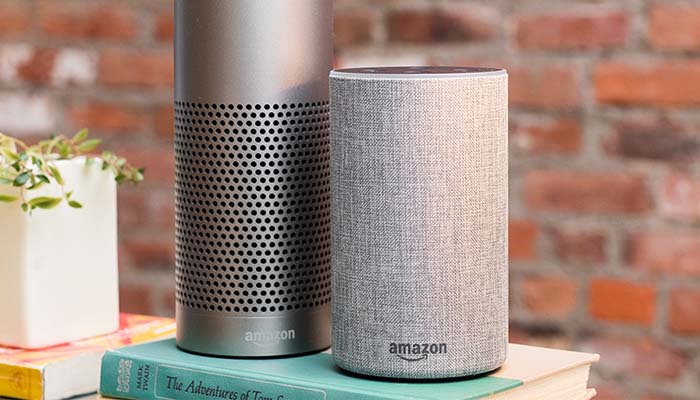
    Amazon Echo devices are some of the most popular smart speakers on the market, for a number of reasons. Firstly, Amazon’s devices are often on sale on their online web store, and the devices are advertised heavily on TV. Alexa has a natural-sounding and calming voice, and can answer a number of questions and perform a lot of tasks for you with just your voice commands. If you’re just looking to try out a smart speaker and see what it’s all about, you want an Amazon Echo Dot, which can be found for $50 online.

    While Alexa might not be the clear winner in 2019 like she was in 2016, Amazon’s device is still the most useful overall for the price. There are so many smart home devices that are compatible with Alexa that you can safely buy just about any smart bulb or smart lock and know it’ll work with your device. The sound quality on the speaker is great for the price, and you can even hook the device up to your own speaker if you want to get better quality sound out of it. All in all, this is a great option for newcomers to the field.


  • Best Car Insurance Companies for 2021

    Best Car Insurance Companies for 2021

    Let’s be honest: you’re required to have car insurance. That’s a given if you’re going to drive your car anywhere outside of closed, privately-owned tracks. Just because you have to have it doesn’t mean it has to stink, though. You deserve only the best car insurance, from only the best car insurance companies. Today we’re taking a look at some of the best car insurance companies for the money in 2021.

    We’re looking at a combination of factors when deciding on the best: customer service, customer satisfaction, price and a good shopping experience. There are tons of car insurance companies all vying for your dollar, so the one you go with needs to have only the top marks in order to be worthy of your hard-earned cash. Let’s get into it.

    Amica Insurance

    Amica isn’t the biggest names in terms of recognition, but they are a juggernaut in the field of customer satisfaction. Amica consistently scores huge marks from their customers in terms of satisfaction: people with Amica feel taken care of, important, and well-covered. Try this one on for size: Amica has proportionally lower complaints from customers than any other agency in the country, even accounting for their small size.

    That’s not to mention their awesome free perks. Car insurance policyholders with Amica get all kinds of goodies like free lock and airbag replacement. You also get a complete reimbursement of your lost wages if you have to go into court at Amica’s request: they have you covered. If you lose your keys, or they get stolen, they’ll cover the cost of getting you replacements. Oh, and did we mention that in most states they won’t take depreciation out of your new car in the first year if you total it?

    Erie Insurance

    Another smaller company with a low profile and stellar customer reviews, Erie Insurance is beloved by their policyholders. The consistently get five-star satisfaction reviews, and they offer a ton of killer perks. The only problem, however, is that they operate in a small selection of states. Only Wisconsin, Ohio, Illinois, Indiana, Kentucky, New York, West Virginia, Maryland, Tennessee, North Carolina, Virginia and Pennsylvania are covered.

    If you do happen to be covered, however, Erie is well-worth considering. They offer a rate-lock so that you know your premiums won’t go up unless you add cars or drivers to your policy. After three years, you get accident forgiveness so that your first at-fault accident doesn’t carry a surcharge. They also offer goodies like a diminishing deductible and even pet injury coverage if your pet is hurt in a car accident.

    Nationwide

    Nationwide insurance is the only insurer on this list with a large national profile, and for good reason. Normally operating at the scale they do makes it difficult to keep customers satisfied, but they manage to be both massive and care about their policyholders. Ignoring their obnoxious televised commercials, Nationwide is a good company to have in your corner. They consistently score five-star customer satisfaction reviews, and they have a very low number of customer complaints year over year.

    The much-talked-about vanishing deductible is one of Nationwide’s staples, and it can really add up: after five years of safe driving, you’ll have $500 off your deductible. In some states, Nationwide offers accident forgiveness, which can be a lifesaver if you get into a little fender bender and don’t want your rates to go up. Likewise, their “On Your Side Review” offers you the yearly chance to go over your life and needs to make sure you’re getting the right coverage and all the discounts you need. In short, Nationwide treats their customers with care and tries to make sure they feel valuable and cared for.


  • Do You Need Homeowner’s Insurance? The Facts

    Do You Need Homeowner’s Insurance? The Facts

    When you hear about homeowner’s insurance, you might be thinking “I don’t need that.” However, just because you’re not required to have homeowner’s insurance by law like you are with car insurance doesn’t mean you don’t “need” it. There are a number of reasons you should consider getting a homeowner’s insurance plan.

    Today we’re going over the kinds of things that are covered by homeowner’s insurance to help you make a wise decision. You spend a lot of money on a house: make sure it’s protected.

    What Homeowner’s Insurance Covers

    Homeowner’s insurance typically covers damage done to your home from unforeseen incidents. Keep in mind that this can change from policy to policy, of course. However, typically speaking, HO-2 homeowner’s insurance covers things like fires, storms, hail, wind and explosions. Most versions of homeowner’s insurance can also cover you against crimes, such as vandalism, theft and damage from riots.

    HO-3 homeowner’s insurance, on the other hand, covers pretty much any type of damage that could be done to your home and any type of property loss. HO-3 policies, of course, have some exceptions, so make sure you read up on any policy you’re considering thoroughly. HO-3 policies are also the most expensive type of insurance you can get for your home, though you can rest assured knowing your things are all insured.

    When it Might Be Required

    While homeowner’s insurance isn’t usually required by law, many homeowners are required to have it through their mortgage company. Unless your home was gifted to you by a relative or left to you in an inheritance, you likely have to finance the home with a mortgage. Except in very unusual circumstances, this means you will be required to insure the home.

    If you’re in a townhome community or a condo, your HOA might require you to insure the property, as well. This could mean you just need renter’s insurance, if the HOA has a master policy that covers the entire community. Otherwise, you’ll need conventional homeowner’s insurance. In either case, it’s still a good idea to have insurance, even if it’s not required.

    Why You Should Care

    You might be thinking “okay, this is all well and good, but why should I care?” Your home is one of the biggest financial investments you’ll ever make, possible across your lifetime. As such, it doesn’t make any sense for you to not take care of it. It’s where you and your family call home, it’s where you’ll make memories and raise kids. It’s an important place to cover!

    In the event that something bad happens to your home, like a fire or a break-in, you’ll be seriously kicking yourself if you don’t have insurance. The cost to cover your losses would likely be tremendous if you had to pay it out of pocket: likely significantly more than you would have saved not paying for a homeowner’s insurance policy.

    Liability and Belongings

    Another important aspect of homeowner’s insurance, and a big reason you might consider getting it, is that it covers your liability in case someone gets hurt on your property. Whether it’s someone just visiting, a person walking by or anything in between, if someone gets hurt on your property and wants to sue you, your insurance can cover it.

    Likewise, if someone steals your belongings, or they’re destroyed in an accident, your insurance will cover the loss. This is why doing home inventories and keeping a good track of all of your things is so important. If you’re a collector and have lots of high-dollar valuables in your home, this goes double. Make sure your property and your belongings are covered!


  • Preventing Porch Pirates: Protect your Packages

    Preventing Porch Pirates: Protect your Packages

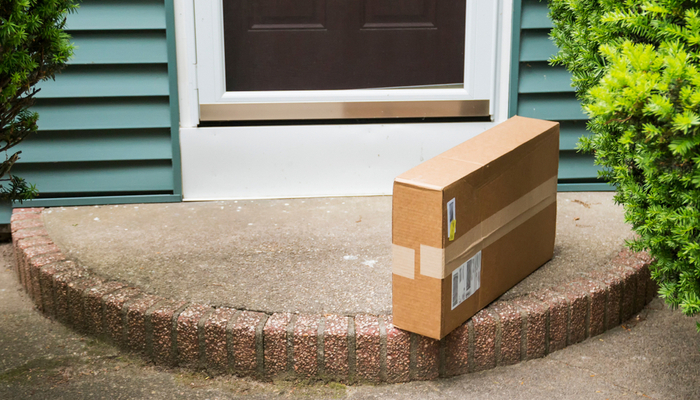
    Porch pirates, or people who steal your packages off your front porch, are a serious problem in the age of Amazon. You’re likely to have dozens of packages delivered to your front door every year, and each one that gets dropped off while you’re at work is liable to be stolen by a ne’er-do-well. How can you protect your property and ensure your stuff doesn’t get pilfered?

    Protecting Your Packages from Porch Pirates

    Amazon Key

    One of the most direct ways to address this problem is to sign up for Amazon Key. A variant of the Amazon Cloud Cam, this service allows you to give Amazon delivery employees access to drop your packages off inside your home. You can use the Cloud Cam functionality and your smart home’s smart key to grant them entry to drop off your package, and then use the smart key to digitally lock back up when they leave.

    One of the best things about the Cloud Cam set up is that it allows you to see the delivery person, grant them access (or not) and then lock back up. You can see your home and your package the whole time, and there’s no chance for anyone to just slip up can easily steal off with your package: they’d have to just break into your home, which is far less likely.

    Box Lock

    A similar solution is to use a delivery box located on your porch to take your deliveries. If you have concerns about smart locks and letting strangers into your home, this is a similar alternative that locks your packages up without giving anyone access to your home. Firstly, you need a smart lock like BoxLock, or a similar product.

    BoxLock works by connecting to the paired app via wi-fi, allowing you to enter your pending deliveries. Then, when the delivery person arrives, they can use the BoxLock to scan the package, which temporarily unlocks it and allows them to put your package in the strongbox. Then, the lock automatically closes back up when they leave. This way, your packages are safely locked up, and no one had to enter your home.

    Security Cam

    A more old-school, and direct, way to deter (and detect) thieves is to just install a security camera. This does a few things that help secure your packages. Firstly, it acts as a strong deterrent: most thieves aren’t dedicated enough to stealing your stuff to hazard getting caught on camera doing so. Merely seeing the camera is usually enough to convince them to move on to another would-be victim.

    Secondly, and most directly, if they do go through with stealing your stuff, you’ll have video evidence of the event. You’ll be able to show the police the image of the person stealing your property, and this makes it that much more likely the person will get caught. You might even get your stuff back!

    Video Doorbell

    Along the same lines as a security camera, you could get a video doorbell service like Ring. These services are much more discreet in appearance than a security camera, though they’re great for keeping tabs on your home from a distance. Several video doorbells can be installed with motion detection, so they’ll ping you when someone is on your porch, and they can even start recording when someone walks up.

    Once you see that someone is on your porch, if it’s someone stealing your package, you can actually talk to them through most video doorbells. Often, this alone is enough to scare off petty crooks: hearing your voice, knowing they’re being watched, is typically a big enough scare to get them to move on to some other, less well-monitored mark.


  • Xiaomi Mi A3 Review: A Worthwhile Budget Android Phone?

    Xiaomi Mi A3 Review: A Worthwhile Budget Android Phone?

    Fans of Android phones have a big leg up on iPhone users when it comes to budget options. If you like high-end smartphones, both Android and iOS have great flagships you can pick up. However, if you’re in the market for a smartphone under $300 and you like iOS, you’re going to be rocking a four-year-old phone at best.

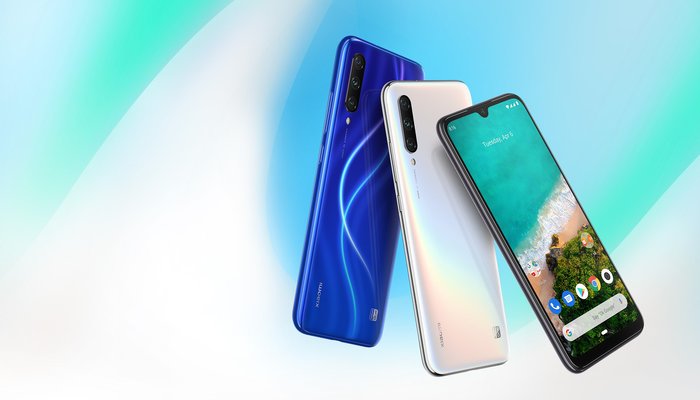
    Android, on the other hand, has a wealth of mid-range and budget phones from various manufacturers that still function as great daily-use cell phones. One such phone is the upcoming Xiaomi Mi A3, the newest in Xiaomi’s “A” line of mid-range Android phones. Is the A3 a worthwhile phone at its budget price, or does it leave too much to be desired? Let’s take a look.

    The Specs

    An important aspect of any smartphone is the technical specifications. The Mi A3 isn’t exactly loaded with top-of-the-line tech, but it’s also only retailing for around $280. The phone is powered by the Snapdragon 665 system on a chip, offers up 4 GB of RAM, and is running an Adreno 610 GPU. The phone has a good number of ports: a 3.5mm headphone jack makes a return, as does the fan-favorite IR blaster (allowing the phone to be used as a universal TV remote).

    Unfortunately, the display of the Mi A3 is only 720p, which leaves a lot to be desired. The screen is OLED, which means it offers great blacks and deep contrast, but the lower-resolution display is very unusual. For the price, it would have been nice to see the A3 sporting a 1080p screen. As it stands, the phone likely won’t age well.

    User Interface

    The A3 also isn’t running Xiaomi’s in-house Android skin, but is running on the stock Android One program. This means that, like the previous “A” models, the A3 will only receive two years of software updates from Google. The Android One program is Google’s way of letting budget phones exist at a lower price by running a bare-bones, minimalist version of Android.

    As such, all the inherent strengths of the open Android OS are here, as are all of its rough edges and warts. If you already love Android, there’s nothing here that will make you hate it. Likewise, if you’re ot an Android fan, the bare-bones Android One won’t be convincing you.

    US Customers

    It’s worth noting that US Customers will need to be wary of the A3’s LTE compatibility. The LTE bands that the phone is compatible with are 1, 2, 3, 4, 5, 7, 8, 20, 28, 38, and 40. This means that the phone isn’t completely compatible with any US carriers. However, T-Mobile is the closest to full support for these bands, so consider the A3 if you use T-Mobile, or don’t mind not always having LTE coverage.

    Xiaomi isn’t exactly a well-known brand in the US: in fact, most Chinese smartphone manufacturers aren’t. Only diehard Android fans tend to know names like Huawei and Xiaomi, though that’s not to say you can’t get the A3 in the US. Sites like Amazon will sell the phone unlocked, so all you need to do is take it to a carrier and have it activated.

    Bottom Line

    For around $280, the A3 is a good deal. The design is sleek, the interface is solid and the included headphone jack and IR blaster are nice to have. If you’re a stickler for nice displays, however, the 720p image is likely to turn you off from this phone. Likewise, the bare-bones software and two-year limit to software support might scare off more tech-savvy users, and the lack of full US LTE coverage could cause some customers to pass on this budget Android phone.


  • Which 4K TV Should You Buy? Our Tips

    Which 4K TV Should You Buy? Our Tips

    If you’re in the market for a new 4K TV, there’s a ton of options on the market for you to check out. The two biggest brands in the business of making TVs are easily Samsung and LG, though thy market their panels under different names. Samsung’s TVs are advertised as QLED, while LG’s are called OLED.

    What’s the difference between these two screen types? Is it just marketing hype, or is something different about their construction and picture quality? Today we’re breaking down the differences between LG and Samsung panels, and giving you some advice on what to look for in a 4K TV panel.

    OLED vs QLED

    OLED, a term used by LG for their screens, as well as some other technology like iPhone X and Apple Watches, stands for “organic light emitting diode.” QLED, on the other hand, stands for “quantum dot LED”. While OLED screens are emissive, meaning the pixels emit their own light, QLED screens are transmissive, meaning they have a backlight passing through them.

    This might sound like a lot of scientific jargon, but it’s important for understanding how each screen creates its image, and why some TVs look better than others. In short, this all means that QLED TVs, while they might sound fancy, actually have more in common with older LCD displays, while OLED displays are a new and more powerful type of technology.

    The Difference

    OLED screens are much more expensive to produce, especially at large sizes. LCD screens, which the QLEDs from Samsung are a variant of, are significantly more affordable, and have been the main type of flat screen panel for about a decade now. Where LCD screens have a crystal display and pixels that have light shined through them to make the image, OLED screens are composed of millions of tiny subpixels that emit their own light.

    This means that, generally speaking, OLED screens have more dynamic and dramatic image quality. They tend to have better blacks and contrasts, as they can simply toggle off pixels to make a perfect contrast. LCD screens, on the other hand, will always let at least a bit of light through the panel, meaning that blacks can often look gray and washed out.

    QLED Strengths

    This isn’t to say that QLED is strictly worse than OLED: Samsung’s panels excel in some areas. Due to their reliance on backlight, they’re able to get very bright compared to OLED screens. As such, bright and colorful content, such as content that supports HDR colors, looks incredible on QLED screens.

    OLED can also make HDR look amazing, with its deep contrasts. However, if you’re in a bright room, you might want to favor a QLED screen, as they can compete with natural light much better than OLED screens can. When shopping for a TV, consider the room the panel is going in when you’re deciding between OLED and QLED.

    Buying Guide

    So, if you’re in the market for a 4K TV and you want the very best image, and nothing else will suffice, you probably want an OLED screen. OLED screens don’t fade over time like LCDs, they don’t have a “sweet spot” you need to view the image from, they offer great contrast, and their color accuracy is unparalleled.

    If you’re on a bit more of a budget, or the panel is going into a room that is normally very bright, you might consider a QLED screen. While the contrast isn’t as good, the colors are still vibrant and the resolution and frames-per-second are identical to those found on an OLED panel. The main edges for the QLED are the lower price and the brighter overall image.


  • Best Deals on Laptops

    Best Deals on Laptops

    Having a nice smartphone is cool, and a good tablet can be great for entertainment uses around the house. When it comes to productivity and getting things done, however, what you really need is a full-fledged laptop. As long as you’re not looking to go too far into the gaming side of things, which will quickly increase the price, you can get a good laptop for school or work for under $500. Let’s take a look at some of the best deals on laptops.

    We’re looking at these laptops based on a number of factors. The primary factor, of course, is price: only laptops under $500 can make this list. The secondary factor is overall usefulness: since laptops compete in price with tablets, we’re concerned primarily with laptops that can help you with your productivity for tasks like typing or creating presentations.

    Acer Aspire E 15

    Far from the prettiest or lightest laptop on the market, the Acer Aspire E 15 is a squat and industrial-looking laptop that you can pick up for under $400. The $360 configuration sports a low-end dual-core i3-8130U and a below-average 6GB of RAM. It offers a sizable 1TB hard drive, though, and the price is notably lower than many competing Windows laptops. The Aspire E 15 is an interesting little laptop for a number of other reasons, though.

    Coming in at 5.3 pounds, the Aspire E is also surprisingly weighty. That said, the design is rugged and likely to last you for a while. If you’re still working with physical media, the laptop includes a DVD drive and even a burner for encoding your own info. Interestingly, this laptop also supports memory expansion: you can open it up and add more physical memory and storage space.

    HP 15

    The very simple and straightforward naming convention of the HP 15 matches up with its very plain and almost dorky design. The 15 is a very inexpensive laptop, coming in for the low price of around $400, though it’s not winning any beauty contests. It sports big bezels, rounded corners and a bulky, blocky design that’s reminiscent of something a child might use. That said, it’s got the goods for someone looking for an inexpensive laptop.

    The HP 15 runs full Windows, which is unique for a laptop of this price range. Many laptops under $500 are Chromebooks, which run on Google’s low power consumption, budget-friendly Chrome OS. If you need a laptop for productivity, such as typing in Word or making PowerPoint Presentations, then the HP 15 is a great inexpensive option. It’s worth noting that it only supports the older, weaker 2.4 GHz Wi-Fi, so it might be worth skipping this one if you don’t use ethernet connections often.

    Dell Inspiron 15 5000

    Another 15-inch Windows laptop, the Inspiron 1500 can often be found on sale for just under $500. If you need a good compromise between low price and high power, this is the laptop for you. It offers up 8GB of RAM, allowing you to multitask and handle beefier requirements like photo editing. The CPU is an i5-8250U, making it a good mid-range CPU that can handle most task.

    Interestingly, the display here is a true HD display. This means that you get the best of both worlds: the price of a budget laptop with the features of a higher-end device. For the cherry on top, this laptop sports a 256GB solid state drive. Solid state drives have some notable advantages over hard disk drives: notably, they load information much more quickly, and they also have no moving parts, making them safer to travel with and likely to last longer.

    sc name=”disableGoogleAds” ]

  • Signs of Depression You Shouldn’t Ignore

    Signs of Depression You Shouldn’t Ignore

    Life isn’t easy: everyone has moments when they feel low, lonely or sad. That’s to be expected, and a bit of the blues is perfectly normal for someone to go through. However, when loneliness and sadness become so profound that you feel as though they’re impacting your ability to lead a fulfilling life, it’s time to seek help. Here are some of the biggest signs of depression you shouldn’t ignore.

    Sings of Depression You Shouldn’t Ignore

    Constant Fatigue

    If you feel like you’re always fighting an uphill battle to gain your energy and face the day, you might be experiencing a symptom of depression. Constant fatigue, sleeping all the time and shirking activities just to rest more could be a symptom of depression. Oversleeping all the time is bad for you for a number of reasons, both physically and socially.

    For one thing, if you’re always oversleeping, you’re encouraging your metabolism to be slower, your skin to be greasier and your organs to be less efficient. You’re also likely to abuse caffeine more in order to feel awake enough to face the day. Likewise, you’re more likely to sleep in too late and miss class or work if you’re always snoozing your alarms and sleeping longer than you should.

    Memory Loss

    An often overlooked and extremely distressing side effect of depression is memory loss. Many people who feel otherwise happy and normal might find themselves suffering from being “scatterbrained” and finding it hard to focus. Their main depression symptoms tend to be fatigue and a habit of forgetting information, both critical and frivolous.

    This memory loss is very distressing for people who don’t know why it’s occurring. Things like the time you need to be at class or at work, where you put your keys or phone, and even dates to meet friends or loved ones can slip the mind. Less commonly, memory loss from depression could include entire spans of time, though this kind of memory loss could be a symptom of other serious neurological disorders.

    Loss of Interest

    A pervasive and telltale sign of depression is a lack of interest in hobbies and activities you once found engaging. This loss of interest can cause you to stop doing things you once enjoyed, like playing sports or video games, painting or singing, and even reduce your interest in sex and relationships. The emotional state of people suffering this depression symptom can be described as malaise, resignation and helplessness.

    Loss of interest in the things once found interesting is a very telltale sign of depression as it is so unlikely to occur for other reasons. While people might occasionally just lose interest in an individual hobby or person, if they suddenly have no interest in any of their former passions, it’s a red flag that they should speak to their doctor about their symptoms.

    Negative Relationship to Food

    A huge indication of a burgeoning problem with depression is a negative relationship with food. This can include thinking about food too often, overeating, eating because you feel bored and indulging in food to ignore your emotions. Another way this can manifest is the opposite effect: some people suffering from depression are so disinterested in food that they simply don’t eat.

    If you find most of your time is spent thinking about food, or you’re not eating enough and don’t seem to feel hungry or have any desire for food, you could be suffering from depression symptoms. No matter what your symptoms are manifesting as, it’s vital that you speak to a medical professional about how you’re feeling. Whether it’s a doctor or a therapist, you can reach out for the resources available to you to help.


  • Two New Joy Con Colors and Better Switch Battery Life

    Two New Joy Con Colors and Better Switch Battery Life

    Only a short week after unveiling the new Switch Lite system, Nintendo has announced two new pieces of news for their incredibly popular hybrid console. The first is that there are two new color combinations for Joy Cons coming soon. The second is that an upcoming hardware refresh for the original Switch will have dramatically better battery life.

    Switch News

    New Joy Cons

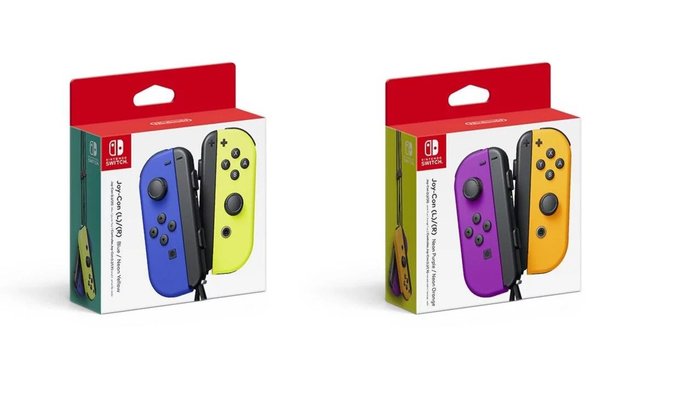
    The new Joy Cons fill in a few more of the two-tone color combinations for Nintendo’s unique Switch controllers. There’s a blue and neon yellow pair, making for a great contrast. Interestingly, the neon yellow Joy Con has been seen once before, though it was bundled with another yellow Joy Con as a promotion for the fighting game game ARMS.

    The second new color pair is the Neon Orange and Neon Purple pair, both brand-new colors for the system. Notably, these are landing on October 4th, meaning they’ll be here in plenty of time for Halloween. This is notable in no small part because Luigi’s Mansion 3, one of the most hotly anticipated Switch titles of the year, is dropping on October 31st to coincide with Halloween!

    Updated Switch Hardware

    While we love our Switches, they have one glaring weak spot: they don’t sport amazing battery life. While the system is great for carrying with you on your work commute, it’s not amazing for long road trips if you forget the charger. Thankfully, Nintendo has a solution to this problem.

    Starting in August, a new batch of original Switch consoles in new packaging will start appearing on store shelves. These have an updated, more efficient chipset that will allow for between two and half to nine extra hours of battery, depending on what you’re using the system for. The new Switch models will be easy to tell apart, as they’ll be sporting a serial code starting with XKW instead of XAW.

    Potential Changes

    The updated chipset in the original Switch comes as no surprise: Nintendo issued a patent for such a design a few months ago. Likewise, this chipset is likely similar to the updated, more efficient Tegra chipset we’ll be seeing in the Switch Lite in September.

    A particular thorn in Nintendo’s side over the two years the Switch has been on the market has been pirates and hackers using a hardware exploit to “jailbreak” their switches. This has allowed some hackers to illegally play duplicated copies of Switch games, a situation Nintendo has cracked down on. It’s likely the updated Switch model will have some methods of preventing this type of hacking.

    Switch Pro Rumors

    Rumors of a completely-updated Switch Pro have been swirling since a few notable publications confirmed that Nintendo had plans for both a lighter, smaller Switch and an updated and beefier version of the console. We know, now, that the rumors for the smaller Switch were accurate, as the Switch Lite fits the description from those earlier leaks. However, the beefed-up “Switch Pro” remains a big mystery.
    It’s theoretically possible that this hardware refresh, with its better battery life and more efficient chipset, could be the rumored “beefier Switch.”

    However, many fans expect to see a more robust update to the base console soon, as the successors to both the Xbox One and PS4 are on the horizon. After all, the Switch’s impressive scaling resolution and adaptive Tegra chip infrastructure allows it to easily scale games up and down for different use cases. It’s not hard to envision a version of the Switch putting out a better resolution while docked and rivaling current-gen hardware.