Month: July 2019

  • Stop Losing Your Keys—And Other Bluetooth Tracker Life Hacks

    Stop Losing Your Keys—And Other Bluetooth Tracker Life Hacks

    Bluetooth trackers give you a ton of options for tech-savvy users looking for great life hacks. The possibilities are limited only by your imagination, so the more uses you can think of for them, the more useful they become. Today we’re going to help jumpstart your imagination by going over some of our favorite Bluetooth tracker life hacks.

    Bluetooth Tracker Life Hacks

    Key Tracking

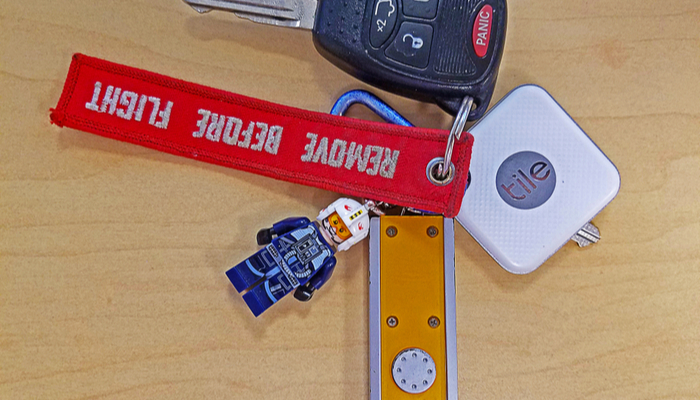
    How often have you lost your keys and wished you could call them the way you can call your cell phone when you lose it? There’s little in the world as frustrating as being in a hurry to leave the house but you can’t find your keys. The trick to this one is pretty straightforward: hook up a Bluetooth tracker and sync it with your phone. Then all you need to do is put the tracker on your key ring. If you misplace your keys, all you have to do is ping it from your phone.

    Most Bluetooth trackers will react to this by letting out a pinging sound, though some will buzz and vibrate and others still will light up, or some combination of the three. While keys are the most common items you’ll use the trackers on, there are some others you might not have considered.

    Wallet or Purse

    Another great use of Bluetooth trackers is stashing one in your wallet or purse. This allows you to safely find them if they are misplaced, though you can also rest assured that if someone tries to steal it, you can ping it for it to emit a loud tone. The presence of the tracker may even dissuade potential thieves, as they might think the tracker is a GPS-enabled device.

    If you want a more thief-proof tracker, you can opt for GPS-enabled trackers. These use either cellular or satellite networks to triangulate the tracker’s location, allowing you to track the item further than just through Bluetooth. If you often misplace items or you’re worried about them getting stolen, this is a great option for you.

    TV Remote

    One of the most commonly lost items in any household is the TV remote. If you’re constantly searching around for your remote, try attaching a tracker to it. This will let you ping the tracker through the phone app and find your remote in no time. The same goes for things like video game controllers, tablets and the like. If it’s small and often misplaced, a Bluetooth tracker is a great option.

    Luggage

    If you travel on planes often, you know how frustrating it can be to find your luggage on the carousel. What better way to keep track of exactly where your luggage is than by incorporating a Bluetooth tracker into your luggage? That way you’ll be able to quickly tell if your luggage is nearby, and even ping it to distinguish it from similar-looking bags to your own. This could save you a ton of time on your next trip.

    Kid’s Items

    If your kids are constantly losing their items at school or summer camp, it can be very frustrating. In order to help keep up with them, consider throwing a Bluetooth tracker in the items they commonly lose. For instance, if they consistently lose track of their lunchbox, their coat or their backpack, consider putting a tracker in those items.

    Keep in mind that most trackers aren’t meant to track kids or pets themselves, so while you might be tempted to throw one on your pet’s collar, that’s not what the items were designed to do. That said, the usefulness of the items depends on you use them.

  • Best Wireless Headphones for 2019

    Best Wireless Headphones for 2019

    Whether you’re looking for a good pair of headphones for working out or just something to wear while drowning out sounds during your commute, not having to fuss with wires is a huge plus. No one wants to worry about the tangle of wires in their pocket or bag, or their cord snagging on something and damaging their headphones. Thankfully, there are some stellar Bluetooth headphones on the market. Here are some of our top picks.

    Best Bluetooth Headphones

    Jabra Elite 65t

    If you like having wireless earbuds for sports activity, we can highly recommend the Jabra Elite 65t. These earbuds fit snugly in most ears, and they have a great sound quality for their small size. The drivers are solid, offering punchy bass, good mid-levels and decent overall sound: while these won’t be beating any dedicated audiophile headphones, they’re good for their price point and size.

    A notable draw to the Jabra Elite 65t is their microphones. They work incredibly well as a headset for taking phone calls, doing a great job of filtering out background noise. If you like wearing earbuds while jogging, cycling or other types of activity, this is a great draw. Taking a call while getting in your workout is a great two-in-one feature for busy professionals.

    Sennheiser Momentum True Wireless

    If you’re looking for the intersection of portability and sound quality, you’re looking for the Sennheiser Momentum True Wireless earbuds. These wireless earbuds offer incredible sound quality and accurate reproduction of recordings. They’re incredibly light: you might even forget they’re in your ears. When you need a good set of earbuds for taking with you on trips or to work and back, these are a great go-to.

    While they’re not the best for sports or activity, the Sennheiser earbuds are great for daily activity like walks or commutes. For the person who wants portable wireless earbuds that can be tucked into a pocket but still wants the best sound quality, these physics-defying little earbuds are the best option.

    AirPods 2019

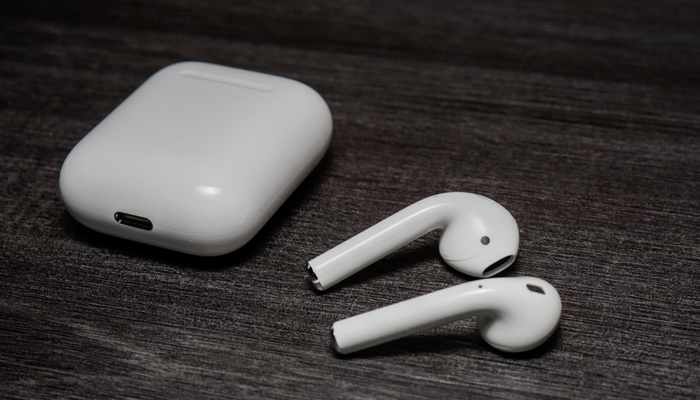
    The expensive and flashy AirPods are better than their reputation would have you believe. For their high price point, you get a pretty stellar product, as is typical for Apple. If you’re already in the Apple ecosystem, these are a no-brainer. Their intuitive gesture controls allow you to change song, adjust volume and answer calls quickly and without having to pull your phone out.

    The 2019 update brings even more useful tricks to the AirPods. They now feature better Siri integration, so you can use your voice to call up the virtual assistant. You can send messages, start playlists and ask for internet searches all while jogging, cleaning or whatever you’re doing while wearing the AirPods. If you love high-tech integration and cool fashion statements, the AirPods are a great pick for you.

    PowerBeats Pro

    If you love the idea of the AirPods but want a more fitness-oriented set of wireless earbuds, the Beats Powerbeats Pro are for you. The same technology that went into the second generation AirPods is on display in the PowerBeats Pro, just in a more fitness-oriented shape. The over-ear design on display here helps the earphones stay on your ears while your exercise, making them great for any active person.

    The sound quality with the PowerBeats pro is excellent, considering their size and price point. They’re a bit more expensive than the average headphones, but their great technology integration and stellar sound quality on phone calls makes them great for fitness-minded users. If you love listening to music while you work out and like the idea of the AirPods, the PowerBeats are perfect for you.


  • Cutting the Cord Without Breaking the Bank

    Cutting the Cord Without Breaking the Bank

    Ostensibly, the whole point of not having cable and using Internet TV is to keep your monthly costs down. After all, cable is prohibitively expense for the average person, so there’s no reason to have a cable subscription. However, if you’re subscribed to Hulu, Netflix, Sling and more, you’re going to see those monthly bills getting to a similar place as that cable bill.

    There’s good news though: there are plenty of free streaming services you can start using today. There’s no great reason to spend a ton of money on entertainment when so much is available for free, right now, on the internet. Let’s keep it inexpensive!

    Pluto TV

    Pluto TV is an internet streaming service available on most streaming platforms. If you have Roku, Apple TV, Fire TV, whatever: you can run Pluto. It works by aggregating content from the internet and grouping it into channels of like content. For instance, if you like anime, there’s tons of websites that have free episodes of anime, and Pluto uses those to create an all-anime channel. Similarly, if you’re into gaming, there’s a channel for that.

    Most of what you’ll see on Pluto is older re-runs of shows from major networks or online content from larger websites. There are commercials, which is how the thing gets monetized, but it’s completely free to download and use. When it comes to completely free television, Pluto is a great option.

    The Roku Channel

    If you run your streaming services through Roku, you can access the Roku Channel. This free streaming channel is operated by Roku themselves and offers classic and modern movies, news streaming and more. Essentially, it’s a great companion to whatever other content you watch on Roku. The channel also offers older streaming TV content, making it a bit of a grab-bag when it comes to entertainment.

    You can also manage your other subscriptions through the Roku Channel. For instance, if you have HBO or Shotime subscriptions, you can manage them through the Roku Channel, streamlining your bill while allowing you to find your content all consolidated to one place. If you use Roku, this is a great free TV option.

    Kanopy

    One of the coolest things about living in the modern world is public goods like parks, public transit and libraries. You’ve already paid for it through your local taxes, after all, so you might as well enjoy these public goods. Kanopy is one such public good in this category: it connects to your local library to allow you to rent movies, though the number you can “borrow” digitally could differ from library to library.

    Once you have the app downloaded, you enter your library card and then create a Kanopy account. Then, like that, you’re hooked up to watch free movies, courtesy of your local library. While you’re at it, consider heading by your library and checking out some books: there’s tons of great stories to be found within!

    Crackle

    The long-running service from Sony, Crackle, has been around in some form or another since 2004, long before Netflix was offering streaming content online. Interestingly, Crackle has a lot in common with Netflix. There are tons of older sitcoms and 90’s cult classic movies available on-demand, and there’s even original programming like The Oath that you can watch. Like Netflix, the selections are updated regularly and you can almost always find something to watch you haven’t seen before on Crackle.

    Unlike Netflix, however, Crackle is totally free. There’s no catch to it: the content streaming on the service costs nothing to view. Why not give it a shot? You can binge some of your favorite old sitcoms today, for free, through Crackle.


  • Best Smart Home Devices for 2019

    Best Smart Home Devices for 2019

    If you’re just getting into smart home technology, you might be wondering what the best smart gadgets for your home are. You’re not alone: tons of people are interested in making their house a smart home but don’t know what products are the best for doing just that. Today, we’re helping you figure that out with our buying guide for smart home technology.

    Best Smart Home Devices

    Amazon Echo

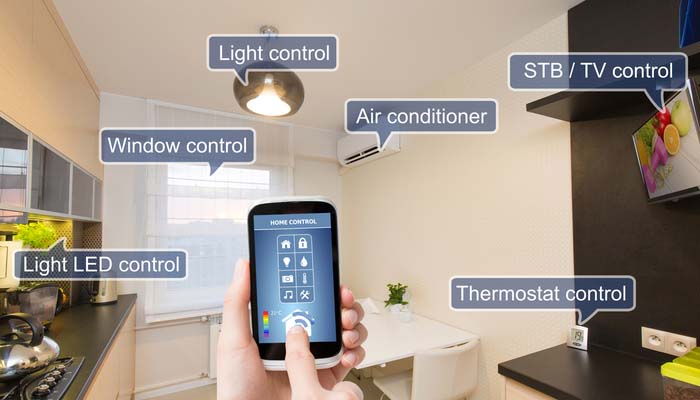
    The first part of any smart home is the hub. You need something to act as a central hub, or a brain, for your smart home. While there are a ton of options on the market, we recommend Amazon’s Echo line of products. There are products at all price points in the range, from the budget-friendly Echo Dot all the way up to the larger Echo Show and standard-sized Echo speaker. We highly recommend the Echo Dot to people who haven’t used smart speakers or smart home technology before.

    The Echo Dot 3rd Generation can be found at Amazon for $50, though if you go with an older generation you can get a speaker for even less than that. The Echo sports Alexa, Amazon’s stellar virtual assistant, who you can issue vocal commands to in order to control your smart home technology. Turning on your lights, ordering off of Amazon and even locking you door can all be controlled with your voice through Alexa.

    TP-Link Kasa Smart Plug Mini

    Smart plugs are the go-to smart technology for anyone just breaking into smart home tech. The reason? It can turn pretty much any simple device into a smart device. Let’s say, for instance, you have a favorite lamp in your living room, but it’s in an awkward position that’s hard to get to. Well, all you need to do is hook up a smart plug, name that plug “living room lamp” and synch it with your smart home hub.

    Once you’ve got it hooked up, you can use your hub to command the lamp on or off through your voice alone. Simply calling out “turn on the living room lamp” will signal the plug to send a current to the lamp, and like that, you’ve got a smart lamp without having to buy any other new technology. With some creativity, you can see how useful these smart plugs can be for someone just starting out.

    Philips Hue

    If you want something a little fancier for your smart lighting, we suggest the Phillips Hue line of products. These smart bulbs connect to your smart home hub and then you can use either the Hue app or your voice to control them. True to their name, these lights can cycle through a wide variety of colors and shades, so you can light a room to whatever color or lamination you’d like.

    Nest Thermostat

    One of the most useful smart home devices is the Nest Learning Thermostat. As its name suggests, this is a smart thermostat that learns your patterns to help make sure your home stays comfortable. Once it knows when you wake up, when you leave for work and when you get back, the thermostat will start to automatically set the temperature to your comfortable ranges. This is more than just convenient: it means you’ll likely see lower power bills.

    Beyond that, you can also use normal voice commands to change the temperature in your home. Little beats calling out to your smart hub to drop the temperature a bit and having your home not only listen, but follow through. It makes you feel like you’re living in the future to assume command of your home with your voice.


  • Samsung Galaxy Fold Release Date Announced (Again)

    Samsung Galaxy Fold Release Date Announced (Again)

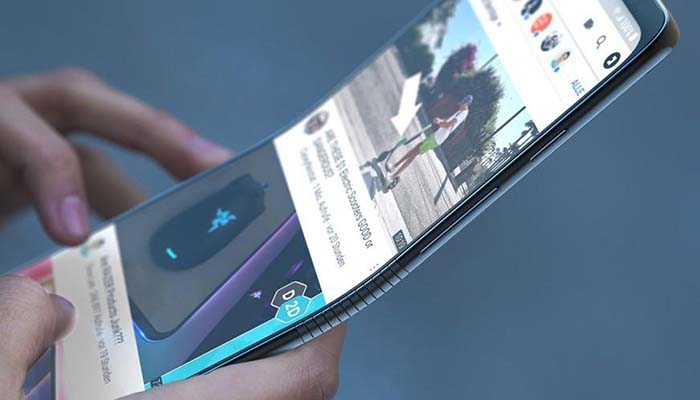
    Earlier this year, one of the biggest exciting developments for smartphones was exected to be the advent of folding phones with central displays. However, after the flagship Samsung Galaxy Fold experienced numerous hardware failures during testing, the phone’s April 26th release date was delayed indefinitely. For a time, it was unclear whether Samsung would be shelving the folding phone concept altogether.

    Now, we have confirmation of a new release window for the hotly-anticipated phone. Samsung has now promised that the folding phone will be on sale by the end of September. This is a far cry from the predictions we made: earlier, we had predicted that it seemed as though Samsung would discontinue the original Fold altogether and start from scratch. It seems they have faith in their original design, and they claim to have corrected the issues that had plagued test models back in April.

    Samsung Course Corrects

    Following the announcement of the delay, many tech industry analysts were convinced that the time just wasn’t right for foldable displays. Clearly, if Samsung couldn’t figure it out, how could we expect this tech to take off for anyone? After all, the price point hovers around $2,000, twice as much as the price of the flagship Galaxy 10.

    According to Samsung, the issues that were present in the test models have been addressed. Reviewers founds their screens bending and bowing from debris that had worked between the screen and the phone’s backing. Additionally, some people removed a thin film layer, thinking it was a screen protector, only to find it was actually an integral part of the phone and resulting in full screen failure.

    Addressing the Issues

    So, what has Samsung done to help make the phone ready for a mass release? Firstly, the protective layer has been extended beyond the bezel to make it appear as though it is not something that could be simply removed like a dust cover. Secondly, there are also now reinforcements worked into the phone’s structure to keep debris from wiggling down in there.

    Thirdly, there are now metal reinforcements beneath the plastic screen in order to bolster the otherwise-flexible display. Finally, Samsung introduced protective caps to the top and bottom of the hinge mechanism, making it that much sturdier. This also includes reducing the gap between the hinge and the body of the phone, making it that much harder for debris to slip between.

    Significance

    If they had been unable to resolve the issues with the Galaxy Fold, it would have resulted in a major embarrassment for Samsung. Tech industry analysts had assumed that foldable displays were going to be the next big thing in smartphone design, so Samsung’s inability to stick the landing came as a shock. Had they been unable to deliver, it would have allowed room for another company, like Motorola, to swoop in and steal their thunder.

    With the newly-announced release window, confidence in the brand and the folding display experiment has been renewed. This is a big step for Samsung, and will likely be the biggest move for the company since they first unveiled their Galaxy line over a decade ago. The question remains whether the public will be eager to embrace a $2,000 phone that now has a reputation for being easy to break.

    Release Details

    At the time of this writing, there’s no definitive release date for the Samsung Galaxy Fold. However, we would expect to see it sometime in mid-September to compete with Apple’s new offerings this year. The phone will retail for $1,980, making it far and away the most expensive smartphone in Samsung’s lineup and nearly double the cost of most premium flagship phones. Time will tell if the phone is the seismic shift that analysts expect.


  • Laptop or Tablet: Which is Right for You?

    Laptop or Tablet: Which is Right for You?

    There are times when you’re not quite sure which device you need for your various tech applications. If you’re looking for an all-around entertainment device, a productivity machine or something in between, it can be hard to decide between a laptop or a tablet. If you add two-in-ones to the mix, things get even more complex. Today we’re looking at the pros and cons of each to help you narrow down which is right for you.

    Best Portable Technology Primer

    Laptop vs Tablet

    The first question you need to ask when considering a laptop versus a tablet is what you need your technology to do. If you’re just looking for something to watch Netflix in bed or play fun games, you might be looking for a tablet. Essentially, if you wish you had a giant version of your cell phone, you want a tablet. If you need something with a bit more horsepower, however, a tablet might not be right for you.

    For instance, if you want something that can render more impressive graphics than a tablet, you’re probably leaning more toward a laptop. Similarly, if you plan to do a ton of typing, like for school or work, you’ll need a laptop; or, at least, a two-in-one with a keyboard. Similarly, if you plan on playing more in-depth games than phone ports, you’ll want a laptop.

    Two-in-One

    If you’re looking for a combination of both pieces of technology, you want a two-in-one. There are a few compromises to be made on both sides when it comes to a two-in-one, though. Firstly, let’s talk about what a two-in-one is. A two-in-one refers to a computer that is both a laptop and a tablet. Typically this means that the screen is a touchscreen and can be detached from the keyboard.

    If you like the touch-screen functionality and comfortable media player aspect of tablets but also want to be able to type and work on documents, a two-in-one is probably a good fit. Keep in mind, however, that the two-in-one screen is often much bigger and runs hotter than a dedicated tablet. The actual computational power of the two-in-one is also typically lower than a dedicated laptop.

    Phablet

    Another option, if you’re really into the idea of a tablet but find most of them too large, is to get a phablet. A phablet is an oversized smartphone, something of a cross between a phone and a tablet. Examples include the Galaxy Note line and the upcoming suite of folding phones from manufacturers like Samsung and Motorola.

    These offer a larger screen sized for more comfortable phone gaming and media viewing while also being small enough to fit in a pocket or purse. You get to roll the costs of your smartphone and tablet together, too, allowing you to save a bit of money.

    Other Entertainment Portables

    If you’re in the market for portable entertainment but want more power than a tablet, you’re probably wondering what a good in-between would be. There are a few options for affordable-yet-powerful entertainment portables. For example, if you’re looking for an entertainment device for a child, you could opt for a Nintendo 3DS, a handheld gaming device.

    Similarly, if you’re looking for a portable piece of technology for entertainment during commutes and breaks from work, you could get a Nintendo Switch. The Switch has Hulu and YouTube support, too, making it similar to a small tablet you can use for general media. A full suite of Nintendo games like Mario and Zelda doesn’t hurt, either!

    So, there you have it. Hopefully this primer helps you decide on what portable technology you need to round out your tech demands!


  • Bose Noise Cancelling 700: Still the Gold Standard?

    Bose Noise Cancelling 700: Still the Gold Standard?

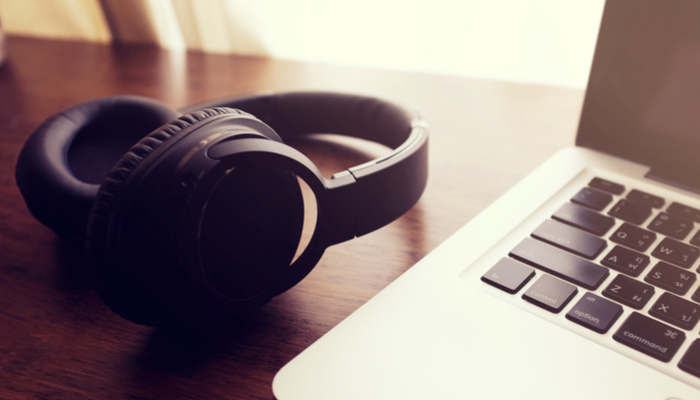
    When you hear the name Bose followed by the words “Noise Cancelling” you know you’ve got a solid piece of audio hardware in front of you. Whether you’re taking a long trip on an airplane, commuting via train or just trying to zone out in the break room, noise cancelling headphones can be huge lifesavers.

    The new Bose Noise Cancelling 700 headphones are upon us, and today we’re answering the question everyone has: are they still the gold standard in audio hardware? Let’s take a closer look.

    The Bose Standard

    The Bose 700 is a follow-up to the now-ancient Bose QuietComfort line, which first hit the market in the year 2000. That’s nearly twenty years ago now, and while the model went through a number of cosmetic changes, the innards remained largely the same for the better part of two decades. So, what’s so new and different that Bose had to introduce a brand-new line of headphones?

    Well, a lot. Firstly, the drivers that pump the sound out and the microphones that detect (and cancel) ambient sound are all brand-new for this headset. The construction is all new, too, incorporating a single stainless steel band that makes the whole set sturdier and more impressive in the hand. The rubberized padding on the inside of the ear cups is new, too. It’s comfortable and sweat-resistant, and a far cry from the old cloth and foam padded cups of the QuietComfort 35 II.

    What Else is New?

    There’s a lot of new things going on under the hood with the Bose 700, as well. There’s been a push on the part of Bose to make these headphones well-known as being great for taking phone calls, too. And, to their credit, they work rather well as headsets for taking phone calls, in case you get called in the middle of your commute or work day.

    The headset’s noise cancelling technology does a great job of preventing the person on the other end of the call from hearing the ambient noise around you, too, which is a huge help. The beam-forming technology in the mics can zero in on your voice and transmit just that to the other person. You can also toggle on voice monitoring so you can hear your own voice through the headphones so you’re not shouting in a quiet room.

    Sound Quality

    We haven’t even touched on the most important part of any pair of headphones: the sound quality. As expected, it’s excellent. The drivers offer up crisp and clear sound on the mid-levels as well as on the bass. The bass isn’t as punchy or powerful as comparable Sony headphones, though it’s much tighter and hits with a lot more precision.

    This isn’t to say that the bass isn’t deep on these headphones: it is. However, when compared to some other high-end headphones, it can be ab it more controlled. This isn’t a good thing or a bad thing, it’s just the nature of these drivers. Unless you’re listening to a lot of music on a lot of different headphones, you likely won’t even notice the differences.

    Bottom Line

    The sound-canceling on display here is top-notch. The only competition hitting a similar benchmark is Sony, as some of their top-notch offerings are on similar territory. This is all to say: if you want the best, it’s this or Sony. As for the nitty-gritty differences, it’s all down to a matter of preference.

    If you’re looking for the top-of-the-line noise cancelling headphones and can stomach the $400 price tag, the Bose Noise Cancelling 700 are a great pair of headphones. They remain the gold standard, and Bose remains nearly unmatched at the top of the heap.


  • Losing Weight Without Dieting: Changing Lifestyle

    Losing Weight Without Dieting: Changing Lifestyle

    Fad diets are a dime a dozen. Maybe you’ve even tried some yourself. There’s been all kind recently: paleo, keto, the list goes on. What many people find is that when they do a fad diet, they lose a bit of weight at first, but then they burn out, eat normally and gain the weight back. How can you lose weight without having to worry about your lifestyle just putting it back on? Well, you have to change your lifestyle.

    Losing Weight Without Dieting

    Healthy Lifestyle

    A healthy lifestyle is made up of a combination of tons of different factors. There’s a lot of important things you need to pursue to be healthy, but the place you need to start is a determination to live better and a mindset that puts your health above everything else. Dedication and discipline are of utmost importance when it comes to living a holistically healthy lifestyle.

    Regular Exercise

    Get out every day and exercise. It doesn’t matter whether this is weightlifting, running, yoga, tai chi or rock-climbing, you just need to get out and move. If you’re never burning calories, your body is storing them as fat. That’s just basic nutrition. Whatever you need to do to squeeze in at least half an hour of exercise per day, do it.

    Maybe you like playing video games. Well, don’t let yourself play until you’ve gotten in a half-hour jog through your neighborhood. Maybe you love shopping. Don’t buy any new shoes until you’ve hit your half-hour goal for yoga for a straight week. The specifics don’t matter: what matters is that it works for you and it gets you moving and burning calories.

    Sleeping Better

    A huge factor in living a healthy overall lifestyle is sleep. If you’re not sleeping right, you’re going to feel bad and you’re going to find it hard to lose any weight. Make sure you’re getting to bed at a reasonable hour, getting between 6 and 8 hours of sleep, and waking up at a decent time. Sleeping in late every day is a surefire way to encourage your body’s metabolism to be slow.

    To help encourage better sleep, you can try a few things. Make sure you don’t drink any caffeine within eight hours of when you want to sleep. If you’re following our advice about regular exercise, you’ll probably be tired enough by the end of the day to hit the hay. If you work second or third shift, try to stop doing so if you can. Ask for a transfer to day shift or try to change jobs. If you can’t, then try to keep your sleeping schedule as consistent as possible.

    Junk Food

    We know we said this was an article about losing weight without dieting, but trust us on this one: you need to cut the junk food out. This includes greasy, fried foods, snack foods and everything high in saturated fats. If you want to snack, that’s fine, just make sure its on something like carrots, apples, bananas or other fruits and veggies. They’re good for you and they’ll help you keep from overeating during meal time.

    While you’re at it, make sure you cut sugary soft drinks and sports drinks out of your normal diet. This isn’t to say you need to go on a diet: feel free to eat whatever else and operate normally. However, if you want to live an overall healthy lifestyle to encourage weight loss then you’re going to want to leave these incredibly fatty, sugary foods out of your diet. If you follow these steps, you’re not guaranteed to lose weight, but we do guarantee you’ll feel a lot better.


  • iPhone 11 Rumors: Latest Reports

    iPhone 11 Rumors: Latest Reports

    New rumors around the iPhone 11 are swirling, and they’re all rather impressive. Apple’s had some issues lately moving phones, as people are keeping their older phones longer and technology is plateauing. The suite of new features in the iPhone 11 seemed geared to both impress tech-heads while also converting people who are hanging on to their iPhone SEs still. Let’s take a look at the newest iPhone 11 rumors.

    iPhone 11 Rumors

    Camera Bump

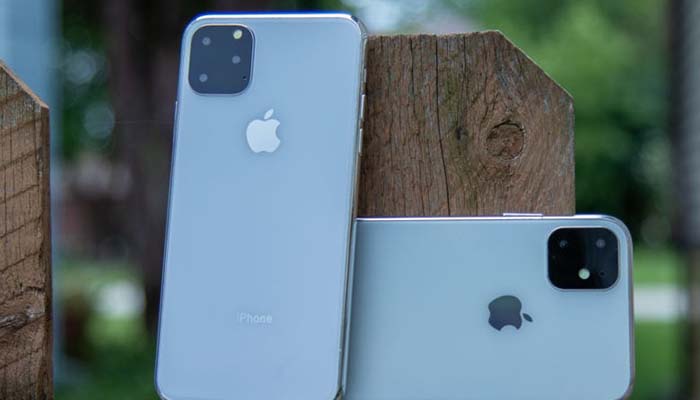
    The notorious camera bump that has been speculated to be coming in the iPhone 11 has looked ugly in previous mock-ups. The large, protruding square with a cluster of three cameras throws the entire appearance of the back of the phone off. Thankfully, some newly-leaked concepts show the iPhone 11’s three-camera array will be on a much more subdued bump from the back of the phone.

    New mockups show the camera bump has rounded corners, a staple of Apple design, as well as a sleek profile that barely pops up from the back of the phone. This design looks much more stylish and professional, and we’re happy to see it rather than a larger, square-shaped version of the iPhone X’s camera bump.

    Mute Switch

    Everyone who owns an iPhone knows what a pain the mute switch on the side can be. If you’ve ever meant to have your phone on silent when it starts ringing during a meeting, you know what we’re talking about. This is due to the shape of the mute switch: it’s a thin bar that can simply be toggled forward or backward to silence or un-mute the phone.

    Thankfully, Apple’s got a solution for this one cooked up for the iPhone 11. The newest phone looks poised to introduce the same silence-toggle seen on the more recent iPad models: a circular switch that is moved up and down, rather than forward or back. Hopefully this will cut down on the number of times the switch gets flipped in our pockets.

    Construction

    It seems like Apple is in the “if it ain’t broke, don’t fix it” camp when it comes to the phone’s glass back. Glass-backed phones started getting big in 2017 for a number of reasons. Firstly, the glass allows for wireless charging signals to pass through unimpeded. Secondly, on the same token, they’ll likely make it easier for 5G signals to be passed to the phone over the airwaves.

    Another upside of an all-glass back is that is looks very stylish while also protecting the phone against damage. That might sound counterintuitive, but hear us out. The incredibly durable Gorilla Glass used in phones like the iPhone XR is actually even better at protecting your phone’s internal components than plastic.

    Returning Features

    Further returning designs include the return of the dual-camera sensor for Face ID and the lack of a physical front button. Apple’s been the sole company allowing for only Face ID to unlock their flagship phones, foregoing fingerprint scanners altogether. This has made the iPhone X and its family of phones a very futuristic and natural device for Apple users.

    The lack of a physical front button means that this iPhone will also necessitate the use of gesture controls to navigate iOS. This news might be disappointing for people who were hoping that Apple would reintroduce the older style of navigation using the physical front button. For fans of the clean and easy-to-use buttonless iOS, however, this is great news.

    When Will it Release?

    If this year is anything like previous release years for Apple, we could expect to see the iPhone 11 landing sometime in late September. We’ll likely see a full and proper unveiling of the device during the week of September 8th.


  • 2019 Honda CR-V: How Does it Stack Up?

    2019 Honda CR-V: How Does it Stack Up?

    The 2019 model year CR-V is upon us, and Honda’s best-selling car looks pretty solid. Is it a worthy competitor to the Toyota RAV 4, though, or does Honda’s biggest rival take the small crossover top spot this year? Today we’re taking a closer look at the 2019 CR-V to answer just that.

    2019 Honda CR-V

    What’s New?

    There’s actually very little that’s new in the 2019 CR-V when compared to the 2018 model. This is the same fifth-generation CR-V we’ve been seeing for the last few model years. That being said, it sports a great suite of technology still and the styling is still modern and sleek. As for brand-new features, the only notable option is the new white paint scheme.

    As for things you won’t find this year, a trim level has been deleted from the roster for 2019. The more simplified range is a good thing for this more budget-level small SUV: as one of Honda’s mainstays and a great practical car, it’s not exactly competing with BMW or Tesla. We appreciate the more concise model range with a simpler statement of purpose: this is a practical car for working families.

    Design

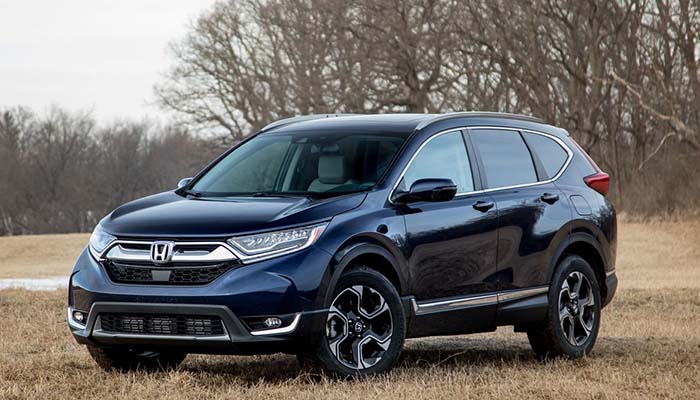
    Much like last year, the fifth-generation CR-V looks great. The styling is modern and slick, and we love the black-painted touches on the rims. Other neat flourishes include the rear taillight molding that gives a 3D effect, the chrome, black and grey plastic finishes all add together for a modern and clean look. Style lines across surfaces like the door panels, framing the grille and across the hood give the car a lot of visual coherency.

    The interior is similarly modern and feels clean and stylish without looking gaudy. We love the soft-touch materials over most major surfaces, as well as the tasteful wood grain finish in some of the panels. From the driving position, the layout is smooth and draws the eye to the infotainment system, which we’ll get to in a moment. From the passengers’ positions, the car’s surroundings are comfortable and calming.

    Interior Tech

    About that infotainment system: the screen is large and bold, and the touch controls are responsive. Honda’s proprietary display-audio system is at work here, and it’s great. The image resolution looks solid, and, while not being the most impressive on the market, works well for what this car is trying to do. Oddly, there’s no wi-fi hotspot option for this vehicle. This is an odd touch for an otherwise modern car.

    That being said, modern touches are also here: the Display Audio system has functionality for both Apple CarPlay and Android Auto, which both allow you to sync your smartphone with your car’s infotainment system. The Display Audio system is also easy to learn and navigate if you’ve not encountered it before. All in all, this is a solid suit of tech for an SUV of this class.

    Practicality

    The interior storage space and drive train are as you’d expect from a CR-V. It can carry tons of stuff, making it a great grocery-getter, and it drives fine. It’s neither fast nor slow, sporting its 190 horsepower and 179 pound-feet of torque in all trim levels but the base LX. It’ll get you on to the highway and around town, but it won’t do so with any panache.

    The ride is smooth and comfortable, much like the interior of the vehicle. Even on a rough road with many bumps and ruts, you’ll likely feel fine as the vehicle just trucks along. From its starting price of $24,450, it’s a great deal for anyone looking for a good daily driver. We’re happy to report that the 2019 CR-V is still on top when it comes to small SUVs.