Month: July 2019

  • Best Bluetooth Speakers for Your Summer Cookout

    Best Bluetooth Speakers for Your Summer Cookout

    There’s nothing quite like having friends and family over in the backyard while you’re grilling burgers and hot dogs in the back. While you’re at it, why not throw on some great tunes to get the party really going? Today we’re looking at some of the best Bluetooth speakers for your summer cookout.

    We’re going to be looking into speakers based on a few criteria. Firstly, the price point is important, as we don’t want to break the bank. Secondly, sound quality is a big concern, of course. Finally, portability and waterproofing are important for any outdoor-use speaker you buy. Hopefully this helps you narrow it down. Let’s jam!

    Best Bluetooth Speakers

    UE Wonderboom

    It’s no secret that we love UE here at GoodFind: they make all-around incredible Bluetooth speakers. The Wonderboom, which has been around for a while, is now only around $50 at most retailers. For the price, it’s hard to beat the Wonderboom. It’s tiny and light, waterproof and dust-resistant, and it offers great 360-degree sound.

    The bass from this little ball of speaker is impressive, putting out loud and driving sound that doesn’t warp at higher volumes despite its size. If you’re looking for a portable and durable speaker that doesn’t break the bank and will sound great at a pool party, there’s little that beats the Wonderboom.

    Bose SoundLink Revolve

    Bose is well-known for their stellar sound quality, and the SoundLink Revolve is no exception. This great speaker runs for $200, making it a bit pricey, but it’s sure to impress your guests with its powerful sound and deep bass. The SoundLink also offers a wonderful 360-degree sound coverage, meaning it sounds great no matter where you are in the room.

    Notably, this speaker isn’t dust-resistant or waterproof, meaning you’ll need to be more careful with it than some speakers. It’s more of a home speaker, not great for traveling, due to its lack of waterproofing and less robust construction.

    JBL Charge 4

    JBL’s Charge 4 speaker is enormous and heavy, but it offers great bass and can even charge your phone from its huge battery. The Charge 4 might not be the best-sounding speaker, but it’s got a great price point, coming in at $150, and it’s plenty durable. If you’re looking for a modern answer to the classic boom box, this is for you.

    The Charge 4 is waterproof, too, making it a great option for pool parties. Kicking bass sound is great from this speaker, thanks to its large footprint and huge woofers. We wouldn’t recommend this speaker for things like hiking, but it’s great for a pool party where you might need to charge your phone!

    UE Boom 3

    Ultimate Ears is far and away the best Bluetooth speaker manufacturer out there. As such, it’s no surprise that the UE Boom 3 is the best Bluetooth speaker for the money. Whether you’re trying to fill a small space like a dining room with sound, or trying to cover a large back porch area, the Boom 3 has you covered. The sound is huge and rich, the bass kicks well and it just sounds great.

    As with nearly all UE speakers, it’s IP67 waterproof and dust proof, meaning you can toss it in the pool and have a laugh as it keeps kicking out killer sound. The speaker is light, coming in barely over a pound, but it’s still incredibly durable and great for throwing in a bag. You’re not worried about it getting jostled too much, and it’s also not going to weigh down your bag. For only $150, it’s one of the best values out there.

  • iOS 13 Beta: New Features and What to Expect

    iOS 13 Beta: New Features and What to Expect

    Every year or so, a new update for Apple’s cellphone operating system, iOS, begins making the rounds. This time around, it’s lucky number 13, and there’s a wealth of new features and quality of life updates coming down the pipeline for Apple’s OS. Today we’re giving you the scoop on the newest iOS update so you know what to expect when the operating system goes live later this year.

    iOS 13 Beta

    Dark Mode

    Dark mode is coming to iOS! Let that sink in for a moment. Real dark mode support from Apple! That’s a first for the nearly 13-year-old OS, but we’d rather see it get here late than never. While some people might not care much about the option for a dark mode, it’s a big deal for some users.

    Some people just don’t like the harsh, bright backgrounds of most apps. Other people don’t like being blinded by the brightness of some white-background apps in the middle of the night. Others still just like to keep it dark, man. No matter your reasoning for wanting dark mode, it’s coming as an OS-wide option for iOS 13. Frankly, this is the one we’re most excited for.

    QuickPath Swipe Keyboard

    A feature that Android users have long enjoyed is the swipe-based keyboard. While Apple offers a great number of security features and clean UI, the option for a swipe keyboard has long been iffy at best. However, the new QuickPath swipe keyboard in iOS 13 will do its part to change that!

    Early reviews from beta testers have stated that the swipe keyboard is responsive and works great in most scenarios. More complex words, uncommon names and acronyms are still a little more difficult to get to work, but the same can be said of any swipe keyboard. Thankfully, it seems to be a far better option for iOS users that want a swipe-based keyboard for quick texting than installing a third-party app.

    FaceTime Attention Correction

    FaceTime attention correction, as its called, is coming to iOS 13. This means that when you’re on a FaceTime call and you’re looking slightly to the side or down to see the person you’re talking to, the phone’s system will automatically center your view so your attention appears to be on the person you’re talking to.

    This means that you’ll not have that strange, slightly-off look when you’re talking to your friends or family on the new iOS. Neat!

    New Siri Voice

    Siri’s new voice will sound more natural and less robotic, according to Apple. This is great for people who use HomePod or AirPods, as it means that when Siri is reading off longer sentences, she’ll sound more natural. For instance, people who use AirPods might want Siri to read their texts to them, and she’ll sound much more natural and normal while doing so.

    Likewise, Siri can now better differentiate between different voices. For instance, when you’re using your HomePod, and you ask Siri to read your calendar, she’ll pull up the correct one for you, not your spouse or kid’s calendar!

    iOS 13 Release Time Table

    The beta for iOS 13 launched in late June, and it’s likely that the iOS update will be hitting phones sometime in mid-September. While there’s no official release date as of yet, it would be unusual for Apple to not ship the new iOS with this year’s new iPhones. Historically, the newest iPhones launch yearly in the middle of September.

    We don’t know about you, but we’re absolutely thrilled that Apple is introducing an OS-wide Dark Mode, so we’ll be updating as soon as the new OS launches!


  • Tesla Cuts Prices Across Product Range

    Tesla Cuts Prices Across Product Range

    Tesla, the fan-favorite controversial electric carmaker, has cut prices across their entire product range as the tax credits on their vehicles fades towards the end of 2019. Previously, before 2019 started, Tesla customers in the US could get a $7,500 tax credit. From January 1st on that credit declined to $3,750, and it’s now only $1,875; it’ll be gone altogether by the end of the year.

    In response to these tax credits vanishing, Tesla is doing its part to try to keep their luxury electric cars attractive to prospective buyers. These changes also include a few product shuffles of trim levels among the higher end of the range. Are the price cuts enough to keep the cars competitive in the market, or does this mark the end of an era for Tesla?

    Lineup Changes

    Starting on Monday, Tesla pulled the Standard Range versions of the Models S and X, leaving only the more expensive Long Range and Performance versions. At the same time, the Long Range Model S dropped down to $79,990 from $85,000. For comparison, the Standard Range Model S was $75,000.

    Oddly, the price of the Model S Performance trim went up to $99,990, where it was previously only $96,000. That said, the Ludicrous mode option is now standard, while it used to be a $20,000 upcharge. The Ludicrous Mode lives up to its name, offering absurd acceleration and speeds.

    Price Cuts

    As for the more affordable Model 3, it’s now seen price cuts across its entire range. Previously, the $35,000 Stander Range Model 3, long promised by Musk, was pulled in favor of the Standard Range Plus. The Standard Range Plus started out at $39,500, though it’s now been reduced to $38,990.

    On the higher end, the Long Range Model 3, which allows for significantly more range, is now down to $47,990, a solid $1,500 cheaper than its previous price of $49,500. The highest trim level of the Model 3, the Performance Model, received the steepest price cut, dropping all the way from $59,500 to $54,990. That’s nearly $5,000 off of one of the best cars on the market!

    Clearer Product Lineup

    This does a few great things for Tesla. Namely, it cleans up the product line dramatically. Previously, there was little distinction between the high end Model 3s and entry-level Model Ss. Now, instead of being a bit more muddied, it’s clear that there’s a distinction between the two vehicles. The high-end Performance Model 3 comes in at $54,990, while the low-end Long Range Model S starts way above that, at $79,990.

    Previously, it was entirely possible to outfit a Performance Model 3 with so many options that it was nearly as expensive as the entry-level Standard Range Model S. Now, it’s significantly more clear that there’s a hard distinction between the two products.

    How Important is This?

    It’s worth noting that this just means that the Model 3’s Standard Range Plus and Long Range options are overall more expensive than when the full tax credit was still available. These price drops do little to make the vehicles more affordable to people who were already unable to afford a Tesla.

    That said, if you’re the kind of person who was already looking into getting a Tesla, but waiting on notable price cuts now’s your time to consider it more seriously. The inclusion of Ludicrous Mode on the Performance Model S for only $99,990 makes it one of the best deals on the absurdly-powerful Tesla. Likewise, anyone interested in the Performance Model 3 should consider picking one up now that they’re only $54,990, a solid $5,000 less than they were a week ago. That’s a hard deal to pass up if you’re in the market!


  • Snapdragon 855+: What’s Up With this New Android Chip?

    Snapdragon 855+: What’s Up With this New Android Chip?

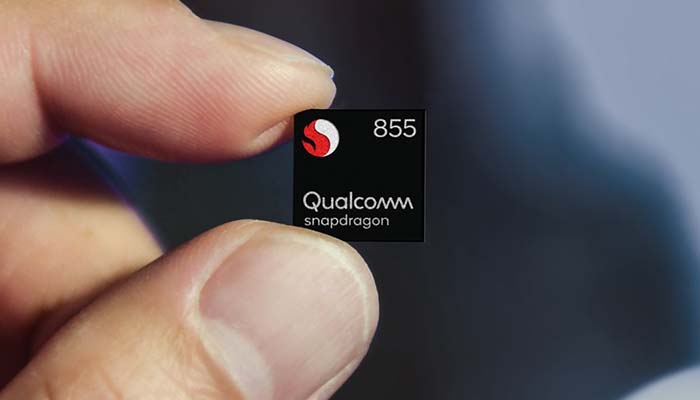
    Qualcomm, one of the biggest manufacturers of Android phone chips, has announced a mid-cycle upgrade for their Snapdragon 855 system on a chip (SoC). The newly-announced Snapdragon 855+ is still an eight-core SoC, and it’s still 7nm, but it has some notable upgrades. What does this mean for upcoming Android phones?

    Today we’re taking a closer look at the hardware that goes into making smartphone tick. We’ll be diving into the technical side of Qualcomm’s SoCs, and what a mid-cycle upgrade could mean for upcoming Android phones. Let’s talk about some silicone.

    System on Chip

    Firstly, a quick primer. A system on a chip means exactly what it sounds like: it’s a computer system on a single chip. While the system in a full-fledged computer, like a desktop or a laptop, has chips specifically for things like processing, graphical capabilities and the like. By contrast, smartphones, tablets and other small technological devices don’t have the space for all of these spread-out components.

    Enter the SoC, and its incredibly useful space-saving capabilities. While you don’t get the same power as you would from a more full-fledged computer, an SoC allows for good performance on a small device without sacrificing much in the way of space or thermal usage. In short, it’s this technology that makes smartphones possible. Were it not for complex and robust SoCs, like Qualcomm’s Snapdragon series, we’d still be using flip phones.

    The Snapdragon 855+

    So, what does this new mid-cycle upgrade mean for Qualcomm? Well, the Prime CPU in the SoC has been bumped up in clock speed. It now clocks in at 2.96GHz, where it was hitting 2.84GHz. This means that the chip can refresh faster, allowing it to accomplish more complex tasks. One of the 855’s strengths is its unusual CPU setup, which sports a “big” cluster of four cores and a smaller set of cores for more power-efficient tasks.

    The 855+ has a new paradigm for this: instead of having a cluster of cores for its “big” core, it now has one Prime core with Cortez A76 infrastructure to handle big tasks. Meanwhile, the new usage of the Prime infrastructure should be useful in delegating tasks, meaning the device will be more powerful overall while also offering better thermals and a lower power consumption for simpler tasks. In short, the 855+ will always use the right tool for the job.

    In Action

    In action, this will mean faster graphics rendering, higher clock rates and better performance. For people interested in using their phones for gaming, levels and textures will load faster. For people more concerned with augmented reality, the graphics will be quicker and more seamlessly integrated. Power users will be able to squeeze tons of utility out of such an upgraded chip, maximizing both their power and battery life.

    Even for users who prefer to use their phones for just browsing the web, answering emails and taking calls, the upgraded chip will offer a ton of new utility and power for any tasks they need to tackle. Swapping between apps, multitasking, screen-in-screen and more will all be faster and more responsive.

    The Phones

    The first phone to roll out with the new chip will be the Asus ROG Phone 2, which will be hitting on July 23rd. We also wouldn’t be surprised to see the new chip infrastructure showing up in the Galaxy Note 10 on August 7th.

    In short, this new Snapdragon 855+ will make for a great upgrade to existing Android phone user interfaces, making gaming and daily use alike faster and more responsive. It’s good to see Qualcomm keeping up with the competition from Apple, who are hard at work on the next iteration of their powerful Bionic chip family.


  • 2019 BMW X3: Luxury SUV Review

    2019 BMW X3: Luxury SUV Review

    BMW’s luxury SUVs have a sterling reputation for a number of reasons. The 2019 X3 has some great expectations behind it: after all, it bears the name of one of the most beloved luxury SUV lines in the world.

    That said, the 2017 and 2018 model years have been a little lackluster for BMW. After a few disappointing entries in both sedan and SUV categories, has BMW returned to form with the 2019 X3, or is this another limp entry in the German automaker’s lineup? Let’s take a closer look.

    New in 2019

    As you may know, the X3 got a full redesign in 2018. While that entry was solid, it wasn’t exactly of expected BMW quality. That said, the updates this year are iterative, not revolutionary. What has changed is enough to make this a more notable car, though.

    Firstly, safety features are more robust now. Options for forward-collision warning, parking sensors and automated emergency brakes have been made standard for 2019. If you opt for the Premium package, you’ll get a heated steering wheel and front seats, real-time traffic updates for the navigation, Apple Car Play and 19-inch wheels. For the more sport-minded driving enthusiasts, the M40i X3 offers a sport steering wheel, as well as a turbocharged six-cylinder engine.

    Engine

    One of the weak points of the last few model years for BMW has been the somewhat boring drive. Thankfully, that trademark verve is back on display in the 2019 X3. This goes double for the M40i, but the other engine options are also stellar and just plain fun to drive. Despite being an SUV, the vehicle is agile and feels light as you maneuver it around the road.

    Even the base powertrain sports 248 horses, though it takes them 6.2 seconds to get up to 60 mph. That said, fans of power can always opt for the M40i, getting a respectable 4.4 second 0-to-60. Optional adaptive suspension allow for a great, sportier ride for some occasions though it can shift into a smoother ride for around-town driving. No matter your preference, the X3 offers a great driving experience.

    Interior

    The base interior of the 2019 X3 is luxurious even with base equipment, before adding any options. Plush seats that are easy to adjust make for a great ride, while premium-feeling interior surfaces lend the interior an upscale and stylish feel. Faux wood grain paneling looks almost just like the real thing, as do the faux leather door linings and dash coverings.

    Brushed nickel finish in places, as well as the large, vibrant infotainment system help to sell the modern interior as one of superior luxury. All of this makes for a great interior, though the glaring omission of Android Auto is a bit surprising, given BMW’s typically technology-driven designs.

    Pricing

    As we mentioned earlier, there are some notable differences in trim levels and pricing packages. The base rear-wheel sDrive30i starts at $41,995, while the all-wheel xDrive30i comes in at $43,995. The sportier, more aggressive M40i, with its inline six cylinder, starts at $55,645, making it notably pricier than the other powertrain options. Premium package upgrades are also available, as are a few different trim levels. In short, expect to pay full luxury BMW prices for the X3.

    If we had to spec out our own BMW X3, we’d go with the M40i powertrain, the Premium package, and the Luxury Design trim. While this ends up being one of the more expensive builds of the X3, it results in a sporty, agile and luxurious vehicle that is fun to drive and great for upscale evenings out with friends. In short, if you’re going to buy a luxury car, why not go all-out?


  • Combating Stress at the Workplace: Relaxing Techniques

    Combating Stress at the Workplace: Relaxing Techniques

    One of the most common causes of workplace depression and burnout is stress. If you find your work stressful and taxing, you might be looking for some ways to help reduce and manage your stress levels. It might feel difficult to do so when you’ve got tons of responsibilities and workplace stressors, but there are some techniques you can try to help yourself relax.

    How to Combat Workplace Stress

    Breathing Techniques

    Take a deep breath, and then slowly exhale it. Count to ten as you do so. Put all of your worries and issues out of your mind. Treat this breathing meditation as your way to expel stress from your body, breathing it out slowly and letting yourself relax. Repeat this technique a few times, as needed. You can also try to simply change your normal breathing pattern to be deeper and go on for longer.

    This practice is good for a number of reasons. The extra oxygen you take in from breathing deeply helps you to calm down by slowing your nervous system. Breathing deeply can activate your parasympathetic nervous system, allowing you to relax and calm your mind.

    Take a Walk

    If your workplace is conductive to it, take a walk. If not, try going for a walk before or after work. Just get out of your normal space and go for a stroll around your workplace, in your neighborhood or in a park. Just try to get out and take it easy. Walking is great because it allows you to do nothing at all, letting you be alone with your thoughts as you actively do nothing.

    Walks through your favorite areas are great for relaxing. This is because you’re able to slowly take in your surroundings, with no responsibilities bearing down on you. Unlike driving, which can be stressful, walking around aimlessly doesn’t include that same feeling of rushing that you get when going to work or to the store.

    Gum

    Chewing gum can be a great way to help you work out some stress. If you’re at work and feeling some pressure bearing down on you, pop out some gum and go to town. Chewing it allows you to work out nervous energy and aggression, chomping away while you focus and try to de-stress. Just make sure you’re not annoying the people around you.

    Make sure it’s a flavor you like, too! Mint tends to be a good calming flavor, while cinnamon might be a bit on the hot side for someone trying to relax. You know your preferences, so make it something that you know will help you to focus and relax.

    Stress Ball

    Keeping a stress ball or some similar object close at hand while you work can be a good way to directly address your stress. Squishy, resistant objects make great stress balls or stress devices, as they allow you to mush them and squish them without destroying them. People often feel restless and aggressive when they’re stressed out, so having a stress or worry ball to crush repeatedly can be rather healthy.

    Meditation

    Try to meditate when you need to clear your mind and center yourself. Meditation techniques take many different forms, from the overtly religious to the purely psychological. Whatever your beliefs, meditation has been proven to help people to relax and focus. Try a few simple meditation techniques that take only a few minutes. You can step away from your work duties for a moment, gather your thoughts and center yourself, then return to work feeling mentally reinvigorated. This not only helps your stress levels, but helps you to get your work done more efficiently.


  • Best 4K TVs Under $300

    Best 4K TVs Under $300

    If you’ve been holding off on buying a 4K TV to wait for prices to drop (and for more 4K content to appear) then you’re not alone. While 4K displays look amazing, they’ve remained rather expensive when compared to 1080p HDTVs. Not to mention, until recently there hasn’t been much support for 4K displays, meaning all that extra power has been largely going unused.

    That’s changed in the last year. With panel prices steadily dropping and the amount of 4K content to stream or play going up, there’s never been a better time to buy into 4K. Today we’re breaking down some of the best deals on 4K TVs you can find, including only screens under $500. We’ve selected these screens based on their relative value when compared to their price. Here’s how to get the most bang for your buck when shopping for a 4K TV.

    TCL 43S517 Roku TV

    Coming in around $250 from most retailers, this TCL 4K Smart TV is a great buy. You get a lot for your money with this one, from built-in Roku support to a bright, clean 43-inch display. While it’s not the biggest 4K TV on the market, 43 inches is a lot for most smaller homes, and would look absolutely massive in an apartment or a bedroom.

    Dolby Vision and Dolby Atmos sounds are both included along with the Smart TV features you’ve come to expect. This means that the sounds and color reproduction are both impressive for a panel at this price range. Once you get this TV, nearly the only thing you’re missing is a soundbar that’s Atmos compatible and you’ll have a serious entertainment setup.

    Element 55-inch Roku TV

    If you’re looking for something with a bit larger panel, then look no further than the Element 55-inch Roku TV. You can usually find this screen for under $300, a stellar price for a 4K panel of this size. Whether you’re looking to put it in your living room or use it as a backup, 55 inches allows for a massive screen that looks great from multiple viewing angles.

    The price might sound too good to be true. A smart TV with a large panel size and a good user interface for less than $400? That’s not very common. However, this Element panel isn’t too good to be true: it’s just a great value. If you’ve never owned a 4K TV and want to ditch your old 1080p screen, then this is a great first step into the world of 4K. You’re in for a treat when you can find this panel on sale, as you’ll get to make a budget entry into the future of display quality.

    Vizio V-Series 50-inch (V505-G9)

    This 50-inch Vizio is another great 4K TV that you can find for under $300 at most retailers. Offering solid HDR support and giving good color reproduction, it’s hard to believe that this panel is as affordable as it is. The user interface is clear and easy-to-read, making this a great first smart TV for a household that hasn’t used one before. The 50 inch size makes it great for a smaller room, though it might look a little out of place in a larger living room.

    Vizio’s built-in SmartCast suite features full support for apps, and it even features support for Chromecast out of the box. This also allows it to connect seamlessly with either Amazon’s Alexa or the Google Assistant, making it a great addition to any smart home network you might be building up. For the low price of $300, this is a seriously cutting-edge screen to add to your modern home. If there were any complaints about it, it might be that 50 inches feels just a tad small for the average living room.


  • Is 5G Going to Make Your 4G Phone Obsolete?

    Is 5G Going to Make Your 4G Phone Obsolete?

    The big shift from one to the next generation of wireless connectivity is right around the corner. This time around, the shift is coming in the form of 4G LTE coverage being augmented by 5G, an event that is being hotly anticipated by tech insiders.

    The question on most consumers’ minds, however, is “will this make my phone obsolete?” In the current smartphone landscape, customers are keeping their phones for longer, upgrading less often and sticking with what they know. This makes the upcoming generational shift a bit uneasy for some people. Let’s take a closer look.

    Availability

    Some big cities are currently seeing major communications companies rolling out 5G networks. They’re all in their infancy at the moment, and they may represent a smaller portion of the current tech landscape than advertising would have you believe. At present, less than ten percent of the country even has access to these networks.

    Beyond this, 5G connections have some notable drawbacks. They’re blisteringly fast: faster, in fact, than fiber optic connection in your own home. However, this doesn’t mean that they’re a strict upgrade over existing wireless communications. Case in point: 5G signals sport a very short wavelength, which means that they can be blocked by trees, double-pane glass and thin walls. They can also only travel a short distance.

    Obsolescence?

    This is where the overlap between 4G LTE and 5G comes in. While the conventional wisdom holds that 5G connectivity is replacing LTE, this is actually inaccurate. As we stated earlier, 5G will be augmenting 4G for years to come. Due to 5G’s inherent limitations, it will need to work with existing 4G infrastructure in order to cross larger distances and work through blocking obstacles.

    What this means is that your 4G phone won’t be going extinct any time soon. In fact, this is likely to mean that your 4G phone is getting a shot in the arm. The addition of 5G technology to existing infrastructures means that you’re likely to see faster, more consistent speeds on your existing 4G handsets.

    How is this Different?

    If this sounds weird, it’s because it is. Prior shifts in wireless technology were massive revolutions, as all of the old tech got tossed out in favor of the new hotness. Wireless communications technology was simply advancing at such an absurd pace that it was hard to even incorporate tech that was a few years old into new infrastructures. That’s changing in the modern era.

    Today, technology is advancing in less dramatic ways. The way data is compressed, the style employed to send that data, is what is shifting now. Existing wireless technology is still great at covering large distances and penetrating barriers. 5G is just a more efficient way of sending that data directly over short distances. In a sense, this will act as an upgrade to existing infrastructure.

    Reasonably Useful

    Another reason why 5G won’t be replacing LTE any time soon is the simple reality of the way people use their phones. Internet speeds and network connectivity are hitting something of an endpoint. Yes, we can make them faster, and yes, there are some uses for 2GBps speeds. However, those uses are incredibly specific and narrow: augmented reality, video game streaming and similarly high-demand tasks.

    Most people just need their phones to stream internet videos and music from their favorite artists. The cost associated with incorporating these ever faster and stronger signals is giving diminishing returns, and most people are quite pleased with their current phone’s performance. There’s just less to improve upon now than ever before. And, in our opinion, this is a good thing. Now, let’s work on just perfecting what we have in front of us.


  • Best Reasons to Get a Nintendo Switch: Gaming on the Go

    Best Reasons to Get a Nintendo Switch: Gaming on the Go

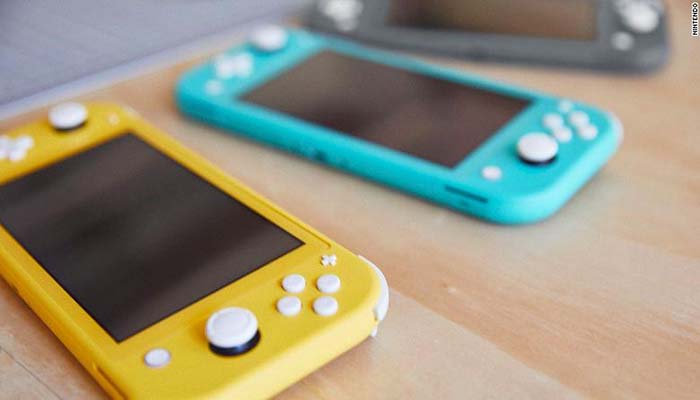
    With the announcement of the upcoming Nintendo Switch Lite and the steady slew of great new games hitting the system, Nintendo’s little hybrid console is red-hot right now. If you’ve been holding off on getting one, this September is your moment. The Switch Lite will be retailing for only $200, making it a very easy entry point for some of Nintendo’s biggest franchises.

    Today we’re taking a look at some of the software that will make you want to preorder your Switch Lite today. From great old standards like Zelda and Mario to returning games from cult favorite developers, there’s a lot of great reasons to own the little system.

    The Legend of Zelda: Breath of the Wild

    Who can deny one of the best video games ever made? Breath of the Wild launched alongside the Switch in 2017, and for a brief period the Switch version of the game actually outsold the Switch itself. While the game also released for the Wii U, its true home has always been the Switch. Exploring Hyrule on the big screen at home or while on your commute to work is where the real magic of the system shines through.

    Mario Kart 8 Deluxe

    Is this a simple port of the Wii U’s best racing game? Well, yes. But it’s beyond amazing: racing your friends around the track has never been more simple, clean and fun than in MK8. The Deluxe version of the game is complete with all of the DLC characters and courses from the Wii U version, and the game benefits tremendously from being playable in both handheld and TV modes.

    Super Mario Odyssey

    Another of the greatest video games ever made graced the Switch in October of 2017: Super Mario Odyssey. Standing alone as one of the last true 3D collect-a-thon platformers, Mario proved why he’s the king of the platforming genre. From capturing enemies to use their powers in interesting ways to duking it out with Bowser on the deck of an airship, Mario Odyssey is a non-stop joyous adventure, made with love and full of wonder.

    Bayonetta 2

    One of the best things about the Switch is that it served as a way for obscure Wii U exclusives to find a wider audience. For a prime example, look no further than the superb Bayonetta 2. Helmed by legendary designers Yusuke Hashimoto and Hideki Kamiya (of Resident Evil and Devil May Cry fame), the game is a showcase of all that is amazing about action video games. Stylish, over-the-top, and just a little ridiculous, Bayonetta 2 is a masterclass in game design.

    Super Mario Maker 2

    What’s better than 2D Mario? Nearly infinite 2D Mario levels. That’s the promise, the premise and the joy of Mario Maker, and the sequel amps this all up by bringing the devilishly simple formula to the Switch. The stage-building game is right at home on the hybrid console: building stages on-the-go with the touchscreen and then playing your friends’ stages while at home connected to the internet is a perfect use of the hybrid console’s unique portability.

    Splatoon 2

    Somewhere between port and proper sequel, Splatoon 2 continues the paintball-splattering fun of the first game. The original was one of the few new IPs introduced during the rocky Wii U era, and the influx of new blood (or ink, in this case) has proven pivotal to Nintendo’s current success. The wild and wacky 4-on-4 action of Splatoon is incredibly fun and addictive, with the three-minute online games flying by in a delightful blur of kinetic action. If you’re looking for a great competitive online shooter with Nintendo’s trademark charm, look no further than Splatoon 2.


  • Best Bluetooth Headphones for Running

    Best Bluetooth Headphones for Running

    Running is pretty much the healthiest things you can do with a spare half-hour. The exercise and cardio you get from going out for a jog can help you to stay in shape and stave off all kinds of diseases related to a sedentary lifestyle. There’s only one issue: it’s kind of boring. Well, running alone and without any music going, at least, is kind of boring.

    The best way to fight this, of course, is to get a good pair of Bluetooth headphones and listen to some tunes or podcasts while you go for your daily run. Today we’re looking at some of the best Bluetooth headphones out there for running to help you narrow down your choices. Let’s look at the cream of the crop. We’re selecting our picks based mainly on sound quality, battery life and cost relative to performance.

    Jabra Elite Active 65t

    Jabra’s earned a name for themselves as makers of top-quality Bluetooth headphones. Their Elite series, in particular, has impressed us, and the Elite Active is no exception. The sportier upgrade to the Elite 65t, the Elite Active 65t offers better sweat resistance and they fit well in the ear. You’re not going to be worried about these popping out while you’re jogging.

    The sound quality on these earbuds is excellent, with clear mid tones, deep base and excellent high-end. Unlike some lesser earbuds, these don’t compress the sound or try to squeeze it into a smaller profile for the smaller drivers. You can find the Jabra Elite Active 65t earbuds online for around $190, and they’re well-worth the price.

    Apple Air Pods

    Apple’s Air Pods are great for runners, on one condition: if they fit well in your ears. Not everyone’s ears are shaped as such that the Air Pods fit in snugly and don’t jostle while they run. If your ears are shaped so that the Air Pods stay in snugly, then they’re amazing for running. The Air Pods are light, they sound great, and they’re incredibly convenient for taking calls and sending messages.

    The Air Pods aren’t without a few drawbacks, though. Notably, they’re very small, so if one falls out of your ear, you might just lose it altogether. For a pair of earbuds that cost upwards of $150, the last thing you want to do is lose one. That said, if you can keep up with them and you’re not worried about them falling out while you run, then the Air Pods make a great companion for any runner or jogger.

    Beats Powerbeats Pro

    The Beats by Dre line of audio hardware has been hit-and-miss over the years, but the Powerbeats Pro have certainly impressed us. These on-ear Bluetooth headphones actually share a lot of their DNA with their cousins, the Air Pods, but are tooled more specifically for active users. The sound is much fuller on these headphones than in the Air Pods, and the battery life is notably better.

    Another huge point in the favor of the Powerbeats Pro is that their over-the-ear design makes them much less likely to fall out of your ears while you’re jogging or running. This allows you to not feel quite as anxious when you’re out and about with them. As any Air Pods owner will tell you, losing one feels like a punch to the gut. You can get your own Powerbeats Pro online for $250 from Apple’s website.