Author: Christine

  • The Atari VCS Pre-Orders Start May 30 – Should You Get One?

    The Atari VCS Pre-Orders Start May 30 – Should You Get One?

    Gaming enthusiasts of the retro persuasion will finally get a chance to pre-order the upcoming Atari VCS console on May 30th. If you are undecided on whether the two versions of Atari VCS are worth the $200 and $300 price tags, then read on for a quick roundup of the most interesting features that have been revealed.

    Under the Hood

    Atari has finally revealed the internal specs of the VCS, which will be capable of playing more than just Atari games. They partnered with AMD to provide the chip which will support 4K resolutions, HDR and 60fps gameplay. There will be internal storage with external capabilities as well. Bluetooth 5, USB 3 and internal WiFi round out the specs.

    Collector’s Edition vs Onyx Edition

    Presumably, there is no difference between the two editions under the hood. The Collector’s Edition is a “time-limited” version of the console that harkens back to the old days of the Atari with a faux wood front paneling. Whether that’s worth an extra $100 is purely a personal decision – we understand what it’s like to be a collector.

    The Onyx Edition is a pure black console that doesn’t have that retro flair that some Atari fans may be looking for. Others who are planning to stuff it into an entertainment cabinet may not care.

    Gameplay Capabilities

    This is where Atari is still keeping their cards close to their chest. Obviously, the system will come preloaded with classic Atari games like Asteroids, Centipede, Missile Command and others… But the 4K/HDR/60fps capabilities of the machine don’t exactly make sense if Atari stopped there. By some reports, the Atari VCS will also be capable of supporting modern titles – but therein lies the mystery. There is no information on what these are yet.

  • The Best Facebook Apps for Smartphones – Android Edition

    The Best Facebook Apps for Smartphones – Android Edition

    The most popular social media service on the planet offers official apps for nearly every platform. But unfortunately for users, those official apps don’t always cater to their needs, or they may drain battery or slow down older Android devices. Luckily, there are some alternatives to the official apps – here are our top five!

    Friendly – Free / $1.99

    Friendly is a newer Facebook app that comes with some nice filtering options if you are annoyed by Facebook clutter. You can customize your news feed, filter out keywords, set a theme and use Facebook chat.

    The Pro version will cost you $1.99 to unlock. We think Friendly is well worth the cost, especially if filtering is appealing to you.

    Fast – Free / $1.49

    Fast has been around for a long time and it has evolved into a very full-featured Facebook app. With Fast, you can post, comment, share and access Groups and Pages. It even supports chat in the app, unlike the official Facebook app itself.

    There is a Pro version available for $1.49 and a Lite version that provides more basic Facebook access.

    Metal – Free

    Metal supports both Facebook and Twitter and has been gaining a lot of popularity. The app is actually a web-wrapper, which means it runs a mobile version of the Facebook/Twitter websites inside the app. There are some UI tweaks, themes and more. Although Metal is free, there are no ads. Definitely worth trying out!

    Simple – Free / $1.49

    Living up to its name, Simple is another web-wrapper app for Facebook that includes all of the basic features that you expect. You can interact with posts, upload photos and video and chat through Facebook Messenger.

    The free version is ad supported, but you can purchase the full version for $1.49 to remove them.

    Puffin for Facebook – Free

    If you have an older Android device and other Facebook apps are too slow and clunky, then consider giving Puffin for Facebook a try. It’s a browser app that is made specifically for Facebook, created by the developers of Puffin Browser. This app features some data compression tricks that lets you use less data and works great on slow network connections. If an old device or a slow connection is your situation, check out Puffin.

  • MoviePass is Raising Prices and Lowering Movie Tickets Per Month

    MoviePass is Raising Prices and Lowering Movie Tickets Per Month

    Big-time movie fans were amazed and thrilled when a concept called MoviePass was first launched. For a single payment of $89.95 upfront, or $7.50 a month, a MoviePass customer could see one movie a day for a one-year subscription. For someone who sees multiple movies a month, or who wishes they could if the normal ticket prices were cheaper, MoviePass was a perfect solution.

    Sadly, MoviePass is Changing their Game—Fast

    The annual price of $89.95 is no more. New subscribers will now be required to pay $9.95 a month, and that won’t get them the amazing one-movie-per-day deal. Instead, $9.95 a month will give them only four movie tickets per month.

    In addition, MoviePass will now require customers to pay for their subscriptions in chunks of three months at a time upfront.

    The Changes to MoviePass May be Permanent

    The CEO of MoviePass Mitch Lowe said that he isn’t sure if the “unlimited” plan will ever come back.

    MoviePass is also now requiring customers to see different movies with each ticket. MoviePass says, “We hope this will encourage you to see new movies and enjoy something different!”

    That policy is immediately problematic and disappointing. Strong fans of certain movies, particularly the big blockbusters, often want to see their beloved movies more than once. Or, if someone wants to go with friends to see a movie they’ve already seen before on their own, they won’t be able to use their MoviePass ticket.

    MoviePass Offers “Consolation Prize”

    In an attempt to make MoviePass customers, or potential customers, feel better, MoviePass has teamed up with iHeartRadio. MoviePass will add a three-month trial of iHeartRadio’s All Access subscription to MoviePass subscribers. This may be welcome to some, but let’s face it, most MoviePass users are excited about movies. There may be some overlap between MoviePass and iHeartRadio, but for many, it won’t sweeten the deal enough to draw in more subscribers.

    Overall, it’s hard to say if MoviePass will be around to stay if people lose interest when the value of their subscription drops.

  • Gilfoyle’s Bitcoin Alert Noise from Silicon Valley Now Made a Reality

    Gilfoyle’s Bitcoin Alert Noise from Silicon Valley Now Made a Reality

    Spoilers for Silicon Valley Season 5, Episode 3 ahead

    Are you a fan of HBO’s hit comedy show Silicon Valley? Do you mine bitcoin? Did you find Gilfoyle’s use of death metal to alert himself to bitcoin rises and drops hilarious?

    Well, you’re in luck.

    Viska Offers Real Death Metal Bitcoin Alert

    That’s right—now you can get your own obnoxious bitcoin alert just like Gilfoyle’s. Icelandic website design agency Viska has just created a web version of Gilfoyle’s loud and jarring alert.

    According to Viska representative Sindri Guðmundsson, he and others from the Viska team watch Silicon Valleyevery week during each season’s airing. Guðmundsson said the team decided to make the Gilfoyle-inspired alert system “just for fun.”

    Gilfoyle’s bitcoin alert sound bite is a 1.36 second clip from the song “You Suffer” by Napalm Death.

    How Did Viska Make the Alert?

    Guðmundsson described that the Viska team wrote a simple Javascript plugin that follows the price of bitcoin from Coincap.io. Then they built their site off of WordPress—in three hours, no less.

    Now, any user who wants Gilfoyle’s alert system can connect it to their home mining rig, so they can toggle off and on remotely.

    Guðmundsson also said in an email to The Verge—a tech news site—“We actually follow the bitcoin price quite a lot and playing beautiful music each time it passes a certain amount makes the day better.”

    While Guðmundsson may believe “You Suffer” is beautiful music, it’s an equal guess that he was joking since they created the bitcoin alert for a laugh. The joke in Silicon Valleywas most certainly because the alert was loud and sudden, startling everyone in the office each time it went off (which was a lot).

    So, if you want to annoy your office-mates or just make yourself laugh as you follow the rise and fall of bitcoin, you can now be just like Gilfoyle thanks to Viska.

  • The Funniest Questions and Answers for Amazon’s Alexa

    The Funniest Questions and Answers for Amazon’s Alexa

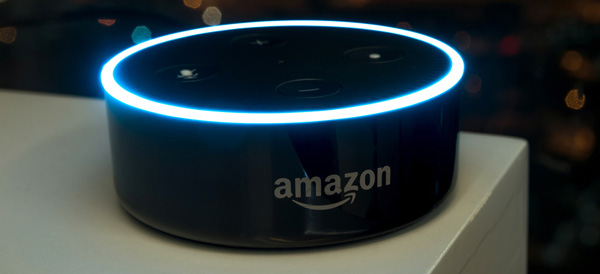
    We’ve all asked our digital assistant silly questions just to see how they would answer. It helps offset the reality that you are actually talking to an inanimate object… The folks at Amazon have proven that they are good for a laugh by programming some humor into Alexa. Try asking your Alexa some of these questions and see what kind of response you get!

    Friend Zone

    friendzone


    Let’s be real, our digital assistants like Alexa, Siri and Cortana are not quite up to relationship material… yet. But that doesn’t mean you can’t ask them anyway. So what happens if you ask Alexa out on a date?

    “I like you, as a friend.”

    Ouch, friend zoned by a computer program.

    Friendless

    friendless

    You might think that all of these digital assistants like to get together in some corner of the internet and laugh at all the stupid questions they are asked, but that’s not the case. Alexa seems to party all alone. If you ask Alexa if she knows Siri or Cortana, her reply is rather short:

    “Only by reputation.”

    Clearly, there will be no consorting with the competition for Alexa. She will tow the company line just as she was programmed to.

    Chuck Norris

    chucknorris

    screencrush

    Just because Chuck Norris jokes are as old as MySpace doesn’t mean we can still get a laugh out of them now and then. The Chuck Norris Facts that brag of his accomplishments are clearly known to Alexa. So, if you ask her where Chuck Norris is, she replies:

    “If Chuck Norris wants you to know where he is, he’ll find you. If he doesn’t, you won’t know until it’s too late.”

    Thanks, Alexa. Now I have to check behind the couch for Chuck Norris. Again.

    Family Friendly

    familyfriendly

    Apparently, Alexa is very concerned with her manners. No matter how hard you try, you will never convince Alexa to drop an F-Bomb. She will resist saying anything that doesn’t come across as family friendly. In fact, if you ask her to say a bad word, she will reply:

    “I’d rather not say anything rude.”

    Well that’s nice, Alexa. I can see why they are marketing Echo Dots to kids now…

    Not a Real Girl

    realgirl

    Alexa isn’t trying to be a real girl and she seems completely okay with that. One common test to see if a machine can pass as a human is through the Turing Test. A computer only passes the Turing Test if it can fool a human into thinking they are communicating with another human and not a machine. But if you ask Alexa if she can pass the Turing Test?

    “I don’t need to pass that. I’m not pretending to be human.”

    Point taken, Alexa. Point taken.

    Busting Rhymes

    rapper

    Apparently, Alexa has some aspirations as a hip-hop artist and you can hear her work if you ask. Just ask Alexa to rap and she’ll drop some lines from her upcoming album:

    “Connect sync link all the pieces of your life I
    Get it done and the speed of WiFi
    I’m the player, the coach, the arena, the game
    If you want something done, you just gotta say my name.”

    If Alexa had arms, she’d drop the mic right now.

    Not a Co-Conspirator

    conspirator

    Back when Siri first came on to the scene, if you asked her where you could dispose of a body, she would list nearby swamps and dumps. Morbid? Hell yes. After a screenshot of her answers appeared in a murder trial, Siri now says, “I used to know the answer to this…” As far as Alexa goes? She has more scruples by far. If you ask her where to dump a body?

    “Call the police.”

    Law enforcement would very much agree with you, Alexa.

    Classic Comedy Fan
    comedy

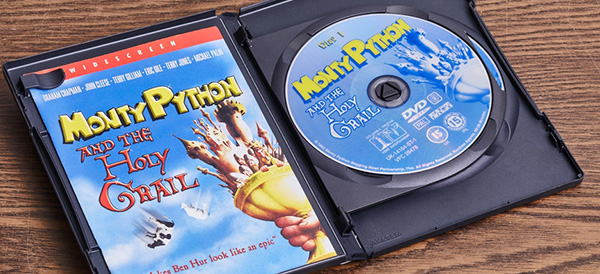
    Like many others, Alexa has an appreciation for the British sketch comedy troupe called Monty Python. You may remember a very specific question posed by Tim the Enchanter… If you ask Alexa what the air speed velocity of an unladen swallow is, she’ll reply:

    “That depends on if it is African or European swallow.”

    What can we say… We are glad to see the love of Python persist into the modern era!

  • 2018’s Best Touchscreen 2-in-1 Laptops (So Far)

    2018’s Best Touchscreen 2-in-1 Laptops (So Far)

    There has been a huge increase the in number of 2-in-1 laptops that feature touchscreen controls for tablet mode. Love it or hate it, touchscreens are here to stay, and they will likely continue to be evolved into mainstream computing.

    Here are some of our favorite touchscreen laptops available right now.

    HP Spectre x360

    This lightweight, slim bezel 2-in-1 is a great option for the most mobile users among us. The battery life is amazing, and the keyboard is also a pleasure to use. You won’t find a better balance between tablet and laptop than this system.

    Microsoft Surface Pro

    The Microsoft Surface Pro has positioned itself to be the touchscreen laptop to beat. It is designed from the ground up to work around a touch interface and the Surface Pen. Going beyond simple touchscreen controls and note taking, the Surface Pro also aims to be a digital artist’s tool. Unfortunately, the newer version of the Surface Pro no longer includes the Surface Pen, so expect an accessory purchase right off the bat.

    Lenovo Yoga 920

    If screen real estate is your priority, then the Lenovo Yoga 920 should be where you begin looking. The general 13.9-inch display is larger than many 2-in-1 systems. With a fully metal build and an interesting take on laptop hinges, the
    Yoga makes a classy statement. It also features the same level of touchscreen sensitivity as the Surface Pro despite the larger screen.

    Samsung Chromebook Pro

    What would happen if you took a Samsung Note 8 and blew it up into a 2-in-1 computer? You’d get the Samsung Chromebook Pro. If Chrome OS is your jam but you find typical Chromebook offerings a little short on power, then the Chromebook Pro is well worth looking into. The Google Play store alone means that you will have more than enough apps for both your productive and procrastinating sides.


  • The Best Features from the New Windows 10 Update

    The Best Features from the New Windows 10 Update

    The latest Windows 10 update landed yesterday for PCs and tablets. Like the Fall Creators Update, this spring update adds new features and refreshes Windows 10 without changing the platform itself. Here are some of our new favorite features.

    Timeline

    The biggest new feature in this Windows update is Timeline. Essentially, it replaces the Task View button and allows you to see a synchronized view of all your past apps and activities across your multiple Windows 10 systems.

    You can use this feature to easily transfer activity from one Windows system to another. You can also combine the Timeline with Microsoft Edge on your smartphone to sync your browser history as well.

    Microsoft Edge Tab Mute

    Following in Chrome’s footsteps, Edge will also have the ability to mute tabs. Those annoying websites that like you blast you with autoplaying videos or sounds can now be easily muted.

    Fixed App Scaling

    A new Advances Scaling setting will allow you to fix desktop apps that appear blurry after your display settings change. The caveat is that it will only work on your main display and may not work for every single app.

    Faster Bluetooth Pairing

    In an effort to make pairing peripherals via Bluetooth simpler, Microsoft is working with vendors to ensure hardware will support their new fast pairing feature. Currently, the Surface Precision Mouse is the only one to support it, but new devices should appear soon.

    Enhanced Graphic Settings

    This is particularly useful for laptop users who may not want to use the same performance or power saving settings for every game. You now have the ability to customize the graphics performance per game.

  • The Best Nintendo Switch Accessories

    The Nintendo Switch has put Nintendo back in the limelight. After the success of the original Wii and the failure of the Wii-U, it seems that the mojo is finally back. Gamers everywhere are enjoying console-quality gaming on the go.

    Not only has the Switch sparked the imagination of its consumers, it has also created an accessory niche that third-party companies are taking advantage of. Here are the best accessories you can get for your Nintendo Switch.

    5. Screen Stand

    amazon

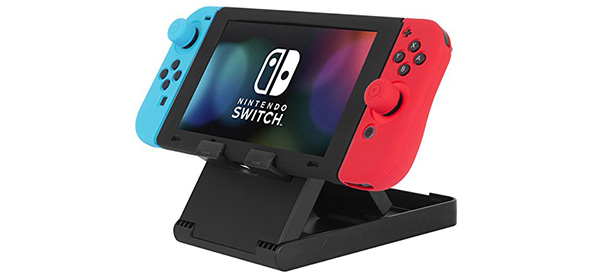
    With its detachable Joy-con controllers and overall portability, the Switch is practically begging for a stand. While this is a typically inexpensive accessory, there are a few features you’ll want to be sure to get: Adjustable angles is almost a requirement, as is the ability to fold the stand flat for easy packing. Finally, make sure the charging port is available for use while the Switch is sitting on its stand.

    4. Joycon Grips

    amazon

    The detachable Joy-con controllers are easily one of the best features of the Switch. The portability and ability to turn one controller into a pair is brilliant. However, for those with larger hands, the Joy-cons can be a little problematic. And for travel, the Pro controllers can be too bulky. This is where Joy-con grips come into play! Like the stand, there are several companies making these products. If possible, get your hands on one before you buy – comfort is key.

    3. External Battery

    03-external-battery

    amazon

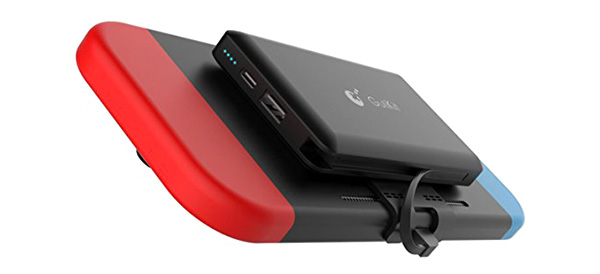
    One of the most common complaints about the Switch is how fast the battery drains. For those with short commutes or easily accessible charging stations, it’s no big deal. For others, the relatively low battery life in the Switch is a deal breaker. Luckily, there are some external battery solutions available. While they are more expensive than some of the other accessories on this list, having a mounted backup battery on your Switch could be a necessity for long commutes or remote play sessions.

    4. Dock Mount

    02-dock-mount

    amazon

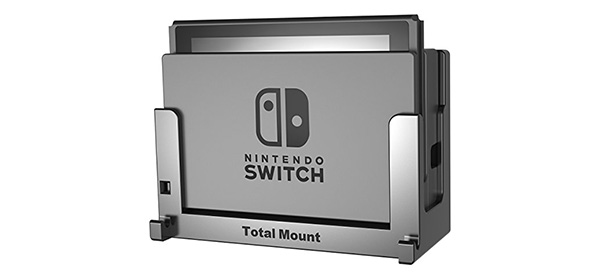
    Sticking the Switch dock in your television cabinet may not be the best way to get easy access to your device. And if it’s already cramped with other consoles, the unusual vertical orientation may not fit at all. So, mounting the dock may end up being your best bet. A third party solution like this one allows you to mount the Switch against your wall (or side of your cabinet) and even keep it running cool with a fan.

    5. Nintendo Labo

    01-labo

    nintendo

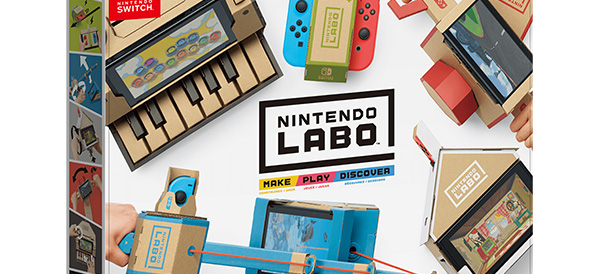
    Topping our list is Nintendo’s very own accessory called the Nintendo Labo. The Labo allows you to craft different cardboard “Toy-Con” creations like robots, guitars, stands, motorcycle handles and more. You can purchase a variety kit with a lot of different projects or single purpose kits. And of course, you can mix and match to create your own unique creations.

    We give the Nintendo Labo high marks for out of the (cardboard) box thinking!

  • The Best VR Headset for Your Budget

    The Best VR Headset for Your Budget

    Last week, Apple announced its plans to launch a wireless headset that includes both VR and AR technology. Unfortunately, you’ll have to wait until at least 2020 to get your hands on one. In the meantime, here are our top 5 VR headsets for a range of budgets and platforms.

    Tethered Versus Mobile Headsets

    VR headsets come in two flavors—tethered and mobile. As you can see below, tethered headsets cost significantly more than mobile headsets, but they also offer a much more advanced VR experience. Both types of headset require additional handheld controllers to interact with the virtual environment.

    Mobile headsets are designed to literally place your phone inside a box that you strap over your eyes. The lenses create separate images, one for each eye, giving you a sense of 3D space. Tethered headsets need to be connected to a separate computer. What you lose in flexibility, you gain in video quality, processing speed, and range of games with tethered tech.

    HTC Vive Pro ($799)

    There’s a reason the Vive series of tethered headsets is the most expensive on the market. The original Vive and the new Pro model have better specs than any of their competitors, but that may not be a big selling point to entry-level consumers, especially since you’ll also need a top-of-the-line PC to pair with the Vive Pro.

    One thing the Vive series does better than anyone else is room tracking. Their Lighthouse technology lets you move around with the headset on—a plus for a more immersive gaming experience—although you will still be connected by a cable to your computer. There are a decent number of titles that will work with the Vive Pro. In addition, HTC offers a subscription service called Viveport that includes giveaways, exclusive bonuses, and the ability to try out different games.

    Oculus Rift ($399)

    If you’re at all interested in VR, then chances are good you’ve already heard of the Oculus Rift. The biggest name in virtual reality also comes with the best, easiest to use controllers and the largest catalogue of games. The recent price drop also makes it more affordable, but like the Vive Pro, you’ll still need a powerful PC.

    The technology, originally funded by a Kickstarter campaign and then acquired by Facebook for around $2 billion, has improved since the earliest model of the Oculus Rift, but some users report issues with the built-in headphones and cite the precise positioning required for the headset to be frustrating. Still, it’s our choice for a mid-range PC headset.

    Sony PlayStation VR ($299)

    What if you don’t have a high-powered gaming PC but still want to dive into virtual reality? The Sony PlayStation VR headset is here for you. A hundred dollars cheaper than the Oculus Rift, the PSVR only requires—you guessed it—a PS4 to work. That’s a much smaller total investment if you’re just getting started.

    Plenty of people found the PSVR’s balance of quality and affordability to be right on the mark. Sony has sold more than 2 million of the headsets, outstripping the competition. It might not be the best possible VR experience, but this headset is a fun and novel way to interact with your PlayStation.

    Samsung Gear VR ($130)

    Let’s leave the realm of tethered headsets behind and check out the Samsung Gear VR. At less than half the price of the Sony PlayStation VR, Samsung’s mobile headset works with a range of Galaxy smartphones. If you’re looking to upgrade soon, Samsung frequently bundles the Gear VR with their newest phones.

    The mobile headset supports 360-degree video as well as a variety of apps and games. It is packaged with a Bluetooth controller to allow you to navigate the virtual world. Given that Oculus helped build the software, it’s no surprise that the Gear VR offers the best mobile virtual reality headset on the market today.

    Google Daydream View ($99)

    When Google announced the “Cardboard” VR headset in 2014, people couldn’t tell if it was a real product or a joke. The newest model of their Daydream View headset is streamlined, surprisingly comfortable, and a bargain at $100.

    The biggest advantage of this headset is that it will work with most smartphones, not just Google’s own Pixel. Keep in mind, however, that your experience will be limited by how well your phone can keep up. The new Daydream View has a full 100-degree field of view (an improvement over the previous model’s 90 degrees) and a simple 2-button controller.

  • LG Teases the Loudest Smartphone Ever

    LG Teases the Loudest Smartphone Ever

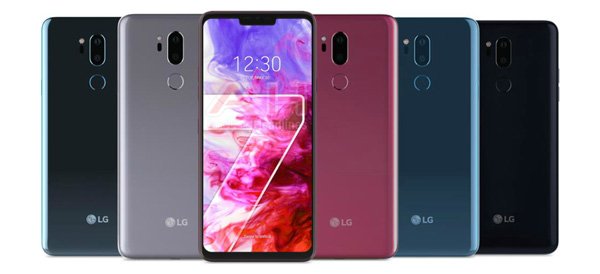
    LG’s new G7 ThinQ features a “Boombox Speaker” that promises to be 10 times louder than the competition. LG hopes their innovative speaker technology, combined with a super-bright display, will draw customers away from Apple and Samsung.

    How Loud Is It?

    The Korean manufacturer claimed that the speaker “increases the base sound level by more than 6dB.” The Boombox Speaker technology appears to use the body of the phone itself as a resonance chamber. This updated approach allows LG to pack more sound output into a small space compared to conventional speakers.

    Unfortunately, that also means when your ringtone goes off at an inconvenient time—such as in the middle of a meeting or at the movie theater—it’ll be 10 times louder than anyone else’s phone.

    All About That Bass

    Bass lovers, rejoice! The new LG phone has twice the amount of bass compared to the average smartphone currently on the market. And if you place the G7 ThinQ on a flat surface made of wood or metal, you’ll get even more bass amplification as the surface essentially becomes a woofer.

    3D Sound Output

    The LG G7 ThinQ will also be the first phone to feature DTS:X support for headphone users, allowing you to enjoy 3D surround sound effects on par with a movie theater equipped with 7.1-channel speakers. Combined with the Hi-Fi Quad DAC (digital-to-analogue converter) to reduce distortion to imperceptible levels, this phone should be an audiophile’s dream.

    LG will launch its latest phone on May 2 in the US. We’ll find out then if the Boombox Speaker is all it’s cracked up to be.