Category: Smart Devices

  • Motorola Razr V4 the Future of Fordable Smartphones

    Motorola Razr V4 the Future of Fordable Smartphones

    No this isn’t a tech throwback on the Motorola V3 Razr, comeback Wednesday for that. This is a new Motorola V4 Razr. We have a concept model from Motorola and that they are currently working on a folding phone, and all signs point to the fact that it could carry the iconic Motorola Razr branding. Back in February 2017, Yang Yuanqing, the CEO of Lenovo (which owns the Motorola brand) noted.

    “With the new technology, particularly foldable screens, I think you will see more and more innovation on our smartphone design. So hopefully what you just described [the Motorola Razr brand] will be developed or released very soon”.

    So that alone is very promising, but we are now at the point were some details are emerging.

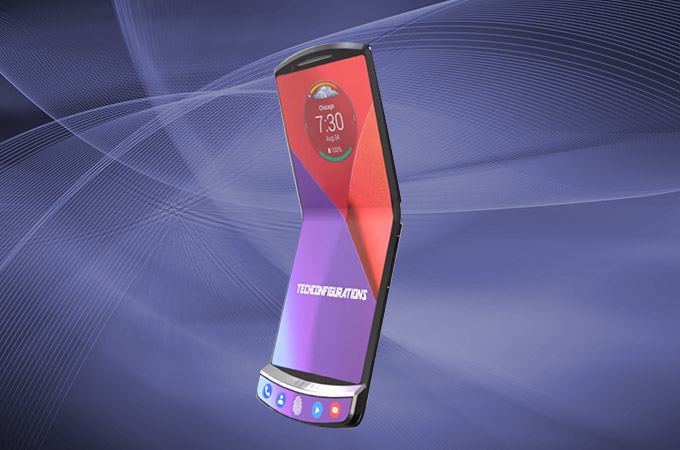
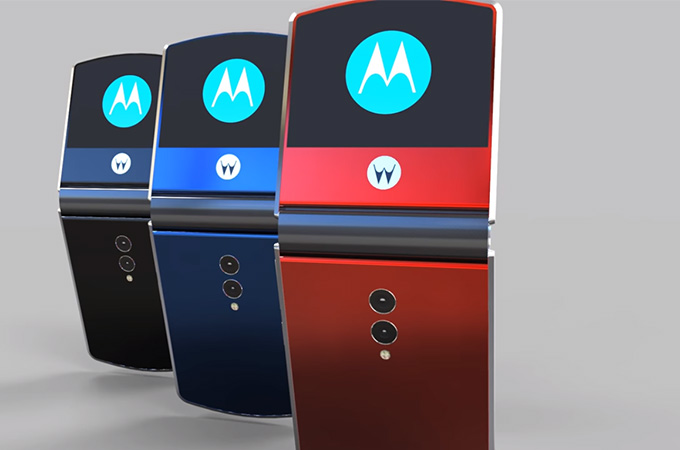
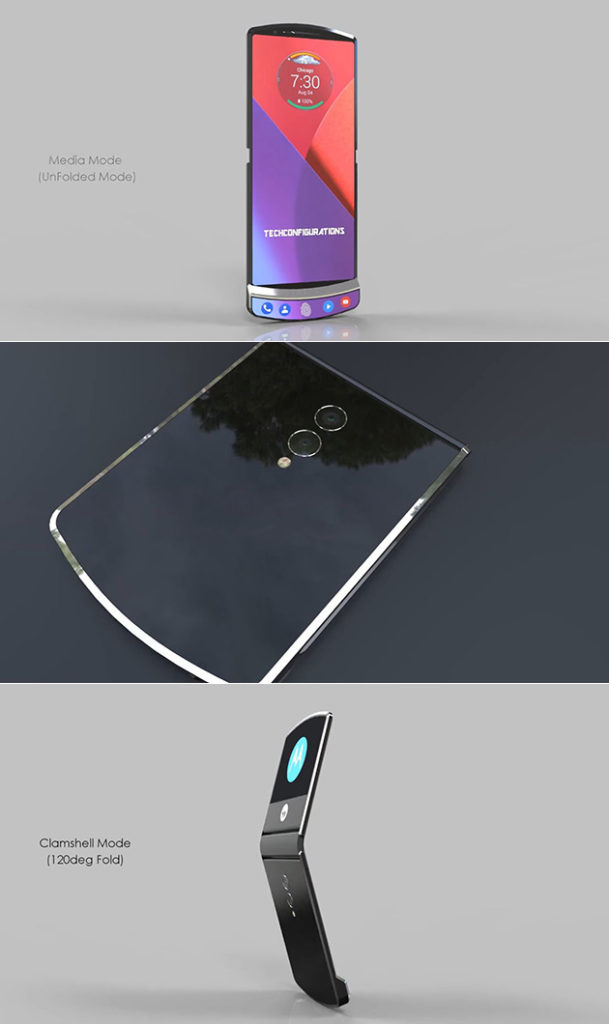
    Motorola Razr V4 Concept

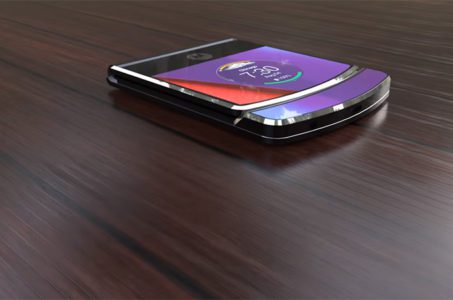
    The Motorola Razr V4 remained very slim when folded reaching 7.5mm and unfolded reaching only 3.7mm. Meanwhile, the device is good enough to give under-display fingerprint scanner available. Notably, Motorola handset features Android Oreo 8.1 out-of-the-box based on Intelligent UI and IP68 certified water/dust resistant.

    From our anonymous source we have a first hand account. “When opened up, the Moto Razr V4 has a 7 inch AMOLED HDR 10 screen, a Snapdragon 855 CPU and a hinge, that feels like it prequels a Surface Phone or Samsung Galaxy X. Crazy enough, this ultra slim device is just 3.7 mm in thickness, when it’s opened up. Folded it reaches 7.5 mm. It feels like Tech Configurations really thought it out this time around,”

    The Spec Rumors

    The Motorola handset will sport a Qualcomm Snapdragon 855 CPU, on the contray to the original infomation we got back in 2017. The handset performance works well on 6GB of RAM and two storage variants including 128GB/256GB ROM (unexpandable). Also, Motorola RAZR V4 camera packs dual 16MP+12MP primary snapper with 4K videos recording ability. Besides, there is a 12MP selfie shooter with a wide-angle lens and an aperture of f/1.8. Further, Motorola phone gets 4100mAh battery.

    At the moment, there is no further information regarding Motorola RAZR V4 price and availability. However, we can expect to meet this legend with the new outlook this June with the price range approximately of $500.

    The Final Thought

    Ive always been  a big fan of the Motorola V3 Razr and the jump in made in the cellular industry. I was also among the very first non Motorola employees to have one. I won a sales contest for Motorola 6 months prior to the release. The initial specs looks on point and these pictures are lighting me up. Is it the next big thing in wireless again? we will see and Ill see you back here for the smartphone spotlight as soon as it releases.


  • Which Tablet is Worth your Money?

    Which Tablet is Worth your Money?

    Smart phones are nice, but sometimes you want a bigger screen for your smart device. Whether you’re drawing, looking at photos, watching movies or playing games, tablets are awesome addition to your smart device arsenal. When you just want that bigger screen for a handheld touch device, nothing else will do!

    Nothing says quality, solid build and premium design more than our 5 best premium tablets. From major manufacturers such as Apple, Samsung, Amazon, Microsoft and Google these tablets carry the state of art in technology and design. With that in mind, let’s check out some of our favorite premium tablets!

    Microsoft Surface Pro

    This tablet is so premium that it’s also a laptop. The Surface Pro made our list of best touchscreen laptops, too, which might sound weird until you see one in person: it really is both. With a stellar screen and great form factor, you can’t get a much cooler 2-in-1 tablet. Retailing for $659, it’s not too pricey.

    There are only a few real downsides for the Surface Pro. The very incremental advances it possesses when compared to its predecessors are slightly disappointing.  Additionally, the design is a little too minimalist: there is no USB-C port! Then again, it’s still a great tablet, so it’s a small nitpick.

    Google Pixel C

    Your favorite Android tablet, the Google Pixel C performs like a giant version of its phone siblings. The Pixel C also has an optional magnetic keyboard that is quite solid, letting the tablet act as a laptop. This is easily the most powerful Android tablet that exists, for what it’s worth. The tablet performs great while multitasking and rarely suffers stutters or slowdown.

    If you need a tablet for work or just like pushing your technology to its limit, this is a great pick for you. On the other hand, this one is a bit expensive, retailing for $950. Additionally, many users see Android as a drawback instead of a feature. Many apps are released on iOS first and often perform better there to boot.

    The Samsung Galaxy Book

    This tablet rightfully belongs on the quickly growing list of impressive Microsoft Surface Pro contenders. The Samsung Galaxy Book is a top-shelf Windows tablet with a price to match. Its robust processing power, high-end display and essential add-on accessories make it one of the best tablet-hybrids.

    It’s a Windows 10 tablet with a stunning 12-inch Super AMOLED display, Intel’s latest processors and detachable keyboard cover with stylus. It starts at $1,130 for the Wi-Fi-only version and $1,300 for the LTE model, sold via Verizon, which was the configuration we reviewed. Samsung offers a 10-inch variant that runs for $630, but this review is of the 12-inch model.

    iPad Pro

    No list of premium tablets would be complete without Apple’s contender in the mix. And this time around, unsurprisingly, Apple is our favorite. The iPad pro is a rock-solid tablet, with a gorgeous Retina display and fantastic performance. Many users have a preference for iOS, and for good reason. Slowdown is almost nonexistent, and app support is fantastic.

    If there are any drawbacks, they’re the same ones that apply to all Apple products: expensive peripherals and proprietary charging. If you want the Apple Pencil or proprietary keyboard to go with it, this one will run you some serious cash. For just the iPad itself, you’ll be spending around $600.


  • Smart TV Roundup: Which One is Right for You?

    Smart TV Roundup: Which One is Right for You?

    Everyone needs to park it on the couch and watch some TV sometimes. After a long day, there’s nothing better than surfing some Netflix or Hulu and enjoying a nice show. Which Smart TV should you consider though? There’s just so many options out there! To help you narrow it down, here’s our favorite smart TVs rounded up! 

    Sony A1 OLED TV 

    Sony’s ultra-premium smart TV is a little pricey, depending on where you get it, running somewhere between $3,000-$4,000. But don’t let that scare you from checking it out! Sporting an amazing picture quality and a really stunning form factor, this TV makes an awesome centerpiece to a room.  

    This 65″ TV boasts all the awesome processing and features you expect from Sony. The picture quality never stutters or suffers under high framerate programming. This TV even incorporates Google Assistant or Alexa support for voice control! If you’re looking for one of the very best and don’t mind spending a bit of money, you’re looking for the Sony A1 OLED. 

    LG SIGNATURE OLED 65W7P W7 

    If you’re looking for something that looks absolutely bananas on your wall and impresses everyone, you’re looking for this. LG’s Signature OLED is a “wallpaper” style display, coming in at a positively unbelievable 2.57mm thick. You read that right. It is downright hard to fathom just how thin this screen is.  

    Even better than the eye-popping form factor of this LG is the picture quality. There is no TV on the market with a better display than this, full stop. That LG managed to make this display so powerful and thin at the same time is a testament to their pedigree. It’s not all magic, though: the TV comes included with a required sound bar. The sound bar is actually the processor for the TV, allowing the display to be as thin as it is. All said, this is quite an impressive TV, but it will cost you: $8,000 MSRP definitely stings.  

    Our Favorite Smart TV: SAMSUNG Q9F 4K QLED TV 

    The QLED line of TVs is just awesome. There’s no better word for them. If you’re looking for the best all-around TV for the price, this is our pick. Operating on the Tizen operating system, the QLED line is easy and accessible to use. The TV boasts great black values, bright colors and sharp images.  

    This TV is seriously smart, too, it’s not just in the name. It automatically detects connected devices and relabels inputs in the menu system. It programs the remote control according to connected devices. It’s really just impressive, easy-to-use and awesome technology. Couple that with the razor-thin connection cable and ability to mount the screen flush with the wall and it’s no wonder this is our favorite! 

  • The Best iOS Photo Apps for Shooting and Editing

    The Best iOS Photo Apps for Shooting and Editing

    Everyone loves to snap pictures! Every smart phone is equipped with great camera functionality, but they lack a decent photo app to go with it. Whether you’re looking to send pictures to family or post them to show your friends, you’re probably wondering which photo apps are the best! Here’s a round-up of our favorite photo apps!

    Snapseed

    Snapseed is a user-friendly photo editing app for iPhone. Allowing for different filter types and tools for adjusting exposure and sharpness, Snapseed allows for professional-style photo editing from your iPhone. You’re also able to edit only selected parts of a photo, letting you fine-tune images to your taste! It even has a healing tool like Photoshop. Best of all, this app is free! Snaseep is our favorite iOS photo editor.

    Cortex Camera

    This app is fantastic for shooting in low-light or nighttime situations. Using a really neat process, Cortex Cam is able to cut down of visual grain that is so common in low light pictures. Typcally, when taking pictures in low light, your phone camera will increase the ISO to attempt to squeeze more light into the lens. This has the side-effect of creating grainy images. Cortex Cam combats this by taking a large number of images in a short span of time and collating them into one image, eliminating that visual noise. This is easily the best app for low-light shooting!

    Superimpose

    Another Photoshop-like app, Superimpose allows two pictures to be blended together. If you want an app to blend together two photos from your phone, this is the app for you! This app has gradient masks that allow for one photo to mask the dark aspects of another with its own light aspects, allowing for interesting artistic projects. Superimpose can also be used for double exposure-style pictures, like using a foreground from one photo and a background from another. Superimpose is $1.99 on the app store, but you get a ton of awesome functionality for that price. If you’re looking to make compositions from your phone, Superimpose is a great app for you!

    Our Favorite Photo App: Camera+

    This app is exactly what is says it is: an enhanced version of the iPhone’s existing camera app. This app gives shutterbugs precise control over their phone’s camera functionality. Between altering shutter speed and white balance, this app is a must-have for smartphone camera enthusiasts. Camera+ has a manual focus function that is especially helpful for photographing extremely close objects, which is great!  It also has a handy 30-second delay feature for those who want to take pictures with themselves in the frame.If you have the technical know-how, or want to develop it, this app is a great choice for you!

  • Is The Phone Notch Here to Stay?

    Is The Phone Notch Here to Stay?

    It seems Apple once again has set a trend for the smartphone industry. The beta for Android P operating systems is now being rolled out and developers are revealing more details of the new Android operating system. According to developers, the new OS supports three different phone notch designs: the standard, iPhone X style notch that many find so odd, a top-right corner notch that looks even more strange, and a double-style, top and bottom notch. This somewhat solidifies suspicions that notch-style designs may be the norm for smartphones going forward.

    Why Notches?

    Many find the phone notch to be an odd choice, aesthetically. Why break up the edge-to-edge screen display with a random notch? Well, the answer is one of functionality: if the whole front face of the handset is a display, where do you put the hardware? Things like selfie cameras and speakers for actual phone calls have to go somewhere. This question has a few answers, but it seems, for now, the answer that manufacturers have chosen is the small cut-out notch.

    Surprisingly Appealing

    The success of the iPhone X is no mistake, to be sure: it’s our favorite smart phone right now too! People love the edge-to-edge display, and most users have said they got used to the phone notch pretty early on in their time with the new handset. The initially off-putting design actually has its own aesthetic appeal in addition to being something of a technological necessity for the time being. I, for one, don’t mind it too much. For many, though, these notches are incredibly bothersome and break up an otherwise uninterrupted screen. In any event, it looks like the notch is here to stay.

  • Is Google Duplex Too Real?

    Is Google Duplex Too Real?

    We’re living in the future. If you needed a reminder of this, you need look no further than the prevalence of artificial intelligence on the cusp of becoming indistinguishable from humans. At their I/O 2018 conference, Google showcased their new Duplex technology. Duplex allows Google Assistant to make phone calls for you to set up appointments and reservations. The unique trick here is just how lifelike and eerie the Assistant sounds on the phone. It says “umm,” and “mmm-hmm.” It uses upward-lilting speech to sound authentic. It sounds completely human.

    How Far is too Far?

    Google claims that the Duplex technology will identify itself as such when it goes live. This, at least, covers our initial fears that people will be unaware that they are interacting with artificial intelligence. However, the presence of this technology alone could be cause for concern: what if another, less responsible company develops similar technology? What if scammers steal the technology and use it to operate elaborate phone scams? The potential for abuse is certainly high. It remains to be seen what protections Google has in place for this lifelike AI.

    So What?

    Maybe you don’t mind the idea of lifelike-sounding machines calling you. If they sound human and I’m not aware that they’re machines, so what? Why should I care? Google already promised it would even identify itself! To which I would say: I don’t think we need to worry about Duplex itself. I thoroughly believe Google will be responsible with this tech, if only because all eyes are on them. They are a leader in AI research and this is a pioneering piece of technology that many will likely follow. As such, I have no doubt Google will toe the line and act ethically with their new tech. The question remains, though: will those that follow do the same? Now that the door is open, who knows what kind of potential for misuse of this technology puts on the table.

    This is Just the Beginning

    Either way, Google is not alone in pushing the boundaries of AI applications. Microsoft and Facebook are also pursuing the future of AI in attempts to make their products synonymous with the burgeoning tech. These companies and others like them are all racing to hit the market with the most lifelike, the most impressive and least detectible AI before their competition. We can only hope they temper their haste to be the first to market with a desire to act ethically and responsibly with technology that will change the way we interact with our world.

  • Which Chat App is Best?

    Which Chat App is Best?

    Practically everyone and their mom has a smartphone now. It’s easier than ever to stay connected to all our friends and family through a chat app! However, not everyone wants to be in huge group chats, and some people would prefer not to give their personal number out just to join in the conversation.

    With that in mind, we’ve got a round-up of our favorite chat apps! Read on to find out which apps we love to use to stay connected.

    Facebook Messenger

    Facebook is the undisputed king of the heap when it comes to social media. Almost everyone has a Facebook profile, and as such, almost everyone has access to Facebook’s messenger app. This app is clean, functional and usable, which is all par the course for what we’ve come to expect from the biggest social media platform on the internet.

    The app experience is somewhat bare-bones, however, which is disappointing when comparing it to Discord or Slack. However, Messenger makes the list for its ubiquity. If you need to make a group chat with friends or just message someone to start a conversation, Messenger is a fine choice.

    Kik

    Kik is something of a replacement for normal phone functions of texting and calling. With a unique video chat functionality that allows for small, thumbnail-sized video feeds while still texting, Kik certainly sets itself apart. Kik has a cool feature to check your phone’s contacts to add them to your contacts in the app. It also has a great interface: clean, smooth and easy to use. You should definitely give Kik a shot, especially if you’re looking for a more in-depth one-to-one text app than your phone’s text messenger allows for.

    Slack

    Mostly used by businesses, but also popular for gaming groups, Slack is a great chat suite. Sporting a good desktop app and a solid phone experience, Slack gets right to the point. With a no-frills interface that still allows for all the requisite emojis and gifs, Slack gets out of the way of your conversations.

    If you’re a small business owner looking to pull all your employees into a chat together to coordinate your efforts, Slack is perfect. Similarly, if you’re trying to organize a gaming group and you don’t like Discord’s app, Slack is a great choice.

    Our Favorite Chat App: Discord

    This one is actually no contest. Discord is the best chat app in existence, bar none. There is no overstating how many awesome features are packed into Discord’s stellar desktop and mobile applications. Discord sports a user-friendly server set-up that can be subdivided into channels.

    Functionality for tons of different types of games and news feeds can be integrated into servers at the admin’s discretion. Do you like Dungeons in Dragons? Install a bot that rolls dice and looks up stats in your server. Do you love sports? Install a bot that gives your final scores for your favorite teams. I can’t recommend Discord enough, whether you’re a gamer, professional, or anything in between.

  • Top 5 Smart Fridges

    Top 5 Smart Fridges

    So last week my fridge broke, this is the fridge that came with the first home I bought 6 years ago. I’ve never purchased a large appliance before, So I was more then a little perplexed. I thought back to an article I wrote about a guy that upgrade his dated house to a smart house to increase his homes value. One of the key elements to that was the smart fridge so I decided that is the way I  want to go.

    Fridges have come a long way in recent years.  Apparently now you don’t even have to leave the comfort of your own home to purchase a smart fridge that will transform your regular, plain old kitchen into a souped-up one. Smart fridges now come equipped with Wi-Fi capability, remote and voice controls (we’re looking at you, Bixby and Alexa), as well as food-preserving temperature monitoring, to name a few. But with so many cool, new features and brands to consider, it can be hard to find the best fridge that will work for me. Now its off to do some research to find my new smartfridge and pass this info I found on to you all as well.


    1.Samsung Family Hub French Door

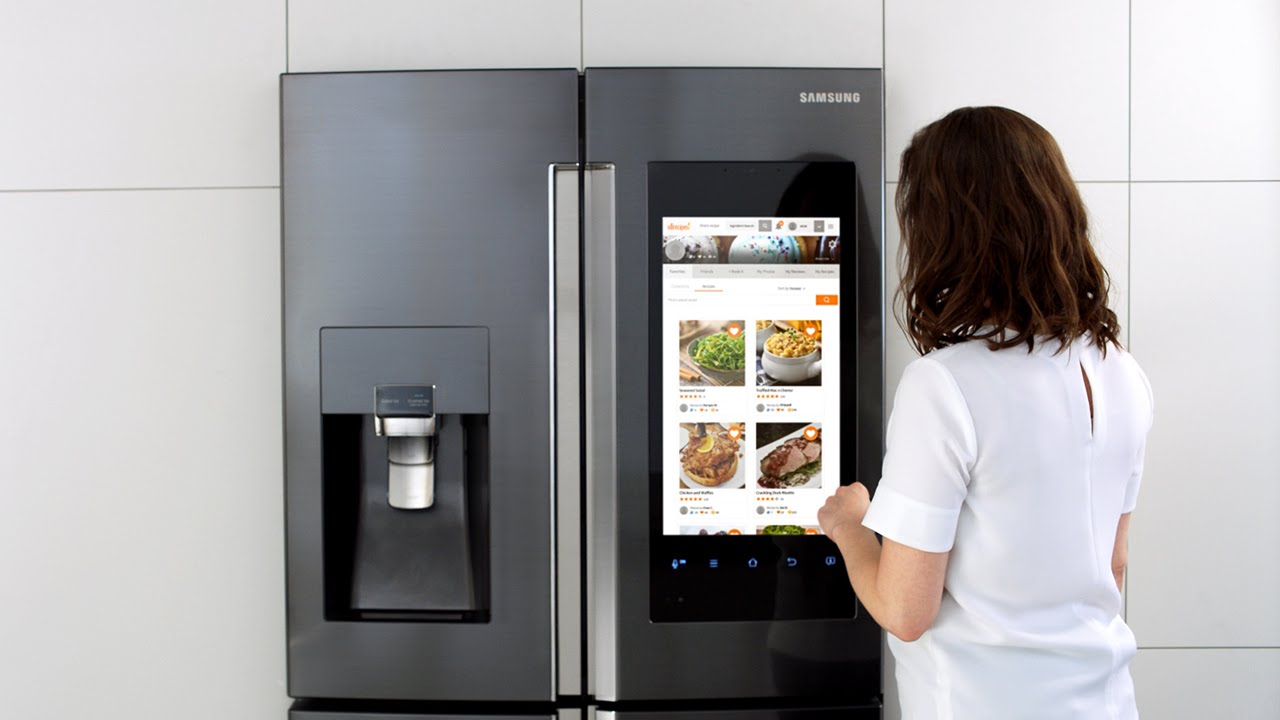
    Samsung’s Family Hub can connect to and control third-party devices that are part of the SmartThings smart home ecosystem such as lights, thermostats, home video cameras, and more. So from this fridge’s screen, you can adjust a SmartThings-compatible thermostat or view what’s happening outside your front door or in another room of the house with a SmartThings-compatible camera. Use Samsung’s Bixby voice-activated assistant to get personalized updates about your schedule – straight from your fridge.

    A good deal on this fridge is $2500. If I can find it for that price this is my guy. It has all the latest features and is the King of the smart-fridge hill right now.

    2.Kenmore Smart

    Stainless steel, French doors, extra-large capacity and the Kenmore Smart app . With this Energy Star-qualified appliance, you can always make sure your food stays at the correct and safe temperature thanks to the convenience of the Kenmore Smart app and GeniusCool™ technology that creates the ideal temperature and humidity levels for your cuisine. I can Control the fridge remotely with Alexa or use voice commands to activate the ice maker or air filter or to adjust and monitor your fridge’s temperature. Nice recessed LED interior lighting brightly illuminates the fridge’s contents, helping to ensure nothing goes to waste in a forgotten corner. Plus, the extra-large dispenser area on the front of the fridge is big enough to accommodate not just glasses but coffee pots, water bottles and even large pitchers, too, making it convenient to access fresh, clean water anytime.

    At $2300 prime this seems like a good option, the only hesitation is we’ve found a few little qualms, the kinda stuff you don’t know when you purchase blind on line like:

    • The plastic components are thinner material = Cheap
    • The drawers don’t pull out as far.
    • The overall feel is light / cheap.
    • Both refrigerator and freezer interior lighting is lacking.


    3.Whirlpool – 32 Cu. Ft. French Door Refrigerator

    Wi-Fi connectivity so that it can connect to your home automation system of choice, but the real advantage of this fridge is that it includes a smart learning process that adapts to your schedule and can readjust for parties or other events where the door is frequently opened or closed. Whirlpool decided to stick with simple, fridge-specific features that don’t ask you to rethink the role of your kitchen. Marinating some meat? The screen will show you recommended times for different cuts and ask if you want to set a timer. Cleaning the fridge? Whirlpool will suspend cooling to save energy and also shut the door alarm off so it doesn’t annoy you while you scrub. Seems more intuitive then smart.. pass

    cost on this guy – $ 4400  and I know you already know what a Whirlpool french door fridges looks like.. boring


    4.GE Profile Smart French Door Refrigerator

    Huge capacity, black stainless steel and a built-in Keurig K-Cup with instant hot water makes this fridge one of the coolest on our list. It comes with two evaporators to create separate, optimized climates in the fresh food compartment and in the freezer to ensure ideal humidity, making your food taste better and last longer.  Electronic Temperature Controlled Drawer with Colored LED Lights and Scheduled hot water. SO i have hot water on tap whenever I know I may need it. I can even use Amazon’s Alexa to control your fridge simply using my voice. Just ask Alexa to heat up water for your favorite hot beverage or turn on GE’s TurboCool function to restore the ideal temperature after putting away groceries

    $3300 I like this one a lot. I like the darker stainless steal look. I love the way the door float open. This one I high in the running for Beau’s new fridge. I just wish it had the big screen wow factor the Samsung does.


    5.LG Signature Smart Fridge French Door Refrigerator

    Again no screen but knock twice to illuminate and see inside InstaView’s glass panel, Door-in-Door feature allows you to get in and get out with ease. LG says it  stays true to the essence, delivering a new sense of life for the most discerning individual. I kinda agree, there is a is a smart sensor detector at the foot of the refrigerator that opens the door automatically. Just step on the “Door Open” light projection on the floor in front of the refrigerator and the door gently opens.

    $6600, its nice but ill have to pass


    The Final Thought

    And the winner of the honor of being my new fridge is… The Samsung Family Hub. It was the highest reveiwed, best priced and has the wow factor of the screen. Not to mention the tech geek I am, but this thing has loads of useless features. Im in, congrats Samsung


  • 5 SmartDevices to Improve Your Golf Game

    5 SmartDevices to Improve Your Golf Game

    The The Players Championship starts today, so what better time to take a look at all the smart toys out there to improve your golf game. SMartdevice are everywhere and in everything, golf just seems a natural fit. We are always looking to drop our score and an edge up and we need the data to do this. Well these 5 devices will have you the envy of your club house and playing like a pro.


    1. Cobra’s “first connected golf club.”


    The $349 King F7 Driver pairs the club with a smartphone app that allows you to track your game via GPS. Beyond that, the club features three different centers of gravity, allowing you three different potential approaches and flight paths. Say that again, yes it is Equipped with 3 Center of Gravity settings for maximum distance.It features an Arccos sensor seamlessly integrated into the grip to automatically record each drive, providing real-time stats for distance and accuracy. Not to mention it is one of the baddest drives out there even with out the connect.


    2. GolfBoard

    This electric-powered vehicle, which evokes a skateboard or snowboard, replaces a golf cart and promises to literally speed up your round of golf. Recently it’s gone from something vaguely futuristic to something you can find at more than 300 courses worldwide. You can even buy your own. Prices start at $6,500 for the standard model that motors up to 10 mph. Yes it looks like fun, and yes it will provide endless hours of youtube fail videos.


    3. FX-Sport VC Golf headphones

    FX-Sport specializes in wireless sport headphones. Its new VC Golf model is called “the first psychological coaching device for golf.” On it, you can access hours of soothing, sage words from golf gurus — they get in your head so you don’t lose yours. It’s listed at $199. The Headphones are preloaded with many hours’ worth of psychological coaching, mental preparation, practice drills and workouts, from world class golf psychologists, coaches and trainers. All practice drills have a strong emphasis on the psychological. Advice on how to focus, what to focus on and what to do when things are not progressing as you would like. I wish I could change the voice to Ty Webb. Be the ball Danny!


    4. TLink GPS Golf Watch

    Wearable golf tech that displays instant yardage ⏤ the distance to the back, middle, and front of the green ⏤ on 40,000+ courses worldwide. Simply open up the GPS app on your smartphone, connect TLink with your phone. Never worry about what club to use, you have the data right there.


    5. SetupEye

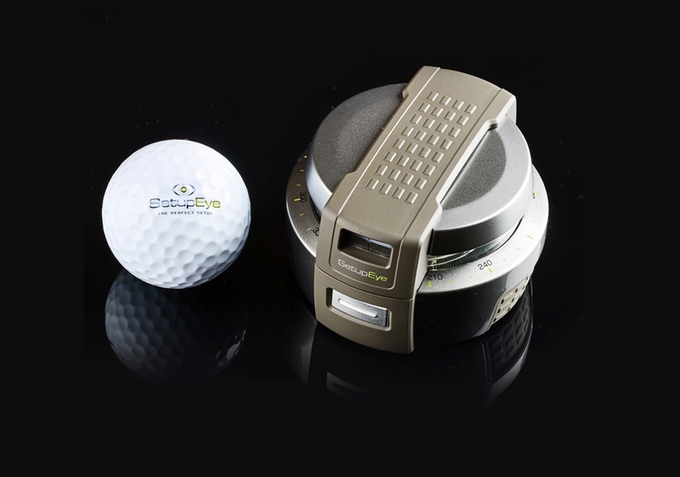
    Im pretty sure this was frowned upon in Caddyshack 2 but If your alignment is off, then you aren’t going to come anywhere close to firing on target. SetupEye uses lasers and “target lock technology” to help golfers take dead aim with absolute confidence. Simply lock onto the flag or your chosen target through the viewfinder, press the button, and place the device on the ground between you and your golf ball. From there, just follow the shooting green lightsaber as it points the way.


    The Final Thought

    You got the ultimate club to track your swing from your drives, the watch to tell you exactly how far to the pin and a golf coach in your ear. You are navigating the course quickly and stylishly on your gold board and you have the target locked on the hole to nail this last putt, see you at the tavern for a beer you golf pro.

  • Find Out Which Fitness Tracker is For You

    Find Out Which Fitness Tracker is For You

    The fitness tracker has been around for some time, but they are always getting better. Whether you’re looking to upgrade from an older model or seeking to get started tracking your fitness, we’ve got a list for you! Read on to see which fitness trackers we love!

    Samsung GearFit 2 Pro

    The sleek, fashionable fitness tracker has a lot to love. From offline Spotify playlist support to GPS support, this is certainly a modern piece of tech. Additionally, your stats are easy to track from the watch itself, as it sports a bright, luminous AMOLED display and clearly displays all of your stats. It also has a very advanced heart rate tracker and fully tracks swimming and is waterproof.

    It has a less-than-optimal user set-up experience, though this is a small gripe. The main drawback to Samsung’s fitness tracker is its high price: it retails for $150, which is quite steep. However, with its large screen and advanced heart rate tracker, this is to be expected: if you’re looking for a great fitness tracker with a fantastic display and awesome features, this is for you. If you’re looking for something more afforable, keep reading!

    TomTom Spark 3

    The Spark 3 is a good spot less expensive than the GearFit, retailing for around $100. This fitness tracker features a monochrome display and clearly displays stats. It also supports on-wrist GPS, which is awesome for running in new areas and discovering new routes. You can also load music directly into the tracker, allowing you to keep your phone at home or in your bag while you run or exercise.

    On the negative side, this fitness tracker doesn’t have terribly impressive sound quality and the menus are difficult to navigate. Set-up was roughly as cumbersome as the GearFit, but as this tracker is significantly less expensive, that is somewhat more forgivable.

    Moov Now

    If you don’t mind a lack of a screen and you want an affordable fitness tracker, the Moov Now is a great find for you. Working as the polar opposite of the GearFit 2, the Moov now is minimalist and doesn’t include a heart tracker. Instead, it opts for a more stripped-down tracker experience. It focusses nearly exclusively on fitness, offering tracking for jogging, boxing and swimming and sleep monitoring.

    That all being said, the Moov is a simple device with few features unrelated to tracking. You won’t find support for GPS or music with this fitness tracker. However, you already have a smart phone and likely a computer and even laptop; how many more ways do you need to listen to music or navigate via GPS? Retailing around $50 and usually available for less, the Moov is an excellent choice for those who are seeking to simply start tracking their fitness.