Category: Computers

  • Tech Throwback: Windows 95

    Tech Throwback: Windows 95

    I like to take a look at where I’ve been to evaluate where Im going. Technology is cyclical after all… wait no its not. That said I still like all the feels that come rushing back like a flood of nostalgia every time I get my hand on the tech I grew up with. Im going to go back periodically and take a looking at the stuff that used to blow our hair back and get our minds rolling. Some of these device blew up and changed the world, some where ahead of their time and some just fell flat and became colossal failures. Today, we’re highlighting Windows 95.


    Windows 95

    You know it well, It kicked our Technology revolution in to 5th gear.  Know around the world as  a quantum leap in difference in technological capability and stability. Windows 95. Windows 95 (codenamed Chicago) is the operating system developed by Microsoft as part of its Windows 9x family of operating systems. It is the successor to Windows 3.1x, and was released to manufacturing on August 15, 1995, and generally to retail on August 24, 1995. Do you remember the lines to get a copy?

    All we had prior to this was DOS. Now Windows 95 was capable of running DOS and Windows-based applications, although it had completely removed DOS as the underlying platform, unlike previous versions of Windows. This helped in overcoming two limitations: eight-character file names and memory-related problems.

    Windows 95 sported new technical features along with updating existing features. It brought updated visual styles and interface advancements. It had new and improved Windows control and introduced the desktop, which was represented as a folder which holds different files. Shortcuts, icons and the recycle bin were introduced in Windows 95. The Computer was no longer for the super tech geek, your mom could now operate it.

    Windows 95 Social Impact

    Twenty years ago, Microsoft changed the world. On August 24, 1995, Windows 95 was released to the public. It was the beginning of a revolution that has helped shaped the technology world for the next two decades. There was even a one hour instructional video with  Matthew Perry and Jennifer Aniston. You know them better  as Chandler and Rachel from Friends. Then the Empire State Building and Toronto’s CN Tower were lit up in Microsoft’s colours. Lastly the Rolling Stones were paid a rumoured $8m for allowing “Start Me Up” to provide the soundtrack to its television adverts. We now lived in a different world then we had just a few hours before.


    The Final Thought


    Computers changed what could be done, Windows 95 changed who could do it. Together they changed the world overnight. It came, it was upgraded, it went. We all know by the time Windows 95 was finally ushered off the market in 2001. It had undoubtedly become a fixture on computer desktops around the world.

  • Best Ways to Check Credit Score

    Best Ways to Check Credit Score

    If you’re looking to make a big purchase, like a car or a house, odds are you’re going to need a loan. The way lenders check to see if you’re eligible for that loan, of course, is your credit score. If you often pay bills on time and are financially secure, your score should be high but you should regularly check your score.

    Grab hold of your financial potential with free information about your credit score. Knowing your credit score is important because it helps you decide what your buying power is and what areas to focus on to improve this important score.

    There are many factors that go into determining a credit score, including employment status, credit history, and financial consistency. There are also several different types of credit scores rather than a standard way to measure creditworthiness. Although banks and lenders may have their own method to determine a credit score, there are ways that general consumers can monitor their credit activity and keep on top of the score as it changes over the years.

    If you’re looking to check your credit score you’ll want to do it for free. That’s where these free credit check sites come in!

    Best Free Credit Reports

    Credit.com

    Credit.com allows you to see your Experian and VantageScore results for free. VantageScore is a newer model of credit scoring that is usually more up-to-date than the traditional FICO score. You have to sign up for an account with Credit.com, but it’s a free process. The site is known for its credit report card, a quick glance at which things go into your credit. This way, you can see what factors you may need to address to get your score higher!

    Credit Karma

    Credit Karma has become the most popular of the free credit monitoring sites for many reasons. You’ve likely heard of this one. Credit Karma offers scores from TransUnion and Equifax, and both are shown as VantageScore. Credit Karma is a free site as well, and they don’t share customer information. If you’re looking for a no-frills credit check, you’re looking for Credit Karma. They offer a great mobile app, too.

    Quizzle

    Since 2008, Quizzle has been helping its customers understand their credit history and providing free access to their full credit report and credit score. Quizzle offers free Equifax and VantageScore reports. Once every three months you can see a free report of your score. Quizzle technically has a premium account too, though you’re better off just using the free functions. The free functionality doesn’t require a credit card, too.

    WalletHub

    WalletHub offers personal financial tools to users online. Their main product is offering a free daily credit score and report associated with it. WalletHub requires you to take a pre-screening questionnaire before you get your free score. Once you answer a few basic questions, such as your income and the last four digits of your Social, you get a TransUnion credit score. The report is similar to Credit.com’s credit report card, showing you what factors influence your score the most.


  • U.S. Military Chooses New Light Attack War Plane

    U.S. Military Chooses New Light Attack War Plane

    Image result for a29 super tucano

    The New War-Bird

    In a Fly-Off to see which plane would become the U.S. Military’s new Light Attack War-Bird, The EMB Super Tucano and the AT-6 Wolverine went head to head to show us what they got. After impressive flying and displaying combat skills, it appears the EMB 314 Super Tucano will win the bid to be the new “Light Attack Aircraft” as of 2019. The Sierra Nevada aircraft company was awarded the $1.5 billion dollar US Contract indefinitely. The company was “awarded a ceiling $1,808,000,000 indefinite-delivery/indefinite quantity contract for potential procurement, sustainment, modifications, ferry, and related equipment for the A-29,”

    The warbirds main purpose will be to perform in small, quick, intermediate counter-insurgency mission. This will be to further assist our efforts in Afghanistan, while greatly reducing cost in the aircraft department as the F22 Raptor cost around $339 Million dollars each to produce. The a-29’s will be produced in Jacksonville, FL and at the U.S. Kabul base as well.

    Image result for a29 super tucano

    What can she do?

    According to Air Force Officials: A-29s are turboprop planes armed with one 20mm cannon below the fuselage able to shoot 650 rounds per minute, one 12.7mm machine gun (FN Herstal) under each wing and up to four 7.62mm Dillion Aero M134 Miniguns able to shoot up to 3,000 rounds per minute. Super Tucanos are also equipped with 70mm rockets, air-to-air missiles such as the AIM-9L Sidewinder, air-to-ground weapons such as the AGM-65 Maverick and precision-guided bombs. It can also use a laser rangefinder and laser-guided weapons. The Super Tucano is a highly maneuverable light attack aircraft able to operate in high temperatures and rugged terrain. It is 11.38 meters long and has a wingspan of 11.14 meters; its maximum take-off weight is 5,400 kilograms. The aircraft has a combat radius of 300 nautical miles, can reach speeds up to 367 mph and hits ranges up to 720 nautical miles. It’s main purpose and functions are as follows:

    Image result for a29 super tucano

     Basic Surface Attack – Assess impact accuracy using hit/miss criteria of practice/laser-guided bomb, and unguided/guided rockets
    – Close Air Support (CAS) – Assess ability to find, fix, track target and engage simulated operational targets while communicating with the Joint Terminal Attack Controller (JTAC)
    – Daytime Ground Assault Force (GAF) – assess aircraft endurance, range, ability to communicate with ground forces through unsecure and secure radio and receive tactical updates
    – Rescue Escort (RESCORT) – Assess pilot workload to operate with a helicopter, receive area updates and targeting data, employ ballistic, unguided/guided rockets and laser-guided munitions
    – Night CAS – Assess pilot workload to find, fix, track, target and engage operational targets

    Image result for a29 super tucano

    Summary

    I think this is a great new way of conserving our military budget and allocating the funds into other much needed areas of the department. Because we have become so advanced and superior with our aircrafts, most of their functions could be considered “overkill” and not necessarily the most efficient. Additionally, I just love the old “Warbird” style aircrafts and glad to see they can still be utilized in this day and age. Would love to get a chance to see one up close!

  • Biggest Changes in the October Update for Windows 10

    Biggest Changes in the October Update for Windows 10

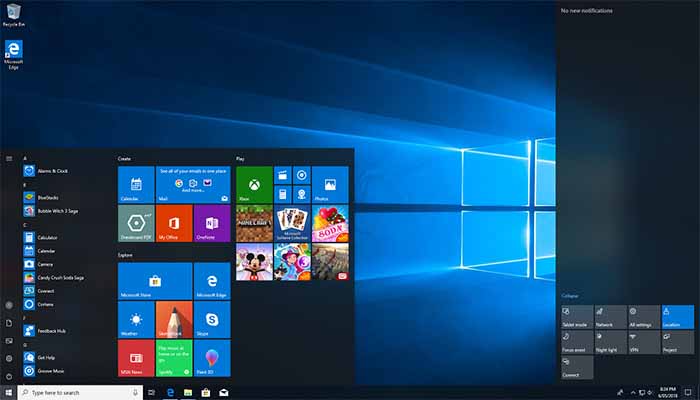
    As of late, Microsoft has been releasing twice-yearly updates for Windows 10. The ubiquitous operating system last received a major overhaul in April with the previous update. Now, the October Update for Windows 10 is right around the corner and we’re eager to see what it brings. As such, today we’re rounding up the biggest changes coming in the October Update for Windows 10.

    Biggest Changes in the October Update for Windows 10

    windows10

    Clipboard History

    The first notable change coming is the clipboard history. Accessed by hitting the window key and V at the same time, it holds a list of your recent cut and copied items. This is a big plus for writers and those who often work in word processors. Also coming is a cloud sync for your clipboard, allowing you to copy and paste across Windows devices. Neat! Well, we think. It might be totally superfluous.

    SwiftKey Keyboard

    If you’re using a Windows tablet or Surface device, you’re going to love this. The SwiftKey keyboard, the fast, responsive Microsoft touchscreen keyboard is getting a big update. Also, prepare to see some pretty crazy designs for dual-screen laptops.

    Dark Mode

    Microsoft apps, like Word, Excel and PowerPoint, will be able to be run in Dark Mode soon. Much like the changes coming to the new MacOS, the October Update for Windows 10 will include Dark Mode. For those who work at night, or just prefer the softer look of Dark Mode, this is a huge boon. No more blinding yourself with stark white apps with no Dark Mode options!

    Less Restarting

    You turn on your computer, and you’re in a hurry. There’s a deadline for a project, or you’re rushing to join your friends online for a game. Whatever it may be, you need your computer to boot up quickly. However, you forgot to restart for an update last night. So, congratulations, you get to sit here and watch your PC update for twenty minutes. Microsoft is aiming to alleviate this with “smart update windows.” The system will attempt to learn your pattern so that it knows the safest times to restart for updates without interrupting you.

    Screenshot Tool

    The Snip and Sketch tool is the newest take on screenshots, courtesy of Microsoft. This tool is not quite a replacement for the Snipping Tool, but it’s being pushed pretty heavily as the way to do screenshots. While the Snip and Sketch tool is useful in some ways, it’s not necessarily better than the Snipping Tool. Pressing prt sc can now be hotkeyed to open the Snip and Sketch, which allows you to draw the area you want to capture

  • Best 5 Laptops Under $500 in 2018

    Best 5 Laptops Under $500 in 2018

    Laptops are very essential these days- for school, work, or just personal use. The price of a premium new laptop can cost up to $1,000, which is pricey for anyone. Numerous companies have made laptops more affordable while keeping the quality and capabilities of more expensive laptops.

    You don’t have to feel like you’re settling when shopping for a laptop under $500. There are value-priced notebooks that include full-HD displays, solid performance and long battery life, plus all the ports you need. We picked all the best all-purpose laptops in $500 price range which we think are best laptops to suit the wide range of requirements of people. Here is a list of the best five laptops under $500!

    1. Dell Inspiron i3567 Laptop

    The latest version of this Dell laptop has a powerful system in place with 8GB of memory and a 128GB hard drive and a Intel Core i3-7100U 2.4GHz processor. It has a professional feel in it’s all black look with a 15.6-inch laptop with a screen resolution of 1366 x 768. The operating system runs smoothly with Windows 10 and is backed with a 12 month warranty, with 12 months of tech support.

    • A new, powerful hardware system
    • Has many ports and slots to use your external devices
    • 8 GB Ram
    • 7th Gen Intel Core i5 processor
    • It is not backlit enabled
    • Battery life up to 5 hours

    2. Acer Aspire A515-51-50RR Laptop

    The Acer Aspire 5 is one of the best budget full-size laptops you can find in stores today. It checks most of the right boxes: well built, slim and fairly light, gets a decent keyboard, an IPS screen and modern hardware, performs well, runs cool and quiet and lasts for a long while on a charge. This slim and sleek laptop is a great all round performing laptop, especially for the price. The visuals are spot on with vivid, bright colors.

    • LCD display and is backlit
    • 2.50 GHz Intel Core i5-7200U processor
    • Storage: 1TB hard disk
    • Intel HD 620 graphics
    • Battery life up to 7 hours
    • All-plastic chassis

    3. HP 15-ay191ms Laptop

    The HP 15-ay191ms, a signature edition laptops that comes with a seventh-generation Intel Core i3 processor, 8GB DDR4 system memory, 1TB of storage and a touchscreen, but still remains insanely affordable. It’s one of those laptops you’d buy without a second thought if you find inexpensive chromebook attractive, but really, really need Windows. If you love touchscreen, this one’s for you! This laptop contains the Kaby Lake processor which makes this laptop consume little power. Apps are not an issue here, they all run very smoothly.

    • Touchscreen
    • Intel Core i3-7100U processor
    • 8GB RAM
    • 1TB hard drive
    • Lag-free performance
    • Battery life up to 6 hours

    4. Dell Inspiron i3567-5185BLK Laptop

    Yet another Inspiron made this list! This version comes in different color options and a textured finish.  Packed with a large 15.6 Inches display and a decent 7th Gen Intel Core i5-7200U up to 3.1GHz CPU processor. This Dell laptop model would work well for portability with its 4.85 Pounds lightweight design and sleek black look. Great for school work or the family computer. A huge bonus with this laptop is it doesn’t heat up much!

    • 2.4 GHz Intel Core i3-7100U processor
    • 8GB RAM
    • TB hard drive
    • LED display with a built-in webcam and mic
    • Battery life is up to 6 hours

    5. ASUS Chromebook Flip

    This is one of the best convertible laptops on the current market. The Asus Chromebook Flip C302 is worthy of its premium stature with a gorgeous screen, tactile keyboard and a classy design that’s equally as comfortable to use in tablet mode or as a traditional laptop. The screen is a full HD touchscreen and can be converted from a laptop to a tablet by turning the screen. A top pick for a college student!

    • Intel Core m3 processor
    • 4GB RAM
    • 64GB of SSD storage
    • Battery life of up to 10 hours

  • Asus ZenBook S UX391UA Review Roundup

    Asus ZenBook S UX391UA Review Roundup

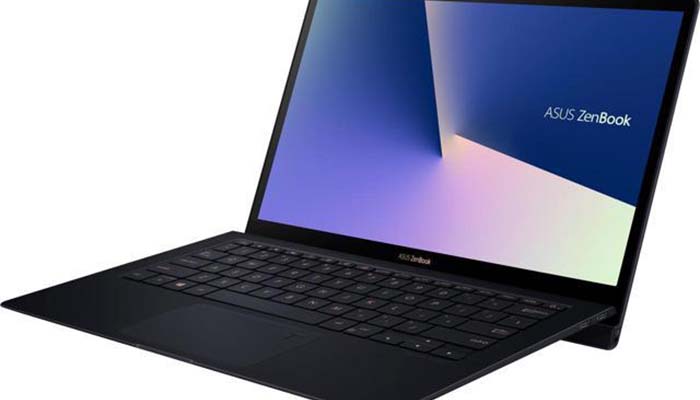
    Asus’ newest ZenBook, the Zenbook S UX391UA (say that three times fast) is here. Is the new super-compact device worth the hefty price tag, or is it better left for the bargain bin? Today we’re going to round up the best features of the new ZenBook and let you know what we think. After all, competition in the laptop market is fierce at the moment, and you shouldn’t waste your time or money on a sub-par product! Let’s talk about the newest release from Asus.

    Design

    The Zenbook S UX391UA is compact. As in, incredibly compact. If you’re the type of person who often works in coffee shops or is on the move a lot, this is a plus. The main design feature here is the ErgoLift hinge. In English, that’s the hinge that lifts the bottom part of the laptop when it’s unfolded. The lift makes it easier to type on the small keyboard and also helps ventilate the laptop. Overall, the design could be described as understated, subtle and soft. That said, it is also quite stylish.

    Specs

    The Zenbook S UX391UA comes standard with a 4K display and a touchscreen. It also sports a 512GB SSD for storing data, and an i7 processor. All said, it’s a pretty hefty machine! That’s not even mentioning the 16GB of memory the ZenBook sports. It’s not going to be the strongest computer for gaming, for what it’s worth. It sports a 128MB (shared) Intel UHD Graphics 620, which will allow it to play basic games at best. However, most in the market for gaming laptops wouldn’t consider an ulta-compact option like this to begin with.

    Price

    This is the biggest sticking point. Despite the i7 processor, 4K display and great design, the Zenbook S UX391UA feels too expensive at $1500. Oddly, the ZenBook doesn’t feel like it brings enough compared to the competition. In fact, there are even computers in Asus’ own range that outpace the Zenbook S UX391UA for the price!

    Zenbook S UX391UA Bottom Line

    The bottom line on this ultra-compact computer: pass unless you really like the design. Generally speaking, ultra-compacts just shouldn’t cost so much. Perhaps in a year or so the price will drop and make this a worthy pickup. Until then, however, stick to the less pricy competition and get a similar (if not better) computer for your money. Better luck next time, ZenBook!

  • Best 5 Laptops Under $500 in 2018

    Best 5 Laptops Under $500 in 2018

    Laptops are very essential these days- for school, work, or just personal use. The price of a premium new laptop can cost up to $1,000, which is pricey for anyone. Numerous companies have made laptops more affordable while keeping the quality and capabilities of more expensive laptops.

    You don’t have to feel like you’re settling when shopping for a laptop under $500. There are value-priced notebooks that include full-HD displays, solid performance and long battery life, plus all the ports you need. We picked all the best all-purpose laptops in $500 price range which we think are best laptops to suit the wide range of requirements of people. Here is a list of the best five laptops under $500!

    1. Dell Inspiron i3567 Laptop

    The latest version of this Dell laptop has a powerful system in place with 8GB of memory and a 128GB hard drive and a Intel Core i3-7100U 2.4GHz processor. It has a professional feel in it’s all black look with a 15.6-inch laptop with a screen resolution of 1366 x 768. The operating system runs smoothly with Windows 10 and is backed with a 12 month warranty, with 12 months of tech support.

    • A new, powerful hardware system
    • Has many ports and slots to use your external devices
    • 8 GB Ram
    • 7th Gen Intel Core i5 processor
    • It is not backlit enabled
    • Battery life up to 5 hours

    2. Acer Aspire A515-51-50RR Laptop

    The Acer Aspire 5 is one of the best budget full-size laptops you can find in stores today. It checks most of the right boxes: well built, slim and fairly light, gets a decent keyboard, an IPS screen and modern hardware, performs well, runs cool and quiet and lasts for a long while on a charge. This slim and sleek laptop is a great all round performing laptop, especially for the price. The visuals are spot on with vivid, bright colors.

    • LCD display and is backlit
    • 2.50 GHz Intel Core i5-7200U processor
    • Storage: 1TB hard disk
    • Intel HD 620 graphics
    • Battery life up to 7 hours
    • All-plastic chassis

    3. HP 15-ay191ms Laptop

    The HP 15-ay191ms, a signature edition laptops that comes with a seventh-generation Intel Core i3 processor, 8GB DDR4 system memory, 1TB of storage and a touchscreen, but still remains insanely affordable. It’s one of those laptops you’d buy without a second thought if you find inexpensive chromebook attractive, but really, really need Windows. If you love touchscreen, this one’s for you! This laptop contains the Kaby Lake processor which makes this laptop consume little power. Apps are not an issue here, they all run very smoothly.

    • Touchscreen
    • Intel Core i3-7100U processor
    • 8GB RAM
    • 1TB hard drive
    • Lag-free performance
    • Battery life up to 6 hours

    4. Dell Inspiron i3567-5185BLK Laptop

    Yet another Inspiron made this list! This version comes in different color options and a textured finish.  Packed with a large 15.6 Inches display and a decent 7th Gen Intel Core i5-7200U up to 3.1GHz CPU processor. This Dell laptop model would work well for portability with its 4.85 Pounds lightweight design and sleek black look. Great for school work or the family computer. A huge bonus with this laptop is it doesn’t heat up much!

    • 2.4 GHz Intel Core i3-7100U processor
    • 8GB RAM
    • TB hard drive
    • LED display with a built-in webcam and mic
    • Battery life is up to 6 hours

    5. ASUS Chromebook Flip

    This is one of the best convertible laptops on the current market. The Asus Chromebook Flip C302 is worthy of its premium stature with a gorgeous screen, tactile keyboard and a classy design that’s equally as comfortable to use in tablet mode or as a traditional laptop. The screen is a full HD touchscreen and can be converted from a laptop to a tablet by turning the screen. A top pick for a college student!

    • Intel Core m3 processor
    • 4GB RAM
    • 64GB of SSD storage
    • Battery life of up to 10 hours

  • Spider-Man PS4: An Excellent Return to Form for Superhero Video Games

    Spider-Man PS4: An Excellent Return to Form for Superhero Video Games

    Since it was announced that legendary developer Insomniac Studios was working on a Spider-Man game for PS4, expectations have been high. Will it live up to the lofty heights of games like Spider-Man 2? Can they capture what makes Spider-Man the world’s greatest superhero? And, most of all, will Insomniac live up to their own stellar pedigree? Well, Spider-Man PS4 is here and we have good news for you: it rocks. Let’s sling some webs!

    spidermanps4

    Featured Image Credit: Variety

    What Wicked(ly Awesome) Webs we Weave

    Swinging from a building, seeing the skyline bob in the distance and then plummeting to the street below is a blast. Pummeling muggers and supervillains alike is smooth and natural. Insomniac has put in some serious work making everything in this game feel as easy and fun as a superhero game should. There is a fast-travel system in this game, but will you really want to use it? Slinging from buildings and flipping in mid-air is so fun and engrossing that it’s just a blast. You’ll find yourself just relaxing and taking in the game’s world as you fly around Manhattan.

    The combat will look familiar to anyone who has played Rocksteady’s Batman games. In places, it’s comfortingly familiar. In others, it’s painfully obvious that this is a take-off on that game. At least, in this game, the dodge-and-counter mechanic is explained by Spider-Sense. And the protagonist’s capacity to take down twenty guys is explained by his super-powers. Batman really has no business winning in a fight that lop-sided…

    Familiar Faces, and Some Uncanny Ones

    Insomniac’s generally done a pretty good job with the facial animation in this one. In some scenarios it dips briefly into uncanny valley, but it rarely stays there too long. The somewhat-cartoony features help this, as the game looks ever-so-slightly like a comic book. It has largely the same stylized, sleek feeling of the big-budget MCU films it borrows its atmosphere from.

    The story is, sadly, less than inspired. In trying to make a more generalized Spidey tale, Insomniac has leaned on some tried-and-true Web-Slinger tales. This can be less than exciting for longtime fans, even if it leans heavily into safe, foolproof storytelling.

    Bottom Line

    This game is excellent, if familiar in many places. The story doesn’t break any new ground for a character who’s been around for over 50 years. But then again, did it need to? The bones of Peter’s tale of responsibility and great power are rock-solid, and the voice actors all put in great work. The gameplay is fun and flowing, even if it feels like a few other games welded together. Spider-Man 2’s web-slinging mechanics are married beautifully to Rocksteady’s combat. If you’re a Spider-Fan, you’re going to love this game. If you don’t like superheroes, Insomniac’s latest outing isn’t changing your mind.

  • Red Dead Redemption 2 is Almost Upon Us

    Red Dead Redemption 2 is Almost Upon Us

    Something Red and Dead this way comes.

    On August 9, 2018, Rockstar released its first gameplay trailer of RDR2. On first glance it appears that they expanded and improved on everything that made RDR great, while simultaneously sticking close to its roots. With integrating new technologies and new graphics to a great gameplay model , I’m expecting another home run for Rockstar.

    Related image

    What to expect

    I think I speak for the general gaming community we I say we all loved Red Dead Redemption. I know I probably put around 300 hours into that game just hunting for pelts. Upon seeing the new gameplay trailer, the first you’ll notice that is that is taking place years after the first RDR and it’s now around the turn of the century. Rockstar’s main goal with the sequel is to provide not just a massive open world game but a deeper, more detailed, and more immersive gaming experience. You’ll play as Arthur Morgan, the head of a notorious outlaw gang who has to deal with the ending of an era as society becomes more civilized. In the trailer we can see that Rockstar has created an incredibly detailed world that appears to incorporate every type of topography from deserts to mountains to swamps. And if I know RDR there will be a plethora of dangerous wildlife accordingly. Some added wildlife we can see at first glance were alligators and desert reptiles. The look of the overgame looks amazing, and there were some great shots of sweeping valleys and ranges in the trailer provided.

    Image result for rdr 2


    Summary

    I know it’s easy nowadays for us to overhype games and expect to much from gaming developers. They keep pushing the envelopes and we keep demanding more when they do. It appears that Rockstar has put a lot of effort into keeping Red Dead 2 tied to its roots, which is important. Bringing us back to a time forgotten and offering a view into a developing and chaotic time in American History. Throw in a great soundtrack comparable to the first and I think we’ll all be very satisfied with the end result. They have my Pre-Order.

  • 7 Best Business Internet Service Providers

    7 Best Business Internet Service Providers

    The fastest man is Usain Bolt. The fastest mammal is the Cheetah. The fastest business internet service provider is . .well, that’s what we set out to uncover. Speed is a top concern for businesses that need to download files, run sales software, or stream video.

    But you may be considering more factors—like price or reliability guarantees—to help you choose a business internet service provider. We decided to dive in and break down all these factors and countdown the 7 Best Business Internet Service Providers!

    The best business internet offers reliable connectivity, excellent customer service, and the right bandwidth for your work volume. Provider availability and plans will vary depending on your location, but if you’re feeling overwhelmed by all the options, we’re here to make things clearer. We researched the top providers of high-speed business internet services to find out how they compare. From maximum download speeds to costs and more, find out which internet service provider can carry your business the furthest.

    Criteria for Selection

    Availability: We focused our search on the business internet providers with the widest nationwide coverage.

    Bandwidth: Business internet plans aren’t one-size-fits-all, the main priority of a business ISP is that there is enough bandwidth to handle all onsite employees.

    Customer Service:  Companies can lose potential revenue during internet outages, which makes prompt and helpful customer service all the more important.

    Pricing: The cost of the internet service for your business can have a very meaningful impact on any business’ bottom line.

    7. Windstream

    In terms of availability, Windstream is close to perfect: coverage can be found in every state except Alaska, more than any other big-name ISP we examined. Windstream boasts an expected uptime of 99.995%, which means its service, though somewhat vague in terms of specific offerings, should nevertheless be reliable. Windstream only offers DSL and cable options, which may be sufficient for some customers but won’t provide the faster speeds of copper or fiber internet that many businesses depend on.

    6. Frontier

    Frontier does a great job providing helpful and clear information for potential customers. They provide side-by-side comparison of different plan offerings, projected price levels for bundled packages, and specific recommendations based on the size and online work volume of your business. Frontier’s plans require a minimum one-year agreement, shorter than those offered by AT&T and Comcast. Combined with lower overall speeds, Frontier is best-suited for small businesses with lower service requirements who may anticipate the volume of their work increasing after one year. For DSL service, Frontier’s maximum download speed ranges from 7-20 Mbps, while the fiber internet option provides faster speeds of 50 to 500 Mbps.

    5.  Spectrum

    Charter Spectrum has some of the most flexible contract policies we saw. With its month-to-month plans and no cancellation fees, it is an attractive option for smaller or growing businesses that aren’t quite ready to commit to a multi-year contract. Charter Spectrum’s fiber-optic speeds go all the way up to 940 Mbps, an impressive number. And unlike some internet providers, the company actually under promises: The FCC reported that in 2016, Spectrum’s actual speeds were 109.1% of advertised. Of all the major business internet providers, only Comcast had a better record. Spectrum’s customer service scores eked out slightly above average, at 3.75/5 for JD Power and 65/100 for the ACSI. That’s not exceptionally impressive, but in an industry that struggles so much with customer service, we like anything that’s above average.

    4. Xfinity

    Comcast Business has some of the fastest advertised speeds that we saw, ranging from 25 to 1,000 Mbps on its fiber network. And the FCC reported Comcast’s actual speeds average 110.23% of its advertised speeds, so if you’re looking for speedy internet, this is one of the best bets out there. All of Comcast Business’s plans come with the option to add a phone line. You can even sync it up with your personal phone, so when someone calls your cell, it automatically rings your office phone. And no matter how many people are using this feature, it’ll only cost an extra $15 per month. Comcast Business is available across 39 states, making it one of the most widespread business internet providers in the country.

    3. Century Link

    Century Link strives for an ambitious uptime between 99.95% and 100%. If your service happens to fail Centurylink does offer a uniquely generous compensation. For every 30 minutes of downtime, you’ll be credited for 1 day. With options for Fiber or DSL business internet, CenturyLink caters to businesses of any size. DSL speeds range from 3 Mbps to 100 Mbps, while Fiber caters to companies that need speeds reaching 1,000 Mbps. Either of these services can be bundled with TV and phone services for consolidated billing, too. If your business reaches several thousand employees, the options expand more generously: You can then bundle cloud storage and network security, making CenturyLink the provider that hosts the most bundling options for big businesses. CenturyLink offers some of the most flexible contract options on the market: You can choose between a 2-year contract or month-to-month plan. Keep in mind that the month-to-month plan will be more expensive, and that the two-year plan offers discounted monthly prices.

    2. Verizon

    With Fios, Business, and High Speed Internet, Verizon offers a trifecta of impressively inclusive services. Unless your business is in the Northeast, you’ll likely be limited to copper. Copper internet installation may take longer and be more expensive than other types of internet, though it’s a more widely available way to get fiber-level speeds. Verizon’s advertised speeds range from 1 to 940 Mbps overall.  Along with Comcast and Spectrum, Verizon is one of the internet providers that’s most likely to maintain the fastest speeds for your business. Verizon tops the industry with its customer service ratings: It received the highest scores among all the biggest providers, with 5/5 from JD Power and 71/100 from the ACSI — Verizon Fios, in particular, stole the show with solid 5s across the board. With Verizon, you can choose between a two-year contract or a month-to-month plan. The month-to-month plan is more expensive, but if you cancel your two-year plan early, you’ll need to pay up to 35% of your remaining balance.

    1. AT&T

    AT&T came in right behind Verizon for highest customer satisfaction ratings. While the seven providers altogether averaged 3.2/5 with JD Power and 62.4/100 with the ACSI, AT&T was comfortably above average with both. AT&T outshines its competition when it comes to price and plan transparency. The company clearly lays out its fees for equipment, installation, and service, which is rare in an industry known for hedgey language and hidden fees. AT&T offers business internet plans with DSL, Fiber, and IPBB (which is basically higher-speed DSL and Ethernet grouped together under one name). The number of plans and speeds available to you will vary based on location, but the download speeds for business plans range from 6 Mbps (DSL) to 1,000 Mbps (fiber) — so whether it’s just you and a few other workers sending emails or 100 employees video conferencing daily, AT&T has a range of speeds that will likely fit your business’s needs.