Category: Computers

  • Online Furniture Stores that Beat Physical Retailers

    Online Furniture Stores that Beat Physical Retailers

    Furniture shopping can be fun, but stores are often crowded and most people don’t really have the time to actually go looking for furniture. Now, don’t get us wrong: we all love a good trip to Ikea. That said, there’s definitely a lot that goes into furniture shopping.

    Everything from the selection to bringing the furniture home to setting up can be a great big hassle.  But thanks to the internet, shopping for furniture and home decor has never been easier. With all these stylish and affordable goods at your fingertips, it’s very easy to decorate and style your home. It’s a new dawn for everyone who loves beautiful designs, and there are several great places online to shop for new furniture.

    If you’re looking to shop for new furniture and avoid the physical retailers, consider these online furniture stores. After all, online shopping is always a great alternative to going to brick and mortar stores to shop!

    Online Furniture Stores

    Blu Dot

    Blu Dot is an interesting retailer from a design perspective. They were originally founded back in 1997, and their focus has always been on design. The two architects and sculptor who started the site have always tried to make the furniture designs modern, striking and accessible all at once. This shows in both their web design and their furniture design!

    With a stated goal of bringing good design to as many people as possible, it’s easy to see why they’re so highly recommended. The mix of materials, styles and sensibilities at play with their furniture is always neat to see. If you like a more off-the-wall look, this is for you!

    Wayfair

    Wayfair is one of the most customer-friendly online furniture stores out there. While you might spend hours on other sites just looking for the right piece of furniture, Wayfair cuts through that like a knife. The “Shop This Look” feature allows you to create a cohesive interior décor that will wow any guest.

    It doesn’t stop there, though. You can filter results based on custom price ranges, and the search functionality is exceptional. The search results are highly accurate and almost always exactly what you’re looking for. They even offer free shipping on items over $50! That’s a hard deal to beat.

    Apt2B

    If you’re looking to furnish a smaller space, such as an apartment, this is the retailer for you. Apt2B specializes in smaller furniture for apartments and town homes, furniture that maximizes smaller spaces. The furniture is designed with an eye for space economy, bringing big style to small furniture.

    Thankfully, that big style doesn’t make for a big price tag: the prices are all rather reasonable. The range on display is upscale and modern, and even the hippest of buyers will love what they have to offer.


  • Best 5 Laptops Under $500 in 2018

    Best 5 Laptops Under $500 in 2018

    Laptops are very essential these days- for school, work, or just personal use. The price of a premium new laptop can cost up to $1,000, which is pricey for anyone. Numerous companies have made laptops more affordable while keeping the quality and capabilities of more expensive laptops.

    You don’t have to feel like you’re settling when shopping for a laptop under $500. There are value-priced notebooks that include full-HD displays, solid performance and long battery life, plus all the ports you need. We picked all the best all-purpose laptops in $500 price range which we think are best laptops to suit the wide range of requirements of people. Here is a list of the best five laptops under $500!

    1. Dell Inspiron i3567 Laptop

    The latest version of this Dell laptop has a powerful system in place with 8GB of memory and a 128GB hard drive and a Intel Core i3-7100U 2.4GHz processor. It has a professional feel in it’s all black look with a 15.6-inch laptop with a screen resolution of 1366 x 768. The operating system runs smoothly with Windows 10 and is backed with a 12 month warranty, with 12 months of tech support.

    • A new, powerful hardware system
    • Has many ports and slots to use your external devices
    • 8 GB Ram
    • 7th Gen Intel Core i5 processor
    • It is not backlit enabled
    • Battery life up to 5 hours

    2. Acer Aspire A515-51-50RR Laptop

    The Acer Aspire 5 is one of the best budget full-size laptops you can find in stores today. It checks most of the right boxes: well built, slim and fairly light, gets a decent keyboard, an IPS screen and modern hardware, performs well, runs cool and quiet and lasts for a long while on a charge. This slim and sleek laptop is a great all round performing laptop, especially for the price. The visuals are spot on with vivid, bright colors.

    • LCD display and is backlit
    • 2.50 GHz Intel Core i5-7200U processor
    • Storage: 1TB hard disk
    • Intel HD 620 graphics
    • Battery life up to 7 hours
    • All-plastic chassis

    3. HP 15-ay191ms Laptop

    The HP 15-ay191ms, a signature edition laptops that comes with a seventh-generation Intel Core i3 processor, 8GB DDR4 system memory, 1TB of storage and a touchscreen, but still remains insanely affordable. It’s one of those laptops you’d buy without a second thought if you find inexpensive chromebook attractive, but really, really need Windows. If you love touchscreen, this one’s for you! This laptop contains the Kaby Lake processor which makes this laptop consume little power. Apps are not an issue here, they all run very smoothly.

    • Touchscreen
    • Intel Core i3-7100U processor
    • 8GB RAM
    • 1TB hard drive
    • Lag-free performance
    • Battery life up to 6 hours

    4. Dell Inspiron i3567-5185BLK Laptop

    Yet another Inspiron made this list! This version comes in different color options and a textured finish.  Packed with a large 15.6 Inches display and a decent 7th Gen Intel Core i5-7200U up to 3.1GHz CPU processor. This Dell laptop model would work well for portability with its 4.85 Pounds lightweight design and sleek black look. Great for school work or the family computer. A huge bonus with this laptop is it doesn’t heat up much!

    • 2.4 GHz Intel Core i3-7100U processor
    • 8GB RAM
    • TB hard drive
    • LED display with a built-in webcam and mic
    • Battery life is up to 6 hours

    5. ASUS Chromebook Flip

    This is one of the best convertible laptops on the current market. The Asus Chromebook Flip C302 is worthy of its premium stature with a gorgeous screen, tactile keyboard and a classy design that’s equally as comfortable to use in tablet mode or as a traditional laptop. The screen is a full HD touchscreen and can be converted from a laptop to a tablet by turning the screen. A top pick for a college student!

    • Intel Core m3 processor
    • 4GB RAM
    • 64GB of SSD storage
    • Battery life of up to 10 hours

  • The New 5G Network Will Evolve the World Part 5

    The New 5G Network Will Evolve the World Part 5

    Wow what a week it has been, we found out a lot about this new 5g network. You now know we are on the cusp of the next big jump in human evolution. We know now how, where, when, who and why of the new 5G Network. Yes, we open Pandora’s box and now our fall down the rabbit hole is reaching an abrupt end. So what is next? Next? The future of the new 5G network.

    In this 5th part of the 5 part break down we are going to take a Snow-white like look into our futures. 5G connectivity is coming, and faster then you would expect. We know when and we know what it can do, and where it will take us. Let’s talk about the real fun stuff, where we will take the new 5G Network. Here is the 3 big theoretical things we will discuss and try to grasp as we think of what we can do with this extreme capabilities. Time Travel, Space travel, and Medical operations/Cyborgs.

    Space Travel

    First up Space travel, This is already In place. NASA’s Ames Research Center is teaming with the often sinister-sounding Machine-to-Machine Intelligence Corporation (m2mi) to create a global networking system using small satellites they call “nanosats.” The organizations say their nanosats will be developed with a fifth generation (or 5G) communication system — which includes VoIP, video, data, and wireless transmissions. This will in increase the data and earth bound communications of vessel ships that we send for colonization. Keeping in contact with earth will be crucial to the survival and thrival of exploration colonies.

    Elon Musk, Yes!, Elon Musk has been batting around the idea of a “space internet” for years, initially proposing it as a way to connect SpaceX’s Martian colonists. In the near-term, the system can be adapted to deliver easy, continuous access to base stations around Earth, providing simple connectivity to the planet’s most remote communities. A proposal filed in November shows how the system would actually work: 4,425 satellites in non-geostationary orbit traveling in a tightly choreographed ballet 700 miles above the surface of the Earth, keeping at least one satellite 40 degrees above the horizon at nearly every spot on Earth. This is set for implementation with the new 5G network.

    The big take away here is that we are already working with the new 5G network in space, when we get this tech and connectivity in the hands of the next generation they are going to find ways to take us further, faster and deeper in to space then we can comprehend. Not to mention the first Hotel in space will provide WiFi via the 5G network.


    Cyborgs On the New 5G Network

    With super-efficient, super-fast technology like 5G, wearables should start to take on a whole new role in our lives. Large batteries will be a thing of the past and it’s a good thing too, this will power cybernetic human components. The idea of a cyborg — a human-machine hybrid — is common in science fiction and although the term dates back to the 1960s it still generates a lot of curiosity. Our merger with machines is already happening. We replace hips and other parts of our bodies with titanium and steel parts. More than 50 000 people have tiny computers surgically implanted in their heads with direct neural connections to their cochleas to enable them to hear. In the testing stage, there are retina microchips to restore vision and motor implants to give quadriplegics the ability to control computers with thought. Robotic prosthetic legs, arms, and hands are becoming more sophisticated.

    The dawn is approaching and that day will bring human enhancements not just medical replacements. We will see people upgraded perfectly working eyes and ears for cyberneticly enhanced options. At some point it will be beneficial for human to have artificial enhancements, leaving un enhanced humans inferior to their upgraded counterparts. See the extinction of Homo- Neanderthals if you need to know what happens next. It will not take 1000s of years this time, I would say 3-4 generations.

    Time Travel

    Time travel — moving between different points in time — has been a popular topic for science fiction for decades. Not all scientists believe that time travel is possible. Some even say that an attempt would be fatal to any human who chooses to undertake it. General relativity also provides scenarios that could allow travelers to go back in time, according to NASA anyways.

    The equations, however, might be difficult to physically achieve, especially with the limits of our computer and networking power. While time travel does not appear possible — at least, possible in the sense that the humans would survive it — with the physics that we use today, the field is constantly changing. However if you take the advances in quantum theory and extrapolate the vast capabilities of the new 5G network some kid somewhere trying to power his next gen Xbox will make a huge time paradox discovery that will baffle and change and evolve the world forever. Yes there is it, The new 5G network will evolve the world.

  • Best 5 Laptops Under $500 in 2018

    Best 5 Laptops Under $500 in 2018

    Laptops are very essential these days- for school, work, or just personal use. The price of a premium new laptop can cost up to $1,000, which is pricey for anyone. Numerous companies have made laptops more affordable while keeping the quality and capabilities of more expensive laptops.

    You don’t have to feel like you’re settling when shopping for a laptop under $500. There are value-priced notebooks that include full-HD displays, solid performance and long battery life, plus all the ports you need. We picked all the best all-purpose laptops in $500 price range which we think are best laptops to suit the wide range of requirements of people. Here is a list of the best five laptops under $500!

    1. Dell Inspiron i3567 Laptop

    The latest version of this Dell laptop has a powerful system in place with 8GB of memory and a 128GB hard drive and a Intel Core i3-7100U 2.4GHz processor. It has a professional feel in it’s all black look with a 15.6-inch laptop with a screen resolution of 1366 x 768. The operating system runs smoothly with Windows 10 and is backed with a 12 month warranty, with 12 months of tech support.

    • A new, powerful hardware system
    • Has many ports and slots to use your external devices
    • 8 GB Ram
    • 7th Gen Intel Core i5 processor
    • It is not backlit enabled
    • Battery life up to 5 hours

    2. Acer Aspire A515-51-50RR Laptop

    The Acer Aspire 5 is one of the best budget full-size laptops you can find in stores today. It checks most of the right boxes: well built, slim and fairly light, gets a decent keyboard, an IPS screen and modern hardware, performs well, runs cool and quiet and lasts for a long while on a charge. This slim and sleek laptop is a great all round performing laptop, especially for the price. The visuals are spot on with vivid, bright colors.

    • LCD display and is backlit
    • 2.50 GHz Intel Core i5-7200U processor
    • Storage: 1TB hard disk
    • Intel HD 620 graphics
    • Battery life up to 7 hours
    • All-plastic chassis

    3. HP 15-ay191ms Laptop

    The HP 15-ay191ms, a signature edition laptops that comes with a seventh-generation Intel Core i3 processor, 8GB DDR4 system memory, 1TB of storage and a touchscreen, but still remains insanely affordable. It’s one of those laptops you’d buy without a second thought if you find inexpensive chromebook attractive, but really, really need Windows. If you love touchscreen, this one’s for you! This laptop contains the Kaby Lake processor which makes this laptop consume little power. Apps are not an issue here, they all run very smoothly.

    • Touchscreen
    • Intel Core i3-7100U processor
    • 8GB RAM
    • 1TB hard drive
    • Lag-free performance
    • Battery life up to 6 hours

    4. Dell Inspiron i3567-5185BLK Laptop

    Yet another Inspiron made this list! This version comes in different color options and a textured finish.  Packed with a large 15.6 Inches display and a decent 7th Gen Intel Core i5-7200U up to 3.1GHz CPU processor. This Dell laptop model would work well for portability with its 4.85 Pounds lightweight design and sleek black look. Great for school work or the family computer. A huge bonus with this laptop is it doesn’t heat up much!

    • 2.4 GHz Intel Core i3-7100U processor
    • 8GB RAM
    • TB hard drive
    • LED display with a built-in webcam and mic
    • Battery life is up to 6 hours

    5. ASUS Chromebook Flip

    This is one of the best convertible laptops on the current market. The Asus Chromebook Flip C302 is worthy of its premium stature with a gorgeous screen, tactile keyboard and a classy design that’s equally as comfortable to use in tablet mode or as a traditional laptop. The screen is a full HD touchscreen and can be converted from a laptop to a tablet by turning the screen. A top pick for a college student!

    • Intel Core m3 processor
    • 4GB RAM
    • 64GB of SSD storage
    • Battery life of up to 10 hours

  • Need a Website Made? The Best Web Creation Tools for 2018

    Need a Website Made? The Best Web Creation Tools for 2018

    When it comes to making websites, it’s much easier today than it was 20 years ago. There was a time when you needed to have a great grasp on coding and web design to make a webpage. Now, however, that process has been made much easier by the existence of powerful web creation tools! If you’re looking to make a great website, look no further than these excellent resources. Here are our picks for the best web creation tools for 2018!

    The Best Web Creation Tools for 2018

    Wix

    Wix is a cloud-based site building platform that is quite popular. It offers a lot of templates and tons of customization options. Their site builder is a drag-and-drop style, meaning it’s incredibly straightforward and easy-to-use. If you’re brand new to web design, it’s a great launching point. Their free version has limited bandwidth and storage, but you can use it to see if you like the style. If so, you can upgrade to premium and get to building more content for your site! The downsides are there, though: it’s unwieldy to move from Wix to another platform. That said, it’s still a good choice.

    Shopify

    A great resource for building online storefronts, Shopify is a fully-hosted site builder. All the data and backups are hosted on their servers. They’re a little on the pricey side, but they offer a great service. You can even integrate your Shopify page into WordPress! They also use a drag and drop style, meaning building your site is very straightforward. If you’re looking to open an online storefront, this is your way to do it.

    Weebly

    Weebly is another fully-hosted site, which is a pro and a con. While your data is backed up and safe, you also can’t change the site functionality. Their site builder is quick and intuitive, though, so you’ve got nothing to worry about there. They also have e-commerce integration, but they charge a 3% transaction fee. All said, they’re a good choice, but not the most popular.

    Squarespace

    Thanks in large part to aggressive advertising via YouTubers, Squarespace is a well-known name on the internet. The web-building tools are top-notch, and it’s easily one of the best out there. You don’t sacrifice a good-looking website for how easy it is to build with the platform. Many swear by the platform’s tools, and it’s rapidly gaining ground as a favorite of web-builders. The only downsides are the limited third-party integration. For instance, they only accept transactions through Apple Pay, PayPal or Stripe, so your options are limited.

    WordPress

    One of the most popular web platforms, WordPress is a fantastic resource. In fact, the site you’re currently on is powered by WordPress! It’s a relatively inexpensive service, but it has a bit of a learning curve. That said, it’s a flexible and robust tool to create any kind of site you would like to make. If you want to exert maximum control, this is a great tool for you! Consider WordPress if a small learning curve doesn’t deter you from making whatever site you have in mind.

  • 2018’s Best Touchscreen 2-in-1 Laptops (So Far)

    2018’s Best Touchscreen 2-in-1 Laptops (So Far)

    There has been a huge increase the in number of 2-in-1 laptops that feature touchscreen controls for tablet mode. Love it or hate it, touchscreens are here to stay, and they will likely continue to be evolved into mainstream computing.

    Here are some of our favorite touchscreen laptops available right now.

    HP Spectre x360

    This lightweight, slim bezel 2-in-1 is a great option for the most mobile users among us. The battery life is amazing, and the keyboard is also a pleasure to use. You won’t find a better balance between tablet and laptop than this system.

    Microsoft Surface Pro

    The Microsoft Surface Pro has positioned itself to be the touchscreen laptop to beat. It is designed from the ground up to work around a touch interface and the Surface Pen. Going beyond simple touchscreen controls and note taking, the Surface Pro also aims to be a digital artist’s tool. Unfortunately, the newer version of the Surface Pro no longer includes the Surface Pen, so expect an accessory purchase right off the bat.

    Lenovo Yoga 920

    If screen real estate is your priority, then the Lenovo Yoga 920 should be where you begin looking. The general 13.9-inch display is larger than many 2-in-1 systems. With a fully metal build and an interesting take on laptop hinges, the
    Yoga makes a classy statement. It also features the same level of touchscreen sensitivity as the Surface Pro despite the larger screen.

    Samsung Chromebook Pro

    What would happen if you took a Samsung Note 8 and blew it up into a 2-in-1 computer? You’d get the Samsung Chromebook Pro. If Chrome OS is your jam but you find typical Chromebook offerings a little short on power, then the Chromebook Pro is well worth looking into. The Google Play store alone means that you will have more than enough apps for both your productive and procrastinating sides.


  • 2018’s Best Touchscreen 2-in-1 Laptops (So Far)

    2018’s Best Touchscreen 2-in-1 Laptops (So Far)

    There has been a huge increase the in number of 2-in-1 laptops that feature touchscreen controls for tablet mode. Love it or hate it, touchscreens are here to stay, and they will likely continue to be evolved into mainstream computing.

    Here are some of our favorite touchscreen laptops available right now.

    HP Spectre x360

    This lightweight, slim bezel 2-in-1 is a great option for the most mobile users among us. The battery life is amazing, and the keyboard is also a pleasure to use. You won’t find a better balance between tablet and laptop than this system.

    Microsoft Surface Pro

    The Microsoft Surface Pro has positioned itself to be the touchscreen laptop to beat. It is designed from the ground up to work around a touch interface and the Surface Pen. Going beyond simple touchscreen controls and note taking, the Surface Pro also aims to be a digital artist’s tool. Unfortunately, the newer version of the Surface Pro no longer includes the Surface Pen, so expect an accessory purchase right off the bat.

    Lenovo Yoga 920

    If screen real estate is your priority, then the Lenovo Yoga 920 should be where you begin looking. The general 13.9-inch display is larger than many 2-in-1 systems. With a fully metal build and an interesting take on laptop hinges, the
    Yoga makes a classy statement. It also features the same level of touchscreen sensitivity as the Surface Pro despite the larger screen.

    Samsung Chromebook Pro

    What would happen if you took a Samsung Note 8 and blew it up into a 2-in-1 computer? You’d get the Samsung Chromebook Pro. If Chrome OS is your jam but you find typical Chromebook offerings a little short on power, then the Chromebook Pro is well worth looking into. The Google Play store alone means that you will have more than enough apps for both your productive and procrastinating sides.


  • Asus ZenBook S: Surprisingly Good

    Asus ZenBook S: Surprisingly Good

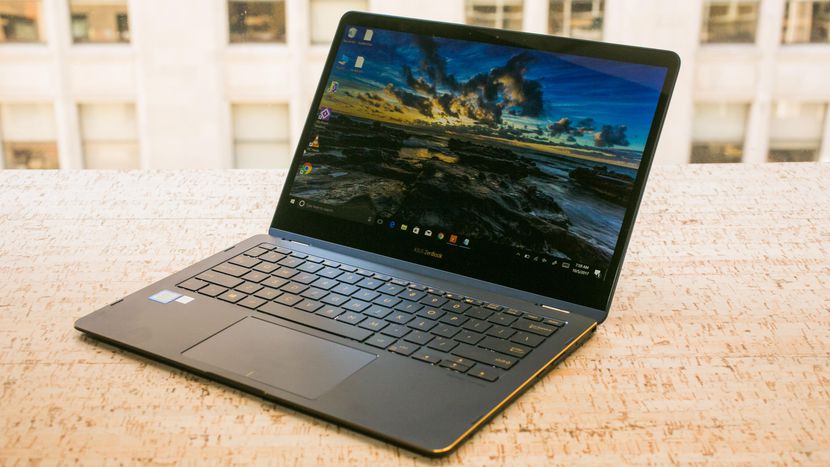
    Apple is the undisputed champ when it comes to extra-thin, stylish laptops. The MacBook line is ostensibly awesome for a number of reasons. That said, PC fans aren’t without hope in the “thin, stylish laptop” race. Case in point: the Asus ZenBook S, a surprisingly good extra-thin entry from Asus. As a sleeper hit, many wouldn’t have expected Asus to deliver something this good. Expectations were low but thoroughly blown out of the water, and we’re not complaining. So, what makes it so good? Let’s discuss the finer points.

    Design and Feel

    You’d be forgiven for thinking this was a 2-in-1 at a glance. It’s little, it’s sleek and it has in interesting silver design. The signature Asus swirl is present in the brushed-metal lid. The chamfered edges are a soft gold, and the laptop comes with either red or blue accents. Little touches of understated elegance give this laptop a premium feel all its own.

    Specs and Performance

    There are two configurations for this laptop, and both are quite good. The more expensive configuration packs an i7 processor, 16GB of RAM and a 4K display. All of that comes with 512 BB of storage on a solid-state drive. You get this all for $1,500, which is pretty nuts when you think about it. While its not going to be powering through any modern gaming rigs, it’s great at video and photo editing and drawing. If you’re a content creator looking for a great workstation, this one has what you need. This laptop is incredible for professionals and students alike.

    Asus ZenBook S Bottom Line

    Unless you’re really adamant about gaming on a laptop, this is a great pick for you. If you’re looking to edit photos, videos or create slideshows for work, this laptop will handle it. If you like making a stylish statement with your laptop, the ZenBook has you covered. If you need something to do homework on while zipping between YouTube, Facebook and a word processor, this is your computer. Really, its hard to overstate how impressed we are with this exceedingly thin and stylish laptop. It’s well worth the money and an ample competitor with the MacBook line.

    Feature Image Credit: CNET

  • Best 5 Laptops Under $500 in 2018

    Best 5 Laptops Under $500 in 2018

    Laptops are very essential these days- for school, work, or just personal use. The price of a premium new laptop can cost up to $1,000, which is pricey for anyone. Numerous companies have made laptops more affordable while keeping the quality and capabilities of more expensive laptops.

    You don’t have to feel like you’re settling when shopping for a laptop under $500. There are value-priced notebooks that include full-HD displays, solid performance and long battery life, plus all the ports you need. We picked all the best all-purpose laptops in $500 price range which we think are best laptops to suit the wide range of requirements of people. Here is a list of the best five laptops under $500!

    1. Dell Inspiron i3567 Laptop

    The latest version of this Dell laptop has a powerful system in place with 8GB of memory and a 128GB hard drive and a Intel Core i3-7100U 2.4GHz processor. It has a professional feel in it’s all black look with a 15.6-inch laptop with a screen resolution of 1366 x 768. The operating system runs smoothly with Windows 10 and is backed with a 12 month warranty, with 12 months of tech support.

    • A new, powerful hardware system
    • Has many ports and slots to use your external devices
    • 8 GB Ram
    • 7th Gen Intel Core i5 processor
    • It is not backlit enabled
    • Battery life up to 5 hours

    2. Acer Aspire A515-51-50RR Laptop

    The Acer Aspire 5 is one of the best budget full-size laptops you can find in stores today. It checks most of the right boxes: well built, slim and fairly light, gets a decent keyboard, an IPS screen and modern hardware, performs well, runs cool and quiet and lasts for a long while on a charge. This slim and sleek laptop is a great all round performing laptop, especially for the price. The visuals are spot on with vivid, bright colors.

    • LCD display and is backlit
    • 2.50 GHz Intel Core i5-7200U processor
    • Storage: 1TB hard disk
    • Intel HD 620 graphics
    • Battery life up to 7 hours
    • All-plastic chassis

    3. HP 15-ay191ms Laptop

    The HP 15-ay191ms, a signature edition laptops that comes with a seventh-generation Intel Core i3 processor, 8GB DDR4 system memory, 1TB of storage and a touchscreen, but still remains insanely affordable. It’s one of those laptops you’d buy without a second thought if you find inexpensive chromebook attractive, but really, really need Windows. If you love touchscreen, this one’s for you! This laptop contains the Kaby Lake processor which makes this laptop consume little power. Apps are not an issue here, they all run very smoothly.

    • Touchscreen
    • Intel Core i3-7100U processor
    • 8GB RAM
    • 1TB hard drive
    • Lag-free performance
    • Battery life up to 6 hours

    4. Dell Inspiron i3567-5185BLK Laptop

    Yet another Inspiron made this list! This version comes in different color options and a textured finish.  Packed with a large 15.6 Inches display and a decent 7th Gen Intel Core i5-7200U up to 3.1GHz CPU processor. This Dell laptop model would work well for portability with its 4.85 Pounds lightweight design and sleek black look. Great for school work or the family computer. A huge bonus with this laptop is it doesn’t heat up much!

    • 2.4 GHz Intel Core i3-7100U processor
    • 8GB RAM
    • TB hard drive
    • LED display with a built-in webcam and mic
    • Battery life is up to 6 hours

    5. ASUS Chromebook Flip

    This is one of the best convertible laptops on the current market. The Asus Chromebook Flip C302 is worthy of its premium stature with a gorgeous screen, tactile keyboard and a classy design that’s equally as comfortable to use in tablet mode or as a traditional laptop. The screen is a full HD touchscreen and can be converted from a laptop to a tablet by turning the screen. A top pick for a college student!

    • Intel Core m3 processor
    • 4GB RAM
    • 64GB of SSD storage
    • Battery life of up to 10 hours

  • Apple’s 2018 MacBook Pro Brings Much Needed Facelift

    Apple’s 2018 MacBook Pro Brings Much Needed Facelift

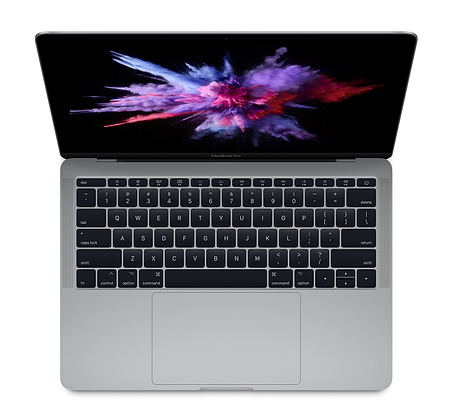
    The MacBook Pro line has been in serious need of some love. They’ve been struggling to make a name for themselves in the increasingly-crowded mobile device space. Between the Surface line from Microsoft, smartphone competition and increasingly affordable Windows laptops, MacBook has been in trouble. Thankfully, the 2018 MacBook Pro is the update the line sorely needed.

    2018 MacBook Pro: What’s New?

    There are a few new things going on with this year’s MacBook. The first, and most notable, of course, is the updated keyboard. The previous butterfly keyboard, with its “chiclet” style, had few fans. It got stuck often, was noisy and generally hard to type on. This redesigned keyboard, by contrast, is quiet, responsive and much more durable. You’ll likely find it a market improvement over the previous keyboard.

    The computer has received an under-the-hood overhaul, too. The 13-inch laptop comes with either an i5 or i7 processor, both of which are quad-core. The 15-inch option has either an i7 or i9 processor running the show, both with six cores. The 13-inch version has 2 TB of internal storage, while the 15-inch has 4 TB. That’s all pretty encouraging, to be sure!

    The 15-inch sports impressive graphics thanks to the AMD Radeon Pro GPU, while the 13-inch has integrated Iris Plus 655 graphics. While the 13-inch will put out a decent image, those with serious design tasks on their plates should opt for the 15-inch.

    A few other minor touches: the new laptops have the iPhone X’s True Tone technology. That means the screens will adapt to ambient light and match the lighting around you. The Touchbar (now standard on both 13- and 15-inch models) has True Tone as well. Neat!

    Oh, and the laptops now support “Hey, Siri!” Alright, that’s pretty cool, if a bit frivolous.

    Pricing and Release

    The pricing on these laptops remains unchanged from last year, which is stellar. The 13-inch model is still $1,300 and the 15-inch runs $2,400. Now, those numbers aren’t low, but the MacBook Pro isn’t a budget machine. Both models are out now.