Category: Electronics

  • Getting the Most out of Your iPad: Multitasking Functionality

    Getting the Most out of Your iPad: Multitasking Functionality

    The newest generation of the iPad implements two new functions that allow you to really multitask. If you’ve been wondering how you can get the most out of your iPad, it’s time to learn more about Split View and Slide Over. These new functions are some of the strongest additions to the iPad since it was launched nearly a decade ago. Let’s dig into them!

    iPad Multitasking

    Why Multitask?

    While your iPad might not be replacing your laptop for productivity tasks, the new multitasking features get it close. If you need to consult an image in one app and work on an email, you’re composing in another, the iPad can handle that. Maybe you’re stuck on a hard level in your favorite game and need a guide.

    Maybe you just want to watch a YouTube video while you work on something else in another app! No matter what your reasoning, there are a number of great applications for this multitasking tech.

    Slide Over

    Slide Over allows you to have one app running while another hovers above it in a pop-out panel. This is great for if you need to reference materials from one app while you’re doing complex tasks in another. For example, consulting a table for numbers while you compose an involved email. Another example would be drawing from a reference image without needing to switch between two apps over and over.

    Split View

    Split View, meanwhile, allows you to pin two apps open at the same time, allowing you to see more from the secondary app. This mode also allows you to do more work in the secondary app, such as composing a note in the Notes app while you’re researching things on Safari.

    Whichever multitasking method you prefer, the iPad works great as a smaller replacement for a laptop. All we need now is for Apple to fully implement mouse compatibility, and the iPad Pro can function as a proper miniature Mac!

  • Do You Need a Video Doorbell? The Facts

    Do You Need a Video Doorbell? The Facts

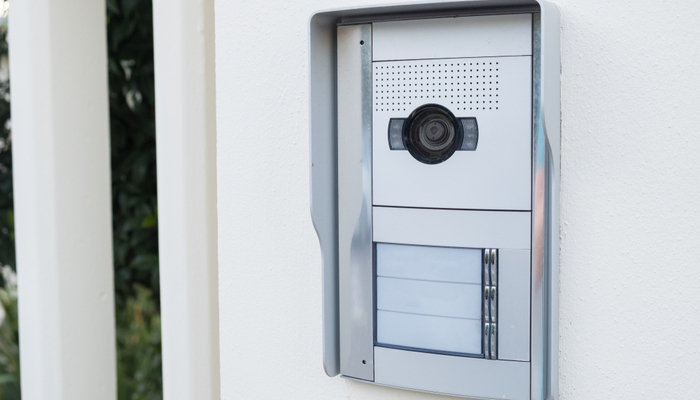
    Video doorbells are a relatively new trend among home security suites. If you’re often away from home, or worried about people coming up to your door, maybe you should consider a video doorbell. They allow you to see who’s at your door, offer you the option to speak to people through an app when they’re at your door, and even interface with your smart home system.

    Video Doorbell

    Which One is Right for You?

    There are a number of options when it comes to the top video doorbells. If you’re looking to get a video doorbell to secure your home, consider some of these options. Factors like budget, range, and which smart home hubs work with them are the biggest considerations.

    Nest Hello

    The Nest Hello is a solid all-around video doorbell. It has connectivity through both Bluetooth and Wi-Fi and can connect to Amazon Alexa-enabled devices. It sports a very standard 160-degree angle for its camera, and allow for both two-way audio and night vision, making it a great option for the average home. It falls right in the middle of pricing, coming in at $230.

    RemoBell S

    The best budget video doorbell on the market is the RemoBell S. If you’re looking for a great video doorbell that won’t break the bank, look no further. For a low price of $100, you can get set up with a video doorbell that offers Google Assistant and Alexa connectivity, two-way audio and night vision. It even sports a full 180-degree image! That’s a lot of band for your buck!

    Ring Video Doorbell Pro

    Our favorite high-end video doorbell is the Ring Video Doorbell Pro. This excellent option offers a full 1080p resolution camera, all the two-way audio and night vision support you’d expect, and a great app interface. Ring can be configured to work with Amazon Alexa, and can even be worked into greater home security ecosystems.

  • Coolest Things Seen at Google I/O 2019

    Coolest Things Seen at Google I/O 2019

    Google I/O 2019 has come and gone, and we’ve learned a lot about Google’s upcoming slate of products. Today we’re taking a look at some of the coolest headlines from that massive event, from gaming infrastructure to new Android operating system updates!

    Google I/O 2019

    Android Q

    The newest version of Google’s own Android infrastructure, Android Q, is coming up later this year. Aside from questions regarding what desert name starts with Q, Google’s answering some interesting questions with their new OS. For instance, the OS will offer support for foldable smartphones, out-of-app functionality through “bubbles” and further system privacy settings.

    Google Stadia

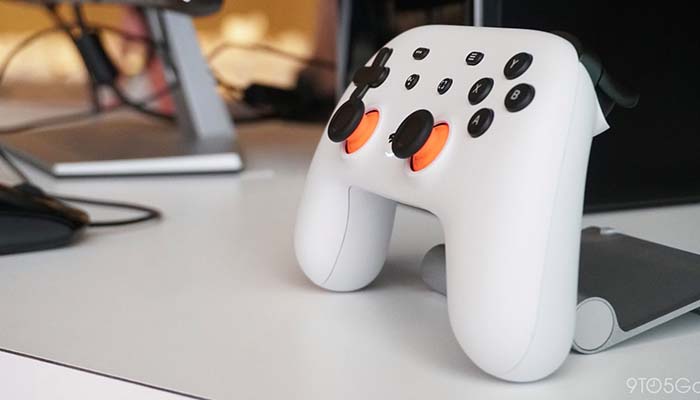
    Google’s upcoming cloud gaming infrastructure, Stadia, got name-checked at the event, as well. The system will allow high-end gaming on any screen that you can stream an internet signal to. While Google didn’t get into specifics, like release date or pricing, they spoke at length about the technical details of the system.

    Without getting too in-depth, Stadia will use a “streamer,” a program that helps to keep even a higher latency signal from appearing too stuttering or choppy. This is good news for people who were concerned about poor performance of the service on lower-end internet connections.

    Pixel 3a Line

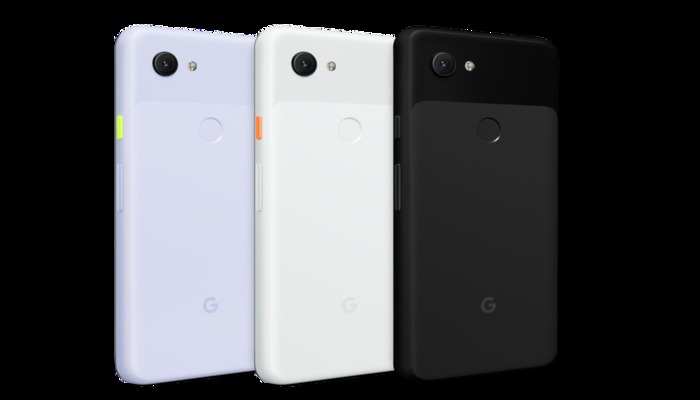
    As everyone anticipated, Google launched the Pixel 3a line of affordable Pixel smartphones the day I/O started. The phones are some of the best budget Android phones on the market, making them a wonderful addition to Google’s lineup.

    The 3a sports the awesome cameras found on the Pixel 3, along with a huge screen and a great intro price of $400. If you’re looking for a low-price, entry-level Android phone, you can’t go wrong with the Pixel 3a.

    Google Duplex Updates

    Google Duplex will be receiving new functionality that will allow it to interface with websites as well as its existing phone applications. If you want to shop for something online, you can instruct Google Duplex to do so for you via your voice and it’ll simply get what you want without you having to take the hassle of the extra clicks.

  • Real HomePod Killer? Sony’s Smart Home Speaker Now Just $50

    Real HomePod Killer? Sony’s Smart Home Speaker Now Just $50

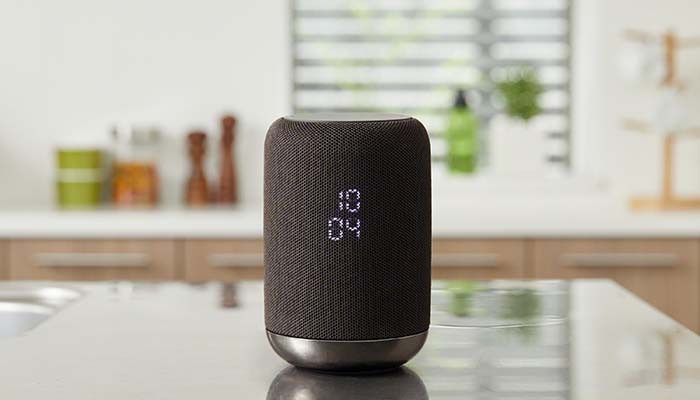
    Sony’s LF-S50G smart home speaker has recently received a price cut down to $50. The speaker started at $200, putting it at a comparable price point to Apple’s HomePod. With its new, reduced price, though, it’s a much sweeter deal than Apple’s expensive, ecosystem locked HomePod.

    Sony LF-S50G Speaker Now $50

    The Speaker

    The LF-S50G itself has stellar sound quality. Music, podcasts and audiobooks all sound great coming from this small, sleek speaker. Included in the device is Google Assistant, ready to help organize all of your smart home needs. In short, for only $20 than the Google Home Mini or Amazon Echo Dot, you get a speaker that’s far more powerful in sound quality.

    Google Assistant

    Google Assistant is helpful in a number of ways. You can ask the system basic questions, like for weather and traffic reports. If you have other smart home devices, like smart lights, locks, thermostats or the like, you can control them from your Google Assistant-enabled speaker. Most commonly, you can call out for the speaker to play your music for you.

    The Right Price

    If you’ve been looking to break into the smart home ecosystem, this is the speaker to do it with. The smart speaker is a small $20 more than the best budget smart speakers, and it packs way bigger, better sound into its small frame. It helps that this is all wrapped into a sleek, attractive package.

    The black finish and elegant styling makes this just as appealing as a piece of eye candy as it does a piece of tech. Did we mention this speaker sports 360-degree sound, like the HomePod? Nothing makes a room feel more alive when you have guests over than huge, room-filling sound coming from all directions.

    In short, this is a hard deal to pass up. For the low price of $50, it’s hard to beat the value of this smart speaker. The huge sound, small size and low price add up to make this the best deal on the smart speaker market right now.

  • The Best Budget Android? Google Pixel 3a Review

    The Best Budget Android? Google Pixel 3a Review

    The only drawback to Google’s stellar Pixel 3 smartphone is the high price tag. That means that the budget-friendly Pixel 3a was high on our radar. Does the handset stack up to the pedigree of its namesake, or has Google cut too much from this budget handset? Let’s get into it.

    Google Pixel 3a

    Overview

    The Pixel 3a is a $400 smartphone with a $1,000 camera. The camera that the Pixel series is so well-known for is here and it looks great. Google wisely cut only the most expensive features and left a pared-down, lean and powerful smartphone with the features all users can enjoy.

    Features

    Essentially, the Pixel 3a and 3a XL function as throwbacks to about three years ago. There’s no in-display fingerprint scanner, no Face ID unlocking, no wireless charging. Instead, this is a bare-bones smartphone that sticks with traditional bezels, a normal fingerprint scanner and even a 3.5mm headphone jack.

    If these features all sound like welcome returns to you, then you’re probably the right person for the 3a. While the features that the 3a lacks are certainly cool on top-of-the-line phones, they’re largely unnecessary. And what new features it brings, it brings well.

    What You Get

    Picture quality on the 3a is incredible, easily matching the earlier phones in this line for capturing beautiful images. The screen is also wonderful, sporting an HD+ OLED panel that’s big and vibrant. While you might not have the most elaborate housing for the screen, it’s still a wonderful smartphone screen.

    You do, however, have some trade-offs. The Snapdragon 670 under the hood is a notably wimpier chip than the Snapdragon 845 found in the normal Pixel 3. However, most users won’t even notice the decrease in power. Also, the phone has a plastic casing, which feels cheap and slippery compared to the glass-and-steel construction of modern flagship phones.

    Bottom Line

    If you’re in the market for a new phone and don’t want to spend $1,000, but still want the best you can get, the Pixel 3a is a very good deal. It’s hard to knock the budget smartphone, as it brings a ton of value for its low price. This is truly the best budget Android device on the market.

  • What to Expect at Google’s 2019 I/O Conference

    What to Expect at Google’s 2019 I/O Conference

    Google’s annual developer summit, the I/O conference, is here Every Spring, Google summons a host of developers to Mountain View, where the company shows off the newest upcoming stuff coming in the next year. What can we expect to see the company show off this year?

    Google’s 2019 I/O Developer Conference

    Stadia News

    Google’s banking big on their Stadia game-streaming service. The game-changing game-delivery service still has a number of question marks circling around it. Will it be subscription based, or will you buy games as normal? How will Google make sure the games on their platform stay stable over weaker internet connections? Will the service allow for cross-platform play with PC and console gamers?

    We expect all these questions and more will be at least touched on, if not answered, during the conference. The biggest question still surrounding the service, of course, is when it will release. Given that we’ve heard it will be available before the end of the year, we’re guessing a Q4 2019 release.

    Google Pixel 3a

    The more budget-friendly Google Pixel, the Pixel 3a, is more than likely the best phone in is $400 price range. The camera is stellar and the build quality is solid for a phone of its price. Expect to see lots of hype and support for the Pixel 3a during Google’s developers conference.

    Android Q

    There are a few big questions looming over Android Q, none the least of which being what dessert food that starts with Q can Google use for the OS. The newest Android OS has been in beta-test mode since mid-March, so we can expect more thorough details on the system and what new features it brings during the conference.

    Namely, features like “bubbles,” an upcoming feature that will allow you to interact with other apps without leaving the app you’re currently in. Other new features are rumored to include share-sheets to allow for easier information sharing, as well as settings panels accessible from within apps. In general, expect lots of small quality of life tweaks.

    Most importantly, Google has promised Android Q will have an updated focus on privacy. The OS will limit what kind of things apps can do in the background, what information apps can transfer about the phone they’re on and more.

  • Is Your Screen’s Blue Light Keeping You Up at Night?

    Is Your Screen’s Blue Light Keeping You Up at Night?

    Television screens, phone screens and computer screens all emit blue light that can make it very difficult to sleep. Your brain often perceives blue light as being similar to the light of the Sun. As such, this light has the effect of making your circadian rhythms misread the time of day and can lead to restlessness.

    What should you do to keep this blue light from keeping you awake late at night? There are a few ways you can keep your screen in check. Let’s get into a few.

    Screen Blue Light Keeping You Up Late

    Put the Phone Down

    The most surefire way to keep blue screen light from interfering with your sleep schedule is to simply practice more discipline. When it’s getting close to time for bed, just put your phone down. A good way to incentivize this is to plug your phone in to charge across the room, not beside your bed. That way, it’s too far for you to mess with.

    Keep Distractions out of Your Room

    Reserve your bedroom for sleeping. Consider not having a TV in your bedroom, or a laptop or tablet. Keeping these things in the same space you sleep in could make you more likely to interact with them instead of going to sleep.

    Consider, instead, having a game room or a rec room in your house where you store these electronics. That way, when you go to bed, your room is free of distractions that could keep you up.

    Activate Night Mode

    Most devices have some kind of night mode that allows you to alter the amount of blue light their screens emit. Many newer smartphones do this automatically. You can download add-ons for Windows that perform this function for your computer, as well.

    Using dark mode on apps and UIs can be helpful, too. Dark modes tend to use dark blue or black background colors to keep the overall brightness of their interface down. This makes them easier on the eyes late at night!

  • Best Mother’s Day Tech Gifts: Good Finds for Mom!

    Best Mother’s Day Tech Gifts: Good Finds for Mom!

    Mother’s Day will be here before you know it. Have you picked out the best gifts for the Mom in your life yet? If not, don’t panic. You still have time to get her something special. Today we’re going over some of the best tech gifts you can get for Mom this Mother’s Day!

    Best Mother’s Day Gifts

    Wireless Charging Pad

    Does Mom use a phone that supports wireless charging? Maybe she does but hasn’t even used the wireless functionality yet. If that’s the case, you should consider picking her up a wireless charging pad for Mother’s Day! Qi chargers can be found for relatively inexpensive prices, and they’re quite useful for anyone who likes the convenience of charging without cables.

    Make sure the person you’re getting one for has a phone that can be wirelessly charged! Simply ask Mom what her phone is and look up its features before you go with this gift. Most phones released in the last two years have wireless charging, but it’s best to err on the side of caution.

    Fitness Tracker

    A fitness tracker or a smartwatch makes an excellent gift for Mom. We love the Apple Watch Series 4, though its steep price tag might be a bit much for some gift-givers. If you’re looking to get mom a fitness tracker without breaking the bank, consider a Fitbit Versa Lite, or even a Fitbit Inspire HR.

    All of these smart watches track fitness activity, and any of them would be a great gift for a Mom who is looking to get more serious about an active lifestyle. These also make great, stylish gifts with practical use and “wow” factor!

    Audible Subscription

    If Mom loves to read books but doesn’t often have the time to sit still and read, she might love a subscription to Audible. Amazon’s own audiobook service, Audible offers access to tons of audiobooks and a subscription, while not required, would be a great gift.

    A subscription offers a free audiobook once per month, as well as access to two “Audible originals”. Give Mom the gift of great stories with Audible.

  • PowerBeats Pro Review: An Alternative to AirPods?

    PowerBeats Pro Review: An Alternative to AirPods?

    AirPods are the de facto true-wireless earbuds on the market, thanks to Apple’s dedication to high quality and brand recognition. However, Beats has a new entry in the wireless market coming on May 10th, the PowerBeats Pro. Are they a true competitor to Apple’s throne?

    Well, Beats is owned by Apple, so it might not be as much of a competition. However, the question remains: are these wireless earbuds worth it? While the two companies have shared innovation from the AirPods on the PowerBeats Pro, these are decidedly different products.

    PowerBeats Pro

    Details and Specs

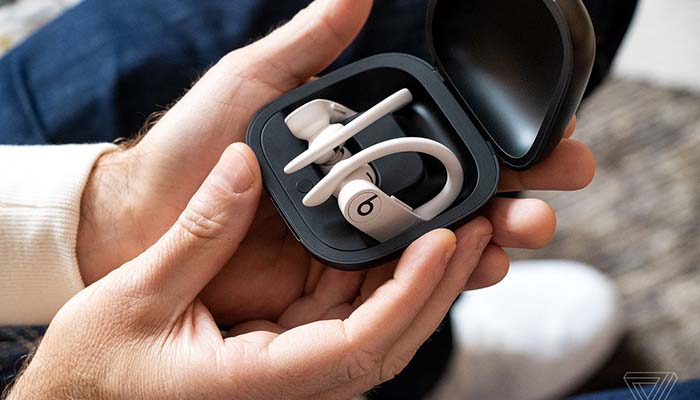
    Out of the gate, the only finish available will be the plain black. However, as time goes on, Beats will roll out navy, moss and ivory color options. The earbuds offer up to nine hours of listening time, making them a solid option on that front. Likewise, the H1 chip seen in Apple’s AirPods is on display here.

    The sound is high quality, spacious and roomy in ways that earbuds often aren’t. The earbuds hook around the ear, locking in place tightly, making them better options for jogging or swimming than AirPods. As you might expect, the PowerBeats Pro are water and sweat resistant.

    Much like the AirPods, these come with a charging case that is slick and helps you keep up with the earbuds when not in use. Speaking of, the rounder, larger design makes these much harder to lose or misplace than AirPods.

    Bottom Line

    If you’re an active type who enjoys jogging, climbing or swimming while listening to music, then these earbuds are likely a great pick for you. If you feel like it’d be too easy for you to lose AirPods, then the PowerBeats Pro, with their larger design and variety of color options, might be the right option for you.

    You can pre-order the newest Beats headphones online at Apple’s site now. They’ll be made available on May 10th, and they’ll be retailing for $250.

  • Ready to Jam? Best Wireless Speakers for Music Streaming

    Ready to Jam? Best Wireless Speakers for Music Streaming

    Who doesn’t love to jam to their favorite tunes? In the era of streaming music, it’s never been easier to get your hands (and ears) on your favorite music. If you’ve been looking for a good wireless speaker for your music streaming, you’ve come to the right place. Let’s look at some of the best wireless speakers on the market!

    Best Wireless Speakers

    Denon HEOS 1

    Nothing beats a speaker that’s as rugged as it is high quality. That’s what the water-resistant Denon HEOS 1 brings to the table, all for the low price of $169. Control options through Alexa and Google Assistant are available, so you can stream your music straight to the smart speaker.

    Importantly, the sound quality is quite good. This speaker brings big sound when you want to really rock out, making it a good value. If flexibility is what you’re looking for, this is the speaker for you.

    Apple HomePod

    If you’ve got a bit of money to spend and don’t already have a proper smart home speaker, consider the Apple HomePod. Apple’s smart speaker uses their Siri voice assistant to synchronize all of your smart home devices. It’s also a really great speaker!

    The HomePod is also the best option for Apple fans who use Apple’s Music streaming service. If you’re already sold on the iPhone, Apple Watch and MacBook line of products, the HomePod is the right smart speaker for you.

    Sonos One

    The Sonos One comes in at $200, and it’s one of the best wireless speakers you can buy for the value. It features Google Assistant and Amazon Alexa support, making it as much a part of your smart home as any other smart device. The sound quality is full and rich, and it can fill a room with great-sounding music.

    You can pair two Sonos One speakers together, as well. This results in a high-quality and flexible audio system that can span multiple rooms. For the price, this is one of the best values you can get in a wireless speaker.