Category: Entertainment

  • It’s International Cat Day! Fun Facts About Cats

    It’s International Cat Day! Fun Facts About Cats

    The internet is really only good for two things. Reading articles on your favorite website, and looking at pictures of cats. Since today is international cat day, there are even more cats on the internet than usual. In honor of our furry friends, today we’re going over some fun facts and trivia about the fuzzy little jerks we love. No dogs allowed, it’s International Cat Day!

    Cat Facts

    Popularity Contest

    We’re not saying it’s a contest, but cats are totally more popular than dogs. In fact, the only pet that’s more popular in America than cats are fish! Over 94 million cats are happily living with their humans in the US, making them more popular than dogs, rabbits, ferrets and pretty much every other pet animal.

    We’re not saying cats are better, but we are saying that cats have almost twice as many neuron connections as dogs do. If you’ve ever seen your cat do something that would have required much more intelligence than you’d expect them to possess, then you were likely seeing the 300 million neurons in their frontal cortex going to work.

    Purring Mysteries

    Scientists are actually unsure about how, exactly, cats purr. Everyone who’s had a happy cat in their lap can tell you that the fuzzy little balls of love vibrate when they’re content, but we’re not sure what the actual mechanism of this calming habit is. What we do know is that kitties purr in a variety of situations, from contentedness to distress, and often for conflicting reasons. Some cats have even been known to purr while injured, or while recovering from injury.

    As it turns out, some tests have shown that cats’ purrs are at the exact frequency that helps to stimulate muscle and bone growth and healing. As such, the old adage about cats having nine lives might have more truth to it than we though. Even if a cat sustains a fall from a high location or gets injured in a fight, they can recover better than comparable animals of a similar size.

    Meow Meanings

    Domestic cats meow loudly to attract the attention of humans. This is adorable, of course, but it’s also a bit of a window into the behavioral psychology of cats. In nature, cats only meow when they’re kittens, just to attract the attention of their mothers. Once they’re fully grown, cats almost never meow at one another. As such, cats’ penchant for meowing at humans indicates that they are more kitten-like than adult cats that grew up outdoors.

    This arrested development could also explain why domestic cats are so much gentler and sweeter than their feral counterparts. Where adult feral cats are terrified of humans and run from them, domestic cats seem to not mind the huge size difference between their caretakers and themselves. This is likely because they simply view their humans as parents, and themselves as permanent kittens.

    Big Cat Connections

    A number of behaviors observed in house cats can also be seen on display in big cats like lions and tigers. Love of boxes, purring, chasing string around: these are all common indicators of an essential “cat-ness”. Even innocuous connections, like the love of catnip and the propensity to rub their faces on things they like, indicate a close connection between these dramatically different-sized cousins.

    Southpaws

    Unlike humans, who are right-hand-dominate 90% of the time, cats appear to be left-paw-dominant in nearly all cases. Only a few cats seem to show a preference for their right paws over their left paws. Anecdotally, some people claim that lefties are better with cats, or are more likely to be cat people, though the overall popularity of cats shows that this isn’t a requirement.



  • Cord-Cutting: Which Internet TV Service is the Best in 2019?

    Cord-Cutting: Which Internet TV Service is the Best in 2019?

    It’s not hard to see why people don’t want to have cable services through traditional providers anymore. Cable bills are astronomical, and they charge consumers a ton for programming that goes mostly unwatched. If you’re looking to save money on your cable bill and watch TV without breaking the bank, your best bet is to use a Roku or Smart TV and connect to an Internet TV service.

    There are so many options on the market, though, and the pricing of all the different services seems to change every few months. Today we’re taking a look at the top Internet TV services to help you decide which one is the best for you. Here are our top picks for the best Internet TV in 2019.

    Sling TV

    The first service to hit with the current business model of being an internet-based TV service, Sling debuted in 2016. Owned by Dish Network, Sling costs only $25, though it offers a number of channel packages and add-ons that can increase that price pretty quickly. Notably, there are two channel packages for the base $25: you choose either Orange or Blue, which essentially is a decision between Fox or Disney and ESPN.

    Notably, Sling recently lost regional Fox Sports in a high-profile contract dispute, which inconveniently also fell right in the middle of baseball season. This frustrating turn of events is due, in part, to Sling’s avowed dedication to keep their price steady at $25 per month. If you’re looking for a good budget TV service, it’s hard to go wrong with Sling. However, the lack of local channels and regional sports can be a turn-off for some viewers.

    PlayStation Vue

    PlayStation Vue might sound like a new video game console from Sony, but it’s actually an Internet TV service like Sling. It’s a more “premium”-style service, as even its base package, called “Access” costs $50 per month. However, Vue offers local channels that aren’t offered on budget services like Sling or Philo, making it a strong choice as a strict cable-replacement.

    The interface for Vue is clean, snappy and similar to many major cable providers. DVR is built in and stores shows for up to 30 days, and normal on-demand content is available through the service. The $55 per month “Core” offers up even more robust sports coverage, and the high-end “Ultra” package, which is $85 per month, adds Showtime and HBO to the channel lineup. Notably, Sony doesn’t carry any Viacom channels, like MTV, Comedy Central and Spike.

    Pluto TV

    If you’re looking to slide in for the low, low price of free with your Internet TV, we’ve got good news. Pluto TV is totally free, though you get what you pay for. The service is more akin to a curated selection of already-available content from the internet, comprising mostly reruns of shows from a few years ago and original content from websites like IGN.

    One of Pluto’s strengths is that it offers incredibly focused channels that are collections of very specific interests, like Gaming or Anime. If you’re just looking for something to throw on to watch idly without giving the content much thought, Pluto is a great option. After all, the content is free and it’s entertaining. If you’re looking to catch current sports games, local channels or new content in general, though, it might be worth springing for a paid TV service.

    HD Antenna

    If you’re looking to catch local channels but don’t have a service that carries them, you can also opt to use an HD antenna. Once you buy one, it picks up HD signals over the airwaves and allows you to watch local channels, including the news and the Big Three. HD antennas can be paired with Sling or Pluto to create a low-cost TV-watching solution without giving up too much content.


  • Cutting the Cord Without Breaking the Bank

    Cutting the Cord Without Breaking the Bank

    Ostensibly, the whole point of not having cable and using Internet TV is to keep your monthly costs down. After all, cable is prohibitively expense for the average person, so there’s no reason to have a cable subscription. However, if you’re subscribed to Hulu, Netflix, Sling and more, you’re going to see those monthly bills getting to a similar place as that cable bill.

    There’s good news though: there are plenty of free streaming services you can start using today. There’s no great reason to spend a ton of money on entertainment when so much is available for free, right now, on the internet. Let’s keep it inexpensive!

    Pluto TV

    Pluto TV is an internet streaming service available on most streaming platforms. If you have Roku, Apple TV, Fire TV, whatever: you can run Pluto. It works by aggregating content from the internet and grouping it into channels of like content. For instance, if you like anime, there’s tons of websites that have free episodes of anime, and Pluto uses those to create an all-anime channel. Similarly, if you’re into gaming, there’s a channel for that.

    Most of what you’ll see on Pluto is older re-runs of shows from major networks or online content from larger websites. There are commercials, which is how the thing gets monetized, but it’s completely free to download and use. When it comes to completely free television, Pluto is a great option.

    The Roku Channel

    If you run your streaming services through Roku, you can access the Roku Channel. This free streaming channel is operated by Roku themselves and offers classic and modern movies, news streaming and more. Essentially, it’s a great companion to whatever other content you watch on Roku. The channel also offers older streaming TV content, making it a bit of a grab-bag when it comes to entertainment.

    You can also manage your other subscriptions through the Roku Channel. For instance, if you have HBO or Shotime subscriptions, you can manage them through the Roku Channel, streamlining your bill while allowing you to find your content all consolidated to one place. If you use Roku, this is a great free TV option.

    Kanopy

    One of the coolest things about living in the modern world is public goods like parks, public transit and libraries. You’ve already paid for it through your local taxes, after all, so you might as well enjoy these public goods. Kanopy is one such public good in this category: it connects to your local library to allow you to rent movies, though the number you can “borrow” digitally could differ from library to library.

    Once you have the app downloaded, you enter your library card and then create a Kanopy account. Then, like that, you’re hooked up to watch free movies, courtesy of your local library. While you’re at it, consider heading by your library and checking out some books: there’s tons of great stories to be found within!

    Crackle

    The long-running service from Sony, Crackle, has been around in some form or another since 2004, long before Netflix was offering streaming content online. Interestingly, Crackle has a lot in common with Netflix. There are tons of older sitcoms and 90’s cult classic movies available on-demand, and there’s even original programming like The Oath that you can watch. Like Netflix, the selections are updated regularly and you can almost always find something to watch you haven’t seen before on Crackle.

    Unlike Netflix, however, Crackle is totally free. There’s no catch to it: the content streaming on the service costs nothing to view. Why not give it a shot? You can binge some of your favorite old sitcoms today, for free, through Crackle.


  • Which Streaming Device is Right for You?

    Which Streaming Device is Right for You?

    TV has changed in the last ten years. At one point in time, it was either cable or nothing. Now, with the popularity of Netflix, Hulu and internet TV at an all-time high, cable is the exception rather than the rule. If you’ve been looking to cut the cord and watch internet TV, you’re probably wondering what the best streaming device for your living room is. How can you narrow them all down, though? That’s what we’re here for.

    There are a number of options out there for streaming. Whether you’re an Apple fan who wants to use Apple TV for your content, or you want something smart-home integrated like Alexa, there’s a ton of options. Maybe you’re looking for something more general-use, like Roku? Let’s take a look at some of the most popular streaming options and what each brings to the table. Hopefully this will help you narrow down your options and make a good decision.

    Fire TV

    Fire TV is Amazon’s proprietary TV streaming platform. There are budget options, like the Fire TV Stick, which just plugs into the back of your TV, and more full-fledged platforms like the Fire TV Cube. No matter which one you’re looking into, there are a number of similarities between the platform’s various hardware devices. Namely, the user interface and the Alexa integration. If you like using your voice to pull up your favorite shows, Fire TV is for you.

    For those who really enjoy voice commands, the Fire TV Cube comes with a remote that offers voice-control option. You can navigate menus, search for actors and movies and issue commands all with your voice. It feels very natural to command your entertainment in much the same way you command your smart home features. For people who like high-tech solutions that just work without lots of fiddling and tech knowledge, Fire TV is a perfect fit.

    Roku

    Roku is a very well-known name when it comes to streaming devices. From the budget-friendly Roku Express to full-blown smart TVs with Roku integration, there are versions of the streaming platform across the spectrum of budgets. The best thing about Roku is how straightforward and simple it is. The remote is small and sports only a few buttons. A clean, simple user interface shows you the information you need to see to find your entertainment.

    If you’re new to the world of internet TV, or just want a simple way to turn your old TV into a smart TV, the Roku is the best option for you. While it might not sport the same wide variety of options and features as Fire TV or Apple TV, Roku offers a great platform for users who want a simple and clean platform. The low entry price of the Roku Express is also a huge selling point for the platform.

    Apple TV

    For those users who are fans of the Apple ecosystem, Apple TV is a no-brainer. Offering a great, seamless experience across your Mac, iPhone and Apple Watch, the Apple TV is a great extension of the clean design and deceptive simplicity that makes Apple so popular. Logging in to apps is simple, as you can copy passwords and logins directly from an iPhone or iPad.

    While the Apple TV ecosystem doesn’t offer as many apps as a system like Roku, it’s still a robust hub for your media. If you have lots of pictures or videos on your phone you’d like to see on your TV, AirPlay 2 gives you that option. You can even issue voice commands through Siri to find TV and movies you’d like to watch. The only downside? The higher-than-average price when compared to the competition.


  • Which 4K TV Should You Buy? Our Tips

    Which 4K TV Should You Buy? Our Tips

    If you’re in the market for a new 4K TV, there’s a ton of options on the market for you to check out. The two biggest brands in the business of making TVs are easily Samsung and LG, though thy market their panels under different names. Samsung’s TVs are advertised as QLED, while LG’s are called OLED.

    What’s the difference between these two screen types? Is it just marketing hype, or is something different about their construction and picture quality? Today we’re breaking down the differences between LG and Samsung panels, and giving you some advice on what to look for in a 4K TV panel.

    OLED vs QLED

    OLED, a term used by LG for their screens, as well as some other technology like iPhone X and Apple Watches, stands for “organic light emitting diode.” QLED, on the other hand, stands for “quantum dot LED”. While OLED screens are emissive, meaning the pixels emit their own light, QLED screens are transmissive, meaning they have a backlight passing through them.

    This might sound like a lot of scientific jargon, but it’s important for understanding how each screen creates its image, and why some TVs look better than others. In short, this all means that QLED TVs, while they might sound fancy, actually have more in common with older LCD displays, while OLED displays are a new and more powerful type of technology.

    The Difference

    OLED screens are much more expensive to produce, especially at large sizes. LCD screens, which the QLEDs from Samsung are a variant of, are significantly more affordable, and have been the main type of flat screen panel for about a decade now. Where LCD screens have a crystal display and pixels that have light shined through them to make the image, OLED screens are composed of millions of tiny subpixels that emit their own light.

    This means that, generally speaking, OLED screens have more dynamic and dramatic image quality. They tend to have better blacks and contrasts, as they can simply toggle off pixels to make a perfect contrast. LCD screens, on the other hand, will always let at least a bit of light through the panel, meaning that blacks can often look gray and washed out.

    QLED Strengths

    This isn’t to say that QLED is strictly worse than OLED: Samsung’s panels excel in some areas. Due to their reliance on backlight, they’re able to get very bright compared to OLED screens. As such, bright and colorful content, such as content that supports HDR colors, looks incredible on QLED screens.

    OLED can also make HDR look amazing, with its deep contrasts. However, if you’re in a bright room, you might want to favor a QLED screen, as they can compete with natural light much better than OLED screens can. When shopping for a TV, consider the room the panel is going in when you’re deciding between OLED and QLED.

    Buying Guide

    So, if you’re in the market for a 4K TV and you want the very best image, and nothing else will suffice, you probably want an OLED screen. OLED screens don’t fade over time like LCDs, they don’t have a “sweet spot” you need to view the image from, they offer great contrast, and their color accuracy is unparalleled.

    If you’re on a bit more of a budget, or the panel is going into a room that is normally very bright, you might consider a QLED screen. While the contrast isn’t as good, the colors are still vibrant and the resolution and frames-per-second are identical to those found on an OLED panel. The main edges for the QLED are the lower price and the brighter overall image.


  • Two New Joy Con Colors and Better Switch Battery Life

    Two New Joy Con Colors and Better Switch Battery Life

    Only a short week after unveiling the new Switch Lite system, Nintendo has announced two new pieces of news for their incredibly popular hybrid console. The first is that there are two new color combinations for Joy Cons coming soon. The second is that an upcoming hardware refresh for the original Switch will have dramatically better battery life.

    Switch News

    New Joy Cons

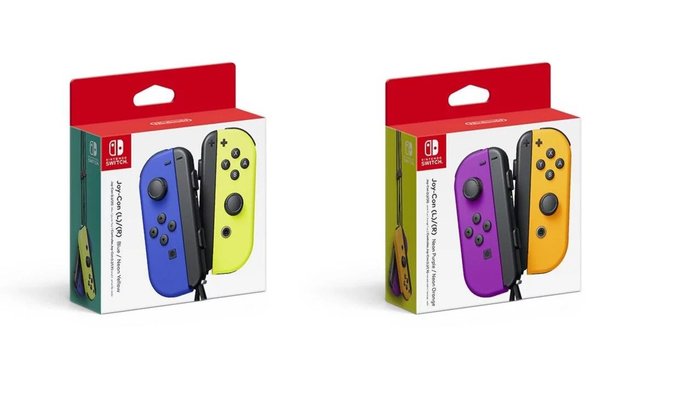
    The new Joy Cons fill in a few more of the two-tone color combinations for Nintendo’s unique Switch controllers. There’s a blue and neon yellow pair, making for a great contrast. Interestingly, the neon yellow Joy Con has been seen once before, though it was bundled with another yellow Joy Con as a promotion for the fighting game game ARMS.

    The second new color pair is the Neon Orange and Neon Purple pair, both brand-new colors for the system. Notably, these are landing on October 4th, meaning they’ll be here in plenty of time for Halloween. This is notable in no small part because Luigi’s Mansion 3, one of the most hotly anticipated Switch titles of the year, is dropping on October 31st to coincide with Halloween!

    Updated Switch Hardware

    While we love our Switches, they have one glaring weak spot: they don’t sport amazing battery life. While the system is great for carrying with you on your work commute, it’s not amazing for long road trips if you forget the charger. Thankfully, Nintendo has a solution to this problem.

    Starting in August, a new batch of original Switch consoles in new packaging will start appearing on store shelves. These have an updated, more efficient chipset that will allow for between two and half to nine extra hours of battery, depending on what you’re using the system for. The new Switch models will be easy to tell apart, as they’ll be sporting a serial code starting with XKW instead of XAW.

    Potential Changes

    The updated chipset in the original Switch comes as no surprise: Nintendo issued a patent for such a design a few months ago. Likewise, this chipset is likely similar to the updated, more efficient Tegra chipset we’ll be seeing in the Switch Lite in September.

    A particular thorn in Nintendo’s side over the two years the Switch has been on the market has been pirates and hackers using a hardware exploit to “jailbreak” their switches. This has allowed some hackers to illegally play duplicated copies of Switch games, a situation Nintendo has cracked down on. It’s likely the updated Switch model will have some methods of preventing this type of hacking.

    Switch Pro Rumors

    Rumors of a completely-updated Switch Pro have been swirling since a few notable publications confirmed that Nintendo had plans for both a lighter, smaller Switch and an updated and beefier version of the console. We know, now, that the rumors for the smaller Switch were accurate, as the Switch Lite fits the description from those earlier leaks. However, the beefed-up “Switch Pro” remains a big mystery.
    It’s theoretically possible that this hardware refresh, with its better battery life and more efficient chipset, could be the rumored “beefier Switch.”

    However, many fans expect to see a more robust update to the base console soon, as the successors to both the Xbox One and PS4 are on the horizon. After all, the Switch’s impressive scaling resolution and adaptive Tegra chip infrastructure allows it to easily scale games up and down for different use cases. It’s not hard to envision a version of the Switch putting out a better resolution while docked and rivaling current-gen hardware.


  • Best 4K TVs Under $300

    Best 4K TVs Under $300

    If you’ve been holding off on buying a 4K TV to wait for prices to drop (and for more 4K content to appear) then you’re not alone. While 4K displays look amazing, they’ve remained rather expensive when compared to 1080p HDTVs. Not to mention, until recently there hasn’t been much support for 4K displays, meaning all that extra power has been largely going unused.

    That’s changed in the last year. With panel prices steadily dropping and the amount of 4K content to stream or play going up, there’s never been a better time to buy into 4K. Today we’re breaking down some of the best deals on 4K TVs you can find, including only screens under $500. We’ve selected these screens based on their relative value when compared to their price. Here’s how to get the most bang for your buck when shopping for a 4K TV.

    TCL 43S517 Roku TV

    Coming in around $250 from most retailers, this TCL 4K Smart TV is a great buy. You get a lot for your money with this one, from built-in Roku support to a bright, clean 43-inch display. While it’s not the biggest 4K TV on the market, 43 inches is a lot for most smaller homes, and would look absolutely massive in an apartment or a bedroom.

    Dolby Vision and Dolby Atmos sounds are both included along with the Smart TV features you’ve come to expect. This means that the sounds and color reproduction are both impressive for a panel at this price range. Once you get this TV, nearly the only thing you’re missing is a soundbar that’s Atmos compatible and you’ll have a serious entertainment setup.

    Element 55-inch Roku TV

    If you’re looking for something with a bit larger panel, then look no further than the Element 55-inch Roku TV. You can usually find this screen for under $300, a stellar price for a 4K panel of this size. Whether you’re looking to put it in your living room or use it as a backup, 55 inches allows for a massive screen that looks great from multiple viewing angles.

    The price might sound too good to be true. A smart TV with a large panel size and a good user interface for less than $400? That’s not very common. However, this Element panel isn’t too good to be true: it’s just a great value. If you’ve never owned a 4K TV and want to ditch your old 1080p screen, then this is a great first step into the world of 4K. You’re in for a treat when you can find this panel on sale, as you’ll get to make a budget entry into the future of display quality.

    Vizio V-Series 50-inch (V505-G9)

    This 50-inch Vizio is another great 4K TV that you can find for under $300 at most retailers. Offering solid HDR support and giving good color reproduction, it’s hard to believe that this panel is as affordable as it is. The user interface is clear and easy-to-read, making this a great first smart TV for a household that hasn’t used one before. The 50 inch size makes it great for a smaller room, though it might look a little out of place in a larger living room.

    Vizio’s built-in SmartCast suite features full support for apps, and it even features support for Chromecast out of the box. This also allows it to connect seamlessly with either Amazon’s Alexa or the Google Assistant, making it a great addition to any smart home network you might be building up. For the low price of $300, this is a seriously cutting-edge screen to add to your modern home. If there were any complaints about it, it might be that 50 inches feels just a tad small for the average living room.


  • Best Reasons to Get a Nintendo Switch: Gaming on the Go

    Best Reasons to Get a Nintendo Switch: Gaming on the Go

    With the announcement of the upcoming Nintendo Switch Lite and the steady slew of great new games hitting the system, Nintendo’s little hybrid console is red-hot right now. If you’ve been holding off on getting one, this September is your moment. The Switch Lite will be retailing for only $200, making it a very easy entry point for some of Nintendo’s biggest franchises.

    Today we’re taking a look at some of the software that will make you want to preorder your Switch Lite today. From great old standards like Zelda and Mario to returning games from cult favorite developers, there’s a lot of great reasons to own the little system.

    The Legend of Zelda: Breath of the Wild

    Who can deny one of the best video games ever made? Breath of the Wild launched alongside the Switch in 2017, and for a brief period the Switch version of the game actually outsold the Switch itself. While the game also released for the Wii U, its true home has always been the Switch. Exploring Hyrule on the big screen at home or while on your commute to work is where the real magic of the system shines through.

    Mario Kart 8 Deluxe

    Is this a simple port of the Wii U’s best racing game? Well, yes. But it’s beyond amazing: racing your friends around the track has never been more simple, clean and fun than in MK8. The Deluxe version of the game is complete with all of the DLC characters and courses from the Wii U version, and the game benefits tremendously from being playable in both handheld and TV modes.

    Super Mario Odyssey

    Another of the greatest video games ever made graced the Switch in October of 2017: Super Mario Odyssey. Standing alone as one of the last true 3D collect-a-thon platformers, Mario proved why he’s the king of the platforming genre. From capturing enemies to use their powers in interesting ways to duking it out with Bowser on the deck of an airship, Mario Odyssey is a non-stop joyous adventure, made with love and full of wonder.

    Bayonetta 2

    One of the best things about the Switch is that it served as a way for obscure Wii U exclusives to find a wider audience. For a prime example, look no further than the superb Bayonetta 2. Helmed by legendary designers Yusuke Hashimoto and Hideki Kamiya (of Resident Evil and Devil May Cry fame), the game is a showcase of all that is amazing about action video games. Stylish, over-the-top, and just a little ridiculous, Bayonetta 2 is a masterclass in game design.

    Super Mario Maker 2

    What’s better than 2D Mario? Nearly infinite 2D Mario levels. That’s the promise, the premise and the joy of Mario Maker, and the sequel amps this all up by bringing the devilishly simple formula to the Switch. The stage-building game is right at home on the hybrid console: building stages on-the-go with the touchscreen and then playing your friends’ stages while at home connected to the internet is a perfect use of the hybrid console’s unique portability.

    Splatoon 2

    Somewhere between port and proper sequel, Splatoon 2 continues the paintball-splattering fun of the first game. The original was one of the few new IPs introduced during the rocky Wii U era, and the influx of new blood (or ink, in this case) has proven pivotal to Nintendo’s current success. The wild and wacky 4-on-4 action of Splatoon is incredibly fun and addictive, with the three-minute online games flying by in a delightful blur of kinetic action. If you’re looking for a great competitive online shooter with Nintendo’s trademark charm, look no further than Splatoon 2.


  • Watching TV for Free: Ditching Cable

    Watching TV for Free: Ditching Cable

    No one likes paying a ton of money just to watch TV. In 2019, it’s very difficult to justify spending a ton of money on TV when you can watch tons of content online for free. After all, YouTube offers a ton of content for free watching, while there are free shows available on a number of official sites. With all of this free content available online, surely there are better ways to watch TV without spending a lot of money. Here are some of the best free TV platforms you can watch right now.

    Free TV Platforms

    Over-the-Air Channels

    Of course, there are a number of channels offered for free over the airwaves. Even if you have an HDTV, you can still tune in to over-the-air channels via an HD receiver. Your local digital stations will include the local news, weather and normal syndicated TV channels. You won’t have to worry about missing some of the biggest TV show premiers, and you don’t even need an internet connection or a smart TV to access these channels.

    The only equipment you need to see your local digital channels is a digital HD receiver and an HD television. There’s no fee for accessing this content, as you already have accessing to these public TV channels. This is the lowest-tech way to access free TV channels, and a tried-and-true method.

    Roku

    One of the best ways to access a wide variety of free content is by getting a Roku device for your living room television. Essentially, a Roku device turns any existing HDTV into a smart TV. This means you can access online content, such as the free Pluto TV or YouTube apps, or you could opt for paid services like Netflix or Hulu. In either case, Roku also offers a “Featured Free” tab for free content through the platform.

    A Roku Express, the lowest-costing Roku device, retails for $30 and gets you set up for online TV through your living room. As another note, there are a number of TVs that are pre-packaged with Roku software, so make sure you’re not already set up with Roku before you head out to buy a Roku Express.

    Pluto TV

    Another free TV option for people looking to cut the cord is Pluto TV. Pluto is a curated content platform that collates a large amount of online content. Essentially, Pluto takes a number of videos that are already available for free online and presents them in handy groupings, adds in commercial breaks, and makes them into TV channels. For instance, lots of channels focus on video games, or cooking, or other granular and specific topics.

    Some larger channels could have reruns or licensed content from the likes of MTV or Comedy Central, for instance, both of whom have Pluto TV channels that offer a free sub-set of their lineups. The biggest draws to Pluto are that it’s free, it’s HD, and the content is incredibly varied and entertaining. If you just want something to watch and don’t want to pay anything to watch it, Pluto is for you. All you need to watch is an internet connection! If you want to watch it on your TV, you can get the app for free on Roku.

    Local Library

    Your local library has quite the large selection of DVDs available for you to borrow. Access to public libraries is free for all citizens of a city, so there’s no reason to not take advantage of this free resource that is available to you. You can find a number of new movies available for borrowing at your library to help you have movie night without spending a dime!

    Remember: a penny saved is a penny earned. Don’t spend more than you have to for your entertainment!


  • Sega Genesis Mini: Pricing and Release Details at Sega Fest

    Sega Genesis Mini: Pricing and Release Details at Sega Fest

    The upcoming Sega Genesis Mini looks promising. Sega has ditched third-party hardware makers in favor of manufacturing a proper emulation of their own classic hardware. At Sega Fest 2019, we got even more details about the upcoming retro console, including ten more game reveals and info on pricing and release!

    Sega Genesis Mini

    The Games

    While we already knew 20 of the games coming to the Genesis Mini, Sega has unveiled ten more games coming to the system. These include Ghouls and Ghosts, Sonic Spinball, Beyond Oasis, Golden Axe, Street Fighter 2, Vectorman, Mega Man: the Wily Wars, Alex Kidd and the Enchanted Caste and Phantasy Star 4.

    The remaining 10 games coming to the Genesis Classic will be unveiled in June, according to Sega.

    Pricing and Release

    We learned more than just that at Sega Fest 2019, too. We also learned when we can expect the micro console and how much it will cost! The system will release on September 19th, and is already available for preorder at some retailers.

    As for how much it’ll run you, Sega has announced an MSRP of $80. With any luck, the system will be produced in large enough quantities that anyone who wants one will be able to snatch them up before scalpers do. Hopefully Sega learns from the mistakes of the NES Classic launch, which saw systems being sold on eBay for four times their MSRP by scalpers.

    In Europe, the system will be marketed under its Mega Drive branding, much as it was originally in the 80’s and 90’s.

    What’s in the Box

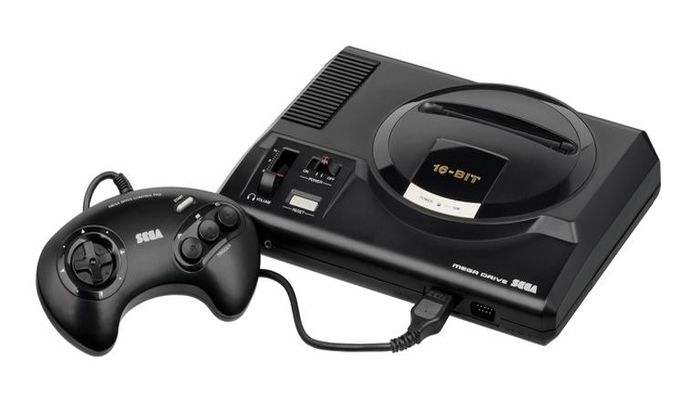
    The Sega Genesis Mini will come with two replica Genesis controllers, as well as an adorable mini version of the classic console. It’ll also come packed in with a USB cable for power and an HDMI cable so you can hook it up to your TV.

    We’re excited to get our hands on one, if only to relive some of the classic Sega goodness of years gone by. Also, it’ll look great next to our SNES and NES Classic Minis.