Category: Electronics

  • Explore The Top 3 Luxury Car Interiors of 2021

    Explore The Top 3 Luxury Car Interiors of 2021

    Every year luxury car makers develop a bevy of new solutions to provide you with a better driving experience. There’s a lot to consider when purchasing a new car. That’s why we’ve put together a simple list of the top 3 affordable luxury car interiors coming in 2021.

    2021 Audi A4
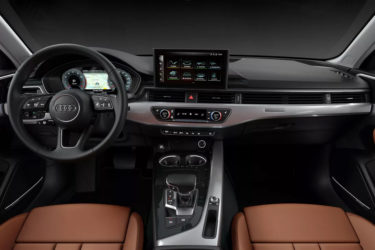
    Audi virtual cockpit

    For 2021, Audi focused on improving everything about its infotainment system. They’ve ditched the 8.3-inch display from the previous system in favor of a new 10.1-inch display that’s perched on top of the dashboard along with a 12.3 inch driver information display. The infotainment system provides you with acoustic feedback on all its functions. They’ve completely ditched the rotary knob in place of the customizable Audi virtual cockpit. The virtual cockpit offers you the ability to customize the display to focus on your most urgent need. It’s laid out in a way that’s meant to be intuitive, useful and a pleasure to operate.

    Pre sense®

    Audi’s goal is to raise the bar on the driver’s experience – and awareness. The A4 is equipped with pre sense® to protect the vehicle in unusual or emergency movements as an effort to increase the drivers’ awareness and help prevent accidents. It will help to detect other cars or pedestrians while automatically initiating the emergency breaks at up to 52 mph!

    Easy on the eyes

    Sporting high-quality leather upholstery, the A4 comfortably seats up to five people. In addition to comfort and support, the seats are ventilated and heated in both the front and rear, setting this 5-star vehicle up for success during any time of the year!

    2020 BMW X3
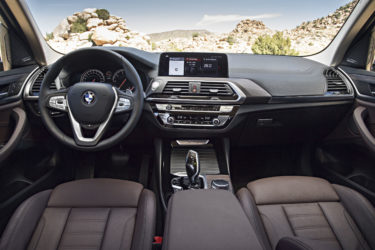
    Technology meets performance

    BMW is known for using ultra high-quality materials in their vehicles. For the 2021 model X3, BMW decided to wrap the X3 cabin seats in Vernasca leather, trim the cabin with high-grade aluminum and offer a variety of other customizable options.

    BMW has also decided to upgrade the navigation system to better integrate with the mechanical components of the M3. The onboard computer can optimize the motor’s performance and fuel consumption based on the route set in the navigation system. It does this by doing things like switching to all-electric mode when the car enters a low-speed school zone or expending the battery on a long uphill climb in anticipation of a long downhill stretch to recharge the battery.

    Prioritizing safety

    BMW has elevated its console to the next level of safety. With the 2021 model, they’ve introduced multiple options to increase safety by keeping the driver’s attention on the road. For example, they’ve rolled out gesture controls to operate some of the most common functions of your entertainment system. You can change the volume of your music, answer calls and set a range of other touch-free functions. They also feature a heads-up display that discreetly projects itself on your windshield. This feature allows you to get from point A to point B without having to take your eyes off the road. They also have standard emergency braking , lane departure warning and available adaptive cruise control.

    2021 Volvo XC90

    Upgraded base options

    This year Volvo designers decided to embrace a stately 12.3-inch touch screen in place of a physical gauge cluster. They’ve also added a luxurious nappa leather interior option for those who don’t prefer traditional leather seats. The material has an upscale look and feel along tension point massage front seats. It has a quality comparable to the Kvadrat textile offered inside certain Land Rover models.

    Smart steering wheel

    For the 2021 model, Volvo’s improved their wide range of new safety features centered around the steering wheel. They’ve integrated haptic feedback to their suite of electronic safety systems like pilot assist adaptive cruise control, lane-departure warning and blind-spot monitoring.


  • Top Must See Labor Day Deals of 2019

    Top Must See Labor Day Deals of 2019

    Labor Day is known is a holiday meant to honor the valuable contributions of every worker to the success of our country. It also marks the end of summer and a great time to get deals on a variety of products. That’s why we’ve taken the labor out of Labor Day by putting together some of the best deals of the year!

    Top Tech Deals

    Do you desperately need to replace your old laptop? Labor Day deals are some of the best of the year. From a basic laptop to a powerful decked out 2-in-1, we’ve got you covered.

    Best Buy is offering an entry-level 15.6-inch Lenovo for just $210 ($90 Savings.) This laptop has a 128 GB solid-state drive for reliable storage and speedy loading. With a basic processor and graphics card, this laptop has your everyday needs covered. Lenovo also decided to include a built-in DVD burner.

    If you’re in the market for a laptop with a little more versatility Dell has you covered. Their Inspiron 15 5000 2-in-1 laptop gives you the option of working traditionally or on-screen in tablet mode. It features a zippy Intel i5 processor with 8 GB of memory and a 256 GB solid-state drive for $599.99 ($170 Savings.)

    A small tablet to watch your favorite shows can make all the difference during your 2-hour layover. One of the best Android tablets on the market is heavily discounted this Labor Day weekend. Amazon’s flagship tablet, the Fire HD 10, is discounted to just $99 ($50 discount.) The Fire boasts 1080p full HD, high-quality cameras and a battery life of up to 10 hours. If you’re also in the market for a smart plug, you can save an additional $15 when you purchase the Fire HD 10 and smart plug bundled together.

    Sleep Well

    The end of summer is always one of the best times of the year to upgrade your mattress. Manufacturers know consumers are hunting for terrific deals. We’ve done the research and here are some of the best mattress deals being offered this Labor Day weekend.

    Online mattress retailers are offering some of the deepest discounts this Labor Day season.

    Nectar, a brand known for their heat dispersing materials, is offering $100 off their mattresses and including 2 premium pillows with your purchase. They also offer a 365-day sleep trial and “forever warranty.”

    If Nectar doesn’t have what you’re looking for, Casper is another highly respected online mattress retailer that’s known for its deep Labor Day discounts. This year they’re offering 10% off the total of any order with the purchase of a mattress. Just make sure you use the code “LABORDAY.”

    Refresh Your Furniture

    The end of summer is a great time to give your furniture a refresh. Your favorite manufacturers are all offering summer clear-out deals.

    Ashley Furniture is offering discount prices of up to 30% on a wide selection of furniture options. They have some especially great deals on dining and living room tables.

    If your dinner table is feeling a little too crowded Pier 1 has you covered. You can score up to 20% off a variety of attractive dining room tables, chairs and essential accessories.

    If you’ve been waiting to upgrade your bathroom Home Depot has some deep discounts. They’re offering up to 40% off select items. Their Home Decorators Collection 61” vanity is now $979 with free delivery. That’s a savings of over $520!


  • Want the New Galaxy S Pen for Free? Here’s How:

    Want the New Galaxy S Pen for Free? Here’s How:

    The Samsung Galaxy line of devices still has that one feature, that one tool that no other phone pulls off quite as well – the S Pen stylus. Are you interested in the new S Pen but not quite ready to dish out $1,000+ on a new smartphone? Here’s a hack on how you can get it for free:

    If you’re like most Android or Apple users, you probably just upgraded your smartphone not too long ago. But, as usual, the new versions keep rolling out. Who can keep up? We’ve got great news, these retailers are slashing $100 – $150 off the Samsung Galaxy Tab S4, which includes the brand-new S Pen! We’ve got the scoop on the best deals.

    Samsung is a dominant player in the smartphone industry, so it should come as no surprise that the company also makes a great range of tablets. Named of the best iPad Pro alternatives, the Samsung Galaxy Tab S4 brings more than just a tablet experience into the table. You can now take advantage of the portability of a tablet with the productivity of a desktop computer, all in one device.

    If you’ve been eyeing that brand-new S Pen and could use a new tablet, this is your chance! Check out this list of retailers slashing major $$$ off prices:

    Amazon

    Amazon currently has a deal on the Samsung 9.7-inch Galaxy Tab S3 (S Pen included) that lets you have it for only $449 – that’s 18% lower than its usual $550 price tag. From entertainment and creativity to productivity, there’s so much you can do with the Samsung Galaxy Tab S3. Grab the black version today on Amazon at a discounted price of $449 while in stock.

    Walmart

    If you are looking for an all-around premium tablet, the Samsung Galaxy Tab S4 10.5-inch Tablet a legit contender – and it comes with that S Pen you’ve been eyeing. Available in 64GB and 256GB models, Walmart is giving away $150 discounts on both variants, selling it now for $498 and $598 from its original price of $648 and $748, respectively.

    Best Buy

    The cheapest Samsung Galaxy Tab S4 model typically sells for $650, but you can get one right now for just $500 from Best Buy. Apart from the $150 discount, customers who purchase the tablet will also receive a free S Pen and a $50 e-gift card, and a six-month Trend Micro Internet Security subscription.


  • Breaking News: You Can Now Rent Tesla Solar Panels for Super Cheap

    Breaking News: You Can Now Rent Tesla Solar Panels for Super Cheap

    Tesla CEO, Elon Musk, declared that 2019 would be “the year of the solar roof,” when launching a new program that lets homeowners rent Tesla solar panels for just $50 per month! An average solar installation will save homeowners tens of thousands of dollars over its lifetime. A green investment and passive income!

    Save money and our planet with renewable energy

    Elon Musk took to twitter early Sunday morning to pitch Tesla’s new solar rental program. Tesla’s sales pitch for choosing the rental option is that it will be cheaper, quicker, and less of a burden for homeowners to get solar panels on their roof.

    According to Musk, the new program is “like having a money printer on your roof” for those who live in states with high energy costs. “Still better to buy, but the rental option makes the economics obvious.”

    Rentals now are available in six states: Arizona, California, Connecticut, Massachusetts, New Jersey and New Mexico. Tesla’s rental program will offer three solar panel packages, with no installation costs and no time commitment.

    Promising to make solar sexy, Tesla’s panels are virtually impossible to notice. The panels are nearly indistinguishable your neighbors normal roof tiles. To make these camouflaged solar panels, they created a special coating that becomes more or less transparent depending the angel you’re looking from.

    What’s this going to cost you?

    Under the new system, Telsa is offering customers the option to rent solar systems for anywhere from $50 a month for a small installation (except in California, where they start at $65 a month), to $195 for their largest installation. Customers only need to pay a fully refundable $100 charge. Tesla said customers can cancel the leases at any time.

    The rental rate varies by state and size of the system — small, medium, or large — but in all instances, the super cheap monthly fee covers anything from the hardware and installation to maintenance and support. According to the agreement, owners can purchase the system outright five years after it’s up and running, too.

    What’s the catch?

    For starters, Customers must own their home to have the panels installed. Tesla doesn’t require solar panel renters to sign a long-term contract and claims the process of signing up requires just “one click, instead of lengthy consultations and piles of paperwork.” While the contract can be canceled any time and renting Tesla’s solar panels might be cheap and easy, be aware that they will charge users $1,500 to remove the system once it has been installed.

    Just how powerful is the sun?

    According to the U.S. National Renewable Energy Laboratories (NREL), the amount of energy from the sunlight that falls to the earth in one hour could supply the world’s energy needs for an entire year! Powerful Indeed.

    What would it normally cost to purchase and install solar panels?

    Residential solar costs are at their lowest in over 30 years. For reference, Tesla sold the systems, which can cost upwards of $30,000, in Home Depot stores for several years, but now it relies entirely on direct sales like its electric vehicles. More affordable than ever, today’s residential solar panels feature technology advances that maximize power production.


  • Biggest Mistakes People Make When Buying Laptops

    Biggest Mistakes People Make When Buying Laptops

    If you’re shopping for a laptop for your kids going back to school, or just looking for something to help you with productivity, there’s a lot to choose from. It’s becoming increasingly difficult for laptops on the lower end to distance themselves from competition in the form of tablets and even smartphones. As such, tons of weird gimmicks have started showing up on laptops across the entire market, and they can be hard to sift through.

    When you’re shopping for a new laptop, there are a few basic mistakes you’ll want to take care to avoid. Whether they’re experienced tech junkies or relative newcomers, here are the basic mistakes that people make when they’re shopping for a new laptop.

    Paying too Much

    Some of the higher-end laptops you’ll find are downright amazing. However, that doesn’t mean that every expensive laptop is a good deal. If a laptop feels like it’s straining your budget for you to fit it into your purchases, it’s likely rocking some features that are completely unnecessary. Don’t get suckered in to paying a huge upcharge for a 4K display, 4TB of memory and 12GB of RAM when the laptop is going to be used for taking notes and watching YouTube videos.

    Along this same line of reasoning, make sure you know what display resolution you’re comfortable with. If you want to use a laptop for lots of Netflix streaming, video games and photo editing, you might want to opt for the full 4K resolution. However, if you’re buying for a student so they can write research papers and check their email, then you might go for a 720p screen that costs less than half the price.

    Undershooting Your Needs

    On the flip side, if you buy a laptop entirely based on “oh, this is the cheapest one I could find!” then you’re likely going to get what you pay for. If your laptop barely has any storage or RAM, then you’ll find it quickly running out of usefulness for you. Likewise, if you need a lot of applications running at once but opt for a dual-core processor over a quad-core processor, just because the dual-core was cheaper, you’ve only short-changed yourself.

    When you’re buying a laptop, have a good idea of your needs. When you know what you need, then it’s easier to set your price point. If you undershoot what you need, then you’ll have issues on you hands that you won’t be able to fix until you just buy the laptop you should have bought in the first place. Likewise, if you overshoot and buy something hilariously overpowered for what you need, then you’ve wasted a ton of money on bells and whistles that aren’t helping you.

    Not Trying it Out

    Would you ever buy a car without test driving it, or a home without touring it? If you would, then, congratulations on your huge piles of disposable cash. However, people with normal budgets try things before buying them, and your laptop should be no exception. The prevalence of online buying has made this a bit less common in recent years, but this is a disturbing trend. It’s important that you try out any complex piece of technology before you buy it.

    The feel of the keyboard, the speed of the processors and the appearance of the resolution are all important things to see in person. Even minor touches, like the shape and weight of the laptop, are hard to gauge just by looking at stats and dimensions on a cold web page. Little things like the sensitivity of the touch pad or the lack of certain features might not jump off the page at you, but would be immediately apparent if you tried the device in-person.


  • Samsung Galaxy S Pen: Best Phone Peripheral Ever?

    Samsung Galaxy S Pen: Best Phone Peripheral Ever?

    Samsung’s Note series of phones started the trend of the massive, tablet-like smartphones called “phablets”. What was once a niche size of phone for those who wanted massive screens and huge batteries has become industry standard. Now, nearly every flagship smartphone has a “plus” or “XL” version that comes with even more bells and whistles. As such, the Galaxy Note has become a little less special for its size. That said, it still has an ace in the hole that makes it impressive.

    That ace in the hole comes from the S Pen peripheral. Part stylus, part Bluetooth remote controller, the S Pen is a huge part of the Note’s ability to overperform as a productivity phablet. Now in its ninth generation as the Galaxy Note 10 (remember, they skipped 6 and went straight to 7 from 5), the Note is back with even more features for its unique stylus. Let’s take a look at what may be the best smartphone peripheral ever: the S Pen.

    S Pen Origins

    Undoubtedly, the Galaxy Note was originally meant to win over power-users who loved the stylus of their Blackberry devices. Handheld PDAs and productivity technology were red-hot in the late nineties and mid-aughts, but after the iPhone blew the doors off of the smartphone market and started a touchscreen revolution, brands like Blackberry fell out of fashion. That’s where the Note came in, complete with a handy stylus and tons of productivity-minded functionality.

    Originally, the S Pen was essentially just a Bluetooth-enabled stylus. It was helpful for navigating precise menus and checking emails, of course. You could take notes with it, as the phone’s name suggests, as well. As such, it was a popular choice among both professionals and students, allowing them to organize their important documents and notes all from their smartphones. Essentially, the S Pen allowed the Note to work almost like a laptop.

    Newest Features

    The Note line of phones has always sported the most cutting-edge tech seen in Samsung handsets, and each new iteration has brought new features to the S Pen. While each successive phone has brought new features like in-display fingerprint scanners and bezel-free screens, the S Pen has also been changed to keep up.

    For example, on the Note 10, the S Pen has the ability to convert your handwriting to text. This is a huge feature for people who need to take quick notes on the fly and then have text versions of them quickly, such as assistants, professionals and students. These text copies can then be copied and pasted into other fields, allowing you to rapidly create transcripts of your notes.

    Air Actions

    Another new feature on the S Pen for Note 10 is the introduction of Air Actions. These are somewhat like gestures you can perform with the pen in order to make your phone take certain actions. For instance, when you’re using the camera, you can use Air Actions to change the camera mode, or to zoom in. Alternatively, you could even use the button on the S Pen to snap a picture, even when you’re not directly at your phone.

    While the Air Actions are a little wonky at first, they become quite intuitive after a few uses. When you add it all together, between the zoom function and switching camera modes, as well as snapping pictures with a button press, it’s easy to see the Note 10 as a great phone for fans of photography! Other new features on display with the new S Pen include AR doodles, which allow you to draw objects onto a digital space and share the drawing with your friends. All said, there’s a lot to love about the new S Pen, and it carries on a great tradition of productivity aids for Note smartphones!


  • Which Galaxy is Which? Our Guide to the Crowded Samsung Phone Lineup

    Which Galaxy is Which? Our Guide to the Crowded Samsung Phone Lineup

    Samsung has been pretty busy making smartphones in their Galaxy family of phones. No fewer than nine Galaxy devices are new for this year, so it might be difficult deciding which is right for you. Thankfully, we’ve got the lowdown for you: here’s our guide to the Galaxy family of phones.

    Samsung Galaxy Guide

    Samsung Galaxy S10

    For starters, the Galaxy S10 is the flagship phone of the Galaxy line. It offers the most standard-style experience, with a medium screen size, solid build quality, great battery life and a sharp display. Lots of unique features, like the in-display fingerprint scanner and the ability to wirelessly charge, aren’t quite as new and flashy as they once were.

    However, just because its family of phones offers some of its cool features elsewhere doesn’t mean you should write off the S10: at $900, it represents a great price for the mainline Galaxy phone lineup. For those looking for a great, standard-style handset with the best build quality and don’t mind a high price tag, the S10 is one of the best Android phones out there.

    Galaxy S10 Variants

    The S10E is the budget version of the Galaxy S10, occupying a similar space to the iPhone XR and Pixel 3A. Unlike its bigger brother, the S10E retails for only $750, and it sports a smaller overall display and handset size. If you’re looking for a phone with a lot of features and a smaller profile that fits easily in a pocket, the S10E is a good option. However, if you love massive displays and cutting-edge tech, consider looking into the full-fledged S10 line.

    On the other end of the spectrum from the budget S10E is the S10 Plus, a $1,000 smartphone with a 6.4-AMOLED screen that looks downright amazing. Fans of huge screens and long battery life should consider the S10 Plus a must-buy, as it offers both in abundance. If you can swing the huge price, this is easily the best S-line Galaxy phone that Samsung has yet made, though its massive size might be a bit of a drawback for those who prefer smaller handsets. A 5G-enabled version of the S10 Plus is also available for $1,300.

    Samsung Galaxy Note 10 Line

    The Note line of phones popularized the massive “phablet” size handsets that are commonly sold as “Plus” or “XL” models of other flagship lines. Ironically, despite the note being the “plus size” Galaxy phone, the Galaxy S10 Plus offers a bigger screen than the Note 10. The main difference, however, is that the Note sports the excellent S Pen, a productivity aid that doubles as a Bluetooth trigger for the camera. Coming in at $950, the Note 10 actually slots comfortably between the S10 Plus and the standard S10.

    Samsung Galaxy Note 10 Plus sports an extremely massive 6.8-inch display that easily bests every other Galaxy device (barring, of course, the Galaxy Fold). It retails for $1,100, making it the most expensive non-folding Galaxy device as well as the largest. Unlike the standard Note 10, the Plus offers expandable memory with an SD card. There is also a 5G-enabled Note 10 Plus, retailing for $1,300.

    Samsung Galaxy A50

    The discount-priced Galaxy A50 is one of our favorite budget Android phones. The A50 sports an in-display fingerprint scanner, a big 6.4-inch screen and three great cameras. For the old-school users, this phone also sports a conventional 3.5mm headphone jack! For only $350, this is a great entry-level, budget smartphone. If you’re looking for something with lots of new bells and whistles, though, the A50 might not be the best choice for you.

    Samsung Galaxy Fold

    The yin to the Samsung Galaxy A50’s yang, the Galaxy Fold will retail for $1,980 and offers a tremendous 7.3-inch, tablet-like inner display. The front face of the folded device is only 4.6 inches, though its far from the main attraction on this stylish and futuristic phone. If you’re looking for the fanciest and craziest smartphone in the world, the Fold is what you’re after. That is, of course, if you can swing the two thousand bones to buy the thing.


  • Back to School Tips: What to Buy and How to Save

    Back to School Tips: What to Buy and How to Save

    When you’re shipping your little ones off to school, the last thing you want is for them to be underequipped. In the modern classroom, things are fast-paced, interconnected and competitive. Getting high marks is harder now than ever before, so making sure your kids are outfitted with the best gear is a must to help them stay competitive. Today we’re going over the must-have tech and best deals you can find on back-to-school gear.

    Back to School Tips

    Only Shop Deals

    Between buying back-to-school clothes, school supplies and new tech the kids might need for school, you might find yourself spending a lot of money on them. This is why we highly recommend you only shop for deals this time of year. If you just buy the first thing you see every time you walk into a store, you’re going to find yourself seriously strapped for cash in no time.

    Make sure you’re getting deals on all school supplies that start around at least 40% off. For clothes, buy either steep discounts, like 30% off or better, or buy secondhand clothes that are significantly cheaper than brand-new. When it comes to tech, it’s okay to buy laptops or tablets that are a few generations behind to save a few hundred bucks. Make sure you make that cash last!

    Don’t Get Distracted

    There are tons of gadgets and gizmos that you might think the kids could need for school. Things like e-readers might seem like sensible purchases until you realize that a tablet does the same thing, but can also double as a notepad and research aid. Don’t let marketing hype trick you into buying tons of stuff that your kid doesn’t actually need for school.

    Another example of this is stores selling back to school clothes in big “sales events” without actually offering significant discounts. Remember, there are tons of stores you can go to in order to find deals on clothes. If you go to a department store and see absurdly high “sale” prices on clothes, it’s best to leave and look for better deals elsewhere.

    Power vs Convenience

    If you plan to buy your kid a laptop for school or for college, it’s best to know what you’re looking at. A lot of high-end laptops might look like they’re great for students, but think critically. How much power does a student really need to write research papers and type notes? A super high-end processor and a 4K screen might be a bit of overkill on a device meant to help with studies.

    We recommend prioritizing a smaller laptop, something like a Chromebook or a netbook. These are less expensive than high-end gaming laptops, offer a smaller, more portable profile, and don’t guzzle battery charge as quickly. These things all make them ideal for putting in a school bag and carrying from class to class to take notes. Your tech-savvy youngster might be begging for a super-powered laptop with tons of RAM and great graphics, but they’ll appreciate not lugging that heavy beast all over campus.

    Fitness Tracker

    If you’re sending a kid off to college and they seem interested in fitness, it might be worth looking into getting them a fitness tracker. Examples like the FitBit and Apple Watch are great for keeping track of time spent exercising and calories burned. They can also serve as handy ways to keep from opening the smartphone and scrolling ad infinitum when it’s study time!

    Many people who use smart watches or fitness trackers that pair with their phones have noted their time saving functionality. Since you don’t have to open your phone to see the time or check an incoming message, you don’t have the same desire to start scrolling through your social media feeds. This frees up that much more time to study and do schoolwork!


  • Cool Uses for Your Old Smartphone: What to do When You Upgrade

    Cool Uses for Your Old Smartphone: What to do When You Upgrade

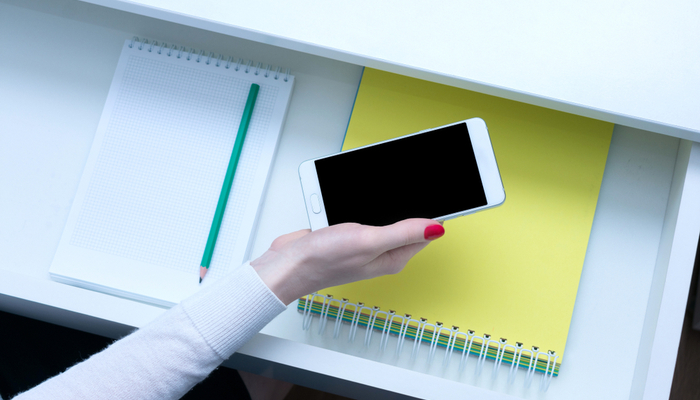
    When you upgrade to a new smartphone, it can be hard to decide what to do with your old phone. You don’t want to just toss it in a drawer, as it’s a great piece of technology. You could sell it, though doing so is a huge hassle and you normally don’t even get back half of what you paid for it. So, what are you supposed to do with an old smartphone to keep it useful even though you’ve got a better handset?

    Today we’re going over some fun and useful things you can turn your old phone into. Whether you’re looking for a new computer mouse or a game system, you’d be surprised at just how useful your old, worn-out smartphone can still be. Let’s get started!

    Wireless Mouse

    If you’ve got an old smartphone, why not turn it into a wireless mouse? No, seriously! If you download an app like Remote Mouse, you can use the phone’s gyro sensor to simulate the movement of a mouse. You connect your phone to your computer over the same wi-fi network, and then the phone functions as a mouse. It’s pretty simple!

    For instance, if you often use a laptop and want to keep a mouse with it, but don’t feel like buying any new pieces of technology, you can just use your old cell phone! This allows you to keep it in the same bag as your laptop and easily bust it out for when you need it. Not bad for something that was going to sit in a desk drawer!

    Universal Remote

    There are a lot of devices on your wireless network that can be controlled via a universal remote. For example, if you have a Roku, a Smart TV or a game console like an Xbox One or a PS4, you can control them all from a universal remote. However, proper universal remotes can be relatively expensive, and your old phone can do this just fine!

    Download an app like iRule, which offers an interface for proper universal remote control, and sync it with your wireless devices. You can even control your smart home tech, like your smart bulbs or smart locks, from this universal remote. Just dedicate the old phone to sitting on the coffee table to control all of your home’s functions, and you’re good to go!

    Game Boy

    Our favorite use for an old Android phone is easily to convert it into a Game Boy emulator. The HyperKin Smartboy Mobile Device is $50 from the HyperKin website, and it can convert most older Android devices into a proper, functioning Game Boy. If your phone is compatible with the device, you simply plug your phone into the device via the USB-C connector, and then plug and run your own Game Boy cartridges.

    The Hyperkin is fully compatible with both original Game Boy and Game Boy Color cartridges, allowing you to play hundreds of old games just like you used to on your old handheld! If you’ve got an old Android phone and some Game Boy cartridges lying around but nothing to play them on, the HyperKin Smartboy is the device for you.

    Google Home

    If you have an older Android device that is up-to-date on firmware, you can get a charging stand for it, connect it to a Bluetooth speaker, and create a Google Home yourself. While Google Home devices are $130, a Bluetooth speaker could cost you half as much or less and sound just as good. Just like that, you’ve built your own Google Home smart speaker to work as your smart home hub! It’s significantly less expensive if you already have the old Android phone lying around, and it works just as well as a proper smart speaker!


  • 5 Best Features in the Samsung Galaxy Note 10 and Galaxy Note 10 Plus

    5 Best Features in the Samsung Galaxy Note 10 and Galaxy Note 10 Plus

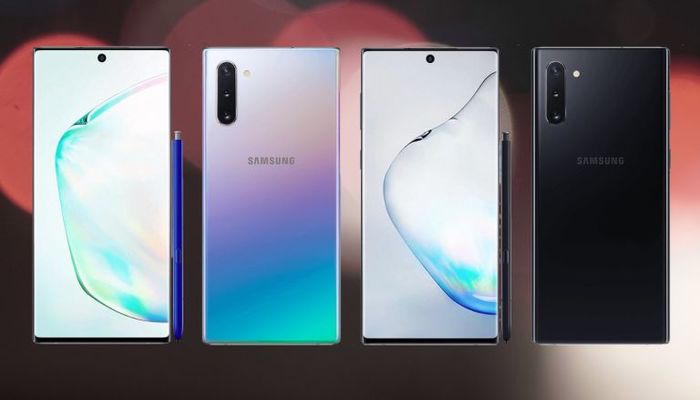
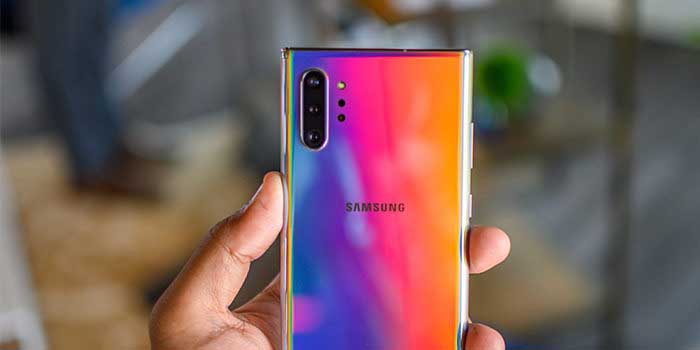
    To kick off the unveiling of the new Samsung Galaxy Note 10 and Galaxy Note 10 Plus, we’ve gathered a list jam-packed with the 5 coolest features included in the new smartphones. The Galaxy Note 10 is not just a new smartphone, it’s a gaming console, a film studio, a computer, comes with your own personal magic wand – and its all in one device!

    1. Smaller – and bigger
    The Samsung Galaxy Note has always been identified as a “big phone.” Users are pleased to see a smaller, hand-friendly version of the Note 10. It is about 0.2-inches smaller than the Note 9 and the Note 10+. 0.2-inches may not sound like much, however it makes a significant difference when it comes to fitting in your hand. On the contrary, this is the first time Samsung has rolled out two versions of the Note to include the Note+ for those who prefer a bigger smartphone.

    2. 3D Scanning
    While Samsung is not the first to roll out 3D scanning, they came up with a cool application for 3D scanning with Augmented Reality. Consumers can now 3D scan objects and drop them into their photos and videos. It doesn’t stop there; consumers can even animate them using motion capture. This will be huge for consumers that put out content on social media platforms such as Instagram and TikTok.

    3. Super-fast charging
    Long gone are the days where your smartphone battery dies a few hours after charging. With a quick 30-minute charging session, the Galaxy Note 10 will hold battery juice all day long. Samsung did this by including a 45W charger to amp up the wattage in comparison to competitors that have a 30W charger.

    4. S-pen
    Say goodbye to selfie sticks and self-timers because the Galaxy Note 10 comes with an S-pen that will allow consumers to take remote photos. It gets even better, with an accelerometer and gyroscope in the S-pen, consumers have their own personal magic wand with gesture-recognition technology.

    5. 5G
    The future is here – 5G is the latest version of cellular networks. This is a once in a decade upgrade to the way consumers can wirelessly deliver data, making the Galaxy Note 10 one of the fastest and most powerful smartphones in the market. Just how much faster? In this new era, the Galaxy Note 10 with 5G will average out to be roughly 20 times faster than the traditional 4G network you are currently using.