Category: Reviews

  • Get Spinning! The 5 Best Spin Bike Choices for Home

    Get Spinning! The 5 Best Spin Bike Choices for Home

    Spinning is a great way to get into shape, but it can be tough getting up in the wee hours to travel to the gym or find a spinning class that fits with your schedule. Luckily, there’s a simple solution to this problem if you are struggling to find the time to hit the gym: put a spin bike in your home!

    What is a Spin Bike?

    To the uninitiated, it might seem like a bike is just a bike, but the spin bike has some unique qualities. For one thing, the spin bike is a hallmark of spin classes at the gym, which are known for upbeat music and an upbeat instructor. They work wonders at keeping you pumped and burning calories.

    Aside from its gym roots, the key difference between the spin bike and a typical stationary bike is the flywheel. The spin bike features a large wheel, usually in the front and separated from the pedals, that provides resistance and momentum to mirror the experience of riding a bike outdoors. These flywheels are usually heavier, weighing in at more than 30 pounds. With its unique flywheel setup, you can expect an intense workout on the spin bike!

    What to Look for in a Spin Bike?

    If you’ve browsed spin bikes online, you may already be overwhelmed by all of the choices. Like with anything, when you’re shopping for a spin bike, you’re trying to find the features you need at the best possible price.

    Resistance: The best bikes have a large range of resistances for novice and expert athletes alike.

    Support: You want a stable bike that holds its own, so you can focus on your workout.

    Materials: The bike’s longevity is dependent on the quality of its materials.

    Technology: Technological innovations can make your biking experience better.

    There are a lot of spin bikes out there to choose from, so to make life a little easier for you we are rounding up the top five spin bikes for working out at home!

    NexHT Fitness Exercise Cycle

    This spin bike uses a caliper style resistance mechanism and a 24.3-pound flywheel. This could be a problem to some users because the heavier the flywheel the smoother the ride. Some riders may experience some rocking while using this bike.

    It features an LCD with five different functions to display Time, Speed, Distance and Calories. We’ll be the first to admit that this bike is best suited for casual users who want to ride while watching television rather than pushing themselves for a hard workout.

    Keiser M3i Indoor Cycle
    If you are looking for style and durability over whizbang features, then the Keiser M3i may be your best choice. It features magnetic resistance instead of physical resistance, so you’ll be able to spin to your heart’s content without making a lot of noise. Great for workouts after the kids go to bed!

    There’s a computer display which can offer a variety of metrics such as heart rate, RPM, elapse time and resistance level. It also features Bluetooth connectivity so you can transfer your workout data to a compatible app.

    Sunny Health & Fitness Belt Drive Indoor Cycling Bike

    This model of spin bike lives somewhere in between “affordable” and “durable” for those who don’t want to spend a fortune but also don’t want to buy a piece of junk that’ll break down in a few months.

    It uses a 40-pound flywheel to create a smooth ride and a caliper style resistance system. Calipers are a bit less reliable than direct friction brake pads and will need to be adjusted as time goes on, but again, the sacrifice is made for affordability.

    There is no computer display, but it’s easy enough to mount a portable device if you already have one. Even without the extra features, the Sunny Health & Fitness Belt Drive Indoor Cycling Bike is a sturdy machine that feels good to pedal. You can go from sitting to standing without wobble.

    Schwinn Fitness AC Performance Plus Indoor Cycling Bike

    Schwinn may be best known for their traditional bikes, but this is a model of spin bike you should absolutely consider. If you want a spin bike that looks more like a traditional bike, then it will definitely catch your eye.

    Like the Keiser M3i, the Schwinn features magnetic resistance rather than friction. With six working magnets, you can take this spin bike from beginner level to professional athlete level at the turn of a knob. There is no display, but the spin bike features Bluetooth technology so you can connect your favorite tracking app.

    If you are looking for a spin bike that feels like an authentic outdoor riding experience, then look no further than this Schwinn.

    The Peloton Bike
    If you are looking for a high-end spin bike, then the Peloton Bike will draw your eye. It features magnetic resistance, a 21-inch display with built-in speakers, microphone and camera. You can connect it to WiFi and also supports Bluetooth audio and wireless ANT+ heart rate straps.

    Why do you need all that? To join a virtual spin class, of course. Peloton’s online platform lets you watch live spin classes, previously recorded spin classes or even host your own! The online platform costs $39 per month, but those who live, eat and breathe spinning will find massive value in The Peloton Bike and its features.

  • Google Pixel Slate: A Worthy iPad Competitor?

    Google Pixel Slate: A Worthy iPad Competitor?

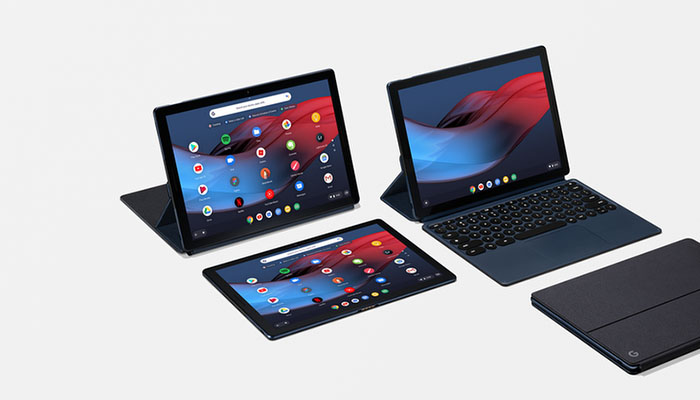
    Apple is a hard act to follow. Their electronics have been the benchmark for smart devices for more than a decade now. Google now attempts to compete with the iPad with their new Google Pixel Slate. How does the hybrid 2-in-1 stack up, and is it worth the high price tag?

    Google Pixel Slate Review

    google-pixel-slate
    PC Mag

    Strengths

    Firstly, this device has great battery life and is reasonably powerful. It should have enough energy from a full charge to get you through a busy day with lots of tabs open and a lot of work on the device.

    The Google Pixel Slate is a great device for productivity. If you often use your laptop for typing and browsing the web, you can use a Pixel Slate for largely the same tasks. When it comes to completing tasks and staying on the ball, the Pixel Slate functions a lot like a laptop. Of course, you need one of those pricey keyboards for this to be true.

    Speaking of price, let’s get into that. This device costs about the same amount as an iPad, coming in at $600 for the base model. The more powerful versions are even more expensive. That’s before shelling out for a $200 Google Pixel Keyboard. Oh, and did we mention that the Pixelbook Pen is $100?

    Weaknesses

    Aside from the price, there are some major weaknesses in this tablet. For one, you have to use Chrome OS and the Google Play Store. When compared to the Microsoft Surface Pro, that makes this an inferior 2-in-1. Meanwhile, the device has inferior Pen tracking to the iPad, and works much less quickly and smoothly than Apple’s device.

    In all, it’s hard to say what this Pixel Slate is trying to be. If it was trying to be a more PC-like device, it falls short compared to the Surface Pro. If it was trying to beat Apple at the tablet game, it certainly doesn’t pull that off.

    Bottom Line

    It’s unclear who the Google Pixel Slate is for. Between its astronomical price and choppy performance, it’s very difficult to recommend this device over its competitors. You’re better off going with a Surface Pro or an iPad, depending on your needs.

  • PlayStation Classic Review: How Does it Stack Up?

    PlayStation Classic Review: How Does it Stack Up?

    Sony, following in Nintendo’s footsteps, has released their PlayStation Classic system. Does it live up to the hype surrounding it, or are these old games better off left forgotten? We’ll tell you in today’s PlayStation Classic review. Let’s travel back to the 90’s!

    PlayStation Classic Review

    playstationclassic
    Sony

    The Emulation

    Firstly, the emulation on display here is excellent. The games on the system are all emulated perfectly as they existed back in the mid-to-late-90’s. That’s certainly an achievement in and of itself, but it does raise a few questions. If this is exactly the ways these games should look, aren’t they all a bit ugly?

    The transition to 3D was rough for a lot of games. Ugly polygonal models and blurry backgrounds were the rule of the day. Many of these games have aged like milk, both graphically and in terms of gameplay. After twenty years or more, many of these are almost unplayable by modern standards.

    The Games

    The game selection is incredibly hit-and-miss. There are some notable (and amazing) inclusions, like Metal Gear Solid, Final Fantasy VII and Resident Evil. There are also glaring omissions, like Castelvania: Symphony of the Night and Twisted Metal II.

    Unusual inclusions like Jumping Flash, Wild Arms and Intelligent Qube make the lack of Tomb Raider and Crash Bandicoot downright puzzling. The PlayStation had an incredible roster of exclusive games, so not having them available on this love letter to the 90’s is nearly criminal.

    For every Oddworld and Tekken on the system there is another frustrating exclusion. No Silent Hill or Tony Hawk on a PlayStation throwback system? It’s hard to justify the $100 price tag with this selection of games.

    The Console

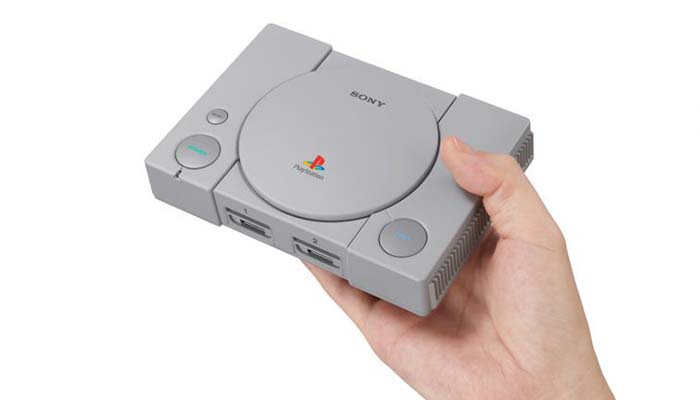
    The console itself is a perfect mini replica of the PlayStation. Likewise, the controller is exactly as you remember it. Sadly, it’s not a DualShock controller, which makes 3D games like Metal Gear Solid a pain to navigate. There are thankfully two controllers for local multiplayer, what little is available in this game selection.

    Bottom Line

    Overall, this is really a system only for diehard collectors. If you really want to play Final Fantasy VII and Metal Gear Solid again (without analog sticks) then knock yourself out. However, there are plenty of ways to do that without spending $100.

  • Mobvoi Ticpods Free: True AirPod Killers?

    Mobvoi Ticpods Free: True AirPod Killers?

    Apple’s AirPod wireless earbuds have a lot of catching up to do. While they were some of the first truly wireless earbuds on the market, they’ve been largely outdone by some of their competitors. One such competitor is Mobvoi. Do the Mobvoi Ticpods Free have what it takes to dethrone the AirPods as best wireless earbuds? Let’s get into it.

    Mobvoi Ticpods Free Review

    Design

    There’s nothing crazy going on with the design of these earbuds. The Mobvoi Ticpods Free have the same standard “earbud with a long tail” look that the AirPods started. The tail is flat, unlike the AirPods, and allows you to use the touch controls. The left earbud controls volume with swipes up or down on the tail. The right earbud can be double tapped to skip songs or long-pressed to bring up the voice assistant.

    Largely, these are sleek-looking earbuds that seem to be designed to look almost just like their chief competitors. If you like the way AirPods look then you’ll like the Ticpods. If you don’t, well, maybe these aren’t for you.

    Features

    Unlike the AirPods, the Ticpods have a comfortable silicone tip that feels great in the ear. The seal these tips make with your ear make the sound quality that much better. Although the AirPods may have better drivers, they sit so loosely in the air that the sound quality is degraded. The Ticpods, on the other hand, suffer no such problem

    The only thing these earbuds don’t have on the AirPods is battery life. While the AirPods last an average of five hours on a single charge, the Ticpods only go for four hours. That said, most people will keep the charging case on hand, which offers an additional 14 hours of battery. You just need to remember to put them back in the case when you’re not using them!

    Bottom Line

    With the exception of battery life, these are tighter earbuds than the AirPods. The best part is that they cost a lot less, coming in at $130. We can recommend these Mobvoi TicPods Free to all but the most die-hard of Apple fans.

  • FaceBook Portal and The New Video Calling

    FaceBook Portal and The New Video Calling

    Facebook has something it wants in every home to be always on, always watching always listening. Its called FaceBook Portal. The FaceBook Portal devices are video-calling machines that people can use to talk through a screen to other Facebook users. They have a 12-megapixel camera with high-definition video and artificial intelligence software; the camera follows people about as they move around. It’s a 10 inch screen that lets you make video calls to other Facebook users while being able to move and talk freely with a smart camera and smart sound.

    Smart Camera

    What do they mean by smart camera? This is automatic framing, which Facebook calls “Smart Camera,” makes every video call more comfortable to participate in. The 12-megapixel camera can do 5x zoom and capture movement within a 140-degree range. The four-mic array flanks the lens on either side, doing double duty of listening to commands and noise canceling during chats. I don’t have a great reason why but its placement reminds me of the eye above the pyramid on the back of a dollar bill.

    The Facebook Portal is Alexa enabled. To trigger the function, say “Hey Portal” and then “call [enter name here].” Simple enough. Though the actual “Hey Portal” features are essentially limited to things like making calls and putting the unit to sleep.

    The FaceBook Portal Setup and Use

    Setting up my Portal Plus was easy. Popped the thing out of the box, plopped it on my desk, plugged it in, connected to Wi-Fi and my Facebook account. I was frankly blown away by how well-designed Portal was. It has one purpose — calling other people who use Facebook. Surprisingly it does that extremely well. But Who still uses Facebook?

    The great thing about these devices is that they are stationary and always on. It uses software to follow you around a room, always keeping the speaker in frame and cropped. I found this very useful. I expected it to be chintzy because it’s the company’s first piece of hardware. But shockingly, it wasn’t. The screen is huge on my Portal Plus. Imagine putting an iPad Pro on a tall vertical sound bar and adding an always-on camera in my home, connected to Facebook, all the time, 24 hours a day. I know Facebook has been working to improve how users can manage their private data on the platform. But Still.

    The Final Thought

    They took all the pieces that are available, condensed them and perfected the Video Calling. If Facebook was more trustworthy in the public’s eyes and Video calling wasn’t such an invasion of privacy to begin with , There could be one in every home. There won’t be.

  • Should You Buy an LG V40?

    Should You Buy an LG V40?

    The newest phone from LG, the LG V40, is here and making waves. Is it worthy of all the hype surrounding it? Or is it a lame entry into the packed Android market? Today we’re going to take an in-depth look at this new smartphone and tell you whether it’s worth your hard-earned money.

    LG V40 Review

    Design

    First things first: this is a smart-looking phone. All-glass designs are a favorite of ours, and this phone feels great in the hand. In fact, it’s probably one of the best-feeling LG phones we’ve seen. The screen is huge and vibrant, and, unlike other premium phones, the LG V40 still has a traditional headphone jack.

    The V40 also sports the industry-standard water resistance and wireless charging capabilities. While these features are unsurprising, they remain as convenient as ever. If you’ve been waiting to upgrade your smartphone you’re going to be impressed by these quality-of-life upgrades.

    Cameras

    The five (yes, five) cameras are the star of the show here. While the Pixel 3 and iPhone XS are impressive for snapshots, the LG V40 is a real photographer’s smartphone. The wide-angle lens is unparalleled for sprawling vista shots. The lighting and colors in bright shots are absolutely stellar. There are low-light options, great portrait settings and more. If you love snapping photos and like a ton of options, this is the phone for you.

    Pricing

    The V40 runs between $900 and $980 in the US, depending on where you go to get it and which carrier you choose. That makes it comparable in price to most premium smartphones like the Galaxy Note 9 and iPhone XS. It is a tad bit less expensive than those phones, but not by much. While it might cost a bit less, you don’t sacrifice on power or speed.

    Bottom Line

    If you’re an Android fan who wants a great phone for taking pictures then you’re going to love the V40. However, casual shutterbugs might find the multitude of settings a bit overwhelming. Compared to the Note 9 and Pixel 3, this is a solid phone. You won’t be disappointed in this phone for the price, and we can fully recommend it (especially for photographers).

  • Best Wireless Charging Pad

    Best Wireless Charging Pad

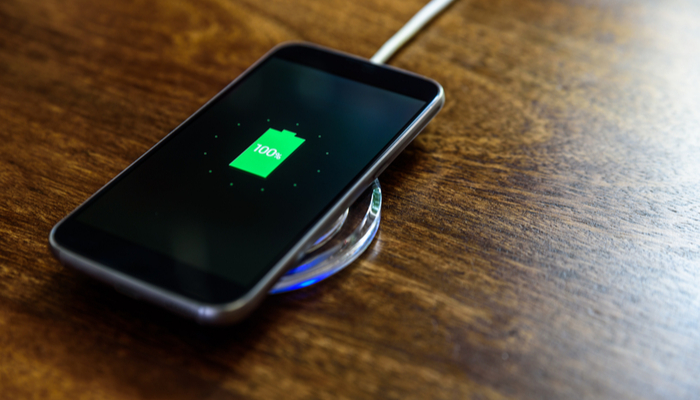
    Wires aren’t fun, when you get down to it. No one really likes having to plug their phone in at night. Wouldn’t it be so much nicer if you could just drop your phone on your nightstand and it would just charge by itself? Well, it can, if you have a wireless charging pad!

    Best Wireless Charging Pad

    Anker PowerPort Wireless 10

    Anker’s pad makes our list based on how inexpensive it is. The MSRP for this pad is $22, which makes it a very affordable option. If you’ve got a phone that supports wireless charging and you’re curious about it, this is a good starter. It also offers some pretty fast charging, which is great!

    Tronsmart Airamp Wireless Charger

    This neat wireless charger checks all the boxes. It’s inexpensive, at $24, it lets your phone rest upright, and it even sports a cooling fan. While the Anker PowerPort is a great pad for your nightstand, this one is better suited for desks. Due to the standing design, fan and always-on LED, you won’t want this next to your bed at night. It’s great for fast-charging on your desk, though!

    iOttie Ion Fast Charging Pad Plus

    There’s a lot to like about the iOttie pad. It comes in a unique oval shape and is covered in a non-slip fabric. There are a variety of cool colors to choose from, too! This one is a bit on the fancier side, with a stylish design and fast charging capabilities. It also comes with a longer cord and a power adapter! The only downside is the price, which can run more than $50!

    Mophie Charge Stream Pad Plus

    We absolutely love this charging pad. It has a simple, minimalist design that is reminiscent of a hockey puck. It’s made from a no-slip material, so it grips to surfaces and your phone. The material is also soft enough to prevent your phone from getting scratched on it! While this charging pad will run you around $60, it’s well worth the price. If you’re looking for a portable, reliable charging pad, look no further!

  • Best 5 Laptops Under $500 in 2018

    Best 5 Laptops Under $500 in 2018

    Laptops are very essential these days- for school, work, or just personal use. The price of a premium new laptop can cost up to $1,000, which is pricey for anyone. Numerous companies have made laptops more affordable while keeping the quality and capabilities of more expensive laptops.

    You don’t have to feel like you’re settling when shopping for a laptop under $500. There are value-priced notebooks that include full-HD displays, solid performance and long battery life, plus all the ports you need. We picked all the best all-purpose laptops in $500 price range which we think are best laptops to suit the wide range of requirements of people. Here is a list of the best five laptops under $500!

    1. Dell Inspiron i3567 Laptop

    The latest version of this Dell laptop has a powerful system in place with 8GB of memory and a 128GB hard drive and a Intel Core i3-7100U 2.4GHz processor. It has a professional feel in it’s all black look with a 15.6-inch laptop with a screen resolution of 1366 x 768. The operating system runs smoothly with Windows 10 and is backed with a 12 month warranty, with 12 months of tech support.

    • A new, powerful hardware system
    • Has many ports and slots to use your external devices
    • 8 GB Ram
    • 7th Gen Intel Core i5 processor
    • It is not backlit enabled
    • Battery life up to 5 hours

    2. Acer Aspire A515-51-50RR Laptop

    The Acer Aspire 5 is one of the best budget full-size laptops you can find in stores today. It checks most of the right boxes: well built, slim and fairly light, gets a decent keyboard, an IPS screen and modern hardware, performs well, runs cool and quiet and lasts for a long while on a charge. This slim and sleek laptop is a great all round performing laptop, especially for the price. The visuals are spot on with vivid, bright colors.

    • LCD display and is backlit
    • 2.50 GHz Intel Core i5-7200U processor
    • Storage: 1TB hard disk
    • Intel HD 620 graphics
    • Battery life up to 7 hours
    • All-plastic chassis

    3. HP 15-ay191ms Laptop

    The HP 15-ay191ms, a signature edition laptops that comes with a seventh-generation Intel Core i3 processor, 8GB DDR4 system memory, 1TB of storage and a touchscreen, but still remains insanely affordable. It’s one of those laptops you’d buy without a second thought if you find inexpensive chromebook attractive, but really, really need Windows. If you love touchscreen, this one’s for you! This laptop contains the Kaby Lake processor which makes this laptop consume little power. Apps are not an issue here, they all run very smoothly.

    • Touchscreen
    • Intel Core i3-7100U processor
    • 8GB RAM
    • 1TB hard drive
    • Lag-free performance
    • Battery life up to 6 hours

    4. Dell Inspiron i3567-5185BLK Laptop

    Yet another Inspiron made this list! This version comes in different color options and a textured finish.  Packed with a large 15.6 Inches display and a decent 7th Gen Intel Core i5-7200U up to 3.1GHz CPU processor. This Dell laptop model would work well for portability with its 4.85 Pounds lightweight design and sleek black look. Great for school work or the family computer. A huge bonus with this laptop is it doesn’t heat up much!

    • 2.4 GHz Intel Core i3-7100U processor
    • 8GB RAM
    • TB hard drive
    • LED display with a built-in webcam and mic
    • Battery life is up to 6 hours

    5. ASUS Chromebook Flip

    This is one of the best convertible laptops on the current market. The Asus Chromebook Flip C302 is worthy of its premium stature with a gorgeous screen, tactile keyboard and a classy design that’s equally as comfortable to use in tablet mode or as a traditional laptop. The screen is a full HD touchscreen and can be converted from a laptop to a tablet by turning the screen. A top pick for a college student!

    • Intel Core m3 processor
    • 4GB RAM
    • 64GB of SSD storage
    • Battery life of up to 10 hours

  • Best 5 Laptops Under $500 in 2018

    Best 5 Laptops Under $500 in 2018

    Laptops are very essential these days- for school, work, or just personal use. The price of a premium new laptop can cost up to $1,000, which is pricey for anyone. Numerous companies have made laptops more affordable while keeping the quality and capabilities of more expensive laptops.

    You don’t have to feel like you’re settling when shopping for a laptop under $500. There are value-priced notebooks that include full-HD displays, solid performance, and long battery life, plus all the ports you need. We picked all the best all-purpose laptops in $500 price range which we think are the best laptops to suit the wide range of requirements of people. Here is a list of the best five laptops under $500!

    1. Dell Inspiron i3567 Laptop

    The latest version of this Dell laptop has a powerful system in place with 8GB of memory and a 128GB hard drive and an Intel Core i3-7100U 2.4GHz processor. It has a professional feel in it’s all black look with a 15.6-inch laptop with a screen resolution of 1366 x 768. The operating system runs smoothly with Windows 10 and is backed with a 12-month warranty, with 12 months of tech support.

    • A new, powerful hardware system
    • Has many ports and slots to use your external devices
    • 8 GB Ram
    • 7th Gen Intel Core i5 processor
    • It is not backlit enabled
    • Battery life up to 5 hours

    2. Acer Aspire A515-51-50RR Laptop

    The Acer Aspire 5 is one of the best budget full-size laptops you can find in stores today. It checks most of the right boxes: well built, slim and fairly light, gets a decent keyboard, an IPS screen and modern hardware, performs well, runs cool and quiet and lasts for a long while on a charge. This slim and sleek laptop is a great all around performing laptop, especially for the price. The visuals are spot on with vivid, bright colors.

    • LCD display and is backlit
    • 2.50 GHz Intel Core i5-7200U processor
    • Storage: 1TB hard disk
    • Intel HD 620 graphics
    • Battery life up to 7 hours
    • All-plastic chassis

    3. HP 15-ay191ms Laptop

    The HP 15-ay191ms, a signature edition laptops that comes with a seventh-generation Intel Core i3 processor, 8GB DDR4 system memory, 1TB of storage and a touchscreen, but still remains insanely affordable. It’s one of those laptops you’d buy without a second thought if you find inexpensive Chromebook attractive, but really, really need Windows. If you love touchscreens, this one’s for you! This laptop contains the Kaby Lake processor which makes this laptop consume little power. Apps are not an issue here, they all run very smoothly.

    • Touchscreen
    • Intel Core i3-7100U processor
    • 8GB RAM
    • 1TB hard drive
    • Lag-free performance
    • Battery life up to 6 hours

    4. Dell Inspiron i3567-5185BLK Laptop

    Yet another Inspiron made this list! This version comes in different color options and a textured finish.  Packed with a large 15.6 Inches display and a decent 7th Gen Intel Core i5-7200U up to 3.1GHz CPU processor. This Dell laptop model would work well for portability with its 4.85 Pounds lightweight design and sleek black look. Great for school work or the family computer. A huge bonus with this laptop is it doesn’t heat up much!

    • 2.4 GHz Intel Core i3-7100U processor
    • 8GB RAM
    • TB hard drive
    • LED display with a built-in webcam and mic
    • Battery life is up to 6 hours

    5. ASUS Chromebook Flip

    This is one of the best convertible laptops on the current market. The Asus Chromebook Flip C302 is worthy of its premium stature with a gorgeous screen, tactile keyboard and a classy design that’s equally as comfortable to use in tablet mode or as a traditional laptop. The screen is a full HD touchscreen and can be converted from a laptop to a tablet by turning the screen. A top pick for a college student!

    • Intel Core m3 processor
    • 4GB RAM
    • 64GB of SSD storage
    • Battery life of up to 10 hours

  • The 2019 Fiat 500

    The 2019 Fiat 500

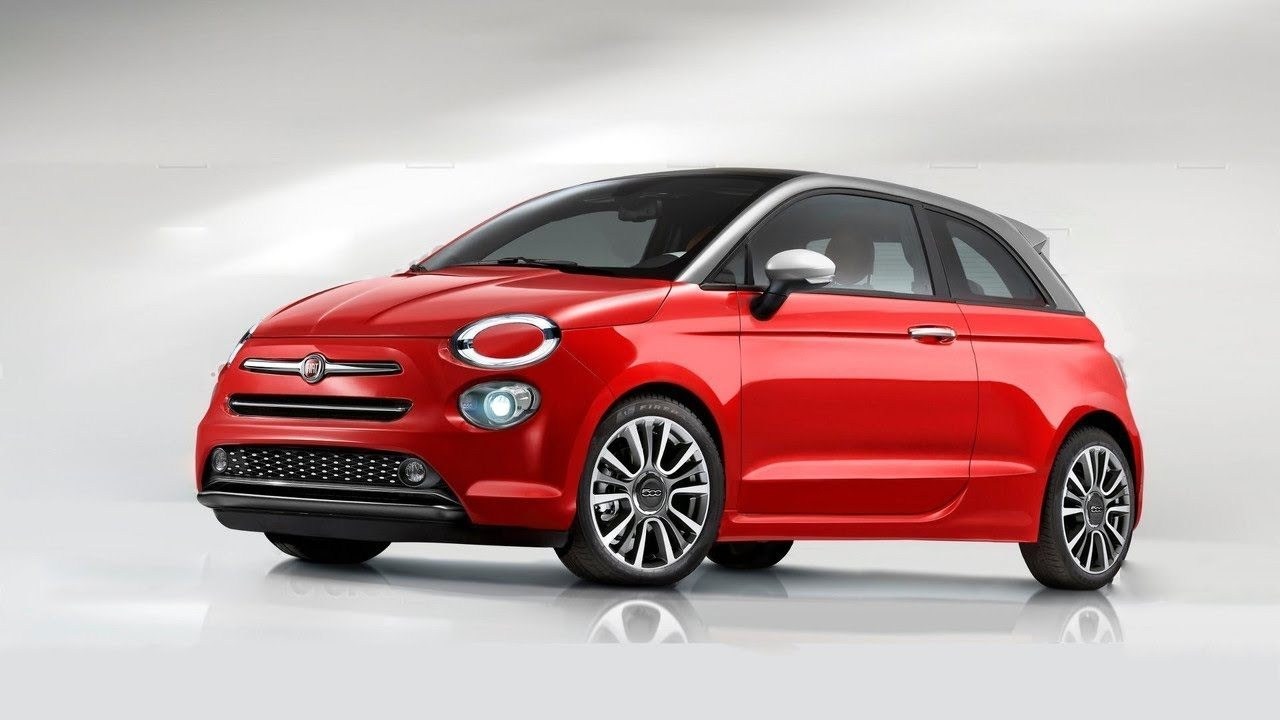
    The Fiat 500X is getting a tiny facelift for its upcoming 2019 refresh. The facelifted Fiat 500X has been unveiled in Europe with a lightly refreshed exterior, improved equipment levels, and two new turbocharged petrol engines.There’s also redesigned front and rear bumpers, with the front-wheel drive City Cross and all-wheel drive Cross variants featuring bash plate-like elements. Lets talk about the New 2019 Fiat 500


    The 2019 Fiat 500

    The FIAT 500 has the capability to take you wherever you want to go. It is fit, fashionable and prepared to take on the most fun adventures ahead. For about the average price of a compact sedan, the FIAT 500X delivers the luxury of a midsize vehicle and is available with all-wheel drive2. With innovative technology and its telling design, this crossover is ready to roll.

    It has been a great while since Fiat updated the 500X and it was in dire need of a mid-cycle refresh. And the Italian carmaker finally heard our voice, and has now teased the 2019 Fiat 500X Facelift ahead of its launch in October. While the teaser image does not speak much about the facelift, but we do know that it is refresh and not a full-blown facelift as such. Nevertheless, the 2019 Fiat 500X facelift gets major updates on the exterior, while continuing with the same powertrain under the hood. But, the question remains, will the 2019 Fiat 500X will only be a facelift or will the company introduce it in a completely new platform is still unclear.

    There are alot of cars in this small crossover market. The jeep renegade is basically the same vehicle with the Fiat rebranded. The 2019 Fiat 500 does stand out with a 1.4L MultiAir® Turbo Engine with Six-Speed Manual Transmission Delivers 160 HP, 184 LB-FT of Torque and up to 33 Highway MP. The 2019 FIAT 500X brings innovation, functionality and Italian style to the crossover market with exceptional space, clever utility, driver-centric amenities, rugged capability and advanced safety and security. Three models make up the lineup—thePop, the Lounge and the more athletic-looking Trekking.


    The Updates

    Aside from adopting the more advanced tech, the headlights themselves have a slightly different look to make the pint-sized crossover appear more high-tech when viewed from the front. It’s a similar story at the back where Fiat has mildly updated the LED taillights, but you’ll need a magnifying glass to spot the changes.

    The big changes with the 2019 Fiat 500, as with the similar Renegade, are under the hood. Three gasoline engine options will be available, two of which are turbocharged. The smaller of the turbo engines is a 1.0-liter three-cylinder engine making 120 horsepower and 140 pound-feet of torque. The larger turbo engine is a 1.3-liter four-cylinder engine making 150 horsepower and 199 pound-feet of torque. Interestingly, there’s no 180-horsepower version of the 1.3-liter engine listed, as there is with the Renegade. There’s also a naturally aspirated 1.6-liter four-cylinder making 110 horsepower that’s a carryover from the old model. Diesel engines will continue to be available on the 500X as well. They’re all four-cylinder engines in 1.3-, 1.6-, and 2.0-liter displacements, from 95 horsepower up to 150 horsepower.

    Fitted with gasoline particulate filters, the two engines are made entirely out of aluminum to keep the weight low. We got the three-cylinder tipping the scales at just 205 pounds. Joining the two new-gen engines is the familiar 1.6-liter E-Torq. The naturally aspirated unit hooked up to a manual gearbox and FWD. This is also  20-percent quieter than the old ones.


    The Final Thought

    The updated 500X follows a mid-cycle refresh given earlier to its sister model, the 2019 Jeep Renegade. This ushers in a new family of Firefly turbocharged gasoline engine. 20 percent more efficient than the previous units, the new engines had to endure a grueling testing procedure involving a total of 5 million on roads from all over the world. 60,000 hours of real-life off-vehicle tests were necessary, along with more than 75,000 hours of virtual tests.

    2019 Fiat 500 comes with more built-in personality than most other small SUVs. Although it’s an urban warrior rather than an off-roader. Want something sharp, teched out and easy to park? need to spend less then 25,000. I’ve got just the car for you, how many can I put you down for?